Disk partion help with sisters laptop

channa

New member
Local time
3:58 PM
Messages
15
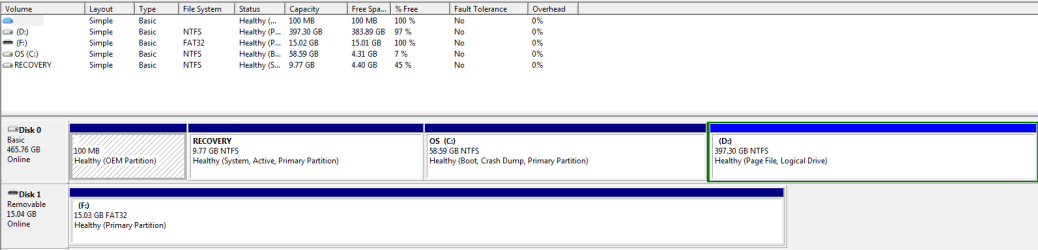
Hello hoping you could help im having a similar problem...It's to do with the disk partitions ill post a snip see if you guys can advise what i need to be doing thanks in advance.

Capture.PNG
 

My Computer My Computer

Computer Manufacturer/Model Number
samsung
OS
windows 7 home premium x 64
I really do not see this as a bad thing but something more positive.
Think of it this way, C is a partition for the OS alone. Only windows and windows updates should go here from now on. Treat D as the storage partition, make a new folder and call it Software or Program files. It will look like this D:\Program Files\_______
and save all the programs in this location. I would then uninstall the programs and reinstall them on this new partition. That way you can clear up some room for C drive.
The advantages of this is in case you need to format, any documents, pictures, songs store on D partition would remain safe. Since you would just format and reinstall windows on C partition.
The downfalls come when you are doing system image backups and it now has to do both partitions.
Another downfall would the need to change the installation location manually every time or you could edit the registry and change to the new location. I would advise against this since editing the registry can lead to catastrophic episodes later on.
I do not think you can merge C and D, unless you delete both volumes (partitions) and then they can join together.

 

My Computer My Computer

Computer type
PC/Desktop
Computer Manufacturer/Model Number
Gateway / Slight Modifications
OS
Windows 8 64 bit PRO
CPU
AMD Phenom X4 9100e
Motherboard
Gateway RS780
Memory
2GB X2 DDR2
Graphics Card(s)
Sapphire HD 6850
Sound Card
Integrated
Monitor(s) Displays
Gateway 19" + Dell 19"
Screen Resolution
1440X900 sometimes 2880 by 900
Hard Drives
WD 80GB
WD 640GB
WD 1,000GB
PSU
Antec BP 550watts
Case
Antec 300
Cooling
Stock Cooling
Keyboard
Saitek Eclipse II
Mouse
Gigabyte GM-M6800
Internet Speed
D: 30Mbps U:4Mbps
Antivirus
Avast version 8
Browser
Internet Explorer ver 10 64 bit
Other Info
This is my work computer.
I have another laptop running Windows 7 64 bit.
Another PC running Windows 8 64 bit pro.
Total of 3
Hello hoping you could help im having a similar problem...It's to do with the disk partitions ill post a snip see if you guys can advise what i need to be doing thanks in advance.

View attachment 219935

When you start a thread, it would help everyone trying to assist you if you state the problem you are having rather than saying "you have a similar problem". I have no idea what your problem is. Thanks,
 

My Computer My Computer

Computer type
PC/Desktop
Computer Manufacturer/Model Number
Custom Build
OS
Windows 7 Home Premium 32-Bit - Build 7600 SP1
CPU
Intel Core i3-2120 3.30Ghz
Motherboard
Asus P8Z68-V LX Intel Z68 Socket H2 ATX
Memory
Kingston 4 GB DDR3 1333 mhz
Graphics Card(s)
AMD Radeon HD6670
Sound Card
Sound Blaster Audigy SE 24-Bit
Monitor(s) Displays
Asus VE228
Screen Resolution
1440 X 900
Hard Drives
OCZ Vertex 3 120 GB Sata 3 SSD ==
Kingston SH103/S3 120 G Hyper X 120 GB SSD ==
Western Digital 500 GB Caviar Green 7200 RPM ==
PSU
Corsair CX600M == 600 Watt
Case
NZXT Apollo - Silver with Clear Side Panel
Cooling
Three 120 mm Fans
Keyboard
Microsoft Natural 4000
Mouse
Microsoft Custom Optical 3000
Internet Speed
AT&T Fiber Optic Wireless Network
Antivirus
Microsoft Security Essentials
Browser
Chrome
Other Info
120 mm Blue LED Fan -- Three Blue LED Lazer Light Sticks
I will take a wild guess he wants to extend the windows partition.

There is an extended partition to the right of it.

If you don't want anything on that D part, delete it and extend windows part.
 

My Computers My Computers

System One System Two

  • Computer type
    PC/Desktop
    OS
    7 X64
    CPU
    i5 8400
    Motherboard
    gigabyte b365m ds3h
    Memory
    2x8gb 3200mhz
    Hard Drives
    various
    PSU
    pure power 11 400w cm
    Case
    Coolermaster
    Cooling
    cryorig m9i
  • Computer type
    PC/Desktop
    OS
    7x64
    CPU
    g5400
    Motherboard
    ga b365m ds3h
    Memory
    8gb ddr4 2400
    PSU
    xfx pro 450w
Should the recovery partition be active like in the op post.
 
Last edited:

My Computer My Computer

Computer type
PC/Desktop
Computer Manufacturer/Model Number
Home made Desktop
OS
Windows 10 Pro. 64/ version 1709 Windows 7 Pro/64
CPU
Intel i7-6800K @ 4.3
Motherboard
ASUS X-99 Deluxe II
Memory
Corsair Platinum 16 gig @2400
Graphics Card(s)
EVGA GTX 1070 OC
Monitor(s) Displays
Asus 27" LED LCD/VE278Q
Screen Resolution
1920-1080 or 1280-720 HDMI
Hard Drives
INTEL SSD 730-240 Gb Sata 3.0/
PSU
EVGA Platium 1200W
Case
Phanteks Luxe Tempered Glass 8 fans/ one radiator
Cooling
XSPC/ Water Cooled CPU
Keyboard
Das 4 Professional
Mouse
Logitech M705/MX Anywhere 2-S
Internet Speed
100 mbits
Antivirus
Microsoft Security Essentials/ Malwarebytes Premium 3.0/ SAS
Browser
I.E. 11 default/Firefox/ ISP Time Warner Cable/Spectrum
Other Info
LG BluRay Burner/
Sound system-KLipsch-THX/
Icy Dock ssd Hot Swap bays.
That's a good question Layback since it has the 100mb OEM partition which should likely be the System Reserved partition marked System and Active. However some OEM's also make Recovery System Active so it will boot easier. It might have changed if OP ran Recovery or repairs.

As to the mystery question, to delete D if you don't want it and have everything moved off of it use these two procedures:
Partition or Volume - Delete D,
then rightclick on C Partition or Volume - Extend
 
As we're commenting/questioning on the picture in the hit & run OP, I'll add one: How did the page file get put on D:?

The OP's got some 'splainin' to do! If they ever return...:)
 
Last edited:

My Computer My Computer

OS
Windows 7 Ultimate x64
It's also a possibility that the OP had posted that in another thread and it was moved to it's own thread, leaving most of us wondering who's problem it is similar to.
 

My Computer My Computer

Computer type
PC/Desktop
Computer Manufacturer/Model Number
Self Built
OS
Win 10 Pro x64
CPU
Intel I5-2500K @3.3GHz
Motherboard
Asrock P67 Extreme4
Memory
16GB G.Skill Ripjaws X (4x4GB)
Graphics Card(s)
EVGA GeForce 750 Ti SC 2GB
Sound Card
ASUS Xonar DG 5.1 Channels 24-bit 96KHz PCI Interface Sound
Monitor(s) Displays
auria eq2367
Screen Resolution
1920 x 1080
Hard Drives
250GB Samsung 850 EVO SSD
1TB WD Blue
1TB Hitachi
PSU
SeaSonic X 650W 80 Plus Gold
Case
Corsair Obsidian 750D
Cooling
Corsair H60, Three 140mm case fans
Keyboard
Logitech Wireless Keyboard K520
Mouse
Logitech Wireless Mouse M310
Internet Speed
Wave Broadband ~ 100 dn 5 up
Antivirus
Windows Defender, Malwarebytes Premium
Browser
Edge, IE11, Chrome
Other Info
Laptop specs: HP g7-1365dx /
CPU: AMD A6-3420M APU with Radeon(tm) HD Graphics /
RAM: Crucial 8Gb (2x4Gb) /
SSD: Crucial M4-CT128M4SSD2 ATA Device/ FW 000F /
GFX: AMD Radeon HD 6520G /
OS: Windows 10 Pro x64
Seem like we have more questions than the OP.
 

My Computer My Computer

Computer type
PC/Desktop
Computer Manufacturer/Model Number
Home made Desktop
OS
Windows 10 Pro. 64/ version 1709 Windows 7 Pro/64
CPU
Intel i7-6800K @ 4.3
Motherboard
ASUS X-99 Deluxe II
Memory
Corsair Platinum 16 gig @2400
Graphics Card(s)
EVGA GTX 1070 OC
Monitor(s) Displays
Asus 27" LED LCD/VE278Q
Screen Resolution
1920-1080 or 1280-720 HDMI
Hard Drives
INTEL SSD 730-240 Gb Sata 3.0/
PSU
EVGA Platium 1200W
Case
Phanteks Luxe Tempered Glass 8 fans/ one radiator
Cooling
XSPC/ Water Cooled CPU
Keyboard
Das 4 Professional
Mouse
Logitech M705/MX Anywhere 2-S
Internet Speed
100 mbits
Antivirus
Microsoft Security Essentials/ Malwarebytes Premium 3.0/ SAS
Browser
I.E. 11 default/Firefox/ ISP Time Warner Cable/Spectrum
Other Info
LG BluRay Burner/
Sound system-KLipsch-THX/
Icy Dock ssd Hot Swap bays.
Op is from uk so different time scale to most of you!!! To be honest i have no clue as to what your telling me as im useless with computersand know only very basic stuff compared to you guys...

I say im having a similar problem because on my new laptop it to has these two partitions and im used to only have one...A C drive! As you can see from the snippet of my sisters laptop her C drive is full,but D has plenty of room...I was asking you for the best course of action to rectify this... If it is at all possible for you guys to take me through it step by step that would be great and save me alot of money getting somebody out to show me how...Once i know how to do it on my sisters laptop ill be able to use my laptop in the same way and use both drives effectively.

i have no idea how to uninstall and re install from one drive to the other,i see Gregrocker says delete D and extend C,ill wait to here from you then take the action recommended...Again thank you for your time in this matter.
 

My Computer My Computer

Computer Manufacturer/Model Number
samsung
OS
windows 7 home premium x 64
Thank you greg
 

My Computer My Computer

Computer Manufacturer/Model Number
samsung
OS
windows 7 home premium x 64
Let us know if you're successfull! ;)
 

My Computer My Computer

OS
Windows 7 Ultimate x64
Well despite your help i havent been able to sort anything,ive follwed the steps but it make no sense to me to begin with so ive no chance in understanding it now...I will find a computer whizz this week to sort them...Many thanks
 

My Computer My Computer

Computer Manufacturer/Model Number
samsung
OS
windows 7 home premium x 64
Where are you running into problems? Let us know, someone's around who can help you!
 

My Computer My Computer

OS
Windows 7 Ultimate x64
Ive been playing around while my youngest has a nap,I've managed to move pictures and what not off of C drive and on to D its freed up space but there is still only 6gb free on C Ive no idea what else i can move and if it's going to affect the pc.Im thinking if i was to get a external Hdd move all the pictures videos and what not onto that then try deleting D as mentioned and extend C...Also back the whole lot up to the external hdd
 

My Computer My Computer

Computer Manufacturer/Model Number
samsung
OS
windows 7 home premium x 64
I say im having a similar problem because on my new laptop it to has these two partitions and im used to only have one...A C drive! As you can see from the snippet of my sisters laptop her C drive is full,but D has plenty of room...I was asking you for the best course of action to rectify this...

It would be helpful for you to make us aware of your true end goal. Do you want to end up with one "drive" [C:], or two [C: and D:]? You say in your quote above you're used to having only one drive (indicating to me that you might want only one drive). But then in your last post you're moving stuff from C: to D: because C: is close to full (and it's odd that C: is consuming that much space to begin with unless there's a lot of user data and temp junk there).

If it was me I would want two drives. One for OS/apps, the second for personal data. To me that setup allows for the easiest recovery in case of physical drive failure or malware infection.

It may also be worthwhile to figure out why C: is so full to begin with.

Please let us know. Plenty of folks around here to help!
 

My Computer My Computer

OS
Windows 7 Ultimate x64
Do you have enough space to move the data off of D so you can delete it and extend C into its space? I gave you the steps to do this with illustrated tutorials.
 
Do you have enough space to move the data off of D so you can delete it and extend C into its space? I gave you the steps to do this with illustrated tutorials.

No mate so im going to get a external drive and move all the data i want from D drive to the external drive then follow your tutorial.Thank's again
 

My Computer My Computer

Computer Manufacturer/Model Number
samsung
OS
windows 7 home premium x 64
Back
Top