
You are using an out of date browser. It may not display this or other websites correctly.
You should upgrade or use an alternative browser.
You should upgrade or use an alternative browser.
word,PDF and PPT ,Outlook all icons are not displaying in their format
- Thread starter sivaee06
- Start date

- Local time
- 5:05 AM
- Messages
- 14,164
Welcome to Seven Forums sivaee06
Could you post a screenshot of your icons? http://www.sevenforums.com/tutorials/9733-screenshots-files-upload-post-seven-forums.html
Could you post a screenshot of your icons? http://www.sevenforums.com/tutorials/9733-screenshots-files-upload-post-seven-forums.html
My Computer
At a glance
Windows 10 Home 64BitIntel Core i5 10400 @ 2.90GHz8.00GB Single-Channel Unknown @ 1329MHz (16-2...
- Computer type
- PC/Desktop
- Computer Manufacturer/Model Number
- Self assembled
- OS
- Windows 10 Home 64Bit
- CPU
- Intel Core i5 10400 @ 2.90GHz
- Motherboard
- Intel Corporation DG41WV (PROCESSOR)
- Memory
- 8.00GB Single-Channel Unknown @ 1329MHz (16-20-20-38)
- Sound Card
- Realtek High Definition Audio
- Monitor(s) Displays
- DELL E170S
- Screen Resolution
- 1280x1024 pixels
- Hard Drives
- 931GB TOSHIBA DT01ACA100 (SATA)
238GB TEAM TM8PS7256G (SATA SSD)
- Case
- Nothing Fancy
- Cooling
- Fans
- Keyboard
- A4 Tech Co LTD
- Mouse
- A4 Tech Co Ltd/Logitech
- Internet Speed
- 25 Mbps
- Local time
- 5:05 AM
- Messages
- 14,164
Sorry, I am not able to see any picture attached
My Computer
At a glance
Windows 10 Home 64BitIntel Core i5 10400 @ 2.90GHz8.00GB Single-Channel Unknown @ 1329MHz (16-2...
- Computer type
- PC/Desktop
- Computer Manufacturer/Model Number
- Self assembled
- OS
- Windows 10 Home 64Bit
- CPU
- Intel Core i5 10400 @ 2.90GHz
- Motherboard
- Intel Corporation DG41WV (PROCESSOR)
- Memory
- 8.00GB Single-Channel Unknown @ 1329MHz (16-20-20-38)
- Sound Card
- Realtek High Definition Audio
- Monitor(s) Displays
- DELL E170S
- Screen Resolution
- 1280x1024 pixels
- Hard Drives
- 931GB TOSHIBA DT01ACA100 (SATA)
238GB TEAM TM8PS7256G (SATA SSD)
- Case
- Nothing Fancy
- Cooling
- Fans
- Keyboard
- A4 Tech Co LTD
- Mouse
- A4 Tech Co Ltd/Logitech
- Internet Speed
- 25 Mbps

Sorry, I am not able to see any picture attached
Don't worry yussi, you're not going blind, I can't see the picture either..
My Computer
At a glance
Windows 7 x64 Professional SP1Intel C2D T9550 2.66 GHz @ 2.793 GHz (Thanks ...8 GB DDR3ATI MOBILITY RADEON 4670
- Computer Manufacturer/Model Number
- DELL SXPS 1640
- OS
- Windows 7 x64 Professional SP1
- CPU
- Intel C2D T9550 2.66 GHz @ 2.793 GHz (Thanks ThrottleStop!!)
- Motherboard
- Intel PM45
- Memory
- 8 GB DDR3
- Graphics Card(s)
- ATI MOBILITY RADEON 4670
- Sound Card
- CREATIVE XFI AUDIO NOTEBOOK
- Monitor(s) Displays
- 16.1 WLED
- Screen Resolution
- 1920x1080
- Hard Drives
- Seagate ST9500420AS 500GB (465GiBi) 7200 RPM Drive
External Drives:-
2 TB WD Essentials x 3
1 TB WD Mybook Gen 1
1 TB WD Mybook Gen 2
1 TB Seagate
1 TB Seagate
320 GB WD Scorpio Black (enclosed)
320 GB WD Scorpio Black (enclosed)
- PSU
- 90W Dell Power Brick
- Case
- Dell Chassis
- Cooling
- Coolermaster Cooling Pad
- Keyboard
- Built-in backlighted Keyboard
- Mouse
- Logitech Wireless Mini Mouse
- Internet Speed
- 4/0.5
- Local time
- 5:05 AM
- Messages
- 14,164
Don't worry yussi, you're not going blind, I can't see the picture either..
Thanks for the confirmation

Anyway, to the OP.
First try a SFC Scannow and reboot if it finds any violations: http://www.sevenforums.com/tutorials/1538-sfc-scannow-command-system-file-checker.html
Then follow the steps on this tutorial: http://www.sevenforums.com/tutorials/49819-icon-cache-rebuild.html
My Computer
At a glance
Windows 10 Home 64BitIntel Core i5 10400 @ 2.90GHz8.00GB Single-Channel Unknown @ 1329MHz (16-2...
- Computer type
- PC/Desktop
- Computer Manufacturer/Model Number
- Self assembled
- OS
- Windows 10 Home 64Bit
- CPU
- Intel Core i5 10400 @ 2.90GHz
- Motherboard
- Intel Corporation DG41WV (PROCESSOR)
- Memory
- 8.00GB Single-Channel Unknown @ 1329MHz (16-20-20-38)
- Sound Card
- Realtek High Definition Audio
- Monitor(s) Displays
- DELL E170S
- Screen Resolution
- 1280x1024 pixels
- Hard Drives
- 931GB TOSHIBA DT01ACA100 (SATA)
238GB TEAM TM8PS7256G (SATA SSD)
- Case
- Nothing Fancy
- Cooling
- Fans
- Keyboard
- A4 Tech Co LTD
- Mouse
- A4 Tech Co Ltd/Logitech
- Internet Speed
- 25 Mbps
- Local time
- 5:05 AM
- Messages
- 14,164
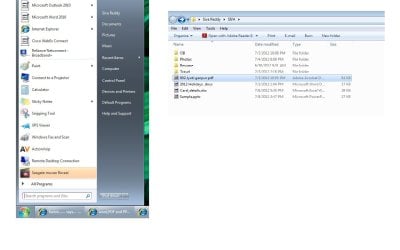
Thanks for the snip.
Did you follow the steps in the tutorials mentioned in post #7 ?
Did you follow the steps in the tutorials mentioned in post #7 ?
My Computer
At a glance
Windows 10 Home 64BitIntel Core i5 10400 @ 2.90GHz8.00GB Single-Channel Unknown @ 1329MHz (16-2...
- Computer type
- PC/Desktop
- Computer Manufacturer/Model Number
- Self assembled
- OS
- Windows 10 Home 64Bit
- CPU
- Intel Core i5 10400 @ 2.90GHz
- Motherboard
- Intel Corporation DG41WV (PROCESSOR)
- Memory
- 8.00GB Single-Channel Unknown @ 1329MHz (16-20-20-38)
- Sound Card
- Realtek High Definition Audio
- Monitor(s) Displays
- DELL E170S
- Screen Resolution
- 1280x1024 pixels
- Hard Drives
- 931GB TOSHIBA DT01ACA100 (SATA)
238GB TEAM TM8PS7256G (SATA SSD)
- Case
- Nothing Fancy
- Cooling
- Fans
- Keyboard
- A4 Tech Co LTD
- Mouse
- A4 Tech Co Ltd/Logitech
- Internet Speed
- 25 Mbps
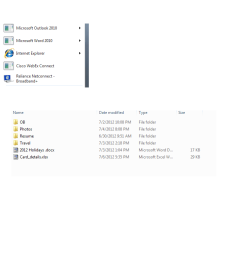

Hello Sivaee,
You might see if you may be able to use Open with to select the .exe file of the program that is suppose to run when you use those shortcuts to fix their icons.
You might see if you may be able to use Open with to select the .exe file of the program that is suppose to run when you use those shortcuts to fix their icons.
My Computer
At a glance
64-bit Windows 11 Pro for WorkstationsIntel i7-8700K OC'd to 5 GHz64 GB (4x16GB) G.SKILL TridentZ RGB DDR4 3600...ASUS ROG-STRIX-GTX1080TI-O11G-GAMING
- Computer type
- PC/Desktop
- Computer Manufacturer/Model Number
- Self built custom
- OS
- 64-bit Windows 11 Pro for Workstations
- CPU
- Intel i7-8700K OC'd to 5 GHz
- Motherboard
- ASUS ROG Maximus XI Formula Z390
- Memory
- 64 GB (4x16GB) G.SKILL TridentZ RGB DDR4 3600 MHz
- Graphics Card(s)
- ASUS ROG-STRIX-GTX1080TI-O11G-GAMING
- Sound Card
- Integrated
- Monitor(s) Displays
- 2 x Samsung Odyssey G7 27"
- Screen Resolution
- 2560x1440
- Hard Drives
- 1TB Samsung 990 PRO M.2,
4TB Samsung 990 PRO PRO M.2,
TerraMaster F8 SSD Plus NAS
- PSU
- Seasonic Prime Titanium 850W
- Case
- Thermaltake Core P3
- Cooling
- Corsair Hydro H115i
- Keyboard
- Logitech wireless K800
- Mouse
- Logitech MX Master 4
- Internet Speed
- 2 Gb/s Download and 100 Mb/s Upload
- Antivirus
- Malwarebyte Anti-Malware Premium
- Browser
- Google Chrome
- Other Info
- Logitech Z625 speaker system,
Logitech BRIO 4K Pro webcam,
HP Color LaserJet Pro MFP M477fdn,
APC SMART-UPS RT 1000 XL - SURT1000XLI,
Galaxy S23 Plus phone
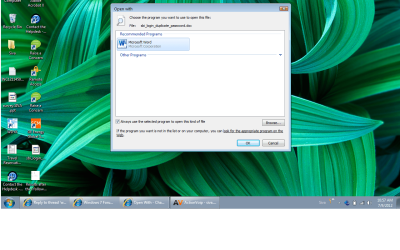
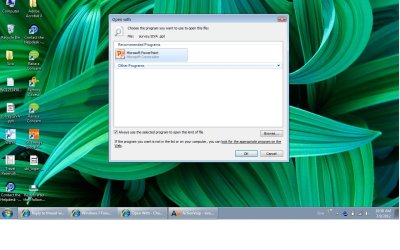
Thanks for help , iwas trying to open by selecting Open with open with than new wind opening name as Open with- Already the file type icon selected ----if iam opening PPT , it already selected PPT type and also the always open open options also selected by default. find the attached .
After it still displaying un know format.
After it still displaying un know format.
Attachments
My Computer
At a glance
WINDOS 7
- OS
- WINDOS 7