Help Setting Up VBox With Windows Xp(can not connect to internet)

RBryan

New member
Local time
3:41 AM
Messages
3
im new with VirtualBox , i got VirtualBox running in my laptop with windows 7 and is connected to my wifi router ..

and yes the internet of my pc is working.

now i already installed windows Xp in Virtualbox but my problem is that windows xp is not connecting to the internet :(

since i have wireless internet and not Cable internet i dont know the right settings on how to set this up to make it work.

any help will be appreciated
 

Attachments
  • 26938789.png
    26938789.png
    31.9 KB · Views: 524
  • 42541833.png
    42541833.png
    33 KB · Views: 526
Last edited:

My Computer My Computer

At a glance

windows 7 ultimate 64Bit
OS
windows 7 ultimate 64Bit
Hi Rbryan, welcome to the Seven Forums

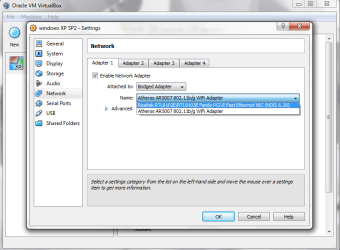
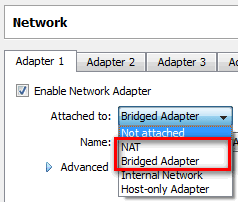
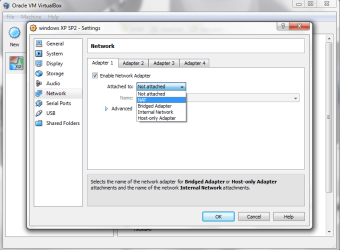
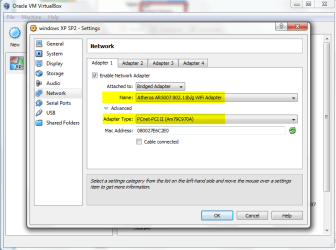
Select Bridged or NAT. Both allow you to connect virtual machine to Internet, Bridged is better for networking and sharing between virtual machine and the rest of your network (host and other computers in network).

VBox_XP_NIC_1.png

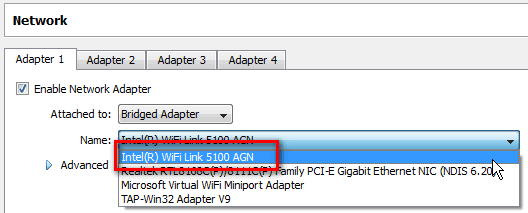
Select your host computer's WiFi adapter (Atheros in your case) from drop down list.

VBox_XP_NIC_2.png

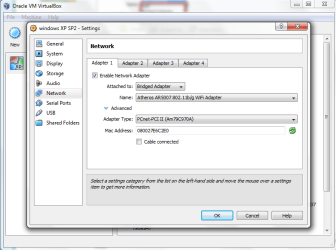
Click Advanced, choose one of the two PCnet adapters.

VBox_XP_NIC_3.png

Should work now.

Kari

P.S. Please couldn't you just be happy with default Seven Forums font color? That yellow or orange or whatever is really annoying, in fact so much so that I was tempted not to answer only because of that.
 

My Computer My Computer

At a glance

Windows 10 Pro x64 EN-GB1.6 GHz Intel Core i7-720QM Processor6 GBATI Mobility Radeon HD 5850 Graphics
Computer type
Laptop
Computer Manufacturer/Model Number
HP ENVY 17-1150eg
OS
Windows 10 Pro x64 EN-GB
CPU
1.6 GHz Intel Core i7-720QM Processor
Memory
6 GB
Graphics Card(s)
ATI Mobility Radeon HD 5850 Graphics
Sound Card
Beats sound system with integrated subwoofer
Monitor(s) Displays
17" laptop display, 22" LED and 32" Full HD TV through HDMI
Screen Resolution
1600*900 (1), 1920*1080 (2&3)
Hard Drives
Internal: 2 x 500 GB SATA Hard Disk Drive 7200 rpm
External: 2TB for backups, 3TB USB3 network drive for media
Cooling
As Envy runs a bit warm, I have it on a Cooler Master pad
Keyboard
Logitech diNovo Media Desktop Laser (bluetooth)
Mouse
Logitech Performance Mouse MX
Internet Speed
50/10 Mbps VDSL
Antivirus
Windows Defender 4.3.9431.0
Browser
Maxthon 3.5.2., IE11
Kari

thanks for replying / helping me out with my problem , sorry about the orange font i have put it back to normal.

I have set all the settings just like you told me to and im still not getting a internet connection.
 

Attachments

  • 1.png
    1.png
    30.8 KB · Views: 287
  • 2.png
    2.png
    112.6 KB · Views: 278

My Computer My Computer

At a glance

windows 7 ultimate 64Bit
OS
windows 7 ultimate 64Bit
First, that font thing was mostly a joke (with a bit truth in it) :)

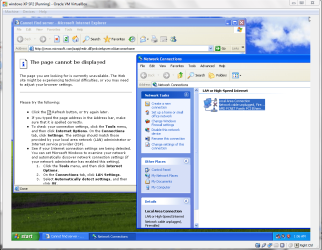
OK, back to the topic. I can see from your second screenshot that you have not installed VirtualBox Guest Additions. It's essential to install them, so please do it now.

Here's how, in case you are not familiar with Guest Additions:
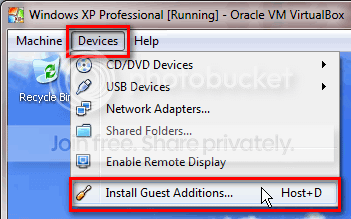
  • Open Devices menu in virtual machine's menu bar. Select Install Guest Additions:
    .
    VBox_Install_GA_1.png

    .
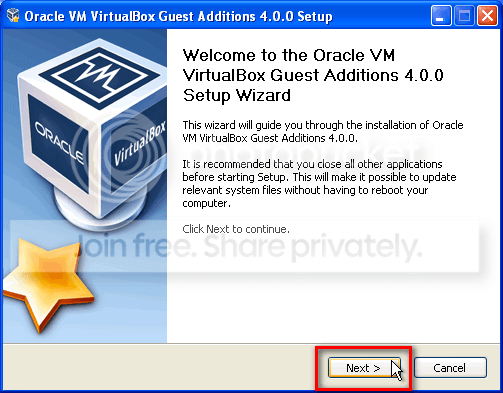
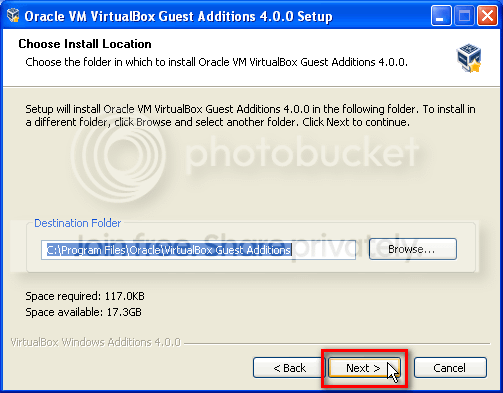
  • Click Next in following two windows:
    .
    VBox_Install_GA_2.png

    .
    VBox_Install_GA_3.png

    .
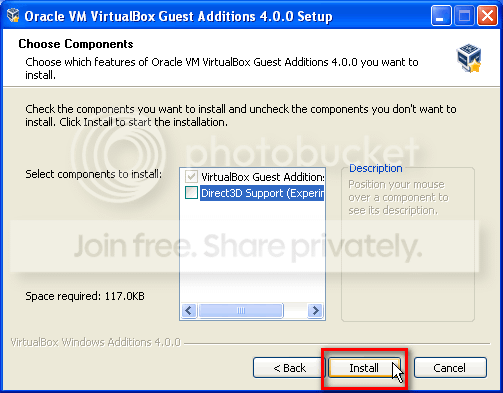
  • Click Install:
    .
    VBox_Install_GA_4.png

    .
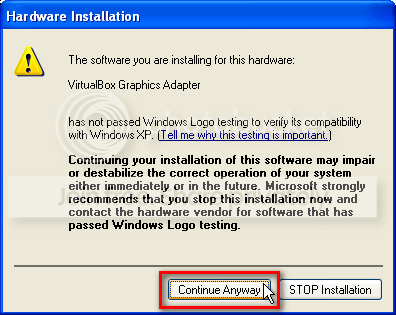
  • When XP warns you about not known device driver (two or three times during installation), click Continue Anyway:
    .
    VBox_Install_GA_5.png

    .
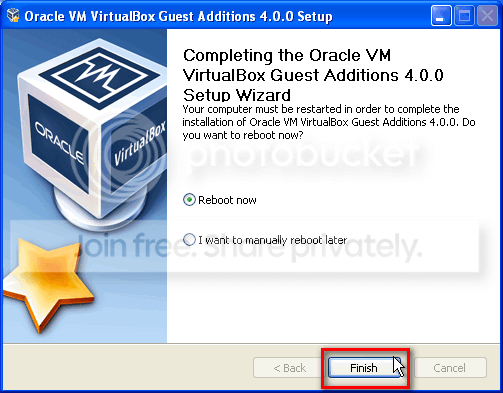
  • Click Finish to end installation and reboot XP:
    .
    VBox_Install_GA_6.png

    .
  • After reboot, you'll see a small Guest Additions symbol in XP's notification area, to indicate that Guest Additions are installed:
    .
    VBox_Install_GA_7.png
Test the Internet connection now, it should work. If not, come back and we'll try something else.

Kari
 

My Computer My Computer

At a glance

Windows 10 Pro x64 EN-GB1.6 GHz Intel Core i7-720QM Processor6 GBATI Mobility Radeon HD 5850 Graphics
Computer type
Laptop
Computer Manufacturer/Model Number
HP ENVY 17-1150eg
OS
Windows 10 Pro x64 EN-GB
CPU
1.6 GHz Intel Core i7-720QM Processor
Memory
6 GB
Graphics Card(s)
ATI Mobility Radeon HD 5850 Graphics
Sound Card
Beats sound system with integrated subwoofer
Monitor(s) Displays
17" laptop display, 22" LED and 32" Full HD TV through HDMI
Screen Resolution
1600*900 (1), 1920*1080 (2&3)
Hard Drives
Internal: 2 x 500 GB SATA Hard Disk Drive 7200 rpm
External: 2TB for backups, 3TB USB3 network drive for media
Cooling
As Envy runs a bit warm, I have it on a Cooler Master pad
Keyboard
Logitech diNovo Media Desktop Laser (bluetooth)
Mouse
Logitech Performance Mouse MX
Internet Speed
50/10 Mbps VDSL
Antivirus
Windows Defender 4.3.9431.0
Browser
Maxthon 3.5.2., IE11
install guest additions in safe mode if you want 3d acceleration
 

My Computer My Computer

At a glance

Windows 7 Ultimate x641.80 GHz Intel Core 2 Duo processor T71003 gig ddr2NVIDIA GeForce 8400M GS
Computer Manufacturer/Model Number
HP dv6519tx
OS
Windows 7 Ultimate x64
CPU
1.80 GHz Intel Core 2 Duo processor T7100
Memory
3 gig ddr2
Graphics Card(s)
NVIDIA GeForce 8400M GS
Sound Card
Realtek High Definition Audio
Monitor(s) Displays
15.4” WXGA High Definition BrightView Widescreen
Screen Resolution
1280 x 800
Hard Drives
Hitachi 320 GB (5400 rpm)
PSU
90 W AC Power Adapter
Cooling
Kitchen plate under the lappy
Keyboard
101 key compatible
Mouse
Touch Pad with On/Off button and dedicated vertical Scroll
Internet Speed
Three Wireless internet prepaid using E160G USB dongle
thank you so much for helping me , everything works perfectly
 

My Computer My Computer

At a glance

windows 7 ultimate 64Bit
OS
windows 7 ultimate 64Bit
That's nice to hear.
 

My Computer My Computer

At a glance

Windows 10 Pro x64 EN-GB1.6 GHz Intel Core i7-720QM Processor6 GBATI Mobility Radeon HD 5850 Graphics
Computer type
Laptop
Computer Manufacturer/Model Number
HP ENVY 17-1150eg
OS
Windows 10 Pro x64 EN-GB
CPU
1.6 GHz Intel Core i7-720QM Processor
Memory
6 GB
Graphics Card(s)
ATI Mobility Radeon HD 5850 Graphics
Sound Card
Beats sound system with integrated subwoofer
Monitor(s) Displays
17" laptop display, 22" LED and 32" Full HD TV through HDMI
Screen Resolution
1600*900 (1), 1920*1080 (2&3)
Hard Drives
Internal: 2 x 500 GB SATA Hard Disk Drive 7200 rpm
External: 2TB for backups, 3TB USB3 network drive for media
Cooling
As Envy runs a bit warm, I have it on a Cooler Master pad
Keyboard
Logitech diNovo Media Desktop Laser (bluetooth)
Mouse
Logitech Performance Mouse MX
Internet Speed
50/10 Mbps VDSL
Antivirus
Windows Defender 4.3.9431.0
Browser
Maxthon 3.5.2., IE11
I know this post is old, but I've been unable to find something with clear steps as Kari has provided in her previous posts. I've done exactly what the posts suggested and still unable to connect to the Internet on my VM running Windows 7 home basic.:cry:

The first time I tried it, it said that the drivers did not install correctly, but now I do not get that error. When I "troubleshoot" the problem, it tells me I need to nstall a driver for my network adapter. Any ideas of how I'm supposed to do this on the virtual machine? Or is this an error that I'm getting because I set something up wrong in the network settings?

I'm attached using a "bridged adapter" because this is the only selection that would populate my wireless card.
Adapter type: PCnet-PCI II
Promiscuous Mode: Allow VMs


Thanks for any help!
 

My Computer My Computer

At a glance

Windows 7 64bit
OS
Windows 7 64bit
... as Kari has provided in her previous posts. ...
His, not her! Really. Back home in Finland Kari is traditional and old male name :)

Check that you have correctly selected your host machine's network adapter, the one you use to connect to the network:

01.png

Try changing the adapter type. If all settings are correct you should be able to connect.

Kari
 

My Computer My Computer

At a glance

Windows 10 Pro x64 EN-GB1.6 GHz Intel Core i7-720QM Processor6 GBATI Mobility Radeon HD 5850 Graphics
Computer type
Laptop
Computer Manufacturer/Model Number
HP ENVY 17-1150eg
OS
Windows 10 Pro x64 EN-GB
CPU
1.6 GHz Intel Core i7-720QM Processor
Memory
6 GB
Graphics Card(s)
ATI Mobility Radeon HD 5850 Graphics
Sound Card
Beats sound system with integrated subwoofer
Monitor(s) Displays
17" laptop display, 22" LED and 32" Full HD TV through HDMI
Screen Resolution
1600*900 (1), 1920*1080 (2&3)
Hard Drives
Internal: 2 x 500 GB SATA Hard Disk Drive 7200 rpm
External: 2TB for backups, 3TB USB3 network drive for media
Cooling
As Envy runs a bit warm, I have it on a Cooler Master pad
Keyboard
Logitech diNovo Media Desktop Laser (bluetooth)
Mouse
Logitech Performance Mouse MX
Internet Speed
50/10 Mbps VDSL
Antivirus
Windows Defender 4.3.9431.0
Browser
Maxthon 3.5.2., IE11
Sorry about that man! And thanks a lot for the quick reply!

So I know that my computer uses the ASUS 802.11n Wireless LAN to connect to the internet, so I used this to begin with. But, still no connectivity. So I tried all three of the options below and also decided to check my device manager and I found this...


Is this supposed to be there? The Virtualbox Host-Only Ethernet Adapter?

I tried all combinations of the 3 Bridge Adapter names with all of the Adapter Types, but still no connectivity? I did get this:


When I changed the adapter to the the Intel(R) Pro/1000MT selected ad the Adapter Type, but as you can see, there's still no connectivity.

Any ideas? Maybe I'm stupid and just missing something easy haha
 

My Computer My Computer

At a glance

Windows 7 64bit
OS
Windows 7 64bit
Hey, the exact same thing is happening to me! That's crazy =o I've just subscribed to post here. I'm used to vb and I've alse tried eveything... So if you find a solution please let me know. Everything was fine some hours ago, idk wtf happened..
 

My Computer My Computer

At a glance

seven 64b
OS
seven 64b
Ok budy, I get it! =D
You need to enable DHCP in your vm. Follow this guide How to enable DHCP in Windows 7? tell me if it works or not (: worked for me

Thanks man, I was just getting on here to tell you what worked for me, when I saw this! haha

All I had to do was click the checkbox "cable connected" in the Network settings tab. I knew it was something easy that I was just missing!

Glad we're both up and running now :)
 

My Computer My Computer

At a glance

Windows 7 64bit
OS
Windows 7 64bit
Back
Top