
Solved How to change SATA mode

Tomtom111

Learn from everything
Member
VIP
Local time
1:04 PM
Messages
365
Location
Great Britian
I want to change the SATA mode to ACHI from the what it is currently, IDE I think. Irritatingly I can't due to restrictions forced down by the manufacturer. So, is there a way to bypass the restrictions and change the SATA mode? And I am aware that if I change it, the current OS will be unable to work, but I'll just reinstall it.

Thanks
 

My Computer My Computer

Computer type
PC/Desktop
Computer Manufacturer/Model Number
Custom Build
OS
Windows 7 Professional SP1 x64
CPU
AMD FX6300 3.6GHz (4.1GHz Turbo) 6 core Black Edition
Motherboard
ASRock 960GM/U3S3 FX Socket AM3+
Memory
Crucial Ballistix Tactial 8GB (2x4GB) 1866MHz
Graphics Card(s)
ASUS Radeon HD6850 1GB
Monitor(s) Displays
HP 22xi 21.5" Monitor
Screen Resolution
1920x1080p
Hard Drives
Western Digital 1TB SATA6 64MB Cache WD10EZEX
PSU
Corsair CX500 500W (Non modular)
Case
Fractal Design Define Mini
Cooling
2x Fractal Design 120MM 1200RPM, GPU fan, CPU fan, PSU fan
Keyboard
Logitech EX100 Keyboard
Mouse
Logitech MX Revoloution
Internet Speed
~37Mbps down, ~15Mbps up
Antivirus
Avast Anti-virus
Browser
Google Chrome
Other Info
Wireless card: TP-Link TL-WN781ND 150Mbps PCI-E Card

It also has a nice blue power button (Yay)

My Computer My Computer

Computer Manufacturer/Model Number
acer aspire 5935g
OS
Windows 7 Home Premium x64 SP1
CPU
intel(R)core(TM)2 duo CPU T6600 @ 2.20GHz
Motherboard
intel gm45/gm47 revision 07
Memory
3 gb ddr3
Graphics Card(s)
ati radeon hd4570/512mb
Monitor(s) Displays
lop156wh2-tle1 15.3 flat
Screen Resolution
1366x768
Hard Drives
OCZ-Agility3 60gig ssd
320gig external hdd
500gig external hdd
Mouse
Optical
Internet Speed
30Mbps Down/30Mbps Up
I've looked all through the BIOS settings, and there's nothing about sata mode. Looking through the guide, when I get to change the 3 to a 0, the value is already a 0. Does that mean its already in ACHI?
 

My Computer My Computer

Computer type
PC/Desktop
Computer Manufacturer/Model Number
Custom Build
OS
Windows 7 Professional SP1 x64
CPU
AMD FX6300 3.6GHz (4.1GHz Turbo) 6 core Black Edition
Motherboard
ASRock 960GM/U3S3 FX Socket AM3+
Memory
Crucial Ballistix Tactial 8GB (2x4GB) 1866MHz
Graphics Card(s)
ASUS Radeon HD6850 1GB
Monitor(s) Displays
HP 22xi 21.5" Monitor
Screen Resolution
1920x1080p
Hard Drives
Western Digital 1TB SATA6 64MB Cache WD10EZEX
PSU
Corsair CX500 500W (Non modular)
Case
Fractal Design Define Mini
Cooling
2x Fractal Design 120MM 1200RPM, GPU fan, CPU fan, PSU fan
Keyboard
Logitech EX100 Keyboard
Mouse
Logitech MX Revoloution
Internet Speed
~37Mbps down, ~15Mbps up
Antivirus
Avast Anti-virus
Browser
Google Chrome
Other Info
Wireless card: TP-Link TL-WN781ND 150Mbps PCI-E Card

It also has a nice blue power button (Yay)

I'm no expert but I would think so.Have a look in device manager, under IDE ATA/ATAPI Controllers or something alike and see if AHCI is mentioned there.

Capture.PNG

Danny
 

My Computer My Computer

Computer Manufacturer/Model Number
acer aspire 5935g
OS
Windows 7 Home Premium x64 SP1
CPU
intel(R)core(TM)2 duo CPU T6600 @ 2.20GHz
Motherboard
intel gm45/gm47 revision 07
Memory
3 gb ddr3
Graphics Card(s)
ati radeon hd4570/512mb
Monitor(s) Displays
lop156wh2-tle1 15.3 flat
Screen Resolution
1366x768
Hard Drives
OCZ-Agility3 60gig ssd
320gig external hdd
500gig external hdd
Mouse
Optical
Internet Speed
30Mbps Down/30Mbps Up
This is what I've got, is the highlighted one the hard drive? If so it must already be ACHI, right?
 

Attachments

  • ImageUploadedBySevenForums1341834551.328877.jpg
    ImageUploadedBySevenForums1341834551.328877.jpg
    98.9 KB · Views: 12

My Computer My Computer

Computer type
PC/Desktop
Computer Manufacturer/Model Number
Custom Build
OS
Windows 7 Professional SP1 x64
CPU
AMD FX6300 3.6GHz (4.1GHz Turbo) 6 core Black Edition
Motherboard
ASRock 960GM/U3S3 FX Socket AM3+
Memory
Crucial Ballistix Tactial 8GB (2x4GB) 1866MHz
Graphics Card(s)
ASUS Radeon HD6850 1GB
Monitor(s) Displays
HP 22xi 21.5" Monitor
Screen Resolution
1920x1080p
Hard Drives
Western Digital 1TB SATA6 64MB Cache WD10EZEX
PSU
Corsair CX500 500W (Non modular)
Case
Fractal Design Define Mini
Cooling
2x Fractal Design 120MM 1200RPM, GPU fan, CPU fan, PSU fan
Keyboard
Logitech EX100 Keyboard
Mouse
Logitech MX Revoloution
Internet Speed
~37Mbps down, ~15Mbps up
Antivirus
Avast Anti-virus
Browser
Google Chrome
Other Info
Wireless card: TP-Link TL-WN781ND 150Mbps PCI-E Card

It also has a nice blue power button (Yay)
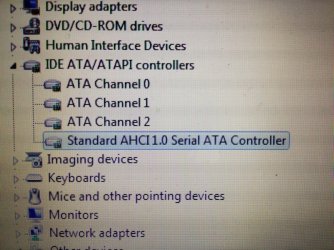
Yer looks good mate I think thats just the default driver. Not sure why mines different I would just presume its an updated Intel one (Dunno know you got me thinking now lol) Im running an SSD that could be the difference.

But yes you're good

Danny
 

My Computer My Computer

Computer Manufacturer/Model Number
acer aspire 5935g
OS
Windows 7 Home Premium x64 SP1
CPU
intel(R)core(TM)2 duo CPU T6600 @ 2.20GHz
Motherboard
intel gm45/gm47 revision 07
Memory
3 gb ddr3
Graphics Card(s)
ati radeon hd4570/512mb
Monitor(s) Displays
lop156wh2-tle1 15.3 flat
Screen Resolution
1366x768
Hard Drives
OCZ-Agility3 60gig ssd
320gig external hdd
500gig external hdd
Mouse
Optical
Internet Speed
30Mbps Down/30Mbps Up
Yes it is! That's the entry to look out for!:D
 

My Computer My Computer

Computer Manufacturer/Model Number
DELL SXPS 1640
OS
Windows 7 x64 Professional SP1
CPU
Intel C2D T9550 2.66 GHz @ 2.793 GHz (Thanks ThrottleStop!!)
Motherboard
Intel PM45
Memory
8 GB DDR3
Graphics Card(s)
ATI MOBILITY RADEON 4670
Sound Card
CREATIVE XFI AUDIO NOTEBOOK
Monitor(s) Displays
16.1 WLED
Screen Resolution
1920x1080
Hard Drives
Seagate ST9500420AS 500GB (465GiBi) 7200 RPM Drive

External Drives:-
2 TB WD Essentials x 3
1 TB WD Mybook Gen 1
1 TB WD Mybook Gen 2
1 TB Seagate
1 TB Seagate
320 GB WD Scorpio Black (enclosed)
PSU
90W Dell Power Brick
Case
Dell Chassis
Cooling
Coolermaster Cooling Pad
Keyboard
Built-in backlighted Keyboard
Mouse
Logitech Wireless Mini Mouse
Internet Speed
4/0.5
OK, thanks. Obviously I don't want to change it from that now, but is there a way to be able to change it in the BIOS settings, by bypassing the restrictions?
 

My Computer My Computer

Computer type
PC/Desktop
Computer Manufacturer/Model Number
Custom Build
OS
Windows 7 Professional SP1 x64
CPU
AMD FX6300 3.6GHz (4.1GHz Turbo) 6 core Black Edition
Motherboard
ASRock 960GM/U3S3 FX Socket AM3+
Memory
Crucial Ballistix Tactial 8GB (2x4GB) 1866MHz
Graphics Card(s)
ASUS Radeon HD6850 1GB
Monitor(s) Displays
HP 22xi 21.5" Monitor
Screen Resolution
1920x1080p
Hard Drives
Western Digital 1TB SATA6 64MB Cache WD10EZEX
PSU
Corsair CX500 500W (Non modular)
Case
Fractal Design Define Mini
Cooling
2x Fractal Design 120MM 1200RPM, GPU fan, CPU fan, PSU fan
Keyboard
Logitech EX100 Keyboard
Mouse
Logitech MX Revoloution
Internet Speed
~37Mbps down, ~15Mbps up
Antivirus
Avast Anti-virus
Browser
Google Chrome
Other Info
Wireless card: TP-Link TL-WN781ND 150Mbps PCI-E Card

It also has a nice blue power button (Yay)
Yes it is! That's the entry to look out for!:D

Like I said Im no expert with this, why is mine different, I do have the option in device manager to install that driver, is it worth it Solarmystic. Im running an ssd though

Danny
 

My Computer My Computer

Computer Manufacturer/Model Number
acer aspire 5935g
OS
Windows 7 Home Premium x64 SP1
CPU
intel(R)core(TM)2 duo CPU T6600 @ 2.20GHz
Motherboard
intel gm45/gm47 revision 07
Memory
3 gb ddr3
Graphics Card(s)
ati radeon hd4570/512mb
Monitor(s) Displays
lop156wh2-tle1 15.3 flat
Screen Resolution
1366x768
Hard Drives
OCZ-Agility3 60gig ssd
320gig external hdd
500gig external hdd
Mouse
Optical
Internet Speed
30Mbps Down/30Mbps Up
Yes it is! That's the entry to look out for!:D

Like I said Im no expert with this, why is mine different, I do have the option in device manager to install that driver, is it worth it Solarmystic. Im running an ssd though

Danny

Yours is a custom one by Intel. Keep what you have, it could be better than the generic one by Windows. The one shown by the OP is a generic AHCI driver by Microsoft.

For a reference point, here's mine after updating it with the Intel INF utlity:-

Capture1.PNG
 

My Computer My Computer

Computer Manufacturer/Model Number
DELL SXPS 1640
OS
Windows 7 x64 Professional SP1
CPU
Intel C2D T9550 2.66 GHz @ 2.793 GHz (Thanks ThrottleStop!!)
Motherboard
Intel PM45
Memory
8 GB DDR3
Graphics Card(s)
ATI MOBILITY RADEON 4670
Sound Card
CREATIVE XFI AUDIO NOTEBOOK
Monitor(s) Displays
16.1 WLED
Screen Resolution
1920x1080
Hard Drives
Seagate ST9500420AS 500GB (465GiBi) 7200 RPM Drive

External Drives:-
2 TB WD Essentials x 3
1 TB WD Mybook Gen 1
1 TB WD Mybook Gen 2
1 TB Seagate
1 TB Seagate
320 GB WD Scorpio Black (enclosed)
PSU
90W Dell Power Brick
Case
Dell Chassis
Cooling
Coolermaster Cooling Pad
Keyboard
Built-in backlighted Keyboard
Mouse
Logitech Wireless Mini Mouse
Internet Speed
4/0.5
Yes it is! That's the entry to look out for!:D

Like I said Im no expert with this, why is mine different, I do have the option in device manager to install that driver, is it worth it Solarmystic. Im running an ssd though

Danny

Yours is a custom one by Intel. Keep what you have, it could be better than the generic one by Windows. The one shown by the OP is a generic AHCI driver by Microsoft.

For a reference point, here's mine after updating it with the Intel INF utlity:-

View attachment 220548

Thanks for the info solar.

Danny
 

My Computer My Computer

Computer Manufacturer/Model Number
acer aspire 5935g
OS
Windows 7 Home Premium x64 SP1
CPU
intel(R)core(TM)2 duo CPU T6600 @ 2.20GHz
Motherboard
intel gm45/gm47 revision 07
Memory
3 gb ddr3
Graphics Card(s)
ati radeon hd4570/512mb
Monitor(s) Displays
lop156wh2-tle1 15.3 flat
Screen Resolution
1366x768
Hard Drives
OCZ-Agility3 60gig ssd
320gig external hdd
500gig external hdd
Mouse
Optical
Internet Speed
30Mbps Down/30Mbps Up
Three time of have read this and I'm lost. Maybe it's just me.
1. There is no System Specs. Please fill them in completely. Very much needed info for us to work with.
2. Please explain restriction put on computer by manufacturer. I have no idea what this means.
3. Is this your computer, a company computer or a school computer ect.?
4. Did you complete the Tutorial that was posted completely?
 

My Computer My Computer

Computer type
PC/Desktop
Computer Manufacturer/Model Number
Home made Desktop
OS
Windows 10 Pro. 64/ version 1709 Windows 7 Pro/64
CPU
Intel i7-6800K @ 4.3
Motherboard
ASUS X-99 Deluxe II
Memory
Corsair Platinum 16 gig @2400
Graphics Card(s)
EVGA GTX 1070 OC
Monitor(s) Displays
Asus 27" LED LCD/VE278Q
Screen Resolution
1920-1080 or 1280-720 HDMI
Hard Drives
INTEL SSD 730-240 Gb Sata 3.0/
PSU
EVGA Platium 1200W
Case
Phanteks Luxe Tempered Glass 8 fans/ one radiator
Cooling
XSPC/ Water Cooled CPU
Keyboard
Das 4 Professional
Mouse
Logitech M705/MX Anywhere 2-S
Internet Speed
100 mbits
Antivirus
Microsoft Security Essentials/ Malwarebytes Premium 3.0/ SAS
Browser
I.E. 11 default/Firefox/ ISP Time Warner Cable/Spectrum
Other Info
LG BluRay Burner/
Sound system-KLipsch-THX/
Icy Dock ssd Hot Swap bays.
Three time of have read this and I'm lost. Maybe it's just me.
1. There is no System Specs. Please fill them in completely. Very much needed info for us to work with.
2. Please explain restriction put on computer by manufacturer. I have no idea what this means.
3. Is this your computer, a company computer or a school computer ect.?
4. Did you complete the Tutorial that was posted completely?

1) my system specs are on my profile.
2) the restriction is that when in the BIOS settings, I cannot change the SATA mode. There isn't even a visible option to do so.
3) This is my PC, made by HP
4) I followed the tutorial up to the point that said to change the number '3' to a '0' as in my case it was already a 0.
 

My Computer My Computer

Computer type
PC/Desktop
Computer Manufacturer/Model Number
Custom Build
OS
Windows 7 Professional SP1 x64
CPU
AMD FX6300 3.6GHz (4.1GHz Turbo) 6 core Black Edition
Motherboard
ASRock 960GM/U3S3 FX Socket AM3+
Memory
Crucial Ballistix Tactial 8GB (2x4GB) 1866MHz
Graphics Card(s)
ASUS Radeon HD6850 1GB
Monitor(s) Displays
HP 22xi 21.5" Monitor
Screen Resolution
1920x1080p
Hard Drives
Western Digital 1TB SATA6 64MB Cache WD10EZEX
PSU
Corsair CX500 500W (Non modular)
Case
Fractal Design Define Mini
Cooling
2x Fractal Design 120MM 1200RPM, GPU fan, CPU fan, PSU fan
Keyboard
Logitech EX100 Keyboard
Mouse
Logitech MX Revoloution
Internet Speed
~37Mbps down, ~15Mbps up
Antivirus
Avast Anti-virus
Browser
Google Chrome
Other Info
Wireless card: TP-Link TL-WN781ND 150Mbps PCI-E Card

It also has a nice blue power button (Yay)

My Computer My Computer

Computer type
PC/Desktop
Computer Manufacturer/Model Number
Home made Desktop
OS
Windows 10 Pro. 64/ version 1709 Windows 7 Pro/64
CPU
Intel i7-6800K @ 4.3
Motherboard
ASUS X-99 Deluxe II
Memory
Corsair Platinum 16 gig @2400
Graphics Card(s)
EVGA GTX 1070 OC
Monitor(s) Displays
Asus 27" LED LCD/VE278Q
Screen Resolution
1920-1080 or 1280-720 HDMI
Hard Drives
INTEL SSD 730-240 Gb Sata 3.0/
PSU
EVGA Platium 1200W
Case
Phanteks Luxe Tempered Glass 8 fans/ one radiator
Cooling
XSPC/ Water Cooled CPU
Keyboard
Das 4 Professional
Mouse
Logitech M705/MX Anywhere 2-S
Internet Speed
100 mbits
Antivirus
Microsoft Security Essentials/ Malwarebytes Premium 3.0/ SAS
Browser
I.E. 11 default/Firefox/ ISP Time Warner Cable/Spectrum
Other Info
LG BluRay Burner/
Sound system-KLipsch-THX/
Icy Dock ssd Hot Swap bays.
Capture.PNG DISC MANAGEMENT.PNG
Can you give us a picture like this so the good folks here can see what you have.
 

My Computer My Computer

Computer type
PC/Desktop
Computer Manufacturer/Model Number
Home made Desktop
OS
Windows 10 Pro. 64/ version 1709 Windows 7 Pro/64
CPU
Intel i7-6800K @ 4.3
Motherboard
ASUS X-99 Deluxe II
Memory
Corsair Platinum 16 gig @2400
Graphics Card(s)
EVGA GTX 1070 OC
Monitor(s) Displays
Asus 27" LED LCD/VE278Q
Screen Resolution
1920-1080 or 1280-720 HDMI
Hard Drives
INTEL SSD 730-240 Gb Sata 3.0/
PSU
EVGA Platium 1200W
Case
Phanteks Luxe Tempered Glass 8 fans/ one radiator
Cooling
XSPC/ Water Cooled CPU
Keyboard
Das 4 Professional
Mouse
Logitech M705/MX Anywhere 2-S
Internet Speed
100 mbits
Antivirus
Microsoft Security Essentials/ Malwarebytes Premium 3.0/ SAS
Browser
I.E. 11 default/Firefox/ ISP Time Warner Cable/Spectrum
Other Info
LG BluRay Burner/
Sound system-KLipsch-THX/
Icy Dock ssd Hot Swap bays.
Sure but I'll have to do it later
 

My Computer My Computer

Computer type
PC/Desktop
Computer Manufacturer/Model Number
Custom Build
OS
Windows 7 Professional SP1 x64
CPU
AMD FX6300 3.6GHz (4.1GHz Turbo) 6 core Black Edition
Motherboard
ASRock 960GM/U3S3 FX Socket AM3+
Memory
Crucial Ballistix Tactial 8GB (2x4GB) 1866MHz
Graphics Card(s)
ASUS Radeon HD6850 1GB
Monitor(s) Displays
HP 22xi 21.5" Monitor
Screen Resolution
1920x1080p
Hard Drives
Western Digital 1TB SATA6 64MB Cache WD10EZEX
PSU
Corsair CX500 500W (Non modular)
Case
Fractal Design Define Mini
Cooling
2x Fractal Design 120MM 1200RPM, GPU fan, CPU fan, PSU fan
Keyboard
Logitech EX100 Keyboard
Mouse
Logitech MX Revoloution
Internet Speed
~37Mbps down, ~15Mbps up
Antivirus
Avast Anti-virus
Browser
Google Chrome
Other Info
Wireless card: TP-Link TL-WN781ND 150Mbps PCI-E Card

It also has a nice blue power button (Yay)

I have been doing a little Googling and from what I have found HP has set the bios to AHCI and doesn't want anybody to mess with it. To my understanding the zero (0) you have is AHCI.
I was just wondering with all those operating systems how things look in Disc Management.
 

My Computer My Computer

Computer type
PC/Desktop
Computer Manufacturer/Model Number
Home made Desktop
OS
Windows 10 Pro. 64/ version 1709 Windows 7 Pro/64
CPU
Intel i7-6800K @ 4.3
Motherboard
ASUS X-99 Deluxe II
Memory
Corsair Platinum 16 gig @2400
Graphics Card(s)
EVGA GTX 1070 OC
Monitor(s) Displays
Asus 27" LED LCD/VE278Q
Screen Resolution
1920-1080 or 1280-720 HDMI
Hard Drives
INTEL SSD 730-240 Gb Sata 3.0/
PSU
EVGA Platium 1200W
Case
Phanteks Luxe Tempered Glass 8 fans/ one radiator
Cooling
XSPC/ Water Cooled CPU
Keyboard
Das 4 Professional
Mouse
Logitech M705/MX Anywhere 2-S
Internet Speed
100 mbits
Antivirus
Microsoft Security Essentials/ Malwarebytes Premium 3.0/ SAS
Browser
I.E. 11 default/Firefox/ ISP Time Warner Cable/Spectrum
Other Info
LG BluRay Burner/
Sound system-KLipsch-THX/
Icy Dock ssd Hot Swap bays.
Ive already worked out its set as ACHI, so from what you said, I can't change it to anything else?
 

My Computer My Computer

Computer type
PC/Desktop
Computer Manufacturer/Model Number
Custom Build
OS
Windows 7 Professional SP1 x64
CPU
AMD FX6300 3.6GHz (4.1GHz Turbo) 6 core Black Edition
Motherboard
ASRock 960GM/U3S3 FX Socket AM3+
Memory
Crucial Ballistix Tactial 8GB (2x4GB) 1866MHz
Graphics Card(s)
ASUS Radeon HD6850 1GB
Monitor(s) Displays
HP 22xi 21.5" Monitor
Screen Resolution
1920x1080p
Hard Drives
Western Digital 1TB SATA6 64MB Cache WD10EZEX
PSU
Corsair CX500 500W (Non modular)
Case
Fractal Design Define Mini
Cooling
2x Fractal Design 120MM 1200RPM, GPU fan, CPU fan, PSU fan
Keyboard
Logitech EX100 Keyboard
Mouse
Logitech MX Revoloution
Internet Speed
~37Mbps down, ~15Mbps up
Antivirus
Avast Anti-virus
Browser
Google Chrome
Other Info
Wireless card: TP-Link TL-WN781ND 150Mbps PCI-E Card

It also has a nice blue power button (Yay)
Why would you want to change it if it's on AHCI. Anything can be changed. There are people here that know HP better than I do I'm sure of that.
Is their any other problem that you are having that would make you want to change it?
 

My Computer My Computer

Computer type
PC/Desktop
Computer Manufacturer/Model Number
Home made Desktop
OS
Windows 10 Pro. 64/ version 1709 Windows 7 Pro/64
CPU
Intel i7-6800K @ 4.3
Motherboard
ASUS X-99 Deluxe II
Memory
Corsair Platinum 16 gig @2400
Graphics Card(s)
EVGA GTX 1070 OC
Monitor(s) Displays
Asus 27" LED LCD/VE278Q
Screen Resolution
1920-1080 or 1280-720 HDMI
Hard Drives
INTEL SSD 730-240 Gb Sata 3.0/
PSU
EVGA Platium 1200W
Case
Phanteks Luxe Tempered Glass 8 fans/ one radiator
Cooling
XSPC/ Water Cooled CPU
Keyboard
Das 4 Professional
Mouse
Logitech M705/MX Anywhere 2-S
Internet Speed
100 mbits
Antivirus
Microsoft Security Essentials/ Malwarebytes Premium 3.0/ SAS
Browser
I.E. 11 default/Firefox/ ISP Time Warner Cable/Spectrum
Other Info
LG BluRay Burner/
Sound system-KLipsch-THX/
Icy Dock ssd Hot Swap bays.
No, the reason I started this thread was because I though it was IDE, but as it is ACHI I don't nee to change it. I was just wondering if there was a way to change it in the BIOS settings instead of within windows.
Anyway, thanks to every who helped.
 

My Computer My Computer

Computer type
PC/Desktop
Computer Manufacturer/Model Number
Custom Build
OS
Windows 7 Professional SP1 x64
CPU
AMD FX6300 3.6GHz (4.1GHz Turbo) 6 core Black Edition
Motherboard
ASRock 960GM/U3S3 FX Socket AM3+
Memory
Crucial Ballistix Tactial 8GB (2x4GB) 1866MHz
Graphics Card(s)
ASUS Radeon HD6850 1GB
Monitor(s) Displays
HP 22xi 21.5" Monitor
Screen Resolution
1920x1080p
Hard Drives
Western Digital 1TB SATA6 64MB Cache WD10EZEX
PSU
Corsair CX500 500W (Non modular)
Case
Fractal Design Define Mini
Cooling
2x Fractal Design 120MM 1200RPM, GPU fan, CPU fan, PSU fan
Keyboard
Logitech EX100 Keyboard
Mouse
Logitech MX Revoloution
Internet Speed
~37Mbps down, ~15Mbps up
Antivirus
Avast Anti-virus
Browser
Google Chrome
Other Info
Wireless card: TP-Link TL-WN781ND 150Mbps PCI-E Card

It also has a nice blue power button (Yay)
Back
Top