Am I able to do this. Launch a program at a higher default priority?

Siveria

New member
Member
Local time
5:50 AM
Messages
67
Hi all, I am wondering if there is a way in windows 7 home premium 64-bit to say, have 7-zip's priority be set to high anytime the program is launched by using the 7-zip.exe or by double clicking a compressed file. Is this doable some how?
 

My Computer

Computer type
PC/Desktop
OS
Windows 7 Home Premium 64 Bit
CPU
Intel(R) Core(TM) i5-2310 CPU @ 2.90GHz
Motherboard
Gateway DX4860
Memory
8.00 GB
Graphics Card(s)
MSI GeForce GTX 970 4G
Sound Card
Onboard (Realtek)
Monitor(s) Displays
Acer 24 Inch LED
Screen Resolution
1920x1080
Hard Drives
(1) WDC WD15EARS-22MVWB0 (2) Generic Mini SD Reader USB Device (3) Generic USB CF Reader USB Device (4) Generic USB MS Reader USB Device (5) Generic USB SD Reader USB Device (6) Generic USB xD/SM Reader USB Device
PSU
450w
Cooling
Heat Sink+Fan
Mouse
Logitech G-300
Internet Speed
6 Mbyte/s
Hello Siveria,

The answer to your question is a qualified YES;

Prio is a freeware application that does it perfectly in the background, with minimal user intervention.

All you have to do is install it, reboot your computer, run your targetted program once, go to your Task Manager while the program is running, right click on your application, and change the priority.

Prio will remember what you've chosen for that application, so that the next time it will launch at the same priority until you change it again manually for that specific program.

An added bonus to Prio is that It allows you change all sorts of other things like not only CPU Priority, but also an remember's an application's CPU preference (choosing the cores that you want an application to use) and also the default Disk IO priority which is arguably more important when dealing with disk intensive operations that could clog up your system like File Extraction or Bulk File Copies.

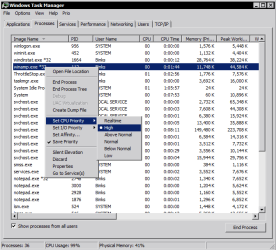
Here're a screenshot of the task manager after it's been modified by Prio:-

Capture3.PNG

Prio - Priority Saver

Hope that answers your query.
 
Last edited:

My Computer

Computer Manufacturer/Model Number
DELL SXPS 1640
OS
Windows 7 x64 Professional SP1
CPU
Intel C2D T9550 2.66 GHz @ 2.793 GHz (Thanks ThrottleStop!!)
Motherboard
Intel PM45
Memory
8 GB DDR3
Graphics Card(s)
ATI MOBILITY RADEON 4670
Sound Card
CREATIVE XFI AUDIO NOTEBOOK
Monitor(s) Displays
16.1 WLED
Screen Resolution
1920x1080
Hard Drives
Seagate ST9500420AS 500GB (465GiBi) 7200 RPM Drive

External Drives:-
2 TB WD Essentials x 3
1 TB WD Mybook Gen 1
1 TB WD Mybook Gen 2
1 TB Seagate
1 TB Seagate
320 GB WD Scorpio Black (enclosed)
PSU
90W Dell Power Brick
Case
Dell Chassis
Cooling
Coolermaster Cooling Pad
Keyboard
Built-in backlighted Keyboard
Mouse
Logitech Wireless Mini Mouse
Internet Speed
4/0.5
It does thank you.
 

My Computer

Computer type
PC/Desktop
OS
Windows 7 Home Premium 64 Bit
CPU
Intel(R) Core(TM) i5-2310 CPU @ 2.90GHz
Motherboard
Gateway DX4860
Memory
8.00 GB
Graphics Card(s)
MSI GeForce GTX 970 4G
Sound Card
Onboard (Realtek)
Monitor(s) Displays
Acer 24 Inch LED
Screen Resolution
1920x1080
Hard Drives
(1) WDC WD15EARS-22MVWB0 (2) Generic Mini SD Reader USB Device (3) Generic USB CF Reader USB Device (4) Generic USB MS Reader USB Device (5) Generic USB SD Reader USB Device (6) Generic USB xD/SM Reader USB Device
PSU
450w
Cooling
Heat Sink+Fan
Mouse
Logitech G-300
Internet Speed
6 Mbyte/s
Windows Task Manager already lets you select a processes Priority and Affinity (which cores it uses). Does Windows not remember these settings after reboot, which is what this program offers?
 

My Computer

OS
XP / Win7 x64 Pro
CPU
Intel Quad-Core Q9450 @ 3.2GHz
Motherboard
Asus P5-E
Memory
2x2GB GSkill DDR2
Graphics Card(s)
NVIDIA GeForce 8600 GTS (EVGA)
Monitor(s) Displays
Dell 2408WFP
Screen Resolution
1920x1200
Windows Task Manager already lets you select a processes Priority and Affinity (which cores it uses). Does Windows not remember these settings after reboot, which is what this program offers?

That's the MAJOR difference, Windows forgets, which is why programs like Prio were made in the first place :)
 

My Computer

Computer Manufacturer/Model Number
DELL SXPS 1640
OS
Windows 7 x64 Professional SP1
CPU
Intel C2D T9550 2.66 GHz @ 2.793 GHz (Thanks ThrottleStop!!)
Motherboard
Intel PM45
Memory
8 GB DDR3
Graphics Card(s)
ATI MOBILITY RADEON 4670
Sound Card
CREATIVE XFI AUDIO NOTEBOOK
Monitor(s) Displays
16.1 WLED
Screen Resolution
1920x1080
Hard Drives
Seagate ST9500420AS 500GB (465GiBi) 7200 RPM Drive

External Drives:-
2 TB WD Essentials x 3
1 TB WD Mybook Gen 1
1 TB WD Mybook Gen 2
1 TB Seagate
1 TB Seagate
320 GB WD Scorpio Black (enclosed)
PSU
90W Dell Power Brick
Case
Dell Chassis
Cooling
Coolermaster Cooling Pad
Keyboard
Built-in backlighted Keyboard
Mouse
Logitech Wireless Mini Mouse
Internet Speed
4/0.5
Back
Top