Large external HDD for backup - Partition? Image and Synctoy?

blue skies

New member
Member
VIP
Local time
1:15 PM
Messages
117
I have an all-in-one desktop computer with a 1 TB internal HDD. When I first got the computer, I did not understand how helpful it would have been to create a separate partition just for my data. Because of the location of the OEM partition, I would have had to use a third-party program to move it and create the data partition.

I ended up just using the built-in utility to create my system image that included a lot of data. My external HDD was only 1 TB. At the time I didn't understand how useful it would have been to have a larger external so that I could keep more than one image without having to write over the old one while saving a new image.

I have finally purchased a 3 TB external hard drive. I am wondering whether there is any need or advantage to partitioning it before I start using it?

I also have been considering imaging the whole HDD, and then also using SyncToy to back up all my data files. The data file backups will then be redundant, but it seems they might be more reliable and also easier to access. Will they be accessible folders just like I have in my internal HDD - so if I wanted, I could hook up the external HDD and easily navigate to and play a file that was stored with SyncToy? (I wanted to verify that SyncToy doesn't break large files into smaller segments and zip them like I think Windows Backup does.)

If I am planning to use SyncToy or something like that, would it be best for me to Partition off 1 TB just for that, and save the other 2 GB for system images? Any advantage to that?

Sorry if these are stupid questions, but I figured it's better to ask stupid questions first rather than regret something later like I do with not partitioning my computer right from the start.
 

My Computer My Computer

At a glance

Windows 7 Home Premium 64 bitIntel ® Core™ i5-3317U Processor6GB DDR3 1600MHzMobile Intel ® HD Graphics with 64MB-1696MB d...
Computer type
Laptop
Computer Manufacturer/Model Number
Toshiba Satellite U845W-S410
OS
Windows 7 Home Premium 64 bit
CPU
Intel ® Core™ i5-3317U Processor
Memory
6GB DDR3 1600MHz
Graphics Card(s)
Mobile Intel ® HD Graphics with 64MB-1696MB dynamically allo
Monitor(s) Displays
All-in-one -- Generic PnP Monitor
Screen Resolution
14.4” diagonal widescreen TruBrite ® TFT display at 1792 x 7
Hard Drives
500GB (5400 RPM, Serial ATA) with dedicated 32GB mSATA SSD disk
cache
Keyboard
Logitech
Mouse
Logitech
Blue Skies,
Without knowing what your storage is needed for, it's hard to give you any advice. Backing up your data is a good think but it's hard to say when enough is enough. That 3TB drive is one big puppy and I think if it were me I'd divide it up into 1TB partitions. Why do you need to make a lot of Imaged Backups? I had several at one time myself and I found only the current one is good for anything. That is especially true if you are adding files to your system on a dialy basis.

Why are you worried about compressed files? I don't know anything about the program (SyncToy) but you want to backup only the Files that you make changes to. Having more backups is over kill and will cost you a lot of big bucks.
Good Luck
 

My Computer My Computer

At a glance

Windows 7 Ultimate x64Intel I7 2600k16 GB Corsair Vengence560 Ti
Computer Manufacturer/Model Number
Intel DZ68BC Home Built
OS
Windows 7 Ultimate x64
CPU
Intel I7 2600k
Motherboard
Intel DZ68BC
Memory
16 GB Corsair Vengence
Graphics Card(s)
560 Ti
Sound Card
onboard
Monitor(s) Displays
Samgung 23"
Hard Drives
SSD Crucial 128GB
Seagate 1TB Sata 3
WD 1TB Sata 3
PSU
OCZ 850W
Case
Lian-Le 7f
Cooling
Intel Std./CPU
Blue Skies,
Without knowing what your storage is needed for, it's hard to give you any advice. Backing up your data is a good think but it's hard to say when enough is enough. That 3TB drive is one big puppy and I think if it were me I'd divide it up into 1TB partitions. Why do you need to make a lot of Imaged Backups? I had several at one time myself and I found only the current one is good for anything. That is especially true if you are adding files to your system on a dialy basis.

Why are you worried about compressed files? I don't know anything about the program (SyncToy) but you want to backup only the Files that you make changes to. Having more backups is over kill and will cost you a lot of big bucks.
Good Luck

I was going to buy a 2 TB, but the extra TB was only $20 more... so I thought I might as well get the larger one since HDDs keep getting bigger.

I use my computer as a DVR, and also have a lot of DVD ISOs, video and music files etc.

The last system image I made failed at the end because I got a BSOD just before it finished, so I'm not sure how useful it will be for restoring. I wanted to have enough space to make a new image without writing over the current one.

I started to have a problem the other day with my computer shutting off with no warning and no blue screen. I'm not sure what the cause was - could be a bad power supply - but I moved it to a cooler spot with a different surge protector and it seems to be working okay right now.

That motivated me to get a good current backup image. But again, I didn't want to write over the image I have right now, especially when my system was behaving so unstable. I was afraid it would die in the middle of the backup and I would lose a lot of my files.

I have considered using the OEM Recovery and restoring to factory condition after I get everything backed up. Things would be much simpler if my data files were sequestered in its own partition on my internal drive. The only reason I never bothered with that is because I had major blue screen problems when I got the computer and I'm afraid I will have to figure out all the things I did to fix them 2 years ago. If I did go the OEM Recovery route and start all over, I thought it might be useful to have my files and folders backed up the way I think SyncToy would back them up. (Not an image, but folders and subfolders that I can access directly and copy on a new data partition.)

If I did partition my backup drive, I thought I would make one 1 TB partition that can mirror my internal 1 TB drive using SyncToy or something similar... and just leave the other 2 TB to story system images mostly.

Maybe SyncToy and Windows Backup folders can co-exist on the 3 TB external hard drive with no reason for adding a partition. I suppose that is likely, but since I am unfamiliar with SyncToy and partitions in general, I thought it might be prudent to ask before I start transferring huge amounts of data.
 

My Computer My Computer

At a glance

Windows 7 Home Premium 64 bitIntel ® Core™ i5-3317U Processor6GB DDR3 1600MHzMobile Intel ® HD Graphics with 64MB-1696MB d...
Computer type
Laptop
Computer Manufacturer/Model Number
Toshiba Satellite U845W-S410
OS
Windows 7 Home Premium 64 bit
CPU
Intel ® Core™ i5-3317U Processor
Memory
6GB DDR3 1600MHz
Graphics Card(s)
Mobile Intel ® HD Graphics with 64MB-1696MB dynamically allo
Monitor(s) Displays
All-in-one -- Generic PnP Monitor
Screen Resolution
14.4” diagonal widescreen TruBrite ® TFT display at 1792 x 7
Hard Drives
500GB (5400 RPM, Serial ATA) with dedicated 32GB mSATA SSD disk
cache
Keyboard
Logitech
Mouse
Logitech
If I did partition my backup drive, I thought I would make one 1 TB partition that can mirror my internal 1 TB drive using SyncToy or something similar... and just leave the other 2 TB to story system images mostly.
I think this is a good approach. To use the full 3TB as one partition you would also need to format the HDD as a GPT drive rather than with an MBR partition table.
 

My Computer My Computer

At a glance

Windows 7x64 Home Premium SP1Intel i7 2600kG.Skill Ripjaws (DDR3-1600) 2x4GBNvidia GeForce GTS 450; Intel HD Graphics 300...
Computer type
PC/Desktop
Computer Manufacturer/Model Number
Own build
OS
Windows 7x64 Home Premium SP1
CPU
Intel i7 2600k
Motherboard
ASUS P8Z68 Deluxe
Memory
G.Skill Ripjaws (DDR3-1600) 2x4GB
Graphics Card(s)
Nvidia GeForce GTS 450; Intel HD Graphics 3000(GT2+)
Monitor(s) Displays
Dell Ultrasharp IPS panel U2311H, Samsung SyncMaster P2350
Screen Resolution
1920x1080
Hard Drives
Samsung 850 Pro SSD 256GB, Samsung SSD 840 120GB, Seagates 1TB Barracuda ST31000528AS x2
PSU
Seasonic M12II 520W
Case
Lian Li Lancool PC-K60
Cooling
Case: 1x120mm, 3x140mm CPU: Hyper 212+
Keyboard
Logitech MK520 (wireless)
Mouse
Logitech MK520
Internet Speed
6-7 Mbps
Antivirus
Norton Security Premium, Malwarebytes on 2 (MSE on 3rd PC)
Browser
FireFox
Other Info
Audio: Logitech Z523 2.1
If I did partition my backup drive, I thought I would make one 1 TB partition that can mirror my internal 1 TB drive using SyncToy or something similar... and just leave the other 2 TB to story system images mostly.
I think this is a good approach. To use the full 3TB as one partition you would also need to format the HDD as a GPT drive rather than with an MBR partition table.

Thank you for mentioning that. I had never heard of GPT versus MBR but I Googled it and it does seem to be a potential issue.

From what I've just read, I think the Seagate 3TB drives are pre-formatted in two partitions so that they are under the 2.2 GB limit and compatible with Windows 7.

I have more reading to do about this. Is there anything else I should know about large external drives?
 

My Computer My Computer

At a glance

Windows 7 Home Premium 64 bitIntel ® Core™ i5-3317U Processor6GB DDR3 1600MHzMobile Intel ® HD Graphics with 64MB-1696MB d...
Computer type
Laptop
Computer Manufacturer/Model Number
Toshiba Satellite U845W-S410
OS
Windows 7 Home Premium 64 bit
CPU
Intel ® Core™ i5-3317U Processor
Memory
6GB DDR3 1600MHz
Graphics Card(s)
Mobile Intel ® HD Graphics with 64MB-1696MB dynamically allo
Monitor(s) Displays
All-in-one -- Generic PnP Monitor
Screen Resolution
14.4” diagonal widescreen TruBrite ® TFT display at 1792 x 7
Hard Drives
500GB (5400 RPM, Serial ATA) with dedicated 32GB mSATA SSD disk
cache
Keyboard
Logitech
Mouse
Logitech
Huh. I just plugged in the 3 TB drive and was expecting it to be already formatted by the manufacturer with two partitions - one that is approximately 2 TB and the other almost 800 GB. Either that, or if it was not already partitioned I was expecting to only see the 2 TB partition as usuable and the other 748 GB (or whatever the exact number is) as unallocated and unusable space. Support for Disk Drives Beyond 2.2 TeraBytes (TB) and 4K Advanced Format Sectors

Instead the full amount of storage is in one single partition.

From what I read, motherboards from 2010 mostly are unable to handle GPT formatted drives over 2.2 GB. I bought my computer two years ago, so I definitely wasn't expecting it to accept such a large drive.

Now I'm thinking maybe I should just avoid partitioning it and use it as is, since I don't really understand the issue very well.

I wonder if it shows as one drive because Windows 7 can manage it and read and write to it, but I still have a motherboard that can't boot to it?

My system images won't be bootable though, anyway right? I have to use the repair disc to boot it if the installed OS won't boot, right?

If anyone reads this and I have this all wrong and am missing something, please let me know. I wasn't expecting the size of the external HDD to be an issue, so I'm a little bit thrown by this.

Thank you ! :)

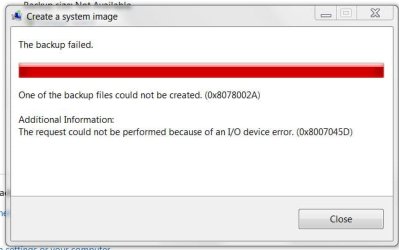
ETA: Darn! I tried to back up and the backup failed due to an I/O device error 0x8007045d I have no idea what that means or how to fix it.
backup failed.JPG
 
Last edited:

My Computer My Computer

At a glance

Windows 7 Home Premium 64 bitIntel ® Core™ i5-3317U Processor6GB DDR3 1600MHzMobile Intel ® HD Graphics with 64MB-1696MB d...
Computer type
Laptop
Computer Manufacturer/Model Number
Toshiba Satellite U845W-S410
OS
Windows 7 Home Premium 64 bit
CPU
Intel ® Core™ i5-3317U Processor
Memory
6GB DDR3 1600MHz
Graphics Card(s)
Mobile Intel ® HD Graphics with 64MB-1696MB dynamically allo
Monitor(s) Displays
All-in-one -- Generic PnP Monitor
Screen Resolution
14.4” diagonal widescreen TruBrite ® TFT display at 1792 x 7
Hard Drives
500GB (5400 RPM, Serial ATA) with dedicated 32GB mSATA SSD disk
cache
Keyboard
Logitech
Mouse
Logitech
I think the issue the issue has more to do with booting your OS from a >2.2 TB drive. Your Motherboard needs to support UEFI and the drive formatted as GPT. You also need to be running Windows 7 x64.
Data drives are different and W7 will recognize 3TB drives formatted as GPT even if you couldn't boot to an unpartitioned 3TB drive.

If it was me I would still partition the 3 TB external and use an MBR partition table. Windows is fine with GPT data drives but some third party software may have issues. I would be using free Partition Wizard for this. It is well regarded software.

Add: maybe Windows imaging itself has a problem with GPT????
Try partitioning the drive and select MBR format then repeat the imaging exercise.

The MBR partition table requires that both the size and start of a partition cannot exceed the 2 TB limit. You can partition to meet these constraints.
 

My Computer My Computer

At a glance

Windows 7x64 Home Premium SP1Intel i7 2600kG.Skill Ripjaws (DDR3-1600) 2x4GBNvidia GeForce GTS 450; Intel HD Graphics 300...
Computer type
PC/Desktop
Computer Manufacturer/Model Number
Own build
OS
Windows 7x64 Home Premium SP1
CPU
Intel i7 2600k
Motherboard
ASUS P8Z68 Deluxe
Memory
G.Skill Ripjaws (DDR3-1600) 2x4GB
Graphics Card(s)
Nvidia GeForce GTS 450; Intel HD Graphics 3000(GT2+)
Monitor(s) Displays
Dell Ultrasharp IPS panel U2311H, Samsung SyncMaster P2350
Screen Resolution
1920x1080
Hard Drives
Samsung 850 Pro SSD 256GB, Samsung SSD 840 120GB, Seagates 1TB Barracuda ST31000528AS x2
PSU
Seasonic M12II 520W
Case
Lian Li Lancool PC-K60
Cooling
Case: 1x120mm, 3x140mm CPU: Hyper 212+
Keyboard
Logitech MK520 (wireless)
Mouse
Logitech MK520
Internet Speed
6-7 Mbps
Antivirus
Norton Security Premium, Malwarebytes on 2 (MSE on 3rd PC)
Browser
FireFox
Other Info
Audio: Logitech Z523 2.1
I think the issue the issue has more to do with booting your OS from a >2.2 TB drive. Your Motherboard needs to support UEFI and the drive formatted as GPT. You also need to be running Windows 7 x64.
Data drives are different and W7 will recognize 3TB drives formatted as GPT even if you couldn't boot to an unpartitioned 3TB drive.

If it was me I would still partition the 3 TB external and use an MBR partition table. Windows is fine with GPT data drives but some third party software may have issues. I would be using free Partition Wizard for this. It is well regarded software.

Add: maybe Windows imaging itself has a problem with GPT????
Try partitioning the drive and select MBR format then repeat the imaging exercise.

The MBR partition table requires that both the size and start of a partition cannot exceed the 2 TB limit. You can partition to meet these constraints.

Thank you for your reply. Microsoft suggested running Chkdsk on the volume to be backed up and the target for the backup. The new HDD was fine. I ran it on my desktop disk and I was in the other room when I heard the computer fans turn on which usually means a BSOD. When I got over to my computer it was rebooting. I don't know what caused it. I may try running it one more time, but I'm afraid it will probably happen again. :(
 

My Computer My Computer

At a glance

Windows 7 Home Premium 64 bitIntel ® Core™ i5-3317U Processor6GB DDR3 1600MHzMobile Intel ® HD Graphics with 64MB-1696MB d...
Computer type
Laptop
Computer Manufacturer/Model Number
Toshiba Satellite U845W-S410
OS
Windows 7 Home Premium 64 bit
CPU
Intel ® Core™ i5-3317U Processor
Memory
6GB DDR3 1600MHz
Graphics Card(s)
Mobile Intel ® HD Graphics with 64MB-1696MB dynamically allo
Monitor(s) Displays
All-in-one -- Generic PnP Monitor
Screen Resolution
14.4” diagonal widescreen TruBrite ® TFT display at 1792 x 7
Hard Drives
500GB (5400 RPM, Serial ATA) with dedicated 32GB mSATA SSD disk
cache
Keyboard
Logitech
Mouse
Logitech
Your ext HDD is not going to self destruct. You can /should experiment a little before storing valuable data on it.
Assuming no critical data on the ext HDD then -
Using Partition Wizard the delete the ext HDD. Do an MBR format then partition into 2 primary 1.5 TB partitions.
Then try again.
 

My Computer My Computer

At a glance

Windows 7x64 Home Premium SP1Intel i7 2600kG.Skill Ripjaws (DDR3-1600) 2x4GBNvidia GeForce GTS 450; Intel HD Graphics 300...
Computer type
PC/Desktop
Computer Manufacturer/Model Number
Own build
OS
Windows 7x64 Home Premium SP1
CPU
Intel i7 2600k
Motherboard
ASUS P8Z68 Deluxe
Memory
G.Skill Ripjaws (DDR3-1600) 2x4GB
Graphics Card(s)
Nvidia GeForce GTS 450; Intel HD Graphics 3000(GT2+)
Monitor(s) Displays
Dell Ultrasharp IPS panel U2311H, Samsung SyncMaster P2350
Screen Resolution
1920x1080
Hard Drives
Samsung 850 Pro SSD 256GB, Samsung SSD 840 120GB, Seagates 1TB Barracuda ST31000528AS x2
PSU
Seasonic M12II 520W
Case
Lian Li Lancool PC-K60
Cooling
Case: 1x120mm, 3x140mm CPU: Hyper 212+
Keyboard
Logitech MK520 (wireless)
Mouse
Logitech MK520
Internet Speed
6-7 Mbps
Antivirus
Norton Security Premium, Malwarebytes on 2 (MSE on 3rd PC)
Browser
FireFox
Other Info
Audio: Logitech Z523 2.1
Well, Disk Check ran over night and found no problems.

I am still unable to create and save a system image to my new Seagate 3 TB external hard drive.

After Googling and reading various sites, it seems I will not be able to save any system images to my 3 TB HDD, at least not until I switch to Windows 8:

Creating a Windows Image Backup Fails on external 3TB Hard Drive « a developer's notes – a semi-technical web development BLOG

New HDs have 4k bytes per section as opposed to the traditional 512 per sector.

Microsoft won’t be supporting this new hard drive formats for Windows 7 or Windows 2008.

“SBS 2011 is based on Windows 2008 R2 Server. Backup uses VHD (Virtual hard disk) format to store the data. The 4k Sector support is not available for VHD in Windows 2008 & R2 (VHD cannot be created on 4k sector size disks). Hence backup cannot provide support for 4k disks. In Windows 8, a new VHDX format is created that supports > 2 TB data storage and 4k sector disks. Therefore only in Win8 the backup is supporting 4k sector disks. When the Win8 based SBS systems will be launched then you can expect support for 4k.”
I am currently doing a regular Windows Backup to the new drive without any System Image... and so far it seems to be okay.
 

My Computer My Computer

At a glance

Windows 7 Home Premium 64 bitIntel ® Core™ i5-3317U Processor6GB DDR3 1600MHzMobile Intel ® HD Graphics with 64MB-1696MB d...
Computer type
Laptop
Computer Manufacturer/Model Number
Toshiba Satellite U845W-S410
OS
Windows 7 Home Premium 64 bit
CPU
Intel ® Core™ i5-3317U Processor
Memory
6GB DDR3 1600MHz
Graphics Card(s)
Mobile Intel ® HD Graphics with 64MB-1696MB dynamically allo
Monitor(s) Displays
All-in-one -- Generic PnP Monitor
Screen Resolution
14.4” diagonal widescreen TruBrite ® TFT display at 1792 x 7
Hard Drives
500GB (5400 RPM, Serial ATA) with dedicated 32GB mSATA SSD disk
cache
Keyboard
Logitech
Mouse
Logitech
Pretty sure your drive emulates 512.

Seagate do a free app. for that purpose.

( Macrium is a popular freebie I don't think macrium free supports gpt or large drives )

Might be the new version of discwizard that you want for that.

make sure you get the right version - they have several
here is a direct link v14387*English

Paragon free will be ok too if you prefer something less intrusive:

http://www.paragon-software.com/home/br-free/
 
Last edited:

My Computers My Computers

  • At a glance

    7 X64i5 84002x8gb 3200mhz
    Computer type
    PC/Desktop
    OS
    7 X64
    CPU
    i5 8400
    Motherboard
    gigabyte b365m ds3h
    Memory
    2x8gb 3200mhz
    Hard Drives
    various
    PSU
    pure power 11 400w cm
    Case
    Coolermaster
    Cooling
    cryorig m9i
  • At a glance

    7x64g54008gb ddr4 2400
    Computer type
    PC/Desktop
    OS
    7x64
    CPU
    g5400
    Motherboard
    ga b365m ds3h
    Memory
    8gb ddr4 2400
    PSU
    xfx pro 450w
I'd be interested for my own education: Can this HDD be formatted as MBR with 2 partitions? If so will it support Windows or free Macrium imaging?
 

My Computer My Computer

At a glance

Windows 7x64 Home Premium SP1Intel i7 2600kG.Skill Ripjaws (DDR3-1600) 2x4GBNvidia GeForce GTS 450; Intel HD Graphics 300...
Computer type
PC/Desktop
Computer Manufacturer/Model Number
Own build
OS
Windows 7x64 Home Premium SP1
CPU
Intel i7 2600k
Motherboard
ASUS P8Z68 Deluxe
Memory
G.Skill Ripjaws (DDR3-1600) 2x4GB
Graphics Card(s)
Nvidia GeForce GTS 450; Intel HD Graphics 3000(GT2+)
Monitor(s) Displays
Dell Ultrasharp IPS panel U2311H, Samsung SyncMaster P2350
Screen Resolution
1920x1080
Hard Drives
Samsung 850 Pro SSD 256GB, Samsung SSD 840 120GB, Seagates 1TB Barracuda ST31000528AS x2
PSU
Seasonic M12II 520W
Case
Lian Li Lancool PC-K60
Cooling
Case: 1x120mm, 3x140mm CPU: Hyper 212+
Keyboard
Logitech MK520 (wireless)
Mouse
Logitech MK520
Internet Speed
6-7 Mbps
Antivirus
Norton Security Premium, Malwarebytes on 2 (MSE on 3rd PC)
Browser
FireFox
Other Info
Audio: Logitech Z523 2.1
Can this HDD be formatted as MBR with 2 partitions?

Only up to 2.2 tb. Bit of a waste.

It is possble to trick Windows into treating it as 2 separate hd's.


Not sure what the problem is with windows sys image.

Macrium should work ok as long as it is not gpt.

It is abit of a faff.

OP is probably better leaving it as it is and using a different imaging solution - the seagate one will be fine - but it only works if it sees at least one seagate drive.
 

My Computers My Computers

  • At a glance

    7 X64i5 84002x8gb 3200mhz
    Computer type
    PC/Desktop
    OS
    7 X64
    CPU
    i5 8400
    Motherboard
    gigabyte b365m ds3h
    Memory
    2x8gb 3200mhz
    Hard Drives
    various
    PSU
    pure power 11 400w cm
    Case
    Coolermaster
    Cooling
    cryorig m9i
  • At a glance

    7x64g54008gb ddr4 2400
    Computer type
    PC/Desktop
    OS
    7x64
    CPU
    g5400
    Motherboard
    ga b365m ds3h
    Memory
    8gb ddr4 2400
    PSU
    xfx pro 450w
Can this HDD be formatted as MBR with 2 partitions?

Only up to 2.2 tb. Bit of a waste.
I thought the MBR partition table had the 2.2TB constraint on the size of a partition and the start of a partition. In which case 2x 1.5TB partitions should be fine. Have I got something wrong here?
I think you may need Partition Wizard to do it. Unfortunately I don't have a 3TB HDD to try it out.
 

My Computer My Computer

At a glance

Windows 7x64 Home Premium SP1Intel i7 2600kG.Skill Ripjaws (DDR3-1600) 2x4GBNvidia GeForce GTS 450; Intel HD Graphics 300...
Computer type
PC/Desktop
Computer Manufacturer/Model Number
Own build
OS
Windows 7x64 Home Premium SP1
CPU
Intel i7 2600k
Motherboard
ASUS P8Z68 Deluxe
Memory
G.Skill Ripjaws (DDR3-1600) 2x4GB
Graphics Card(s)
Nvidia GeForce GTS 450; Intel HD Graphics 3000(GT2+)
Monitor(s) Displays
Dell Ultrasharp IPS panel U2311H, Samsung SyncMaster P2350
Screen Resolution
1920x1080
Hard Drives
Samsung 850 Pro SSD 256GB, Samsung SSD 840 120GB, Seagates 1TB Barracuda ST31000528AS x2
PSU
Seasonic M12II 520W
Case
Lian Li Lancool PC-K60
Cooling
Case: 1x120mm, 3x140mm CPU: Hyper 212+
Keyboard
Logitech MK520 (wireless)
Mouse
Logitech MK520
Internet Speed
6-7 Mbps
Antivirus
Norton Security Premium, Malwarebytes on 2 (MSE on 3rd PC)
Browser
FireFox
Other Info
Audio: Logitech Z523 2.1
2.2tb for the disk.
 

My Computers My Computers

  • At a glance

    7 X64i5 84002x8gb 3200mhz
    Computer type
    PC/Desktop
    OS
    7 X64
    CPU
    i5 8400
    Motherboard
    gigabyte b365m ds3h
    Memory
    2x8gb 3200mhz
    Hard Drives
    various
    PSU
    pure power 11 400w cm
    Case
    Coolermaster
    Cooling
    cryorig m9i
  • At a glance

    7x64g54008gb ddr4 2400
    Computer type
    PC/Desktop
    OS
    7x64
    CPU
    g5400
    Motherboard
    ga b365m ds3h
    Memory
    8gb ddr4 2400
    PSU
    xfx pro 450w
2.2tb for the disk.
I can't dispute what you say but the MBR partition table specs don't seem to support this. Also, I'm sure I've seen others elsewhere claiming they have done this.
I'll go away and do more homework.
 

My Computer My Computer

At a glance

Windows 7x64 Home Premium SP1Intel i7 2600kG.Skill Ripjaws (DDR3-1600) 2x4GBNvidia GeForce GTS 450; Intel HD Graphics 300...
Computer type
PC/Desktop
Computer Manufacturer/Model Number
Own build
OS
Windows 7x64 Home Premium SP1
CPU
Intel i7 2600k
Motherboard
ASUS P8Z68 Deluxe
Memory
G.Skill Ripjaws (DDR3-1600) 2x4GB
Graphics Card(s)
Nvidia GeForce GTS 450; Intel HD Graphics 3000(GT2+)
Monitor(s) Displays
Dell Ultrasharp IPS panel U2311H, Samsung SyncMaster P2350
Screen Resolution
1920x1080
Hard Drives
Samsung 850 Pro SSD 256GB, Samsung SSD 840 120GB, Seagates 1TB Barracuda ST31000528AS x2
PSU
Seasonic M12II 520W
Case
Lian Li Lancool PC-K60
Cooling
Case: 1x120mm, 3x140mm CPU: Hyper 212+
Keyboard
Logitech MK520 (wireless)
Mouse
Logitech MK520
Internet Speed
6-7 Mbps
Antivirus
Norton Security Premium, Malwarebytes on 2 (MSE on 3rd PC)
Browser
FireFox
Other Info
Audio: Logitech Z523 2.1
You can do that thing of using 2mbrs but I don't like the look of adding extra complication.
 

My Computers My Computers

  • At a glance

    7 X64i5 84002x8gb 3200mhz
    Computer type
    PC/Desktop
    OS
    7 X64
    CPU
    i5 8400
    Motherboard
    gigabyte b365m ds3h
    Memory
    2x8gb 3200mhz
    Hard Drives
    various
    PSU
    pure power 11 400w cm
    Case
    Coolermaster
    Cooling
    cryorig m9i
  • At a glance

    7x64g54008gb ddr4 2400
    Computer type
    PC/Desktop
    OS
    7x64
    CPU
    g5400
    Motherboard
    ga b365m ds3h
    Memory
    8gb ddr4 2400
    PSU
    xfx pro 450w
You can do that thing of using 2mbrs but I don't like the look of adding extra complication.
Yes that's what this also states
3TB Hard Disk Utilities « The Data Cloud

I was going on this
"Sector indices have always begun with a 1, not a zero, and due to an early error in MS-DOS, the heads are generally limited to 255[citation needed] instead of 256. Both the partition length and partition start address are sector values stored as 32-bit quantities. The sector size is fixed at 512 (29) bytes, which implies that either the maximum size of a partition or the maximum start address (both in bytes) cannot exceed 2 TiB−512 bytes (2,199,023,255,040 bytes or 4,294,967,295 (232−1) sectors × 512 (29) bytes per sector). Alleviating this capacity limitation was one of the prime motivations for the development of the GUID partition table (GPT)."
from
http://en.wikipedia.org/wiki/Master_boot_record
 

My Computer My Computer

At a glance

Windows 7x64 Home Premium SP1Intel i7 2600kG.Skill Ripjaws (DDR3-1600) 2x4GBNvidia GeForce GTS 450; Intel HD Graphics 300...
Computer type
PC/Desktop
Computer Manufacturer/Model Number
Own build
OS
Windows 7x64 Home Premium SP1
CPU
Intel i7 2600k
Motherboard
ASUS P8Z68 Deluxe
Memory
G.Skill Ripjaws (DDR3-1600) 2x4GB
Graphics Card(s)
Nvidia GeForce GTS 450; Intel HD Graphics 3000(GT2+)
Monitor(s) Displays
Dell Ultrasharp IPS panel U2311H, Samsung SyncMaster P2350
Screen Resolution
1920x1080
Hard Drives
Samsung 850 Pro SSD 256GB, Samsung SSD 840 120GB, Seagates 1TB Barracuda ST31000528AS x2
PSU
Seasonic M12II 520W
Case
Lian Li Lancool PC-K60
Cooling
Case: 1x120mm, 3x140mm CPU: Hyper 212+
Keyboard
Logitech MK520 (wireless)
Mouse
Logitech MK520
Internet Speed
6-7 Mbps
Antivirus
Norton Security Premium, Malwarebytes on 2 (MSE on 3rd PC)
Browser
FireFox
Other Info
Audio: Logitech Z523 2.1
Yes, it is confusing.

It is because you can have one partition taking up the whole 2tb drive.

Hence the max partition size.
 

My Computers My Computers

  • At a glance

    7 X64i5 84002x8gb 3200mhz
    Computer type
    PC/Desktop
    OS
    7 X64
    CPU
    i5 8400
    Motherboard
    gigabyte b365m ds3h
    Memory
    2x8gb 3200mhz
    Hard Drives
    various
    PSU
    pure power 11 400w cm
    Case
    Coolermaster
    Cooling
    cryorig m9i
  • At a glance

    7x64g54008gb ddr4 2400
    Computer type
    PC/Desktop
    OS
    7x64
    CPU
    g5400
    Motherboard
    ga b365m ds3h
    Memory
    8gb ddr4 2400
    PSU
    xfx pro 450w
Yes, it is confusing.

It is because you can have one partition taking up the whole 2tb drive.

Hence the max partition size.
I'm only persisting because I'm not happy until I understand the constraint.
I don't understand your last explanation. Firstly we have a 3TB drive and 2 partitions of 1.5TB meet the partition size and start constraints referred to in my reference.

PS: I don't care if I'm wrong.
 

My Computer My Computer

At a glance

Windows 7x64 Home Premium SP1Intel i7 2600kG.Skill Ripjaws (DDR3-1600) 2x4GBNvidia GeForce GTS 450; Intel HD Graphics 300...
Computer type
PC/Desktop
Computer Manufacturer/Model Number
Own build
OS
Windows 7x64 Home Premium SP1
CPU
Intel i7 2600k
Motherboard
ASUS P8Z68 Deluxe
Memory
G.Skill Ripjaws (DDR3-1600) 2x4GB
Graphics Card(s)
Nvidia GeForce GTS 450; Intel HD Graphics 3000(GT2+)
Monitor(s) Displays
Dell Ultrasharp IPS panel U2311H, Samsung SyncMaster P2350
Screen Resolution
1920x1080
Hard Drives
Samsung 850 Pro SSD 256GB, Samsung SSD 840 120GB, Seagates 1TB Barracuda ST31000528AS x2
PSU
Seasonic M12II 520W
Case
Lian Li Lancool PC-K60
Cooling
Case: 1x120mm, 3x140mm CPU: Hyper 212+
Keyboard
Logitech MK520 (wireless)
Mouse
Logitech MK520
Internet Speed
6-7 Mbps
Antivirus
Norton Security Premium, Malwarebytes on 2 (MSE on 3rd PC)
Browser
FireFox
Other Info
Audio: Logitech Z523 2.1
Back
Top