PC Stuttering mouse/audio/video lag

remuze

New member
Local time
11:39 PM
Messages
18
Since this morning when I turned on my pc I have been experiencing some strange issues and wondered if anyone had any advice or suggestions.

When moving the mouse around in a figure of eight with nothing open, every few seconds it skips for about 1/10th second. This is a brand new issue, but I was also having trouble with my wireless internet speed last night, for which I use a usb netgear wna1100 stick.

It seems my pc is dieing in some way but I'm unsure how to identify whats causing the problem as I don't have lots of spare bits to put in.

Things I've tried so far:
Checked mobo + graphics card temps, both ~40-50C idle.
Malware Bytes found nothing
Full AVG scan found nothing
SeaTools hard drive scan found nothing

This leaves me to suspect a hardware fault somewhere else.

My system specs:
Windows 7 64-Bit Home Edition
Sapphire Radeon 4870 2GB
AMD Athlon 64 X2 6400+
Gigabyte M57SLI-S4
Microsoft Sidewinder Mouse

The stuttering is fairly random, but always present and it never goes for longer than about 10 seconds without doing it.

Any ideas? Dieing motherboard or HD? How can i tell without replacing them?
 

My Computer My Computer

OS
Windows 7 x64
CPU
Athlon 64 X2 6400+ Black Edition
Motherboard
Gigabyte GA-M57-SLI
Memory
2 x 1GB Crucial Ballistix PC-6400 DDR2
Graphics Card(s)
Sapphire Vapor-X 4870 1GB
Monitor(s) Displays
Samsung SyncMaster 225MW
PSU
OCZ 600W StealthXStream
Case
Antec 900

My Computer My Computer

Computer Manufacturer/Model Number
DELL SXPS 1640
OS
Windows 7 x64 Professional SP1
CPU
Intel C2D T9550 2.66 GHz @ 2.793 GHz (Thanks ThrottleStop!!)
Motherboard
Intel PM45
Memory
8 GB DDR3
Graphics Card(s)
ATI MOBILITY RADEON 4670
Sound Card
CREATIVE XFI AUDIO NOTEBOOK
Monitor(s) Displays
16.1 WLED
Screen Resolution
1920x1080
Hard Drives
Seagate ST9500420AS 500GB (465GiBi) 7200 RPM Drive

External Drives:-
2 TB WD Essentials x 3
1 TB WD Mybook Gen 1
1 TB WD Mybook Gen 2
1 TB Seagate
1 TB Seagate
320 GB WD Scorpio Black (enclosed)
PSU
90W Dell Power Brick
Case
Dell Chassis
Cooling
Coolermaster Cooling Pad
Keyboard
Built-in backlighted Keyboard
Mouse
Logitech Wireless Mini Mouse
Internet Speed
4/0.5
Thanks for your quick reply! Obviously something is misbehaving, which is strange as I haven't installed anything new recently so it could have been an automatic windows update or something? The program said to try turning things on and off so I might give that a pop? Bonus points to you for shot in the dark :)


My Computer My Computer

OS
Windows 7 x64
CPU
Athlon 64 X2 6400+ Black Edition
Motherboard
Gigabyte GA-M57-SLI
Memory
2 x 1GB Crucial Ballistix PC-6400 DDR2
Graphics Card(s)
Sapphire Vapor-X 4870 1GB
Monitor(s) Displays
Samsung SyncMaster 225MW
PSU
OCZ 600W StealthXStream
Case
Antec 900
Thanks for your quick reply! Obviously something is misbehaving, which is strange as I haven't installed anything new recently so it could have been an automatic windows update or something? The program said to try turning things on and off so I might give that a pop? Bonus points to you for shot in the dark :)


Hold on a tick remuze, I've got an incoming post with everything you need to do next... your patience is appreciated...
 

My Computer My Computer

Computer Manufacturer/Model Number
DELL SXPS 1640
OS
Windows 7 x64 Professional SP1
CPU
Intel C2D T9550 2.66 GHz @ 2.793 GHz (Thanks ThrottleStop!!)
Motherboard
Intel PM45
Memory
8 GB DDR3
Graphics Card(s)
ATI MOBILITY RADEON 4670
Sound Card
CREATIVE XFI AUDIO NOTEBOOK
Monitor(s) Displays
16.1 WLED
Screen Resolution
1920x1080
Hard Drives
Seagate ST9500420AS 500GB (465GiBi) 7200 RPM Drive

External Drives:-
2 TB WD Essentials x 3
1 TB WD Mybook Gen 1
1 TB WD Mybook Gen 2
1 TB Seagate
1 TB Seagate
320 GB WD Scorpio Black (enclosed)
PSU
90W Dell Power Brick
Case
Dell Chassis
Cooling
Coolermaster Cooling Pad
Keyboard
Built-in backlighted Keyboard
Mouse
Logitech Wireless Mini Mouse
Internet Speed
4/0.5
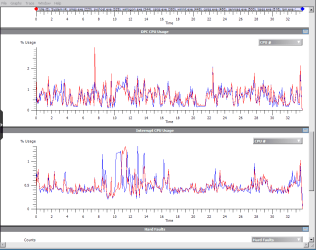
Hmm.. that is one disturbing looking graph full of red spikes!

A normal, healthy system would only ever have green spikes...

It's time for us to get up close and personal with what the exact problem might be using this nifty tool from Microsoft called the Windows Performance Toolkit:-

View attachment 221644 View attachment 221645 View attachment 221646

Download the attachments, unrar them using WinRAR/7zip/or your preferred file extractor, and run the installer.

When done, please prepare your system for the diagnosis by Disabling Paging Executive (needed for xperf to run with the stackwalk profile)

View attachment DisablePagingExecutive.reg

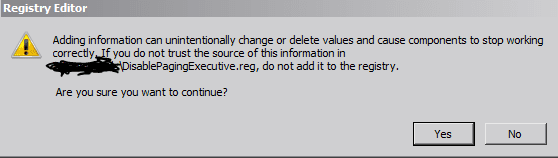
Double click the downloaded .reg file and click yes to allow it change that entry in your registry.


Capture1.PNG


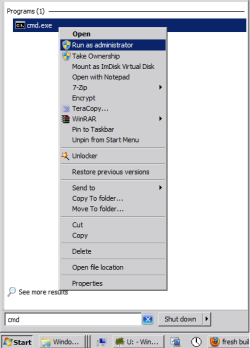
Next, open a command prompt with admin rights (type in cmd at your search bar, right click on cmd.exe and run as administrator)


start.png


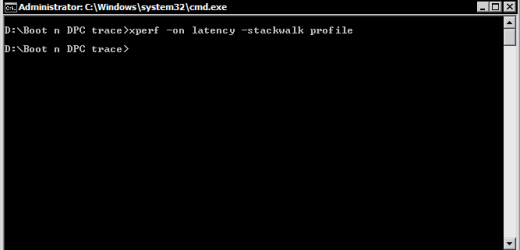
Go to C:\temp (cd\temp) (make the folder if you do not have it) and run the following commands:

Code:
[I]xperf -on latency -stackwalk profile [/I]
(I use a different folder for mine but it doesn't matter where you run it from)

Capture2.PNG

Now wait for some time (2 - 3 minutes) while the high DPC and Interrupt usage occurs.

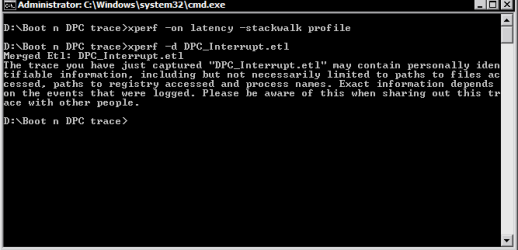
To stop the trace run the following command:

Code:
[I]xperf -d DPC_Interrupt.etl [/I]
Capture3.PNG

This closes the trace and writes the result to the file DPC_Interrupt.etl.

In the next step, make a double click the etl file (which would be in the C:\temp folder) to run the Viewer.

Now wait until the 2 passes are over.

Here's what the graphs looks like for example on my system (scroll down to see DPC CPU Utilization and Interrupt CPU Utilization)


Capture4.PNG


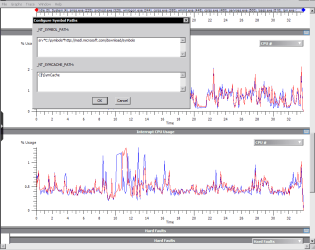
Go to "Trace"(in the menu bar at the top) ->"Configure Symbol Paths" and type in the following:

Code:
[I]srv*C:\symbols*[URL]http://msdl.microsoft.com/download/symbols[/URL] [/I]
Click OK, to close the dialog.


Capture5.PNG


Now go to the graphs "DPC CPU Usage" or "Interrupt CPU Usage" (depending where your high CPU usage occurs) and select the interval, make a right click and select "Load Symbols" and next, click summary table.

Now, you will have to accept the license agreement to download the public debugging symbols.

(The PDBs can be massive, and it may take a while to download depending on your Internet connection)


Here you'll see summary of the calls..

Convert the etl files to uploadable txt files by using this command from the same location (C:\temp) where the DPC_Interrupt.etl file is stored.

Run it, and upload the txt file in your next reply please...

Code:
[I]xperf -I DPC_Interrupt.etl -a dpcisr > dpc.txt[/I]
Thanks for your patience!
 

My Computer My Computer

Computer Manufacturer/Model Number
DELL SXPS 1640
OS
Windows 7 x64 Professional SP1
CPU
Intel C2D T9550 2.66 GHz @ 2.793 GHz (Thanks ThrottleStop!!)
Motherboard
Intel PM45
Memory
8 GB DDR3
Graphics Card(s)
ATI MOBILITY RADEON 4670
Sound Card
CREATIVE XFI AUDIO NOTEBOOK
Monitor(s) Displays
16.1 WLED
Screen Resolution
1920x1080
Hard Drives
Seagate ST9500420AS 500GB (465GiBi) 7200 RPM Drive

External Drives:-
2 TB WD Essentials x 3
1 TB WD Mybook Gen 1
1 TB WD Mybook Gen 2
1 TB Seagate
1 TB Seagate
320 GB WD Scorpio Black (enclosed)
PSU
90W Dell Power Brick
Case
Dell Chassis
Cooling
Coolermaster Cooling Pad
Keyboard
Built-in backlighted Keyboard
Mouse
Logitech Wireless Mini Mouse
Internet Speed
4/0.5
The second xperf command take about 1 minute to finish executing and came back with this, the file it created was then empty (0KB).


Also I am on 64-bit windows and the .reg file you gave me said its type was 'Regedit file' and it wasnt assigned to regedit, i manually opened it with SysWOW64\regedit.exe, was this correct? It then asked me if I wanted to add it to the registry, but other posts suggest there may be a difference between 32-bit and 64-bit registrys?
 

My Computer My Computer

OS
Windows 7 x64
CPU
Athlon 64 X2 6400+ Black Edition
Motherboard
Gigabyte GA-M57-SLI
Memory
2 x 1GB Crucial Ballistix PC-6400 DDR2
Graphics Card(s)
Sapphire Vapor-X 4870 1GB
Monitor(s) Displays
Samsung SyncMaster 225MW
PSU
OCZ 600W StealthXStream
Case
Antec 900
The regedit file should be fine, it was built for 64bit registrys.. You were meant to import the file by double clicking on it to allow the entries to be added to the registry.

Hmm that's a very interesting error, which means that there's too many DPC Interrupts happening on your system that even the logging program could not deal with it, or you don't have enough space/RAM for the logger/tracer to cope with the amount of data.

How much free space do you have on C:?

Do you have another hard disk that's empty to run the commands on again?
(D: ?)

You could try to run the 1st xperf command again on C:\temp

xperf -on latency -stackwalk profile

but for a much shorter time (10-15 seconds), and then quickly type in the second xperf command

xperf -d DPC_Interrupt.etl

to stop the trace after that period of time...
 

My Computer My Computer

Computer Manufacturer/Model Number
DELL SXPS 1640
OS
Windows 7 x64 Professional SP1
CPU
Intel C2D T9550 2.66 GHz @ 2.793 GHz (Thanks ThrottleStop!!)
Motherboard
Intel PM45
Memory
8 GB DDR3
Graphics Card(s)
ATI MOBILITY RADEON 4670
Sound Card
CREATIVE XFI AUDIO NOTEBOOK
Monitor(s) Displays
16.1 WLED
Screen Resolution
1920x1080
Hard Drives
Seagate ST9500420AS 500GB (465GiBi) 7200 RPM Drive

External Drives:-
2 TB WD Essentials x 3
1 TB WD Mybook Gen 1
1 TB WD Mybook Gen 2
1 TB Seagate
1 TB Seagate
320 GB WD Scorpio Black (enclosed)
PSU
90W Dell Power Brick
Case
Dell Chassis
Cooling
Coolermaster Cooling Pad
Keyboard
Built-in backlighted Keyboard
Mouse
Logitech Wireless Mini Mouse
Internet Speed
4/0.5
If you want to be sure that the entry from that DisablePagingExecutive registry file applied properly to your Registry head to the registry itself and check the entry as shown in this following screenshot:-

Capture.PNG
 

My Computer My Computer

Computer Manufacturer/Model Number
DELL SXPS 1640
OS
Windows 7 x64 Professional SP1
CPU
Intel C2D T9550 2.66 GHz @ 2.793 GHz (Thanks ThrottleStop!!)
Motherboard
Intel PM45
Memory
8 GB DDR3
Graphics Card(s)
ATI MOBILITY RADEON 4670
Sound Card
CREATIVE XFI AUDIO NOTEBOOK
Monitor(s) Displays
16.1 WLED
Screen Resolution
1920x1080
Hard Drives
Seagate ST9500420AS 500GB (465GiBi) 7200 RPM Drive

External Drives:-
2 TB WD Essentials x 3
1 TB WD Mybook Gen 1
1 TB WD Mybook Gen 2
1 TB Seagate
1 TB Seagate
320 GB WD Scorpio Black (enclosed)
PSU
90W Dell Power Brick
Case
Dell Chassis
Cooling
Coolermaster Cooling Pad
Keyboard
Built-in backlighted Keyboard
Mouse
Logitech Wireless Mini Mouse
Internet Speed
4/0.5
I have about 2gigs free on my system partition out of 40GB and the rest of my 500GB HD is used for storage and games and i have atleast 300GB free, so I tried running it on the D drive instead.

It said the same thing about events being lost but did manage to capture something, the data file is about 27MB, I am currently downloading the symbols file (hopefully as the program has turned unresponsive :P) Will upload the txt file in the next reply! Thanks for bearing with me!
 

My Computer My Computer

OS
Windows 7 x64
CPU
Athlon 64 X2 6400+ Black Edition
Motherboard
Gigabyte GA-M57-SLI
Memory
2 x 1GB Crucial Ballistix PC-6400 DDR2
Graphics Card(s)
Sapphire Vapor-X 4870 1GB
Monitor(s) Displays
Samsung SyncMaster 225MW
PSU
OCZ 600W StealthXStream
Case
Antec 900
Thanks for replying, and it's great to know some thing has been caught this time :)

Did you check out my follow up post regarding the registry entry?
 

My Computer My Computer

Computer Manufacturer/Model Number
DELL SXPS 1640
OS
Windows 7 x64 Professional SP1
CPU
Intel C2D T9550 2.66 GHz @ 2.793 GHz (Thanks ThrottleStop!!)
Motherboard
Intel PM45
Memory
8 GB DDR3
Graphics Card(s)
ATI MOBILITY RADEON 4670
Sound Card
CREATIVE XFI AUDIO NOTEBOOK
Monitor(s) Displays
16.1 WLED
Screen Resolution
1920x1080
Hard Drives
Seagate ST9500420AS 500GB (465GiBi) 7200 RPM Drive

External Drives:-
2 TB WD Essentials x 3
1 TB WD Mybook Gen 1
1 TB WD Mybook Gen 2
1 TB Seagate
1 TB Seagate
320 GB WD Scorpio Black (enclosed)
PSU
90W Dell Power Brick
Case
Dell Chassis
Cooling
Coolermaster Cooling Pad
Keyboard
Built-in backlighted Keyboard
Mouse
Logitech Wireless Mini Mouse
Internet Speed
4/0.5
Yeah i checked the registry and that was indeed set to 1 so thats all good. I can't convert the file into a txt file now, it just creates a 0KB empty txt file, something strange is going on? I can take a screenshot of the entire summary page instead?

The error I receive is xperf: warning: applying restriction of access for trace processing.

But it thinks it has executed properly?
 

My Computer My Computer

OS
Windows 7 x64
CPU
Athlon 64 X2 6400+ Black Edition
Motherboard
Gigabyte GA-M57-SLI
Memory
2 x 1GB Crucial Ballistix PC-6400 DDR2
Graphics Card(s)
Sapphire Vapor-X 4870 1GB
Monitor(s) Displays
Samsung SyncMaster 225MW
PSU
OCZ 600W StealthXStream
Case
Antec 900
Yeah i checked the registry and that was indeed set to 1 so thats all good. I can't convert the file into a txt file now, it just creates a 0KB empty txt file, something strange is going on? I can take a screenshot of the entire summary page instead?

The error I receive is xperf: warning: applying restriction of access for trace processing.

But it thinks it has executed properly?

You need to run that last xperf command in an elevated command prompt also :)

You can also take multiple screenshots of the summary page also if you wish.
 

My Computer My Computer

Computer Manufacturer/Model Number
DELL SXPS 1640
OS
Windows 7 x64 Professional SP1
CPU
Intel C2D T9550 2.66 GHz @ 2.793 GHz (Thanks ThrottleStop!!)
Motherboard
Intel PM45
Memory
8 GB DDR3
Graphics Card(s)
ATI MOBILITY RADEON 4670
Sound Card
CREATIVE XFI AUDIO NOTEBOOK
Monitor(s) Displays
16.1 WLED
Screen Resolution
1920x1080
Hard Drives
Seagate ST9500420AS 500GB (465GiBi) 7200 RPM Drive

External Drives:-
2 TB WD Essentials x 3
1 TB WD Mybook Gen 1
1 TB WD Mybook Gen 2
1 TB Seagate
1 TB Seagate
320 GB WD Scorpio Black (enclosed)
PSU
90W Dell Power Brick
Case
Dell Chassis
Cooling
Coolermaster Cooling Pad
Keyboard
Built-in backlighted Keyboard
Mouse
Logitech Wireless Mini Mouse
Internet Speed
4/0.5
Yep it says administrator top left and I opened another window just to make sure, it just isn't happy to do it :(

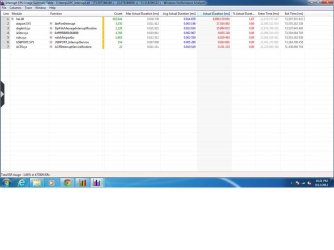
Heres a screenshot of the summary page, it fits into 1 nicely.


My Computer My Computer

OS
Windows 7 x64
CPU
Athlon 64 X2 6400+ Black Edition
Motherboard
Gigabyte GA-M57-SLI
Memory
2 x 1GB Crucial Ballistix PC-6400 DDR2
Graphics Card(s)
Sapphire Vapor-X 4870 1GB
Monitor(s) Displays
Samsung SyncMaster 225MW
PSU
OCZ 600W StealthXStream
Case
Antec 900
The biggest offender on that chart is nvstor.sys.

This is a sys file related to the functionality of the NVIDIA® nForce 570-SLIc chipset that is on your motherboard. (ergo the heart of your computer)

There are two ways we can deal with this problem:-

One, would be to procure updated drivers for the motherboard, and update the chipset drivers to see whether the issue would resolve itself.

Two, try moving your boot drive to the 1st SATA port on your board (If it isn't already there)

(and three, which is the one everybody dreads to hear... replace the motherboard as it may be going faulty...you did mention is only started happening very very recently...with no added devices or driver changes to your system right?)

To validate my hypothesis for option 3, try rebooting your system in Safe Mode and see whether the issue still occurs... if it does.. I'm sorry but it's the most viable option.
 

My Computer My Computer

Computer Manufacturer/Model Number
DELL SXPS 1640
OS
Windows 7 x64 Professional SP1
CPU
Intel C2D T9550 2.66 GHz @ 2.793 GHz (Thanks ThrottleStop!!)
Motherboard
Intel PM45
Memory
8 GB DDR3
Graphics Card(s)
ATI MOBILITY RADEON 4670
Sound Card
CREATIVE XFI AUDIO NOTEBOOK
Monitor(s) Displays
16.1 WLED
Screen Resolution
1920x1080
Hard Drives
Seagate ST9500420AS 500GB (465GiBi) 7200 RPM Drive

External Drives:-
2 TB WD Essentials x 3
1 TB WD Mybook Gen 1
1 TB WD Mybook Gen 2
1 TB Seagate
1 TB Seagate
320 GB WD Scorpio Black (enclosed)
PSU
90W Dell Power Brick
Case
Dell Chassis
Cooling
Coolermaster Cooling Pad
Keyboard
Built-in backlighted Keyboard
Mouse
Logitech Wireless Mini Mouse
Internet Speed
4/0.5
Its fixed :D Only trouble is, I am too lazy to open my pc up twice, so it could either be the amount of dust I removed from around the HD and front intake fan, the fact I swapped it from SATA 1 to SATA 2 or just disconnecting and reconnecting the cables. Ran a quick check using that xperf thing you told me about and DPC only reached 4% max during 1 minute, with the highest reading coming from USBPORT and nvstor about halfway down the list. Could have been overheating, as I only read GPU and CPU temps which both have their own fan. Thanks a bunch for helping me track it down to the HD, I'm one happy guy now +++rep.
 

My Computer My Computer

OS
Windows 7 x64
CPU
Athlon 64 X2 6400+ Black Edition
Motherboard
Gigabyte GA-M57-SLI
Memory
2 x 1GB Crucial Ballistix PC-6400 DDR2
Graphics Card(s)
Sapphire Vapor-X 4870 1GB
Monitor(s) Displays
Samsung SyncMaster 225MW
PSU
OCZ 600W StealthXStream
Case
Antec 900
Its fixed :D Only trouble is, I am too lazy to open my pc up twice, so it could either be the amount of dust I removed from around the HD and front intake fan, the fact I swapped it from SATA 1 to SATA 2 or just disconnecting and reconnecting the cables. Ran a quick check using that xperf thing you told me about and DPC only reached 4% max during 1 minute, with the highest reading coming from USBPORT and nvstor about halfway down the list. Could have been overheating, as I only read GPU and CPU temps which both have their own fan. Thanks a bunch for helping me track it down to the HD, I'm one happy guy now +++rep.

Wow.. so a simple SATA port swap settled it?
Thats great news! :thumbsup:

Thanks for the feedback, I was wondering where you've been!
 

My Computer My Computer

Computer Manufacturer/Model Number
DELL SXPS 1640
OS
Windows 7 x64 Professional SP1
CPU
Intel C2D T9550 2.66 GHz @ 2.793 GHz (Thanks ThrottleStop!!)
Motherboard
Intel PM45
Memory
8 GB DDR3
Graphics Card(s)
ATI MOBILITY RADEON 4670
Sound Card
CREATIVE XFI AUDIO NOTEBOOK
Monitor(s) Displays
16.1 WLED
Screen Resolution
1920x1080
Hard Drives
Seagate ST9500420AS 500GB (465GiBi) 7200 RPM Drive

External Drives:-
2 TB WD Essentials x 3
1 TB WD Mybook Gen 1
1 TB WD Mybook Gen 2
1 TB Seagate
1 TB Seagate
320 GB WD Scorpio Black (enclosed)
PSU
90W Dell Power Brick
Case
Dell Chassis
Cooling
Coolermaster Cooling Pad
Keyboard
Built-in backlighted Keyboard
Mouse
Logitech Wireless Mini Mouse
Internet Speed
4/0.5
im having the same problem here is the report Any help would be appreciated
 

Attachments

  • log.jpg
    log.jpg
    52 KB · Views: 70

My Computer My Computer

OS
windows 7 64 bit home premium
CPU
i7 2600k
Motherboard
gigabyte z68-ud5
Memory
8 gb gskill 1600 mhz
Graphics Card(s)
gigabyte amd radeon hd 6850
Monitor(s) Displays
2X hp 2011 20" displays
Screen Resolution
3200 X 900
Hard Drives
boot drive - Mushkin Chronos enhanced 120 gb
Storage drive - WD Caviar green 1.5 tb
PSU
corsair ax 650 watt
Case
corsair obsidian 650 d
Cooling
cooler master hyper 120+ Dual fans
Keyboard
Corsair k90
Mouse
Logitech marathon mouse
Internet Speed
6 mb/s
Back
Top