- Local time
- 4:52 PM
- Messages
- 50,634
Check the logs for repeat errors, use the System Resources to check for solutions to problems, establish a Clean boot and these other Troubleshooting Steps for Windows 7

# ************************************************************
# Clear the EVENT LOGS
#
# **********************INSTRUCTIONS**************************
# STEP 1 *****************************************************
# RUN PowerShell as ADMINISTRATOR
# START ORB | type POWERSHELL | CTRL+SHIFT+ENTER key combo | ALT+Y keycombo
# ************************************************************
# STEP 2 *****************************************************
# COPY, starting with the first line that does NOT start with a #
# COPY, using CTRL+C, every line thru both EXIT statements
# PASTE into Powershell
# You PASTE by Right-clicking at the PowerShell Prompt
#  (Ctrl+V does not work)
# ************************************************************

Get-WinEvent -ListLog * -Force | % { $_.logname;Wevtutil.exe cl $_.logname };Wevtutil.exe cl system

EXIT
EXIT

# ***************** NOTE - POWERSHELL VERSION*****************
# if you receive this error msg:
#  Get-WinEvent: The system can not find the path specified
# you need to update your PowerShell
# you must be using Powershell 2.0 or later.
#
# To determine your Powershell version:
#   Run PowerShell
#   enter $host.version
#   you should see at least:
# Major  Minor  Build  Revision
# -----  -----  -----  --------
# 2      0      -1     -1
#
# If you do not see the above, update your Vista/Win 7.
# ************************************************************
# *************** NOTE - EXECUTION POLICY*********************
# If you haven't set the execution policy, you may need to:
#   Run PowerShell
#   enter Set-ExecutionPolicy -executionpolicy remotesigned
#
# ************************************************************# ************************************************************
# Places CRITICALandERROREVENTS.TXT on your DESKTOP
#
# Displays 100 most recent critical and error events in a Grid View
# Writes 100 most recent critical and error events to CriticalAndErrorEvents.txt
#
# Change the $MAX value for more or fewer events
# Change the $Lwidth value to 254 for example for longer lines
# **********************************************************
# **********************INSTRUCTIONS**************************
# STEP 1 *****************************************************
# RUN PowerShell as administrator
# START ORB | type POWERSHELL | CTRL+SHIFT+ENTER key combo | ALT+Y keycombo
# ************************************************************
# STEP 2 *****************************************************
# COPY, using CTRL+C, every line down thru both EXIT statements
# PASTE into Powershell == Right-Click at the PowerShell Prompt
# (Ctrl+V does not work)
# Start copying with first line without a # at start of the line
# Note: Actually, you can paste the entire file if you rather
# Lines starting with a # are ignored by PowerShell
# ************************************************************
# Copy thru the two EXIT statements
# Paste, using Right-Click into Powershell
# Ctrl + V will NOT work
# Start Copying with Next Line
$MAX = 100
$LWidth = 132
$a = Get-WinEvent -FilterHashtable @{logname='*'; level=1,2} `
-max $MAX -verbose:$false -erroraction:silentlycontinue |
sort-object -property `
@{expression="level";Descending=$false}, `
@{expression="timecreated";Descending=$true} |
select-object -property leveldisplayname, timecreated, ID, Message
# $a | out-gridview -Title "Critical and Error Events"
$a | format-table @{Label = "Level"; Expression = {$_.leveldisplayname} }, timecreated, ID, Message -wrap -auto |
out-file $env:userprofile\Desktop\CRITICALandERROREVENTS.TXT -width $Lwidth
EXIT
EXIT
# **********************INSTRUCTIONS**************************
# STEP 1 *****************************************************
# RUN PowerShell as administrator
# START ORB | type POWERSHELL | CTRL+SHIFT+ENTER key combo | ALT+Y keycombo
# ************************************************************
# STEP 2 *****************************************************
# COPY, using CTRL+C, every line down thru both EXIT statements
# PASTE into Powershell == Right-Click at the PowerShell Prompt
# (Ctrl+V does not work)
# The EXITs are the last statements
# ************************************************************
# ***************** NOTE - POWERSHELL VERSION*****************
# if you receive this error msg:
# Get-WinEvent: The system can not find the path specified
# you need to update your PowerShell
# you must be using Powershell 2.0 or later.
#
# To determine your Powershell version:
# Run PowerShell
# enter $host.version
# you should see at least:
# Major Minor Build Revision
# ----- ----- ----- --------
# 2 0 -1 -1
#
# If you do not see the above, update your Vista/Win 7.
# ************************************************************
# *************** NOTE - EXECUTION POLICY*********************
# If you haven't set the execution policy, you may need to:
# Run PowerShell
# enter Set-ExecutionPolicy -executionpolicy remotesigned
#
# ************************************************************# ************************************************************
# Clear the EVENT LOGS
#
# ************************************************************
Get-WinEvent -ListLog * -Force | % { $_.logname;Wevtutil.exe cl $_.logname };Wevtutil.exe cl system
EXIT
EXIT
# ************************************************************# ************************************************************
# Places CRITICALandERROREVENTS.TXT on your DESKTOP
#
# Displays 100 most recent critical and error events in a Grid View
# Writes 100 most recent critical and error events to CriticalAndErrorEvents.txt
#
# Change the $MAX value for more or fewer events
# Change the $Lwidth value to 254 for example for longer lines
# **********************************************************
$MAX = 100
$LWidth = 132
$a = Get-WinEvent -FilterHashtable @{logname='*'; level=1,2} `
-max $MAX -verbose:$false -erroraction:silentlycontinue |
sort-object -property `
@{expression="level";Descending=$false}, `
@{expression="timecreated";Descending=$true} |
select-object -property leveldisplayname, timecreated, ID, Message
# $a | out-gridview -Title "Critical and Error Events"
$a | format-table @{Label = "Level"; Expression = {$_.leveldisplayname} }, timecreated, ID, Message -wrap -auto |
out-file $env:userprofile\Desktop\CRITICALandERROREVENTS.TXT -width $Lwidth
EXIT
EXIT
# ************************************************************What exactly should I look for?If you got the same speed using the Lucid Puppy OS, then I think you've got to check any available settings in your BIOS that can affect your network adapters.
karlsnooks, I must be doing something wrong again. In Powershell, I pasted the script along with both exits. Many lines of script appeared and I waited for it to finish. Then the window closed all on its own. I didn't get the chance to copy what came up.
I hadn't realized that the slow speed in Lucid Puppy would show that my problem isn't program related.
My computer can be connected to the internet with a wired and wireless connection. I bought the wireless network card. I don't believe that my Ethernet port on my computer is on an network card. I have to take a closer look to be sure.
About the only thing you can do is make absolutely sure you are using an up to date Windows 7 certified driver for the Ethernet adaptor.
It might also be worth messing with the network adaptors settings in Device Manager, it's hard to say which settings might work best, it usually takes a bit of experimenting.
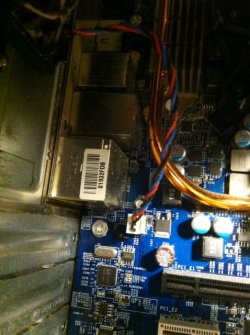
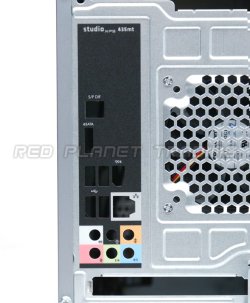
I checked and it's built into the motherboard. I attached some images. Is it at all possible that my problem is due to the ethernet port?Do you know if it's a separate network card or is it built into the motherboard?
I had already disabled all non important programs in msconfig a few days earlier. I still hadn't checked "Hide All MS Services," however. I did that earlier and rebooted but noticed that it was once again unchecked when I went into msconfig. I'm not sure if this is supposed to happen.Did you establish a Clean Boot as I suggested earlier? Then other programs aren't a concern.
I didn't check the error events until today. Running that script placed a file on my desktop (I've attached it below)but the clear the events log didn't place any file on my desktop yesterday nor today. BTW I waited to check the error events until after I had rebooted and not immediately after the events log like you mentioned.If you immediately ran the other other script, then there are no events to be written to ta text file, since the logs are empty.
Realtek
I'm not sure they're for your exact model, but they've definitely made some recent updates for models that seem to be at least closely related to yours. Use the tools on that page for finding any updates for your specific model.
If your network adapter is integrated into the motherboard I think it would be best to check out the Dell site (which I see apparently has nothing for your model). If you enter your Service Tag you may get better results than I did.
Only other things I can think of right now is checking the BIOS settings that relate to the network adapter or reseating an add-on NIC (observing proper precautions for opening your case).
I upgraded to Win 7 on the 2nd of that month. The download speed is higher but still not