ISP says computer to blame for slow internet

kiddo,

I don't need the info, but if at some other time you want to upload the output from ipconfig /all then:

Go to an elevated command prompt.

Enter following:
ipconfig /all > %userprofile%\desktop\ipconfigstuff.txt

Enter
EXIT
to return.

You will now have a file called ipconfigstuff.txt on your Desktop.

Go To an Elevated Command Prompt


Elevated command prompt = Run CMD.EXE as administrator
WIN | type CMD.EXE | do not hit Enter |
CTRL+SHIFT+ENTER keycombo| YES

WIN is the key with the Microsoft flag on top.
 

My Computer My Computer

At a glance

MS Windows 7 Ultimate SP1 64-bitAMD A10-4600M6.00 GB Dual-Channel DDR3 @ 798MHz (11-11-12-28)AMD Radeon HD 7660G
Computer Manufacturer/Model Number
Toshiba Satellite S875D-S7239 laptop
OS
MS Windows 7 Ultimate SP1 64-bit
CPU
AMD A10-4600M
Motherboard
AMD Pumori (Socket FT1)
Memory
6.00 GB Dual-Channel DDR3 @ 798MHz (11-11-12-28)
Graphics Card(s)
AMD Radeon HD 7660G
Sound Card
High Definition Audio Device
Monitor(s) Displays
Generic PnP Monitor (1600x900@60Hz)
Screen Resolution
1600x900@60Hz
Hard Drives
SSD 119GB Corsair CSSD-V128GB2 ATA Device
Keyboard
Standard PS/2 Keyboard
Mouse
HP Wireless Optical Mobile Mouse Model FHA-3410
Internet Speed
What the local pub, local coffee shop offers.
Other Info
Optical Drive:MATSHITA BD-CMB UJ160B ATA Device


Also have an Asus ha1002xp netbook with Win 7 Ultimate installed.
I concur to temporarily (at least) uninstall Norton using it's Uninstall tool since it's like a major infection. Install MSE in its place.

Work through these other steps to optimize and clean up Win7, especially establishing a Clean Boot to shrug off the freeloaders.
Clean Up Factory Bloatware
Optimize Windows 7

What is the speed difference after these changes?
 
In the top section the last line is "WINS proxy enabled". I usually see another line beneath it which is normally "dns suffix search list". Do you see that extra line on the other computers on your network?

It shouldn't matter, but I see your connected both wired and wirelessly. What happens if you disconnect one or the other?

My sister's laptop has says WINS proxy enabled. Next to it says No.

There is a one point difference between my wireless connection and my wired connection. The wireless connection is 1 kbps slower.

I just checked my wired speed 5 times in the last 20 minutes. The first 2 times it was 1226, 3rd and 4th was 941 (depressing), and 5th was 1227.

I meant for you to check the line underneath the "WINS proxy enabled"; it would be something like "dns suffix search list". It should match what the other PC's on the network have. I didn't see the "dns suffix search list" line in the ipconfig you posted.

Another thing you could try is using msconfig to disable autostart of unecessary apps upon boot.

Also try is Safe Mode with networking.
 

My Computer My Computer

At a glance

Windows 7 Ultimate x64
OS
Windows 7 Ultimate x64
Please update and rerun MBAM and Norton one more time to make sure all malware has been removed.
Done. Malwarebytes didn't find anything. Norton found a whole bunch of tracking cookies but that's actually nothing new for my computer. Tracking cookies are always found on my system after a Norton scan. I have no idea if this is normal. I've attached the list of cookies found.

I meant for you to check the line underneath the "WINS proxy enabled"; it would be something like "dns suffix search list". It should match what the other PC's on the network have.
Whoops. Sorry for the mistake. I don't see "dns suffix search list" on either my computer and the laptop.

Also try is Safe Mode with networking.
Just tried it and there was no significant different in speed (it was less than 1200).

Regarding deleting Norton: I believe that Norton only lets you download the software to 3 systems. I've used 2 already. Lets say nothing changes after I uninstall norton and then I reinstall it. Will Norton count it as a 3rd system?
 

Attachments

My Computer My Computer

At a glance

Windows 7 64bitIntel Core i7 920 @ 2.67GHz15 GB512MB ATI Radeon HD 4850
Computer type
PC/Desktop
Computer Manufacturer/Model Number
Dell XPS 435T
OS
Windows 7 64bit
CPU
Intel Core i7 920 @ 2.67GHz
Memory
15 GB
Graphics Card(s)
512MB ATI Radeon HD 4850
Monitor(s) Displays
Dell S2409W 24in. Widescreen
Hard Drives
Seagate Barracuda 7200.12 SATA 3Gb/s 1TB
Antivirus
MSE
Browser
Firefox
I turned everything off on Norton and initially, it gave me a slower speed. Usually my speed is between 950 and 1250. With all of the norton features OFF, my speed was in the 200s, 300s, 800s and now it's back to 1000s.
 

My Computer My Computer

At a glance

Windows 7 64bitIntel Core i7 920 @ 2.67GHz15 GB512MB ATI Radeon HD 4850
Computer type
PC/Desktop
Computer Manufacturer/Model Number
Dell XPS 435T
OS
Windows 7 64bit
CPU
Intel Core i7 920 @ 2.67GHz
Memory
15 GB
Graphics Card(s)
512MB ATI Radeon HD 4850
Monitor(s) Displays
Dell S2409W 24in. Widescreen
Hard Drives
Seagate Barracuda 7200.12 SATA 3Gb/s 1TB
Antivirus
MSE
Browser
Firefox

My Computer My Computer

At a glance

MS Windows 7 Ultimate SP1 64-bitAMD A10-4600M6.00 GB Dual-Channel DDR3 @ 798MHz (11-11-12-28)AMD Radeon HD 7660G
Computer Manufacturer/Model Number
Toshiba Satellite S875D-S7239 laptop
OS
MS Windows 7 Ultimate SP1 64-bit
CPU
AMD A10-4600M
Motherboard
AMD Pumori (Socket FT1)
Memory
6.00 GB Dual-Channel DDR3 @ 798MHz (11-11-12-28)
Graphics Card(s)
AMD Radeon HD 7660G
Sound Card
High Definition Audio Device
Monitor(s) Displays
Generic PnP Monitor (1600x900@60Hz)
Screen Resolution
1600x900@60Hz
Hard Drives
SSD 119GB Corsair CSSD-V128GB2 ATA Device
Keyboard
Standard PS/2 Keyboard
Mouse
HP Wireless Optical Mobile Mouse Model FHA-3410
Internet Speed
What the local pub, local coffee shop offers.
Other Info
Optical Drive:MATSHITA BD-CMB UJ160B ATA Device


Also have an Asus ha1002xp netbook with Win 7 Ultimate installed.
Hi there
another quick test -- if you have say a USB Wireless adapter try unplugging the LAN cable and seeing what you get with the wireless USB -- you should be able to get faster than the 1000 you are getting.

This would prove that your LAN network card isn't working as it should be.

cheers
jimbo
 

My Computer My Computer

At a glance

Linux CENTOS 7 / various Windows OS'es and se...Intel i7 Intel i58GB, 16GBOn Motherboard
Computer type
PC/Desktop
Computer Manufacturer/Model Number
Custom built, several laptops HP/ASUS
OS
Linux CENTOS 7 / various Windows OS'es and servers
CPU
Intel i7 Intel i5
Memory
8GB, 16GB
Graphics Card(s)
On Motherboard
Sound Card
Realtek HD audio
Monitor(s) Displays
Apple Cinema display, Samsung LCD
Screen Resolution
1920 X 1080
Hard Drives
4 X 1TB SATA
Mouse
Toshiba wireless laser
Internet Speed
> 20MB up
I've used the Norton Removal tool to uninstall Norton. I then installed MSE. Next, I ran speed tests. The first speed test was the highest at 1360. Three tests later, my speed is 1227. Darn!

another quick test -- if you have say a USB Wireless adapter try unplugging the LAN cable and seeing what you get with the wireless USB -- you should be able to get faster than the 1000 you are getting.

The above speed test were done with a wired connection. I did what you said and disconnected the cable from computer and ran the speed test again. I've ran it a few times and it keeps coming up 1227.
 

Attachments

My Computer My Computer

At a glance

Windows 7 64bitIntel Core i7 920 @ 2.67GHz15 GB512MB ATI Radeon HD 4850
Computer type
PC/Desktop
Computer Manufacturer/Model Number
Dell XPS 435T
OS
Windows 7 64bit
CPU
Intel Core i7 920 @ 2.67GHz
Memory
15 GB
Graphics Card(s)
512MB ATI Radeon HD 4850
Monitor(s) Displays
Dell S2409W 24in. Widescreen
Hard Drives
Seagate Barracuda 7200.12 SATA 3Gb/s 1TB
Antivirus
MSE
Browser
Firefox
Post a screenshot of you network adapter properties:

Go to Control Panel\Network and Internet\Network Connections, right click on your network adapter and select properties.
 

My Computer My Computer

At a glance

Windows 7 Ultimate x64
OS
Windows 7 Ultimate x64
What I do is disconnect from wireless network to use wired connection when speed testing. I got tired of having to do that so I disabled my adapter under device manager.
 

My Computer My Computer

At a glance

Windows 7 64bitIntel Core i7 920 @ 2.67GHz15 GB512MB ATI Radeon HD 4850
Computer type
PC/Desktop
Computer Manufacturer/Model Number
Dell XPS 435T
OS
Windows 7 64bit
CPU
Intel Core i7 920 @ 2.67GHz
Memory
15 GB
Graphics Card(s)
512MB ATI Radeon HD 4850
Monitor(s) Displays
Dell S2409W 24in. Widescreen
Hard Drives
Seagate Barracuda 7200.12 SATA 3Gb/s 1TB
Antivirus
MSE
Browser
Firefox
My network connections

EDIT to add: I still haven't reconnected the ethernet cable.
 

Attachments

  • network connections.JPG
    network connections.JPG
    15.4 KB · Views: 16

My Computer My Computer

At a glance

Windows 7 64bitIntel Core i7 920 @ 2.67GHz15 GB512MB ATI Radeon HD 4850
Computer type
PC/Desktop
Computer Manufacturer/Model Number
Dell XPS 435T
OS
Windows 7 64bit
CPU
Intel Core i7 920 @ 2.67GHz
Memory
15 GB
Graphics Card(s)
512MB ATI Radeon HD 4850
Monitor(s) Displays
Dell S2409W 24in. Widescreen
Hard Drives
Seagate Barracuda 7200.12 SATA 3Gb/s 1TB
Antivirus
MSE
Browser
Firefox
Right click on the active adapter, select properties, post screenshot.

Why is it set as a public network?
 

My Computer My Computer

At a glance

Windows 7 Ultimate x64
OS
Windows 7 Ultimate x64
I really don't know why it's public. *shrugs* Should I change it?
 

Attachments

  • network adapter.JPG
    network adapter.JPG
    36 KB · Views: 7

My Computer My Computer

At a glance

Windows 7 64bitIntel Core i7 920 @ 2.67GHz15 GB512MB ATI Radeon HD 4850
Computer type
PC/Desktop
Computer Manufacturer/Model Number
Dell XPS 435T
OS
Windows 7 64bit
CPU
Intel Core i7 920 @ 2.67GHz
Memory
15 GB
Graphics Card(s)
512MB ATI Radeon HD 4850
Monitor(s) Displays
Dell S2409W 24in. Widescreen
Hard Drives
Seagate Barracuda 7200.12 SATA 3Gb/s 1TB
Antivirus
MSE
Browser
Firefox
If you're connected to your own network with only your computers on it then it can be set to Private.

The dialog window looks okay otherwise; I've seen where some AV programs decide to add their own protocols to the adapter, but you're clean. What's under the sharing tab?
 

My Computer My Computer

At a glance

Windows 7 Ultimate x64
OS
Windows 7 Ultimate x64
I've just changed it to private.

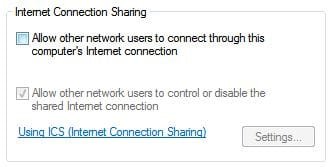
What's under sharing:
 

Attachments

  • sharing.JPG
    sharing.JPG
    15.5 KB · Views: 4

My Computer My Computer

At a glance

Windows 7 64bitIntel Core i7 920 @ 2.67GHz15 GB512MB ATI Radeon HD 4850
Computer type
PC/Desktop
Computer Manufacturer/Model Number
Dell XPS 435T
OS
Windows 7 64bit
CPU
Intel Core i7 920 @ 2.67GHz
Memory
15 GB
Graphics Card(s)
512MB ATI Radeon HD 4850
Monitor(s) Displays
Dell S2409W 24in. Widescreen
Hard Drives
Seagate Barracuda 7200.12 SATA 3Gb/s 1TB
Antivirus
MSE
Browser
Firefox
Right now the best thing I can think of is to rule out your hardware by booting into a CD/DVD based OS that has networking support.

I deleted my previous post because I'm not sure of the legalities involved in using the software I linked to.
 

My Computer My Computer

At a glance

Windows 7 Ultimate x64
OS
Windows 7 Ultimate x64
WIN | type MSCONFIG | ENTER | STARTUP tab |
Uncheck ALL except for:
PHP:
Sidebar    Microsoft Corporation    C:\Program Files\Windows Sidebar\sidebar.exe /autoRun
MSC    Microsoft Corporation    "c:\Program Files\Microsoft Security Client\msseces.exe" -hide -runkey
REBOOT!

You have just told Win 7 to not run unchecked programs at start up time.

You have not disabled the programs. They will be run when needed.

WIN = key with the Microsoft logo on top

=================================

I expect you will see a better performance.

karl
 

My Computer My Computer

At a glance

MS Windows 7 Ultimate SP1 64-bitAMD A10-4600M6.00 GB Dual-Channel DDR3 @ 798MHz (11-11-12-28)AMD Radeon HD 7660G
Computer Manufacturer/Model Number
Toshiba Satellite S875D-S7239 laptop
OS
MS Windows 7 Ultimate SP1 64-bit
CPU
AMD A10-4600M
Motherboard
AMD Pumori (Socket FT1)
Memory
6.00 GB Dual-Channel DDR3 @ 798MHz (11-11-12-28)
Graphics Card(s)
AMD Radeon HD 7660G
Sound Card
High Definition Audio Device
Monitor(s) Displays
Generic PnP Monitor (1600x900@60Hz)
Screen Resolution
1600x900@60Hz
Hard Drives
SSD 119GB Corsair CSSD-V128GB2 ATA Device
Keyboard
Standard PS/2 Keyboard
Mouse
HP Wireless Optical Mobile Mouse Model FHA-3410
Internet Speed
What the local pub, local coffee shop offers.
Other Info
Optical Drive:MATSHITA BD-CMB UJ160B ATA Device


Also have an Asus ha1002xp netbook with Win 7 Ultimate installed.
kiddo,


CCLEANER | TOOLS
icon | STARTUP tab | SCHEDULED TASKS tab |
Use DISABLE button to disable ALL

Close CCleaner.

REBOOT!


You have not disabled any programs. You have disabled the scheduled running.
Later, after your system is running smoothly, you may reenable desired programs.
 

My Computer My Computer

At a glance

MS Windows 7 Ultimate SP1 64-bitAMD A10-4600M6.00 GB Dual-Channel DDR3 @ 798MHz (11-11-12-28)AMD Radeon HD 7660G
Computer Manufacturer/Model Number
Toshiba Satellite S875D-S7239 laptop
OS
MS Windows 7 Ultimate SP1 64-bit
CPU
AMD A10-4600M
Motherboard
AMD Pumori (Socket FT1)
Memory
6.00 GB Dual-Channel DDR3 @ 798MHz (11-11-12-28)
Graphics Card(s)
AMD Radeon HD 7660G
Sound Card
High Definition Audio Device
Monitor(s) Displays
Generic PnP Monitor (1600x900@60Hz)
Screen Resolution
1600x900@60Hz
Hard Drives
SSD 119GB Corsair CSSD-V128GB2 ATA Device
Keyboard
Standard PS/2 Keyboard
Mouse
HP Wireless Optical Mobile Mouse Model FHA-3410
Internet Speed
What the local pub, local coffee shop offers.
Other Info
Optical Drive:MATSHITA BD-CMB UJ160B ATA Device


Also have an Asus ha1002xp netbook with Win 7 Ultimate installed.
Right now the best thing I can think of is to rule out your hardware by booting into a CD/DVD based OS that has networking support.
I'm not sure how to go about trying this.

Karlsnooks, I did just as you asked. After disabling startup programs, my speed was 1226. It's still 1226 after disabling scheduled tasks.

It's almost like my computer is allergic to speeds higher than 1300. How frustrating.

Ever since uninstalling Norton, I keep hearing some kind of alert when I boot up. I hear it as soon as I get on my desktop and then continue to hear is about 3 more times within 5 minutes. It's sounds something like Dadadadum lol. I don't know how else to type it out.
 

My Computer My Computer

At a glance

Windows 7 64bitIntel Core i7 920 @ 2.67GHz15 GB512MB ATI Radeon HD 4850
Computer type
PC/Desktop
Computer Manufacturer/Model Number
Dell XPS 435T
OS
Windows 7 64bit
CPU
Intel Core i7 920 @ 2.67GHz
Memory
15 GB
Graphics Card(s)
512MB ATI Radeon HD 4850
Monitor(s) Displays
Dell S2409W 24in. Widescreen
Hard Drives
Seagate Barracuda 7200.12 SATA 3Gb/s 1TB
Antivirus
MSE
Browser
Firefox
Back
Top