Desktop keeps showing a colored overlay

Wurzel

New member
Local time
10:14 AM
Messages
3
Hi All,

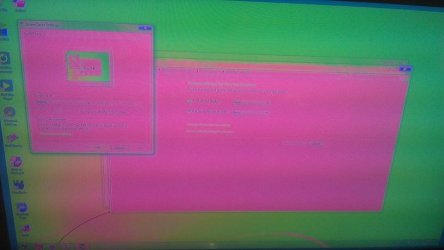
I have a problem that is driving me crazy. Every 10 - 15 mins my desktop changes color and then 10 - 15 mins later it changes back.

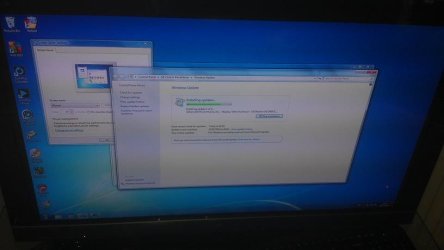
Im attaching an image to show what i mean as its hard to explain. One is my normal deskop the other shows the problem. The colour can also differ today its pink but in a few days ago it was bright blue!

I am running Windows 7 Pro 64Bit with a ATI Mobility Radeon HD5400 and connected to my Sony Bravia via hdmi

Any help or pointers would be greatly appreciated.

Many Thanks

Wurz
 

Attachments
  • NormalDesktop.jpg
    NormalDesktop.jpg
    35.6 KB · Views: 8
  • ProblemDesktop.jpg
    ProblemDesktop.jpg
    36.8 KB · Views: 7

My Computer My Computer

Computer Manufacturer/Model Number
HP Compaq 6000 Pro MT
OS
Windows 7 Pro 64 bit
CPU
Intel Core 2 Duo E7500 @ 2.93 GHz
Memory
4 Gb
Graphics Card(s)
ATI Mobility Radeon HD 5400
Monitor(s) Displays
Sony Bravia KDL-40EX401
Hi All,

I have a problem that is driving me crazy. Every 10 - 15 mins my desktop changes color and then 10 - 15 mins later it changes back.

Im attaching an image to show what i mean as its hard to explain. One is my normal deskop the other shows the problem. The colour can also differ today its pink but in a few days ago it was bright blue!

I am running Windows 7 Pro 64Bit with a ATI Mobility Radeon HD5400 and connected to my Sony Bravia via hdmi

Any help or pointers would be greatly appreciated.

Many Thanks

Wurz

The only experience I have had with the problem you are experiencing was a failing monitor. Have you got another monitor you can use to perform a test?

HTH
 

My Computer My Computer

Computer type
PC/Desktop
Computer Manufacturer/Model Number
Custom Built
OS
Windows 7 Professional x64
CPU
Intel i5 quad processor
Motherboard
DP67BG
Memory
16 GB
Graphics Card(s)
Radeon HD 5770
Sound Card
Realtek High Definition Audio
Monitor(s) Displays
Samsung SyncMaster
Screen Resolution
1920X1080
Hard Drives
WD 2TB (SATA Internal)
WD 1TB (USB External)
PSU
Corsair GS800
Case
Tower (Generic)
Cooling
3 Internal Fans
Keyboard
MS Wireless
Mouse
MS Optical Wired
Internet Speed
54 mbps
Antivirus
Emsisoft
Browser
IE-Version 9, Palemoon-Version 24.2.0
The only experience I have had with the problem you are experiencing was a failing monitor. Have you got another monitor you can use to perform a test?

HTH

Thanks for the reply

I do have a friend bringing one over later to test this. Im hoping this isn't the problem as the TV im using isn't a year old yet. TV works fine.
 

My Computer My Computer

Computer Manufacturer/Model Number
HP Compaq 6000 Pro MT
OS
Windows 7 Pro 64 bit
CPU
Intel Core 2 Duo E7500 @ 2.93 GHz
Memory
4 Gb
Graphics Card(s)
ATI Mobility Radeon HD 5400
Monitor(s) Displays
Sony Bravia KDL-40EX401
Ok, i was looking in the wrong place for he answer as I didn't think for a second it would be the new and otherwise perfectly working TV. Thanks to Sir George my train of thought concentrated more on the TV than windows. Seems i am not the only one with this problem and it is an issue with the Bravia TV with no real fix! :(


Thanks Sir George at least i now know the problem.
 

My Computer My Computer

Computer Manufacturer/Model Number
HP Compaq 6000 Pro MT
OS
Windows 7 Pro 64 bit
CPU
Intel Core 2 Duo E7500 @ 2.93 GHz
Memory
4 Gb
Graphics Card(s)
ATI Mobility Radeon HD 5400
Monitor(s) Displays
Sony Bravia KDL-40EX401
Back
Top