Acronis True Image 10. How does it Work?

XGUNTHERC

I Click Home Too Much
Power User
VIP
Local time
1:30 PM
Messages
440
Location
Viva Las Vegas
Hey guys, I'm basically confused on how to actually use Acronis while making an image of my drive.

I got Acronis True Image 10 for Free from Acronis a few months back. they emailed me the download link, and serial number to my email address.

OK, so here's where I'm confused. I've done a COMPLETE backup of my HD. an entire image of everything. That includes the OS right??

So my question is so I get a new HD. I install the new HD. how do I get that entire backup image on my new drive. Do I install the New OS first, or no because the image has the OS on it correct. So if it does. How do I get into my system, and plug in and access my external hard drive to get my Image and load to my system.

What do I do? Do I need to make a Boot Recovery CD or whatever with Acronis' software?

Any help would be great. I need to do a complete backup image and not sure how exactly it works.

Rep+ will be gave to the one that helps me do this the best.

thanks!
 

My Computer

OS
Windows 7 Ultimate Edition x64
CPU
Q9650 E0 @ 4.0 GHz 1.304v
Motherboard
eVGA 750i FTW!
Memory
2x2GB Corsair Dominator PC2-8500C5D 1100 Mhz 5-5-5-15
Graphics Card(s)
eVGA/Gigabyte GTX 480's SLI
Sound Card
X-Fi XtremeGamer
Monitor(s) Displays
Dell U2410 24" IPS Panel (Beautiful)
Screen Resolution
1900 x 1200 & 1680 x 1050
Hard Drives
WD Caviar Black 640GB AALS x2 (Raid0) + Seagate Pro 500GB External x2
PSU
Enermax Revolution 85+ 1050w PSU
Case
Cooler Master HAF 932 H20
Cooling
Apogee GTZ, Feser 360, D5 Vario, Scythe GT 1850's
Keyboard
Logitech G11
Mouse
Logitech MX-518 / G9
Internet Speed
Fast!
Other Info
Nikon D40 DSLR 18-105mm VR - Nikon 35mm f/1.8 & 55-200mm VR
Bose Companion 3 - 16GB Patriot Xporter USB - ATH AD900's & UR Triple.Fi 10 Custom Phones w/ 32GB iPod Touch 3rd Gen -
Google Nexus One (Phone Rocks!) w/ Kingston 16GB MicroSDHC Class 10 running Amon RA1.7 and Cyan 5.06.1
...
What do I do? Do I need to make a Boot Recovery CD or whatever with Acronis' software?

YES ... The attached Screen Shot is version 11 .. but it should be about the same ..
Find the create "Bootable rescue menu" .. and make a Bootable CD.

This is used when the computer will not boot .. or Acronis is not installed.
Put in the CD .. turn the computer on and it will load Acronis to RAM and run there.

If you're backing up W7 ...
Make a backup Image of the C system partition .. and the W7 system reserved partition.
This will backup both partitions .. and the MBR

However .. I'm having trouble getting Acronis to perform a successful recovery of W7.
I've tried Acronis V11 and ATI H2009.
After a recovery .. I have to make repairs with the original W7 install DVD.

We may have to wait on Acronis to catch up ..
Or there's something "funny" with the trial versions of W7.

The recovery procedure is the reverse of the backup procedure.
Run ATI ... (probably from the ATI Boot CD) ..
Tell it where the backup ***.tib file is ...
and which partitions (or unallocated space) to want to recover.
 

Attachments

  • Clipboard.gif
    Clipboard.gif
    106.6 KB · Views: 387

My Computer

Computer Manufacturer/Model Number
HP d4996t (upgraded)
OS
XP MCE .... XP Pro 64 .... W7 U x64
CPU
E6750, 2.67GHz C2D
Memory
4GB, PC2 6400
Graphics Card(s)
GeForce 9400GT
Monitor(s) Displays
Twin Samsung 2443BWT
Screen Resolution
1920x1200
Hard Drives
Many .. 3 Installed
PSU
460W
Internet Speed
Cable
YES ... The attached Screen Shot is version 11 .. but it should be about the same ..
Find the create "Bootable rescue menu" .. and make a Bootable CD.

This is used when the computer will not boot .. or Acronis is not installed.
Put in the CD .. turn the computer on and it will load Acronis to RAM and run there.

If you're backing up W7 ...
Make a backup Image of the C system partition .. and the W7 system reserved partition.
This will backup both partitions .. and the MBR

However .. I'm having trouble getting Acronis to perform a successful recovery of W7.
I've tried Acronis V11 and ATI H2009.
After a recovery .. I have to make repairs with the original W7 install DVD.

We may have to wait on Acronis to catch up ..
Or there's something "funny" with the trial versions of W7
noyb

Acronis 12.0.x does the same. Backs up fine, but restore is another story.

Ken
 

My Computer

Computer Manufacturer/Model Number
HP Pavillion dv-7 1005 Tx
OS
Win 8 Release candidate 8400
CPU
[email protected]
Memory
4 gigs
Graphics Card(s)
Nvidia 9600M
Sound Card
HD built-in
Monitor(s) Displays
17" Wxga
Screen Resolution
1440x900
Cooling
none
Internet Speed
45Mb down 5Mb up
I normally use ATI v11 ... V12 (H2009) confuses me.
Even back in my V10 days .. I had NO problems restoring XP or Vista.

A backup is worthless .. if it will not restore.
 

My Computer

Computer Manufacturer/Model Number
HP d4996t (upgraded)
OS
XP MCE .... XP Pro 64 .... W7 U x64
CPU
E6750, 2.67GHz C2D
Memory
4GB, PC2 6400
Graphics Card(s)
GeForce 9400GT
Monitor(s) Displays
Twin Samsung 2443BWT
Screen Resolution
1920x1200
Hard Drives
Many .. 3 Installed
PSU
460W
Internet Speed
Cable
noyb
Ok i will dump 12, and try 11. Gave up on ghost and im an old DOS guy so maybe just read (nevermind I didn't read the manual) the manual wrong:D

K
 

My Computer

Computer Manufacturer/Model Number
HP Pavillion dv-7 1005 Tx
OS
Win 8 Release candidate 8400
CPU
[email protected]
Memory
4 gigs
Graphics Card(s)
Nvidia 9600M
Sound Card
HD built-in
Monitor(s) Displays
17" Wxga
Screen Resolution
1440x900
Cooling
none
Internet Speed
45Mb down 5Mb up
Hi Xguntherc,

Putting an image on a new HD will not work.

You need to either Clone the old to the new, or install 7 on the new one, then restore the image onto that new installation.

No need to update or activate the new install - you can just restore the image straight over the top of it.

Because you are not restoring to the original drive, you will need to run startup repair on the 7 dvd to correct the bcd entry.

You will need to run off the bootable cd from whichever imaging app. you are using to restore the image.

(Some of the fancier imaging apps. will allow you to restore to the drive you are booted into as they put themselves into "boot - time" mode - but it's better to use the cd, imo)

If you are having trouble with the Acronis, you could use the free version of Macrium Reflect - I have used it a lot and it has always worked perfectly.

Macrium Reflect FREE Edition - Information and download

I also use Paragon Backup ( it's included in the Hard Disk Manager) that works perfectly, too - but it's not free.

EDIT: There is free version

http://www.paragon-software.com/home/db-express/
 

My Computers

System One System Two

  • Computer type
    PC/Desktop
    OS
    7 X64
    CPU
    i5 8400
    Motherboard
    gigabyte b365m ds3h
    Memory
    2x8gb 3200mhz
    Hard Drives
    various
    PSU
    pure power 11 400w cm
    Case
    Coolermaster
    Cooling
    cryorig m9i
  • Computer type
    PC/Desktop
    OS
    7x64
    CPU
    g5400
    Motherboard
    ga b365m ds3h
    Memory
    8gb ddr4 2400
    PSU
    xfx pro 450w
I have been using Acronis True Image Home v11.... A LOT... with W7 7100 and 7127, It is working like a CHAMP, both backup and restore operations.

In trouble-shooting 2 particular "re-installations" of EMC10 and PSE5.0 before and after a 7100 to 7127 upgrade I must have backed up and restored 10 times so I had a well defined starting point for debug.

Install Acronis. Make sure you register with Acronis, log into support, check and, if needed, download the latest update. For ATI Home v11 the "update" is a complete re-install. Once it is updated - create a bootable recovery CD.

I, too, gave up the Ghost long ago.... Norton support became unable to support it a'la' the same fashion they did NAV 2005-2008 (NAV 2009 is a different story - seems to be a success instead of a cluster-f***).
 

My Computer

OS
XP Pro & Vista Home Premium (x86); Windows Ultimate 7600 x64 Retail
Awesome thanks for the info guys.. so I could use acronis ti 10 for vista with no problems. My brother wants me to make an image of current 500gb and place it on his new 1tb drive. So do I need to install vista on the new drive before recovering with the acronis image?? And win 7 I will just do clean install
 

My Computer

OS
Windows 7 Ultimate Edition x64
CPU
Q9650 E0 @ 4.0 GHz 1.304v
Motherboard
eVGA 750i FTW!
Memory
2x2GB Corsair Dominator PC2-8500C5D 1100 Mhz 5-5-5-15
Graphics Card(s)
eVGA/Gigabyte GTX 480's SLI
Sound Card
X-Fi XtremeGamer
Monitor(s) Displays
Dell U2410 24" IPS Panel (Beautiful)
Screen Resolution
1900 x 1200 & 1680 x 1050
Hard Drives
WD Caviar Black 640GB AALS x2 (Raid0) + Seagate Pro 500GB External x2
PSU
Enermax Revolution 85+ 1050w PSU
Case
Cooler Master HAF 932 H20
Cooling
Apogee GTZ, Feser 360, D5 Vario, Scythe GT 1850's
Keyboard
Logitech G11
Mouse
Logitech MX-518 / G9
Internet Speed
Fast!
Other Info
Nikon D40 DSLR 18-105mm VR - Nikon 35mm f/1.8 & 55-200mm VR
Bose Companion 3 - 16GB Patriot Xporter USB - ATH AD900's & UR Triple.Fi 10 Custom Phones w/ 32GB iPod Touch 3rd Gen -
Google Nexus One (Phone Rocks!) w/ Kingston 16GB MicroSDHC Class 10 running Amon RA1.7 and Cyan 5.06.1
You're also saying use True Image 11. I have 10. will that work with 7 if I get the latest updates.

I didn't have time yesterday. so I'll do tomorrow.

so, say I do a complete image right now. but then I install 7201. Can I use that image and only extract the things I want.

Like can I image almost everything but the OS. or is it all or nothing?
 

My Computer

OS
Windows 7 Ultimate Edition x64
CPU
Q9650 E0 @ 4.0 GHz 1.304v
Motherboard
eVGA 750i FTW!
Memory
2x2GB Corsair Dominator PC2-8500C5D 1100 Mhz 5-5-5-15
Graphics Card(s)
eVGA/Gigabyte GTX 480's SLI
Sound Card
X-Fi XtremeGamer
Monitor(s) Displays
Dell U2410 24" IPS Panel (Beautiful)
Screen Resolution
1900 x 1200 & 1680 x 1050
Hard Drives
WD Caviar Black 640GB AALS x2 (Raid0) + Seagate Pro 500GB External x2
PSU
Enermax Revolution 85+ 1050w PSU
Case
Cooler Master HAF 932 H20
Cooling
Apogee GTZ, Feser 360, D5 Vario, Scythe GT 1850's
Keyboard
Logitech G11
Mouse
Logitech MX-518 / G9
Internet Speed
Fast!
Other Info
Nikon D40 DSLR 18-105mm VR - Nikon 35mm f/1.8 & 55-200mm VR
Bose Companion 3 - 16GB Patriot Xporter USB - ATH AD900's & UR Triple.Fi 10 Custom Phones w/ 32GB iPod Touch 3rd Gen -
Google Nexus One (Phone Rocks!) w/ Kingston 16GB MicroSDHC Class 10 running Amon RA1.7 and Cyan 5.06.1
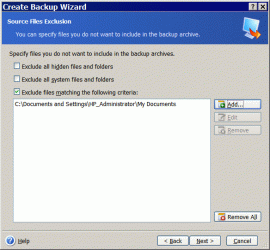
...can I image almost everything but the OS. or is it all or nothing?
I've never tried this .. But there's a way to tell ATI what to exclude from the backup Image.

ATI is great for backing up/recovering a functioning operating system ...
But if you have a HUGE amount of personal data ....
It can take forever to make a backup or recover to/from a backup image.

If the drive is organized and all the personal data is in "My docs" ..
this might work to get "just" the operating system.

It will take twice as long to make a backup image .. then recover from the backup Image ...
you may want to think about cloning directly from drive 1 to drive2.

How many gigs is occupied in the C partition ???
 

Attachments

  • Clipboard.gif
    Clipboard.gif
    44 KB · Views: 101

My Computer

Computer Manufacturer/Model Number
HP d4996t (upgraded)
OS
XP MCE .... XP Pro 64 .... W7 U x64
CPU
E6750, 2.67GHz C2D
Memory
4GB, PC2 6400
Graphics Card(s)
GeForce 9400GT
Monitor(s) Displays
Twin Samsung 2443BWT
Screen Resolution
1920x1200
Hard Drives
Many .. 3 Installed
PSU
460W
Internet Speed
Cable
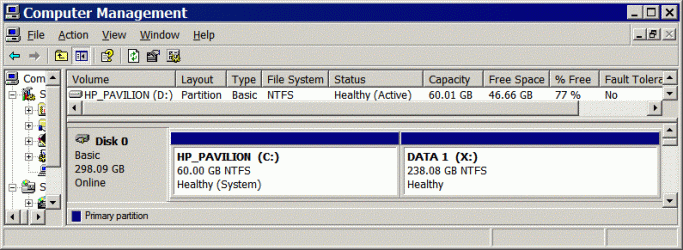
You said you where moving from 500GB to 1TB .. This scares me.
If you have as much personal data included in the OS as I suspect ...
You may want to consider partitioning the System and all the Data separately.

I use ATI to backup/recover my operation system ..
and plain ole Copy>Paste for my data.

I can recover my OS in about 10 minutes .. and not bother with the data Partition ..
of rebuild it later when I have the time.
 

Attachments

  • Clip1.gif
    Clip1.gif
    40.5 KB · Views: 689

My Computer

Computer Manufacturer/Model Number
HP d4996t (upgraded)
OS
XP MCE .... XP Pro 64 .... W7 U x64
CPU
E6750, 2.67GHz C2D
Memory
4GB, PC2 6400
Graphics Card(s)
GeForce 9400GT
Monitor(s) Displays
Twin Samsung 2443BWT
Screen Resolution
1920x1200
Hard Drives
Many .. 3 Installed
PSU
460W
Internet Speed
Cable
You're also saying use True Image 11. I have 10. will that work with 7 if I get the latest updates.

I didn't have time yesterday. so I'll do tomorrow.

so, say I do a complete image right now. but then I install 7201. Can I use that image and only extract the things I want.

Like can I image almost everything but the OS. or is it all or nothing?

I have used v7 and v11. V11 is more flexible on specifying backup and restore of a) entire disk or b) specific partition or c) specific folders/files.

It also includes an "explore image" functionality. This allows one to simply click to open the image file, explore it as if it were a disk drive and copy specific files/folder from the image file back to the some location on the hard drive.

V10 - I don't know. I suggest you try it and find out. Also, RTFM as they say :D. I know that some older versions of ATI had problems with SATA drivers in the ATI Emergency Recovery CD. So be advised to create an emergency recovery CD and TEST IT! Boot to the recovery CD and verify that it can "see" all your drives and partitions.

Note that you WILL have to register your product version with Acronis in order to logon to the support site and download updates specific to your product version.

Also note, personally, I DO NOT restore entire partitions from the OS. Acronis can do it but I just don't. If it is just specific files/folders, no problem. But if it is an entire partition restore I boot to the Acronis Recovery CD to do the restore. Especially any boot partitions!


When all else fails read the manual. Then test and try a backup/restore procedure BEFORE you actually need it! This is sound advice regardless of what backup/restore tool you may have chosen.
 

My Computer

OS
XP Pro & Vista Home Premium (x86); Windows Ultimate 7600 x64 Retail
Whatever image software you use, take the time to get confidence in it. As the previous poster said, it's absolutely useless without the ability to restore, so the only way to get comfortable is to backup and restore before you are desperate.

Acronis has been very stable for me. I've moved up the latest version, but I may be odd in that I always boot to the disc to make an image.

I had a question though. I had XP installed with plenty of room on the next partition, so I installed 7. Then when I restored an XP backup on the first partition it overwrote the MBR that 7 had created. There must be a way to back up the MBR so I can restore XP or 7 independent of each other. Otherwise what is the use of having a dual boot system with awesome imaging software. The disadvantage of imaging outside of Windows is no ability to cut and paste your description of the Date, time OS, partition configuration, hard drive, motherboard, software, updates and patches installed. It can get tedious towards the end when you have a lot of information to input. When running it from Windows I would just keep a running tab in notepad or similar.
 

My Computer

Computer Manufacturer/Model Number
Assembled by me
OS
Windows 7 Professional 64-bit
CPU
Intel Core i7-960 Bloomfield 3.2GHz 8MB L3 Cache Quad-Core
Motherboard
ASUS P6X58D Premium LGA 1366 Intel X58 SATA 6Gb/s USB 3.0
Memory
12 gb Corsair Dominator DDR3 1866 (PC3 15000) Triple Channel
Graphics Card(s)
XFX Radeon HD 5770 1GB 128-bit DDR5
Sound Card
Asus Essence STX Audiophile Heaven!
Monitor(s) Displays
ViewSonic VP201b
Screen Resolution
1600 x 1200
Hard Drives
(1) Crucial Real SSD C300
(2) WD Velociraptor 300gb
(1) Seagate DB35 750gb
PSU
Seasonic 750 Gold
Case
Lian Li 2100
Cooling
Noctua
Keyboard
Microsoft Wireless Comfort 5000
Mouse
Logitech USB Trackman Wheel
Internet Speed
1gp/s
ATI Home 2009

I had ATI Home 2009 Installed on Win 7 RC (7100) and had some problems. The cursor would disappear off and on. etc. But the biggest complaint I had was I couldn't mount an image. When I clicked on mount it would start and after a while it would time out and say it couldn't assign a drive letter. While it was working I could call explorer and see the image with an assigned drive letter. When ATI gave up the drive would disappear from explorer. I haven't reloaded it into the RTM yet which is what I am running now. Some where I seen a post for "snapAPIsetup.msi" which I am not familiar with should it be run prior to install or post install?

:cry:
 

My Computer

Computer Manufacturer/Model Number
BGC (Bob's Garage Crew)
OS
win 7 X64 Ultimate SP1
CPU
I3770K
Motherboard
Asus P8Z77-V Deluxe
Memory
G Skill F3-14900CL9-4GBXL x 4
Graphics Card(s)
NVIDIA GeForce GTX670 + Intel 4000
Sound Card
Realtek HD 5.1 (MOB)
Monitor(s) Displays
Asus VW224T (1)
Screen Resolution
1920 x 1080
Hard Drives
SATA Corsair Force GT 2.5" 180GB (System) Sata 3
OCZ Vertex3 120GB
OCZ Vertex 2 120GB 2.5" SATA II
ST31000524AS 1000.2GB
WD15EARS (External)
PSU
CoolerMaster 1000 Watt
Case
CoolerMaster HAF X
Cooling
CPU -- CoolerMaster 520N
Keyboard
MS Wireless 3000 V2
Mouse
MS Wireless 3000 V2
Internet Speed
Cable
Antivirus
Norton Internet Security
Browser
IE9
Other Info
AMI Bios 1805
OC'd 3%

My Computers

System One System Two

  • Computer type
    PC/Desktop
    OS
    7 X64
    CPU
    i5 8400
    Motherboard
    gigabyte b365m ds3h
    Memory
    2x8gb 3200mhz
    Hard Drives
    various
    PSU
    pure power 11 400w cm
    Case
    Coolermaster
    Cooling
    cryorig m9i
  • Computer type
    PC/Desktop
    OS
    7x64
    CPU
    g5400
    Motherboard
    ga b365m ds3h
    Memory
    8gb ddr4 2400
    PSU
    xfx pro 450w
.

.....

I had a question though. I had XP installed with plenty of room on the next partition, so I installed 7. Then when I restored an XP backup on the first partition it overwrote the MBR that 7 had created. There must be a way to back up the MBR so I can restore XP or 7 independent of each other. Otherwise what is the use of having a dual boot system with awesome imaging software.

I am using ATI Home 11. So it may vary in 2009.

If you are restoring from an image backup of a disk/parttion one of the options to restore is "Track 0 and MBR".

From the ATI Help file:

"Select a Disk/Partition to Restore

The selected archive file can contain images of several partitions or even disks.

Flag a disk/partition to select it for restoring

Disk images contain a copy of track 0 along with a MBR (Master Boot Record). It appears in this window in a separate line. You can choose whether to restore a MBR and track 0 by checking the respective box. Restore the MBR if it is critical to your system boot."

Based on your description you restored an XP image created before the WIN7 Install. In which case it restored the MBR that existed when ONLY XP was installed. I have not tried this particular sequence. Perhaps after the XP image restore the MBR and Track 0 needed to be restored from an image that contained the LATEST MBR and Track 0 information for the disk, one which included BOTH boot partitions.
 
Last edited:

My Computer

OS
XP Pro & Vista Home Premium (x86); Windows Ultimate 7600 x64 Retail
I had ATI Home 2009 Installed on Win 7 RC (7100) and had some problems. The cursor would disappear off and on. etc. But the biggest complaint I had was I couldn't mount an image. When I clicked on mount it would start and after a while it would time out and say it couldn't assign a drive letter. While it was working I could call explorer and see the image with an assigned drive letter. When ATI gave up the drive would disappear from explorer. I haven't reloaded it into the RTM yet which is what I am running now. Some where I seen a post for "snapAPIsetup.msi" which I am not familiar with should it be run prior to install or post install?

:cry:


Did you go to the Acronis Support Site, register your ATI product and download and install the latest update?

I know that ATI Home 11 is working fine. Just don't use it to parttion disks. And I don't suggest Windows Disk Manager for parttioning either as I have discussed in previous posts.
 

My Computer

OS
XP Pro & Vista Home Premium (x86); Windows Ultimate 7600 x64 Retail
Acronis - Seagate DiscWizard

I'm using Seagate DiscWizard (free from Seagate if you have at least one Seagate or Maxtor HD in your system), which is a limited version of Acronis mainly for clonning, backup and restore. There is limited partition function when Clonning a new disc.
I've done several backups and restored with it a couple of times.
I had to read the manual (a couple of paragraphs only!) to figure out how to get the restore to do what I wanted.
Not completely intutive but easy enough after the first time.

Initially, I installed Win7 on my eSATA external HD, got it all setup and then found I wanted to use it as my primary OS. Today I re-partitioned my internal HD, thought I would see if 7 would run if I just restored it (obviously new to backup images), of coarse it didn't. Reformatted the partition, installed Win7 from my USB Win7 RC installation memory stick, activated it (but don't think I needed to) restored my backup from the external HD and got everything, all drivers, all updates, all additional software, working as it was on the external HD. As it is suppose to work.

External HD Win7 partition 30GB, Internal HD partition 80GB, the different sized partition didn't bother the restore.

Would restoring this image on a new partition and then running repair from the installation USB have done the same thing? Made it bootable?
 
Last edited:

My Computer

Computer type
PC/Desktop
Computer Manufacturer/Model Number
76~2.0
OS
Windows 7 Ult x64 - SP1/ Windows 8 Pro x64
CPU
Intel Core i5-3570K 4.6GHz
Motherboard
Gigabyte GA-Z77X UD3H, f18
Memory
8GB (2X4GB) DDR3 1600 Corsair Vengeance CL8 1.5v
Graphics Card(s)
Sapphire HD 7770 Vapor-X OC 1GB DDR5
Sound Card
Onboard VIA VT2021
Monitor(s) Displays
22" LCD Dell
Screen Resolution
1680x1050
Hard Drives
Samsung 840Pro 128GB SSD,
Seagate Barracuda 500GB SATA2 7200rpm 32MB cache, Seagate Barracuda 1TB SATA2 7200rpm 32MB cache,
PSU
Corsair HX650W
Case
Cooler Master Storm Scout
Cooling
Corsair H80 2x12cm Noctua NF P12 , 2x14cm case fans
Keyboard
Logitech Wave
Mouse
CM Sentinel
Internet Speed
Dismal
Antivirus
Avast
Browser
Opera Next
Other Info
Haswell laptop: HP Envy 17t-j, i7-4700MQ, GeForce 740M 2GB DDR3, 17.3" Full HD 1920x1080, 16GB RAM, Samsung 840 Pro 128GB, 1TB Hitachi 7200 HDD,
Desktop: eSATA ports,
External eSATA Seagate 500GB SATA2 7200rpm,
External WD USB 500GB
.
..
...

External HD Win7 partition 30GB, Internal HD partition 80GB, the different sized partition didn't bother the restore.

Would restoring this image on a new partition and then running repair from the installation USB have done the same thing? Made it bootable?

When you attempted to boot to the restored Win7 parttion was there any error message? If so that would be clue....

Depending on any error message I may have tried the Vista (and Win7) Recovery Environment" "bootrec /fixmbr" command. But, again, I have not needed to use it much in Win7 (yet).

Fixing "BOOTMGR is missing" Error While Trying to Boot Windows Vista :: the How-To Geek

Just ensure you keep a good image backup protected until you feel confident the repair was successful....:)
 

My Computer

OS
XP Pro & Vista Home Premium (x86); Windows Ultimate 7600 x64 Retail
Seagate "Diskwizard" is very large and it's a disk manager, which means it will always have control of the MBR, which means you can't use any other software to create or re-size partitions. If you can live with that then it's fine. I had an improperly dismounted partition on a Seagate drive and generic partition software would not work until that partition table error was fixed.

One added benefit I hadn't used before in Acronis was it's ability to delete and create a partition on the very same drive that Seagate said only Diskwizard would be able to fix.
 

My Computer

Computer Manufacturer/Model Number
Assembled by me
OS
Windows 7 Professional 64-bit
CPU
Intel Core i7-960 Bloomfield 3.2GHz 8MB L3 Cache Quad-Core
Motherboard
ASUS P6X58D Premium LGA 1366 Intel X58 SATA 6Gb/s USB 3.0
Memory
12 gb Corsair Dominator DDR3 1866 (PC3 15000) Triple Channel
Graphics Card(s)
XFX Radeon HD 5770 1GB 128-bit DDR5
Sound Card
Asus Essence STX Audiophile Heaven!
Monitor(s) Displays
ViewSonic VP201b
Screen Resolution
1600 x 1200
Hard Drives
(1) Crucial Real SSD C300
(2) WD Velociraptor 300gb
(1) Seagate DB35 750gb
PSU
Seasonic 750 Gold
Case
Lian Li 2100
Cooling
Noctua
Keyboard
Microsoft Wireless Comfort 5000
Mouse
Logitech USB Trackman Wheel
Internet Speed
1gp/s
Back
Top