Acronis True Image 10. How does it Work?

I have used DiskWizard.

It never had control of my MBR, neither did it prevent the use of any partition managers.:confused:

One added benefit I hadn't used before in Acronis was it's ability to delete and create a partition on the very same drive that Seagate said only Diskwizard would be able to fix.

DiskWizard is Acronis True Image 11 and so is Maxblast 5, which probably explains that bit.
 

My Computers

System One System Two

  • Computer type
    PC/Desktop
    OS
    7 X64
    CPU
    i5 8400
    Motherboard
    gigabyte b365m ds3h
    Memory
    2x8gb 3200mhz
    Hard Drives
    various
    PSU
    pure power 11 400w cm
    Case
    Coolermaster
    Cooling
    cryorig m9i
  • Computer type
    PC/Desktop
    OS
    7x64
    CPU
    g5400
    Motherboard
    ga b365m ds3h
    Memory
    8gb ddr4 2400
    PSU
    xfx pro 450w
It's possible my memory is wrong, but when you use it to install a disk doesn't Disk Wizard use disk overlay, dynamic disk or something similar which demands from that point forward that you are tied to using that disk manager to add or remove disks and partitions from your system?
 

My Computer

Computer Manufacturer/Model Number
Assembled by me
OS
Windows 7 Professional 64-bit
CPU
Intel Core i7-960 Bloomfield 3.2GHz 8MB L3 Cache Quad-Core
Motherboard
ASUS P6X58D Premium LGA 1366 Intel X58 SATA 6Gb/s USB 3.0
Memory
12 gb Corsair Dominator DDR3 1866 (PC3 15000) Triple Channel
Graphics Card(s)
XFX Radeon HD 5770 1GB 128-bit DDR5
Sound Card
Asus Essence STX Audiophile Heaven!
Monitor(s) Displays
ViewSonic VP201b
Screen Resolution
1600 x 1200
Hard Drives
(1) Crucial Real SSD C300
(2) WD Velociraptor 300gb
(1) Seagate DB35 750gb
PSU
Seasonic 750 Gold
Case
Lian Li 2100
Cooling
Noctua
Keyboard
Microsoft Wireless Comfort 5000
Mouse
Logitech USB Trackman Wheel
Internet Speed
1gp/s
I don't know - I never used it for that. It would be very strange if it did.

I think you may be referring to the option to create a bootable backup capsule to store the images , and possibly a copy of itself?

That would involve the MBR and the creation of a non- standard partition for protection.

The Paragon I use offers something similar.

Both can be used to create/restore images without taking that option.
 

My Computers

System One System Two

  • Computer type
    PC/Desktop
    OS
    7 X64
    CPU
    i5 8400
    Motherboard
    gigabyte b365m ds3h
    Memory
    2x8gb 3200mhz
    Hard Drives
    various
    PSU
    pure power 11 400w cm
    Case
    Coolermaster
    Cooling
    cryorig m9i
  • Computer type
    PC/Desktop
    OS
    7x64
    CPU
    g5400
    Motherboard
    ga b365m ds3h
    Memory
    8gb ddr4 2400
    PSU
    xfx pro 450w
How versatile is an image backup?

When you attempted to boot to the restored Win7 parttion was there any error message? If so that would be clue....

Depending on any error message I may have tried the Vista (and Win7) Recovery Environment" "bootrec /fixmbr" command. But, again, I have not needed to use it much in Win7 (yet).

Fixing "BOOTMGR is missing" Error While Trying to Boot Windows Vista :: the How-To Geek

Just ensure you keep a good image backup protected until you feel confident the repair was successful....:)

No error message. Only boot choice was Win7 on my external HD, which was not connected, and Vista. After re-installation of Win7 on C drive I now have 2 Win7s and Vista (3) boot options.
Two backup copies in different places, just 'in case'.

Win7 is going on my laptop next.
Will I be able to use the desktop backup image to work on the laptop?
I wouldn't think so, but it would save me from loading drivers and updates, new apps, etc.
Would restoring the desktop image to the laptop, then using the disk/USB for a 'repair' work? Or is that just wishful thinking?
Has anyone tried this on two different computers?
 

My Computer

Computer type
PC/Desktop
Computer Manufacturer/Model Number
76~2.0
OS
Windows 7 Ult x64 - SP1/ Windows 8 Pro x64
CPU
Intel Core i5-3570K 4.6GHz
Motherboard
Gigabyte GA-Z77X UD3H, f18
Memory
8GB (2X4GB) DDR3 1600 Corsair Vengeance CL8 1.5v
Graphics Card(s)
Sapphire HD 7770 Vapor-X OC 1GB DDR5
Sound Card
Onboard VIA VT2021
Monitor(s) Displays
22" LCD Dell
Screen Resolution
1680x1050
Hard Drives
Samsung 840Pro 128GB SSD,
Seagate Barracuda 500GB SATA2 7200rpm 32MB cache, Seagate Barracuda 1TB SATA2 7200rpm 32MB cache,
PSU
Corsair HX650W
Case
Cooler Master Storm Scout
Cooling
Corsair H80 2x12cm Noctua NF P12 , 2x14cm case fans
Keyboard
Logitech Wave
Mouse
CM Sentinel
Internet Speed
Dismal
Antivirus
Avast
Browser
Opera Next
Other Info
Haswell laptop: HP Envy 17t-j, i7-4700MQ, GeForce 740M 2GB DDR3, 17.3" Full HD 1920x1080, 16GB RAM, Samsung 840 Pro 128GB, 1TB Hitachi 7200 HDD,
Desktop: eSATA ports,
External eSATA Seagate 500GB SATA2 7200rpm,
External WD USB 500GB
Seagate "Diskwizard" is very large and it's a disk manager, which means it will always have control of the MBR, which means you can't use any other software to create or re-size partitions. If you can live with that then it's fine. I had an improperly dismounted partition on a Seagate drive and generic partition software would not work until that partition table error was fixed.

One added benefit I hadn't used before in Acronis was it's ability to delete and create a partition on the very same drive that Seagate said only Diskwizard would be able to fix.

I have DiscWizard installed and have made backups with it. Used Easeus partition Mgr to expand an exsisting partition using space taken from my OS C: drive. No problems with the partition adjustments or Vista after the change. This is the second partition adjustment done on my desktop with Easeus. No problems.
 

My Computer

Computer type
PC/Desktop
Computer Manufacturer/Model Number
76~2.0
OS
Windows 7 Ult x64 - SP1/ Windows 8 Pro x64
CPU
Intel Core i5-3570K 4.6GHz
Motherboard
Gigabyte GA-Z77X UD3H, f18
Memory
8GB (2X4GB) DDR3 1600 Corsair Vengeance CL8 1.5v
Graphics Card(s)
Sapphire HD 7770 Vapor-X OC 1GB DDR5
Sound Card
Onboard VIA VT2021
Monitor(s) Displays
22" LCD Dell
Screen Resolution
1680x1050
Hard Drives
Samsung 840Pro 128GB SSD,
Seagate Barracuda 500GB SATA2 7200rpm 32MB cache, Seagate Barracuda 1TB SATA2 7200rpm 32MB cache,
PSU
Corsair HX650W
Case
Cooler Master Storm Scout
Cooling
Corsair H80 2x12cm Noctua NF P12 , 2x14cm case fans
Keyboard
Logitech Wave
Mouse
CM Sentinel
Internet Speed
Dismal
Antivirus
Avast
Browser
Opera Next
Other Info
Haswell laptop: HP Envy 17t-j, i7-4700MQ, GeForce 740M 2GB DDR3, 17.3" Full HD 1920x1080, 16GB RAM, Samsung 840 Pro 128GB, 1TB Hitachi 7200 HDD,
Desktop: eSATA ports,
External eSATA Seagate 500GB SATA2 7200rpm,
External WD USB 500GB
Hi Dave76,

Would restoring the desktop image to the laptop, then using the disk/USB for a 'repair' work? Or is that just wishful thinking?
Has anyone tried this on two different computers?

You can do that with the Paragon "Adaptive Restore" function.

I imagine Acronis has something similar, but I don't believe it would be in the Free versions, e.g. DiskWizard.


Paragon Adaptive Restore:

Create backup image of your system using either Drive Backup or Hard Disk Manager.

Create Recovery CD via Recovery Media Builder. Then boot from this CD your new hardware based machine and run into Normal Mode.

Select Simple Restore Wizard and browse for backup image. Select hard drive to restore image to.

Then check the "Restore to diffrent hardware configuration" box. This will make necessary changes during restore. Hit apply and wait till restore completes. Restart to Windows and install necessary drivers as requested by Windows.
 

My Computers

System One System Two

  • Computer type
    PC/Desktop
    OS
    7 X64
    CPU
    i5 8400
    Motherboard
    gigabyte b365m ds3h
    Memory
    2x8gb 3200mhz
    Hard Drives
    various
    PSU
    pure power 11 400w cm
    Case
    Coolermaster
    Cooling
    cryorig m9i
  • Computer type
    PC/Desktop
    OS
    7x64
    CPU
    g5400
    Motherboard
    ga b365m ds3h
    Memory
    8gb ddr4 2400
    PSU
    xfx pro 450w
Hi Dave76,


You can do that with the Paragon "Adaptive Restore" function.

I imagine Acronis has something similar, but I don't believe it would be in the Free versions, e.g. DiskWizard.


Paragon Adaptive Restore:

Create backup image of your system using either Drive Backup or Hard Disk Manager.

Create Recovery CD via Recovery Media Builder. Then boot from this CD your new hardware based machine and run into Normal Mode.

Select Simple Restore Wizard and browse for backup image. Select hard drive to restore image to.

Then check the "Restore to diffrent hardware configuration" box. This will make necessary changes during restore. Hit apply and wait till restore completes. Restart to Windows and install necessary drivers as requested by Windows.

I also have Paragon Hard Disk Manager (8.5?) 32bit and Drive Backup SE, these are both special offers, free, and therefore older and somewhat limited functionality editions. But will give DiscWizard and Paragon a look to see if I have these options.
This will make the Win7 install much easier and faster.

Thanks for the information,
Dave
 

My Computer

Computer type
PC/Desktop
Computer Manufacturer/Model Number
76~2.0
OS
Windows 7 Ult x64 - SP1/ Windows 8 Pro x64
CPU
Intel Core i5-3570K 4.6GHz
Motherboard
Gigabyte GA-Z77X UD3H, f18
Memory
8GB (2X4GB) DDR3 1600 Corsair Vengeance CL8 1.5v
Graphics Card(s)
Sapphire HD 7770 Vapor-X OC 1GB DDR5
Sound Card
Onboard VIA VT2021
Monitor(s) Displays
22" LCD Dell
Screen Resolution
1680x1050
Hard Drives
Samsung 840Pro 128GB SSD,
Seagate Barracuda 500GB SATA2 7200rpm 32MB cache, Seagate Barracuda 1TB SATA2 7200rpm 32MB cache,
PSU
Corsair HX650W
Case
Cooler Master Storm Scout
Cooling
Corsair H80 2x12cm Noctua NF P12 , 2x14cm case fans
Keyboard
Logitech Wave
Mouse
CM Sentinel
Internet Speed
Dismal
Antivirus
Avast
Browser
Opera Next
Other Info
Haswell laptop: HP Envy 17t-j, i7-4700MQ, GeForce 740M 2GB DDR3, 17.3" Full HD 1920x1080, 16GB RAM, Samsung 840 Pro 128GB, 1TB Hitachi 7200 HDD,
Desktop: eSATA ports,
External eSATA Seagate 500GB SATA2 7200rpm,
External WD USB 500GB
I think you will need a more recent Paragon than that. ;)

The problem you may have ( and this would be the same with a clean reinstall from 7 dvd ) is the laptop drivers may be very specific.

I would visit the mfrs site and d/l the latest drivers for your lappy model and copy them to cd.
 

My Computers

System One System Two

  • Computer type
    PC/Desktop
    OS
    7 X64
    CPU
    i5 8400
    Motherboard
    gigabyte b365m ds3h
    Memory
    2x8gb 3200mhz
    Hard Drives
    various
    PSU
    pure power 11 400w cm
    Case
    Coolermaster
    Cooling
    cryorig m9i
  • Computer type
    PC/Desktop
    OS
    7x64
    CPU
    g5400
    Motherboard
    ga b365m ds3h
    Memory
    8gb ddr4 2400
    PSU
    xfx pro 450w
Win7 is going on my laptop next.
Will I be able to use the desktop backup image to work on the laptop?
I wouldn't think so, but it would save me from loading drivers and updates, new apps, etc.
Would restoring the desktop image to the laptop, then using the disk/USB for a 'repair' work? Or is that just wishful thinking?
Has anyone tried this on two different computers?

The problem you may have ( and this would be the same with a clean reinstall from 7 dvd ) is the laptop drivers may be very specific.

I would visit the mfrs site and d/l the latest drivers for your lappy model and copy them to cd.

Ditto on what SIW2 said.

Laptop drivers can be OEM/hardware specific, more so than desktop drivers. You may spend more time sorting out the quirks and problems than if you did a clean install with all the correct drivers in hand. JMO.
 

My Computer

OS
XP Pro & Vista Home Premium (x86); Windows Ultimate 7600 x64 Retail
I think you will need a more recent Paragon than that. ;)

The problem you may have ( and this would be the same with a clean reinstall from 7 dvd ) is the laptop drivers may be very specific.

I would visit the mfrs site and d/l the latest drivers for your lappy model and copy them to cd.

Tried to get Paragon 9.5 SE, but it's not available anymore.

I have all the laptop 64bit drivers downloaded, in a file and on DVD.

Was Just Wondering out loud! Didn't think it would work!

Will do the laptop Win7RC 64bit install, then: drivers (chipset first, etc), windows updates, backup, install apps, backup, run for a week or so, backup again.
Then wait for the GA.

Thanks for the replies,
Dave
 

My Computer

Computer type
PC/Desktop
Computer Manufacturer/Model Number
76~2.0
OS
Windows 7 Ult x64 - SP1/ Windows 8 Pro x64
CPU
Intel Core i5-3570K 4.6GHz
Motherboard
Gigabyte GA-Z77X UD3H, f18
Memory
8GB (2X4GB) DDR3 1600 Corsair Vengeance CL8 1.5v
Graphics Card(s)
Sapphire HD 7770 Vapor-X OC 1GB DDR5
Sound Card
Onboard VIA VT2021
Monitor(s) Displays
22" LCD Dell
Screen Resolution
1680x1050
Hard Drives
Samsung 840Pro 128GB SSD,
Seagate Barracuda 500GB SATA2 7200rpm 32MB cache, Seagate Barracuda 1TB SATA2 7200rpm 32MB cache,
PSU
Corsair HX650W
Case
Cooler Master Storm Scout
Cooling
Corsair H80 2x12cm Noctua NF P12 , 2x14cm case fans
Keyboard
Logitech Wave
Mouse
CM Sentinel
Internet Speed
Dismal
Antivirus
Avast
Browser
Opera Next
Other Info
Haswell laptop: HP Envy 17t-j, i7-4700MQ, GeForce 740M 2GB DDR3, 17.3" Full HD 1920x1080, 16GB RAM, Samsung 840 Pro 128GB, 1TB Hitachi 7200 HDD,
Desktop: eSATA ports,
External eSATA Seagate 500GB SATA2 7200rpm,
External WD USB 500GB
So, my acronis don't work on 7600. What imaging program can i use in Win 7 7600 x64?
 

My Computer

Computer Manufacturer/Model Number
Dell E520
OS
7600x64 RTM
CPU
Intel® Q6700, 2.66 GHz stock clock (upgraded)
Motherboard
Dell
Memory
4g (upgraded)
Graphics Card(s)
Sapphire Radeon Toxic HD 3870 512MB GDDR4 (upgraded)
Sound Card
HT Omega Claro Plus (upgraded)
Monitor(s) Displays
22' , 40"
Screen Resolution
1050, 1080p
Hard Drives
1.5tb (upgraded)
PSU
Zalman 600w (upgraded)
Case
Dell
Cooling
stock Dell
Keyboard
dell
Mouse
dell
Internet Speed
100m Fiber optical
Other Info
Bought the Dell secondhand for cheap and upgraded cpu, vga, ram, soundcard, psu and HDD's.

My Computer

OS
XP Pro & Vista Home Premium (x86); Windows Ultimate 7600 x64 Retail
So, my acronis don't work on 7600. What imaging program can i use in Win 7 7600 x64?
I'm guessing that some of us may be having problems due to our specific Bios.
I can get an Acronis recovery to work .. but it takes TWO repair installs from the W7 install DVD.

I cannot perform a recovery if I have a third (Data) partition after the system C partition.
My computer will not even respond to the W7 Install DVD or the Acronis Boot CD as long as I have a third Data partition.

For those as unlucky as me ..
I'm guessing we'll just have to wait for Acronis to catch up and hope they can fix it.

I'm also waiting until I can get an official "final" RTM from M$ .. hopefully in about a week.

In the meantime .. an Acronis Clone to a backup HDD works great.
 

My Computer

Computer Manufacturer/Model Number
HP d4996t (upgraded)
OS
XP MCE .... XP Pro 64 .... W7 U x64
CPU
E6750, 2.67GHz C2D
Memory
4GB, PC2 6400
Graphics Card(s)
GeForce 9400GT
Monitor(s) Displays
Twin Samsung 2443BWT
Screen Resolution
1920x1200
Hard Drives
Many .. 3 Installed
PSU
460W
Internet Speed
Cable
I'm guessing that some of us may be having problems due to our specific Bios.
I can get an Acronis recovery to work .. but it takes TWO repair installs from the W7 install DVD.

I cannot perform a recovery if I have a third (Data) partition after the system C partition.
My computer will not even respond to the W7 Install DVD or the Acronis Boot CD as long as I have a third Data partition.

For those as unlucky as me ..
I'm guessing we'll just have to wait for Acronis to catch up and hope they can fix it.

I'm also waiting until I can get an official "final" RTM from M$ .. hopefully in about a week.

In the meantime .. an Acronis Clone to a backup HDD works great.

And how would the BIOS affect either the MBR or the NTFS files structure on the HDD? Why would a third data partition be different? What happens if you add a fourth?

"My computer will not even respond to the W7 Install DVD or the Acronis Boot CD as long as I have a third Data partition."

If the system will not even respond to a W7 install DVD if it has a third data partition the problem(s) on your system have nothing to do with Acronis.

"For those as unlucky as me ..
I'm guessing we'll just have to wait for Acronis to catch up and hope they can fix it."

See above statement, if your system will not respond to a W7 Install DVD there is nothing for Acronis to "fix". The problem lies within your system.

"I'm also waiting until I can get an official "final" RTM from M$ .. hopefully in about a week."

Again, if your system "will not even respond to a W7 Install DVD" how are you planning on installing the RTM?

Whatever the problem is I suggest it is with your system not Acronis. It is your problem to fix not Acronis'.

I suggest you backup your personal data, wipe your drive, re-partition it and re-install.

In the mean-time would you please stop cutting and pasting this same drivel into every thread which has the word "Acronis" in it? :sarc:
 

My Computer

OS
XP Pro & Vista Home Premium (x86); Windows Ultimate 7600 x64 Retail
In the mean-time would you please stop cutting and pasting this same drivel into every thread which has the word "Acronis" in it? :sarc:

The major point I was trying to make to spliff .. Some of us may have to wait.
 

My Computer

Computer Manufacturer/Model Number
HP d4996t (upgraded)
OS
XP MCE .... XP Pro 64 .... W7 U x64
CPU
E6750, 2.67GHz C2D
Memory
4GB, PC2 6400
Graphics Card(s)
GeForce 9400GT
Monitor(s) Displays
Twin Samsung 2443BWT
Screen Resolution
1920x1200
Hard Drives
Many .. 3 Installed
PSU
460W
Internet Speed
Cable
I've used Acronis True Image 11 and 2009 fairly extensively. For me, TI11 had a few problems with earlier builds of Windows 7 (Beta and prior). 2009 had problems up until a few builds after RC. Now they both work correctly (for me).
For SSD users, Acronis is one of a few that allows restoring partition alignment, which is very critical for SSDs. It's not an "option" to select from the program but by restoring the image and then as a second step, restoring MBR and Track 0, the correct partition alignment is restored.
And like others, I tend to boot from "Acronis Recovery Media" and use it that way.
Tom
 

My Computer

Computer type
PC/Desktop
Computer Manufacturer/Model Number
Dell: XPS 420 (2), XPS M1330 (several), XPS 14z, Mini 9, Mini 10v
OS
W8 Pro, W7 Ultimate, XP Pro x64, Vista x64, Ubuntu
CPU
Q6600, Q6700, T7500, T7500, N270, N270
Motherboard
Dell
Memory
8GB, 8GB, 4GB, 4GB, 2GB, 2GB
Graphics Card(s)
ATI, nVidia, nVidia, nVidia, Intel, Intel
Monitor(s) Displays
Dell 2408WFP
Hard Drives
A drawer full. OCZ Vertex's in RAID 0. Vertex 3's, Vertex 4, Samsung 830's, Samsung 840's, Intel 330. Don't use dino drives any more except for servers.
Keyboard
Logitech Wave
Internet Speed
29 Mbps DL / .95 Mbps UL
Other Info
New project(2013)...Another low power server. Zotac H67ITX, i3-2100T, Windows Server 2012 Essentials on Samsung SSD.
Previous project...Low power (38-40 watts using Kill-a-Watt) Windows Home Server. Zotac ION (Atom 330, GeForce9400), 4GB RAM, 2x2TB WD Green, IN WIM miniITX Case. Fits on a shelf in laundry closet, practically silent.
Hi there
I believe you can make it work in build 7600 by changing the name of the program to ti.exe

(only a get around)

Incidentally it will continue to work if you create bootable media and then recover your data by booting the USB drive or CD/DVD. Then just restore your old image to the new disk. You can increase the partition size as well if you need to.

Cheers
jimbo
 

My Computer

Computer type
PC/Desktop
Computer Manufacturer/Model Number
Custom built, several laptops HP/ASUS
OS
Linux CENTOS 7 / various Windows OS'es and servers
CPU
Intel i7 Intel i5
Memory
8GB, 16GB
Graphics Card(s)
On Motherboard
Sound Card
Realtek HD audio
Monitor(s) Displays
Apple Cinema display, Samsung LCD
Screen Resolution
1920 X 1080
Hard Drives
4 X 1TB SATA
Mouse
Toshiba wireless laser
Internet Speed
> 20MB up
Macrium is a nice program and works fine in x64...thanks for those that posted about it. Faster and the image takes up less space as well.

However, it gives two options for creating a recoverty boot disc..which should I use, I tried the linux one but that wouldn't boot on my system.
 
Last edited:

My Computer

Computer Manufacturer/Model Number
Dell E520
OS
7600x64 RTM
CPU
Intel® Q6700, 2.66 GHz stock clock (upgraded)
Motherboard
Dell
Memory
4g (upgraded)
Graphics Card(s)
Sapphire Radeon Toxic HD 3870 512MB GDDR4 (upgraded)
Sound Card
HT Omega Claro Plus (upgraded)
Monitor(s) Displays
22' , 40"
Screen Resolution
1050, 1080p
Hard Drives
1.5tb (upgraded)
PSU
Zalman 600w (upgraded)
Case
Dell
Cooling
stock Dell
Keyboard
dell
Mouse
dell
Internet Speed
100m Fiber optical
Other Info
Bought the Dell secondhand for cheap and upgraded cpu, vga, ram, soundcard, psu and HDD's.
Hi Xguntherc,

Putting an image on a new HD will not work.

OH DEAR NOT TRUE AT ALL.


If you put a new hard disk into your computer you can restore an acronis True Image to it without ANY problems -- I've done this zillions of times on laptops for example where I've replaced the crappy 80 / 100 GB installed hard disk with a nice fast 320 GB version.

The only problem you *might* encounter is that the program might not recogniize a hard disk at all if its never been formatted -- in this case just insert a Windows install disk , create a partition and cancel the install or use GPARTED to create an initial partition.

Acronis will then allow you to restore your old image from your backup -- Create the Stand alone bootable recovery program on to an external USB device / CD / DVD.

When restoring you can change the size of the partition too.

Note if you Multi-boot or have a "hidden" small partition restore that as well and make it ACTIVE. Make the rest PRIMARY.

If you don't have a hidden small system partition then make the one you are restoring ACTIVE if its an OS partition or PRIMARY if its just a data partition.

Cheers
jimbo
 

My Computer

Computer type
PC/Desktop
Computer Manufacturer/Model Number
Custom built, several laptops HP/ASUS
OS
Linux CENTOS 7 / various Windows OS'es and servers
CPU
Intel i7 Intel i5
Memory
8GB, 16GB
Graphics Card(s)
On Motherboard
Sound Card
Realtek HD audio
Monitor(s) Displays
Apple Cinema display, Samsung LCD
Screen Resolution
1920 X 1080
Hard Drives
4 X 1TB SATA
Mouse
Toshiba wireless laser
Internet Speed
> 20MB up
Hi Spliff,

Unusual the Macrium Linux recovery cd won't boot. Did you check the cd itself is bootable - on another machine, for example?

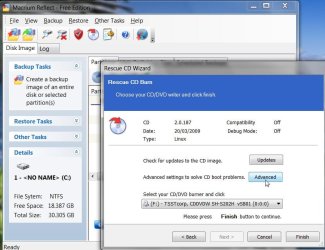
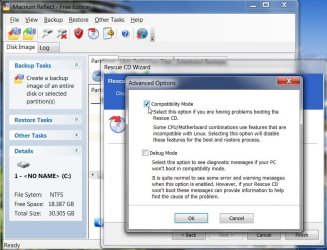
Otherwise, you can burn another using Advanced Options >Compatibility.

MACRIUM CD ADVANCED SETTINGS2009-08-19_184055.jpg

macrium cd -2-2009-08-19_184148.jpg

I seem to recall Miles Ahead downloaded the fully functional Trial version of Macrium - and used the cd from that , which apparently is a slightly newer version.

Jimbo - it didn't work when I tried it. Mind you, it was some time ago, it is an older version of the program , and as you say there could be any number of reasons for that. Cloning was fine though.
 

My Computers

System One System Two

  • Computer type
    PC/Desktop
    OS
    7 X64
    CPU
    i5 8400
    Motherboard
    gigabyte b365m ds3h
    Memory
    2x8gb 3200mhz
    Hard Drives
    various
    PSU
    pure power 11 400w cm
    Case
    Coolermaster
    Cooling
    cryorig m9i
  • Computer type
    PC/Desktop
    OS
    7x64
    CPU
    g5400
    Motherboard
    ga b365m ds3h
    Memory
    8gb ddr4 2400
    PSU
    xfx pro 450w
Back
Top