How do I block sites from accessing IIS webserver

jimbo45

New member
Guru
Gold Member
VIP
Local time
2:41 PM
Messages
5,941
Location
Hafnarfjörður IS
Hi guys
Not sure if question should be here or in Networking

Is there a way of BLOCKING some incoming sites from possibly accessing your web servers. Note this is for a HOME webserver with a bog standard home router -- so no corporate type of hardware firewall etc.

Using W7 X-64 build 7137 with latest IIS server installed

Looking at the Router log I see some entries like this I've blanked out the destination for obvious reasons)

TCP Packet - Source:125.65.165.139,12200 Destination:- [Web Server rule match]
Thu, 2009-07-30 09:43:03 - TCP Packet - Source:222.208.183.218,12200 Destination: - [Web Server rule match]
Thu, 2009-07-30 10:45:54 - TCP Packet - Source:222.208.183.218,12200 Destination:- [Web Server rule match]
Thu, 2009-07-30 11:49:15 - TCP Packet - Source:222.208.183.218,12200 Destination: - [Web Server rule match]
Thu, 2009-07-30 11:59:33 - TCP Packet - Source:125.65.165.139,12200


The IP 's found from the WHOIS IP site are

125.65.165.139 - Geo InformationIP Address125.65.165.139Host125.65.165.139Location
cn.gif
CN, ChinaCityChengdu, 32 -OrganizationCHINANET Sichuan province networkISPCHINANET Sichuan province networkAS NumberAS4134 No.31,Jin-rong Street


and
222.208.183.218 - Geo InformationIP Address222.208.183.218Host222.208.183.218Location
cn.gif
CN, ChinaCityChengdu, 32 -OrganizationCHINANET Sichuan province networkISPCHINANET Sichuan province networkAS NumberAS4134 No.31,Jin-rong Street


Any network gurus out there -- what do I need to do now if anything

BTW it doesn't look like they've logged on or anything -- decent passwords / firewalls / closed ports and router remote facility is turned off.

Cheers
jimbo
 

My Computer My Computer

At a glance

Linux CENTOS 7 / various Windows OS'es and se...Intel i7 Intel i58GB, 16GBOn Motherboard
Computer type
PC/Desktop
Computer Manufacturer/Model Number
Custom built, several laptops HP/ASUS
OS
Linux CENTOS 7 / various Windows OS'es and servers
CPU
Intel i7 Intel i5
Memory
8GB, 16GB
Graphics Card(s)
On Motherboard
Sound Card
Realtek HD audio
Monitor(s) Displays
Apple Cinema display, Samsung LCD
Screen Resolution
1920 X 1080
Hard Drives
4 X 1TB SATA
Mouse
Toshiba wireless laser
Internet Speed
> 20MB up
Hi Jimbo,

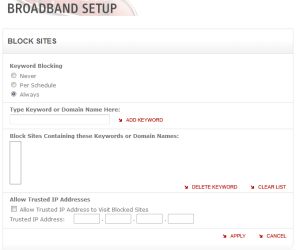
I'm no IIS/network/security guru but can't you set your router to deny certain Sites/IP addresses from 'passing' through your router?

For example:
Capture.PNG

Sorry, only think I can think of :p
 

My Computer My Computer

At a glance

Windows 7 Ultimate x64AMD Sempron Dual Core3GBNVIDIA GeForce 6150SE nForce 430
Computer Manufacturer/Model Number
Compaq Desktop
OS
Windows 7 Ultimate x64
CPU
AMD Sempron Dual Core
Memory
3GB
Graphics Card(s)
NVIDIA GeForce 6150SE nForce 430
Screen Resolution
1024x768
Hard Drives
150GB Sata
Hi there
I think the Router allows you to block users on your OWN site from accesssing specific web sites so for example you can prevent kids from having access to undesirable sites (Porn etc etc).

What I want is the OTHER way round - block certain IP addresses from accessing mi IIS server.

More expensive (Commercial type) routers seem to allows this but I can't seem to do ir with a cheap "Domestic" type router.

With security being more of an issue now I really think this feature should be implemented IN THE ROUTER.

Whatever one thinks of AV software and firewalls IMO it would also be helpful to block certain IP addresses from being able to attempt to logon in the first place.

I've changed the default IIS port but that won't stop a determined person from trying all possible ports -- would delay them a bit -- and I change it once a week in any case.

I'm not an expert at all in this stuff especially Windows networking although I have used an apache server on a linux box where you can configure "Black Lists" of domains and IP addresses.

Maybe the Forum software might have some idea as they can obviously ban people and know their IP addresses.

Cheers
jimbo
 

My Computer My Computer

At a glance

Linux CENTOS 7 / various Windows OS'es and se...Intel i7 Intel i58GB, 16GBOn Motherboard
Computer type
PC/Desktop
Computer Manufacturer/Model Number
Custom built, several laptops HP/ASUS
OS
Linux CENTOS 7 / various Windows OS'es and servers
CPU
Intel i7 Intel i5
Memory
8GB, 16GB
Graphics Card(s)
On Motherboard
Sound Card
Realtek HD audio
Monitor(s) Displays
Apple Cinema display, Samsung LCD
Screen Resolution
1920 X 1080
Hard Drives
4 X 1TB SATA
Mouse
Toshiba wireless laser
Internet Speed
> 20MB up
Jim

My linksys does have site blocking by either url, or ip. Im not sure how many sites it would allow but. could also block by country suffix, (ie cn) or ip range.

Ken
 

My Computer My Computer

At a glance

Win 8 Release candidate 8400[email protected]4 gigsNvidia 9600M
Computer Manufacturer/Model Number
HP Pavillion dv-7 1005 Tx
OS
Win 8 Release candidate 8400
CPU
[email protected]
Memory
4 gigs
Graphics Card(s)
Nvidia 9600M
Sound Card
HD built-in
Monitor(s) Displays
17" Wxga
Screen Resolution
1440x900
Cooling
none
Internet Speed
45Mb down 5Mb up
Jim

My linksys does have site blocking by either url, or ip. Im not sure how many sites it would allow but. could also block by country suffix, (ie cn) or ip range.

Ken

Hi there
can you check that because I think that the Router will block those sites from being accessed by computers INSIDE your network.


I want to block those IP addresses from acessing my site from OUTSIDE the router (I.E from the "Public Internet")

My router can block sites / IP addresses but only it seems to prevent computers on the network from acessing those sites.

I tested with a 2nd (DIFFERENT) network -- I blocked the IP address via the router -- that worked as I couldn't access the home page on the server on the 2nd network but it didn't stop the computer from the 2nd network from accessing the home page of the IIS server on the computer of the FIRST network -- i.e I couldn't block an INWARD request from the "general Internet".

Cheers
jimbo
 

My Computer My Computer

At a glance

Linux CENTOS 7 / various Windows OS'es and se...Intel i7 Intel i58GB, 16GBOn Motherboard
Computer type
PC/Desktop
Computer Manufacturer/Model Number
Custom built, several laptops HP/ASUS
OS
Linux CENTOS 7 / various Windows OS'es and servers
CPU
Intel i7 Intel i5
Memory
8GB, 16GB
Graphics Card(s)
On Motherboard
Sound Card
Realtek HD audio
Monitor(s) Displays
Apple Cinema display, Samsung LCD
Screen Resolution
1920 X 1080
Hard Drives
4 X 1TB SATA
Mouse
Toshiba wireless laser
Internet Speed
> 20MB up
Hi there
can you check that because I think that the Router will block those sites from being accessed by computers INSIDE your network.


I want to block those IP addresses from acessing my site from OUTSIDE the router (I.E from the "Public Internet")

My router can block sites / IP addresses but only it seems to prevent computers on the network from acessing those sites.

I tested with a 2nd (DIFFERENT) network -- I blocked the IP address via the router -- that worked as I couldn't access the home page on the server on the 2nd network but it didn't stop the computer from the 2nd network from accessing the home page of the IIS server on the computer of the FIRST network -- i.e I couldn't block an INWARD request from the "general Internet".

Cheers
jimbo

Jim
You absolutely correct. I understood what you wanted but when I went to look it didnt specify in my router. Your router is nat right? so is your chinese net touching the router but not the pc's inside? On a commercial router (I dont have one home either) it shouldn't pass a request/packet from an outside site without having a request from a browser ( or other app) inside.

Just rying to get my head around how you could do this

Ken
 

My Computer My Computer

At a glance

Win 8 Release candidate 8400[email protected]4 gigsNvidia 9600M
Computer Manufacturer/Model Number
HP Pavillion dv-7 1005 Tx
OS
Win 8 Release candidate 8400
CPU
[email protected]
Memory
4 gigs
Graphics Card(s)
Nvidia 9600M
Sound Card
HD built-in
Monitor(s) Displays
17" Wxga
Screen Resolution
1440x900
Cooling
none
Internet Speed
45Mb down 5Mb up
How you go about securing the website depends how how accessible you want it to be. Is it just for 1 or 2 people from set networks or a group of people on different networks or the whole internet. If it's just from certain people you could allow just there IP's through the router. If it starts getting more complicated then the rules on the homer router may not be enough and you would have to look at a software firewall on the PC.
 

My Computer My Computer

At a glance

Windows 7 x64Intel Core 2 Quad Q6700 @ 3.2 GHz4 GigATI Radeon HD 4870
Computer Manufacturer/Model Number
Home Built
OS
Windows 7 x64
CPU
Intel Core 2 Quad Q6700 @ 3.2 GHz
Motherboard
Gigabyte GA-965P-DQ6
Memory
4 Gig
Graphics Card(s)
ATI Radeon HD 4870
Sound Card
Creative X-Fi XtremeMusic
Monitor(s) Displays
Samsung SyncMaster 226BW
Screen Resolution
1680 x 1050
PSU
Antec TruePower TP-550
Case
Antec P180
Cooling
Zalman CNPS9700, 3 Antec TriCool 120mm
Keyboard
Logitech G15
Back
Top