Issue with uxstyle theme not skinning start menu/taskbar correctly

RonaldRaygun

New member
Local time
4:07 PM
Messages
6
Location
Bristol, United Kingdom
Hey all. From doing a bit of digging it seems to be a re-occurring theme but I created an account to ask for some help!

So i've just bought a new alienware m17x laptop and wanted to apply the Concave 7 theme to my copy of Windows 7 Home Premium 64bit. From what I've read the theme is an unsigned third party theme so the system needs to be patched to apply it properly.

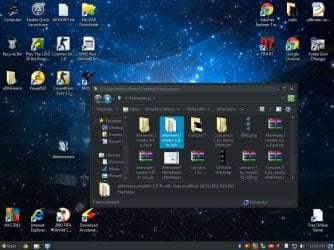
I downloaded the Concave 7 theme and copied the files to the Theme folder, went into personalize and when I selected the theme it changes the colours of everything but switches to the windows classic task bar/start menu in black, I've attached an example picture of someone else having the same problem. I've also attached an example of how the Concave 7 theme should look.

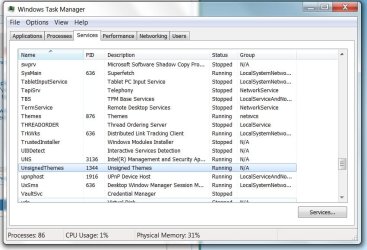
I've tried getting it to work with both Theme Patcher which didn't work so I restored the original system files and now I've got uxstyle installed. It all installed fine and I've got the UnsignedThemes service running (picture attached). I've tried the two sc config commands and also restarting the UnsignedThemes and the Desktop window manager services and still the theme reverts to the windows classic when I try to run it.

Sorry to post asking for help but I've been trawling the net for 2 days now and have found lots of solutions but none have worked.

Any input would be appreciated. Cheers guys!
 

Attachments
  • example.jpg
    example.jpg
    120.2 KB · Views: 55
  • UnsignedThemes.jpg
    UnsignedThemes.jpg
    77.1 KB · Views: 29
  • concave7 example.jpg
    concave7 example.jpg
    49.5 KB · Views: 52

My Computer My Computer

Computer Manufacturer/Model Number
Alienware M17x R4
OS
Widows 7 Home Premium 64bit
CPU
i7-3610QM
Memory
8gb DDR3 1600mhz
Graphics Card(s)
Nvidia Geforce GTX 675M
If I remember rightly you have to change the taskbar buttons to never combine, right click task bar then go to properties, change the taskbar buttons to never combine, i think its that one just flick through them.
 

My Computer My Computer

Computer type
PC/Desktop
Computer Manufacturer/Model Number
Self Build
OS
MS Windows 7 Professional 64-bit SP1
CPU
AMD FX(tm)-6100 Six-Core Processor Socket AM3+ (942)
Motherboard
ASUSTeK COMPUTER INC. SABERTOOTH 990FX (AM3r2)
Memory
8.00 GB Dual-Channel DDR3 @ 802MHz (11-11-11-36) 1.5Volts
Graphics Card(s)
NVIDIA GeForce GTX 560 Ti
Sound Card
Onboard Realtek HD
Monitor(s) Displays
shimian (1920x1080@60Hz)
Screen Resolution
1920*1080
Hard Drives
OCZ-AGIL ITY3 SATA Disk Device 120GB
PSU
Corsair TX 750
Case
Corsair
Cooling
WaterCooled
Keyboard
Microsoft Wired
Mouse
Logitech USB Optical TiltWheel Mouse
Internet Speed
Realtek PCIe GBE Family Controller 20MB*1MB
Antivirus
Avast
Browser
Firefox
Other Info
150GB Internal Hard Drive for Backing Up Important Files -
Hauppauge Nova-DT Dual DVB-T Tuner Device (+IR) -
USB PC Camera with Mic (SN9C105)
Hi Tom982,

I've tried using the Universal Theme Patcher and I got the same results that I'm getting now thats why I originally restored the files then tried using uxstyle. I'll try uninstalling uxstyle now and trying again but I imagine I'll get the same results.


If I remember rightly you have to change the taskbar buttons to never combine, right click task bar then go to properties, change the taskbar buttons to never combine, i think its that one just flick through them.

Hey Anythony, I've already got that feature disable as I hate it
 

My Computer My Computer

Computer Manufacturer/Model Number
Alienware M17x R4
OS
Widows 7 Home Premium 64bit
CPU
i7-3610QM
Memory
8gb DDR3 1600mhz
Graphics Card(s)
Nvidia Geforce GTX 675M
Can you link me to the Concave 7 you downloaded so i can test it?
 

My Computer My Computer

Computer type
PC/Desktop
Computer Manufacturer/Model Number
Self Build
OS
MS Windows 7 Professional 64-bit SP1
CPU
AMD FX(tm)-6100 Six-Core Processor Socket AM3+ (942)
Motherboard
ASUSTeK COMPUTER INC. SABERTOOTH 990FX (AM3r2)
Memory
8.00 GB Dual-Channel DDR3 @ 802MHz (11-11-11-36) 1.5Volts
Graphics Card(s)
NVIDIA GeForce GTX 560 Ti
Sound Card
Onboard Realtek HD
Monitor(s) Displays
shimian (1920x1080@60Hz)
Screen Resolution
1920*1080
Hard Drives
OCZ-AGIL ITY3 SATA Disk Device 120GB
PSU
Corsair TX 750
Case
Corsair
Cooling
WaterCooled
Keyboard
Microsoft Wired
Mouse
Logitech USB Optical TiltWheel Mouse
Internet Speed
Realtek PCIe GBE Family Controller 20MB*1MB
Antivirus
Avast
Browser
Firefox
Other Info
150GB Internal Hard Drive for Backing Up Important Files -
Hauppauge Nova-DT Dual DVB-T Tuner Device (+IR) -
USB PC Camera with Mic (SN9C105)
Hi Tom982,

I've tried using the Universal Theme Patcher and I got the same results that I'm getting now thats why I originally restored the files then tried using uxstyle. I'll try uninstalling uxstyle now and trying again but I imagine I'll get the same results.

Sorry RonaldRaygun, I misread your first post and when I realised, I deleted my post :) When you used UTP, did you patch both system32 and syswow64 files? I only had to do system32 on my 64bit installation, but it says sometimes both are needed.

Tom
 

My Computer My Computer

Computer type
PC/Desktop
Computer Manufacturer/Model Number
Build #1
OS
Windows 8.1 Pro x64
CPU
Intel i7 3770K @4.5GHz
Motherboard
ASUS P8Z77-V PRO
Memory
Corsair Vengeance 2x4GB DDR3 1600MHz Low Profile (White)
Graphics Card(s)
Gigabyte Radeon HD 7850 (2GB GDDR5)
Sound Card
Integrated on motherboard
Monitor(s) Displays
23" LG LCD/LED IPS
Screen Resolution
1920*1080
Hard Drives
Samsung EVO 128GB SSD
Seagate Barracuda 2GB 7200rpm
2x Seagate FreeAgent [500gb]
PSU
Corsair TX650W V2 (80+ Bronze)
Case
NZXT Phantom 410 White
Cooling
Corsair H100 Water Cooler
Keyboard
Microsoft Desktop 2000 Wireless Keyboard
Mouse
Microsoft Desktop 2000 Wireless Mouse
Internet Speed
95 Mb/s Download 70 Mb/s Upload
Antivirus
MSE + MBAM Pro
Browser
Firefox
Hi Tom982,

I've tried using the Universal Theme Patcher and I got the same results that I'm getting now thats why I originally restored the files then tried using uxstyle. I'll try uninstalling uxstyle now and trying again but I imagine I'll get the same results.

Sorry RonaldRaygun, I misread your first post and when I realised, I deleted my post :) When you used UTP, did you patch both system32 and syswow64 files? I only had to do system32 on my 64bit installation, but it says sometimes both are needed.

Tom

Hmmm I just ran the x64 version and patched those three, should I run the x84 version as well and patch those?
 

My Computer My Computer

Computer Manufacturer/Model Number
Alienware M17x R4
OS
Widows 7 Home Premium 64bit
CPU
i7-3610QM
Memory
8gb DDR3 1600mhz
Graphics Card(s)
Nvidia Geforce GTX 675M
I just tested it and the same thing is happening, i think it might have something to do with sp1, anyway here is a link to the guy that made it MrGRiM01 on deviantART , he is a member at sevenforums.

Maybe you can ask him what the problem is...
 

My Computer My Computer

Computer type
PC/Desktop
Computer Manufacturer/Model Number
Self Build
OS
MS Windows 7 Professional 64-bit SP1
CPU
AMD FX(tm)-6100 Six-Core Processor Socket AM3+ (942)
Motherboard
ASUSTeK COMPUTER INC. SABERTOOTH 990FX (AM3r2)
Memory
8.00 GB Dual-Channel DDR3 @ 802MHz (11-11-11-36) 1.5Volts
Graphics Card(s)
NVIDIA GeForce GTX 560 Ti
Sound Card
Onboard Realtek HD
Monitor(s) Displays
shimian (1920x1080@60Hz)
Screen Resolution
1920*1080
Hard Drives
OCZ-AGIL ITY3 SATA Disk Device 120GB
PSU
Corsair TX 750
Case
Corsair
Cooling
WaterCooled
Keyboard
Microsoft Wired
Mouse
Logitech USB Optical TiltWheel Mouse
Internet Speed
Realtek PCIe GBE Family Controller 20MB*1MB
Antivirus
Avast
Browser
Firefox
Other Info
150GB Internal Hard Drive for Backing Up Important Files -
Hauppauge Nova-DT Dual DVB-T Tuner Device (+IR) -
USB PC Camera with Mic (SN9C105)
Hi Tom982,

I've tried using the Universal Theme Patcher and I got the same results that I'm getting now thats why I originally restored the files then tried using uxstyle. I'll try uninstalling uxstyle now and trying again but I imagine I'll get the same results.

Sorry RonaldRaygun, I misread your first post and when I realised, I deleted my post :) When you used UTP, did you patch both system32 and syswow64 files? I only had to do system32 on my 64bit installation, but it says sometimes both are needed.

Tom

Hmmm I just ran the x64 version and patched those three, should I run the x84 version as well and patch those?

x64 = Patch system32 files
x86 = Patch syswow64 files

Tom :)
 

My Computer My Computer

Computer type
PC/Desktop
Computer Manufacturer/Model Number
Build #1
OS
Windows 8.1 Pro x64
CPU
Intel i7 3770K @4.5GHz
Motherboard
ASUS P8Z77-V PRO
Memory
Corsair Vengeance 2x4GB DDR3 1600MHz Low Profile (White)
Graphics Card(s)
Gigabyte Radeon HD 7850 (2GB GDDR5)
Sound Card
Integrated on motherboard
Monitor(s) Displays
23" LG LCD/LED IPS
Screen Resolution
1920*1080
Hard Drives
Samsung EVO 128GB SSD
Seagate Barracuda 2GB 7200rpm
2x Seagate FreeAgent [500gb]
PSU
Corsair TX650W V2 (80+ Bronze)
Case
NZXT Phantom 410 White
Cooling
Corsair H100 Water Cooler
Keyboard
Microsoft Desktop 2000 Wireless Keyboard
Mouse
Microsoft Desktop 2000 Wireless Mouse
Internet Speed
95 Mb/s Download 70 Mb/s Upload
Antivirus
MSE + MBAM Pro
Browser
Firefox
I just tested it and the same thing is happening, i think it might have something to do with sp1, anyway here is a link to the guy that made it MrGRiM01 on deviantART , he is a member at sevenforums.

Maybe you can ask him what the problem is...

Aww fair enough, I'll drop him a PM and see if I can find out what's going on. I don't suppose you know of any good themes that you can get working on SP1 that look similar to the one posted?

-- don't suppose you know what his account on here is do you?
 

My Computer My Computer

Computer Manufacturer/Model Number
Alienware M17x R4
OS
Widows 7 Home Premium 64bit
CPU
i7-3610QM
Memory
8gb DDR3 1600mhz
Graphics Card(s)
Nvidia Geforce GTX 675M
Deviantart is probably your best bet for themes.

Here is his Profile page, Hes not been on for a while so it might be a waste of time contacting him through that.
 

My Computer My Computer

Computer type
PC/Desktop
Computer Manufacturer/Model Number
Self Build
OS
MS Windows 7 Professional 64-bit SP1
CPU
AMD FX(tm)-6100 Six-Core Processor Socket AM3+ (942)
Motherboard
ASUSTeK COMPUTER INC. SABERTOOTH 990FX (AM3r2)
Memory
8.00 GB Dual-Channel DDR3 @ 802MHz (11-11-11-36) 1.5Volts
Graphics Card(s)
NVIDIA GeForce GTX 560 Ti
Sound Card
Onboard Realtek HD
Monitor(s) Displays
shimian (1920x1080@60Hz)
Screen Resolution
1920*1080
Hard Drives
OCZ-AGIL ITY3 SATA Disk Device 120GB
PSU
Corsair TX 750
Case
Corsair
Cooling
WaterCooled
Keyboard
Microsoft Wired
Mouse
Logitech USB Optical TiltWheel Mouse
Internet Speed
Realtek PCIe GBE Family Controller 20MB*1MB
Antivirus
Avast
Browser
Firefox
Other Info
150GB Internal Hard Drive for Backing Up Important Files -
Hauppauge Nova-DT Dual DVB-T Tuner Device (+IR) -
USB PC Camera with Mic (SN9C105)
I HAVE FINALLY FIGURED IT OUT!!! if you're having the same problem as me please don't dispair! Right click on your desktop, click personalise then display on the bottom left (this may be visible through your control panel if you cant find it here) then you want to change 'Make it easier to read what's on your screen' to 100% (mine was set to 125%) and la de dah it should all work!

took me 2 days to figure this out don't let it take you so long :D
 

My Computer My Computer

Computer Manufacturer/Model Number
Alienware M17x R4
OS
Widows 7 Home Premium 64bit
CPU
i7-3610QM
Memory
8gb DDR3 1600mhz
Graphics Card(s)
Nvidia Geforce GTX 675M
Back
Top