
You are using an out of date browser. It may not display this or other websites correctly.
You should upgrade or use an alternative browser.
You should upgrade or use an alternative browser.
Solved Need Direct Download Link For Windows Xp
- Thread starter addan
- Start date

Sorry but there are no official downloads and posting a pirate link would get the poster banned.
My Computer
- Computer type
- PC/Desktop
- OS
- Windows 11

What about the ISO from MS...if the original poster has a legit Product Key? Would be that be consider ok to link to.
My Computer
- Computer Manufacturer/Model Number
- Custom built
- OS
- Windows 7 Ultimate 64 bit
- CPU
- AMD Phenom II X4 965 Black Edition
- Motherboard
- Gigabyte GA-MA790X-DS4
- Memory
- GSkill 4 X 2 GB PC 8500
- Graphics Card(s)
- XFX Radeon HD 6790 D
- Sound Card
- On board RealTek HD
- Monitor(s) Displays
- Dual monitors:Samsung SyncMaster S20B300
- Screen Resolution
- 1600 X 900
- Hard Drives
- Seagate Barracuda 1TB (primary)
Seagate Barracuda 2 X 320 GB
- PSU
- Ultra X4 750 watt fully modular
- Case
- Thermaltake Overseer RX 1 full tower
- Cooling
- Core-Contact 92 mm CPU Cooler
- Keyboard
- Logitech G510
- Mouse
- Razor DeathAdder
- Internet Speed
- 50/5 Mbps UL/DL
- Other Info
- Optical: Super Muliti DVD burner w/lightscribe, Hauppauge WinTV HVR-1800
An XP ISO from MSFT? I've never seen an official one posted.
My Computer
- Computer type
- PC/Desktop
- OS
- Windows 11
Well, we kind of have. We've mentioned there is no official ISO available.
And as mentioned, posting a link to pirated copy would result in a ban.
And as mentioned, posting a link to pirated copy would result in a ban.
My Computer
- Computer type
- PC/Desktop
- Computer Manufacturer/Model Number
- Systems by SmartEyeball
- OS
- 8 Pro x64
- CPU
- i7 3770K 4.6GHz
- Motherboard
- ASUS P8Z77 WS
- Memory
- 16GB G.Skill Trident X 2666mhz
- Graphics Card(s)
- x2 EVGA 780 Ti Superclocked SLI
- Sound Card
- SB X-FI Surround 5.1 PRO USB / ATH-AD900 Headphones
- Monitor(s) Displays
- x3 Dell U2410 / 58" Samsung
- Screen Resolution
- 5760*1200/ 1920*1200
- Hard Drives
- 2x Intel 520 240GB (RAID 0) * 2x WD Caviar Blacks 2TB (RAID 0) * 2TB WD Caviar Black * Sony Optirac DVD
- PSU
- Silverstone Strider Evolution 1200W
- Case
- Thermaltake Level 10 GT Snow Edition
- Cooling
- Noctua NH-D14
- Keyboard
- Topre Realforce // Ducky Shine MX Black // Filco Ninja TKL
- Mouse
- Thermaltake Theron (Highly Recommended) + Razer Imperator
- Antivirus
- MSE
- Browser
- IE, FF, WaterFox
- Other Info
- GT Extreme V2 Sim Racing Cockpit + 40" LCD and K/B Mouse stand ▼
Fanatec CSR Elite Wheel + Clubsport V1 Pedals + CSR shifter/7G-H ▼Saitek X52 Pro ▼ TrackIR 5 Pro
Buttkicker v2 Seat Rumbler with Dedicated 5.1 and Sub Woofer attached to frame ▼
=
Bloody Big Grin
its mean no luck ...?
Sorry, no luck, I've never heard of an official MS download for XP either.
What sort of problem are you having?
My Computer
- OS
- Windows 7 Ultimate x64

- Local time
- 3:20 AM
- Messages
- 28
last time i was using windows 7 pro everything working fine but some days ago i reinstall win 7 pro and update it from MS after updated my wireless card stop working i ask this problem in this forum
http://www.sevenforums.com/network-sharing/244423-wifi-not-work-windows-7-pro-after-updates.html
there for i m going back to window Xp but problem is that i lost my windows xp CD i think my son break CD.but i have my orignal CD key therefor i m asking for ISO from MS to make new CD and use my Key.
http://www.sevenforums.com/network-sharing/244423-wifi-not-work-windows-7-pro-after-updates.html
there for i m going back to window Xp but problem is that i lost my windows xp CD i think my son break CD.but i have my orignal CD key therefor i m asking for ISO from MS to make new CD and use my Key.
My Computer
- OS
- windows 7 Pro 32

But did you not follow the sound advice given by chev65 in you previous thread here:
http://www.sevenforums.com/network-sharing/244423-wifi-not-work-windows-7-pro-after-updates.html
It' very much a retrograde step to go back to XP!
http://www.sevenforums.com/network-sharing/244423-wifi-not-work-windows-7-pro-after-updates.html
It' very much a retrograde step to go back to XP!
My Computer
- Computer type
- PC/Desktop
- OS
- Microsoft Windows 7 Home Premium 64-bit 7601 Multiprocessor Free Service Pack 1
- CPU
- Intel(R) Core(TM) i7-3770 CPU @ 3.40GHz
- Motherboard
- ASUSTeK COMPUTER INC. P8H77-M
- Memory
- 8.00 GB
- Graphics Card(s)
- Intel(R) HD Graphics 4000
- Sound Card
- On Board
- Monitor(s) Displays
- Dell 24"
- Screen Resolution
- 1920 x 1080
- Hard Drives
- (1) INTEL SSDSC2CT180A3 ATA Device (2) ST500DM002-1BD142 ATA Device (3) WDC WD3200AAKS-75L9A0 ATA Device (4) Generic- Compact Flash USB Device (5) Generic- MS/MS-Pro USB Device (6) Generic- SD/MMC USB Device (7) Generic- SM/xD-Picture USB
- PSU
- 500w Corsair
- Case
- Cooler Master
- Cooling
- 3 Fans
- Keyboard
- Logitech MK300
- Mouse
- Logitech WOM
- Internet Speed
- 75Mb
- Antivirus
- Norton 360
- Browser
- Firefox, Opera, IE
 is here any way to check my wireless card is card is working fine or faulty ?
Click Start, right click "Computer" Click "Manage" Click "Device manager" and see if there is an entry for your Wireless Card. Is there a yellow triangle against it? Double click the Wireless Card and that will open a window which will tell you if there is a problem!. is there any way to check my wireless card is card is working fine or faulty ?
My Computer
- Computer type
- PC/Desktop
- OS
- Microsoft Windows 7 Home Premium 64-bit 7601 Multiprocessor Free Service Pack 1
- CPU
- Intel(R) Core(TM) i7-3770 CPU @ 3.40GHz
- Motherboard
- ASUSTeK COMPUTER INC. P8H77-M
- Memory
- 8.00 GB
- Graphics Card(s)
- Intel(R) HD Graphics 4000
- Sound Card
- On Board
- Monitor(s) Displays
- Dell 24"
- Screen Resolution
- 1920 x 1080
- Hard Drives
- (1) INTEL SSDSC2CT180A3 ATA Device (2) ST500DM002-1BD142 ATA Device (3) WDC WD3200AAKS-75L9A0 ATA Device (4) Generic- Compact Flash USB Device (5) Generic- MS/MS-Pro USB Device (6) Generic- SD/MMC USB Device (7) Generic- SM/xD-Picture USB
- PSU
- 500w Corsair
- Case
- Cooler Master
- Cooling
- 3 Fans
- Keyboard
- Logitech MK300
- Mouse
- Logitech WOM
- Internet Speed
- 75Mb
- Antivirus
- Norton 360
- Browser
- Firefox, Opera, IE

OK Download and run Belarc Advisor from here:
Belarc Advisor - Free Personal PC Audit, for software, hardware and security configuration information on your computer. Software license management, IT asset management, cyber security audits, and more.
and see if that can find the Wireless card
Can you also fill in your System Specs please as we don't even know whether you have a laptop or desktop PC!
All the details you need to complete your system specs in the User Control Panel under "Edit System Specs" will be contained in the Belarc output details. Also post a screenshot of the relevant part of the Belarc Sheet please!
Belarc Advisor - Free Personal PC Audit, for software, hardware and security configuration information on your computer. Software license management, IT asset management, cyber security audits, and more.
and see if that can find the Wireless card
Can you also fill in your System Specs please as we don't even know whether you have a laptop or desktop PC!
All the details you need to complete your system specs in the User Control Panel under "Edit System Specs" will be contained in the Belarc output details. Also post a screenshot of the relevant part of the Belarc Sheet please!
My Computer
- Computer type
- PC/Desktop
- OS
- Microsoft Windows 7 Home Premium 64-bit 7601 Multiprocessor Free Service Pack 1
- CPU
- Intel(R) Core(TM) i7-3770 CPU @ 3.40GHz
- Motherboard
- ASUSTeK COMPUTER INC. P8H77-M
- Memory
- 8.00 GB
- Graphics Card(s)
- Intel(R) HD Graphics 4000
- Sound Card
- On Board
- Monitor(s) Displays
- Dell 24"
- Screen Resolution
- 1920 x 1080
- Hard Drives
- (1) INTEL SSDSC2CT180A3 ATA Device (2) ST500DM002-1BD142 ATA Device (3) WDC WD3200AAKS-75L9A0 ATA Device (4) Generic- Compact Flash USB Device (5) Generic- MS/MS-Pro USB Device (6) Generic- SD/MMC USB Device (7) Generic- SM/xD-Picture USB
- PSU
- 500w Corsair
- Case
- Cooler Master
- Cooling
- 3 Fans
- Keyboard
- Logitech MK300
- Mouse
- Logitech WOM
- Internet Speed
- 75Mb
- Antivirus
- Norton 360
- Browser
- Firefox, Opera, IE
i think my wireless card is not working look in this picture.. ??
I see the wired adapter, but there is no wireless adapter. Might go into the BIOS to see if there's anything there that can enable the wireless card.
My Computer
- OS
- Windows 7 Ultimate x64
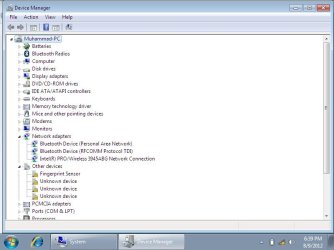
So it was just a bad seat causing the problem! Should have thought of that earlier Mind you still don't know if it was a laptop or desktop so feel a bit better!!!!!!
Mind you still don't know if it was a laptop or desktop so feel a bit better!!!!!!My Computer
- Computer type
- PC/Desktop
- OS
- Microsoft Windows 7 Home Premium 64-bit 7601 Multiprocessor Free Service Pack 1
- CPU
- Intel(R) Core(TM) i7-3770 CPU @ 3.40GHz
- Motherboard
- ASUSTeK COMPUTER INC. P8H77-M
- Memory
- 8.00 GB
- Graphics Card(s)
- Intel(R) HD Graphics 4000
- Sound Card
- On Board
- Monitor(s) Displays
- Dell 24"
- Screen Resolution
- 1920 x 1080
- Hard Drives
- (1) INTEL SSDSC2CT180A3 ATA Device (2) ST500DM002-1BD142 ATA Device (3) WDC WD3200AAKS-75L9A0 ATA Device (4) Generic- Compact Flash USB Device (5) Generic- MS/MS-Pro USB Device (6) Generic- SD/MMC USB Device (7) Generic- SM/xD-Picture USB
- PSU
- 500w Corsair
- Case
- Cooler Master
- Cooling
- 3 Fans
- Keyboard
- Logitech MK300
- Mouse
- Logitech WOM
- Internet Speed
- 75Mb
- Antivirus
- Norton 360
- Browser
- Firefox, Opera, IE
thanks Every one now working fine i open wireless card slat and press it again now card is working fine any way thanks all.
Good to hear you've got it working again! Aren't you glad you didn't have to go back to XP afterall?
One odd thing I see in your last screenshot is the fact that I don't see your wired adapter anymore. Did you remove the card?
My Computer
- OS
- Windows 7 Ultimate x64
Mind you still don't know if it was a laptop or desktop so feel a bit better!!!!!!
I'm going with laptop, since battery is listed in device manager.
My Computer
- Computer type
- PC/Desktop
- Computer Manufacturer/Model Number
- Self Built
- OS
- Win 10 Pro x64
- CPU
- Intel I5-2500K @3.3GHz
- Motherboard
- Asrock P67 Extreme4
- Memory
- 16GB G.Skill Ripjaws X (4x4GB)
- Graphics Card(s)
- EVGA GeForce 750 Ti SC 2GB
- Sound Card
- ASUS Xonar DG 5.1 Channels 24-bit 96KHz PCI Interface Sound
- Monitor(s) Displays
- auria eq2367
- Screen Resolution
- 1920 x 1080
- Hard Drives
- 250GB Samsung 850 EVO SSD
1TB WD Blue
1TB Hitachi
- PSU
- SeaSonic X 650W 80 Plus Gold
- Case
- Corsair Obsidian 750D
- Cooling
- Corsair H60, Three 140mm case fans
- Keyboard
- Logitech Wireless Keyboard K520
- Mouse
- Logitech Wireless Mouse M310
- Internet Speed
- Wave Broadband ~ 100 dn 5 up
- Antivirus
- Windows Defender, Malwarebytes Premium
- Browser
- Edge, IE11, Chrome
- Other Info
- Laptop specs: HP g7-1365dx /
CPU: AMD A6-3420M APU with Radeon(tm) HD Graphics /
RAM: Crucial 8Gb (2x4Gb) /
SSD: Crucial M4-CT128M4SSD2 ATA Device/ FW 000F /
GFX: AMD Radeon HD 6520G /
OS: Windows 10 Pro x64
But I favour a desktop otherwise how could he reseat the wireless card? I don't use a laptop but would it not be quite difficult to get to the card?Mind you still don't know if it was a laptop or desktop so feel a bit better!!!!!!
I'm going with laptop, since battery is listed in device manager.
My Computer
- Computer type
- PC/Desktop
- OS
- Microsoft Windows 7 Home Premium 64-bit 7601 Multiprocessor Free Service Pack 1
- CPU
- Intel(R) Core(TM) i7-3770 CPU @ 3.40GHz
- Motherboard
- ASUSTeK COMPUTER INC. P8H77-M
- Memory
- 8.00 GB
- Graphics Card(s)
- Intel(R) HD Graphics 4000
- Sound Card
- On Board
- Monitor(s) Displays
- Dell 24"
- Screen Resolution
- 1920 x 1080
- Hard Drives
- (1) INTEL SSDSC2CT180A3 ATA Device (2) ST500DM002-1BD142 ATA Device (3) WDC WD3200AAKS-75L9A0 ATA Device (4) Generic- Compact Flash USB Device (5) Generic- MS/MS-Pro USB Device (6) Generic- SD/MMC USB Device (7) Generic- SM/xD-Picture USB
- PSU
- 500w Corsair
- Case
- Cooler Master
- Cooling
- 3 Fans
- Keyboard
- Logitech MK300
- Mouse
- Logitech WOM
- Internet Speed
- 75Mb
- Antivirus
- Norton 360
- Browser
- Firefox, Opera, IE
Similar threads
- Replies
- 4
- Views
- 2K

- Replies
- 2
- Views
- 18K
