Solved disk management, how do i allocate more drive space

malkari

New member
Local time
4:22 PM
Messages
9
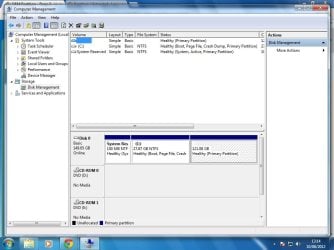
hi sorry to bother you i recently installed win7 ultimate x64 and wondering why there is a non labelled partition with over 100 gig ,the thing is i had a mate fit this hd in for me and said he had to dos format it or something im not sure what he did as im not a techy person i know he said he deleted 2 partitions and left 2 on.Is there a chance i could delete the uknown one to allocate for more space pls .:o
 

Attachments

  • partition.jpg
    partition.jpg
    80.9 KB · Views: 39

My Computer My Computer

OS
win7 ultimate x64
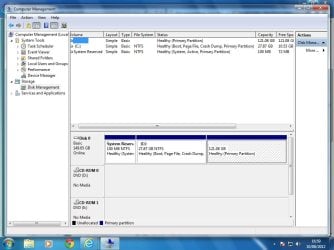
heres a better pic

better screenshot of management
 

Attachments

  • partition2.jpg
    partition2.jpg
    82.8 KB · Views: 45

My Computer My Computer

OS
win7 ultimate x64
The small partition is allocated by windows.
If you are not familiar with the disk manager,
keep far away from it.
100M is useless for storing anything.:rolleyes:
 

My Computer My Computer

OS
Windows 7 64 bit
no ive no idea lol so any1 know how i can pls
 

My Computer My Computer

OS
win7 ultimate x64
Hello malkari, welcome to Seven Forums!


If you're referring to the one on the far right, there in Windows disk management right click the partition and click "Change Drive ..." then "Add Letter" that will/should give you access to it.


Do not give the one on the far left a letter.
 

My Computer My Computer

Computer Manufacturer/Model Number
* BFK Customs *
OS
W 7 64-bit Ultimate
CPU
Intel Q9550 Yorkfield
Motherboard
ASUS P5Q Pro
Memory
8GB Dominator 8500C5D
Graphics Card(s)
ATI : XFX 5870
Sound Card
Realtek HD Audio 7-1
Monitor(s) Displays
1x 47" LCD HDMI & 3x 26" LCD HDMI
Screen Resolution
1920x1080P & 1920x1200
Hard Drives
1x 80GB Intel X25-M G2 SSD : 1x 500GB & 1x 640GB WD Caviar Black(s)
PSU
Corsair 620HX
Case
Cooler Master RC-690
Cooling
Tuniq Tower 120, 2x 140mm and 3x 120mm case fans
Keyboard
Microsoft 500
Mouse
Razer Diamondback 3G
Internet Speed
14 Mb/s
Other Info
1x Koutech 3Gb/s SATA HDD Hot Swap Rack
i think i know what you mean the one that has over 100 gig unused and no label,sorry im a newbie. the far right with over 100 gig will only let me delete it
 

My Computer My Computer

OS
win7 ultimate x64
i think i know what you mean the one that has over 100 gig unused and no label,sorry im a newbie.

Hello malkari, welcome to Seven Forums!


If you're referring to the one on the far right, there in Windows disk management right click the partition and click "Change Drive ..." then "Add Letter" that will/should give you access to it.


Do not give the one on the far left a letter.

Yes that one, leave the one on the left alone or you will be sorry. ;)
 

My Computer My Computer

Computer Manufacturer/Model Number
* BFK Customs *
OS
W 7 64-bit Ultimate
CPU
Intel Q9550 Yorkfield
Motherboard
ASUS P5Q Pro
Memory
8GB Dominator 8500C5D
Graphics Card(s)
ATI : XFX 5870
Sound Card
Realtek HD Audio 7-1
Monitor(s) Displays
1x 47" LCD HDMI & 3x 26" LCD HDMI
Screen Resolution
1920x1080P & 1920x1200
Hard Drives
1x 80GB Intel X25-M G2 SSD : 1x 500GB & 1x 640GB WD Caviar Black(s)
PSU
Corsair 620HX
Case
Cooler Master RC-690
Cooling
Tuniq Tower 120, 2x 140mm and 3x 120mm case fans
Keyboard
Microsoft 500
Mouse
Razer Diamondback 3G
Internet Speed
14 Mb/s
Other Info
1x Koutech 3Gb/s SATA HDD Hot Swap Rack
drive c will let me change drive letter ect but the 100gig will only say delete volume?:shock:
 

My Computer My Computer

OS
win7 ultimate x64
What are you needing to do make C: larger?


If you are sure there is nothing on the partition to the right you need then just delete it then right click C: and click "Extend Volume" that should do it for you.
 

My Computer My Computer

Computer Manufacturer/Model Number
* BFK Customs *
OS
W 7 64-bit Ultimate
CPU
Intel Q9550 Yorkfield
Motherboard
ASUS P5Q Pro
Memory
8GB Dominator 8500C5D
Graphics Card(s)
ATI : XFX 5870
Sound Card
Realtek HD Audio 7-1
Monitor(s) Displays
1x 47" LCD HDMI & 3x 26" LCD HDMI
Screen Resolution
1920x1080P & 1920x1200
Hard Drives
1x 80GB Intel X25-M G2 SSD : 1x 500GB & 1x 640GB WD Caviar Black(s)
PSU
Corsair 620HX
Case
Cooler Master RC-690
Cooling
Tuniq Tower 120, 2x 140mm and 3x 120mm case fans
Keyboard
Microsoft 500
Mouse
Razer Diamondback 3G
Internet Speed
14 Mb/s
Other Info
1x Koutech 3Gb/s SATA HDD Hot Swap Rack
yes im wanting to make c larger thankyou all
 

My Computer My Computer

OS
win7 ultimate x64
What are you needing to do make C: larger?


If you are sure there is nothing on the partition to the right you need then just delete it then right click C: and click "Extend Volume" that should do it for you.


Do this.
 

My Computer My Computer

Computer Manufacturer/Model Number
* BFK Customs *
OS
W 7 64-bit Ultimate
CPU
Intel Q9550 Yorkfield
Motherboard
ASUS P5Q Pro
Memory
8GB Dominator 8500C5D
Graphics Card(s)
ATI : XFX 5870
Sound Card
Realtek HD Audio 7-1
Monitor(s) Displays
1x 47" LCD HDMI & 3x 26" LCD HDMI
Screen Resolution
1920x1080P & 1920x1200
Hard Drives
1x 80GB Intel X25-M G2 SSD : 1x 500GB & 1x 640GB WD Caviar Black(s)
PSU
Corsair 620HX
Case
Cooler Master RC-690
Cooling
Tuniq Tower 120, 2x 140mm and 3x 120mm case fans
Keyboard
Microsoft 500
Mouse
Razer Diamondback 3G
Internet Speed
14 Mb/s
Other Info
1x Koutech 3Gb/s SATA HDD Hot Swap Rack
ty all i can install a vid card and memory but hds lol no way.im a bit wary .
 

My Computer My Computer

OS
win7 ultimate x64
Did you get C: extended into that space?
 

My Computer My Computer

Computer Manufacturer/Model Number
* BFK Customs *
OS
W 7 64-bit Ultimate
CPU
Intel Q9550 Yorkfield
Motherboard
ASUS P5Q Pro
Memory
8GB Dominator 8500C5D
Graphics Card(s)
ATI : XFX 5870
Sound Card
Realtek HD Audio 7-1
Monitor(s) Displays
1x 47" LCD HDMI & 3x 26" LCD HDMI
Screen Resolution
1920x1080P & 1920x1200
Hard Drives
1x 80GB Intel X25-M G2 SSD : 1x 500GB & 1x 640GB WD Caviar Black(s)
PSU
Corsair 620HX
Case
Cooler Master RC-690
Cooling
Tuniq Tower 120, 2x 140mm and 3x 120mm case fans
Keyboard
Microsoft 500
Mouse
Razer Diamondback 3G
Internet Speed
14 Mb/s
Other Info
1x Koutech 3Gb/s SATA HDD Hot Swap Rack
heck it did it tyvm everybody and especially bare foot kid :D i know it will but hopefully pc work after switchin off pc :D
 

My Computer My Computer

OS
win7 ultimate x64
Good we could help and you're welcome.


As long as you don't mess with the partition on the far left.
 

My Computer My Computer

Computer Manufacturer/Model Number
* BFK Customs *
OS
W 7 64-bit Ultimate
CPU
Intel Q9550 Yorkfield
Motherboard
ASUS P5Q Pro
Memory
8GB Dominator 8500C5D
Graphics Card(s)
ATI : XFX 5870
Sound Card
Realtek HD Audio 7-1
Monitor(s) Displays
1x 47" LCD HDMI & 3x 26" LCD HDMI
Screen Resolution
1920x1080P & 1920x1200
Hard Drives
1x 80GB Intel X25-M G2 SSD : 1x 500GB & 1x 640GB WD Caviar Black(s)
PSU
Corsair 620HX
Case
Cooler Master RC-690
Cooling
Tuniq Tower 120, 2x 140mm and 3x 120mm case fans
Keyboard
Microsoft 500
Mouse
Razer Diamondback 3G
Internet Speed
14 Mb/s
Other Info
1x Koutech 3Gb/s SATA HDD Hot Swap Rack
a million thanks all heh now ive learnt something new now heh and btw sorry for not saying hi to everybody hi all lol :),hope every1 gets problems sorted .
 

My Computer My Computer

OS
win7 ultimate x64
Back
Top