how do i make my user account in win 7 be the administrator

nfsworldpinoy

New member
Member
VIP
Local time
8:22 AM
Messages
117
when running in cmd i must be administrator to make the commands work

how do i make my user account be the administrator

i dont want to right click and run as admin all the time
 

My Computer My Computer

At a glance

windows xp pro 32-bit
OS
windows xp pro 32-bit
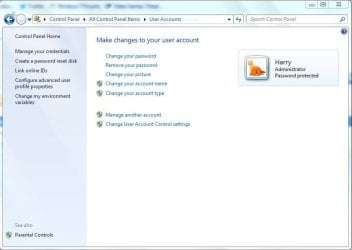
Go to User Accounts within the Control Panel, then click on Change Account Type of your user.
 

Attachments

  • User Accounts.JPG
    User Accounts.JPG
    43.9 KB · Views: 15

My Computer My Computer

Computer type
Laptop
Go to User Accounts within the Control Panel, then click on Change Account Type of your user.

I think you may also have to Administrator to change your account type too, but Windows provides you will a Administrative account any way.

Log-on with: Administrator

Should log-on you on as the default account Windows creates when you install the OS.
 

My Computer My Computer

Computer type
Laptop
when running in cmd i must be administrator to make the commands work

how do i make my user account be the administrator

i dont want to right click and run as admin all the time
If you have a standard user account you cannot change that account to "Administrator" If you could that would destroy the whole idea of different levels of account. An Administrator can create a user account or another Administrator Account but a User Account cannot. There must always be one Administrator Account to every installation of Windows 7.
Are you getting a little confused about the Windows Built in Administrator?
 

My Computer My Computer

At a glance

Microsoft Windows 7 Home Premium 64-bit 7601 ...Intel(R) Core(TM) i7-3770 CPU @ 3.40GHz8.00 GBIntel(R) HD Graphics 4000
Computer type
PC/Desktop
OS
Microsoft Windows 7 Home Premium 64-bit 7601 Multiprocessor Free Service Pack 1
CPU
Intel(R) Core(TM) i7-3770 CPU @ 3.40GHz
Motherboard
ASUSTeK COMPUTER INC. P8H77-M
Memory
8.00 GB
Graphics Card(s)
Intel(R) HD Graphics 4000
Sound Card
On Board
Monitor(s) Displays
Dell 24"
Screen Resolution
1920 x 1080
Hard Drives
(1) INTEL SSDSC2CT180A3 ATA Device (2) ST500DM002-1BD142 ATA Device (3) WDC WD3200AAKS-75L9A0 ATA Device (4) Generic- Compact Flash USB Device (5) Generic- MS/MS-Pro USB Device (6) Generic- SD/MMC USB Device (7) Generic- SM/xD-Picture USB
PSU
500w Corsair
Case
Cooler Master
Cooling
3 Fans
Keyboard
Logitech MK300
Mouse
Logitech WOM
Internet Speed
75Mb
Antivirus
Norton 360
Browser
Firefox, Opera, IE
when running in cmd i must be administrator to make the commands work

how do i make my user account be the administrator

i dont want to right click and run as admin all the time
If you have a standard user account you cannot change that account to "Administrator" If you could that would destroy the whole idea of different levels of account. An Administrator can create a user account or another Administrator Account but a User Account cannot. There must always be one Administrator Account to every installation of Windows 7.
Are you getting a little confused about the Windows Built in Administrator?

I think the OP's question is; can you set the "cmd.exe" to be run as an administrator without right clicking the command executable. To my knowledge you cannot, you have to select admin for each instance. I do know it has no relationship to how you have your windows user account settings.

I realize it can be confusing that the admin privilege does not carry over to the "cmd.exe".

HTH
 

My Computer My Computer

At a glance

Windows 7 Professional x64Intel i5 quad processor16 GBRadeon HD 5770
Computer type
PC/Desktop
Computer Manufacturer/Model Number
Custom Built
OS
Windows 7 Professional x64
CPU
Intel i5 quad processor
Motherboard
DP67BG
Memory
16 GB
Graphics Card(s)
Radeon HD 5770
Sound Card
Realtek High Definition Audio
Monitor(s) Displays
Samsung SyncMaster
Screen Resolution
1920X1080
Hard Drives
WD 2TB (SATA Internal)
WD 1TB (USB External)
PSU
Corsair GS800
Case
Tower (Generic)
Cooling
3 Internal Fans
Keyboard
MS Wireless
Mouse
MS Optical Wired
Internet Speed
54 mbps
Antivirus
Emsisoft
Browser
IE-Version 9, Palemoon-Version 24.2.0
I looked this up. From what I've seen, if you want Command Prompt (cmd.exe) to run as administrator with out right-clicking it and choosing "Run as Administrator", You can do this: Set a cmd.exe shortcut on your desktop and then go to properties > compatibility and click the option to always run as administrator.

NOTE: Now when I looked this up, the discussion was only over Vista. I know that this does not work with Seven. I am unsure about XP.
 

My Computer My Computer

At a glance

Microsoft Windows 7 Home Premium 64-bit SP1AMD K10 (45nm Technology)4.00 GB Dual-Channel DDR3 @ 536MHz (7-7-7-20)ATI Mobility Radeon HD 4200 Series (Acer Inco...
Computer Manufacturer/Model Number
Acer / PEW76(B)
OS
Microsoft Windows 7 Home Premium 64-bit SP1
CPU
AMD K10 (45nm Technology)
Motherboard
Acer JE51_DN (Socket S1G4)
Memory
4.00 GB Dual-Channel DDR3 @ 536MHz (7-7-7-20)
Graphics Card(s)
ATI Mobility Radeon HD 4200 Series (Acer Incorporated [ALI])
Sound Card
AMD High Definition Audio Device
Monitor(s) Displays
Generic PnP Monitor on ATI Mobility Radeon HD 4200 Series
Screen Resolution
Dual Monitor: 1366x768 / 1440 x 900
Hard Drives
298GB TOSHIBA MK3275GSX SATA Disk Device (SATA)
PSU
6-Cell Li-ion Battery

My Computer My Computer

At a glance

Windows 10 Pro x64 ; Xubuntu x64Intel i7 860 @ 2.80 GHz O/C'ed to 4.0GHz16GB Corsair Vengance DDR3 @ 661 MHz Dual Cha...EVGA NVidia GTX 560 1024MB
Computer type
PC/Desktop
Computer Manufacturer/Model Number
Golden Mk. I.4
OS
Windows 10 Pro x64 ; Xubuntu x64
CPU
Intel i7 860 @ 2.80 GHz O/C'ed to 4.0GHz
Motherboard
Gigabyte P55A-UD3R Rev.1. Award BIOS F13
Memory
16GB Corsair Vengance DDR3 @ 661 MHz Dual Channel (9-9-9-24)
Graphics Card(s)
EVGA NVidia GTX 560 1024MB
Sound Card
Realtek Integrated
Monitor(s) Displays
Dual Samsung SyncMaster 2494HS
Screen Resolution
1920*1080 and 1920*1080
Hard Drives
1*Samsung 840 EVO 120GB SSD;
1*OCZ Vertex 2 60GB SSD;
2*Samsung F3 SpinPoint 1TB in RAID0;
1*Samsung F1 SpinPoint 1TB;
2*Western Digital 1TB External USB 3.0
1*Western Digital 500GB External USB 3.0
1*Seagate 500GB External USB 2.0
PSU
Thermaltake ToughPower QFan 750W
Case
Thermaltake Element S VK60001W2Z
Cooling
Corsair H60 Water Cooling, 2*230mm and 2*80mm case fans
Keyboard
Logitech G110
Mouse
Logitech MX518

My Computer My Computer

At a glance

Microsoft Windows 7 Home Premium 64-bit SP1AMD K10 (45nm Technology)4.00 GB Dual-Channel DDR3 @ 536MHz (7-7-7-20)ATI Mobility Radeon HD 4200 Series (Acer Inco...
Computer Manufacturer/Model Number
Acer / PEW76(B)
OS
Microsoft Windows 7 Home Premium 64-bit SP1
CPU
AMD K10 (45nm Technology)
Motherboard
Acer JE51_DN (Socket S1G4)
Memory
4.00 GB Dual-Channel DDR3 @ 536MHz (7-7-7-20)
Graphics Card(s)
ATI Mobility Radeon HD 4200 Series (Acer Incorporated [ALI])
Sound Card
AMD High Definition Audio Device
Monitor(s) Displays
Generic PnP Monitor on ATI Mobility Radeon HD 4200 Series
Screen Resolution
Dual Monitor: 1366x768 / 1440 x 900
Hard Drives
298GB TOSHIBA MK3275GSX SATA Disk Device (SATA)
PSU
6-Cell Li-ion Battery
I realize it can be confusing that the admin privilege does not carry over to the "cmd.exe".
But it does, that's the whole point.
 

My Computer My Computer

At a glance

Microsoft Windows 7 Home Premium 64-bit 7601 ...Intel(R) Core(TM) i7-3770 CPU @ 3.40GHz8.00 GBIntel(R) HD Graphics 4000
Computer type
PC/Desktop
OS
Microsoft Windows 7 Home Premium 64-bit 7601 Multiprocessor Free Service Pack 1
CPU
Intel(R) Core(TM) i7-3770 CPU @ 3.40GHz
Motherboard
ASUSTeK COMPUTER INC. P8H77-M
Memory
8.00 GB
Graphics Card(s)
Intel(R) HD Graphics 4000
Sound Card
On Board
Monitor(s) Displays
Dell 24"
Screen Resolution
1920 x 1080
Hard Drives
(1) INTEL SSDSC2CT180A3 ATA Device (2) ST500DM002-1BD142 ATA Device (3) WDC WD3200AAKS-75L9A0 ATA Device (4) Generic- Compact Flash USB Device (5) Generic- MS/MS-Pro USB Device (6) Generic- SD/MMC USB Device (7) Generic- SM/xD-Picture USB
PSU
500w Corsair
Case
Cooler Master
Cooling
3 Fans
Keyboard
Logitech MK300
Mouse
Logitech WOM
Internet Speed
75Mb
Antivirus
Norton 360
Browser
Firefox, Opera, IE
I realize it can be confusing that the admin privilege does not carry over to the "cmd.exe".
But it does, that's the whole point.

No it doesn't. If the Windows 7 admin account is run without restriction, the "cmd.exe" will not run without requiring the "Run as Administrator" selection. As noted, you can create a shortcut to provide admin privilege, but that is not the same as stripping the command prompt from its requirement. There is a difference.

My post was not addressing the use of a shortcut, it simply stated the admin account does not inherently remove the additional step of selecting "run as admin". Of course you can use a workaround with a shortcut, which is different. I run a test machine with no Windows 7 restrictions and direct access to "cmd.exe" always requires the "run as admin". If you can provide a reliable source that states otherwise, I would be very interested in reviewing it...I am always open to learning something new.

HTH
 

My Computer My Computer

At a glance

Windows 7 Professional x64Intel i5 quad processor16 GBRadeon HD 5770
Computer type
PC/Desktop
Computer Manufacturer/Model Number
Custom Built
OS
Windows 7 Professional x64
CPU
Intel i5 quad processor
Motherboard
DP67BG
Memory
16 GB
Graphics Card(s)
Radeon HD 5770
Sound Card
Realtek High Definition Audio
Monitor(s) Displays
Samsung SyncMaster
Screen Resolution
1920X1080
Hard Drives
WD 2TB (SATA Internal)
WD 1TB (USB External)
PSU
Corsair GS800
Case
Tower (Generic)
Cooling
3 Internal Fans
Keyboard
MS Wireless
Mouse
MS Optical Wired
Internet Speed
54 mbps
Antivirus
Emsisoft
Browser
IE-Version 9, Palemoon-Version 24.2.0
Sorry my post was not intended to be confrontational. What I meant to imply was that according to my understanding there are two different levels of Administrator. One is the admin that you can give a user through the Create new user in Control Panel. This one cannot be named "Administrator" If you give a user a name say "Tom" that user can be given admin rights. As I said earlier there must be one of that type of user to every installation of Windows 7. The other Administrator is the Windows (Hidden) Administrator. If you enable this one then you you are aleready in the elevated admin so the "Run as administrator is not required" You are already there as the command line will show. This user will be automatically named "Administrator" and that will appear in the login Window Like so:
Command4.PNG
 

My Computer My Computer

At a glance

Microsoft Windows 7 Home Premium 64-bit 7601 ...Intel(R) Core(TM) i7-3770 CPU @ 3.40GHz8.00 GBIntel(R) HD Graphics 4000
Computer type
PC/Desktop
OS
Microsoft Windows 7 Home Premium 64-bit 7601 Multiprocessor Free Service Pack 1
CPU
Intel(R) Core(TM) i7-3770 CPU @ 3.40GHz
Motherboard
ASUSTeK COMPUTER INC. P8H77-M
Memory
8.00 GB
Graphics Card(s)
Intel(R) HD Graphics 4000
Sound Card
On Board
Monitor(s) Displays
Dell 24"
Screen Resolution
1920 x 1080
Hard Drives
(1) INTEL SSDSC2CT180A3 ATA Device (2) ST500DM002-1BD142 ATA Device (3) WDC WD3200AAKS-75L9A0 ATA Device (4) Generic- Compact Flash USB Device (5) Generic- MS/MS-Pro USB Device (6) Generic- SD/MMC USB Device (7) Generic- SM/xD-Picture USB
PSU
500w Corsair
Case
Cooler Master
Cooling
3 Fans
Keyboard
Logitech MK300
Mouse
Logitech WOM
Internet Speed
75Mb
Antivirus
Norton 360
Browser
Firefox, Opera, IE
Sorry my post was not intended to be confrontational. What I meant to imply was that according to my understanding there are two different levels of Administrator. One is the admin that you can give a user through the Create new user in Control Panel. This one cannot be named "Administrator" If you give a user a name say "Tom" that user can be given admin rights. As I said earlier there must be one of that type of user to every installation of Windows 7. The other Administrator is the Windows (Hidden) Administrator. If you enable this one then you you are aleready in the elevated admin so the "Run as administrator is not required" You are already there as the command line will show. This user will be automatically named "Administrator" and that will appear in the login Window Like so:
View attachment 225897

By your reply, it appears I failed at expressing my point as informational and not confrontational. I was merely trying to clarify the fact that the UAC settings in Windows 7 do not provide unconditional control to the user. I believe Microsoft's use of terminology is sometimes based on a poor choice of words which can create confusion.

Many of the replies by senior members of the SevenForums have addressed this problem when a user attempts to delete a file or install a program only to be confronted by a message that states; "You do not have sufficient rights to perform this operation...", even though the user has set UAC to Administrator. So, the average user is quite right in being confused when their computer is preventing some function or operation when they are the Administrator.

The OP in this thread seemed to be perplexed, that as the Administrator of his/her account, why does the "cmd.exe" require "run as administrator" and not default to that level of control. I was hoping my simple little statement would help shed some light on the subject.

I hope this reply does not make me appear as an arrogant arse, but simply an anal retentive one.
 

My Computer My Computer

At a glance

Windows 7 Professional x64Intel i5 quad processor16 GBRadeon HD 5770
Computer type
PC/Desktop
Computer Manufacturer/Model Number
Custom Built
OS
Windows 7 Professional x64
CPU
Intel i5 quad processor
Motherboard
DP67BG
Memory
16 GB
Graphics Card(s)
Radeon HD 5770
Sound Card
Realtek High Definition Audio
Monitor(s) Displays
Samsung SyncMaster
Screen Resolution
1920X1080
Hard Drives
WD 2TB (SATA Internal)
WD 1TB (USB External)
PSU
Corsair GS800
Case
Tower (Generic)
Cooling
3 Internal Fans
Keyboard
MS Wireless
Mouse
MS Optical Wired
Internet Speed
54 mbps
Antivirus
Emsisoft
Browser
IE-Version 9, Palemoon-Version 24.2.0
I hope this reply does not make me appear as an arrogant arse
Certainly not. It is a difficult subject to get a view across. We both, I am sure, understand what we are talking about, it's just difficult I find to explain it to others. It's like all these things, if you know how to do it its easy, if you don't it's most frustrating!
 

My Computer My Computer

At a glance

Microsoft Windows 7 Home Premium 64-bit 7601 ...Intel(R) Core(TM) i7-3770 CPU @ 3.40GHz8.00 GBIntel(R) HD Graphics 4000
Computer type
PC/Desktop
OS
Microsoft Windows 7 Home Premium 64-bit 7601 Multiprocessor Free Service Pack 1
CPU
Intel(R) Core(TM) i7-3770 CPU @ 3.40GHz
Motherboard
ASUSTeK COMPUTER INC. P8H77-M
Memory
8.00 GB
Graphics Card(s)
Intel(R) HD Graphics 4000
Sound Card
On Board
Monitor(s) Displays
Dell 24"
Screen Resolution
1920 x 1080
Hard Drives
(1) INTEL SSDSC2CT180A3 ATA Device (2) ST500DM002-1BD142 ATA Device (3) WDC WD3200AAKS-75L9A0 ATA Device (4) Generic- Compact Flash USB Device (5) Generic- MS/MS-Pro USB Device (6) Generic- SD/MMC USB Device (7) Generic- SM/xD-Picture USB
PSU
500w Corsair
Case
Cooler Master
Cooling
3 Fans
Keyboard
Logitech MK300
Mouse
Logitech WOM
Internet Speed
75Mb
Antivirus
Norton 360
Browser
Firefox, Opera, IE
Back
Top