Solved Outlook 2010 Email formatting issue with original message

joeblah

New member
Local time
1:58 PM
Messages
13
OS: Windows 7 Pro x64
Software: MS Office 2010 - Outlook

Issue: Emails sending differently than they look going out.

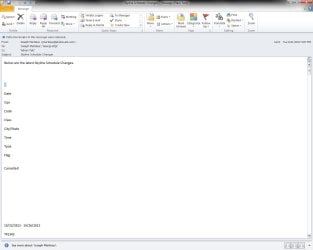
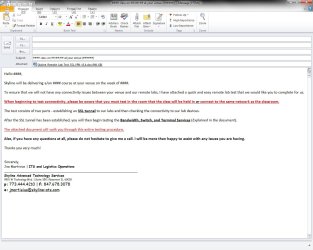
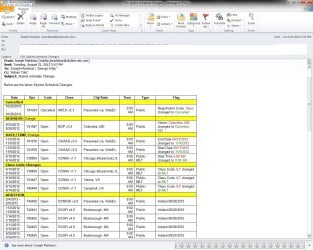
To explain this a little better, I have included pictures. Outlook1 and 3 are how they should look. Outlook 2 and 4 is how they are actually being received.

As you can tell, there is a big difference between them and it is not good when copying reports or supposed to have certain aspects of emails bolded/highlighted.

I have searched for a bit and tried a few things but still have not had any success.

History: just recently transferred from Windows XP/Office 2k3 this past weekend and now I have these issues.
~~~~~~~~~~~~~~~~~~~~~~
Edit: I do have it setup to send/convert outgoing emails to HTML
 

Attachments
  • outlook1.jpg
    outlook1.jpg
    168.1 KB · Views: 43
  • outlook2.jpg
    outlook2.jpg
    53 KB · Views: 46
  • outlook3.jpg
    outlook3.jpg
    111.4 KB · Views: 52
  • outlook4.jpg
    outlook4.jpg
    103 KB · Views: 46

My Computer My Computer

At a glance

Windows 7 Pro x64
OS
Windows 7 Pro x64
Hello joeblah -

The sent samples are correct based on your format selection of HTML.

HTML is not the same as plain or rich text and has little resemblence to how things look in a word processor.

If you must send as HTML then convert your content to an image (picture) and embed that. Otherwise try rich text and see what happens.

Note that sending in HTML is your choice but no guarantee that the receipient will ALLOW your email to be view as HTML. I do NOT allow HTML emails in 6 of my 8 email accounts, PLAIN TEXT ONLY.

Regards,
GEWB
 

My Computer My Computer

At a glance

Linux Mint / XP / Win7 Home, Pro, Ultimate / ...
Computer type
PC/Desktop
Computer Manufacturer/Model Number
(7 different computers booting up to 10 systems)
OS
Linux Mint / XP / Win7 Home, Pro, Ultimate / Win8.1 / Win10
Other Info
Four desktops, two laptops, one notebook and one tablet
I guess I am comparing this to Outlook 2k3. When I sent an email like the previous with color and attachment, only HTML would show it properly. I just find it odd that even the red text turns black when I receive it. It looks like it goes out in HTML but it constantly receives as plain text.

Another odd part is that if I forward the HTML'd email from my SENT folder, the recipient will receive it as they should of.

Right now, I have to send a email to myself then forward it on for proper display.
 

My Computer My Computer

At a glance

Windows 7 Pro x64
OS
Windows 7 Pro x64
I guess I am comparing this to Outlook 2k3. When I sent an email like the previous with color and attachment, only HTML would show it properly. I just find it odd that even the red text turns black when I receive it. It looks like it goes out in HTML but it constantly receives as plain text.

Another odd part is that if I forward the HTML'd email from my SENT folder, the recipient will receive it as they should of.

Right now, I have to send a email to myself then forward it on for proper display.

Are you sure about your settings (as per the first post). I'm confused here...

Regards,
GEWB
 

My Computer My Computer

At a glance

Linux Mint / XP / Win7 Home, Pro, Ultimate / ...
Computer type
PC/Desktop
Computer Manufacturer/Model Number
(7 different computers booting up to 10 systems)
OS
Linux Mint / XP / Win7 Home, Pro, Ultimate / Win8.1 / Win10
Other Info
Four desktops, two laptops, one notebook and one tablet
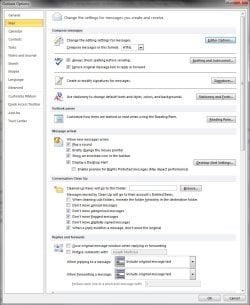
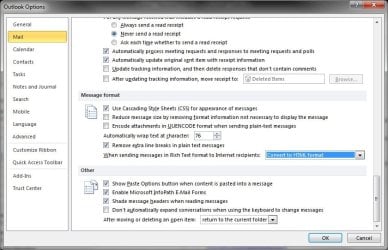
Best way to show is with some Pictures I guess.
This is:
File>Options>Mail
and
File>Options>Mail>Editor Options

If I need to try and explain it better, please let me know.
 

Attachments

  • outlook5.jpg
    outlook5.jpg
    95.2 KB · Views: 83
  • outlook6.jpg
    outlook6.jpg
    88.7 KB · Views: 80

My Computer My Computer

At a glance

Windows 7 Pro x64
OS
Windows 7 Pro x64
Hmm, I think I'm understanding the situation:

  1. You compose in HTML (insert tables, assign colors, sizes, etc.)
  2. SEND out to recipient
  3. Copy is placed in your SENT box
  4. Recipient gets PLAIN TEXT version of original SEND
  5. If you FOREWARD from SENT, recipient gets HTML (desired) version
Is this correct?

If correct, looks like the Compose and Send are different (trying to find the settings). I say this because:

  • Recipient gets plain text - HTML is stripped (thus black instead of red text, no table structure, etc.)
  • FOREWARD function appears to retain original format (which I expect)
What are your Options > Mail > Message format settings?

Regards,
GEWB
 

My Computer My Computer

At a glance

Linux Mint / XP / Win7 Home, Pro, Ultimate / ...
Computer type
PC/Desktop
Computer Manufacturer/Model Number
(7 different computers booting up to 10 systems)
OS
Linux Mint / XP / Win7 Home, Pro, Ultimate / Win8.1 / Win10
Other Info
Four desktops, two laptops, one notebook and one tablet
Yes, I do believe you are now understanding my confusion. It does look properly set but here is a screenshot so you can see yourself.
 

Attachments

  • Untitled7.jpg
    Untitled7.jpg
    69 KB · Views: 69

My Computer My Computer

At a glance

Windows 7 Pro x64
OS
Windows 7 Pro x64
GEWB, or anyone else, have any other ideas for me to try? Could this possibly be from transferring the .pst from 2k3 to 2010? I am really trying to get this taken care so I dont have to do double to work every time.
 

My Computer My Computer

At a glance

Windows 7 Pro x64
OS
Windows 7 Pro x64
Hello joeblah -

Haven't had time to dig into it any further but so far I'm at a dead end.

Regards,
GEWB
 

My Computer My Computer

At a glance

Linux Mint / XP / Win7 Home, Pro, Ultimate / ...
Computer type
PC/Desktop
Computer Manufacturer/Model Number
(7 different computers booting up to 10 systems)
OS
Linux Mint / XP / Win7 Home, Pro, Ultimate / Win8.1 / Win10
Other Info
Four desktops, two laptops, one notebook and one tablet
I had the same problem and I tried many suggested solutions over several months and had pretty much given up with much frustration. It now seems to have been solved in my Outlook 2010 by going to Outlook Options/Mail and changing 'Compose messages in this format' from 'HTML' to 'Rich Text' + OK, then to 'Plain Text' + OK, and finally back to 'HTML' and OK. This somehow seemed to clear the problem. Without change 'HTML' to something else the problem persisted whatever I did...
 

My Computer My Computer

At a glance

Windows 7 Professional 32bit
OS
Windows 7 Professional 32bit
Vaughan9,
Thanks for that info, I think it helped a little. I was curious as well if just switching through the formats would reset them.

I seem to have another interesting issue now, I will send properly in a new email I create but not in a template already made... I might try to remake the templates by copying the existing text over to a new email and saving it as a new template and see how that works.
 

My Computer My Computer

At a glance

Windows 7 Pro x64
OS
Windows 7 Pro x64
Okay so I just checked, it seems to only have an issue with Templates now and even newly created ones with nothing copied from another email. This seems very counter productive when templates should make things easier...
 

My Computer My Computer

At a glance

Windows 7 Pro x64
OS
Windows 7 Pro x64
Back
Top