
2 out of 3 laptops suddenly not connecting wirelessly

Pigpen

New member
Local time
10:10 PM
Messages
9
I have a Belkin_N_ADSL_829C73 wireless router, connected to my desktop via a cable.
I have three laptops and mobile phones using the wireless router.
Suddenly 2 out of the 3 laptops have errors:
IPv4 Connectivity: No Internet access
IPv6 Connectivity: No network access

The other laptop is working fine
I've rebooted everything concerned.

On one of the laptops concerned:
I've uninstalled the network adapters and rebooted the laptop to re-instal them.
I've reset to default settings in the laptop BIOS to clear the CMOS.
I've run a full system scan with the McAfee.
I've temp disabled the firewall.
I've uninstalled all wireless networks in the Manage wireless networs and reconnected to the Belkin.

All to no avail.

On the full network map the laptop and desktop are both displayed, on both computers the same, with dashed lines going to the laptop, but on command prompt net view neither desktop nor laptop list each other.

Where do I go next, please?
Thanks,
Pigpen.
 

Attachments

My Computer My Computer

At a glance

Windows 7 Home Premium 64-Bit Service pack 1
OS
Windows 7 Home Premium 64-Bit Service pack 1
I have a Belkin_N_ADSL_829C73 wireless router, connected to my desktop via a cable.
I have three laptops and mobile phones using the wireless router.
Suddenly 2 out of the 3 laptops have errors:
IPv4 Connectivity: No Internet access
IPv6 Connectivity: No network access

The other laptop is working fine
I've rebooted everything concerned.

On one of the laptops concerned:
I've uninstalled the network adapters and rebooted the laptop to re-instal them.
I've reset to default settings in the laptop BIOS to clear the CMOS.
I've run a full system scan with the McAfee.
I've temp disabled the firewall.
I've uninstalled all wireless networks in the Manage wireless networs and reconnected to the Belkin.

All to no avail.

On the full network map the laptop and desktop are both displayed, on both computers the same, with dashed lines going to the laptop, but on command prompt net view neither desktop nor laptop list each other.

Where do I go next, please?
Thanks,
Pigpen.

Maybe you need to read about the McAfee update problem that has been causing wireless connection problems by the millions. :sarc:

McAfee - Resolving the recent update issues with McAfee Consumer Products
 

My Computer My Computer

At a glance

Windows 7 Ult, Windows 8.1 Pro,Q9650-4.275GHz, E8600 4.5GHz, E6750-3.8GHzG.Skill PC2 9600 1200Mhz 5 5 5 15 2TGTX480
Computer type
PC/Desktop
Computer Manufacturer/Model Number
Home built
OS
Windows 7 Ult, Windows 8.1 Pro,
CPU
Q9650-4.275GHz, E8600 4.5GHz, E6750-3.8GHz
Motherboard
Evga 780i FTW
Memory
G.Skill PC2 9600 1200Mhz 5 5 5 15 2T
Graphics Card(s)
GTX480
Sound Card
Asus Xonar D2
Monitor(s) Displays
HannsG
Screen Resolution
1680X1050
Hard Drives
GSkill Phoenix Pro 120GB SSD
PSU
ThermalTake Toughpower 1000Watt modular
Case
ThermalTake XaserV
Cooling
Xigmatek S1283
Keyboard
Logitech G15
Mouse
Logitech G9
Internet Speed
T1
Thanks, Chev.
You're a star.

I've removed McAfee from 1st laptop and, hey presto, internet is back.
Just in the process of reinstalling it, now, so it will hopefully all work nicely afterwards.

Then repeat on the other laptop, and probably on the third one, also, as it will no doubt update itself and lock me out!
 

My Computer My Computer

At a glance

Windows 7 Home Premium 64-Bit Service pack 1
OS
Windows 7 Home Premium 64-Bit Service pack 1
Thanks, Chev.
You're a star.

I've removed McAfee from 1st laptop and, hey presto, internet is back.
Just in the process of reinstalling it, now, so it will hopefully all work nicely afterwards.

Then repeat on the other laptop, and probably on the third one, also, as it will no doubt update itself and lock me out!

The McAfee update problem has been killing off wireless on a bunch of systems lately.

I'm sure they will straighten out the mess pretty soon with a new update. :sarc:
 

My Computer My Computer

At a glance

Windows 7 Ult, Windows 8.1 Pro,Q9650-4.275GHz, E8600 4.5GHz, E6750-3.8GHzG.Skill PC2 9600 1200Mhz 5 5 5 15 2TGTX480
Computer type
PC/Desktop
Computer Manufacturer/Model Number
Home built
OS
Windows 7 Ult, Windows 8.1 Pro,
CPU
Q9650-4.275GHz, E8600 4.5GHz, E6750-3.8GHz
Motherboard
Evga 780i FTW
Memory
G.Skill PC2 9600 1200Mhz 5 5 5 15 2T
Graphics Card(s)
GTX480
Sound Card
Asus Xonar D2
Monitor(s) Displays
HannsG
Screen Resolution
1680X1050
Hard Drives
GSkill Phoenix Pro 120GB SSD
PSU
ThermalTake Toughpower 1000Watt modular
Case
ThermalTake XaserV
Cooling
Xigmatek S1283
Keyboard
Logitech G15
Mouse
Logitech G9
Internet Speed
T1
Well it worked on the first laptop. Daughter 1 is happy.

But not on the second or third (which soon after denied any connection at all).
I've tried uninstalling using the download from your link.
I've tried uninstalling from control panel.
I've tried restoring laptop settings to a restore point a month ago.
I've tried all the steps I mentioned in my original post.
I've tried the DAT6807/6808 fix from mcafee site, but mine was only on DAT6788.

They're just not connecting.:(
 

My Computer My Computer

At a glance

Windows 7 Home Premium 64-Bit Service pack 1
OS
Windows 7 Home Premium 64-Bit Service pack 1
Well it worked on the first laptop. Daughter 1 is happy.

But not on the second or third (which soon after denied any connection at all).
I've tried uninstalling using the download from your link.
I've tried uninstalling from control panel.
I've tried restoring laptop settings to a restore point a month ago.
I've tried all the steps I mentioned in my original post.
I've tried the DAT6807/6808 fix from mcafee site, but mine was only on DAT6788.

They're just not connecting.:(

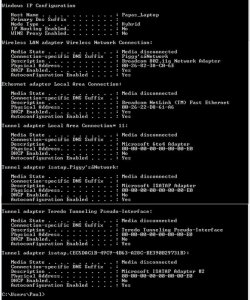
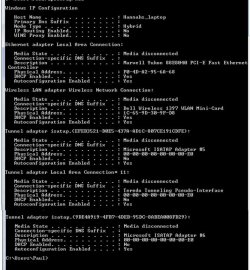
If you can post the ipconfig/all from these machines I might be able to spot other problems.

I have a feeling that you are still dealing with a McAfee created problem but maybe there is a way to work around it. :rolleyes:
 

My Computer My Computer

At a glance

Windows 7 Ult, Windows 8.1 Pro,Q9650-4.275GHz, E8600 4.5GHz, E6750-3.8GHzG.Skill PC2 9600 1200Mhz 5 5 5 15 2TGTX480
Computer type
PC/Desktop
Computer Manufacturer/Model Number
Home built
OS
Windows 7 Ult, Windows 8.1 Pro,
CPU
Q9650-4.275GHz, E8600 4.5GHz, E6750-3.8GHz
Motherboard
Evga 780i FTW
Memory
G.Skill PC2 9600 1200Mhz 5 5 5 15 2T
Graphics Card(s)
GTX480
Sound Card
Asus Xonar D2
Monitor(s) Displays
HannsG
Screen Resolution
1680X1050
Hard Drives
GSkill Phoenix Pro 120GB SSD
PSU
ThermalTake Toughpower 1000Watt modular
Case
ThermalTake XaserV
Cooling
Xigmatek S1283
Keyboard
Logitech G15
Mouse
Logitech G9
Internet Speed
T1
Thanks, Chev.
I have a suspicion that it is all linked to Mcafee, too!
Please find attached the ipconfig/all readouts from both laptops, pasted into word docs for ease.
Pigpen.
 

Attachments

My Computer My Computer

At a glance

Windows 7 Home Premium 64-Bit Service pack 1
OS
Windows 7 Home Premium 64-Bit Service pack 1
The .doc files aren't opening correctly for me using Word. A screen shot is better for me. Snipping tool comes in handy for this.

You should save the file below, unzip and run the file, your machine will reboot itself. This will fix most every problem related to the TCP/IP stack it will flush the DNS and reset winsock.
 

Attachments

My Computer My Computer

At a glance

Windows 7 Ult, Windows 8.1 Pro,Q9650-4.275GHz, E8600 4.5GHz, E6750-3.8GHzG.Skill PC2 9600 1200Mhz 5 5 5 15 2TGTX480
Computer type
PC/Desktop
Computer Manufacturer/Model Number
Home built
OS
Windows 7 Ult, Windows 8.1 Pro,
CPU
Q9650-4.275GHz, E8600 4.5GHz, E6750-3.8GHz
Motherboard
Evga 780i FTW
Memory
G.Skill PC2 9600 1200Mhz 5 5 5 15 2T
Graphics Card(s)
GTX480
Sound Card
Asus Xonar D2
Monitor(s) Displays
HannsG
Screen Resolution
1680X1050
Hard Drives
GSkill Phoenix Pro 120GB SSD
PSU
ThermalTake Toughpower 1000Watt modular
Case
ThermalTake XaserV
Cooling
Xigmatek S1283
Keyboard
Logitech G15
Mouse
Logitech G9
Internet Speed
T1
But I can't paste into this message window :confused:
 

My Computer My Computer

At a glance

Windows 7 Home Premium 64-Bit Service pack 1
OS
Windows 7 Home Premium 64-Bit Service pack 1
But I can't paste into this message window :confused:

You need to use the Advanced settings button which will give you options for managing attachments.
 

My Computer My Computer

At a glance

Windows 7 Ult, Windows 8.1 Pro,Q9650-4.275GHz, E8600 4.5GHz, E6750-3.8GHzG.Skill PC2 9600 1200Mhz 5 5 5 15 2TGTX480
Computer type
PC/Desktop
Computer Manufacturer/Model Number
Home built
OS
Windows 7 Ult, Windows 8.1 Pro,
CPU
Q9650-4.275GHz, E8600 4.5GHz, E6750-3.8GHz
Motherboard
Evga 780i FTW
Memory
G.Skill PC2 9600 1200Mhz 5 5 5 15 2T
Graphics Card(s)
GTX480
Sound Card
Asus Xonar D2
Monitor(s) Displays
HannsG
Screen Resolution
1680X1050
Hard Drives
GSkill Phoenix Pro 120GB SSD
PSU
ThermalTake Toughpower 1000Watt modular
Case
ThermalTake XaserV
Cooling
Xigmatek S1283
Keyboard
Logitech G15
Mouse
Logitech G9
Internet Speed
T1
I ran that on Hannah's laptop and still it's unable to connect.
Haven't run it on the other laptop yet.
 

My Computer My Computer

At a glance

Windows 7 Home Premium 64-Bit Service pack 1
OS
Windows 7 Home Premium 64-Bit Service pack 1
I ran that on Hannah's laptop and still it's unable to connect.
Haven't run it on the other laptop yet.

Have you done this yet on those machines...

Solution 2
Use this solution if the Solution 1 did not solve the issues with your McAfee Consumer product.
Download and run the McAfee Removal tool
  1. To download the removal tool, go to https://us.mcafee.com/root/MCPR2.exe
  2. If you receive a security alert, click Yes.
  3. Click Save to download the file to a location on your computer.
  4. Navigate to the location where the file was saved.
  5. Ensure all McAfee application windows are closed.
  6. Double-click MCPR2.exe to run the removal tool.
    Note: Windows Vista users must right-click and select Run as Administrator.
  7. Restart your computer when prompted. Your McAfee products will not be fully removed until you restart.
    All McAfee products are now removed from your computer.
 

My Computer My Computer

At a glance

Windows 7 Ult, Windows 8.1 Pro,Q9650-4.275GHz, E8600 4.5GHz, E6750-3.8GHzG.Skill PC2 9600 1200Mhz 5 5 5 15 2TGTX480
Computer type
PC/Desktop
Computer Manufacturer/Model Number
Home built
OS
Windows 7 Ult, Windows 8.1 Pro,
CPU
Q9650-4.275GHz, E8600 4.5GHz, E6750-3.8GHz
Motherboard
Evga 780i FTW
Memory
G.Skill PC2 9600 1200Mhz 5 5 5 15 2T
Graphics Card(s)
GTX480
Sound Card
Asus Xonar D2
Monitor(s) Displays
HannsG
Screen Resolution
1680X1050
Hard Drives
GSkill Phoenix Pro 120GB SSD
PSU
ThermalTake Toughpower 1000Watt modular
Case
ThermalTake XaserV
Cooling
Xigmatek S1283
Keyboard
Logitech G15
Mouse
Logitech G9
Internet Speed
T1
Yes, but it's made no difference.
Infact, on Papa's laptop after running that second option the McAfee icon is still on the desktop and when you click on it, it opens as normal!

Try these JPEGs for ipconfig/all
 

Attachments

  • Papa's laptop ipconfig.jpg
    Papa's laptop ipconfig.jpg
    110.5 KB · Views: 3
  • Hannah's laptop ipconfig.jpg
    Hannah's laptop ipconfig.jpg
    112.2 KB · Views: 3

My Computer My Computer

At a glance

Windows 7 Home Premium 64-Bit Service pack 1
OS
Windows 7 Home Premium 64-Bit Service pack 1
Yes, but it's made no difference.
Infact, on Papa's laptop after running that second option the McAfee icon is still on the desktop and when you click on it, it opens as normal!

Try these JPEGs for ipconfig/all

From what you are saying McAfee is still installed on those machines. I'd have to run the uninstaller again or try to uninstall it manually.

I'm not even sure how McAfee expects anyone be able to click on the link for the uninstaller when they can't even get online? They really created quite a mess for their customers, in my book this is inexcusable.

As usual, these big bloated A/V's end up causing more problems then they solve, nothing new really. I'd go with Msoft security essentials next time.

As it stands there is no connection at all showing up on either of those machines, it appears that something is blocking the connection to the router, so I'd have to place the blame firmly on McAfee. ;)
 

My Computer My Computer

At a glance

Windows 7 Ult, Windows 8.1 Pro,Q9650-4.275GHz, E8600 4.5GHz, E6750-3.8GHzG.Skill PC2 9600 1200Mhz 5 5 5 15 2TGTX480
Computer type
PC/Desktop
Computer Manufacturer/Model Number
Home built
OS
Windows 7 Ult, Windows 8.1 Pro,
CPU
Q9650-4.275GHz, E8600 4.5GHz, E6750-3.8GHz
Motherboard
Evga 780i FTW
Memory
G.Skill PC2 9600 1200Mhz 5 5 5 15 2T
Graphics Card(s)
GTX480
Sound Card
Asus Xonar D2
Monitor(s) Displays
HannsG
Screen Resolution
1680X1050
Hard Drives
GSkill Phoenix Pro 120GB SSD
PSU
ThermalTake Toughpower 1000Watt modular
Case
ThermalTake XaserV
Cooling
Xigmatek S1283
Keyboard
Logitech G15
Mouse
Logitech G9
Internet Speed
T1
I quite agree with you on all counts, Chev.

Downloading the MCPR2,exe file on to my USB stick via my (Norton protected) desktop, then plugging that into the laptops didn't work - the only way I found was to download it onto my S3 Android phone and run it from there via the phone's USB lead.
What a paff!

Funny how the first laptop worked ok when I uninstalled McAfee manually, though. :confused:
 

My Computer My Computer

At a glance

Windows 7 Home Premium 64-Bit Service pack 1
OS
Windows 7 Home Premium 64-Bit Service pack 1
I quite agree with you on all counts, Chev.

Downloading the MCPR2,exe file on to my USB stick via my (Norton protected) desktop, then plugging that into the laptops didn't work - the only way I found was to download it onto my S3 Android phone and run it from there via the phone's USB lead.
What a paff!

Funny how the first laptop worked ok when I uninstalled McAfee manually, though. :confused:

Yes if it's an uninstall program I would think you could run it right off the USB stick but maybe the update problem effects that as well.

Here is a method for manually uninstalling it. It looks to be a pain but this may be the only way.
https://kc.mcafee.com/corporate/index?page=content&id=KB65863
 

My Computer My Computer

At a glance

Windows 7 Ult, Windows 8.1 Pro,Q9650-4.275GHz, E8600 4.5GHz, E6750-3.8GHzG.Skill PC2 9600 1200Mhz 5 5 5 15 2TGTX480
Computer type
PC/Desktop
Computer Manufacturer/Model Number
Home built
OS
Windows 7 Ult, Windows 8.1 Pro,
CPU
Q9650-4.275GHz, E8600 4.5GHz, E6750-3.8GHz
Motherboard
Evga 780i FTW
Memory
G.Skill PC2 9600 1200Mhz 5 5 5 15 2T
Graphics Card(s)
GTX480
Sound Card
Asus Xonar D2
Monitor(s) Displays
HannsG
Screen Resolution
1680X1050
Hard Drives
GSkill Phoenix Pro 120GB SSD
PSU
ThermalTake Toughpower 1000Watt modular
Case
ThermalTake XaserV
Cooling
Xigmatek S1283
Keyboard
Logitech G15
Mouse
Logitech G9
Internet Speed
T1
I managed to download the latest MCPR exe from the McAfee website and ran that via my phone.
It has uninstalled McAfee.

Problem persists.

Been to online chat with McAfee - Tier 2 support are going to phone me tomorrow.

In the meantime, I've plugged one of the laptops into the LAN cable and managed to access the internet that way to reinstall McAfee with the latest version - but it's still not accessing wirelessly.

At least I'll be able to plug it into the LAN tomorrow for them to have a play about with!
 

My Computer My Computer

At a glance

Windows 7 Home Premium 64-Bit Service pack 1
OS
Windows 7 Home Premium 64-Bit Service pack 1
Here is what McAfee is posting as a work around for the problem. It looks like they have you start up in safe mode then you can get online in order to install the McAfee virtual technician which is supposed to fix the network access problem.

http://service.mcafee.com/faq/TS101446.htm
 

My Computer My Computer

At a glance

Windows 7 Ult, Windows 8.1 Pro,Q9650-4.275GHz, E8600 4.5GHz, E6750-3.8GHzG.Skill PC2 9600 1200Mhz 5 5 5 15 2TGTX480
Computer type
PC/Desktop
Computer Manufacturer/Model Number
Home built
OS
Windows 7 Ult, Windows 8.1 Pro,
CPU
Q9650-4.275GHz, E8600 4.5GHz, E6750-3.8GHz
Motherboard
Evga 780i FTW
Memory
G.Skill PC2 9600 1200Mhz 5 5 5 15 2T
Graphics Card(s)
GTX480
Sound Card
Asus Xonar D2
Monitor(s) Displays
HannsG
Screen Resolution
1680X1050
Hard Drives
GSkill Phoenix Pro 120GB SSD
PSU
ThermalTake Toughpower 1000Watt modular
Case
ThermalTake XaserV
Cooling
Xigmatek S1283
Keyboard
Logitech G15
Mouse
Logitech G9
Internet Speed
T1
Back
Top