Can't play games on fullscreen

visy199

Sony Ericsson Modder
Power User
Local time
9:29 PM
Messages
193
Location
RO
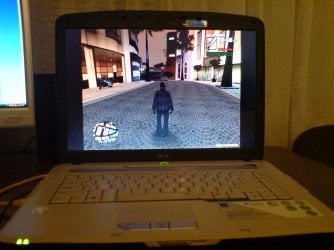
When i play games they're runing on the center of the screen and the rest comes black,see on pictures!
Please help me fix this,thanks!
 

Attachments

  • DSC01623.JPG
    DSC01623.JPG
    389.5 KB · Views: 351
  • DSC01625.JPG
    DSC01625.JPG
    315.2 KB · Views: 468

My Computer

Computer Manufacturer/Model Number
Fujitsu Siemens
OS
XP SP2
CPU
Intel Celeron D 3.07 GHz
Motherboard
/
Memory
1GB
Graphics Card(s)
Nvidia GeForce 6200 SE 256mb
Sound Card
Realtek
Monitor(s) Displays
17 "
Screen Resolution
1280x1024
Hard Drives
160GB
Internet Speed
2mb
Have you tried changing the resolution to a higher setting?
 

My Computer

Computer Manufacturer/Model Number
Home Brew
OS
Windows 7 Ultimate Vista Ultimate x64
CPU
Core 2 Duo E8500 3.16Ghz @ 3.8Ghz
Motherboard
eVGA 750i FTW
Memory
2x2Gigs Patriot PC2-6400 LL
Graphics Card(s)
Inno3D GeForce GTX260 216 SP
Monitor(s) Displays
ASUS VW222U 22" 2ms Response time
Screen Resolution
1680x1050
Hard Drives
SATA 150GB
SATA II 250GB
USB IDE 750GB Ext.
PSU
HYTEC 600W & Thermaltake 650W Toughpower Power Exp
Case
Thermaltake Armor LCS (Liquid Cooling System)
Cooling
Liquid Cooling System
Keyboard
Logitech G15 Gaming Keyboard
Mouse
Logitech G9 Gaming Mouse
Have you tried changing the resolution to a higher setting?

I tried and it works but game work's slower at high resolution,when i was using Vista or XP every game worked on fullscreen without changing resolution!
Another sugestion?
 

My Computer

Computer Manufacturer/Model Number
Fujitsu Siemens
OS
XP SP2
CPU
Intel Celeron D 3.07 GHz
Motherboard
/
Memory
1GB
Graphics Card(s)
Nvidia GeForce 6200 SE 256mb
Sound Card
Realtek
Monitor(s) Displays
17 "
Screen Resolution
1280x1024
Hard Drives
160GB
Internet Speed
2mb
Check the game configuration menu. It will either be a separate program in the same folder or an option in the main menu (or both). There should be settings there where you can adjust graphics and audio quality. Of course, it could be that the game can only utilise a 4:3 aspect ratio in which case you'll have to accept this limitation. Alternatively, set your screen to that resolution.
 

My Computer

Computer type
PC/Desktop
Computer Manufacturer/Model Number
Dwarf Dwf/11/2012 r09/2013
OS
Windows 8.1 Pro RTM x64
CPU
Intel Core-i5-3570K 4-core @ 3.4GHz (Ivy Bridge) (OC 4.4GHz)
Motherboard
ASRock Z77 Extreme4-M
Memory
4 x 4GB DDR3-1600 Corsair Vengeance CMZ8GX3M2A1600C9B (16GB)
Graphics Card(s)
MSI GeForce GTX770 Gaming OC 2GB
Sound Card
Realtek High Definition on board solution (ALC 898)
Monitor(s) Displays
ViewSonic VA1912w Widescreen (VGA)
Screen Resolution
1440x900
Hard Drives
OCZ Agility 3 SSD 120GB SATA III x2 (RAID 0)
Samsung HD501LJ 500GB SATA II x2
Hitachi HDS721010CLA332 1TB SATA II
Iomega 1.5TB Ext USB 2.0
WD 2.0TB Ext USB 3.0
PSU
XFX Pro Series 850W Semi-Modular
Case
Gigabyte IF233
Cooling
1 x 120mm Front Inlet 1 x 120mm Rear Exhaust
Keyboard
Microsoft Comfort Curve Keyboard 3000 (USB)
Mouse
Microsoft Comfort Mouse 3000 for Business (USB)
Internet Speed
NetGear DG834Gv3 ADSL Modem/Router (Ethernet) ~4.0 Mb/s (O2)
Antivirus
Avast! 8.0.1497
Browser
IE 11
Other Info
Optical Drive: HL-DT-ST BD-RE BH10LS30 SATA Bluray
Lexmark S305 Printer/Scanner/Copier (USB)
WEI Score: 8.1/8.1/8.5/8.5/8.25
Asus Eee PC 1011PX Netbook (Windows 7 x86 Starter)
I know what your talking about and I have noticed it myself although I don't have to worry about having anything other then my native resolution as my computer it pretty powerful.

I think that it may be feature they have made on purpose because when you have a lower then native resolution on a LCD the picture quality looks horible and in a way that has been overcome by scaling the image to the set resolution and by doing so you don't loose picture quality but the veiwing area is reduced.
 

My Computer

Computer Manufacturer/Model Number
Home Brew
OS
Windows 7 Ultimate Vista Ultimate x64
CPU
Core 2 Duo E8500 3.16Ghz @ 3.8Ghz
Motherboard
eVGA 750i FTW
Memory
2x2Gigs Patriot PC2-6400 LL
Graphics Card(s)
Inno3D GeForce GTX260 216 SP
Monitor(s) Displays
ASUS VW222U 22" 2ms Response time
Screen Resolution
1680x1050
Hard Drives
SATA 150GB
SATA II 250GB
USB IDE 750GB Ext.
PSU
HYTEC 600W & Thermaltake 650W Toughpower Power Exp
Case
Thermaltake Armor LCS (Liquid Cooling System)
Cooling
Liquid Cooling System
Keyboard
Logitech G15 Gaming Keyboard
Mouse
Logitech G9 Gaming Mouse
So there's nothing i can do?I don't care about graphics quality,i want to play games streched on full screen!

I start to dislike Windows Seven:first I can't access network pc which use XP SP2 and now games don't go streched on fullscreen!
 

My Computer

Computer Manufacturer/Model Number
Fujitsu Siemens
OS
XP SP2
CPU
Intel Celeron D 3.07 GHz
Motherboard
/
Memory
1GB
Graphics Card(s)
Nvidia GeForce 6200 SE 256mb
Sound Card
Realtek
Monitor(s) Displays
17 "
Screen Resolution
1280x1024
Hard Drives
160GB
Internet Speed
2mb
OMG i have the exact same problem...i just got the RTM and now i dont know what to do...
 

My Computer

Computer Manufacturer/Model Number
Dell Studio XPS 16
OS
Windoes 7 RTM
CPU
Intel Dual Core T9550 2.66Ghz
Memory
4 GIG
Graphics Card(s)
ATI Radeon HD 3670
Monitor(s) Displays
1
Screen Resolution
1920 x 1080
Hard Drives
7400 RPM 500 GIG. (or something like that)
Internet Speed
Verizon Fios.
The inflow has arrived!
 

My Computer

Computer type
PC/Desktop
Computer Manufacturer/Model Number
LENOVO K450 @3.0GHZ
OS
64-bit Windows 8.1 Pro
CPU
Core(TM) i5 CPU 4330 Haswell @ 3.20GHz
Motherboard
LENOVO
Memory
12.00 GB
Graphics Card(s)
Intel(R) HD Graphics
Sound Card
Intel HD integtrated
Monitor(s) Displays
HP 25' ISP Monitor
Screen Resolution
1900/1020
Hard Drives
(1) ST1000DM003-1CH162 (2) Generic STORAGE DEVICE USB Device (3) Generic STORAGE DEVICE USB Device
Internet Speed
100mb down/10mb up
OMG i have the exact same problem...i just got the RTM and now i dont know what to do...

XDark

have you tried all of the sugestions posted? It might help if you filled in your system specs so we would know a little bit about your computer. You could also tell us exactly what the problem is.

Ken
 

My Computer

Computer Manufacturer/Model Number
HP Pavillion dv-7 1005 Tx
OS
Win 8 Release candidate 8400
CPU
[email protected]
Memory
4 gigs
Graphics Card(s)
Nvidia 9600M
Sound Card
HD built-in
Monitor(s) Displays
17" Wxga
Screen Resolution
1440x900
Cooling
none
Internet Speed
45Mb down 5Mb up
oh my bad..i just added everythihng.. let me know if i need to give you anything else...ok so i have the same problem like the first guy...my game is playing in 4:3 ratio i think? where there are black strips at the ends..i want it to fill the whole screen. i read somewhere that you can change it from the graphics manager..i just downloaded the ATI catalyst for Windows 7....and i dont think it installed anything..like there is nothing in the folder..and no new program.
 

My Computer

Computer Manufacturer/Model Number
Dell Studio XPS 16
OS
Windoes 7 RTM
CPU
Intel Dual Core T9550 2.66Ghz
Memory
4 GIG
Graphics Card(s)
ATI Radeon HD 3670
Monitor(s) Displays
1
Screen Resolution
1920 x 1080
Hard Drives
7400 RPM 500 GIG. (or something like that)
Internet Speed
Verizon Fios.
oh my bad..i just added everythihng.. let me know if i need to give you anything else...ok so i have the same problem like the first guy...my game is playing in 4:3 ratio i think? where there are black strips at the ends..i want it to fill the whole screen. i read somewhere that you can change it from the graphics manager..i just downloaded the ATI catalyst for Windows 7....and i dont think it installed anything..like there is nothing in the folder..and no new program.

Xdark

Hi snd welcome to seven forums

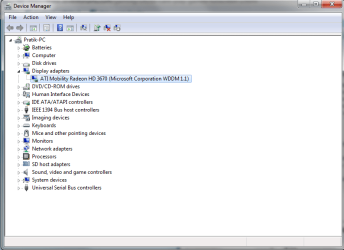
Ok either its a display drvier or monitor. Lets take a look in devic manager (type device manager in search) look under display adapters and see if is working correctly.

You can upload a snip (use snipping tool yeah type that in search) and upload it using the paperclip icon for attachments.

lets try that first

Ken
 
Last edited:

My Computer

Computer Manufacturer/Model Number
HP Pavillion dv-7 1005 Tx
OS
Win 8 Release candidate 8400
CPU
[email protected]
Memory
4 gigs
Graphics Card(s)
Nvidia 9600M
Sound Card
HD built-in
Monitor(s) Displays
17" Wxga
Screen Resolution
1440x900
Cooling
none
Internet Speed
45Mb down 5Mb up
ok here it is..also i tried installing the NEWest ATI catalyst thingy...9.7 i believe...for windows 7..and now there is nothing..its like the installation did not do anything,
 

Attachments

  • Capture.PNG
    Capture.PNG
    22.1 KB · Views: 384

My Computer

Computer Manufacturer/Model Number
Dell Studio XPS 16
OS
Windoes 7 RTM
CPU
Intel Dual Core T9550 2.66Ghz
Memory
4 GIG
Graphics Card(s)
ATI Radeon HD 3670
Monitor(s) Displays
1
Screen Resolution
1920 x 1080
Hard Drives
7400 RPM 500 GIG. (or something like that)
Internet Speed
Verizon Fios.
Xdark

Ok so the driver appears ok. Is the monitor also "working properly" indevice monitor?

Ken
 

My Computer

Computer Manufacturer/Model Number
HP Pavillion dv-7 1005 Tx
OS
Win 8 Release candidate 8400
CPU
[email protected]
Memory
4 gigs
Graphics Card(s)
Nvidia 9600M
Sound Card
HD built-in
Monitor(s) Displays
17" Wxga
Screen Resolution
1440x900
Cooling
none
Internet Speed
45Mb down 5Mb up
yes it is..there is nothing wrong there..either. its really wierd..did you read about my ATI driver thing? like i used XP, Vista and now 7..and in the former 2...there was a graphics center where i could control some settings for my graphics card..and i read somewhere for someone who had nvidia that he had used his program for nvidia to solve the game problem..but i cant seem to instaill the program for the ATI radeoon card..everytime i install..it just finishes but nothing new is added.
 

My Computer

Computer Manufacturer/Model Number
Dell Studio XPS 16
OS
Windoes 7 RTM
CPU
Intel Dual Core T9550 2.66Ghz
Memory
4 GIG
Graphics Card(s)
ATI Radeon HD 3670
Monitor(s) Displays
1
Screen Resolution
1920 x 1080
Hard Drives
7400 RPM 500 GIG. (or something like that)
Internet Speed
Verizon Fios.
yes it is..there is nothing wrong there..either. its really wierd..did you read about my ATI driver thing? like i used XP, Vista and now 7..and in the former 2...there was a graphics center where i could control some settings for my graphics card..and i read somewhere for someone who had nvidia that he had used his program for nvidia to solve the game problem..but i cant seem to instaill the program for the ATI radeoon card..everytime i install..it just finishes but nothing new is added.


Its been a while since I had an ati card (all in wonder days) but doesn't it come in 2 files the driver and the control center?

Let me look

Ken

edit for add . Im assuming you dl'ed the 3600 series for either 32 or 64 bit, right. If 32 the ccc is here http://game.amd.com/us-en/drivers_catalyst.aspx?p=win7/windows-7-32bit if 64 bit they dont support so you may have to use vista 64.
 

My Computer

Computer Manufacturer/Model Number
HP Pavillion dv-7 1005 Tx
OS
Win 8 Release candidate 8400
CPU
[email protected]
Memory
4 gigs
Graphics Card(s)
Nvidia 9600M
Sound Card
HD built-in
Monitor(s) Displays
17" Wxga
Screen Resolution
1440x900
Cooling
none
Internet Speed
45Mb down 5Mb up
OHHH yea...i think your right then..cause i have 64 bit...so should i just download the 3600 for vista? 64bit?
 

My Computer

Computer Manufacturer/Model Number
Dell Studio XPS 16
OS
Windoes 7 RTM
CPU
Intel Dual Core T9550 2.66Ghz
Memory
4 GIG
Graphics Card(s)
ATI Radeon HD 3670
Monitor(s) Displays
1
Screen Resolution
1920 x 1080
Hard Drives
7400 RPM 500 GIG. (or something like that)
Internet Speed
Verizon Fios.
Xdark

The CCC for (vowsta kinda like wowsta) vista 64 might work its probably your best bet given that they dont have a win 7 support for the ccc yet.

Ken
 

My Computer

Computer Manufacturer/Model Number
HP Pavillion dv-7 1005 Tx
OS
Win 8 Release candidate 8400
CPU
[email protected]
Memory
4 gigs
Graphics Card(s)
Nvidia 9600M
Sound Card
HD built-in
Monitor(s) Displays
17" Wxga
Screen Resolution
1440x900
Cooling
none
Internet Speed
45Mb down 5Mb up
wait i think they do have it tho..the 9.7 cataylist center for windoes 7 64 bit?
 

My Computer

Computer Manufacturer/Model Number
Dell Studio XPS 16
OS
Windoes 7 RTM
CPU
Intel Dual Core T9550 2.66Ghz
Memory
4 GIG
Graphics Card(s)
ATI Radeon HD 3670
Monitor(s) Displays
1
Screen Resolution
1920 x 1080
Hard Drives
7400 RPM 500 GIG. (or something like that)
Internet Speed
Verizon Fios.
wait i think they do have it tho..the 9.7 cataylist center for windoes 7 64 bit?

Xdark

Dont wait on me try it. let me know if it doesn't work

Ken
 

My Computer

Computer Manufacturer/Model Number
HP Pavillion dv-7 1005 Tx
OS
Win 8 Release candidate 8400
CPU
[email protected]
Memory
4 gigs
Graphics Card(s)
Nvidia 9600M
Sound Card
HD built-in
Monitor(s) Displays
17" Wxga
Screen Resolution
1440x900
Cooling
none
Internet Speed
45Mb down 5Mb up
i dono how to link..it has aspx...
ATI Catalyst™ 9.7 Suite for Windows 7 (64 bit)

Release notes
Windows Vista Driver Feedback
Note: ATI All-in-Wonder™ cards function with AMD Windows Vista-Ready display drivers in Windows 7. However there is currently no software application which provides TV/Capture functionality for All-in-Wonder™ cards in Windows 7.

Package Includes File Size Version Date Posted Download Link
Display Driver (?)
ATI WDM Integrated Driver (?)
Catalyst Control Center (?) (English Language Only)
58.5MB 9.7 7/22/2009
Catalyst Software Suite (64 bit) English Only


isnt that it?? i know it loooks wierd..sorry bad copying..but isnt that for 64 bit? i downloaded that
 

My Computer

Computer Manufacturer/Model Number
Dell Studio XPS 16
OS
Windoes 7 RTM
CPU
Intel Dual Core T9550 2.66Ghz
Memory
4 GIG
Graphics Card(s)
ATI Radeon HD 3670
Monitor(s) Displays
1
Screen Resolution
1920 x 1080
Hard Drives
7400 RPM 500 GIG. (or something like that)
Internet Speed
Verizon Fios.
Back
Top