Suggest me suitable graphic card or any other solution

Maqsood

New member
Local time
11:34 PM
Messages
6
Location
Islamabad, Pakistan
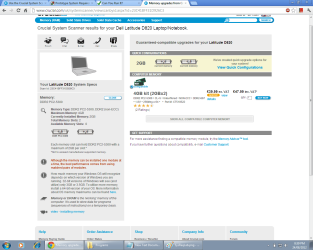
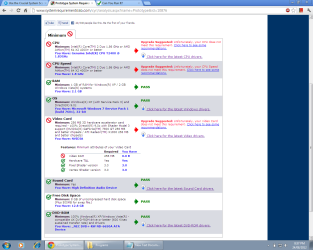
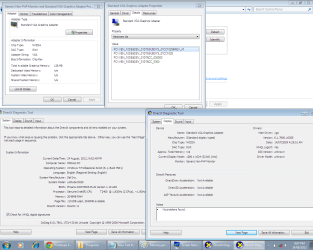
My Dell D820 specifications are attached. Also, there is a problem of dedicated video memory of zero. I have downloaded latest NVIDIA drivers from their site, but i am failed to install them. An error occurred showing: "NVIDIA Setup program could not locate any drivers that are compatible with your current hardware. Setup will now exit".

I am new to gaming, please help me step by step.


Thanks in advance!
 

Attachments
  • dxdiag and VGA.png
    dxdiag and VGA.png
    56.1 KB · Views: 26
  • Memory.png
    Memory.png
    61.8 KB · Views: 18
  • SysReqLab.png
    SysReqLab.png
    56.3 KB · Views: 17

My Computer My Computer

At a glance

Windows 7 Professional 32-bit SP1 (Build 7601)Intel core duo T2400 @ 1.83GHz Yonah 65nm Tec...2.00 Gb Dual-Channel DDR2 @ 458 MHz (5-5-5-15)128 MB Standard VGA Graphics Adapter (Dell)
Computer Manufacturer/Model Number
Dell D820
OS
Windows 7 Professional 32-bit SP1 (Build 7601)
CPU
Intel core duo T2400 @ 1.83GHz Yonah 65nm Technology
Motherboard
Dell Inc. 0JF240 (Microprocessor)
Memory
2.00 Gb Dual-Channel DDR2 @ 458 MHz (5-5-5-15)
Graphics Card(s)
128 MB Standard VGA Graphics Adapter (Dell)
Sound Card
High Definition Audio Device
Monitor(s) Displays
Generic Non-Pnp Monitor (1280x1024@1Hz)
Screen Resolution
1280x1024
Hard Drives
56 GB Hitachi Hitachi HTS542560K9SA00 ATA Device (SATA)
Keyboard
Standard PS/2 Keyboard
Mouse
PS/2 Compatible Mouse
Other Info
Optical Drivers: NEC DVD+-RW ND 6650A ATA Device
Bios Version: Chip Rev (or A09)
Network: Broadcom NetXtreme 57xx Gigabit Controller
GPU: nVidia G72M
Use this little free program to show us your specs. Then use the User CP at the top of every page to install them. That way they will follow your every post.
Speccy - System Information - Free Download
At the lower left cornor of this post tick on My System Specs. That information follows my every post. This will help us help you.
 

My Computer My Computer

At a glance

Windows 10 Pro. 64/ version 1709 Windows 7 Pr...Intel i7-6800K @ 4.3Corsair Platinum 16 gig @2400EVGA GTX 1070 OC
Computer type
PC/Desktop
Computer Manufacturer/Model Number
Home made Desktop
OS
Windows 10 Pro. 64/ version 1709 Windows 7 Pro/64
CPU
Intel i7-6800K @ 4.3
Motherboard
ASUS X-99 Deluxe II
Memory
Corsair Platinum 16 gig @2400
Graphics Card(s)
EVGA GTX 1070 OC
Monitor(s) Displays
Asus 27" LED LCD/VE278Q
Screen Resolution
1920-1080 or 1280-720 HDMI
Hard Drives
INTEL SSD 730-240 Gb Sata 3.0/
PSU
EVGA Platium 1200W
Case
Phanteks Luxe Tempered Glass 8 fans/ one radiator
Cooling
XSPC/ Water Cooled CPU
Keyboard
Das 4 Professional
Mouse
Logitech M705/MX Anywhere 2-S
Internet Speed
100 mbits
Antivirus
Microsoft Security Essentials/ Malwarebytes Premium 3.0/ SAS
Browser
I.E. 11 default/Firefox/ ISP Time Warner Cable/Spectrum
Other Info
LG BluRay Burner/
Sound system-KLipsch-THX/
Icy Dock ssd Hot Swap bays.
It appears this particular Dell Latitude used one of 2 versions of Nvidia Quadro graphics. These are business (cad/cam etc) graphics oriented cards, NOT gaming cards. I believe they are also not upgradeable/changeable). With a T2400 intel processor, I'm going to guess this laptop is about 6years old?.

But your best bet for the propwer driver may be from Dell as many OEM mfg's 'customized' the drivers. While Nvidia has seemed to changed this with their consumer series, I'm not sure about the Quadro mobile series & that's why Dell may be your best bet.

Jim
 

My Computer My Computer

At a glance

Win 7 Pro
OS
Win 7 Pro
Use this little free program to show us your specs. Then use the User CP at the top of every page to install them. That way they will follow your every post.
Speccy - System Information - Free Download
At the lower left cornor of this post tick on My System Specs. That information follows my every post. This will help us help you.

I have updated my system specifications. One more thing, nvidia site scanner detects that i have GeForce Go 7300, but the Piriform Specy didn't detect it!
 

My Computer My Computer

At a glance

Windows 7 Professional 32-bit SP1 (Build 7601)Intel core duo T2400 @ 1.83GHz Yonah 65nm Tec...2.00 Gb Dual-Channel DDR2 @ 458 MHz (5-5-5-15)128 MB Standard VGA Graphics Adapter (Dell)
Computer Manufacturer/Model Number
Dell D820
OS
Windows 7 Professional 32-bit SP1 (Build 7601)
CPU
Intel core duo T2400 @ 1.83GHz Yonah 65nm Technology
Motherboard
Dell Inc. 0JF240 (Microprocessor)
Memory
2.00 Gb Dual-Channel DDR2 @ 458 MHz (5-5-5-15)
Graphics Card(s)
128 MB Standard VGA Graphics Adapter (Dell)
Sound Card
High Definition Audio Device
Monitor(s) Displays
Generic Non-Pnp Monitor (1280x1024@1Hz)
Screen Resolution
1280x1024
Hard Drives
56 GB Hitachi Hitachi HTS542560K9SA00 ATA Device (SATA)
Keyboard
Standard PS/2 Keyboard
Mouse
PS/2 Compatible Mouse
Other Info
Optical Drivers: NEC DVD+-RW ND 6650A ATA Device
Bios Version: Chip Rev (or A09)
Network: Broadcom NetXtreme 57xx Gigabit Controller
GPU: nVidia G72M
It appears this particular Dell Latitude used one of 2 versions of Nvidia Quadro graphics. These are business (cad/cam etc) graphics oriented cards, NOT gaming cards. I believe they are also not upgradeable/changeable). With a T2400 intel processor, I'm going to guess this laptop is about 6years old?.

But your best bet for the propwer driver may be from Dell as many OEM mfg's 'customized' the drivers. While Nvidia has seemed to changed this with their consumer series, I'm not sure about the Quadro mobile series & that's why Dell may be your best bet.

Jim

Yes, these are for professionals, but i have read that low graphics games can be played using some virtual memory or something like this. I have updated my system specifications, please have a look at them.
 

My Computer My Computer

At a glance

Windows 7 Professional 32-bit SP1 (Build 7601)Intel core duo T2400 @ 1.83GHz Yonah 65nm Tec...2.00 Gb Dual-Channel DDR2 @ 458 MHz (5-5-5-15)128 MB Standard VGA Graphics Adapter (Dell)
Computer Manufacturer/Model Number
Dell D820
OS
Windows 7 Professional 32-bit SP1 (Build 7601)
CPU
Intel core duo T2400 @ 1.83GHz Yonah 65nm Technology
Motherboard
Dell Inc. 0JF240 (Microprocessor)
Memory
2.00 Gb Dual-Channel DDR2 @ 458 MHz (5-5-5-15)
Graphics Card(s)
128 MB Standard VGA Graphics Adapter (Dell)
Sound Card
High Definition Audio Device
Monitor(s) Displays
Generic Non-Pnp Monitor (1280x1024@1Hz)
Screen Resolution
1280x1024
Hard Drives
56 GB Hitachi Hitachi HTS542560K9SA00 ATA Device (SATA)
Keyboard
Standard PS/2 Keyboard
Mouse
PS/2 Compatible Mouse
Other Info
Optical Drivers: NEC DVD+-RW ND 6650A ATA Device
Bios Version: Chip Rev (or A09)
Network: Broadcom NetXtreme 57xx Gigabit Controller
GPU: nVidia G72M
what you'll find is that you could probably with enough tweeking play the odd game on very low settings, however i must point out that it may not be playable ie 1-2 frames per second.

now depending on what games it is your trying to play it could be doable but we can pretty much discount most games from the last 8 years and even some from before that, you can check my post history on many sites from swtor to here and i flat out do not recommend gaming on a laptop they just aren't good enough at the best of times to compete with a far cheaper desktop.

in the bios you may be able to assign more memory to the display adapter, check if you want press f2 on startup.
some searching turned up some messy methods to increase it but none i can suggest as i can not test them to see if they would work or break something so i'll not list them.

I'm going to be a bit mean here sorry, but if you want to do any kind of gaming then you need to replace the laptop either with a newer laptop or with a desktop for gaming purposes, subjecting your current laptop to the stress that gaming can invoke could cause a fault that is being hidden or just not appeared yet to come to the fore and cause it to fail, memory, overheating( most likely due to age) cpu overheating again quite probable due to the age of the machine the thermal solution and fan may be clogged up or have reduced capacity.

in short be careful what you do, 6 years is a long time for a laptop thermal paste degrades fans fail or don't do their job correctly solder on the main board is drying out due to prolonged exposure to electrical currents and so forth.
 

My Computer My Computer

At a glance

....
Computer Manufacturer/Model Number
.
OS
.
CPU
.
Motherboard
.
Memory
.
Graphics Card(s)
.
Monitor(s) Displays
.
Screen Resolution
.
Hard Drives
.
PSU
.
Case
.
Cooling
.
Keyboard
.
Mouse
.
Internet Speed
.
Other Info
.
To keep it simple. You do not have a gamer computer. It would cost more to try and make it a gamer than it would to buy one.
 

My Computer My Computer

At a glance

Windows 10 Pro. 64/ version 1709 Windows 7 Pr...Intel i7-6800K @ 4.3Corsair Platinum 16 gig @2400EVGA GTX 1070 OC
Computer type
PC/Desktop
Computer Manufacturer/Model Number
Home made Desktop
OS
Windows 10 Pro. 64/ version 1709 Windows 7 Pro/64
CPU
Intel i7-6800K @ 4.3
Motherboard
ASUS X-99 Deluxe II
Memory
Corsair Platinum 16 gig @2400
Graphics Card(s)
EVGA GTX 1070 OC
Monitor(s) Displays
Asus 27" LED LCD/VE278Q
Screen Resolution
1920-1080 or 1280-720 HDMI
Hard Drives
INTEL SSD 730-240 Gb Sata 3.0/
PSU
EVGA Platium 1200W
Case
Phanteks Luxe Tempered Glass 8 fans/ one radiator
Cooling
XSPC/ Water Cooled CPU
Keyboard
Das 4 Professional
Mouse
Logitech M705/MX Anywhere 2-S
Internet Speed
100 mbits
Antivirus
Microsoft Security Essentials/ Malwarebytes Premium 3.0/ SAS
Browser
I.E. 11 default/Firefox/ ISP Time Warner Cable/Spectrum
Other Info
LG BluRay Burner/
Sound system-KLipsch-THX/
Icy Dock ssd Hot Swap bays.
what you'll find is that you could probably with enough tweeking play the odd game on very low settings, however i must point out that it may not be playable ie 1-2 frames per second.

now depending on what games it is your trying to play it could be doable but we can pretty much discount most games from the last 8 years and even some from before that, you can check my post history on many sites from swtor to here and i flat out do not recommend gaming on a laptop they just aren't good enough at the best of times to compete with a far cheaper desktop.

in the bios you may be able to assign more memory to the display adapter, check if you want press f2 on startup.
some searching turned up some messy methods to increase it but none i can suggest as i can not test them to see if they would work or break something so i'll not list them.

I'm going to be a bit mean here sorry, but if you want to do any kind of gaming then you need to replace the laptop either with a newer laptop or with a desktop for gaming purposes, subjecting your current laptop to the stress that gaming can invoke could cause a fault that is being hidden or just not appeared yet to come to the fore and cause it to fail, memory, overheating( most likely due to age) cpu overheating again quite probable due to the age of the machine the thermal solution and fan may be clogged up or have reduced capacity.

in short be careful what you do, 6 years is a long time for a laptop thermal paste degrades fans fail or don't do their job correctly solder on the main board is drying out due to prolonged exposure to electrical currents and so forth.


Thank you and thank you so much, though i bought it a long time ago but i used it for less time,:D
 

My Computer My Computer

At a glance

Windows 7 Professional 32-bit SP1 (Build 7601)Intel core duo T2400 @ 1.83GHz Yonah 65nm Tec...2.00 Gb Dual-Channel DDR2 @ 458 MHz (5-5-5-15)128 MB Standard VGA Graphics Adapter (Dell)
Computer Manufacturer/Model Number
Dell D820
OS
Windows 7 Professional 32-bit SP1 (Build 7601)
CPU
Intel core duo T2400 @ 1.83GHz Yonah 65nm Technology
Motherboard
Dell Inc. 0JF240 (Microprocessor)
Memory
2.00 Gb Dual-Channel DDR2 @ 458 MHz (5-5-5-15)
Graphics Card(s)
128 MB Standard VGA Graphics Adapter (Dell)
Sound Card
High Definition Audio Device
Monitor(s) Displays
Generic Non-Pnp Monitor (1280x1024@1Hz)
Screen Resolution
1280x1024
Hard Drives
56 GB Hitachi Hitachi HTS542560K9SA00 ATA Device (SATA)
Keyboard
Standard PS/2 Keyboard
Mouse
PS/2 Compatible Mouse
Other Info
Optical Drivers: NEC DVD+-RW ND 6650A ATA Device
Bios Version: Chip Rev (or A09)
Network: Broadcom NetXtreme 57xx Gigabit Controller
GPU: nVidia G72M
To keep it simple. You do not have a gamer computer. It would cost more to try and make it a gamer than it would to buy one.

Ummm, thank you!
 

My Computer My Computer

At a glance

Windows 7 Professional 32-bit SP1 (Build 7601)Intel core duo T2400 @ 1.83GHz Yonah 65nm Tec...2.00 Gb Dual-Channel DDR2 @ 458 MHz (5-5-5-15)128 MB Standard VGA Graphics Adapter (Dell)
Computer Manufacturer/Model Number
Dell D820
OS
Windows 7 Professional 32-bit SP1 (Build 7601)
CPU
Intel core duo T2400 @ 1.83GHz Yonah 65nm Technology
Motherboard
Dell Inc. 0JF240 (Microprocessor)
Memory
2.00 Gb Dual-Channel DDR2 @ 458 MHz (5-5-5-15)
Graphics Card(s)
128 MB Standard VGA Graphics Adapter (Dell)
Sound Card
High Definition Audio Device
Monitor(s) Displays
Generic Non-Pnp Monitor (1280x1024@1Hz)
Screen Resolution
1280x1024
Hard Drives
56 GB Hitachi Hitachi HTS542560K9SA00 ATA Device (SATA)
Keyboard
Standard PS/2 Keyboard
Mouse
PS/2 Compatible Mouse
Other Info
Optical Drivers: NEC DVD+-RW ND 6650A ATA Device
Bios Version: Chip Rev (or A09)
Network: Broadcom NetXtreme 57xx Gigabit Controller
GPU: nVidia G72M

My Computer My Computer

At a glance

Windows 7 pro 64bit. (SP1)Intel core I5 24008GB DDR3 KingstonGigabyte GF GTX650OC
Computer type
PC/Desktop
Computer Manufacturer/Model Number
Self Built PC
OS
Windows 7 pro 64bit. (SP1)
CPU
Intel core I5 2400
Motherboard
Gigabyte H61
Memory
8GB DDR3 Kingston
Graphics Card(s)
Gigabyte GF GTX650OC
Sound Card
Realtek HD audio
Monitor(s) Displays
LCD 20"
Screen Resolution
1600x900
Hard Drives
INTEL SSD 320 80GB +Seagate 7200.12 1TBx3
PSU
Coolermaster RX450W
Case
Coolermaster atx case
Cooling
stock cooler
Keyboard
logitech
Mouse
logitech
Internet Speed
FTTD 100mbps

My Computer My Computer

At a glance

Windows 7 Professional 32-bit SP1 (Build 7601)Intel core duo T2400 @ 1.83GHz Yonah 65nm Tec...2.00 Gb Dual-Channel DDR2 @ 458 MHz (5-5-5-15)128 MB Standard VGA Graphics Adapter (Dell)
Computer Manufacturer/Model Number
Dell D820
OS
Windows 7 Professional 32-bit SP1 (Build 7601)
CPU
Intel core duo T2400 @ 1.83GHz Yonah 65nm Technology
Motherboard
Dell Inc. 0JF240 (Microprocessor)
Memory
2.00 Gb Dual-Channel DDR2 @ 458 MHz (5-5-5-15)
Graphics Card(s)
128 MB Standard VGA Graphics Adapter (Dell)
Sound Card
High Definition Audio Device
Monitor(s) Displays
Generic Non-Pnp Monitor (1280x1024@1Hz)
Screen Resolution
1280x1024
Hard Drives
56 GB Hitachi Hitachi HTS542560K9SA00 ATA Device (SATA)
Keyboard
Standard PS/2 Keyboard
Mouse
PS/2 Compatible Mouse
Other Info
Optical Drivers: NEC DVD+-RW ND 6650A ATA Device
Bios Version: Chip Rev (or A09)
Network: Broadcom NetXtreme 57xx Gigabit Controller
GPU: nVidia G72M
Back
Top