
windows explorer keeps crashing and searching for a solution windows 7

auburn2eugene

New member
Local time
4:50 AM
Messages
6
Location
Eugene Oregon
i have windowns 7 ultimate. my windows explorer keeps crashing, it only happens when i try to access some of the files on my 1.5TB external hard drive. i dont want to have to wipe it clean, as it would take ages to get all my information back. and its 3/4 full, so i couldnt back it up on my internal hard drive as it is 75GB. any suggestions? i looked on here and ran the event viewer this is what i got. it is all greek to me. i am knowledgeable with computers, but this type of stuff is beyond my knowledge. and honestly, it hurts my pride having to ask for help...

thank you in advance

Log Name: Application
Source: Application Error
Date: 8/30/2012 7:04:48 PM
Event ID: 1000
Task Category: (100)
Level: Error
Keywords: Classic
User: N/A
Computer: pc-PC
Description:
Faulting application name: explorer.exe, version: 6.1.7601.17567, time stamp: 0x4d6727a7
Faulting module name: DivXMFSource.dll, version: 1.0.0.72, time stamp: 0x4cffcf66
Exception code: 0xc0000005
Fault offset: 0x0009b890
Faulting process id: 0x14a4
Faulting application start time: 0x01cd86e49823b396
Faulting application path: C:\Windows\explorer.exe
Faulting module path: C:\Program Files\DivX\DivX Plus Media Foundation Components\DivXMFSource.dll
Report Id: 3d83ab09-f310-11e1-ac16-d7b33ff68031
Event Xml:
<Event xmlns="http://schemas.microsoft.com/win/2004/08/events/event">
<System>
<Provider Name="Application Error" />
<EventID Qualifiers="0">1000</EventID>
<Level>2</Level>
<Task>100</Task>
<Keywords>0x80000000000000</Keywords>
<TimeCreated SystemTime="2012-08-31T02:04:48.000000000Z" />
<EventRecordID>104057</EventRecordID>
<Channel>Application</Channel>
<Computer>pc-PC</Computer>
<Security />
</System>
<EventData>
<Data>explorer.exe</Data>
<Data>6.1.7601.17567</Data>
<Data>4d6727a7</Data>
<Data>DivXMFSource.dll</Data>
<Data>1.0.0.72</Data>
<Data>4cffcf66</Data>
<Data>c0000005</Data>
<Data>0009b890</Data>
<Data>14a4</Data>
<Data>01cd86e49823b396</Data>
<Data>C:\Windows\explorer.exe</Data>
<Data>C:\Program Files\DivX\DivX Plus Media Foundation Components\DivXMFSource.dll</Data>
<Data>3d83ab09-f310-11e1-ac16-d7b33ff68031</Data>
</EventData>
</Event>
 

My Computer My Computer

At a glance

Microsoft Windows 7 Ultimate 32-bit 7601 Mult...Intel(R) Core(TM)2 Duo CPU T7100 @ 1.80GHz2GB(1) Mobile Intel(R) 965 Express Chipset Famil...
Computer Manufacturer/Model Number
dell latitude d630 laptop
OS
Microsoft Windows 7 Ultimate 32-bit 7601 Multiprocessor Free Service Pack 1
CPU
Intel(R) Core(TM)2 Duo CPU T7100 @ 1.80GHz
Motherboard
Dell Inc. 0KU184
Memory
2GB
Graphics Card(s)
(1) Mobile Intel(R) 965 Express Chipset Family (2) Mobile
Sound Card
High Definition Audio Device
Hard Drives
75GB internal (1) and 1.5TB external (2)

(1) Hitachi HTS722080K9A300 ATA Device (2) Seagate FA GoFlex Desk
Internet Speed
COMCAST FINEST
Other Info
BiOS:Phoenix ROM BIOS PLUS Version 1.10 A04
auburn2eugene,
Welcome to SevenForums.

Help us to help you.

Update your SevenForums System Specs
User CP (located on the top menu bar) |
Your Profile | Edit System Spec
(left-hand column)

To gather info, use Speccy (my favorite) or SIW or System Info

In the System Manufacturer Block, enter:
Ø Manufacturer and Model OR Custom build.
Ø ADD the word laptop, desktop, netbook or tablet.
For example:
Toshiba Satellite L305D notebook.

Provide full windows version info, for example:
MS Windows 7 Ultimate SP1 64-bit

Use the “Other Info” block for Optical Reader,
Mouse, touchpad, wifi adapter, speakers, monitor, etc

Scroll down and click on SAVE CHANGES.

With Speccy, you can select with your mouse/touchpad info from the display
and paste that info into your specs.

SIW is a marvelous program, but the free version does not offer
this capability.
 

My Computer My Computer

At a glance

MS Windows 7 Ultimate SP1 64-bitAMD A10-4600M6.00 GB Dual-Channel DDR3 @ 798MHz (11-11-12-28)AMD Radeon HD 7660G
Computer Manufacturer/Model Number
Toshiba Satellite S875D-S7239 laptop
OS
MS Windows 7 Ultimate SP1 64-bit
CPU
AMD A10-4600M
Motherboard
AMD Pumori (Socket FT1)
Memory
6.00 GB Dual-Channel DDR3 @ 798MHz (11-11-12-28)
Graphics Card(s)
AMD Radeon HD 7660G
Sound Card
High Definition Audio Device
Monitor(s) Displays
Generic PnP Monitor (1600x900@60Hz)
Screen Resolution
1600x900@60Hz
Hard Drives
SSD 119GB Corsair CSSD-V128GB2 ATA Device
Keyboard
Standard PS/2 Keyboard
Mouse
HP Wireless Optical Mobile Mouse Model FHA-3410
Internet Speed
What the local pub, local coffee shop offers.
Other Info
Optical Drive:MATSHITA BD-CMB UJ160B ATA Device


Also have an Asus ha1002xp netbook with Win 7 Ultimate installed.
ok, i got that updated, i had most of it in there already, but i just copied from system info, can you help me with my problem?
 

My Computer My Computer

At a glance

Microsoft Windows 7 Ultimate 32-bit 7601 Mult...Intel(R) Core(TM)2 Duo CPU T7100 @ 1.80GHz2GB(1) Mobile Intel(R) 965 Express Chipset Famil...
Computer Manufacturer/Model Number
dell latitude d630 laptop
OS
Microsoft Windows 7 Ultimate 32-bit 7601 Multiprocessor Free Service Pack 1
CPU
Intel(R) Core(TM)2 Duo CPU T7100 @ 1.80GHz
Motherboard
Dell Inc. 0KU184
Memory
2GB
Graphics Card(s)
(1) Mobile Intel(R) 965 Express Chipset Family (2) Mobile
Sound Card
High Definition Audio Device
Hard Drives
75GB internal (1) and 1.5TB external (2)

(1) Hitachi HTS722080K9A300 ATA Device (2) Seagate FA GoFlex Desk
Internet Speed
COMCAST FINEST
Other Info
BiOS:Phoenix ROM BIOS PLUS Version 1.10 A04
Your specs point to one possible problem area.

I strongly recommend increasing your ram to 4 GB.

Run CCleaner. Link in my signature.

Post following:

HOW TO POST A SNAPSHOT OF DISK MANAGEMENT DISPLAY
Run disk management:
WIN |
type DISKMGMT.MSC | ENTER
This method gives you a display without the unneeded navigation pane.
WIN=key with Microsoft logo on top.

Maximize the output of Disk Management:
ALT-Spacebar key combo | X key (selects Maximize) |
Drag the field separators (such as between Status and Capacity) to show entire field.


Make a snapshot:
WIN |
type SNIPPING | ENTER | New
Drag the cursor around the area you want to snip.
File | Save as | select save location and name | Save


Post the snapshot:
Post a File or Screenshot in Seven Forums
 

My Computer My Computer

At a glance

MS Windows 7 Ultimate SP1 64-bitAMD A10-4600M6.00 GB Dual-Channel DDR3 @ 798MHz (11-11-12-28)AMD Radeon HD 7660G
Computer Manufacturer/Model Number
Toshiba Satellite S875D-S7239 laptop
OS
MS Windows 7 Ultimate SP1 64-bit
CPU
AMD A10-4600M
Motherboard
AMD Pumori (Socket FT1)
Memory
6.00 GB Dual-Channel DDR3 @ 798MHz (11-11-12-28)
Graphics Card(s)
AMD Radeon HD 7660G
Sound Card
High Definition Audio Device
Monitor(s) Displays
Generic PnP Monitor (1600x900@60Hz)
Screen Resolution
1600x900@60Hz
Hard Drives
SSD 119GB Corsair CSSD-V128GB2 ATA Device
Keyboard
Standard PS/2 Keyboard
Mouse
HP Wireless Optical Mobile Mouse Model FHA-3410
Internet Speed
What the local pub, local coffee shop offers.
Other Info
Optical Drive:MATSHITA BD-CMB UJ160B ATA Device


Also have an Asus ha1002xp netbook with Win 7 Ultimate installed.
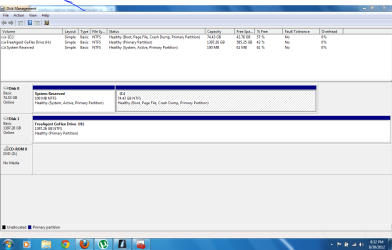
downloaded and ran ccleaner, then here is the rest you asked for. this only started happening sometime recently, and all i am doing is right clicking on the file name. i have not loaded any new programs or anything like that.

Capture.PNG
 

My Computer My Computer

At a glance

Microsoft Windows 7 Ultimate 32-bit 7601 Mult...Intel(R) Core(TM)2 Duo CPU T7100 @ 1.80GHz2GB(1) Mobile Intel(R) 965 Express Chipset Famil...
Computer Manufacturer/Model Number
dell latitude d630 laptop
OS
Microsoft Windows 7 Ultimate 32-bit 7601 Multiprocessor Free Service Pack 1
CPU
Intel(R) Core(TM)2 Duo CPU T7100 @ 1.80GHz
Motherboard
Dell Inc. 0KU184
Memory
2GB
Graphics Card(s)
(1) Mobile Intel(R) 965 Express Chipset Family (2) Mobile
Sound Card
High Definition Audio Device
Hard Drives
75GB internal (1) and 1.5TB external (2)

(1) Hitachi HTS722080K9A300 ATA Device (2) Seagate FA GoFlex Desk
Internet Speed
COMCAST FINEST
Other Info
BiOS:Phoenix ROM BIOS PLUS Version 1.10 A04
DiskManagement looks good.

Another avenue to pursue:
Install CCleaner:
CCleaner - PC Optimization and Cleaning - Free Download

list of STARTUP PROGRAMS

CCleaner | Tools
icon | Startup button | Windows tab |
click on Save to text file button (bottom right side) |
accept Startup.txt as file name | SAVE button

list of SCHEDULED TASKS

CCleaner | Tools
icon | Startup button | Scheduled Tasks tab |
click on Save to text file button (bottom right side) |
enter Scheduled Tasks as File name | Save button

List of INSTALLED PROGRAMS

CCleaner | Tools
icon | Uninstall button |
click on Save to text file button (bottom right side) |
accept install.txt as File name | Save button


UPLOAD, as an attachment, the startup.txt file
UPLOAD, as an attachment, the Scheduled Tasks.txt file
UPLOAD, as an attachment, the install.txt file.

HOW TO UPLOAD
Post a File or Screenshot in Seven Forums

=====================================
=====================================

Also, we need to make sure that your system is correctly configured to generate minidump files so that we can take a look at the resulting dump files.


[FONT=&quot]MEMORY DUMPS - REQUIREMENTS[/FONT]


Enable automatic management of the Paging file
WIN + PAUSE/BREAK key combo |
Advanced system settings (left-hand side) |
Advanced tab, Performance section, Settings |
Advanced tab, Virtual Memory section, Change |
checkmark Automatically manage paging file size for all drives |
OK | OK | OK


STARTUP AND RECOVERY SETTINGS
WIN + PAUSE/BREAK key combo |
Advanced system settings (left-hand side) |
Advanced
tab, Startup and Recovery section, Settings |
System Failure section | checkmark Write an Event to the system log
| uncheck
Automatically restart |


Under Write debugging information, select Small memory dump |
in the Small dump directory: box, enter %SystemRoot%\Minidump| OK

If Overwrite any existing file is checked, then:
Ø Under Write debugging information, select Kernel memory dump
Ø Uncheck Overwrite any existing file
Ø Under Write debugging information, select Small memory dump
Ø OK button
If you get a crazy message from Win 7 about your paging file being too small, then just ignore the message since we have already made sure that the paging file is set to be managed by Win 7.

ENABLE THE WINDOWS ERROR REPORTING SERVICE
WIN key | type SERVICES.MSC | ENTER |
Scroll down to Windows Error Reporting Service |
Rt-clk on Windows Error Reporting Service | Properties |
General
tab | for Startup type, choose Automatic |
In Service status, Start button (unless grayed out) | OK


ASSURE THAT CCLEANER IS NOT DELETING DUMPS
CCLEANER | Cleaner icon | Windows tab | System category |
Uncheck Memory Dumps
· WINDOWS ERROR REPORTING SERVICE must NOT be disabled!
· WIN | Services.msc | Enter
· Under Name, locate Windows Error Reporting Service
· If Status is not Started, then
Right-click on Windows Error Reporting Service |choose START
· If Startup Type is not Automatic, then
Right-click on Windows Error Reporting Service |
choose Properties | General tab |
set Startup type to Automatic
· Close Services.msc (I like to use ALT + F4)

After a crash, the minidump file will be in %SystemRoot%\Minidump
%SystemRoot% is generally C:\Windows
 

My Computer My Computer

At a glance

MS Windows 7 Ultimate SP1 64-bitAMD A10-4600M6.00 GB Dual-Channel DDR3 @ 798MHz (11-11-12-28)AMD Radeon HD 7660G
Computer Manufacturer/Model Number
Toshiba Satellite S875D-S7239 laptop
OS
MS Windows 7 Ultimate SP1 64-bit
CPU
AMD A10-4600M
Motherboard
AMD Pumori (Socket FT1)
Memory
6.00 GB Dual-Channel DDR3 @ 798MHz (11-11-12-28)
Graphics Card(s)
AMD Radeon HD 7660G
Sound Card
High Definition Audio Device
Monitor(s) Displays
Generic PnP Monitor (1600x900@60Hz)
Screen Resolution
1600x900@60Hz
Hard Drives
SSD 119GB Corsair CSSD-V128GB2 ATA Device
Keyboard
Standard PS/2 Keyboard
Mouse
HP Wireless Optical Mobile Mouse Model FHA-3410
Internet Speed
What the local pub, local coffee shop offers.
Other Info
Optical Drive:MATSHITA BD-CMB UJ160B ATA Device


Also have an Asus ha1002xp netbook with Win 7 Ultimate installed.

My Computer My Computer

At a glance

Microsoft Windows 7 Ultimate 32-bit 7601 Mult...Intel(R) Core(TM)2 Duo CPU T7100 @ 1.80GHz2GB(1) Mobile Intel(R) 965 Express Chipset Famil...
Computer Manufacturer/Model Number
dell latitude d630 laptop
OS
Microsoft Windows 7 Ultimate 32-bit 7601 Multiprocessor Free Service Pack 1
CPU
Intel(R) Core(TM)2 Duo CPU T7100 @ 1.80GHz
Motherboard
Dell Inc. 0KU184
Memory
2GB
Graphics Card(s)
(1) Mobile Intel(R) 965 Express Chipset Family (2) Mobile
Sound Card
High Definition Audio Device
Hard Drives
75GB internal (1) and 1.5TB external (2)

(1) Hitachi HTS722080K9A300 ATA Device (2) Seagate FA GoFlex Desk
Internet Speed
COMCAST FINEST
Other Info
BiOS:Phoenix ROM BIOS PLUS Version 1.10 A04
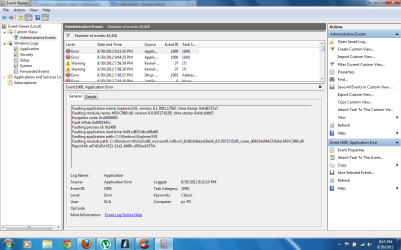
ok, it just did a crash when i was trying to access a certain file, that it always happens with, i went and found the mini dump folder, it is empty. there is nothing in it. would it be because the only time i am having this problem is in my external hard drive, and not my laptop its self?
 

My Computer My Computer

At a glance

Microsoft Windows 7 Ultimate 32-bit 7601 Mult...Intel(R) Core(TM)2 Duo CPU T7100 @ 1.80GHz2GB(1) Mobile Intel(R) 965 Express Chipset Famil...
Computer Manufacturer/Model Number
dell latitude d630 laptop
OS
Microsoft Windows 7 Ultimate 32-bit 7601 Multiprocessor Free Service Pack 1
CPU
Intel(R) Core(TM)2 Duo CPU T7100 @ 1.80GHz
Motherboard
Dell Inc. 0KU184
Memory
2GB
Graphics Card(s)
(1) Mobile Intel(R) 965 Express Chipset Family (2) Mobile
Sound Card
High Definition Audio Device
Hard Drives
75GB internal (1) and 1.5TB external (2)

(1) Hitachi HTS722080K9A300 ATA Device (2) Seagate FA GoFlex Desk
Internet Speed
COMCAST FINEST
Other Info
BiOS:Phoenix ROM BIOS PLUS Version 1.10 A04
here is the snip from the errors happening, but the mini dump folder is empty
 

Attachments

  • Capture2.PNG
    Capture2.PNG
    59.3 KB · Views: 18

My Computer My Computer

At a glance

Microsoft Windows 7 Ultimate 32-bit 7601 Mult...Intel(R) Core(TM)2 Duo CPU T7100 @ 1.80GHz2GB(1) Mobile Intel(R) 965 Express Chipset Famil...
Computer Manufacturer/Model Number
dell latitude d630 laptop
OS
Microsoft Windows 7 Ultimate 32-bit 7601 Multiprocessor Free Service Pack 1
CPU
Intel(R) Core(TM)2 Duo CPU T7100 @ 1.80GHz
Motherboard
Dell Inc. 0KU184
Memory
2GB
Graphics Card(s)
(1) Mobile Intel(R) 965 Express Chipset Family (2) Mobile
Sound Card
High Definition Audio Device
Hard Drives
75GB internal (1) and 1.5TB external (2)

(1) Hitachi HTS722080K9A300 ATA Device (2) Seagate FA GoFlex Desk
Internet Speed
COMCAST FINEST
Other Info
BiOS:Phoenix ROM BIOS PLUS Version 1.10 A04
Attach the file which this script puts on your desktop.
Verifies that the settings are correct.

# **********************INSTRUCTIONS**************************
# STEP 1 ** RUN POWERSHELL AS ADMINISTRATOR ******************
# ************************************************************
#
# WIN key | type POWERSHELL | do NOT hit ENTER |
# in the PROGRAMS list, right-click on WINDOWS POWERSHELL |
# choose "Run as administrator" |
# Click on the YES button (if such appears)
#
# WIN key = key with Microsoft log on top
#
# for the guru:
# WIN | type POWERSHELL | CTRL+SHIFT+ENTER key combo | ALT+Y keycombo
# ************************************************************
# STEP 2 ** COPY AND PASTE ***********************************
# ************************************************************
#
# COPY the script using CTRL+C,
# COPY every line of script down thru both EXIT statements
#
# PASTE into Powershell
#----Right-Click at the PowerShell Prompt
#----(Ctrl+V does not work)
#
# Start copying with first script line without a # at start of the line
# Note: Actually, you can paste the entire file if you rather
#-------Lines starting with a # are ignored by PowerShell
# ************************************************************
# STEP 3 ** SCRIPT OUTPUT & SCRIPT PURPOSE *******************
# ************************************************************
# --The script output and purpose is given at the very front of the script
#
# --The script output and purpose is given at the very front of the script
#
# ************************************************************
# ***************** NOTE - POWERSHELL VERSION*****************
# if you receive this error msg:
#--The system can not find the path specified
# you may need to update your PowerShell
# you must be using Powershell 2.0 or later.
#
# To determine your Powershell version:
#---Run PowerShell
#---enter $host.version
#---you should see at least:
# Major Minor Build Revision
# ----- ----- ----- --------
# 2......0......-1.....-1
#
# If you do not see the above, update your Vista/Win 7.
# ************************************************************
# *************** NOTE - EXECUTION POLICY*********************
# If you haven't set the execution policy, you may need to:
#---Run PowerShell
#---enter SET-EXECUTIONPOLICY -EXECUTIONPOLICY REMOTESIGNED
# ************************************************************

PHP:
# **************************************************************
# Puts MiniDumpSettings.TXT in your user profile folder
# WIN | type %userprofile%\ then click on MiniDumpSettings.TXT
# to view the important minidump settings
# WIN = key with Microsoft logo on top
# **************************************************************
gwmi Win32_OSRecoveryConfiguration | 
select minidumpdirectory, expandedminidumpdirectory, overwriteexistingdebugfile, kerneldumponly,`
debuginfotype, autoreboot, writedebuginfo, writetosystemlog | fl > $env:userprofile\desktop\minidumpsettings.txt

EXIT
EXIT
 

My Computer My Computer

At a glance

MS Windows 7 Ultimate SP1 64-bitAMD A10-4600M6.00 GB Dual-Channel DDR3 @ 798MHz (11-11-12-28)AMD Radeon HD 7660G
Computer Manufacturer/Model Number
Toshiba Satellite S875D-S7239 laptop
OS
MS Windows 7 Ultimate SP1 64-bit
CPU
AMD A10-4600M
Motherboard
AMD Pumori (Socket FT1)
Memory
6.00 GB Dual-Channel DDR3 @ 798MHz (11-11-12-28)
Graphics Card(s)
AMD Radeon HD 7660G
Sound Card
High Definition Audio Device
Monitor(s) Displays
Generic PnP Monitor (1600x900@60Hz)
Screen Resolution
1600x900@60Hz
Hard Drives
SSD 119GB Corsair CSSD-V128GB2 ATA Device
Keyboard
Standard PS/2 Keyboard
Mouse
HP Wireless Optical Mobile Mouse Model FHA-3410
Internet Speed
What the local pub, local coffee shop offers.
Other Info
Optical Drive:MATSHITA BD-CMB UJ160B ATA Device


Also have an Asus ha1002xp netbook with Win 7 Ultimate installed.
WIN | type MSCONFIG | ENTER | STARTUP tab |
Uncheck ALL

REBOOT!

You have just told Win 7 to not run unchecked programs at start up time.

You have not disabled the programs. They will be run when needed.

WIN = key with the Microsoft logo on top
 

My Computer My Computer

At a glance

MS Windows 7 Ultimate SP1 64-bitAMD A10-4600M6.00 GB Dual-Channel DDR3 @ 798MHz (11-11-12-28)AMD Radeon HD 7660G
Computer Manufacturer/Model Number
Toshiba Satellite S875D-S7239 laptop
OS
MS Windows 7 Ultimate SP1 64-bit
CPU
AMD A10-4600M
Motherboard
AMD Pumori (Socket FT1)
Memory
6.00 GB Dual-Channel DDR3 @ 798MHz (11-11-12-28)
Graphics Card(s)
AMD Radeon HD 7660G
Sound Card
High Definition Audio Device
Monitor(s) Displays
Generic PnP Monitor (1600x900@60Hz)
Screen Resolution
1600x900@60Hz
Hard Drives
SSD 119GB Corsair CSSD-V128GB2 ATA Device
Keyboard
Standard PS/2 Keyboard
Mouse
HP Wireless Optical Mobile Mouse Model FHA-3410
Internet Speed
What the local pub, local coffee shop offers.
Other Info
Optical Drive:MATSHITA BD-CMB UJ160B ATA Device


Also have an Asus ha1002xp netbook with Win 7 Ultimate installed.
CCLEANER | TOOLS icon | STARTUP tab | SCHEDULED TASKS tab |
Use DISABLE button to disable ALL except for:
PHP:
Adobe Flash Player Updater    Adobe Systems Incorporated    C:\Windows\system32\Macromed\Flash\FlashPlayerUpdateService.exe
CCleanerSkipUAC    Piriform Ltd    "C:\Program Files\CCleaner\CCleaner.exe" $(Arg0)
SidebarExecute    Microsoft Corporation    C:\Program Files\Windows Sidebar\sidebar.exe /addGadget

Close CCleaner.


REBOOT!


You have not disabled any programs. You have disabled the scheduled running.
Later, after your system is running smoothly, you may reenable desired programs.
 

My Computer My Computer

At a glance

MS Windows 7 Ultimate SP1 64-bitAMD A10-4600M6.00 GB Dual-Channel DDR3 @ 798MHz (11-11-12-28)AMD Radeon HD 7660G
Computer Manufacturer/Model Number
Toshiba Satellite S875D-S7239 laptop
OS
MS Windows 7 Ultimate SP1 64-bit
CPU
AMD A10-4600M
Motherboard
AMD Pumori (Socket FT1)
Memory
6.00 GB Dual-Channel DDR3 @ 798MHz (11-11-12-28)
Graphics Card(s)
AMD Radeon HD 7660G
Sound Card
High Definition Audio Device
Monitor(s) Displays
Generic PnP Monitor (1600x900@60Hz)
Screen Resolution
1600x900@60Hz
Hard Drives
SSD 119GB Corsair CSSD-V128GB2 ATA Device
Keyboard
Standard PS/2 Keyboard
Mouse
HP Wireless Optical Mobile Mouse Model FHA-3410
Internet Speed
What the local pub, local coffee shop offers.
Other Info
Optical Drive:MATSHITA BD-CMB UJ160B ATA Device


Also have an Asus ha1002xp netbook with Win 7 Ultimate installed.
UNINSTALL

PHP:
AVG 2012    AVG Technologies    8/30/2012        2012.0.2197
Java(TM) 6 Update 30    Oracle    2/4/2012    95.1 MB    6.0.300
Norton Security Suite    Symantec Corporation    2/9/2012        5.2.2.3
XFINITY Toolbar        2/9/2012    651 KB    3.5.1.10
µTorrent        5/6/2012        3.1.3


REBOOT

Uninstall anything Java.
When and if a program needs Java, then you will be prompted to download the latest version which is Version 7. All previous versions have some serious security flaws. This is advice from Oracle, the makers of your Java software.

Get rid of all of your anti-virus, anti-malware, firewall software.
The three products you have listed there are trouble sources, especially AVG and the XFinity. Older versions of Norton and the free version are also notorious offenders.

Install and use ONLY MSE, Microsoft Security Essentials.
Link for MSE in my signature.

µTorrent must go while we are diagnosing your problem. This point is not discussable


REMOVAL OF P2P PROGRAMS

There are signs of one or more P2P (Peer to Peer) File Sharing Programs on your computer.

As long as you are using any form of P2P networking to download files, you can anticipate malware infestations.

References citing the risk of using P2P programs:
How cyber criminals infect victims via P2P with pirated software on Vimeo
Malware: Help prevent the Infection
Perils of P2P File Sharing
How to Prevent the Online Invasion of Spyware and Adware
The Hidden Security Risks of P2P Traffic


I strongly recommend that you uninstall:
µTorrent
BitTorrent
Vuze


My Computer My Computer

At a glance

MS Windows 7 Ultimate SP1 64-bitAMD A10-4600M6.00 GB Dual-Channel DDR3 @ 798MHz (11-11-12-28)AMD Radeon HD 7660G
Computer Manufacturer/Model Number
Toshiba Satellite S875D-S7239 laptop
OS
MS Windows 7 Ultimate SP1 64-bit
CPU
AMD A10-4600M
Motherboard
AMD Pumori (Socket FT1)
Memory
6.00 GB Dual-Channel DDR3 @ 798MHz (11-11-12-28)
Graphics Card(s)
AMD Radeon HD 7660G
Sound Card
High Definition Audio Device
Monitor(s) Displays
Generic PnP Monitor (1600x900@60Hz)
Screen Resolution
1600x900@60Hz
Hard Drives
SSD 119GB Corsair CSSD-V128GB2 ATA Device
Keyboard
Standard PS/2 Keyboard
Mouse
HP Wireless Optical Mobile Mouse Model FHA-3410
Internet Speed
What the local pub, local coffee shop offers.
Other Info
Optical Drive:MATSHITA BD-CMB UJ160B ATA Device


Also have an Asus ha1002xp netbook with Win 7 Ultimate installed.
I've seen where a corrupt media file can crash explorer.
The OP shows DIVX faulting.

Can the file(s) causing the issue be copied to another PC to see if they cause a problem?
Maybe try re-installing DIVX or try a different version?
Did the problem just start with recently downloaded file(s)?
Were file(s) causing issues downloaded via Torrent?
 

My Computer My Computer

At a glance

Multi-Boot W7_Pro_x64 W8.1_Pro_x64 W10_Pro_x6...AMD Athlon II x4 6206GB GSkill DDR2 800AMD 4670 GPU + AMD 4200 IGP
Computer type
PC/Desktop
Computer Manufacturer/Model Number
home built
OS
Multi-Boot W7_Pro_x64 W8.1_Pro_x64 W10_Pro_x64 +Linux_VMs +Chromium_VM
CPU
AMD Athlon II x4 620
Motherboard
Gigabyte GA-MA785G-UD3H
Memory
6GB GSkill DDR2 800
Graphics Card(s)
AMD 4670 GPU + AMD 4200 IGP
Sound Card
on board Realtek ALC889A
Monitor(s) Displays
RCA 40" LCD TV, Insignia 32" LCD TV, HP 15" LCD monitor
Screen Resolution
1680 x 1050
Hard Drives
OCZ Vertex 3 120GB,
Samsung F3 1TB (3),
Several others - WD, Seagate, Hitachi, ...
PSU
Corsair 500 W
Case
Rosewill mid tower
Cooling
CM 90mm rifle
Keyboard
Gyration wireless, Logitech wireless, Dell USB wired
Mouse
Gyration wireless, Logitech wireless, V7 USB wired
Internet Speed
Spectrum - 100Mbps D / 10Mbps U
Antivirus
Avast, MBAM3, EMET, WinPatrol
Browser
Pale Moon, Firefox, IE
Other Info
2 multi-boot PC's
Mainly HTPC/Office/Gen purpose (no gaming).
Trendnet USB KVM.
LG DVD burner/Blue Ray Player.
Tray system for removable SATA backup drives.

Not currently OCd, under-volted.
I use Hybrid sleep, rarely re-boot or shutdown.

Hauppauge HD-PVR, Avermedia PCIe TV Tuner, Hauppauge PCI TV Tuner.

My Computer My Computer

At a glance

MS Windows 7 Ultimate SP1 64-bitAMD A10-4600M6.00 GB Dual-Channel DDR3 @ 798MHz (11-11-12-28)AMD Radeon HD 7660G
Computer Manufacturer/Model Number
Toshiba Satellite S875D-S7239 laptop
OS
MS Windows 7 Ultimate SP1 64-bit
CPU
AMD A10-4600M
Motherboard
AMD Pumori (Socket FT1)
Memory
6.00 GB Dual-Channel DDR3 @ 798MHz (11-11-12-28)
Graphics Card(s)
AMD Radeon HD 7660G
Sound Card
High Definition Audio Device
Monitor(s) Displays
Generic PnP Monitor (1600x900@60Hz)
Screen Resolution
1600x900@60Hz
Hard Drives
SSD 119GB Corsair CSSD-V128GB2 ATA Device
Keyboard
Standard PS/2 Keyboard
Mouse
HP Wireless Optical Mobile Mouse Model FHA-3410
Internet Speed
What the local pub, local coffee shop offers.
Other Info
Optical Drive:MATSHITA BD-CMB UJ160B ATA Device


Also have an Asus ha1002xp netbook with Win 7 Ultimate installed.

My Computer My Computer

At a glance

Multi-Boot W7_Pro_x64 W8.1_Pro_x64 W10_Pro_x6...AMD Athlon II x4 6206GB GSkill DDR2 800AMD 4670 GPU + AMD 4200 IGP
Computer type
PC/Desktop
Computer Manufacturer/Model Number
home built
OS
Multi-Boot W7_Pro_x64 W8.1_Pro_x64 W10_Pro_x64 +Linux_VMs +Chromium_VM
CPU
AMD Athlon II x4 620
Motherboard
Gigabyte GA-MA785G-UD3H
Memory
6GB GSkill DDR2 800
Graphics Card(s)
AMD 4670 GPU + AMD 4200 IGP
Sound Card
on board Realtek ALC889A
Monitor(s) Displays
RCA 40" LCD TV, Insignia 32" LCD TV, HP 15" LCD monitor
Screen Resolution
1680 x 1050
Hard Drives
OCZ Vertex 3 120GB,
Samsung F3 1TB (3),
Several others - WD, Seagate, Hitachi, ...
PSU
Corsair 500 W
Case
Rosewill mid tower
Cooling
CM 90mm rifle
Keyboard
Gyration wireless, Logitech wireless, Dell USB wired
Mouse
Gyration wireless, Logitech wireless, V7 USB wired
Internet Speed
Spectrum - 100Mbps D / 10Mbps U
Antivirus
Avast, MBAM3, EMET, WinPatrol
Browser
Pale Moon, Firefox, IE
Other Info
2 multi-boot PC's
Mainly HTPC/Office/Gen purpose (no gaming).
Trendnet USB KVM.
LG DVD burner/Blue Ray Player.
Tray system for removable SATA backup drives.

Not currently OCd, under-volted.
I use Hybrid sleep, rarely re-boot or shutdown.

Hauppauge HD-PVR, Avermedia PCIe TV Tuner, Hauppauge PCI TV Tuner.
The external drive may have problems.

Why not try running dskchk /r or the manufacturer's diagnostics on the external drive?
 

My Computer My Computer

At a glance

Windows 7 Home Premium 64biti3-5308 Gbonboard
Computer Manufacturer/Model Number
HP p6370t
OS
Windows 7 Home Premium 64bit
CPU
i3-530
Motherboard
MSI - IONA
Memory
8 Gb
Graphics Card(s)
onboard
Sound Card
onboard
Monitor(s) Displays
Dell ST2400
Screen Resolution
1920x1080
Hard Drives
Intell 520 SSD 120Gb, WD6400AAKS, 640Gb & WD USB MyBook 1Tb
Internet Speed
1.5 Mmbps, Hughes Satellite
Back
Top