Solved I get the DNS server not responding

i haven't hardcoded the settings. They are all the same in another's laptop.
So all is set to "obtain automatically". Nice.

tracert 41.204.164.3 on sick and working machine. Any difference?

pinging google times out, and tracert reports destination unreachable
tracert 41.204.164.3 on working machine shouldn't give you destination unreachable! At least it should give valueable information.

Anyway : tracert 173.194.66.104 (that's google.com)
That show you the machines that are between you and 173.194.66.104.
Should be the same on working and sick machine. Post tracert 173.194.66.104 output of sick machine. It should show at least 192.168.3.3 as it was pingable.
 

My Computer My Computer

Computer type
Laptop
Computer Manufacturer/Model Number
ACER ASPIRE 5742G
OS
Microsoft Windows 7 Home Premium 64-bits 7601 Multiprocessor Free Service Pack 1
CPU
Intel(R) Core(TM) i3 CPU M 370 @ 2.40GHz
Motherboard
Acer Aspire 5742G
Memory
4,00 GB
Graphics Card(s)
ATI Mobility Radeon HD 5400 Series
Sound Card
(1) AMD High Definition Audio Device (2) Realtek High Defi
Screen Resolution
1366 x 768 x 32 bits (4294967296 colors) @ 60 Hz
Hard Drives
WDC WD5000BEVT-22ZAT0
And could there be another program, service, or anything interfering with my wireless network adapter. Coz it appears that my laptop is the one with issue here,
 

My Computer My Computer

Computer Manufacturer/Model Number
samsung RV515L-AO3NG
OS
windows starter 32 bit
CPU
AMD E-450 APU
Graphics Card(s)
AMD Radeon HD
Sound Card
AMD High Definition Audio Device
Monitor(s) Displays
Generic PnP monitor
Hard Drives
Samsung HM321HI ATA Device
this is the screenshot of the ping and tracert
Default Gateway . . . . . . . . . : fe80::98d6:38f2:a6cd:6c97%32
172.24.8.1

was in ipconfig output. But in tracert is another 172.24 number!
Was this screenshot taken on your sick laptop or another laptop?

Post tracert output from a healthy laptop as well
 

My Computer My Computer

Computer type
Laptop
Computer Manufacturer/Model Number
ACER ASPIRE 5742G
OS
Microsoft Windows 7 Home Premium 64-bits 7601 Multiprocessor Free Service Pack 1
CPU
Intel(R) Core(TM) i3 CPU M 370 @ 2.40GHz
Motherboard
Acer Aspire 5742G
Memory
4,00 GB
Graphics Card(s)
ATI Mobility Radeon HD 5400 Series
Sound Card
(1) AMD High Definition Audio Device (2) Realtek High Defi
Screen Resolution
1366 x 768 x 32 bits (4294967296 colors) @ 60 Hz
Hard Drives
WDC WD5000BEVT-22ZAT0
Code:
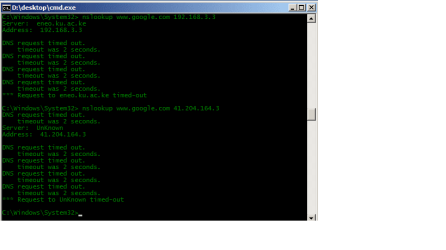
nslookup  [URL="http://www.google.com/"]www.google.com[/URL]  192.168.3.3
nslookup  [URL="http://www.google.com/"]www.google.com[/URL]  41.204.164.3
On working machine it answers succesfully? Or connection refused? Or no answer at all?

Do the same on sick machine
Please answer this question
 

My Computer My Computer

Computer type
Laptop
Computer Manufacturer/Model Number
ACER ASPIRE 5742G
OS
Microsoft Windows 7 Home Premium 64-bits 7601 Multiprocessor Free Service Pack 1
CPU
Intel(R) Core(TM) i3 CPU M 370 @ 2.40GHz
Motherboard
Acer Aspire 5742G
Memory
4,00 GB
Graphics Card(s)
ATI Mobility Radeon HD 5400 Series
Sound Card
(1) AMD High Definition Audio Device (2) Realtek High Defi
Screen Resolution
1366 x 768 x 32 bits (4294967296 colors) @ 60 Hz
Hard Drives
WDC WD5000BEVT-22ZAT0
So all is set to "obtain automatically". Nice.

tracert 41.204.164.3 on sick and working machine. Any difference?

pinging google times out, and tracert reports destination unreachable
tracert 41.204.164.3 on working machine shouldn't give you destination unreachable! At least it should give valueable information.

Anyway : tracert 173.194.66.104 (that's google.com)
That show you the machines that are between you and 173.194.66.104.
Should be the same on working and sick machine. Post tracert 173.194.66.104 output of sick machine. It should show at least 192.168.3.3 as it was pingable.

here is the ping and tracert of google and 41.204.164.3 on sick machine
 

Attachments

  • tracert and ping in sick machine.png
    tracert and ping in sick machine.png
    26.1 KB · Views: 9

My Computer My Computer

Computer Manufacturer/Model Number
samsung RV515L-AO3NG
OS
windows starter 32 bit
CPU
AMD E-450 APU
Graphics Card(s)
AMD Radeon HD
Sound Card
AMD High Definition Audio Device
Monitor(s) Displays
Generic PnP monitor
Hard Drives
Samsung HM321HI ATA Device
pinging google times out, and tracert reports destination unreachable
tracert 41.204.164.3 on working machine shouldn't give you destination unreachable! At least it should give valueable information.

Anyway : tracert 173.194.66.104 (that's google.com)
That show you the machines that are between you and 173.194.66.104.
Should be the same on working and sick machine. Post tracert 173.194.66.104 output of sick machine. It should show at least 192.168.3.3 as it was pingable.

here is the ping and tracert of google and 41.204.164.3 on sick machine
It gets to 172.31.0.6 and then it's blocked. Healthy machine shows same hops of ip addresses? And shows more?

tracert 192.168.3.3 works fine on sick laptop?
 

My Computer My Computer

Computer type
Laptop
Computer Manufacturer/Model Number
ACER ASPIRE 5742G
OS
Microsoft Windows 7 Home Premium 64-bits 7601 Multiprocessor Free Service Pack 1
CPU
Intel(R) Core(TM) i3 CPU M 370 @ 2.40GHz
Motherboard
Acer Aspire 5742G
Memory
4,00 GB
Graphics Card(s)
ATI Mobility Radeon HD 5400 Series
Sound Card
(1) AMD High Definition Audio Device (2) Realtek High Defi
Screen Resolution
1366 x 768 x 32 bits (4294967296 colors) @ 60 Hz
Hard Drives
WDC WD5000BEVT-22ZAT0
Code:
nslookup  [URL="http://www.google.com/"]www.google.com[/URL]  192.168.3.3
nslookup  [URL="http://www.google.com/"]www.google.com[/URL]  41.204.164.3
On working machine it answers succesfully? Or connection refused? Or no answer at all?

Do the same on sick machine
Please answer this question

this is the nslookup of google on both dns servers on the sick machinenslookup of google on both dns servers.png
 

My Computer My Computer

Computer Manufacturer/Model Number
samsung RV515L-AO3NG
OS
windows starter 32 bit
CPU
AMD E-450 APU
Graphics Card(s)
AMD Radeon HD
Sound Card
AMD High Definition Audio Device
Monitor(s) Displays
Generic PnP monitor
Hard Drives
Samsung HM321HI ATA Device
tracert 41.204.164.3 on working machine shouldn't give you destination unreachable! At least it should give valueable information.

Anyway : tracert 173.194.66.104 (that's google.com)
That show you the machines that are between you and 173.194.66.104.
Should be the same on working and sick machine. Post tracert 173.194.66.104 output of sick machine. It should show at least 192.168.3.3 as it was pingable.

here is the ping and tracert of google and 41.204.164.3 on sick machine
It gets to 172.31.0.6 and then it's blocked. Healthy machine shows same hops of ip addresses? And shows more?

tracert 192.168.3.3 works fine on sick laptop?
i doubt if anyone would want me to check out the tracert and ping in their comps. i'm in the library, and some wouldn't want me to use their cmd
 

My Computer My Computer

Computer Manufacturer/Model Number
samsung RV515L-AO3NG
OS
windows starter 32 bit
CPU
AMD E-450 APU
Graphics Card(s)
AMD Radeon HD
Sound Card
AMD High Definition Audio Device
Monitor(s) Displays
Generic PnP monitor
Hard Drives
Samsung HM321HI ATA Device
Code:
nslookup  [URL="http://www.google.com/"]www.google.com[/URL]  192.168.3.3
nslookup  [URL="http://www.google.com/"]www.google.com[/URL]  41.204.164.3
On working machine it answers succesfully? Or connection refused? Or no answer at all?

Do the same on sick machine
Please answer this question

this is the nslookup of google on both dns servers on the sick machineView attachment 230132
And on working machine? No screenshot needed. Just tell me if it works there
 

My Computer My Computer

Computer type
Laptop
Computer Manufacturer/Model Number
ACER ASPIRE 5742G
OS
Microsoft Windows 7 Home Premium 64-bits 7601 Multiprocessor Free Service Pack 1
CPU
Intel(R) Core(TM) i3 CPU M 370 @ 2.40GHz
Motherboard
Acer Aspire 5742G
Memory
4,00 GB
Graphics Card(s)
ATI Mobility Radeon HD 5400 Series
Sound Card
(1) AMD High Definition Audio Device (2) Realtek High Defi
Screen Resolution
1366 x 768 x 32 bits (4294967296 colors) @ 60 Hz
Hard Drives
WDC WD5000BEVT-22ZAT0

My Computer My Computer

Computer Manufacturer/Model Number
samsung RV515L-AO3NG
OS
windows starter 32 bit
CPU
AMD E-450 APU
Graphics Card(s)
AMD Radeon HD
Sound Card
AMD High Definition Audio Device
Monitor(s) Displays
Generic PnP monitor
Hard Drives
Samsung HM321HI ATA Device
You told me before all settings in ipconfig are the same on sick and working machine. You can ping 192.168.3.3 but I think it's just a Fordwarding DNS-server. It forwards the requests to a server you cannot reach!

When did problems start? Did it work last week for example?
After problems started... were you still able to use another accesspoint.... at home for example?
 

My Computer My Computer

Computer type
Laptop
Computer Manufacturer/Model Number
ACER ASPIRE 5742G
OS
Microsoft Windows 7 Home Premium 64-bits 7601 Multiprocessor Free Service Pack 1
CPU
Intel(R) Core(TM) i3 CPU M 370 @ 2.40GHz
Motherboard
Acer Aspire 5742G
Memory
4,00 GB
Graphics Card(s)
ATI Mobility Radeon HD 5400 Series
Sound Card
(1) AMD High Definition Audio Device (2) Realtek High Defi
Screen Resolution
1366 x 768 x 32 bits (4294967296 colors) @ 60 Hz
Hard Drives
WDC WD5000BEVT-22ZAT0
You told me before all settings in ipconfig are the same on sick and working machine. You can ping 192.168.3.3 but I think it's just a Fordwarding DNS-server. It forwards the requests to a server you cannot reach!

When did problems start? Did it work last week for example?
After problems started... were you still able to use another accesspoint.... at home for example?

i just opened school this week, at home i usuallu use a broadband modem, this is the first time i'm connecting using wireless...that's why i'm thinking it has to do with something else in my laptop. i can connect to the network, i can see the signals and all that, but on connecting it shows no internet connection, and on troubleshooting it says dns server not responding! i've tried so many tricks i've seen around but to no avail. what outside the box method can i use?
 

My Computer My Computer

Computer Manufacturer/Model Number
samsung RV515L-AO3NG
OS
windows starter 32 bit
CPU
AMD E-450 APU
Graphics Card(s)
AMD Radeon HD
Sound Card
AMD High Definition Audio Device
Monitor(s) Displays
Generic PnP monitor
Hard Drives
Samsung HM321HI ATA Device
You told me before all settings in ipconfig are the same on sick and working machine. You can ping 192.168.3.3 but I think it's just a Fordwarding DNS-server. It forwards the requests to a server you cannot reach!

When did problems start? Did it work last week for example?
After problems started... were you still able to use another accesspoint.... at home for example?

i just opened school this week, at home i usuallu use a broadband modem, this is the first time i'm connecting using wireless...that's why i'm thinking it has to do with something else in my laptop. i can connect to the network, i can see the signals and all that, but on connecting it shows no internet connection, and on troubleshooting it says dns server not responding! i've tried so many tricks i've seen around but to no avail. what outside the box method can i use?
So at home everything still works (test later at home). Although it's wired it doesn't matter. It proves. DHCP and DNS works fine.

Also try to cannot wireless somewhere else, at neighbors for example. Post results later please.

For now http://www.sevenforums.com/tutorial...ation-conflicts-performing-clean-startup.html

Does it connect to internet if booted clean?
 

My Computer My Computer

Computer type
Laptop
Computer Manufacturer/Model Number
ACER ASPIRE 5742G
OS
Microsoft Windows 7 Home Premium 64-bits 7601 Multiprocessor Free Service Pack 1
CPU
Intel(R) Core(TM) i3 CPU M 370 @ 2.40GHz
Motherboard
Acer Aspire 5742G
Memory
4,00 GB
Graphics Card(s)
ATI Mobility Radeon HD 5400 Series
Sound Card
(1) AMD High Definition Audio Device (2) Realtek High Defi
Screen Resolution
1366 x 768 x 32 bits (4294967296 colors) @ 60 Hz
Hard Drives
WDC WD5000BEVT-22ZAT0
The clean start up does not help.
 

My Computer My Computer

Computer Manufacturer/Model Number
samsung RV515L-AO3NG
OS
windows starter 32 bit
CPU
AMD E-450 APU
Graphics Card(s)
AMD Radeon HD
Sound Card
AMD High Definition Audio Device
Monitor(s) Displays
Generic PnP monitor
Hard Drives
Samsung HM321HI ATA Device
The clean start up does not help.
Put it back to "normal" using msconfig. Go read a book for a while ;-) and test at home
 

My Computer My Computer

Computer type
Laptop
Computer Manufacturer/Model Number
ACER ASPIRE 5742G
OS
Microsoft Windows 7 Home Premium 64-bits 7601 Multiprocessor Free Service Pack 1
CPU
Intel(R) Core(TM) i3 CPU M 370 @ 2.40GHz
Motherboard
Acer Aspire 5742G
Memory
4,00 GB
Graphics Card(s)
ATI Mobility Radeon HD 5400 Series
Sound Card
(1) AMD High Definition Audio Device (2) Realtek High Defi
Screen Resolution
1366 x 768 x 32 bits (4294967296 colors) @ 60 Hz
Hard Drives
WDC WD5000BEVT-22ZAT0
I've even tried safe mode with networking but still the same problem
 

My Computer My Computer

Computer Manufacturer/Model Number
samsung RV515L-AO3NG
OS
windows starter 32 bit
CPU
AMD E-450 APU
Graphics Card(s)
AMD Radeon HD
Sound Card
AMD High Definition Audio Device
Monitor(s) Displays
Generic PnP monitor
Hard Drives
Samsung HM321HI ATA Device
I've used the broadcom utility and it says the driver installation wasn't ok. The driver path leads to a system file athr.sys which on looking at the details, shows it's an atheros installation device. Could it be causing the broadcom adapter and driver issues?
 

My Computer My Computer

Computer Manufacturer/Model Number
samsung RV515L-AO3NG
OS
windows starter 32 bit
CPU
AMD E-450 APU
Graphics Card(s)
AMD Radeon HD
Sound Card
AMD High Definition Audio Device
Monitor(s) Displays
Generic PnP monitor
Hard Drives
Samsung HM321HI ATA Device
I've used the broadcom utility and it says the driver installation wasn't ok. The driver path leads to a system file athr.sys which on looking at the details, shows it's an atheros installation device. Could it be causing the broadcom adapter and driver issues?
you can ping 192.168.3.3 so tcp/ip works. So drivers works. Don't know yet what problem is! But sure... it's not a DNS error at all. You cannot reach 173.194.78.104
And also cannot reach dns server.

Something in building is blocking your laptop? Anyone can use the wireless network automatically? Or do you need to authenticate? Or can anyone walk in building and use it?
 

My Computer My Computer

Computer type
Laptop
Computer Manufacturer/Model Number
ACER ASPIRE 5742G
OS
Microsoft Windows 7 Home Premium 64-bits 7601 Multiprocessor Free Service Pack 1
CPU
Intel(R) Core(TM) i3 CPU M 370 @ 2.40GHz
Motherboard
Acer Aspire 5742G
Memory
4,00 GB
Graphics Card(s)
ATI Mobility Radeon HD 5400 Series
Sound Card
(1) AMD High Definition Audio Device (2) Realtek High Defi
Screen Resolution
1366 x 768 x 32 bits (4294967296 colors) @ 60 Hz
Hard Drives
WDC WD5000BEVT-22ZAT0
I've used the broadcom utility and it says the driver installation wasn't ok. The driver path leads to a system file athr.sys which on looking at the details, shows it's an atheros installation device. Could it be causing the broadcom adapter and driver issues?
you can ping 192.168.3.3 so tcp/ip works. So drivers works. Don't know yet what problem is! But sure... it's not a DNS error at all. You cannot reach 173.194.78.104
And also cannot reach dns server.

Something in building is blocking your laptop? Anyone can use the wireless network automatically? Or do you need to authenticate? Or can anyone walk in building and use it?

yes, anyone can walk in and connect. It's open, i've tried connecting to another wireless network and it's the same problem. My broadband 3G modem works ok! I usually carry it around....
 

My Computer My Computer

Computer Manufacturer/Model Number
samsung RV515L-AO3NG
OS
windows starter 32 bit
CPU
AMD E-450 APU
Graphics Card(s)
AMD Radeon HD
Sound Card
AMD High Definition Audio Device
Monitor(s) Displays
Generic PnP monitor
Hard Drives
Samsung HM321HI ATA Device
I've used the broadcom utility and it says the driver installation wasn't ok. The driver path leads to a system file athr.sys which on looking at the details, shows it's an atheros installation device. Could it be causing the broadcom adapter and driver issues?
you can ping 192.168.3.3 so tcp/ip works. So drivers works. Don't know yet what problem is! But sure... it's not a DNS error at all. You cannot reach 173.194.78.104
And also cannot reach dns server.

Something in building is blocking your laptop? Anyone can use the wireless network automatically? Or do you need to authenticate? Or can anyone walk in building and use it?

yes, anyone can walk in and connect. It's open, i've tried connecting to another wireless network and it's the same problem. My broadband 3G modem works ok! I usually carry it around....
Try at friends home (using cable and using wireless). Connected with cable always works?

Can you ping default gateway? tracert 173.194.66.94
post output
 

My Computer My Computer

Computer type
Laptop
Computer Manufacturer/Model Number
ACER ASPIRE 5742G
OS
Microsoft Windows 7 Home Premium 64-bits 7601 Multiprocessor Free Service Pack 1
CPU
Intel(R) Core(TM) i3 CPU M 370 @ 2.40GHz
Motherboard
Acer Aspire 5742G
Memory
4,00 GB
Graphics Card(s)
ATI Mobility Radeon HD 5400 Series
Sound Card
(1) AMD High Definition Audio Device (2) Realtek High Defi
Screen Resolution
1366 x 768 x 32 bits (4294967296 colors) @ 60 Hz
Hard Drives
WDC WD5000BEVT-22ZAT0
Back
Top