Is it a better idea to have media files on a different drive?

sam9953

New member
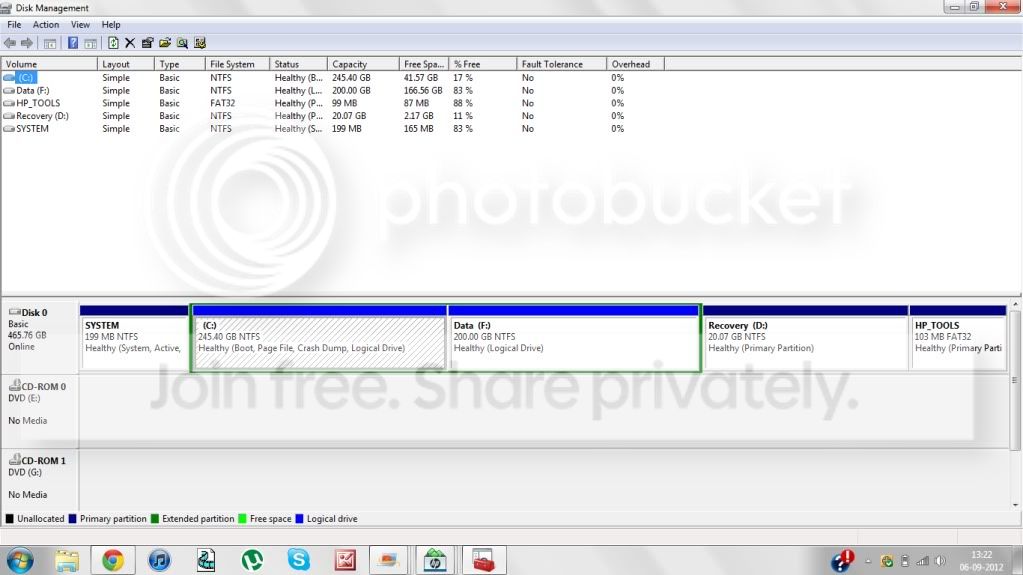
I have created a few extended partition on my current C drive. Now what if incase my OS gets corrupt then will it affect the whole of my C drive or just the partition in which I have the OS? I am asking this because currently all my data is stored on the OS drive but I will create a new extended partition and store data on it incase you say that the extended drive does not get affected if my OS drive gets corrupt.
NewPicture-6.jpg


Like in the above picture, if incase my system gets affected by a virus and my OS is affected then in that case will this damage both F and C drive or just my C drive, plus also what will be useful when I make a dual OS system, should I keep my data in C only or put my data in F.
 

My Computer

OS
Windows 7 Home Basic 64 bit
I'd keep my data in a separate partition, regardless of what OS setup I had.

Even if partition issues or viruses are confined to C only, the entire drive can of course fail at any time.

I hope you have your F partition backed up to some other drive.
 

My Computer

Computer type
PC/Desktop
Computer Manufacturer/Model Number
Ignatz Special; 4 speed manual gearbox; factory air conditioning; one of one
OS
Windows 7 Home Premium SP1, 64-bit
CPU
Intel Skylake i5-6600K, not overclocked
Motherboard
AsRock Z170M Extreme 4, micro ATX
Memory
8 GB HyperX DDR4-2666 (2 x 4 GB)
Graphics Card(s)
none; graphics are integrated on CPU
Sound Card
onboard: Realtek ALC1150; external: USB Behringer UF0-202
Monitor(s) Displays
Dell S2340M 23 inch IPS
Screen Resolution
1600 x 900
Hard Drives
System: Crucial MX100 series SSD, 128 GB;
Data: Samsung Spinpoint 103SJ, 1 TB;
Backup: WD Caviar Green WD30EZRX-00D8PB0, 3 TB
PSU
Rosewill SilentNight 500 watt fanless, semi-modular
Case
Antec Solo II
Cooling
Noctua NH-U12S; Noctua F12 intake, Noctua S12A exhaust
Keyboard
Microsoft 200 6JH-00001 USB
Mouse
Dell or Microsoft optical wired; USB
Antivirus
Microsoft Security Essentials and Malwarebytes Premium
Browser
Pale Moon
Other Info
All fans PWM; speeds at idle: CPU circa 500 rpm; intake circa 600 rpm; exhaust circa 600 rpm; CPU temps 27 idle and 47 C load in a warm room (27 C/81 F) when running Intel Extreme Tuning Utility stress test.
Yes I have backed up my data on an external drive, but what I am trying to say is that I will be soon creating another extended partition, lets say G, and I will install Windows 8 on it. So now when this case happens then I will have two OS' , so in that case will it be a better idea to have my data on F drive or on the other two drives containing the OS, i.e C or G.
 

My Computer

OS
Windows 7 Home Basic 64 bit
As I said in my first post, I see no reason to have data on an OS drive.


As it is now, your data appears to be on F, NOT on an OS partition. Why change that?
 

My Computer

Computer type
PC/Desktop
Computer Manufacturer/Model Number
Ignatz Special; 4 speed manual gearbox; factory air conditioning; one of one
OS
Windows 7 Home Premium SP1, 64-bit
CPU
Intel Skylake i5-6600K, not overclocked
Motherboard
AsRock Z170M Extreme 4, micro ATX
Memory
8 GB HyperX DDR4-2666 (2 x 4 GB)
Graphics Card(s)
none; graphics are integrated on CPU
Sound Card
onboard: Realtek ALC1150; external: USB Behringer UF0-202
Monitor(s) Displays
Dell S2340M 23 inch IPS
Screen Resolution
1600 x 900
Hard Drives
System: Crucial MX100 series SSD, 128 GB;
Data: Samsung Spinpoint 103SJ, 1 TB;
Backup: WD Caviar Green WD30EZRX-00D8PB0, 3 TB
PSU
Rosewill SilentNight 500 watt fanless, semi-modular
Case
Antec Solo II
Cooling
Noctua NH-U12S; Noctua F12 intake, Noctua S12A exhaust
Keyboard
Microsoft 200 6JH-00001 USB
Mouse
Dell or Microsoft optical wired; USB
Antivirus
Microsoft Security Essentials and Malwarebytes Premium
Browser
Pale Moon
Other Info
All fans PWM; speeds at idle: CPU circa 500 rpm; intake circa 600 rpm; exhaust circa 600 rpm; CPU temps 27 idle and 47 C load in a warm room (27 C/81 F) when running Intel Extreme Tuning Utility stress test.
I originally had this setup on my one internal hard drive. Data is where all my Documents, Pictures, Music etc is.
[System Reserved 200meg] [Windows 7 214 gig] [Data 250 gig]
I then split the windows 7 partition to dual boot with windows 8
[System Reserved 200meg] [Windows 7 107 gig] [Windows 8 107 gig] [Data 250 gig]
It hasn't caused me any problems that I know of. I don't expect any problems removing Windows 8 to go back to the original setup either. The only problem you may run into is if the drive letter of your media partition changes you may have to adjust your library locations to match.
 

My Computer

Computer type
PC/Desktop
Computer Manufacturer/Model Number
Home Built
OS
Windows 10 Education 64 bit
CPU
AMD Phenom II X4 980 Black Edition Deneb 3.7GHz
Motherboard
Asus M4N68T-M V2 µATX Motherboard
Memory
8GB 4GBx2 Kingston PC10600 DDR3 1333 Memory
Graphics Card(s)
Zotac NVIDIA Geforce GT640 2 Gig DDR3 PCIe
Sound Card
VIA VT1708s High Definition Audio 8-channel Onboard
Monitor(s) Displays
22" LG E2242 1080p and 2 19" I-INC AG191D
Screen Resolution
1280x1024 - 1920x1080 - 1280x1024
Hard Drives
Crucial M100 256 GB SSD and 500 GB WD Blue SATA
PSU
Thermaltake TR 620
Case
Power Up Black ATX Mid-Tower Case
Cooling
Stock heatsink and fan
Keyboard
Logitech Wireless K350 Wave
Mouse
Logitech Wireless M570 Trackman Wheel
Internet Speed
80 Mbps Down 30 Mbps Up
Antivirus
Windows Defender
Browser
Internet Explorer 11
Other Info
HP DVD1040e Lightscribe - External USB2
I am very very new to all this partitioning stuff and I have just learned some of it, so can you tell me when you say this "The only problem you may run into is if the drive letter of your media partition changes you may have to adjust your library locations to match." what do you mean by that? I mean how can the drive letter get changed untill and unless I don't do it using the disk management.
 

My Computer

OS
Windows 7 Home Basic 64 bit
Windows determines the drive letters. For instance, I'm booted up into Windows 8 right now. Disk management shows Windows 8 as C and the Windows 7 partition as G. If I boot up into Windows 7 disk management shows the Windows 7 partition as C and Windows 8 as G. They get reversed when I switch from Windows 8 to Windows 7. I had to change some drive letters around so that my Data partition was D for both 7 & 8 and my DVD was E for both. After that I moved my user folders to D. Windows 7 and Windows 8 both show the Location for my Documents folder as D:\Documents. If the drive letter of my Data partition gets changed Windows won't be able to find my Documents, Pictures, and Music,etc.
 

My Computer

Computer type
PC/Desktop
Computer Manufacturer/Model Number
Home Built
OS
Windows 10 Education 64 bit
CPU
AMD Phenom II X4 980 Black Edition Deneb 3.7GHz
Motherboard
Asus M4N68T-M V2 µATX Motherboard
Memory
8GB 4GBx2 Kingston PC10600 DDR3 1333 Memory
Graphics Card(s)
Zotac NVIDIA Geforce GT640 2 Gig DDR3 PCIe
Sound Card
VIA VT1708s High Definition Audio 8-channel Onboard
Monitor(s) Displays
22" LG E2242 1080p and 2 19" I-INC AG191D
Screen Resolution
1280x1024 - 1920x1080 - 1280x1024
Hard Drives
Crucial M100 256 GB SSD and 500 GB WD Blue SATA
PSU
Thermaltake TR 620
Case
Power Up Black ATX Mid-Tower Case
Cooling
Stock heatsink and fan
Keyboard
Logitech Wireless K350 Wave
Mouse
Logitech Wireless M570 Trackman Wheel
Internet Speed
80 Mbps Down 30 Mbps Up
Antivirus
Windows Defender
Browser
Internet Explorer 11
Other Info
HP DVD1040e Lightscribe - External USB2
Of course it`s a good idea.
 

My Computer

Computer type
PC/Desktop
Computer Manufacturer/Model Number
Skylake Special #666
OS
Windows 10 Pro x64
CPU
Intel Core i7 6700K
Motherboard
Asus Sabertooth Z170 Mark 1
Memory
GSkill TridentZ RGB 16GB 3600 16-16-16-36
Graphics Card(s)
EVGA GTX 980 Ti SC x2
Sound Card
Realtek High Definition
Monitor(s) Displays
AOC G2460PG
Screen Resolution
1920 x 1080 144Hz
Hard Drives
Samsung 860 Pro 256GB, Seagate Barracuda 4TB x2
PSU
EVGA 1000 P2, EVGA White Custom Braided Cables
Case
Corsair Vengeance C70 Gunmetal Black
Cooling
Corsair H100i v2, Corsair ML120 x2, Thermal Grizzly Kryonaut
Keyboard
Logitech G910 Orion Spectrum
Mouse
Logitech G700s
Internet Speed
Verizon Fios Quantum Gateway 75/75
Antivirus
Windows Defender, Malwarebytes Free 3.8.3
Browser
Chrome
Other Info
Corsair SP120 x4, LG Blu-ray Drive, Durabrand HT-395 100 Watt Dolby Digital Amp, Corsair H2100 Wireless 7.1 Headset
Windows determines the drive letters. For instance, I'm booted up into Windows 8 right now. Disk management shows Windows 8 as C and the Windows 7 partition as G. If I boot up into Windows 7 disk management shows the Windows 7 partition as C and Windows 8 as G. They get reversed when I switch from Windows 8 to Windows 7. I had to change some drive letters around so that my Data partition was D for both 7 & 8 and my DVD was E for both. After that I moved my user folders to D. Windows 7 and Windows 8 both show the Location for my Documents folder as D:\Documents. If the drive letter of my Data partition gets changed Windows won't be able to find my Documents, Pictures, and Music,etc.

Oh I get it now, can you tell me as well, how can I make such a setting so that I don't my F drive which currently has all my data has the same letter in both the OS. Though I have not installed windows 8 right now, but still for the future.
 

My Computer

OS
Windows 7 Home Basic 64 bit
I prefer to keep my media on different drives,
drives-15tb.jpg


drives-samsung.jpg
 

My Computer

Computer Manufacturer/Model Number
HAL-9000
OS
Windows 7 Ultimate 64bit
CPU
Intel i7 3770K
Motherboard
Asus Sabertooth Z77
Memory
16GB DDR3 1333 Corsair XMS3
Graphics Card(s)
XFX HD6950 2GB EyeFinity
Sound Card
Logitech G35 & Sennheiser PC135 & VIA HD
Monitor(s) Displays
23" HP 2310e, 23" Samsung B2230, 21.5" Viewsonic
Screen Resolution
5760x1080
Hard Drives
16TB of Storage
128GB & 256GB Crucial M4 SSD's, 2X 1TB WD Black, 3x 2TB WD, 3x 2TB Samsung F4, 1.5TB Seagate, WD 500GB,
PSU
Antec True Power New 650watt
Case
Cooler Master HAF-932
Cooling
Corsair H60 Hydro Cooler, 3x 230mm Fans, 2x120mm Fan
Keyboard
Logitech G15 and G13
Mouse
Logitech G700 Gaming Mouse
Internet Speed
50/10 Mbit
Other Info
Speakers : Alesis M1 Active Mk2 Studio Monitors , APC RS 1200 UPS, HP 4500DN Color Laser, HP P1006 mono Laser, Kodak 8500 Dye-Sub, Epson 1280 inkjet, Epson Worforce 610 MFC
Windows determines the drive letters. For instance, I'm booted up into Windows 8 right now. Disk management shows Windows 8 as C and the Windows 7 partition as G. If I boot up into Windows 7 disk management shows the Windows 7 partition as C and Windows 8 as G. They get reversed when I switch from Windows 8 to Windows 7. I had to change some drive letters around so that my Data partition was D for both 7 & 8 and my DVD was E for both. After that I moved my user folders to D. Windows 7 and Windows 8 both show the Location for my Documents folder as D:\Documents. If the drive letter of my Data partition gets changed Windows won't be able to find my Documents, Pictures, and Music,etc.

Oh I get it now, can you tell me as well, how can I make such a setting so that I don't my F drive which currently has all my data has the same letter in both the OS. Though I have not installed windows 8 right now, but still for the future.

You can change the drive letters in disk management.
http://www.sevenforums.com/tutorials/82994-drive-letter-add-change-remove-windows-7-a.html
http://www.sevenforums.com/tutorials/77899-hard-drives-lock-drive-letter.html
 

My Computer

Computer type
PC/Desktop
Computer Manufacturer/Model Number
Home Built
OS
Windows 10 Education 64 bit
CPU
AMD Phenom II X4 980 Black Edition Deneb 3.7GHz
Motherboard
Asus M4N68T-M V2 µATX Motherboard
Memory
8GB 4GBx2 Kingston PC10600 DDR3 1333 Memory
Graphics Card(s)
Zotac NVIDIA Geforce GT640 2 Gig DDR3 PCIe
Sound Card
VIA VT1708s High Definition Audio 8-channel Onboard
Monitor(s) Displays
22" LG E2242 1080p and 2 19" I-INC AG191D
Screen Resolution
1280x1024 - 1920x1080 - 1280x1024
Hard Drives
Crucial M100 256 GB SSD and 500 GB WD Blue SATA
PSU
Thermaltake TR 620
Case
Power Up Black ATX Mid-Tower Case
Cooling
Stock heatsink and fan
Keyboard
Logitech Wireless K350 Wave
Mouse
Logitech Wireless M570 Trackman Wheel
Internet Speed
80 Mbps Down 30 Mbps Up
Antivirus
Windows Defender
Browser
Internet Explorer 11
Other Info
HP DVD1040e Lightscribe - External USB2
Thanks a lot for this guys, now I am facing another problem, I have my hard disk with total space of 445 GB after excluding 20GB for the Recovery. Now I have made F drive which is 200 GB and C drive as 245 GB as you can see in my first post, but now when I try to make a partition of the 245 GB drive then it is allowing me to shrink it just by 100 Gb not more, even though I have nearly 180 GB free. Please tell me how can I shrink to at least 180 GB?
 

My Computer

OS
Windows 7 Home Basic 64 bit

My Computer

Computer type
PC/Desktop
Computer Manufacturer/Model Number
Ignatz Special; 4 speed manual gearbox; factory air conditioning; one of one
OS
Windows 7 Home Premium SP1, 64-bit
CPU
Intel Skylake i5-6600K, not overclocked
Motherboard
AsRock Z170M Extreme 4, micro ATX
Memory
8 GB HyperX DDR4-2666 (2 x 4 GB)
Graphics Card(s)
none; graphics are integrated on CPU
Sound Card
onboard: Realtek ALC1150; external: USB Behringer UF0-202
Monitor(s) Displays
Dell S2340M 23 inch IPS
Screen Resolution
1600 x 900
Hard Drives
System: Crucial MX100 series SSD, 128 GB;
Data: Samsung Spinpoint 103SJ, 1 TB;
Backup: WD Caviar Green WD30EZRX-00D8PB0, 3 TB
PSU
Rosewill SilentNight 500 watt fanless, semi-modular
Case
Antec Solo II
Cooling
Noctua NH-U12S; Noctua F12 intake, Noctua S12A exhaust
Keyboard
Microsoft 200 6JH-00001 USB
Mouse
Dell or Microsoft optical wired; USB
Antivirus
Microsoft Security Essentials and Malwarebytes Premium
Browser
Pale Moon
Other Info
All fans PWM; speeds at idle: CPU circa 500 rpm; intake circa 600 rpm; exhaust circa 600 rpm; CPU temps 27 idle and 47 C load in a warm room (27 C/81 F) when running Intel Extreme Tuning Utility stress test.
If you can spare $50 or maybe less, best thing is get an SSD for boot only and use yr hd only for storage. even a small old recent hd (not too old as then it will be too slow) for o/s only is still better than having boot and data storage on one physical hd IMHO
 

My Computer

Computer Manufacturer/Model Number
Viliv X70|Asus P8Z68 Deluxe|MSI FXA890-GD70
OS
Windows 7 Ultimate SP1
CPU
Intel Atom z520 1.33ghz|Intel Core i7 2600K|AMD Phenom II955
Memory
1 GB DDR2|32 GB DDR3|32 GB DDR3
Graphics Card(s)
Intel GM500|Nvidia GTX480|Nvidia 9800GT
Sound Card
Built in
Monitor(s) Displays
Built in Touch sensitive resistive lcd|Samsung 305T|HP 3065
Screen Resolution
1024x600|2560x1600|2506x1600
Hard Drives
16 GB SSD Siliconmotion SM2233AB|Mechanical HDD
PSU
Built in|Ultra LSP 650|Ultra LSP 650
Cooling
Passive|active|active
Internet Speed
12 mbit cable
Well it's always a good idea to have media on the other drives than having them in the OS drive.. When i say media im talking about setups, songs, movies, images etc. not talking about Installed softwares on OS drive.
 

My Computer

Computer type
PC/Desktop
Computer Manufacturer/Model Number
Self Built
OS
Windows 10 Pro
CPU
Core i5 9600K
Motherboard
ASUS ROG Strix Z390-F Gaming
Memory
Corsair Vengeance Pro 2x 8GB (16GB) 3200MHz DDR4
Graphics Card(s)
MSI GTX 1070 Gaming X 8GB
Sound Card
ASRock A-Style Purity Sound
Monitor(s) Displays
ASUS VX239H IPS
Screen Resolution
1920x1080
Hard Drives
XPG SPECTRIX S40G 2566GB M.2 NVMe | Patriot P210 512GB SSD | Seagate BarraCuda 4TB 5400RPM
PSU
Thermaltake Smart 600w RGB 80Plus
Case
NZXT H500 with 3x Corsair HD120 RGB w/Node Pro
Cooling
Cryorig H7
Keyboard
Corsair K70 RapidFire RGB (Cherry MX Speed)
Mouse
Logitech G402 Hyperion Fury
Internet Speed
20MB Cable Broadband
Browser
Chrome
Other Info
Corsair MM300 Extended Anti-Fray Mouse Pad | Edifier C2 2.1ch Sound System | XBOX One S Controller | XBOX 360 Wireless Controller for Windows | APC SUA1000i Smart-UPS | PS4 Slim 500GB [Region 1 - USA]
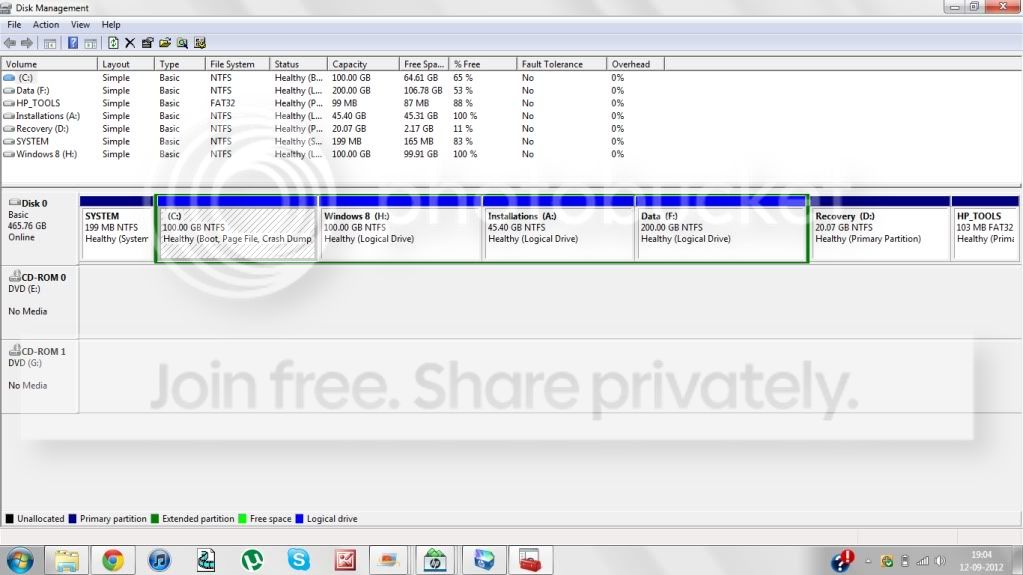
Okay guys I have now made the changes with the help of partition wizard, you can see my photo to see how my disk partitions currently look like.

NewPicture-7.jpg


I have a few questions, after using these three softwares I found the following:

Disk management: Allows merging of partitions, but gives restrictions when extending the partition
Partition Wizard home edition: Allows extending to the full extent but when trying to merge,it says that this function is not supported by the home edition.
Partition Wizard server edition: As the demo version is available online, and the full version is very expensive, I used the demo one and when trying to merge or extend the partition it says that neither of the functions could be done.

So my question is that how is it possible to able to all the disk management functions without any restrictions.
 

My Computer

OS
Windows 7 Home Basic 64 bit
I think some of the restrictions on the built in disk management come from it not being able to move some system files. It may show X amount of free space but it may not be continuous free space. There may be free space, some files or folders and then more free space. It can only shrink back to that file or folder. Running a defrage and doing a disk cleanup may free that space up. When you use a third party tool, especially one that boots to its own environment, those locked system files can be moved. The free version is restricted because they want you to buy the full version. The typical bait and switch.
 

My Computer

Computer type
PC/Desktop
Computer Manufacturer/Model Number
Home Built
OS
Windows 10 Education 64 bit
CPU
AMD Phenom II X4 980 Black Edition Deneb 3.7GHz
Motherboard
Asus M4N68T-M V2 µATX Motherboard
Memory
8GB 4GBx2 Kingston PC10600 DDR3 1333 Memory
Graphics Card(s)
Zotac NVIDIA Geforce GT640 2 Gig DDR3 PCIe
Sound Card
VIA VT1708s High Definition Audio 8-channel Onboard
Monitor(s) Displays
22" LG E2242 1080p and 2 19" I-INC AG191D
Screen Resolution
1280x1024 - 1920x1080 - 1280x1024
Hard Drives
Crucial M100 256 GB SSD and 500 GB WD Blue SATA
PSU
Thermaltake TR 620
Case
Power Up Black ATX Mid-Tower Case
Cooling
Stock heatsink and fan
Keyboard
Logitech Wireless K350 Wave
Mouse
Logitech Wireless M570 Trackman Wheel
Internet Speed
80 Mbps Down 30 Mbps Up
Antivirus
Windows Defender
Browser
Internet Explorer 11
Other Info
HP DVD1040e Lightscribe - External USB2
Okay what you are saying might be true but once I saw that my disk management is giving me less than 17 to shrink although I had like 180GB free, I did defragmentation for my C drive, and guess what, once I tried disk management again after defragmenting my C drive, It showed me even lesser amount to shrink.

So my question is still unanswered, is there any software or any other way to get one tool which allows both merge and extending partitions, without paying huge amount of money like buying pro edition of partition wizard.
 

My Computer

OS
Windows 7 Home Basic 64 bit
Back
Top