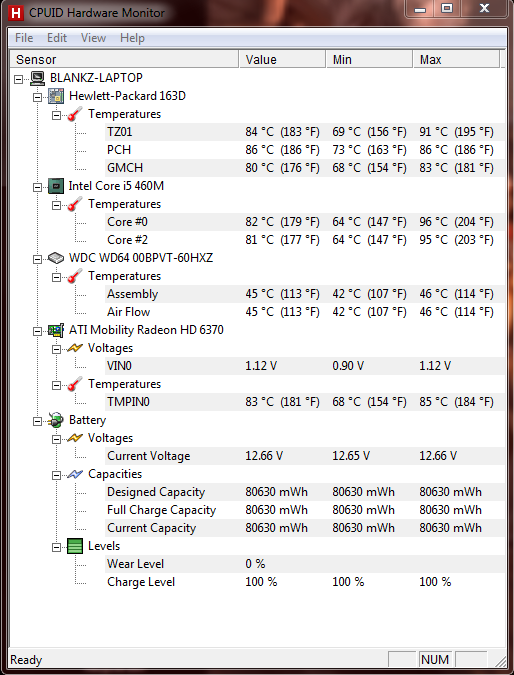
Is my computer to hot? (Screenshot)

BlankZ

New member
Local time
9:06 AM
Messages
15
Location
Dade County
Hello W7F friends!

I have a question for you this morning!

I own a Pavilion Dv7 HP Notebook, Intel Core i5 M460 @ 2.53 GHz, ATI Mobility Radeon HD 6370, 6GB ram running Windows 7 Home Premium 64-Bit.

I do play games on my laptop and have noticed that after a few hours of playing my laptop can get really hot. I took a screenshot of my computers temperature as soon as I got done playing for a few hours and here is what I saw.

9259908.png


Based on the image provided,.. do you believe my computer temperature is to high? Keep in mind that those temp's could rise while I'm playing a game. Thank you for any on formation you could provide! Sorry if I posted this in the wrong place, I'm a newbie to the forums.

BlankZ
 
Last edited:

My Computer My Computer

At a glance

Windows 7 64-bit Home PremiumIntel Core i56GBATI Mobility Radeon HD 6370 512 MB DDR3
Computer Manufacturer/Model Number
Hewlett-Packard/ Pavilion dv7-4285dx Notebook PC
OS
Windows 7 64-bit Home Premium
CPU
Intel Core i5
Memory
6GB
Graphics Card(s)
ATI Mobility Radeon HD 6370 512 MB DDR3
Sound Card
IDT High Definition Audio (Beats Audio)
Screen Resolution
1600x900
Hard Drives
WDC WD6400BPVT-60HXZT1 ATA Device
Mouse
Steelseries XAI Laser Mouse (MoH Edition)
Internet Speed
DL 25.00 Mbps/UL 4.00 Mbps

My Computer My Computer

Computer type
Laptop
Are the temperatures when playing games?

Here's some information about your processer: ARK | Intel® Core)

The TJ Max (Thermal Junction) is 105'C, which is the highest temperature your CPU will run at, until it starts displaying warning messages and desperately trying to cool your CPU.

Install CoreTemp: Core Temp

This program will monitor your CPU's temperature and it's TJ.Max

Hope this helps,

Harry

Thanks for the quick reply x Blue Robot.

Good information that you provided I bookmarked it for future use. I have to say that unfortunately the temperature above is the temperature exactly a minute or two after closing my game down after 3 hours of playing.

I still felt like it was too hot after I shut down the game.. that's the reason why I'm asking. I know my computer has never displayed any warning messages, I sure hope I don't get to that point. So is my temperature normal typically after 3 hours playing for my laptop? I bought my computer new around March 2011..... :sarc:
 

My Computer My Computer

At a glance

Windows 7 64-bit Home PremiumIntel Core i56GBATI Mobility Radeon HD 6370 512 MB DDR3
Computer Manufacturer/Model Number
Hewlett-Packard/ Pavilion dv7-4285dx Notebook PC
OS
Windows 7 64-bit Home Premium
CPU
Intel Core i5
Memory
6GB
Graphics Card(s)
ATI Mobility Radeon HD 6370 512 MB DDR3
Sound Card
IDT High Definition Audio (Beats Audio)
Screen Resolution
1600x900
Hard Drives
WDC WD6400BPVT-60HXZT1 ATA Device
Mouse
Steelseries XAI Laser Mouse (MoH Edition)
Internet Speed
DL 25.00 Mbps/UL 4.00 Mbps
The temps in your snip are fine. In fact fairly cool for a lappy. :D
 

My Computer My Computer

At a glance

Windows 7 Ultimate X64 SP1Intel i5-2550K, Differing ~4.4-4.8GHz No buil...16GB G.Skill Sniper 1866MHz @ 2133MHz 2x8GBASUS GTX650TIB-DC2OC-2GD5, (650TI Boost)
Computer type
PC/Desktop
Computer Manufacturer/Model Number
Home Built Desktop By DataTech
OS
Windows 7 Ultimate X64 SP1
CPU
Intel i5-2550K, Differing ~4.4-4.8GHz No built in GPU
Motherboard
ASUS P8Z68-V PRO/GEN3
Memory
16GB G.Skill Sniper 1866MHz @ 2133MHz 2x8GB
Graphics Card(s)
ASUS GTX650TIB-DC2OC-2GD5, (650TI Boost)
Sound Card
Onboard Realtek 5-1
Monitor(s) Displays
Samsung P2570HD
Screen Resolution
1920x1080
Hard Drives
Samsung 840 Pro 256GB SSD for OS, 500GB Seagate Constellation (Enterprise drive) for Data
PSU
Corsair HX650W
Case
Inwin Dragon Rider
Cooling
Hyper 212 EVO w/two Noctua fans, push-pull, @1300 RPM
Keyboard
E-Z Eyes, bright yellow keys with large characters
Mouse
steelseries SENSEI Laser Pro Gaming
Internet Speed
48-51Mbs Mbs down, 11 Mbs up Xfinity Cable
Antivirus
Norton Internet Security 2013
Browser
IE 10, Opera, Pale Moon if needed
Other Info
4 case fans, LG BluRay-RE, ASUS DVD-RW, Mr. Fusion power supply, 1.21 gigawatts.
Are the temperatures when playing games?

Here's some information about your processer: ARK | Intel® Core)

The TJ Max (Thermal Junction) is 105'C, which is the highest temperature your CPU will run at, until it starts displaying warning messages and desperately trying to cool your CPU.

Install CoreTemp: Core Temp

This program will monitor your CPU's temperature and it's TJ.Max

Hope this helps,

Harry

Thanks for the quick reply x Blue Robot.

Good information that you provided I bookmarked it for future use. I have to say that unfortunately the temperature above is the temperature exactly a minute or two after closing my game down after 3 hours of playing.

I still felt like it was too hot after I shut down the game.. that's the reason why I'm asking. I know my computer has never displayed any warning messages, I sure hope I don't get to that point. So is my temperature normal typically after 3 hours playing for my laptop? I bought my computer new around March 2011..... :sarc:

You could purchase a cooling pad from a PC retailer, and just in case you do, don't have your battery charging while playing games, it generates extra heat from putting strain on the battery whilst charging (:
 

My Computer My Computer

Computer type
Laptop
The temps in your snip are fine. In fact fairly cool for a lappy. :D


Phew! That is some good news. I will be back later on today after I take a screenshot of my temperature after a little while of playing. I'm still a bit weary about this whole thing.. I want to be on the safe side.

Thanks again! Sure am happy with this piece of technology.. LOVE IT!
 

My Computer My Computer

At a glance

Windows 7 64-bit Home PremiumIntel Core i56GBATI Mobility Radeon HD 6370 512 MB DDR3
Computer Manufacturer/Model Number
Hewlett-Packard/ Pavilion dv7-4285dx Notebook PC
OS
Windows 7 64-bit Home Premium
CPU
Intel Core i5
Memory
6GB
Graphics Card(s)
ATI Mobility Radeon HD 6370 512 MB DDR3
Sound Card
IDT High Definition Audio (Beats Audio)
Screen Resolution
1600x900
Hard Drives
WDC WD6400BPVT-60HXZT1 ATA Device
Mouse
Steelseries XAI Laser Mouse (MoH Edition)
Internet Speed
DL 25.00 Mbps/UL 4.00 Mbps
Are the temperatures when playing games?

Here's some information about your processer: ARK | Intel® Core)

The TJ Max (Thermal Junction) is 105'C, which is the highest temperature your CPU will run at, until it starts displaying warning messages and desperately trying to cool your CPU.

Install CoreTemp: Core Temp

This program will monitor your CPU's temperature and it's TJ.Max

Hope this helps,

Harry

Thanks for the quick reply x Blue Robot.

Good information that you provided I bookmarked it for future use. I have to say that unfortunately the temperature above is the temperature exactly a minute or two after closing my game down after 3 hours of playing.

I still felt like it was too hot after I shut down the game.. that's the reason why I'm asking. I know my computer has never displayed any warning messages, I sure hope I don't get to that point. So is my temperature normal typically after 3 hours playing for my laptop? I bought my computer new around March 2011..... :sarc:

You could purchase a cooling pad from a PC retailer, and just in case you do, don't have your battery charging while playing games, it generates extra heat from putting strain on the battery whilst charging (:


I was going to buy one, but I feel weird about connecting hardware device via usb while playing and charging my computer. Thing is my computer is not exactly on the "high high" end.. so when I'm playing & I don't have my charger connected my computer isn't exactly performing at it's best.

I want a cooling pad, but one that connects via socket. Any suggestions?

BlankZ
 

My Computer My Computer

At a glance

Windows 7 64-bit Home PremiumIntel Core i56GBATI Mobility Radeon HD 6370 512 MB DDR3
Computer Manufacturer/Model Number
Hewlett-Packard/ Pavilion dv7-4285dx Notebook PC
OS
Windows 7 64-bit Home Premium
CPU
Intel Core i5
Memory
6GB
Graphics Card(s)
ATI Mobility Radeon HD 6370 512 MB DDR3
Sound Card
IDT High Definition Audio (Beats Audio)
Screen Resolution
1600x900
Hard Drives
WDC WD6400BPVT-60HXZT1 ATA Device
Mouse
Steelseries XAI Laser Mouse (MoH Edition)
Internet Speed
DL 25.00 Mbps/UL 4.00 Mbps
You can remove the battery and then just have the charger plugged into the laptop, which is what I do (:

For the cooling pad, another forum suggested purchasing a USB to AC Adapter, but also you can purchase cooling mats which contain special crystals which in turn absorb the heat from the laptop; here's the forum:

Non-USB powered laptop cooling pad? - Super User
 

My Computer My Computer

Computer type
Laptop
Here's an updated screenshot...

After playing for about 20 minutes. I'll be posting more later on tonight.


9263169.png


Temperature is higher, very close to the 107 mark. Seems pretty high imo.. I'm taking your suggestion on removing my battery and just use my AC adapter charger, hoping that helps with the temp as well. Note, I'm not even playing on the highest settings, because if I do the laptops fans sounds crazy.
 

My Computer My Computer

At a glance

Windows 7 64-bit Home PremiumIntel Core i56GBATI Mobility Radeon HD 6370 512 MB DDR3
Computer Manufacturer/Model Number
Hewlett-Packard/ Pavilion dv7-4285dx Notebook PC
OS
Windows 7 64-bit Home Premium
CPU
Intel Core i5
Memory
6GB
Graphics Card(s)
ATI Mobility Radeon HD 6370 512 MB DDR3
Sound Card
IDT High Definition Audio (Beats Audio)
Screen Resolution
1600x900
Hard Drives
WDC WD6400BPVT-60HXZT1 ATA Device
Mouse
Steelseries XAI Laser Mouse (MoH Edition)
Internet Speed
DL 25.00 Mbps/UL 4.00 Mbps
You temperatures have increased considerably, and also you can lower your maximum processor state within the Advanced Power options, which can also lower your temperature without affecting the performance to a certain extent.

If the performance is affected then change the processor state back.

Hope this helps,

Harry
 

Attachments

  • Power Options.JPG
    Power Options.JPG
    64.2 KB · Views: 37

My Computer My Computer

Computer type
Laptop
Something that's probably worth mentioning here is that HPs are known to heat up very fast, due to the poor ventilation they offer by design. They never did make any good gaming laptops, so I wouldn't expect one to perform to that extent either. Definitely wouldn't game for long periods on a HP notebook. Especially one one of those fancy multimedia series ones.

I would also recommend using a good laptop cooling pad as suggested previously. Does make a difference with the temps. NZXT and Cryo offer some coolers that work on AC Power.
 

My Computer My Computer

At a glance

Windows 7 HP / Ultimate x64Core i5 / X4 955 BE4GB DDR3 1333Mhz / 8GB DDR3 1600MhzHD5470 / HD5670
Computer Manufacturer/Model Number
Dell / Custom
OS
Windows 7 HP / Ultimate x64
CPU
Core i5 / X4 955 BE
Motherboard
OEM / Gigabyte 880GM-USB3
Memory
4GB DDR3 1333Mhz / 8GB DDR3 1600Mhz
Graphics Card(s)
HD5470 / HD5670
Sound Card
Onboard
Monitor(s) Displays
FullHD 15" / Dell 22" WS
Screen Resolution
1920x1080 / 1680x1050
Hard Drives
320GB / 1.5TB
PSU
CM
Case
CM
Cooling
CM, Antec
Keyboard
Logitech
Mouse
Logitech
Something that's probably worth mentioning here is that HPs are known to heat up very fast, due to the poor ventilation they offer by design. They never did make any good gaming laptops, so I wouldn't expect one to perform to that extent either. Definitely wouldn't game for long periods on a HP notebook. Especially one one of those fancy multimedia series ones.

I would also recommend using a good laptop cooling pad as suggested previously. Does make a difference with the temps. NZXT and Cryo offer some coolers that work on AC Power.


I understand your concern.. I believe this is one of those "fancy" multimedia type notebook. I tend play games that aren't that graphically intense.. such as minecraft. After a few hours of playing it could get really hot.. i mean, if I open my computer and put my hand on that hardware, my hand will melt!

I do agree with you when you say HP doesn't seem to make laptops with good ventilation. What seems to worry me more than the heat is my gfx card.. it sounds like a turbo when it's been doing its thing for more than a few hours.. scary noise.

Thank you for the suggestions, I'll be sure to check them out, I'm really in need of one. :geek:
 

My Computer My Computer

At a glance

Windows 7 64-bit Home PremiumIntel Core i56GBATI Mobility Radeon HD 6370 512 MB DDR3
Computer Manufacturer/Model Number
Hewlett-Packard/ Pavilion dv7-4285dx Notebook PC
OS
Windows 7 64-bit Home Premium
CPU
Intel Core i5
Memory
6GB
Graphics Card(s)
ATI Mobility Radeon HD 6370 512 MB DDR3
Sound Card
IDT High Definition Audio (Beats Audio)
Screen Resolution
1600x900
Hard Drives
WDC WD6400BPVT-60HXZT1 ATA Device
Mouse
Steelseries XAI Laser Mouse (MoH Edition)
Internet Speed
DL 25.00 Mbps/UL 4.00 Mbps
Check out my systems temperatures after a couple hours of playing last night! I think that is as hot my laptop has ever got..

I'm ordering one of those cooling pads today after I get paid.. I also configured my maximum processor rate to 80% connected to a power source, hope that helps a bit. Anyone else know of anything I could do to possibly lower my temp's a bit?


9288530.png
 

My Computer My Computer

At a glance

Windows 7 64-bit Home PremiumIntel Core i56GBATI Mobility Radeon HD 6370 512 MB DDR3
Computer Manufacturer/Model Number
Hewlett-Packard/ Pavilion dv7-4285dx Notebook PC
OS
Windows 7 64-bit Home Premium
CPU
Intel Core i5
Memory
6GB
Graphics Card(s)
ATI Mobility Radeon HD 6370 512 MB DDR3
Sound Card
IDT High Definition Audio (Beats Audio)
Screen Resolution
1600x900
Hard Drives
WDC WD6400BPVT-60HXZT1 ATA Device
Mouse
Steelseries XAI Laser Mouse (MoH Edition)
Internet Speed
DL 25.00 Mbps/UL 4.00 Mbps
Wow those are dangerous temps! Aside from the cooling pad make sure all of your vents are free of dust. A can of compressed air can blow them out. don't use the lappy on any soft, cloth surface like a pillow or sofa cushion.
 

My Computer My Computer

At a glance

Windows 7 Ultimate X64 SP1Intel i5-2550K, Differing ~4.4-4.8GHz No buil...16GB G.Skill Sniper 1866MHz @ 2133MHz 2x8GBASUS GTX650TIB-DC2OC-2GD5, (650TI Boost)
Computer type
PC/Desktop
Computer Manufacturer/Model Number
Home Built Desktop By DataTech
OS
Windows 7 Ultimate X64 SP1
CPU
Intel i5-2550K, Differing ~4.4-4.8GHz No built in GPU
Motherboard
ASUS P8Z68-V PRO/GEN3
Memory
16GB G.Skill Sniper 1866MHz @ 2133MHz 2x8GB
Graphics Card(s)
ASUS GTX650TIB-DC2OC-2GD5, (650TI Boost)
Sound Card
Onboard Realtek 5-1
Monitor(s) Displays
Samsung P2570HD
Screen Resolution
1920x1080
Hard Drives
Samsung 840 Pro 256GB SSD for OS, 500GB Seagate Constellation (Enterprise drive) for Data
PSU
Corsair HX650W
Case
Inwin Dragon Rider
Cooling
Hyper 212 EVO w/two Noctua fans, push-pull, @1300 RPM
Keyboard
E-Z Eyes, bright yellow keys with large characters
Mouse
steelseries SENSEI Laser Pro Gaming
Internet Speed
48-51Mbs Mbs down, 11 Mbs up Xfinity Cable
Antivirus
Norton Internet Security 2013
Browser
IE 10, Opera, Pale Moon if needed
Other Info
4 case fans, LG BluRay-RE, ASUS DVD-RW, Mr. Fusion power supply, 1.21 gigawatts.
Wow those are dangerous temps! Aside from the cooling pad make sure all of your vents are free of dust. A can of compressed air can blow them out. don't use the lappy on any soft, cloth surface like a pillow or sofa cushion.

I agree with Britton30, the temperatures are very high, and it's good you have ordered a cooling pad should lower your temperatures well, and as said before, make sure the vents are clean from any dust using compressed air.

Hope this helps,

Harry
 

My Computer My Computer

Computer type
Laptop
Crazy temps. A Sandy Bridge based laptop would've had a thermal shut down at those temps. Ivy Bridge laptop CPUs though can still handle these temps with mild to no throttling from some review websites.
 

My Computer My Computer

At a glance

Windows 7 Professional x64 SP1Intel® Pentium® 4 @ 2.26 GHz, Intel Core i7-2...512MB Dual channel DDR SDRAM @ 400MHz 2.5-3-3...Intel 82865G, Nvidia GeForce 520M Graphics
Computer type
Laptop
Computer Manufacturer/Model Number
Dell Optiplex SX270, Lenovo Z470
OS
Windows 7 Professional x64 SP1
CPU
Intel® Pentium® 4 @ 2.26 GHz, Intel Core i7-2670QM @ 2.20 GH
Motherboard
Dell, Lenovo
Memory
512MB Dual channel DDR SDRAM @ 400MHz 2.5-3-3-7, 8 GB DDR3
Graphics Card(s)
Intel 82865G, Nvidia GeForce 520M Graphics
Sound Card
SoundMax Integrated Audio, Integrated HD Audio
Monitor(s) Displays
LG W1952
Screen Resolution
1440x900, 1366 x 768
Hard Drives
40 GB 2.5" IDE 4200 RPM HDD, 500 GB 5400 RPM Sata 1.5 + 32 GB SSD
PSU
Dell 145 Watt, Lenovo 120 Watt Power Adapter
Case
Optiplex SX270 Small Form Factor, Laptop
Cooling
Dell Proprietary Air Cooling, Stock laptop cooling
Keyboard
Dell SK-8125 USB Keyboard
Mouse
Dell PS/2 2 button ball mouse with wheel scroll
Internet Speed
300 Mbit down / 20 Mbps up Time Warner Cable
Antivirus
MSE, Malwarebytes Scanner
Browser
Internet (Aizawa) Explorer 11
Other Info
Running Windows Server 2012 Datacenter on a virtual machine to run Metro Apps.
I own one of these HPs too, playing Minecraft has always caused my fan to speed up.. and it's only Minecraft, lol. Fan slows down considerably after closing it.

The only other times my fan has sped up was during a complete reinstall with updates to Windows, and the HP Support Assistant. Fan was running so fast (felt like 300mph), I thought my laptop was going to blast off!! :p
 

My Computer My Computer

At a glance

Windows 7 Home Premium 64 bit
OS
Windows 7 Home Premium 64 bit
@Curious Mew

Almost all 3D games (even the old Counter Strike 1.6) will use your CPU to 100% CPU on 1 core/thread (GPU usage depends on the game and its video settings) for as long as they are running. No matter how old or graphically weak the 3D game is, it will still use 100% CPU on 1 thread (or balance the load in each core if the game supports multithreading i.e. instead of 100% load on 1 core, it may use 80% CPU on 2 cores) so it's natural to hear the fans sound like a jet taking off.
 

My Computer My Computer

At a glance

Windows 7 Professional x64 SP1Intel® Pentium® 4 @ 2.26 GHz, Intel Core i7-2...512MB Dual channel DDR SDRAM @ 400MHz 2.5-3-3...Intel 82865G, Nvidia GeForce 520M Graphics
Computer type
Laptop
Computer Manufacturer/Model Number
Dell Optiplex SX270, Lenovo Z470
OS
Windows 7 Professional x64 SP1
CPU
Intel® Pentium® 4 @ 2.26 GHz, Intel Core i7-2670QM @ 2.20 GH
Motherboard
Dell, Lenovo
Memory
512MB Dual channel DDR SDRAM @ 400MHz 2.5-3-3-7, 8 GB DDR3
Graphics Card(s)
Intel 82865G, Nvidia GeForce 520M Graphics
Sound Card
SoundMax Integrated Audio, Integrated HD Audio
Monitor(s) Displays
LG W1952
Screen Resolution
1440x900, 1366 x 768
Hard Drives
40 GB 2.5" IDE 4200 RPM HDD, 500 GB 5400 RPM Sata 1.5 + 32 GB SSD
PSU
Dell 145 Watt, Lenovo 120 Watt Power Adapter
Case
Optiplex SX270 Small Form Factor, Laptop
Cooling
Dell Proprietary Air Cooling, Stock laptop cooling
Keyboard
Dell SK-8125 USB Keyboard
Mouse
Dell PS/2 2 button ball mouse with wheel scroll
Internet Speed
300 Mbit down / 20 Mbps up Time Warner Cable
Antivirus
MSE, Malwarebytes Scanner
Browser
Internet (Aizawa) Explorer 11
Other Info
Running Windows Server 2012 Datacenter on a virtual machine to run Metro Apps.
I own one of these HPs too, playing Minecraft has always caused my fan to speed up.. and it's only Minecraft, lol. Fan slows down considerably after closing it.

The only other times my fan has sped up was during a complete reinstall with updates to Windows, and the HP Support Assistant. Fan was running so fast (felt like 300mph), I thought my laptop was going to blast off!! :p

The HP Support Assistant did the same thing to my fans! Was it a BIOS update?
 

My Computer My Computer

Computer type
Laptop
general rule of thumb: if you cannot keep your hands confortably on the underside, you need a cooling pad.

Ones with big fans do wonders.
 

My Computer My Computer

At a glance

Win 7 Pro 64-bit 7601AMD Phenom 9650 QuadCore, revision DR-B35 GB yes I run 2x 2GB and 1x 1GB, different b...NVIDIA GeForce 9800 GT 512 Mb, unknown manufa...
Computer type
PC/Desktop
Computer Manufacturer/Model Number
custom built
OS
Win 7 Pro 64-bit 7601
CPU
AMD Phenom 9650 QuadCore, revision DR-B3
Motherboard
ASUS M4A78
Memory
5 GB yes I run 2x 2GB and 1x 1GB, different brand, spank me.
Graphics Card(s)
NVIDIA GeForce 9800 GT 512 Mb, unknown manufacturer.
Sound Card
Crappy Realtek Integrated Audio
Monitor(s) Displays
Fujitsu Siemens P19-3P
Screen Resolution
1280 x 1024 x 32 bits @ 60 Hz Oh yeah, 4:3 rocks!
Hard Drives
(1) MAXTOR S TM3320613AS SATA Disk Device (2) STM35004 18AS SATA Disk Device (3) TOSHIBA USB 2.5"-HDD
PSU
whatever, around 450w
Case
Scavenged from old company PC, 10+ years old
Cooling
CPU fan, GPU fan, case fan, nothing fancy
Keyboard
Microsoft, PS/2, white.
Mouse
Optical, logitec.
Internet Speed
effective max speeds: 70-ish kB/s down 30-ish kB/s up
Antivirus
Avira, free edition.
Browser
Firefox with FXChrome to make it look like Google Chrome :P
Other Info
Was discarded by previous owner due to "horrible performance".
Was running Win Xp from a IDE drive. Yeah. Was a pain.
SATA II drive and Win7 and it zips away! Yay!
Back
Top