The volume is locked. Lower UAC.Can someone explain me why i cant run the command in the elavated cmd ?
I get Access Denied for every Partition, even C: ?

You are using an out of date browser. It may not display this or other websites correctly.
You should upgrade or use an alternative browser.
You should upgrade or use an alternative browser.
Bug in Windows 7 RTM
- Thread starter maccik
- Start date

Interesting :shock: The memory kept climbing on mine.
My Computer
- Computer Manufacturer/Model Number
- Home Built
- OS
- Windows 7 x64
- CPU
- Intel Core 2 Quad Q6700 @ 3.2 GHz
- Motherboard
- Gigabyte GA-965P-DQ6
- Memory
- 4 Gig
- Graphics Card(s)
- ATI Radeon HD 4870
- Sound Card
- Creative X-Fi XtremeMusic
- Monitor(s) Displays
- Samsung SyncMaster 226BW
- Screen Resolution
- 1680 x 1050
- PSU
- Antec TruePower TP-550
- Case
- Antec P180
- Cooling
- Zalman CNPS9700, 3 Antec TriCool 120mm
- Keyboard
- Logitech G15

Hi all
The OP doesn't say if he / she was using X-86 or X-64, whether the processor was dual / quad core, whether RAID was involved, / SATA IDE etc etc.
Cheers
jimbo
I replicated it on 64 bit. Using a dual core, 4GB RAM. My C: drive is a RAID 0 setup, which wasn't affected with the bug. My D: drive, which I managed to replicate it on is just a single 500GB SATA drive. You can see the RAM usage shooting up from the screenshot I posted on the first page of this thread.
I can replicate the phenomenon - 500 GB non-RAID. The "issue" did not present until the free space, stage 5/5, was scanned. Waiting patiently for the crash. 102,nnn,nnn free clusters.
I replicated the issue as soon as the chkdsk begun. The RAM began climbing from the start, then at stage 4 was when it peaked at 89% usage.
My Computer
- Computer type
- PC/Desktop
- Computer Manufacturer/Model Number
- Custom Built
- OS
- Windows 8.1 Pro x64
- CPU
- Intel Core i7 4790k
- Motherboard
- MSI Z97S Krait Edition
- Memory
- 8GB Corsair Dominator 1600MHz
- Graphics Card(s)
- MSI TwinFrozr GeForce GTX770
- Sound Card
- ASUS Xonar DX/XD 7.1
- Monitor(s) Displays
- Dell 24" S2409W + Dell 20" E207WFP
- Screen Resolution
- 1920x1080 + 1680x1050
- Hard Drives
- 1x 120GB OCZ Agility 3, 1x 750GB Western Digital Caviar Black, 1x 1TB Western Digital Caviar Blue
- PSU
- Corsair HX850 modular
- Case
- Fractal Design Define R4
- Cooling
- Corsair H60 w/ twin Corsair SP120 fans
- Keyboard
- Logitech G510S Keyboard
- Mouse
- Logitech G500S Laser Mouse
- Internet Speed
- 40Mbps
- Antivirus
- Microsoft Security Essentials
- Browser
- Google Chrome
- Other Info
- LG Blu-Ray player

- Local time
- 9:43 AM
- Messages
- 716
There is nothing wrong with a process maximizing its use of available resources, memory or processor, if those resources are not needed by other processes.
In fact it is a waste if the OS does not allow a process acess to idle resources to complete its task as fast as possible. That is the purpose of the resources.
Dynamic "Working Set" allocation has been around since virtual memory OSes were created (i.e. DEC VAX/VMS was amont the earlier OSes)
It is only a problem if a poorly coded process attempts manual working set control and does not relenquish or share resources.
Google "windows working set usage" for more info.
In fact it is a waste if the OS does not allow a process acess to idle resources to complete its task as fast as possible. That is the purpose of the resources.
Dynamic "Working Set" allocation has been around since virtual memory OSes were created (i.e. DEC VAX/VMS was amont the earlier OSes)
It is only a problem if a poorly coded process attempts manual working set control and does not relenquish or share resources.
Google "windows working set usage" for more info.
My Computer
- OS
- XP Pro & Vista Home Premium (x86); Windows Ultimate 7600 x64 Retail

- Local time
- 7:43 AM
- Messages
- 488
I agree there is nothing wrong with it, but this isn't by design. They have a memory leak. No biggy, they have time to fix it...
My Computer
- Computer Manufacturer/Model Number
- fakeasdf (c)
- OS
- Win 7 Pro x64 x 3, Win 7 Pro x86, Ubuntu 9.04
- CPU
- 2 x C2D [email protected] Ghz, C2D [email protected] ghz, P4 @ 3.0 ghz,
- Motherboard
- GIGABYTE GA-EP35-DS3P LGA 775 Intel P35 ATX Dynamic Energy S
- Memory
- 2x8 GB Corsair, 4GB Kingston, 2GB GSkill
- Graphics Card(s)
- ATI Radeon 4670 1 GB DDR3, 2600 Pro, 2400 Pro, Intel 965
- Sound Card
- I don't care... Connected using Optical on Media Center
- Monitor(s) Displays
- Panasonic Viera 50" Plasma, 2x 19"
- Screen Resolution
- 1080P, 1280x1024's
- Hard Drives
- 4 Terabytes
- Case
- Antec P182 Gun Metal Black
- Internet Speed
- 20 Mbit U/D

The volume is locked. Lower UAC.
Thanks, But no luck. Still getting the Access Denied ?

Iv lowered UAC to 0 and ran cmd using admin
My Computer
- Computer Manufacturer/Model Number
- Intel
- OS
- Windows 7 Professional, Windows XP
- CPU
- Intel Dual Core
- Motherboard
- Intel D945GCNL
- Memory
- 2GB
- Graphics Card(s)
- Intel 82945G Express
- Monitor(s) Displays
- HP Pavilion 1859m
- Screen Resolution
- 1366x768
- Hard Drives
- Samsung 250GB SATA
Maxtor 80GB SATA
- Case
- High Tower
- Cooling
- Air
- Keyboard
- Delux
- Mouse
- A4Tech
- Internet Speed
- 512kbps downlink and 128kbps uplink :(
- Local time
- 9:43 AM
- Messages
- 716
I agree there is nothing wrong with it, but this isn't by design. They have a memory leak. No biggy, they have time to fix it...
Maybe, where is it confirmed it is memory leak?
My Computer
- OS
- XP Pro & Vista Home Premium (x86); Windows Ultimate 7600 x64 Retail

Name any other 36kb app that consumes 3GB+ of memory to examine 4kb structures.
Internet Explorer?

- Local time
- 9:43 AM
- Messages
- 716
Hopefully they fix it soon through an update.
It may not be a question of a 4kb structure but how many 4kb structures.
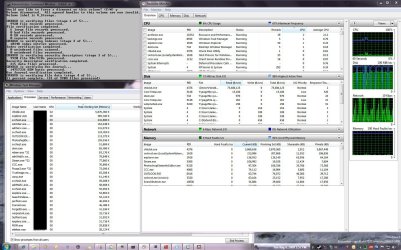
The screenshots below indicate that Win7 has more robust capabilities in memory management than either XP or Vista.
In the first with CHKDSK running, max memory usage peaked at 7.4GB. At which point several other apps were started - Photoshop Elements, Microsoft Publisher, MalawareBytes Anti-Malaware (ran a quick scan), Picasa and Sound Forge 9 (see Taskbar), etc.
As expected all "Standby" memory quickly disappeared and hard page faults started. Though the pictures do not show it, dynamic Working Set size adjustments were made to CHKDSK and the other processes (Task manager - View Columns option). The system response time slowed of course, but it still responded.
The second screenshot shows the Resource Monitor screens shortly after CHKDSK completion.
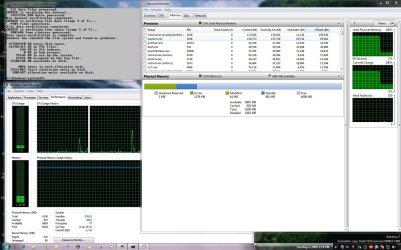
As can be seen CHKDSK relenquished its Working Set allocation when it was no longer needed. System performance returned to normal. There were no BSOD or Event Log messages.
As a long time VMS Cluster Admin I can tell you that one of the maintenance functions never performed during production hours, except when absolutely necessary, is the "Analyze/Disk" utility (the VMS "CHKDSK"). The nature of the activity requires expediency and priority to resolve a problem or perform maintenance. For this reason it is allocated resources as appropriate to the detriment of all other system processes
If the WIN7 CHKDSK is buffering the disk to memory for performance considerations there is nothing to fix. MS could cap the MAX Working Set size to some % of available memory but why bother? CHKDSK is a maintenace function.
What....? You want to run CHKDSK while playing Half-Life 2? Well you can. You will just play it more slowly.
Reminds me of the guy who goes to the Doctor with a rock in his hand. Every few seconds he hits himself in the face with the rock and says, "Doc every time I do this it hurts!". The Doctor says "Don't do that anymore. That will be $25 please."
If it is not a bug, MS may be the Doctor. Just don't be surprised.

My Computer
- OS
- XP Pro & Vista Home Premium (x86); Windows Ultimate 7600 x64 Retail
Two months worth of postings all over the internet about this and a single well-qualified analysis. New group task: start posting links on other fora.It may not be a question of a 4kb structure but how many 4kb structures...
BTW - can you refer me to your doctor? What's the co-pay?
I just scanned an empty 500gb drive, I fail to see how 800mb of memory is required for that operation :huh:
Im still using build 7127 and these are the resources it used before chkdsk finished its scan a minute later :shock:
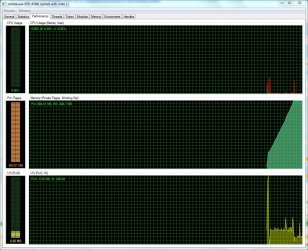
Im still using build 7127 and these are the resources it used before chkdsk finished its scan a minute later :shock:
For discussional purposes only - assume that's the MFT held in RAM and the data would seem consistent with the Dr's (MD's) analysis. Cowboy math, I know.I just scanned an empty 500gb drive, I fail to see how 800mb of memory is required for that operation
- Local time
- 9:43 AM
- Messages
- 716
Two months worth of postings all over the internet about this and a single well-qualified analysis. New group task: start posting links on other fora.
BTW - can you refer me to your doctor? What's the co-pay?
Thank you Antman.
My Doctor? His name is Doctor Who. It is difficult to get an appointment with him because one never knows at what time he will be available.

My Computer
- OS
- XP Pro & Vista Home Premium (x86); Windows Ultimate 7600 x64 Retail

I just scanned an empty 500gb drive, I fail to see how 800mb of memory is required for that operation :huh:
Im still using build 7127 and these are the resources it used before chkdsk finished its scan a minute later :shock:
View attachment 21406
The 500GB disk is not empty. It may not contain data, but it is not empty
. Chkdsk is still going to analyze each 4kb cluster to check for errors. Muad provided probably one of the best analysis I have seen regarding this issue.PhreePhly
My Computer
- Computer Manufacturer/Model Number
- MPC Transport T2500 Laptop
- OS
- Windows 7 x64 (RTM via MSDN)
- CPU
- Intel Core 2 Duo T9300 (2.5 GHz)
- Motherboard
- MPC
- Memory
- 4 GB SODIMMS (System Max)
- Graphics Card(s)
- nVidia 8600M GS 256MB
- Sound Card
- Realtek On-Board
- Monitor(s) Displays
- 15.4" LCD with a Dell 2005FPW 20" attached
- Screen Resolution
- 1680x1050 (15.4") and 1680x1050 (20")
- Hard Drives
- Toshiba 2.5" 320 GB 7200 RPM

Got this over on another forum:
There ya go guys, try the fix and see if it works.
After emailing back and forth with the VP Sinofsky, it was found that the chkdsk /r tool is not at fault here. It was simply a chipset controller issue. Please update you chipset drivers to the current driver from your motherboard manufacturer. I did mine, and this fixed the issue. Yes it still uses alot of physical memory, because your checking for physical damage, and errors on the Harddrive your testing. I'm currently completed the chkdsk scan with no BSOD's or computer sluggishness. Feel free to do this and try it for yourselves. Again, there is no Bug.
There ya go guys, try the fix and see if it works.
My Computer
- Computer type
- PC/Desktop
- Computer Manufacturer/Model Number
- SuperBeast
- OS
- Windows 10 Tech Preview 9926 x64
- CPU
- AMD FX-8350
- Motherboard
- Gigabyte GA-990FXA-UD3
- Memory
- 16GB DDR3 1333
- Graphics Card(s)
- Asus R9 290 DirectCU II OC, Gigabyte Windforce R9 290 OC
- Sound Card
- Integrated w/ Creative A250 2.1 speakers
- Monitor(s) Displays
- Main: Asus VN289H 28" Secondary: Acer G246HL 24"
- Screen Resolution
- 1920x1080
- Hard Drives
- 128 GB SanDisk Ultra Plus (Windows drive)
240 GB Crucial M500 SSD (Games drive)
1 TB WDC WD10EACS 7200RPM HDD (Data drive)
2 TB Seagate Expansion Desktop external HDD (Backup drive)
- PSU
- 900w Antec HCG-900
- Case
- Raidmax Agusta Full ATX
- Cooling
- Corsair H80
- Keyboard
- Cooler Master Devastator MB24
- Mouse
- Cooler Master Devastator MS2K 1000/1600/2000 DPI
- Internet Speed
- 100Mbps cable
- Antivirus
- Avast!
- Browser
- Chrome
I just tried this under both x86 and x64 editions, on two different systems, and I can reproduce the behavior every time. I also tested it under VMware (to rule out the chipset driver) and it appeared there as well. Looks like a legitimate bug to me...and a nasty one, at that.
RCK
RCK
My Computer
- Computer Manufacturer/Model Number
- HP Mini 2140
- OS
- Peanut Butter & Jelly.
- CPU
- Propeller Hat (with chin strap upgrade).
- Motherboard
- She keeps calling me!
- Memory
- Not what it used to be.
- Graphics Card(s)
- Hey! Let's not get too personal!
- Sound Card
- What?
- Monitor(s) Displays
- They're watching me right now!
- Screen Resolution
- Hasn't been resolved yet.
- Hard Drives
- Only when I take this little blue pill.
- PSU
- Twice yearly.
- Case
- On file with the DA's office.
- Cooling
- The Colin Fletcher approach to wilderness walking.
- Keyboard
- How quaint!
- Mouse
- Trap!
- Internet Speed
- None, I'm broke
- Other Info
- Redacted at the request of the Department of Homeland Security.
Similar threads
- Replies
- 0
- Views
- 1K
- Replies
- 1
- Views
- 563

- Replies
- 14
- Views
- 36K

- Replies
- 2
- Views
- 9K

- Replies
- 3
- Views
- 2K