Solved New external hard drive 2TB-won't backup-says not enough space

jizlim94

New member
Local time
2:28 AM
Messages
6
Hi all, new to the forum so please forgive me if I don't get terminology right or ask really dumb questions. I have a new desktop pc -HP pavilion p6-2203a- pre installed with windows 7 home premium service pack 1. I have a new 2tb Seagate Expansion external drive. Apparently on the hd I have 1.76tb of space, yet the system will not do a backup as it says there is not enough space. When I check through ''disk management'' the whole bar is blue, I thought if it wasn't used it should be black? Today I have spoken to hp, seagate, and microsoft who all say it isn't their problem and tell me to call one of the others. This pc is only a fortnight old and I have already had no end of trouble with it!
I have also tried to save a copy of the ''system image'', but it won't let me do that either.
Sorry for such a long post but has been a reeeaaaalllly long day trying to fix this and just about ready to throw this thing....
 

My Computer My Computer

At a glance

Windows 7 Home Premium 64 bit
Computer Manufacturer/Model Number
HP p6-2203a
OS
Windows 7 Home Premium 64 bit
Hard Drives
External Seagate 2Tb
Maybe the backup programs are not ready for very large partitions.
I try splitting it into two partitions. Use one for backups and the other for images.
 

My Computer My Computer

At a glance

Windows 7 Home Premium 32bitIntel Core 2 2.4GHz4GBATI Radeon 4850
Computer Manufacturer/Model Number
CCL Online OEM
OS
Windows 7 Home Premium 32bit
CPU
Intel Core 2 2.4GHz
Motherboard
Foxconn 946GZ7MA
Memory
4GB
Graphics Card(s)
ATI Radeon 4850
Sound Card
Realtek HD Audio
Monitor(s) Displays
Prolite E2407HDS
Screen Resolution
1920x1080
Hard Drives
2 x WDC 500 GB
Cooling
Fan
Keyboard
Microsoft Digital Media
Mouse
Optical Wheel Mouse
Internet Speed
14Mb/sec
Other Info
Internet ISP: Plusnet
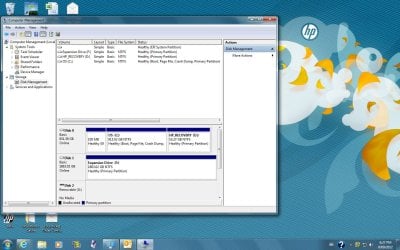
Post a screen shot of what you see in Disk Management.

What software are you using to do this backup?

Have you installed any of the Seagate software that likely came with the external drive? My first inclination would be to not do that.
 

My Computer My Computer

At a glance

Windows 7 Home Premium SP1, 64-bitIntel Skylake i5-6600K, not overclocked8 GB HyperX DDR4-2666 (2 x 4 GB)none; graphics are integrated on CPU
Computer type
PC/Desktop
Computer Manufacturer/Model Number
Ignatz Special; 4 speed manual gearbox; factory air conditioning; one of one
OS
Windows 7 Home Premium SP1, 64-bit
CPU
Intel Skylake i5-6600K, not overclocked
Motherboard
AsRock Z170M Extreme 4, micro ATX
Memory
8 GB HyperX DDR4-2666 (2 x 4 GB)
Graphics Card(s)
none; graphics are integrated on CPU
Sound Card
onboard: Realtek ALC1150; external: USB Behringer UF0-202
Monitor(s) Displays
Dell S2340M 23 inch IPS
Screen Resolution
1600 x 900
Hard Drives
System: Crucial MX100 series SSD, 128 GB;
Data: Samsung Spinpoint 103SJ, 1 TB;
Backup: WD Caviar Green WD30EZRX-00D8PB0, 3 TB
PSU
Rosewill SilentNight 500 watt fanless, semi-modular
Case
Antec Solo II
Cooling
Noctua NH-U12S; Noctua F12 intake, Noctua S12A exhaust
Keyboard
Microsoft 200 6JH-00001 USB
Mouse
Dell or Microsoft optical wired; USB
Antivirus
Microsoft Security Essentials and Malwarebytes Premium
Browser
Pale Moon
Other Info
All fans PWM; speeds at idle: CPU circa 500 rpm; intake circa 600 rpm; exhaust circa 600 rpm; CPU temps 27 idle and 47 C load in a warm room (27 C/81 F) when running Intel Extreme Tuning Utility stress test.
Hi all, thanks for responding.
I am just using the windows back up and restore to do the backup. Same for trying to do the system image. No software with the Seagate (plug n play)
Disk management.jpg

and I would just like to say that I LOVE the way the people on this forum set everything out so even a beginner can follow the instructions...(tutorial to take snapshot)

Liz
 

My Computer My Computer

At a glance

Windows 7 Home Premium 64 bit
Computer Manufacturer/Model Number
HP p6-2203a
OS
Windows 7 Home Premium 64 bit
Hard Drives
External Seagate 2Tb
Liz:

I can't help a lot because I don't use Windows built-in Backup and Restore.

How much space is occupied on that 915 GB C partition?

But-----in the back of my brain, I seem to recall reading something to the effect that Backup and Restore has some sort of limitation on the size of the partition to be backed up---over 900 GB in your case. That may be part of your problem.

At any rate, have you considered shrinking that C partition to maybe 100 GB and making another partition of 800 GB from that saved space? And then putting your personal files on the new partition, rather than C? That's a common practice on this forum that can simplify backups, images, and reinstallation. If you did that, you would have a much smaller C partition to back up.

In such a case, you would back up the newly created 800 GB partition containing data with some other program.

But----I do not know if that would solve your immediate problem. Wait for more comments on that from someone with more experience with the Windows program you are using.

For that matter, you could try another program without changing your partition structure and avoid the Windows program altogether.
 

My Computer My Computer

At a glance

Windows 7 Home Premium SP1, 64-bitIntel Skylake i5-6600K, not overclocked8 GB HyperX DDR4-2666 (2 x 4 GB)none; graphics are integrated on CPU
Computer type
PC/Desktop
Computer Manufacturer/Model Number
Ignatz Special; 4 speed manual gearbox; factory air conditioning; one of one
OS
Windows 7 Home Premium SP1, 64-bit
CPU
Intel Skylake i5-6600K, not overclocked
Motherboard
AsRock Z170M Extreme 4, micro ATX
Memory
8 GB HyperX DDR4-2666 (2 x 4 GB)
Graphics Card(s)
none; graphics are integrated on CPU
Sound Card
onboard: Realtek ALC1150; external: USB Behringer UF0-202
Monitor(s) Displays
Dell S2340M 23 inch IPS
Screen Resolution
1600 x 900
Hard Drives
System: Crucial MX100 series SSD, 128 GB;
Data: Samsung Spinpoint 103SJ, 1 TB;
Backup: WD Caviar Green WD30EZRX-00D8PB0, 3 TB
PSU
Rosewill SilentNight 500 watt fanless, semi-modular
Case
Antec Solo II
Cooling
Noctua NH-U12S; Noctua F12 intake, Noctua S12A exhaust
Keyboard
Microsoft 200 6JH-00001 USB
Mouse
Dell or Microsoft optical wired; USB
Antivirus
Microsoft Security Essentials and Malwarebytes Premium
Browser
Pale Moon
Other Info
All fans PWM; speeds at idle: CPU circa 500 rpm; intake circa 600 rpm; exhaust circa 600 rpm; CPU temps 27 idle and 47 C load in a warm room (27 C/81 F) when running Intel Extreme Tuning Utility stress test.
ok, I am trying to back up to the Expansion file (F drive). Can I format this into partitions, if I understand what you are saying, is that windows doesn't like the size of the partition?
If I don't want to change the partition on the F drive, what program would you recommend to backup and restore, and create system image?

Thanks

Liz
 

My Computer My Computer

At a glance

Windows 7 Home Premium 64 bit
Computer Manufacturer/Model Number
HP p6-2203a
OS
Windows 7 Home Premium 64 bit
Hard Drives
External Seagate 2Tb
ok, I am trying to back up to the Expansion file (F drive). Can I format this into partitions, if I understand what you are saying, is that windows doesn't like the size of the partition?
If I don't want to change the partition on the F drive, what program would you recommend to backup and restore, and create system image?

Thanks

Liz

I assume you are trying to backup the the C drive onto the F drive.

I suggested making the C drive smaller, but that may not help.

You could split the F drive into 2 partitions as pjhutch mentions, but I don't know if that would help either. It wouldn't hurt to try that.

Macrium Reflect Free Edition is the most commonly mentioned substitute for Windows Backup and Restore. It's an excellent application, but there may be something else going on that would prevent it from working properly as well. It's probably easier to understand and it wouldn't hurt to try it either.

You are using an external drive for the backups and that can complicate things.

Or you could wait for more comments.
 

My Computer My Computer

At a glance

Windows 7 Home Premium SP1, 64-bitIntel Skylake i5-6600K, not overclocked8 GB HyperX DDR4-2666 (2 x 4 GB)none; graphics are integrated on CPU
Computer type
PC/Desktop
Computer Manufacturer/Model Number
Ignatz Special; 4 speed manual gearbox; factory air conditioning; one of one
OS
Windows 7 Home Premium SP1, 64-bit
CPU
Intel Skylake i5-6600K, not overclocked
Motherboard
AsRock Z170M Extreme 4, micro ATX
Memory
8 GB HyperX DDR4-2666 (2 x 4 GB)
Graphics Card(s)
none; graphics are integrated on CPU
Sound Card
onboard: Realtek ALC1150; external: USB Behringer UF0-202
Monitor(s) Displays
Dell S2340M 23 inch IPS
Screen Resolution
1600 x 900
Hard Drives
System: Crucial MX100 series SSD, 128 GB;
Data: Samsung Spinpoint 103SJ, 1 TB;
Backup: WD Caviar Green WD30EZRX-00D8PB0, 3 TB
PSU
Rosewill SilentNight 500 watt fanless, semi-modular
Case
Antec Solo II
Cooling
Noctua NH-U12S; Noctua F12 intake, Noctua S12A exhaust
Keyboard
Microsoft 200 6JH-00001 USB
Mouse
Dell or Microsoft optical wired; USB
Antivirus
Microsoft Security Essentials and Malwarebytes Premium
Browser
Pale Moon
Other Info
All fans PWM; speeds at idle: CPU circa 500 rpm; intake circa 600 rpm; exhaust circa 600 rpm; CPU temps 27 idle and 47 C load in a warm room (27 C/81 F) when running Intel Extreme Tuning Utility stress test.
ok, just a quick update. I split the hard drive into 2 partitions and tried to backup to the new one. Still no joy.
Will now try the Macrium software.

Liz
 

My Computer My Computer

At a glance

Windows 7 Home Premium 64 bit
Computer Manufacturer/Model Number
HP p6-2203a
OS
Windows 7 Home Premium 64 bit
Hard Drives
External Seagate 2Tb
Your C partition is 915 GB.

How much of that 915 GB is occupied?
 

My Computer My Computer

At a glance

Windows 7 Home Premium SP1, 64-bitIntel Skylake i5-6600K, not overclocked8 GB HyperX DDR4-2666 (2 x 4 GB)none; graphics are integrated on CPU
Computer type
PC/Desktop
Computer Manufacturer/Model Number
Ignatz Special; 4 speed manual gearbox; factory air conditioning; one of one
OS
Windows 7 Home Premium SP1, 64-bit
CPU
Intel Skylake i5-6600K, not overclocked
Motherboard
AsRock Z170M Extreme 4, micro ATX
Memory
8 GB HyperX DDR4-2666 (2 x 4 GB)
Graphics Card(s)
none; graphics are integrated on CPU
Sound Card
onboard: Realtek ALC1150; external: USB Behringer UF0-202
Monitor(s) Displays
Dell S2340M 23 inch IPS
Screen Resolution
1600 x 900
Hard Drives
System: Crucial MX100 series SSD, 128 GB;
Data: Samsung Spinpoint 103SJ, 1 TB;
Backup: WD Caviar Green WD30EZRX-00D8PB0, 3 TB
PSU
Rosewill SilentNight 500 watt fanless, semi-modular
Case
Antec Solo II
Cooling
Noctua NH-U12S; Noctua F12 intake, Noctua S12A exhaust
Keyboard
Microsoft 200 6JH-00001 USB
Mouse
Dell or Microsoft optical wired; USB
Antivirus
Microsoft Security Essentials and Malwarebytes Premium
Browser
Pale Moon
Other Info
All fans PWM; speeds at idle: CPU circa 500 rpm; intake circa 600 rpm; exhaust circa 600 rpm; CPU temps 27 idle and 47 C load in a warm room (27 C/81 F) when running Intel Extreme Tuning Utility stress test.
I think this is usually a problem with not enough space to make a shadow copy on the 100MB reserved system partition. I don't know how to fix it but you might google for this condition.
 

My Computer My Computer

At a glance

Windows 10 Pro. EFI boot partition, full EFI ...i7 4770k 4.4GHz (44-44-43-43 turbo) @ 1.248V16GB (8GBx2) @2200 MHz G.skill Sniper 10-11-1...MSI GTX 970 Gaming 4G
Computer type
PC/Desktop
Computer Manufacturer/Model Number
Home built (GeneO industries)/Model 4
OS
Windows 10 Pro. EFI boot partition, full EFI boot
CPU
i7 4770k 4.4GHz (44-44-43-43 turbo) @ 1.248V
Motherboard
ASUS Maximus VI Hero
Memory
16GB (8GBx2) @2200 MHz G.skill Sniper 10-11-10-30-1, 1.6V
Graphics Card(s)
MSI GTX 970 Gaming 4G
Sound Card
Onboard SupremeFX Audio
Monitor(s) Displays
NEC Spectraview 2490WUXi-SV
Screen Resolution
1920 x 1200
Hard Drives
Samsung 850 Pro 256GB (OS), Samsung 2x 128GB 840 Pro SSD in RAID0, 3x WD Blue 6Gb/s 1TB RAID0, WD 2TB Black external USB 3.0, 2TB WD20EARS Green external USB 3.0, 2x 500GB Seagate and 1 750 GB external USB, 1x 350GB external USB3
PSU
Seasonic X-850 (2012 KM3 model)
Case
Fractal Design Define R4
Cooling
NH-D14, NF-F12, NF-A15; NF-P14, NF-P12,NF-A14, S12A PWM
Keyboard
Cooler Master Storm Quickfire Rapid - Brown
Mouse
Logitech G602
Internet Speed
126.4 Mb/s down, 24.3 Mb/s up
Other Info
USB 3.0 x8 , SATA III x8, eSATA, USB 2.0 x6. Samsung DVD R/W drive.

WEI: CPU 7.8, Memory 7.9, Graphics 7.9, Disk 7.9

My Computer My Computer

At a glance

Microsoft Windows 7 Home Premium 64-bits 7601...Intel(R) Core(TM) i3 CPU M 370 @ 2.40GHz4,00 GBATI Mobility Radeon HD 5400 Series
Computer type
Laptop
Computer Manufacturer/Model Number
ACER ASPIRE 5742G
OS
Microsoft Windows 7 Home Premium 64-bits 7601 Multiprocessor Free Service Pack 1
CPU
Intel(R) Core(TM) i3 CPU M 370 @ 2.40GHz
Motherboard
Acer Aspire 5742G
Memory
4,00 GB
Graphics Card(s)
ATI Mobility Radeon HD 5400 Series
Sound Card
(1) AMD High Definition Audio Device (2) Realtek High Defi
Screen Resolution
1366 x 768 x 32 bits (4294967296 colors) @ 60 Hz
Hard Drives
WDC WD5000BEVT-22ZAT0
hi all, thanks for all replies. Just a quick update. Have managed to complete a backup (finally) . A friend came over and had a look for me and suggested that I clean up my C drive that was full of junk carried over from the old pc when I did the windows "easy transfer'' (which I now wish I hadn't done at all). All I need to do now is get my outlook working properly so that I can send emails and then I will leave it alone!!!

Liz
 

My Computer My Computer

At a glance

Windows 7 Home Premium 64 bit
Computer Manufacturer/Model Number
HP p6-2203a
OS
Windows 7 Home Premium 64 bit
Hard Drives
External Seagate 2Tb
It's good your backup succeeded but if F: was near empty as you suggested, I am surprised cleaning up C: solved the problem.
If the problem returns post a full Disk Management screenshot next time, showing partition usage.
 

My Computer My Computer

At a glance

Windows 7x64 Home Premium SP1Intel i7 2600kG.Skill Ripjaws (DDR3-1600) 2x4GBNvidia GeForce GTS 450; Intel HD Graphics 300...
Computer type
PC/Desktop
Computer Manufacturer/Model Number
Own build
OS
Windows 7x64 Home Premium SP1
CPU
Intel i7 2600k
Motherboard
ASUS P8Z68 Deluxe
Memory
G.Skill Ripjaws (DDR3-1600) 2x4GB
Graphics Card(s)
Nvidia GeForce GTS 450; Intel HD Graphics 3000(GT2+)
Monitor(s) Displays
Dell Ultrasharp IPS panel U2311H, Samsung SyncMaster P2350
Screen Resolution
1920x1080
Hard Drives
Samsung 850 Pro SSD 256GB, Samsung SSD 840 120GB, Seagates 1TB Barracuda ST31000528AS x2
PSU
Seasonic M12II 520W
Case
Lian Li Lancool PC-K60
Cooling
Case: 1x120mm, 3x140mm CPU: Hyper 212+
Keyboard
Logitech MK520 (wireless)
Mouse
Logitech MK520
Internet Speed
6-7 Mbps
Antivirus
Norton Security Premium, Malwarebytes on 2 (MSE on 3rd PC)
Browser
FireFox
Other Info
Audio: Logitech Z523 2.1
Will do. I was desperate and willing to try anything. Unforunately I only know the basics so was willing to try anything.

Liz:)
 

My Computer My Computer

At a glance

Windows 7 Home Premium 64 bit
Computer Manufacturer/Model Number
HP p6-2203a
OS
Windows 7 Home Premium 64 bit
Hard Drives
External Seagate 2Tb
Back
Top