Wireless Button no longer works - Acer Aspire 5920

CluelessAcer

New member
Local time
9:47 PM
Messages
7
I apologise in advance if i irritate you but i litterally have no clue what is what when it comes to laptops.

Ive had my Acer Aspire 5920 for a good few years now, it ran perfectly fine on vista for a good 3 years, not a hitch or care in the system. Then out of no where it goes missing for a week, and my mums ex boyfriend had upgraded it to 'windows 7 extreme edition' and none of the buttons of the sides worked, including the most important one- the wireless.

now i understand that a driver synaptics or something fixed the others, and it did. but still the wireless and all the buttons to the left refuse to work.

i cant ask the ex for help because he left on very bad terms and i have none of my original discs left. My friend has now got me running windows 7 professional 32 bit and i have the glowy buttons working, but not the wireless.

the reason i need wireless is soon im going to uni where i cant plug it into the wall to get the internet-that and the socket for the internet cable has started to melt and warped out of shape.

i cant seem to find ANY advice on this matter, that or i just simply dont understand the jargon. I dont care if it means going back to vista as that was fine to work with anyway - but how would i go about doing that if so?

Sorry to be a pain in the dariair.
- Aridan
 

My Computer My Computer

At a glance

windows 7 proffessional 32 bit
Computer Manufacturer/Model Number
Acer Aspire 5920
OS
windows 7 proffessional 32 bit

My Computer My Computer

At a glance

Windows 7 Home Premium x64 SP1intel(R)core(TM)2 duo CPU T6600 @ 2.20GHz3 gb ddr3ati radeon hd4570/512mb
Computer Manufacturer/Model Number
acer aspire 5935g
OS
Windows 7 Home Premium x64 SP1
CPU
intel(R)core(TM)2 duo CPU T6600 @ 2.20GHz
Motherboard
intel gm45/gm47 revision 07
Memory
3 gb ddr3
Graphics Card(s)
ati radeon hd4570/512mb
Monitor(s) Displays
lop156wh2-tle1 15.3 flat
Screen Resolution
1366x768
Hard Drives
OCZ-Agility3 60gig ssd
320gig external hdd
500gig external hdd
Mouse
Optical
Internet Speed
30Mbps Down/30Mbps Up
Thanks Danny, but ive already been their and downloaded the wireless drivers with no luck still. ive even had a friend whos alittle more computer savvy check the drivers ive re installed and we're still baffled at why it isnt working.

Its amazing how such a small button can be such a problem :<

-Aridan
 

My Computer My Computer

At a glance

windows 7 proffessional 32 bit
Computer Manufacturer/Model Number
Acer Aspire 5920
OS
windows 7 proffessional 32 bit
Just to throw in a quick piece of advice; you don't need that button so even if you don't get it working in the end, there is an alternative.

If you open up Control Panel (in the Start menu) and ensure that it is set to View by: Small Icons (you'll find this option in the upper right of the Control Panel window), then you will be able to find an icon called Network and Sharing Centre. Clicking on this will bring up a whole load of gumph you won't need, and one bit of gumph you will need.
On the left hand side you should see, in order from top to bottom:

- Control Panel Home
- Manage Wireless Networks
- Change Adapter Settings
- Change advanced Sharing Settings.

It is the third one we're interested in so go ahead and click that now.

It will bring you to a new screen with probably two icons; now I can't say for sure what they'll be called for you, but one will most likely be "Local Area Connection" and may have a number, while the second will say "Wireless Network Connection". If this says 'Disabled' then all you need to do is right-click on it and press 'Enable' again. Voila! You have just turned on your wireless adapter without using the laptop's inbuilt button.
 

My Computer My Computer

At a glance

Windows 7 Ultimate 64-bitAMD Phenom II X4 955 Black OC'ed 4.0GHz8GB Mushkin Enhanced Silverline (2x4GB) 1333XFX Radeon HD6870 1024MB GDDR5 OC'ed 945MHz; ...
Computer Manufacturer/Model Number
Custom
OS
Windows 7 Ultimate 64-bit
CPU
AMD Phenom II X4 955 Black OC'ed 4.0GHz
Motherboard
Asus M5A88-V EVO
Memory
8GB Mushkin Enhanced Silverline (2x4GB) 1333
Graphics Card(s)
XFX Radeon HD6870 1024MB GDDR5 OC'ed 945MHz; 1151MHz
Sound Card
Soundblaster X-Fi Xtreme PCIe
Monitor(s) Displays
32" Hannspree SE32LMNB
Screen Resolution
1920 x 1080
Hard Drives
250GB Hitachi Deskstar (OS); 2TB Western Digital Elements
PSU
650W XFX XXX Edition 80PLUS Bronze Modular
Case
Cougar 6GR1 Evolution
Cooling
Corsair H60 p/p 120mm; Zalman VF3000A; x4 120mm; x1 140mm
Keyboard
Logitech G510
Mouse
CM Storm Sentinel Advance Zero-G
Internet Speed
Not fast enough :I
Other Info
No matter what your specs, my PC is better.
Have you installed the launch manager application as that's what controls the side buttons but that wouldn't effect the wireless card itself. Look in device manager and check to see if there are any missing drivers (post a screenshot if you like). You could also try uninstalling your current wireless driver and rebooting see if windows update will locate you a suitable one

Danny
 

My Computer My Computer

At a glance

Windows 7 Home Premium x64 SP1intel(R)core(TM)2 duo CPU T6600 @ 2.20GHz3 gb ddr3ati radeon hd4570/512mb
Computer Manufacturer/Model Number
acer aspire 5935g
OS
Windows 7 Home Premium x64 SP1
CPU
intel(R)core(TM)2 duo CPU T6600 @ 2.20GHz
Motherboard
intel gm45/gm47 revision 07
Memory
3 gb ddr3
Graphics Card(s)
ati radeon hd4570/512mb
Monitor(s) Displays
lop156wh2-tle1 15.3 flat
Screen Resolution
1366x768
Hard Drives
OCZ-Agility3 60gig ssd
320gig external hdd
500gig external hdd
Mouse
Optical
Internet Speed
30Mbps Down/30Mbps Up
Have you installed the launch manager application as that's what controls the side buttons but that wouldn't effect the wireless card itself. Look in device manager and check to see if there are any missing drivers (post a screenshot if you like). You could also try uninstalling your current wireless driver and rebooting see if windows update will locate you a suitable one

Danny

Launch Manager Application
 

My Computer My Computer

At a glance

Win 10 Pro x64Intel I5-2500K @3.3GHz16GB G.Skill Ripjaws X (4x4GB)EVGA GeForce 750 Ti SC 2GB
Computer type
PC/Desktop
Computer Manufacturer/Model Number
Self Built
OS
Win 10 Pro x64
CPU
Intel I5-2500K @3.3GHz
Motherboard
Asrock P67 Extreme4
Memory
16GB G.Skill Ripjaws X (4x4GB)
Graphics Card(s)
EVGA GeForce 750 Ti SC 2GB
Sound Card
ASUS Xonar DG 5.1 Channels 24-bit 96KHz PCI Interface Sound
Monitor(s) Displays
auria eq2367
Screen Resolution
1920 x 1080
Hard Drives
250GB Samsung 850 EVO SSD
1TB WD Blue
1TB Hitachi
PSU
SeaSonic X 650W 80 Plus Gold
Case
Corsair Obsidian 750D
Cooling
Corsair H60, Three 140mm case fans
Keyboard
Logitech Wireless Keyboard K520
Mouse
Logitech Wireless Mouse M310
Internet Speed
Wave Broadband ~ 100 dn 5 up
Antivirus
Windows Defender, Malwarebytes Premium
Browser
Edge, IE11, Chrome
Other Info
Laptop specs: HP g7-1365dx /
CPU: AMD A6-3420M APU with Radeon(tm) HD Graphics /
RAM: Crucial 8Gb (2x4Gb) /
SSD: Crucial M4-CT128M4SSD2 ATA Device/ FW 000F /
GFX: AMD Radeon HD 6520G /
OS: Windows 10 Pro x64
It will bring you to a new screen with probably two icons; now I can't say for sure what they'll be called for you, but one will most likely be "Local Area Connection" and may have a number, while the second will say "Wireless Network Connection". If this says 'Disabled' then all you need to do is right-click on it and press 'Enable' again. Voila! You have just turned on your wireless adapter without using the laptop's inbuilt button.
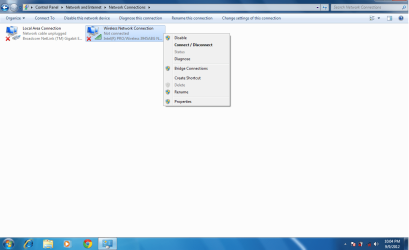
My Acer seems to not want to co-operate, OxyMoron, and ive got the window up now, and it's apparently already enabled - but still nada. The wireless works on everything else but this is seems :C

sfgsdfgsdfg.png


Have you installed the launch manager application as that's what controls the side buttons but that wouldn't effect the wireless card itself. Look in device manager and check to see if there are any missing drivers (post a screenshot if you like). You could also try uninstalling your current wireless driver and rebooting see if windows update will locate you a suitable one
I have tried uninstalling and re-installing the driver with no luck, and i wouldnt have the foggiest idea if something were to be missing
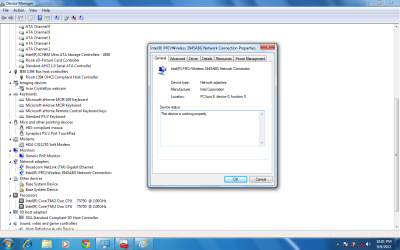
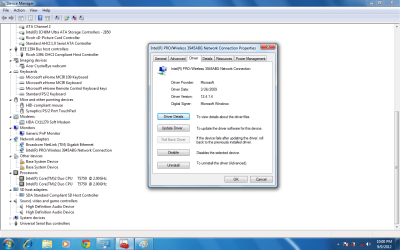
here are the screenshots-hope they help


Untitledd.png

Untitled.png
 

My Computer My Computer

At a glance

windows 7 proffessional 32 bit
Computer Manufacturer/Model Number
Acer Aspire 5920
OS
windows 7 proffessional 32 bit
The 2 caution symbols are missing drivers but I'm not sure what they are for but the wireless ones look okay. Can you actually connect to any wireless networks/are there any available when you click the icon in the system tray. If you have one available try to connect anyway. It has been known for the icon to display wrong but the wireless to be functional, lets rule that out first.

Also check here for any updates - http://www.intel.com/p/en_US/support/detect?iid=dc_iduu

Danny
 

My Computer My Computer

At a glance

Windows 7 Home Premium x64 SP1intel(R)core(TM)2 duo CPU T6600 @ 2.20GHz3 gb ddr3ati radeon hd4570/512mb
Computer Manufacturer/Model Number
acer aspire 5935g
OS
Windows 7 Home Premium x64 SP1
CPU
intel(R)core(TM)2 duo CPU T6600 @ 2.20GHz
Motherboard
intel gm45/gm47 revision 07
Memory
3 gb ddr3
Graphics Card(s)
ati radeon hd4570/512mb
Monitor(s) Displays
lop156wh2-tle1 15.3 flat
Screen Resolution
1366x768
Hard Drives
OCZ-Agility3 60gig ssd
320gig external hdd
500gig external hdd
Mouse
Optical
Internet Speed
30Mbps Down/30Mbps Up
Judging by that screenshot your adapter is turned on, just not connected to your wireless network :)

Could you do me a favour and post another screenshot, this time after clicking the icon down on the right hand side (second to the left next to the clock). This should bring up a very small window above the clock listing available nearby wireless networks. I want to check your laptop is actually seeing them, as it seems (by the little red x) that none are.
 

My Computer My Computer

At a glance

Windows 7 Ultimate 64-bitAMD Phenom II X4 955 Black OC'ed 4.0GHz8GB Mushkin Enhanced Silverline (2x4GB) 1333XFX Radeon HD6870 1024MB GDDR5 OC'ed 945MHz; ...
Computer Manufacturer/Model Number
Custom
OS
Windows 7 Ultimate 64-bit
CPU
AMD Phenom II X4 955 Black OC'ed 4.0GHz
Motherboard
Asus M5A88-V EVO
Memory
8GB Mushkin Enhanced Silverline (2x4GB) 1333
Graphics Card(s)
XFX Radeon HD6870 1024MB GDDR5 OC'ed 945MHz; 1151MHz
Sound Card
Soundblaster X-Fi Xtreme PCIe
Monitor(s) Displays
32" Hannspree SE32LMNB
Screen Resolution
1920 x 1080
Hard Drives
250GB Hitachi Deskstar (OS); 2TB Western Digital Elements
PSU
650W XFX XXX Edition 80PLUS Bronze Modular
Case
Cougar 6GR1 Evolution
Cooling
Corsair H60 p/p 120mm; Zalman VF3000A; x4 120mm; x1 140mm
Keyboard
Logitech G510
Mouse
CM Storm Sentinel Advance Zero-G
Internet Speed
Not fast enough :I
Other Info
No matter what your specs, my PC is better.
The 2 caution symbols are missing drivers but I'm not sure what they are for but the wireless ones look okay. Can you actually connect to any wireless networks/are there any available when you click the icon in the system tray. If you have one available try to connect anyway. It has been known for the icon to display wrong but the wireless to be functional, lets rule that out first.

Also check here for any updates - Intel® Driver Update Utility
Danny: I went on the website, i had two drivers that could be up to date, one was the wireless one too- i updated, restarted and still nothing :C
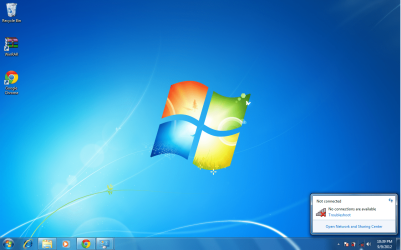
and this might be a screenshot for both you and Oxymoron, as i think its the same thing?

nop.png
 

My Computer My Computer

At a glance

windows 7 proffessional 32 bit
Computer Manufacturer/Model Number
Acer Aspire 5920
OS
windows 7 proffessional 32 bit
Ah, well that very definitely is a problem. I take it that there is a wireless spot where you are now?
 

My Computer My Computer

At a glance

Windows 7 Ultimate 64-bitAMD Phenom II X4 955 Black OC'ed 4.0GHz8GB Mushkin Enhanced Silverline (2x4GB) 1333XFX Radeon HD6870 1024MB GDDR5 OC'ed 945MHz; ...
Computer Manufacturer/Model Number
Custom
OS
Windows 7 Ultimate 64-bit
CPU
AMD Phenom II X4 955 Black OC'ed 4.0GHz
Motherboard
Asus M5A88-V EVO
Memory
8GB Mushkin Enhanced Silverline (2x4GB) 1333
Graphics Card(s)
XFX Radeon HD6870 1024MB GDDR5 OC'ed 945MHz; 1151MHz
Sound Card
Soundblaster X-Fi Xtreme PCIe
Monitor(s) Displays
32" Hannspree SE32LMNB
Screen Resolution
1920 x 1080
Hard Drives
250GB Hitachi Deskstar (OS); 2TB Western Digital Elements
PSU
650W XFX XXX Edition 80PLUS Bronze Modular
Case
Cougar 6GR1 Evolution
Cooling
Corsair H60 p/p 120mm; Zalman VF3000A; x4 120mm; x1 140mm
Keyboard
Logitech G510
Mouse
CM Storm Sentinel Advance Zero-G
Internet Speed
Not fast enough :I
Other Info
No matter what your specs, my PC is better.
Yes there is :c
 

My Computer My Computer

At a glance

windows 7 proffessional 32 bit
Computer Manufacturer/Model Number
Acer Aspire 5920
OS
windows 7 proffessional 32 bit
Could you go to this link and install the driver, after selecting your correct options? (Windows 7 32-bit)

http://downloadcenter.intel.com/Sea...ntel®+PRO/Wireless+3945ABG+Network+Connection

Then toward the bottom of the page you'll see "Intel® PROSet/Wireless Software and Drivers for Windows 7*", with a publish date of 4/8/2012.

The only reason I suggest this is because I noticed earlier that the driver for your wireless adapter is showing as being provided by Microsoft, which I think may be causing your issue.
 
Last edited:

My Computer My Computer

At a glance

Windows 7 Ultimate 64-bitAMD Phenom II X4 955 Black OC'ed 4.0GHz8GB Mushkin Enhanced Silverline (2x4GB) 1333XFX Radeon HD6870 1024MB GDDR5 OC'ed 945MHz; ...
Computer Manufacturer/Model Number
Custom
OS
Windows 7 Ultimate 64-bit
CPU
AMD Phenom II X4 955 Black OC'ed 4.0GHz
Motherboard
Asus M5A88-V EVO
Memory
8GB Mushkin Enhanced Silverline (2x4GB) 1333
Graphics Card(s)
XFX Radeon HD6870 1024MB GDDR5 OC'ed 945MHz; 1151MHz
Sound Card
Soundblaster X-Fi Xtreme PCIe
Monitor(s) Displays
32" Hannspree SE32LMNB
Screen Resolution
1920 x 1080
Hard Drives
250GB Hitachi Deskstar (OS); 2TB Western Digital Elements
PSU
650W XFX XXX Edition 80PLUS Bronze Modular
Case
Cougar 6GR1 Evolution
Cooling
Corsair H60 p/p 120mm; Zalman VF3000A; x4 120mm; x1 140mm
Keyboard
Logitech G510
Mouse
CM Storm Sentinel Advance Zero-G
Internet Speed
Not fast enough :I
Other Info
No matter what your specs, my PC is better.
Still nada my friend :c
 

My Computer My Computer

At a glance

windows 7 proffessional 32 bit
Computer Manufacturer/Model Number
Acer Aspire 5920
OS
windows 7 proffessional 32 bit
This is very perplexing. We have a wireless adapter which for all intents and purposes seems to be installed and enabled, but which cannot see any nearby wireless networks.
Could you take another screenshot similar to the one before showing the installed driver for your adapter?

Do you also have access to another wireless adapter (a USB one)? I would recommend a Nano n150 from Maplin Electronics, but I think that would count as being bias. Shhh!
 

My Computer My Computer

At a glance

Windows 7 Ultimate 64-bitAMD Phenom II X4 955 Black OC'ed 4.0GHz8GB Mushkin Enhanced Silverline (2x4GB) 1333XFX Radeon HD6870 1024MB GDDR5 OC'ed 945MHz; ...
Computer Manufacturer/Model Number
Custom
OS
Windows 7 Ultimate 64-bit
CPU
AMD Phenom II X4 955 Black OC'ed 4.0GHz
Motherboard
Asus M5A88-V EVO
Memory
8GB Mushkin Enhanced Silverline (2x4GB) 1333
Graphics Card(s)
XFX Radeon HD6870 1024MB GDDR5 OC'ed 945MHz; 1151MHz
Sound Card
Soundblaster X-Fi Xtreme PCIe
Monitor(s) Displays
32" Hannspree SE32LMNB
Screen Resolution
1920 x 1080
Hard Drives
250GB Hitachi Deskstar (OS); 2TB Western Digital Elements
PSU
650W XFX XXX Edition 80PLUS Bronze Modular
Case
Cougar 6GR1 Evolution
Cooling
Corsair H60 p/p 120mm; Zalman VF3000A; x4 120mm; x1 140mm
Keyboard
Logitech G510
Mouse
CM Storm Sentinel Advance Zero-G
Internet Speed
Not fast enough :I
Other Info
No matter what your specs, my PC is better.
Just one other thing I want you to try. In the steps I mentioned before to Enable the adapter; disable it once, reboot, and reenable it if you haven't tried that already.
 

My Computer My Computer

At a glance

Windows 7 Ultimate 64-bitAMD Phenom II X4 955 Black OC'ed 4.0GHz8GB Mushkin Enhanced Silverline (2x4GB) 1333XFX Radeon HD6870 1024MB GDDR5 OC'ed 945MHz; ...
Computer Manufacturer/Model Number
Custom
OS
Windows 7 Ultimate 64-bit
CPU
AMD Phenom II X4 955 Black OC'ed 4.0GHz
Motherboard
Asus M5A88-V EVO
Memory
8GB Mushkin Enhanced Silverline (2x4GB) 1333
Graphics Card(s)
XFX Radeon HD6870 1024MB GDDR5 OC'ed 945MHz; 1151MHz
Sound Card
Soundblaster X-Fi Xtreme PCIe
Monitor(s) Displays
32" Hannspree SE32LMNB
Screen Resolution
1920 x 1080
Hard Drives
250GB Hitachi Deskstar (OS); 2TB Western Digital Elements
PSU
650W XFX XXX Edition 80PLUS Bronze Modular
Case
Cougar 6GR1 Evolution
Cooling
Corsair H60 p/p 120mm; Zalman VF3000A; x4 120mm; x1 140mm
Keyboard
Logitech G510
Mouse
CM Storm Sentinel Advance Zero-G
Internet Speed
Not fast enough :I
Other Info
No matter what your specs, my PC is better.
And one moooooore thing to screencap; again in the Network Connections screen (where you go to enable or disable the adapter), right-click the adapter and hit up Properties for me.

While you're at that, in the Start menu go to Run and type in msconfig. You may have to press Allow or OK on a dialogue box after this, but the window which pops up will have some information for me in the 'Services' tab, if you could switch to that and arrange by reverse alphabetical order so that I can see all entries to do with 'Wireless'.
 

My Computer My Computer

At a glance

Windows 7 Ultimate 64-bitAMD Phenom II X4 955 Black OC'ed 4.0GHz8GB Mushkin Enhanced Silverline (2x4GB) 1333XFX Radeon HD6870 1024MB GDDR5 OC'ed 945MHz; ...
Computer Manufacturer/Model Number
Custom
OS
Windows 7 Ultimate 64-bit
CPU
AMD Phenom II X4 955 Black OC'ed 4.0GHz
Motherboard
Asus M5A88-V EVO
Memory
8GB Mushkin Enhanced Silverline (2x4GB) 1333
Graphics Card(s)
XFX Radeon HD6870 1024MB GDDR5 OC'ed 945MHz; 1151MHz
Sound Card
Soundblaster X-Fi Xtreme PCIe
Monitor(s) Displays
32" Hannspree SE32LMNB
Screen Resolution
1920 x 1080
Hard Drives
250GB Hitachi Deskstar (OS); 2TB Western Digital Elements
PSU
650W XFX XXX Edition 80PLUS Bronze Modular
Case
Cougar 6GR1 Evolution
Cooling
Corsair H60 p/p 120mm; Zalman VF3000A; x4 120mm; x1 140mm
Keyboard
Logitech G510
Mouse
CM Storm Sentinel Advance Zero-G
Internet Speed
Not fast enough :I
Other Info
No matter what your specs, my PC is better.
I happen to have an Acer Aspire 5920 that is now running Windows 7 Ultimate. it originally shipped with Windows Vista. As far as I know you don't need the launch manger to get the Wifi button to work. Under Windows 7 the Launch manager only uses the blue E key, the key with the planet on it and the envelope key. My WIFI adapter is an Intel Pro/Wireless 3945ABG and the driver I used I downloaded from Intel. The one I used was Wireless 14.2.0.10 Ds64, but I see a newer version on this page. Wireless 15.2.0.Ds64
http://downloadcenter.intel.com/Detail_Desc.aspx?ProductID=2259&DwnldID=21560&lang=eng&iid=dc_rss
If that link doesn't work just go to the Intel site and look for a driver for the Intel Pro/Wireless 3945ABG, if thats whats in your 5920.
 

My Computer My Computer

At a glance

Windows 10 Education 64 bitAMD Phenom II X4 980 Black Edition Deneb 3.7GHz8GB 4GBx2 Kingston PC10600 DDR3 1333 MemoryZotac NVIDIA Geforce GT640 2 Gig DDR3 PCIe
Computer type
PC/Desktop
Computer Manufacturer/Model Number
Home Built
OS
Windows 10 Education 64 bit
CPU
AMD Phenom II X4 980 Black Edition Deneb 3.7GHz
Motherboard
Asus M4N68T-M V2 µATX Motherboard
Memory
8GB 4GBx2 Kingston PC10600 DDR3 1333 Memory
Graphics Card(s)
Zotac NVIDIA Geforce GT640 2 Gig DDR3 PCIe
Sound Card
VIA VT1708s High Definition Audio 8-channel Onboard
Monitor(s) Displays
22" LG E2242 1080p and 2 19" I-INC AG191D
Screen Resolution
1280x1024 - 1920x1080 - 1280x1024
Hard Drives
Crucial M100 256 GB SSD and 500 GB WD Blue SATA
PSU
Thermaltake TR 620
Case
Power Up Black ATX Mid-Tower Case
Cooling
Stock heatsink and fan
Keyboard
Logitech Wireless K350 Wave
Mouse
Logitech Wireless M570 Trackman Wheel
Internet Speed
80 Mbps Down 30 Mbps Up
Antivirus
Windows Defender
Browser
Internet Explorer 11
Other Info
HP DVD1040e Lightscribe - External USB2
So sorry for the late Reply Oxymoron and thank you AlphaNumeric for the adivce!
I happend to have woken up with my laptop gine and it came back today from a dads friend, and from what it sounds like it was a huge pain in the ass. I dont know exactly what he did, but i have windows 7 ultimate and the wireless is working, huzzah!

He said it was mostly perservirence, and even he didnt know what happened- he was tweeking around with it like we were trying to do and then he left it,got a cuppa tea and when he sat back down the wireless was back on- he said it baffled him.
We're working on getting a recovery disc from Acer which is alot cheaper than just buying vista again!

But still thank you all so much for the advice and trying i very much appreciate each bit of help!
~Aridan
 

My Computer My Computer

At a glance

windows 7 proffessional 32 bit
Computer Manufacturer/Model Number
Acer Aspire 5920
OS
windows 7 proffessional 32 bit
Thats to bad you are going back to Vista. I'm guessing your Windows 7 install may not be legit anyway. My biggest pain was getting those blue media keys on the right hand side working. Once I found out they were actually part of the touch pad it was just a matter of finding the correct driver. Even then it was a little tricky because the Acer supplied driver wouldn't install. I eventually found one that worked though. At least with the recovery disk set, everything should work when you are done.
 

My Computer My Computer

At a glance

Windows 10 Education 64 bitAMD Phenom II X4 980 Black Edition Deneb 3.7GHz8GB 4GBx2 Kingston PC10600 DDR3 1333 MemoryZotac NVIDIA Geforce GT640 2 Gig DDR3 PCIe
Computer type
PC/Desktop
Computer Manufacturer/Model Number
Home Built
OS
Windows 10 Education 64 bit
CPU
AMD Phenom II X4 980 Black Edition Deneb 3.7GHz
Motherboard
Asus M4N68T-M V2 µATX Motherboard
Memory
8GB 4GBx2 Kingston PC10600 DDR3 1333 Memory
Graphics Card(s)
Zotac NVIDIA Geforce GT640 2 Gig DDR3 PCIe
Sound Card
VIA VT1708s High Definition Audio 8-channel Onboard
Monitor(s) Displays
22" LG E2242 1080p and 2 19" I-INC AG191D
Screen Resolution
1280x1024 - 1920x1080 - 1280x1024
Hard Drives
Crucial M100 256 GB SSD and 500 GB WD Blue SATA
PSU
Thermaltake TR 620
Case
Power Up Black ATX Mid-Tower Case
Cooling
Stock heatsink and fan
Keyboard
Logitech Wireless K350 Wave
Mouse
Logitech Wireless M570 Trackman Wheel
Internet Speed
80 Mbps Down 30 Mbps Up
Antivirus
Windows Defender
Browser
Internet Explorer 11
Other Info
HP DVD1040e Lightscribe - External USB2
Back
Top