Questions Concerning Upgrading RAM and Hard Drive

Seraphyn

New member
Local time
7:26 AM
Messages
9
The original hard drive that came with my Dell Studio XPS 8100 crapped out and I installed a new one just this spring. Now that hard drive has also bit the dust. I was advised to upgrade my RAM and I have a few questions concerning that.

I get that RAM is like "hands". The more "hands" you have, the quicker tasks are completed, programs are opened, etc etc. Does having more RAM also help the hard drive last longer? I was told that the more RAM installed, the easier the tasks are done by the hard drive, thus less strain. Is this true?

Also, since I have to purchase a new hard drive and re-install everything, should I wait until after it's all done before slipping in a new stick? Does it matter what slot out of the 4 it goes into? Are there any specific requirements/recommendations that you might advice me to take?

I really appreciate all the help and advice you send this way! Thank you for your time and patience with my newbie questions.
 

My Computer My Computer

At a glance

Windows 7 Home Premium x64Intel Core i7 860 @ 2.80 GHz8.00 GBATI Radeon HD 5770
Computer Manufacturer/Model Number
Dell Studio XPS 8100
OS
Windows 7 Home Premium x64
CPU
Intel Core i7 860 @ 2.80 GHz
Motherboard
Dell Studio XPS 8100 H57 DH57M01
Memory
8.00 GB
Graphics Card(s)
ATI Radeon HD 5770
Monitor(s) Displays
HP w1907 Wide LCD Monitor
Screen Resolution
1024 x 768
Hard Drives
Standard 1 TB 7200 RPM
Keyboard
HID Keyboard Device
Mouse
HID Compliant Mouse
See comments in bold:

The original hard drive that came with my Dell Studio XPS 8100 crapped out and I installed a new one just this spring. Now that hard drive has also bit the dust. I was advised to upgrade my RAM and I have a few questions concerning that.

I get that RAM is like "hands". The more "hands" you have, the quicker tasks are completed, programs are opened, etc etc. Does having more RAM also help the hard drive last longer? I was told that the more RAM installed, the easier the tasks are done by the hard drive, thus less strain. Is this true?

I wouldn't think it would have any measurable effect on hard drive life. You just had bad luck. RAM is much faster than a hard drive and that's why you see improved performance, within reason. RAM doesn't perform miracles. If you are not using all that you now have, putting more in isn't going to help. Your CPU horsepower is also a major factor in overall performance.


You have 8 GB of RAM now. I don't know what you do on your PC, but 8 is plenty for well over 90% of all people. The chances of you needing more is small. I've got 4 GB and have never used it all.


Also, since I have to purchase a new hard drive and re-install everything, should I wait until after it's all done before slipping in a new stick? Does it matter what slot out of the 4 it goes into? Are there any specific requirements/recommendations that you might advice me to take?

You can install RAM before or after the hard drive. The location does matter, depending on motherboard. Typically, you will have RAM slots of 2 different colors and should use all of one color, all of the other color, or all of both----as opposed to one stick in color A and another stick in color B. Most likely, you have 4 RAM slots, with a total of 2 colors.

We would need to know your motherboard to get more specific. If I were you, I would confirm that all of the existing RAM is being used frequently (through Performance Monitor) and if it is, go to Crucial.com and have their very handy tool "sniff" your PC and recommend the type of RAM you need. You should not just go down to Best Buy and buy any old RAM.


I really appreciate all the help and advice you send this way! Thank you for your time and patience with my newbie questions.
 

My Computer My Computer

At a glance

Windows 7 Home Premium SP1, 64-bitIntel Skylake i5-6600K, not overclocked8 GB HyperX DDR4-2666 (2 x 4 GB)none; graphics are integrated on CPU
Computer type
PC/Desktop
Computer Manufacturer/Model Number
Ignatz Special; 4 speed manual gearbox; factory air conditioning; one of one
OS
Windows 7 Home Premium SP1, 64-bit
CPU
Intel Skylake i5-6600K, not overclocked
Motherboard
AsRock Z170M Extreme 4, micro ATX
Memory
8 GB HyperX DDR4-2666 (2 x 4 GB)
Graphics Card(s)
none; graphics are integrated on CPU
Sound Card
onboard: Realtek ALC1150; external: USB Behringer UF0-202
Monitor(s) Displays
Dell S2340M 23 inch IPS
Screen Resolution
1600 x 900
Hard Drives
System: Crucial MX100 series SSD, 128 GB;
Data: Samsung Spinpoint 103SJ, 1 TB;
Backup: WD Caviar Green WD30EZRX-00D8PB0, 3 TB
PSU
Rosewill SilentNight 500 watt fanless, semi-modular
Case
Antec Solo II
Cooling
Noctua NH-U12S; Noctua F12 intake, Noctua S12A exhaust
Keyboard
Microsoft 200 6JH-00001 USB
Mouse
Dell or Microsoft optical wired; USB
Antivirus
Microsoft Security Essentials and Malwarebytes Premium
Browser
Pale Moon
Other Info
All fans PWM; speeds at idle: CPU circa 500 rpm; intake circa 600 rpm; exhaust circa 600 rpm; CPU temps 27 idle and 47 C load in a warm room (27 C/81 F) when running Intel Extreme Tuning Utility stress test.
RAM is more like a table, the bigger it is, the more stuff you can keep on it to work with. But past a certain point it's so ridicolously big that you become the bottleneck, as you cannot really work with more than X stuff on the table at the same time.

Most people do fine with 4 gb, from 8 gb to infinity you'll likely not notice the difference even when gaming. Assuming your specs in the panel are correct, you have already 8 gb.


Now, since you have to buy a new HDD and everyone here will say that you don't need more RAM so you'll have extra cash, and you likely want something faster and less failure-prone than your older ones, what about buying a SSD? (solid state drive)
 
Last edited:

My Computer My Computer

At a glance

Win 7 Pro 64-bit 7601AMD Phenom 9650 QuadCore, revision DR-B35 GB yes I run 2x 2GB and 1x 1GB, different b...NVIDIA GeForce 9800 GT 512 Mb, unknown manufa...
Computer type
PC/Desktop
Computer Manufacturer/Model Number
custom built
OS
Win 7 Pro 64-bit 7601
CPU
AMD Phenom 9650 QuadCore, revision DR-B3
Motherboard
ASUS M4A78
Memory
5 GB yes I run 2x 2GB and 1x 1GB, different brand, spank me.
Graphics Card(s)
NVIDIA GeForce 9800 GT 512 Mb, unknown manufacturer.
Sound Card
Crappy Realtek Integrated Audio
Monitor(s) Displays
Fujitsu Siemens P19-3P
Screen Resolution
1280 x 1024 x 32 bits @ 60 Hz Oh yeah, 4:3 rocks!
Hard Drives
(1) MAXTOR S TM3320613AS SATA Disk Device (2) STM35004 18AS SATA Disk Device (3) TOSHIBA USB 2.5"-HDD
PSU
whatever, around 450w
Case
Scavenged from old company PC, 10+ years old
Cooling
CPU fan, GPU fan, case fan, nothing fancy
Keyboard
Microsoft, PS/2, white.
Mouse
Optical, logitec.
Internet Speed
effective max speeds: 70-ish kB/s down 30-ish kB/s up
Antivirus
Avira, free edition.
Browser
Firefox with FXChrome to make it look like Google Chrome :P
Other Info
Was discarded by previous owner due to "horrible performance".
Was running Win Xp from a IDE drive. Yeah. Was a pain.
SATA II drive and Win7 and it zips away! Yay!
Wow, your hard drive certainly didn't last very long. Most hard drives come with a 1 year warranty, some even longer. You should check on it to see if you have any recourse.

But as bobafett suggested, if you have to go with a new one, consider an SSD or SSD+HD hybrid. While it has only been this past year that they finally became "affordable", the technology has been ramping up rather quickly. If you want a large drive, SSD will be too expensive. But if you can get by with 256Gb or less, SSD is an affordable choice. The speed differences are significant, so much so that standard magnetic media HD's will be going by the way of the floppy drive in less than 3 years (my prediction).
 

My Computer My Computer

At a glance

Windows 7 Home Premium x64AMD Vision A8-3500M 4 Core8GbAMD Radeon HD 6620G
Computer type
Laptop
Computer Manufacturer/Model Number
HP Pavillion dv6 (dv6-6165dx)
OS
Windows 7 Home Premium x64
CPU
AMD Vision A8-3500M 4 Core
Motherboard
AMD
Memory
8Gb
Graphics Card(s)
AMD Radeon HD 6620G
Screen Resolution
1366x768
Hard Drives
Hitachi Travelstar 500Gb
Internet Speed
Realtek RTL8188CE 802.11b/g/n
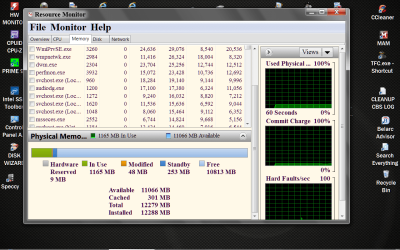
Does ram change the way your hard drive has to work? Yes. The more ram you have means the system will use your ram instead of accessing your hard drive for some operations. That being said, your 8 gigs of ram should be more than enough than most people will use or need. I seriously dough add more ram to your system will extend the life of your hard drive. Proper mounting and to some extent proper cooling would be my concern. I think you had bad luck with your hard drives. Wish you good luck with your new hard drive. Go to Resource Monitor and get this type of picture. Hold your cursor over each color square and it will give you information about that ram be used.

Resource Monitor RAM.PNG
 
Last edited:

My Computer My Computer

At a glance

Windows 10 Pro. 64/ version 1709 Windows 7 Pr...Intel i7-6800K @ 4.3Corsair Platinum 16 gig @2400EVGA GTX 1070 OC
Computer type
PC/Desktop
Computer Manufacturer/Model Number
Home made Desktop
OS
Windows 10 Pro. 64/ version 1709 Windows 7 Pro/64
CPU
Intel i7-6800K @ 4.3
Motherboard
ASUS X-99 Deluxe II
Memory
Corsair Platinum 16 gig @2400
Graphics Card(s)
EVGA GTX 1070 OC
Monitor(s) Displays
Asus 27" LED LCD/VE278Q
Screen Resolution
1920-1080 or 1280-720 HDMI
Hard Drives
INTEL SSD 730-240 Gb Sata 3.0/
PSU
EVGA Platium 1200W
Case
Phanteks Luxe Tempered Glass 8 fans/ one radiator
Cooling
XSPC/ Water Cooled CPU
Keyboard
Das 4 Professional
Mouse
Logitech M705/MX Anywhere 2-S
Internet Speed
100 mbits
Antivirus
Microsoft Security Essentials/ Malwarebytes Premium 3.0/ SAS
Browser
I.E. 11 default/Firefox/ ISP Time Warner Cable/Spectrum
Other Info
LG BluRay Burner/
Sound system-KLipsch-THX/
Icy Dock ssd Hot Swap bays.
RAM is more like a table, the bigger it is, the more stuff you can keep on it to work with. But past a certain point it's so ridicolously big that you become the bottleneck, as you cannot really work with more than X stuff on the table at the same time.

That is the best analogy I've ever seen about RAM.
 

My Computer My Computer

At a glance

Black Label 7 x64AMD Phenom II X6 1055t8GB Corsair XMS3Radeon HD 6790
Computer Manufacturer/Model Number
Colonel Travis 5000
OS
Black Label 7 x64
CPU
AMD Phenom II X6 1055t
Motherboard
GA-890FXA-UD5
Memory
8GB Corsair XMS3
Graphics Card(s)
Radeon HD 6790
Sound Card
X-FI Titanium Fatal1ty Pro
Monitor(s) Displays
Acer AJ15
Screen Resolution
1600x900
Hard Drives
OCZ Agility 3 SSD 120GB |
Corsair Force GT SSD 120 GB |
Barracuda 7200 SATA 300GB |
WD Caviar Green SATA 500GB
PSU
OCZ ModXStream 700W
Cooling
50 billion case fans
Internet Speed
35Mbps/35Mbps
Thanks for all your comments! I honestly have never heard of SSD and never knew that it was an option. I do have fears about how even though SSDs have no moving parts to wear and fail, they can only be erased and written a limited number of times before it fails. Also how data loss can be attributed to firmware bugs. I'll need to delve further into it, and possibly ask even more questions.

Also, thank you for clearing up the issue about RAM. I figured with 8 GB, that would have been enough even with my computer gaming and my husband's constant music and movie downloading/watching, so when I was told I needed more RAM, it threw me for a loop.

Other then asking what everyone's preference is when it comes to hard drives and SSDs, I can't really think of any other way to answer my questions, so once again, thank you very much!
 

My Computer My Computer

At a glance

Windows 7 Home Premium x64Intel Core i7 860 @ 2.80 GHz8.00 GBATI Radeon HD 5770
Computer Manufacturer/Model Number
Dell Studio XPS 8100
OS
Windows 7 Home Premium x64
CPU
Intel Core i7 860 @ 2.80 GHz
Motherboard
Dell Studio XPS 8100 H57 DH57M01
Memory
8.00 GB
Graphics Card(s)
ATI Radeon HD 5770
Monitor(s) Displays
HP w1907 Wide LCD Monitor
Screen Resolution
1024 x 768
Hard Drives
Standard 1 TB 7200 RPM
Keyboard
HID Keyboard Device
Mouse
HID Compliant Mouse
I do have fears about how even though SSDs have no moving parts to wear and fail, they can only be erased and written a limited number of times before it fails.

That's also true of HDDs.

The fear of overwriting thing seems to have been exaggerated, particularly for recent generation drives.

I've written over 2 TB to my SSD in 19 months. My Intel Toolbox for the SSD still says 100% for "estimated life remaining".

Re brands: the current SSD favorites are Samsung, Intel, and Crucial. For HDDs, probably Western Digital and Samsung.
 

My Computer My Computer

At a glance

Windows 7 Home Premium SP1, 64-bitIntel Skylake i5-6600K, not overclocked8 GB HyperX DDR4-2666 (2 x 4 GB)none; graphics are integrated on CPU
Computer type
PC/Desktop
Computer Manufacturer/Model Number
Ignatz Special; 4 speed manual gearbox; factory air conditioning; one of one
OS
Windows 7 Home Premium SP1, 64-bit
CPU
Intel Skylake i5-6600K, not overclocked
Motherboard
AsRock Z170M Extreme 4, micro ATX
Memory
8 GB HyperX DDR4-2666 (2 x 4 GB)
Graphics Card(s)
none; graphics are integrated on CPU
Sound Card
onboard: Realtek ALC1150; external: USB Behringer UF0-202
Monitor(s) Displays
Dell S2340M 23 inch IPS
Screen Resolution
1600 x 900
Hard Drives
System: Crucial MX100 series SSD, 128 GB;
Data: Samsung Spinpoint 103SJ, 1 TB;
Backup: WD Caviar Green WD30EZRX-00D8PB0, 3 TB
PSU
Rosewill SilentNight 500 watt fanless, semi-modular
Case
Antec Solo II
Cooling
Noctua NH-U12S; Noctua F12 intake, Noctua S12A exhaust
Keyboard
Microsoft 200 6JH-00001 USB
Mouse
Dell or Microsoft optical wired; USB
Antivirus
Microsoft Security Essentials and Malwarebytes Premium
Browser
Pale Moon
Other Info
All fans PWM; speeds at idle: CPU circa 500 rpm; intake circa 600 rpm; exhaust circa 600 rpm; CPU temps 27 idle and 47 C load in a warm room (27 C/81 F) when running Intel Extreme Tuning Utility stress test.
I have a Intel 510 and I don't worry about writes because Intel doesn't. It's warranty is for 5 years no matter how many wrights. I'm also still at 100% life remaining.
 

My Computer My Computer

At a glance

Windows 10 Pro. 64/ version 1709 Windows 7 Pr...Intel i7-6800K @ 4.3Corsair Platinum 16 gig @2400EVGA GTX 1070 OC
Computer type
PC/Desktop
Computer Manufacturer/Model Number
Home made Desktop
OS
Windows 10 Pro. 64/ version 1709 Windows 7 Pro/64
CPU
Intel i7-6800K @ 4.3
Motherboard
ASUS X-99 Deluxe II
Memory
Corsair Platinum 16 gig @2400
Graphics Card(s)
EVGA GTX 1070 OC
Monitor(s) Displays
Asus 27" LED LCD/VE278Q
Screen Resolution
1920-1080 or 1280-720 HDMI
Hard Drives
INTEL SSD 730-240 Gb Sata 3.0/
PSU
EVGA Platium 1200W
Case
Phanteks Luxe Tempered Glass 8 fans/ one radiator
Cooling
XSPC/ Water Cooled CPU
Keyboard
Das 4 Professional
Mouse
Logitech M705/MX Anywhere 2-S
Internet Speed
100 mbits
Antivirus
Microsoft Security Essentials/ Malwarebytes Premium 3.0/ SAS
Browser
I.E. 11 default/Firefox/ ISP Time Warner Cable/Spectrum
Other Info
LG BluRay Burner/
Sound system-KLipsch-THX/
Icy Dock ssd Hot Swap bays.
Tom's does this once a month for all kinds of components:
Best SSDs for the money - August 2012

I've got a couple SSDs and a couple HDDs in my machine for a fastness/bigness mixture. Don't worry about SSDs conking out on you prematurely - just google "ssd longevity" and you'll find more than enough information about this.
 

My Computer My Computer

At a glance

Black Label 7 x64AMD Phenom II X6 1055t8GB Corsair XMS3Radeon HD 6790
Computer Manufacturer/Model Number
Colonel Travis 5000
OS
Black Label 7 x64
CPU
AMD Phenom II X6 1055t
Motherboard
GA-890FXA-UD5
Memory
8GB Corsair XMS3
Graphics Card(s)
Radeon HD 6790
Sound Card
X-FI Titanium Fatal1ty Pro
Monitor(s) Displays
Acer AJ15
Screen Resolution
1600x900
Hard Drives
OCZ Agility 3 SSD 120GB |
Corsair Force GT SSD 120 GB |
Barracuda 7200 SATA 300GB |
WD Caviar Green SATA 500GB
PSU
OCZ ModXStream 700W
Cooling
50 billion case fans
Internet Speed
35Mbps/35Mbps
Well, there were no SSDs at Best Buy and I'm too impatient to wait. I went and bought a Seagate Barracuda 500 GB SATA. Here's the problem, after the BIOS(?) screen where it gives you the options of Setup or Boot Options, I get a screen that reads

No Boot Device Available, wait for Enter key to retry.
SATA 1: Installed
SATA 2: Installed
SATA 3: None
SATA 4: None

I ran a diagnostic and it does read a drive and there are no problems that were detected. Since this is a brand spanking new HDD, there is no OS and probably needs formating? I'm sorry, I'm all thumbs and dumbs so please forgive me for testing your patience.
 

My Computer My Computer

At a glance

Windows 7 Home Premium x64Intel Core i7 860 @ 2.80 GHz8.00 GBATI Radeon HD 5770
Computer Manufacturer/Model Number
Dell Studio XPS 8100
OS
Windows 7 Home Premium x64
CPU
Intel Core i7 860 @ 2.80 GHz
Motherboard
Dell Studio XPS 8100 H57 DH57M01
Memory
8.00 GB
Graphics Card(s)
ATI Radeon HD 5770
Monitor(s) Displays
HP w1907 Wide LCD Monitor
Screen Resolution
1024 x 768
Hard Drives
Standard 1 TB 7200 RPM
Keyboard
HID Keyboard Device
Mouse
HID Compliant Mouse
If I installed a new and non-faulty drive, I don't think I'd expect to see that message on a screen.

What happens if you just do this:

Connect the drive. This requires 2 cables. Disconnect any other hard drive you may have.

Boot from the Windows installation disc. I assume you have one?

If you do that, does the PC boot and enter the Windows installation process, asking you to choose a language?

If you do not enter the installation process, I'd then look in the BIOS to see if the drive is recognized.

Formatting is normally done automatically as part of that installation process and does not have to be done separately.

I wouldn't use any software discs that may have come with that drive.
 

My Computer My Computer

At a glance

Windows 7 Home Premium SP1, 64-bitIntel Skylake i5-6600K, not overclocked8 GB HyperX DDR4-2666 (2 x 4 GB)none; graphics are integrated on CPU
Computer type
PC/Desktop
Computer Manufacturer/Model Number
Ignatz Special; 4 speed manual gearbox; factory air conditioning; one of one
OS
Windows 7 Home Premium SP1, 64-bit
CPU
Intel Skylake i5-6600K, not overclocked
Motherboard
AsRock Z170M Extreme 4, micro ATX
Memory
8 GB HyperX DDR4-2666 (2 x 4 GB)
Graphics Card(s)
none; graphics are integrated on CPU
Sound Card
onboard: Realtek ALC1150; external: USB Behringer UF0-202
Monitor(s) Displays
Dell S2340M 23 inch IPS
Screen Resolution
1600 x 900
Hard Drives
System: Crucial MX100 series SSD, 128 GB;
Data: Samsung Spinpoint 103SJ, 1 TB;
Backup: WD Caviar Green WD30EZRX-00D8PB0, 3 TB
PSU
Rosewill SilentNight 500 watt fanless, semi-modular
Case
Antec Solo II
Cooling
Noctua NH-U12S; Noctua F12 intake, Noctua S12A exhaust
Keyboard
Microsoft 200 6JH-00001 USB
Mouse
Dell or Microsoft optical wired; USB
Antivirus
Microsoft Security Essentials and Malwarebytes Premium
Browser
Pale Moon
Other Info
All fans PWM; speeds at idle: CPU circa 500 rpm; intake circa 600 rpm; exhaust circa 600 rpm; CPU temps 27 idle and 47 C load in a warm room (27 C/81 F) when running Intel Extreme Tuning Utility stress test.
I do have fears about how even though SSDs have no moving parts to wear and fail, they can only be erased and written a limited number of times before it fails.
This is true. It is also true that unless you are in an enterprise environment (where the SSD is constantly writinge/erasing stuff) SSDs are likely to last decades. this article for example says that if you write 7 GB per day without some of the weird tricks some SSD pull out the drive will last 5 years.

Really, who is writing 7 gigs per day on a home computer?

But they also say that a drive with smart tricks can do the same for 75 years.

I ran a diagnostic and it does read a drive and there are no problems that were detected. Since this is a brand spanking new HDD, there is no OS and probably needs formating?
Well, if the HDD is brand new, it is empty, so it's normal that the BIOS tells you "ehm, what I'm supposed to boot from?". You need to install Windows 7 on it.

this tutorial tells you how to install Win 7 and gives you handy links to download win 7 isos you can use to make an installation CD or USB drive in case you don't have one.
The only thing you need is the sticker with the activation key to activate it after the installation which should be under the laptop.
 

My Computer My Computer

At a glance

Win 7 Pro 64-bit 7601AMD Phenom 9650 QuadCore, revision DR-B35 GB yes I run 2x 2GB and 1x 1GB, different b...NVIDIA GeForce 9800 GT 512 Mb, unknown manufa...
Computer type
PC/Desktop
Computer Manufacturer/Model Number
custom built
OS
Win 7 Pro 64-bit 7601
CPU
AMD Phenom 9650 QuadCore, revision DR-B3
Motherboard
ASUS M4A78
Memory
5 GB yes I run 2x 2GB and 1x 1GB, different brand, spank me.
Graphics Card(s)
NVIDIA GeForce 9800 GT 512 Mb, unknown manufacturer.
Sound Card
Crappy Realtek Integrated Audio
Monitor(s) Displays
Fujitsu Siemens P19-3P
Screen Resolution
1280 x 1024 x 32 bits @ 60 Hz Oh yeah, 4:3 rocks!
Hard Drives
(1) MAXTOR S TM3320613AS SATA Disk Device (2) STM35004 18AS SATA Disk Device (3) TOSHIBA USB 2.5"-HDD
PSU
whatever, around 450w
Case
Scavenged from old company PC, 10+ years old
Cooling
CPU fan, GPU fan, case fan, nothing fancy
Keyboard
Microsoft, PS/2, white.
Mouse
Optical, logitec.
Internet Speed
effective max speeds: 70-ish kB/s down 30-ish kB/s up
Antivirus
Avira, free edition.
Browser
Firefox with FXChrome to make it look like Google Chrome :P
Other Info
Was discarded by previous owner due to "horrible performance".
Was running Win Xp from a IDE drive. Yeah. Was a pain.
SATA II drive and Win7 and it zips away! Yay!
Back
Top