BSOD with proper nVidia drivers on Windows Start-up, nvlddmkm.sys

Fuzzwolf

New member
Local time
5:23 AM
Messages
15
(Diagnostic .zip Report is attached)

I type this from my Windows 64 bit system running the standard VGA driver. I generally am pretty good with troubleshooting in the computer field, but I have now spent over 10 hours on this problem with very little luck, and lots of frustration. I'll try to provide as much information as possible.

The problem started 4 nights ago when I was playing a somewhat-old computer game called Age of Empires 3. The graphics are not overly intense - I had not even maximized settings - but nonetheless my screen began to flicker and I was confronted with a blue screen, informing me that problem was caused by a failure to read nvlddmkm.sys, the nVidia driver file. I still have not figured out why my drivers suddenly crashed, I run a pretty cool system with no overclocking whatsoever. I have not been able to run the drivers since, so I was forced to go in to safe mode, disable the drivers, and boot up in normal with the standard VGA drivers.

So my question - how can I go about fixing this without completely reinstalling Windows. I realize that by now I could have backed up my files, reinstalled, and copied everything over. I've done that two times already in the last 3 months, and I'm really annoyed by the necessity of doing it. What can I do to get my system to properly run the drivers again without reinstalling the operating system?

Information:
- Spacious desktop rig with plenty of cooling, built by myself
- Graphics card remains at a temperature hovering around 65 degrees celsius
- EVGA GeForce GTX 560 TI 2GB 256-bit GDDR5
- Card is in perfect condition, no visible damage on the exterior (nor is it hot to the touch seconds after shutdown)
- I have never ran in to any errors with the card prior (I've only had it for two months)
- I do not overclock
- Motherboard (Supermicro X8SIA-F) does contain onboard VGA
- I am currently running this card rather than onboard VGA, but with VGA drivers
- I run RAID 1, I never have experienced any problems with its status until I started to receive all of these blue screens, now my second hard-drive is running in to issues giving the volume a "degraded" status (when I first experienced the blue screen my volume's condition was fine, as was it when I was first started troubleshooting. This is something new that seems to accommodate my frequent blue screens). This disables some extra functionality, but it is still entirely operable.
- I am unable to perform a system restore due to the lack of recent saves
- Yes, I have researched this problem and tested the methods of others on various help forums, including this very own

What I have tried and what happened:
- Reinstall proper drivers (to no avail)
- Completely wipe nVidia from my system, then try a reinstall (to no avail)
- Run a Windows Update to upgrade the drivers (cannot update)
- Search for drivers in the Device Manager (to no avail)
- Upgrade Windows (literally right after everything finished I was told that my system is illegible for an upgrade, though my system seemed ready according to their tool)
- Repair my drivers via System File Checker (no faults found)
- Expand (via cmd prompt) the nvlddmkm file from the driver installation in to the actual driver manually to ensure that the file is up to date (no change)
- Ensure that I am not running in Aero Mode (apparently this is incompatible without the proper drivers, did not work)
- Completely unplug my system (to no avail)
- Talk very sternly to my system (to no avail, though I do question my sanity more than I should now)

Any ideas? Any and all help is appreciated. My freetime has been swallowed by this dilemma. I will update my post with additional information when appropriate, it is more than likely I have left out or misaddressed some information due to the hastiness in which I wrote this.


Thank you for your time.
 
Last edited:

My Computer My Computer

At a glance

Windows 7 Ultimate x64Intel Xeon X3450 2.66ghz24GB Registered ECC RAMEVGA 02G-P3-1568-KR GeForce GTX 560 Ti (Fermi...
OS
Windows 7 Ultimate x64
CPU
Intel Xeon X3450 2.66ghz
Motherboard
Supermicro X8SIA-F
Memory
24GB Registered ECC RAM
Graphics Card(s)
EVGA 02G-P3-1568-KR GeForce GTX 560 Ti (Fermi) 2GB 256-bit G
Sound Card
RF-71SDCD
Monitor(s) Displays
HP S2331a 23 inch Diagonal LCD Monitor
Screen Resolution
1920x1080
Keyboard
Logitech® Wireless Wave Combo MK550
Mouse
Logitech® Wireless Wave Combo MK550
Internet Speed
30mbs x 30mbs
Fuzzwolf,
Point 1:
Help us to help you by filling in your system specs and here is how:
Update your SevenForums System Specs
User CP (located on the top menu bar) |
Your Profile | Edit System Spec
(left-hand column)

To gather info, use Speccy (my favorite) or SIW or System Info

In the System Manufacturer Block, enter:
Ø Manufacturer and Model OR Custom build.
Ø ADD the word laptop, desktop, netbook or tablet.
For example:
Toshiba Satellite L305D notebook.

Provide full windows version info, for example:
MS Windows 7 Ultimate SP1 64-bit

Use the “Other Info” block for Optical Reader,
Mouse, touchpad, wifi adapter, speakers, monitor, etc

Scroll down and click on SAVE CHANGES.

With Speccy, you can select with your mouse/touchpad info from the display
and paste that info into your specs.

SIW is a marvelous program, but the free version does not offer
this capability.

=====================================
======================================
After that is out of the way,
then if you are getting BSODs,
then
Post in the Crash and BSOD forum.

You will be expected to:
http://www.sevenforums.com/crashes-debugging/96879-blue-screen-death-bsod-posting-instructions.html

Your system specs will travel with you wherever you go on SevenForums.

========================================
thanks,
karl
 

My Computer My Computer

At a glance

MS Windows 7 Ultimate SP1 64-bitAMD A10-4600M6.00 GB Dual-Channel DDR3 @ 798MHz (11-11-12-28)AMD Radeon HD 7660G
Computer Manufacturer/Model Number
Toshiba Satellite S875D-S7239 laptop
OS
MS Windows 7 Ultimate SP1 64-bit
CPU
AMD A10-4600M
Motherboard
AMD Pumori (Socket FT1)
Memory
6.00 GB Dual-Channel DDR3 @ 798MHz (11-11-12-28)
Graphics Card(s)
AMD Radeon HD 7660G
Sound Card
High Definition Audio Device
Monitor(s) Displays
Generic PnP Monitor (1600x900@60Hz)
Screen Resolution
1600x900@60Hz
Hard Drives
SSD 119GB Corsair CSSD-V128GB2 ATA Device
Keyboard
Standard PS/2 Keyboard
Mouse
HP Wireless Optical Mobile Mouse Model FHA-3410
Internet Speed
What the local pub, local coffee shop offers.
Other Info
Optical Drive:MATSHITA BD-CMB UJ160B ATA Device


Also have an Asus ha1002xp netbook with Win 7 Ultimate installed.
Fuzzwolf,
Point 1:
Help us to help you by filling in your system specs and here is how:
Update your SevenForums System Specs
User CP (located on the top menu bar) |
Your Profile | Edit System Spec
(left-hand column)

To gather info, use Speccy (my favorite) or SIW or System Info

In the System Manufacturer Block, enter:
Ø Manufacturer and Model OR Custom build.
Ø ADD the word laptop, desktop, netbook or tablet.
For example:
Toshiba Satellite L305D notebook.

Provide full windows version info, for example:
MS Windows 7 Ultimate SP1 64-bit

Use the “Other Info” block for Optical Reader,
Mouse, touchpad, wifi adapter, speakers, monitor, etc

Scroll down and click on SAVE CHANGES.

With Speccy, you can select with your mouse/touchpad info from the display
and paste that info into your specs.

SIW is a marvelous program, but the free version does not offer
this capability.

=====================================
======================================
After that is out of the way,
then if you are getting BSODs,
then
Post in the Crash and BSOD forum.

You will be expected to:
http://www.sevenforums.com/crashes-debugging/96879-blue-screen-death-bsod-posting-instructions.html

Your system specs will travel with you wherever you go on SevenForums.

========================================
thanks,
karl

Hello, thanks for the assistance. I've attached the report, but is there any way I can have a moderator move my post to the appropriate category? I do not want to duplicate my post since I am unable to delete it from this section.
 

My Computer My Computer

At a glance

Windows 7 Ultimate x64Intel Xeon X3450 2.66ghz24GB Registered ECC RAMEVGA 02G-P3-1568-KR GeForce GTX 560 Ti (Fermi...
OS
Windows 7 Ultimate x64
CPU
Intel Xeon X3450 2.66ghz
Motherboard
Supermicro X8SIA-F
Memory
24GB Registered ECC RAM
Graphics Card(s)
EVGA 02G-P3-1568-KR GeForce GTX 560 Ti (Fermi) 2GB 256-bit G
Sound Card
RF-71SDCD
Monitor(s) Displays
HP S2331a 23 inch Diagonal LCD Monitor
Screen Resolution
1920x1080
Keyboard
Logitech® Wireless Wave Combo MK550
Mouse
Logitech® Wireless Wave Combo MK550
Internet Speed
30mbs x 30mbs
First, NEVER backpost.
Always put new info in a new post.

Understandable mistake, You can correct that mistake by putting the zip file in your next post.

Now fill out those specs. Really fill them out. That's why I gave you that procedure so that we can get info that we need.

I'll ask that this thread be moved.
 

My Computer My Computer

At a glance

MS Windows 7 Ultimate SP1 64-bitAMD A10-4600M6.00 GB Dual-Channel DDR3 @ 798MHz (11-11-12-28)AMD Radeon HD 7660G
Computer Manufacturer/Model Number
Toshiba Satellite S875D-S7239 laptop
OS
MS Windows 7 Ultimate SP1 64-bit
CPU
AMD A10-4600M
Motherboard
AMD Pumori (Socket FT1)
Memory
6.00 GB Dual-Channel DDR3 @ 798MHz (11-11-12-28)
Graphics Card(s)
AMD Radeon HD 7660G
Sound Card
High Definition Audio Device
Monitor(s) Displays
Generic PnP Monitor (1600x900@60Hz)
Screen Resolution
1600x900@60Hz
Hard Drives
SSD 119GB Corsair CSSD-V128GB2 ATA Device
Keyboard
Standard PS/2 Keyboard
Mouse
HP Wireless Optical Mobile Mouse Model FHA-3410
Internet Speed
What the local pub, local coffee shop offers.
Other Info
Optical Drive:MATSHITA BD-CMB UJ160B ATA Device


Also have an Asus ha1002xp netbook with Win 7 Ultimate installed.
Reattached BSOD crash report .zip to here.
 

My Computer My Computer

At a glance

Windows 7 Ultimate x64Intel Xeon X3450 2.66ghz24GB Registered ECC RAMEVGA 02G-P3-1568-KR GeForce GTX 560 Ti (Fermi...
OS
Windows 7 Ultimate x64
CPU
Intel Xeon X3450 2.66ghz
Motherboard
Supermicro X8SIA-F
Memory
24GB Registered ECC RAM
Graphics Card(s)
EVGA 02G-P3-1568-KR GeForce GTX 560 Ti (Fermi) 2GB 256-bit G
Sound Card
RF-71SDCD
Monitor(s) Displays
HP S2331a 23 inch Diagonal LCD Monitor
Screen Resolution
1920x1080
Keyboard
Logitech® Wireless Wave Combo MK550
Mouse
Logitech® Wireless Wave Combo MK550
Internet Speed
30mbs x 30mbs
Fuzzwolf:

Now fill out those specs. Really fill them out. That's why I gave you that procedure so that we can get info that we need.
 

My Computer My Computer

At a glance

MS Windows 7 Ultimate SP1 64-bitAMD A10-4600M6.00 GB Dual-Channel DDR3 @ 798MHz (11-11-12-28)AMD Radeon HD 7660G
Computer Manufacturer/Model Number
Toshiba Satellite S875D-S7239 laptop
OS
MS Windows 7 Ultimate SP1 64-bit
CPU
AMD A10-4600M
Motherboard
AMD Pumori (Socket FT1)
Memory
6.00 GB Dual-Channel DDR3 @ 798MHz (11-11-12-28)
Graphics Card(s)
AMD Radeon HD 7660G
Sound Card
High Definition Audio Device
Monitor(s) Displays
Generic PnP Monitor (1600x900@60Hz)
Screen Resolution
1600x900@60Hz
Hard Drives
SSD 119GB Corsair CSSD-V128GB2 ATA Device
Keyboard
Standard PS/2 Keyboard
Mouse
HP Wireless Optical Mobile Mouse Model FHA-3410
Internet Speed
What the local pub, local coffee shop offers.
Other Info
Optical Drive:MATSHITA BD-CMB UJ160B ATA Device


Also have an Asus ha1002xp netbook with Win 7 Ultimate installed.
I have filled out as much information as I can at the moment, I built this system a few years back so I still am having troubles finding the model numbers of some of the hardware.

I performed a complete wipe of my hard-drive, reset everything to non-RAID as well, and booted up under a fresh installation of Windows. I still cannot run the drivers - does this point towards a faulty graphics card since it doesn't appear to be a software problem in the OS?
 

My Computer My Computer

At a glance

Windows 7 Ultimate x64Intel Xeon X3450 2.66ghz24GB Registered ECC RAMEVGA 02G-P3-1568-KR GeForce GTX 560 Ti (Fermi...
OS
Windows 7 Ultimate x64
CPU
Intel Xeon X3450 2.66ghz
Motherboard
Supermicro X8SIA-F
Memory
24GB Registered ECC RAM
Graphics Card(s)
EVGA 02G-P3-1568-KR GeForce GTX 560 Ti (Fermi) 2GB 256-bit G
Sound Card
RF-71SDCD
Monitor(s) Displays
HP S2331a 23 inch Diagonal LCD Monitor
Screen Resolution
1920x1080
Keyboard
Logitech® Wireless Wave Combo MK550
Mouse
Logitech® Wireless Wave Combo MK550
Internet Speed
30mbs x 30mbs
Fuzzwolf,

You have wiped a hard disk clean and installed Win 7 Ultimate.

Is that correct? yes/no

I'm trying to make sure where we are.

What drivers did you try to install?

Is your system functional at this time? Yes/No.

That's three questions. Looking forward to three answers.

karl
 

My Computer My Computer

At a glance

MS Windows 7 Ultimate SP1 64-bitAMD A10-4600M6.00 GB Dual-Channel DDR3 @ 798MHz (11-11-12-28)AMD Radeon HD 7660G
Computer Manufacturer/Model Number
Toshiba Satellite S875D-S7239 laptop
OS
MS Windows 7 Ultimate SP1 64-bit
CPU
AMD A10-4600M
Motherboard
AMD Pumori (Socket FT1)
Memory
6.00 GB Dual-Channel DDR3 @ 798MHz (11-11-12-28)
Graphics Card(s)
AMD Radeon HD 7660G
Sound Card
High Definition Audio Device
Monitor(s) Displays
Generic PnP Monitor (1600x900@60Hz)
Screen Resolution
1600x900@60Hz
Hard Drives
SSD 119GB Corsair CSSD-V128GB2 ATA Device
Keyboard
Standard PS/2 Keyboard
Mouse
HP Wireless Optical Mobile Mouse Model FHA-3410
Internet Speed
What the local pub, local coffee shop offers.
Other Info
Optical Drive:MATSHITA BD-CMB UJ160B ATA Device


Also have an Asus ha1002xp netbook with Win 7 Ultimate installed.
Fuzzwolf,

You have wiped a hard disk clean and installed Win 7 Ultimate.

Is that correct? yes/no

I'm trying to make sure where we are.

What drivers did you try to install?

Is your system functional at this time? Yes/No.

That's three questions. Looking forward to three answers.

karl
1) Yes, I wiped my HD clean and then proceeded to install a new copy of Win 7 Ultimate.

2) I am unable to boot Windows up while I have the proper nVidia drivers enabled for my card. I have tried the drivers on the disc included with the graphics card, an older version of the drivers, and a new version of the same drivers all with the same blue screen.

3) My system is not functional if I attempt start Windows with the nVidia drivers enabled. I must disable them and run the default VGA to get on to Windows.
 

My Computer My Computer

At a glance

Windows 7 Ultimate x64Intel Xeon X3450 2.66ghz24GB Registered ECC RAMEVGA 02G-P3-1568-KR GeForce GTX 560 Ti (Fermi...
OS
Windows 7 Ultimate x64
CPU
Intel Xeon X3450 2.66ghz
Motherboard
Supermicro X8SIA-F
Memory
24GB Registered ECC RAM
Graphics Card(s)
EVGA 02G-P3-1568-KR GeForce GTX 560 Ti (Fermi) 2GB 256-bit G
Sound Card
RF-71SDCD
Monitor(s) Displays
HP S2331a 23 inch Diagonal LCD Monitor
Screen Resolution
1920x1080
Keyboard
Logitech® Wireless Wave Combo MK550
Mouse
Logitech® Wireless Wave Combo MK550
Internet Speed
30mbs x 30mbs

My Computer My Computer

At a glance

MS Windows 7 Ultimate SP1 64-bitAMD A10-4600M6.00 GB Dual-Channel DDR3 @ 798MHz (11-11-12-28)AMD Radeon HD 7660G
Computer Manufacturer/Model Number
Toshiba Satellite S875D-S7239 laptop
OS
MS Windows 7 Ultimate SP1 64-bit
CPU
AMD A10-4600M
Motherboard
AMD Pumori (Socket FT1)
Memory
6.00 GB Dual-Channel DDR3 @ 798MHz (11-11-12-28)
Graphics Card(s)
AMD Radeon HD 7660G
Sound Card
High Definition Audio Device
Monitor(s) Displays
Generic PnP Monitor (1600x900@60Hz)
Screen Resolution
1600x900@60Hz
Hard Drives
SSD 119GB Corsair CSSD-V128GB2 ATA Device
Keyboard
Standard PS/2 Keyboard
Mouse
HP Wireless Optical Mobile Mouse Model FHA-3410
Internet Speed
What the local pub, local coffee shop offers.
Other Info
Optical Drive:MATSHITA BD-CMB UJ160B ATA Device


Also have an Asus ha1002xp netbook with Win 7 Ultimate installed.
your 2)
Did you disable the onboard vga before using your add-on card?

If you remove the add-on card, what happens?

Is your add-on card on the MS compatibility list? see: Windows 7 Compatibility: Software Programs & Hardware Devices: Find Updates, Drivers, & Downloads

I disabled the onboard VGA from BiOS in order to use my card.

If I remove the add-on card, I will not receive input to my monitor unless I re-enable onboard VGA and plug my monitor cable in to the motherboard port rather than in to the graphics card's port.

My add-on card is on the MS compatibility list.
 

My Computer My Computer

At a glance

Windows 7 Ultimate x64Intel Xeon X3450 2.66ghz24GB Registered ECC RAMEVGA 02G-P3-1568-KR GeForce GTX 560 Ti (Fermi...
OS
Windows 7 Ultimate x64
CPU
Intel Xeon X3450 2.66ghz
Motherboard
Supermicro X8SIA-F
Memory
24GB Registered ECC RAM
Graphics Card(s)
EVGA 02G-P3-1568-KR GeForce GTX 560 Ti (Fermi) 2GB 256-bit G
Sound Card
RF-71SDCD
Monitor(s) Displays
HP S2331a 23 inch Diagonal LCD Monitor
Screen Resolution
1920x1080
Keyboard
Logitech® Wireless Wave Combo MK550
Mouse
Logitech® Wireless Wave Combo MK550
Internet Speed
30mbs x 30mbs
Does your add-on card also have the Window LOGO?
Remember: compatible is what the mfg says. Logo means MS has tested the card and given the card their stamp of approval.

There are, however, many compatible, non-logoed devices which work fine.

To receive the logo,the mfg must pay MS for the testing and then if the device passes, the logo is given.
 

My Computer My Computer

At a glance

MS Windows 7 Ultimate SP1 64-bitAMD A10-4600M6.00 GB Dual-Channel DDR3 @ 798MHz (11-11-12-28)AMD Radeon HD 7660G
Computer Manufacturer/Model Number
Toshiba Satellite S875D-S7239 laptop
OS
MS Windows 7 Ultimate SP1 64-bit
CPU
AMD A10-4600M
Motherboard
AMD Pumori (Socket FT1)
Memory
6.00 GB Dual-Channel DDR3 @ 798MHz (11-11-12-28)
Graphics Card(s)
AMD Radeon HD 7660G
Sound Card
High Definition Audio Device
Monitor(s) Displays
Generic PnP Monitor (1600x900@60Hz)
Screen Resolution
1600x900@60Hz
Hard Drives
SSD 119GB Corsair CSSD-V128GB2 ATA Device
Keyboard
Standard PS/2 Keyboard
Mouse
HP Wireless Optical Mobile Mouse Model FHA-3410
Internet Speed
What the local pub, local coffee shop offers.
Other Info
Optical Drive:MATSHITA BD-CMB UJ160B ATA Device


Also have an Asus ha1002xp netbook with Win 7 Ultimate installed.
sorry to piecemeal this, but I've had to read up on various elements of your system.

What is the version number of the latest graphic driver package that you installed?

Where did you get the "latest" drivers?
 

My Computer My Computer

At a glance

MS Windows 7 Ultimate SP1 64-bitAMD A10-4600M6.00 GB Dual-Channel DDR3 @ 798MHz (11-11-12-28)AMD Radeon HD 7660G
Computer Manufacturer/Model Number
Toshiba Satellite S875D-S7239 laptop
OS
MS Windows 7 Ultimate SP1 64-bit
CPU
AMD A10-4600M
Motherboard
AMD Pumori (Socket FT1)
Memory
6.00 GB Dual-Channel DDR3 @ 798MHz (11-11-12-28)
Graphics Card(s)
AMD Radeon HD 7660G
Sound Card
High Definition Audio Device
Monitor(s) Displays
Generic PnP Monitor (1600x900@60Hz)
Screen Resolution
1600x900@60Hz
Hard Drives
SSD 119GB Corsair CSSD-V128GB2 ATA Device
Keyboard
Standard PS/2 Keyboard
Mouse
HP Wireless Optical Mobile Mouse Model FHA-3410
Internet Speed
What the local pub, local coffee shop offers.
Other Info
Optical Drive:MATSHITA BD-CMB UJ160B ATA Device


Also have an Asus ha1002xp netbook with Win 7 Ultimate installed.
Does your add-on card also have the Window LOGO?
Remember: compatible is what the mfg says. Logo means MS has tested the card and given the card their stamp of approval.

There are, however, many compatible, non-logoed devices which work fine.

To receive the logo,the mfg must pay MS for the testing and then if the device passes, the logo is given.

The box and manual do not feature the Windows logo, so I suppose not.
 

My Computer My Computer

At a glance

Windows 7 Ultimate x64Intel Xeon X3450 2.66ghz24GB Registered ECC RAMEVGA 02G-P3-1568-KR GeForce GTX 560 Ti (Fermi...
OS
Windows 7 Ultimate x64
CPU
Intel Xeon X3450 2.66ghz
Motherboard
Supermicro X8SIA-F
Memory
24GB Registered ECC RAM
Graphics Card(s)
EVGA 02G-P3-1568-KR GeForce GTX 560 Ti (Fermi) 2GB 256-bit G
Sound Card
RF-71SDCD
Monitor(s) Displays
HP S2331a 23 inch Diagonal LCD Monitor
Screen Resolution
1920x1080
Keyboard
Logitech® Wireless Wave Combo MK550
Mouse
Logitech® Wireless Wave Combo MK550
Internet Speed
30mbs x 30mbs
sorry to piecemeal this, but I've had to read up on various elements of your system.

What is the version number of the latest graphic driver package that you installed?

Where did you get the "latest" drivers?

I tested various drivers from here. (GeForce 500 family, OS windows 64 bit)

I also used the one which nVidia's website recommended, which I assumed is the latest, here.

I have tried: 306.23, 306.02, 301.42, 296.10 all with the same results
 

My Computer My Computer

At a glance

Windows 7 Ultimate x64Intel Xeon X3450 2.66ghz24GB Registered ECC RAMEVGA 02G-P3-1568-KR GeForce GTX 560 Ti (Fermi...
OS
Windows 7 Ultimate x64
CPU
Intel Xeon X3450 2.66ghz
Motherboard
Supermicro X8SIA-F
Memory
24GB Registered ECC RAM
Graphics Card(s)
EVGA 02G-P3-1568-KR GeForce GTX 560 Ti (Fermi) 2GB 256-bit G
Sound Card
RF-71SDCD
Monitor(s) Displays
HP S2331a 23 inch Diagonal LCD Monitor
Screen Resolution
1920x1080
Keyboard
Logitech® Wireless Wave Combo MK550
Mouse
Logitech® Wireless Wave Combo MK550
Internet Speed
30mbs x 30mbs
Fuzzwolf,

The following snip is from the evga site, 500 series, win 7 x64 drivers
View attachment 232114

My suggestion:
download the latest correct driver.

Do NOT install at this time.

once again, put the jumper to the onboard graphics.

Boot up.

Use Device Management, (devmgmt.msc) and disable, then uninstall all of the drivers for your evga card.

shut back down,
reset the jumper to use your graphics card.

Do NOT install any drivers.

Does the card work correctly?

If no, then :
Install the driver you just downloaded.
 

My Computer My Computer

At a glance

MS Windows 7 Ultimate SP1 64-bitAMD A10-4600M6.00 GB Dual-Channel DDR3 @ 798MHz (11-11-12-28)AMD Radeon HD 7660G
Computer Manufacturer/Model Number
Toshiba Satellite S875D-S7239 laptop
OS
MS Windows 7 Ultimate SP1 64-bit
CPU
AMD A10-4600M
Motherboard
AMD Pumori (Socket FT1)
Memory
6.00 GB Dual-Channel DDR3 @ 798MHz (11-11-12-28)
Graphics Card(s)
AMD Radeon HD 7660G
Sound Card
High Definition Audio Device
Monitor(s) Displays
Generic PnP Monitor (1600x900@60Hz)
Screen Resolution
1600x900@60Hz
Hard Drives
SSD 119GB Corsair CSSD-V128GB2 ATA Device
Keyboard
Standard PS/2 Keyboard
Mouse
HP Wireless Optical Mobile Mouse Model FHA-3410
Internet Speed
What the local pub, local coffee shop offers.
Other Info
Optical Drive:MATSHITA BD-CMB UJ160B ATA Device


Also have an Asus ha1002xp netbook with Win 7 Ultimate installed.
Without running any drivers (after uninstalling with onboard VGA), I do receive a display but it does not fit my entire monitor like it would if the drivers were running. Upon installing the driver after, I still receive the same blue screen if I try to boot up normally with them since a restart is required.

Thank you for your help so far, though. I really appreciate it.
 

My Computer My Computer

At a glance

Windows 7 Ultimate x64Intel Xeon X3450 2.66ghz24GB Registered ECC RAMEVGA 02G-P3-1568-KR GeForce GTX 560 Ti (Fermi...
OS
Windows 7 Ultimate x64
CPU
Intel Xeon X3450 2.66ghz
Motherboard
Supermicro X8SIA-F
Memory
24GB Registered ECC RAM
Graphics Card(s)
EVGA 02G-P3-1568-KR GeForce GTX 560 Ti (Fermi) 2GB 256-bit G
Sound Card
RF-71SDCD
Monitor(s) Displays
HP S2331a 23 inch Diagonal LCD Monitor
Screen Resolution
1920x1080
Keyboard
Logitech® Wireless Wave Combo MK550
Mouse
Logitech® Wireless Wave Combo MK550
Internet Speed
30mbs x 30mbs
which driver did you install?
Also,
WIN |type DEVMGMT.MSC | ENTER |
expand Display Adapters | right-click on your adapter | choose Properties | Driver tab

Now make a Snip of what you see and attach to your next post.
[FONT=&quot]Make a snapshot (Snip)[/FONT][FONT=&quot]
[/FONT]
[FONT=&quot]WIN |[/FONT][FONT=&quot] type SNIP | ENTER |[/FONT]
[FONT=&quot]Drag the cursor around the area you want to snip. |
File | Save as | select save location and name | Save
[/FONT]
[FONT=&quot]
WIN=key with the Microsoft logo on top.

[/FONT]
 

My Computer My Computer

At a glance

MS Windows 7 Ultimate SP1 64-bitAMD A10-4600M6.00 GB Dual-Channel DDR3 @ 798MHz (11-11-12-28)AMD Radeon HD 7660G
Computer Manufacturer/Model Number
Toshiba Satellite S875D-S7239 laptop
OS
MS Windows 7 Ultimate SP1 64-bit
CPU
AMD A10-4600M
Motherboard
AMD Pumori (Socket FT1)
Memory
6.00 GB Dual-Channel DDR3 @ 798MHz (11-11-12-28)
Graphics Card(s)
AMD Radeon HD 7660G
Sound Card
High Definition Audio Device
Monitor(s) Displays
Generic PnP Monitor (1600x900@60Hz)
Screen Resolution
1600x900@60Hz
Hard Drives
SSD 119GB Corsair CSSD-V128GB2 ATA Device
Keyboard
Standard PS/2 Keyboard
Mouse
HP Wireless Optical Mobile Mouse Model FHA-3410
Internet Speed
What the local pub, local coffee shop offers.
Other Info
Optical Drive:MATSHITA BD-CMB UJ160B ATA Device


Also have an Asus ha1002xp netbook with Win 7 Ultimate installed.
which driver did you install?
Also,
WIN |type DEVMGMT.MSC | ENTER |
expand Display Adapters | right-click on your adapter | choose Properties | Driver tab

Now make a Snip of what you see and attach to your next post.
[FONT=&quot]Make a snapshot (Snip)[/FONT][FONT=&quot]
[/FONT]
[FONT=&quot]WIN |[/FONT][FONT=&quot] type SNIP | ENTER |[/FONT]
[FONT=&quot]Drag the cursor around the area you want to snip. |
File | Save as | select save location and name | Save
[/FONT]
[FONT=&quot]
WIN=key with the Microsoft logo on top.

[/FONT]
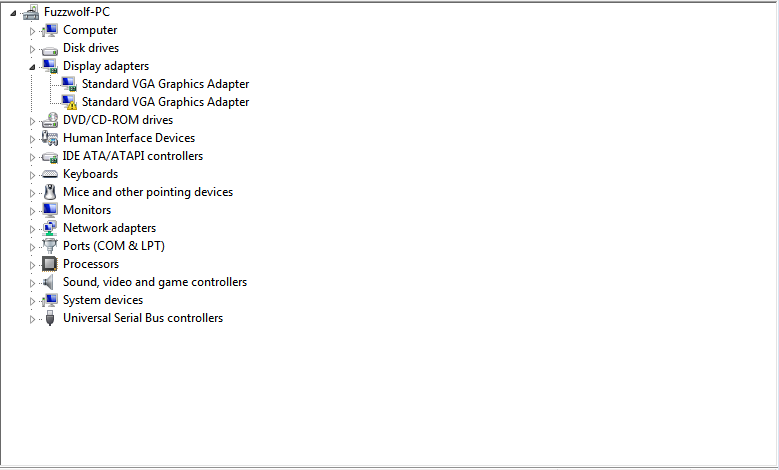
I attempted to install the latest one (306.02) which was recommended on the nVidia website. This is what I have after uninstalling that driver since I cannot load Windows with it (default VGA drivers are running right now because I'm in onboard mode)

aV1k2.png
 

My Computer My Computer

At a glance

Windows 7 Ultimate x64Intel Xeon X3450 2.66ghz24GB Registered ECC RAMEVGA 02G-P3-1568-KR GeForce GTX 560 Ti (Fermi...
OS
Windows 7 Ultimate x64
CPU
Intel Xeon X3450 2.66ghz
Motherboard
Supermicro X8SIA-F
Memory
24GB Registered ECC RAM
Graphics Card(s)
EVGA 02G-P3-1568-KR GeForce GTX 560 Ti (Fermi) 2GB 256-bit G
Sound Card
RF-71SDCD
Monitor(s) Displays
HP S2331a 23 inch Diagonal LCD Monitor
Screen Resolution
1920x1080
Keyboard
Logitech® Wireless Wave Combo MK550
Mouse
Logitech® Wireless Wave Combo MK550
Internet Speed
30mbs x 30mbs
Fuzzwolf,
go to the evga site and download, from there the latest there.
See post #16
 

My Computer My Computer

At a glance

MS Windows 7 Ultimate SP1 64-bitAMD A10-4600M6.00 GB Dual-Channel DDR3 @ 798MHz (11-11-12-28)AMD Radeon HD 7660G
Computer Manufacturer/Model Number
Toshiba Satellite S875D-S7239 laptop
OS
MS Windows 7 Ultimate SP1 64-bit
CPU
AMD A10-4600M
Motherboard
AMD Pumori (Socket FT1)
Memory
6.00 GB Dual-Channel DDR3 @ 798MHz (11-11-12-28)
Graphics Card(s)
AMD Radeon HD 7660G
Sound Card
High Definition Audio Device
Monitor(s) Displays
Generic PnP Monitor (1600x900@60Hz)
Screen Resolution
1600x900@60Hz
Hard Drives
SSD 119GB Corsair CSSD-V128GB2 ATA Device
Keyboard
Standard PS/2 Keyboard
Mouse
HP Wireless Optical Mobile Mouse Model FHA-3410
Internet Speed
What the local pub, local coffee shop offers.
Other Info
Optical Drive:MATSHITA BD-CMB UJ160B ATA Device


Also have an Asus ha1002xp netbook with Win 7 Ultimate installed.
Back
Top