Nero 9 Free Edition

swarfega

da Cleaner
Nero 9 is mostly known for being bloatware rather than being a reliable user friendly disk burning software, sadly Nero was all that several years ago. Recently Nero has introduced a new version of Nero 9 that is free and 54MB in size. This version is a stripped down version of Nero 9 ultra and consists of Disk burning and disk copying components. And that actually is a good thing compared to the whatnots that come bundled with the other versions. So basically the free version is Nero Essentials that come bundled with most CD/DVD writers these days. However I still don’t think the free version will be a success as you will need to submit an email address to get the download link(that seems ok) but they messed it all up adding the Ask toolbar which comes as an optional component during install. All Eset users will find out that the Antivirus flags it as a “potentially unwanted application”.

So if you really really like Nero and want only to burn or copy disks, this is for you otherwise there are lots of other smaller free applications out there.
Requirements:

  • Windows® XP SP2 or SP3, Windows Vista®, Windows® 7, Windows® XP Media Center Edition 2005 with SP2
  • Windows® XP 64 bit, Windows Vista® 64 bit, and Windows® 7 64 bit versions are supported via 32 bit emulation mode.
  • Windows® Internet Explorer® 6.0 or higher.
  • 1 GHz Intel® Pentium® III or equivalent AMD and Intel® processor (2 GHz Intel® Pentium® 4 or equivalent AMD and Intel® processor for Windows Vista®), 256 MB RAM (512 MB RAM for Windows Vista®).
  • ~270MB hard drive space for a typical installation of all components.
  • ~500MB hard drive space temporary for the installation
  • CD or DVD recordable or rewritable drive for burning.
  • DirectX® 9.0c revision 30 (August 2006) or higher.
  • Up to 9 GB available hard drive space for DVD images and temporary DVD files.
  • Graphics card with at least 32 MB video memory, minimum resolution of 800 x 600 pixels, and 16-bit color settings (24-bit or 32-bit true color is recommended).
  • Installation of the latest WHQL certified device drivers is strongly recommended.
  • For the Nero Online services: Nero product registration, product updates, and other features an Internet connection is required.
Optional Requirements

  • *16-bit Microsoft® Windows® compatible sound device and speakers Installation of latest WHQL certified device drivers recommended.
Product details:
Version: 9.4.12.3
Release Date: July 30, 2009
File Size: 55 MB (57.187.288 bytes)
MD5 checksum: 11c83041227b73c0c490ffe16a5d65c3
Download Nero Free Edition – Nero Website | Softpedia*
more
 

My Computer

Computer Manufacturer/Model Number
self built
OS
Windows 7 Professional 64-bit
CPU
Intel E8400 3GHz
Motherboard
Intel DX48BT2
Memory
Kingston PC3-10700H 4Gb
Graphics Card(s)
XFX Radeon HD 5850 BlackEd.
Sound Card
Asus Xonar DG
Monitor(s) Displays
2x Samsung SM-T220HD 22"
Screen Resolution
1680x1050 on two monitors
Hard Drives
OCZ Vertex 2 120gb 3.5" (OS)
Seagate Momentus XT 500gb
Samsung F3 1Tb (games)
2x Samsung F1 1Tb
PSU
Thermaltake ToughPower 850w
Case
Thermaltake Armor
Cooling
Scythe Mugen II
Keyboard
Microsoft Comfort Curve USB
Mouse
Razer Diamondback 3G
Internet Speed
8128/443
only 55 MB???
 

My Computer

Computer Manufacturer/Model Number
Custom made
OS
Window 7 build 7600, Xp pro(VM)
CPU
Amd Athlon 2000 xp+
Motherboard
Asus x series
Memory
kingstone(1gb+256MB)
Graphics Card(s)
Nvdia 6200(256 mb+255mb(shared))
Sound Card
soundmax
Monitor(s) Displays
Lg Flatron w1943
Screen Resolution
1360x768
Hard Drives
segate 80GB
Case
i-ball
Keyboard
i-ball
Mouse
i-ball
Internet Speed
256kbps up and 256 kbps down
LOL. I thought my Ashampoo Burning studio was big at 35mb.
 

My Computers

System One System Two

  • Computer type
    PC/Desktop
    OS
    7 X64
    CPU
    i5 8400
    Motherboard
    gigabyte b365m ds3h
    Memory
    2x8gb 3200mhz
    Hard Drives
    various
    PSU
    pure power 11 400w cm
    Case
    Coolermaster
    Cooling
    cryorig m9i
  • Computer type
    PC/Desktop
    OS
    7x64
    CPU
    g5400
    Motherboard
    ga b365m ds3h
    Memory
    8gb ddr4 2400
    PSU
    xfx pro 450w
Thanks Nick.
 

My Computer

Computer Manufacturer/Model Number
Home Brew
OS
Windows 7 Ultimate Vista Ultimate x64
CPU
Core 2 Duo E8500 3.16Ghz @ 3.8Ghz
Motherboard
eVGA 750i FTW
Memory
2x2Gigs Patriot PC2-6400 LL
Graphics Card(s)
Inno3D GeForce GTX260 216 SP
Monitor(s) Displays
ASUS VW222U 22" 2ms Response time
Screen Resolution
1680x1050
Hard Drives
SATA 150GB
SATA II 250GB
USB IDE 750GB Ext.
PSU
HYTEC 600W & Thermaltake 650W Toughpower Power Exp
Case
Thermaltake Armor LCS (Liquid Cooling System)
Cooling
Liquid Cooling System
Keyboard
Logitech G15 Gaming Keyboard
Mouse
Logitech G9 Gaming Mouse
I use Nero but I do find it somewhat bloated on size. 397 MB for an update. :shock:
 

My Computer

Computer Manufacturer/Model Number
Home Built
OS
Windows 7 x64
CPU
Intel Core 2 Quad Q6700 @ 3.2 GHz
Motherboard
Gigabyte GA-965P-DQ6
Memory
4 Gig
Graphics Card(s)
ATI Radeon HD 4870
Sound Card
Creative X-Fi XtremeMusic
Monitor(s) Displays
Samsung SyncMaster 226BW
Screen Resolution
1680 x 1050
PSU
Antec TruePower TP-550
Case
Antec P180
Cooling
Zalman CNPS9700, 3 Antec TriCool 120mm
Keyboard
Logitech G15
C

Hi all
I gave up on Nero a while ago version 6 was the last decent version which didn't come full to the brim with a load of bloat.

Their "Drive Image" virtual DVD/CD mounting tool hasn't worked since VISTA -- and this is a useful tool (ULTRA ISO works fine even on W7 X-64)

At least Nero realize that to stay in business a bit of "getting back to their roots" is in order.

I still find the easiest way to burn a CD / DVD is to make an ISO with something like ULTRA ISO and then use the built in burner.

About the only thing I find NERO even worthy of consideration for these days is that you can burn an audio CD directly from FLAC files (My music Library is all FLAC files - I'm not a fan of hideously compressed mp3 files).

I still use this method to get stuff on to a Minidisc recorder although using an XP Virtual machine - W7 doesn't support MiniDisc Simple Burner -- Mount Virtual drive with Ultra ISO, Burn Audio CD from FLAC and then use Minidisc Simple Burner to transfer CD to Minidisc. A bit old but it works (and although it might seem like Dinosaur technology the sound quality of a Minidisc runs RINGS around any IPOD - discussion for another Forum like Hydrogen Audio etc).

If Version 9 (Free version) allows you to burn FLAC files to CD Audio then I might be interested - you need the Nero mega plugin pack (free) to make V6/7 work.

Anybody tried the mega plugin pack with V9.

Cheers
jimbo
 

My Computer

Computer type
PC/Desktop
Computer Manufacturer/Model Number
Custom built, several laptops HP/ASUS
OS
Linux CENTOS 7 / various Windows OS'es and servers
CPU
Intel i7 Intel i5
Memory
8GB, 16GB
Graphics Card(s)
On Motherboard
Sound Card
Realtek HD audio
Monitor(s) Displays
Apple Cinema display, Samsung LCD
Screen Resolution
1920 X 1080
Hard Drives
4 X 1TB SATA
Mouse
Toshiba wireless laser
Internet Speed
> 20MB up
i used to find the dvd authoring part (nerovision, i think it was called) of the bloatware suite pretty powerful but also crash-prone.

the free slimware cdburnerxp (3.06 MB! download) can also make audio discs with flac files - it works great on my rtm x64. it can burn iso's too...
 

My Computer

Computer Manufacturer/Model Number
mickey megabyte 1234
OS
ultimate 64 sp1
CPU
i5 2500K [email protected]
Motherboard
MSI P67A-GD53
Memory
8 gigs GSkill Ripjaws 1600
Graphics Card(s)
amd hd6950
Sound Card
creative x-fi gamer
Monitor(s) Displays
samsung 24"
Screen Resolution
1920x1080
Hard Drives
ocz vertex 2e 60 gig, samsung f3 1tb, buffalo 2tb ext
PSU
antec 550
Case
antec three hundred
Cooling
i'm a cooling fan
Keyboard
saitek eclipse ii
Mouse
logitech g3
Internet Speed
about 4 Mbps
Other Info
i love win7
Wow this is awesome... finally nero in basic functions only... and free :)
 

My Computer

OS
Windows7 Enterprise SP1 x64 (Technet)
but it's still so bloated - just where does that code go?

the app i mentioned above can do all that nero does (probably more - i havent actually checked) but at well under 10% of download/install size (nero=55 MB, cdburnerxp=3 MB). :)
 

My Computer

Computer Manufacturer/Model Number
mickey megabyte 1234
OS
ultimate 64 sp1
CPU
i5 2500K [email protected]
Motherboard
MSI P67A-GD53
Memory
8 gigs GSkill Ripjaws 1600
Graphics Card(s)
amd hd6950
Sound Card
creative x-fi gamer
Monitor(s) Displays
samsung 24"
Screen Resolution
1920x1080
Hard Drives
ocz vertex 2e 60 gig, samsung f3 1tb, buffalo 2tb ext
PSU
antec 550
Case
antec three hundred
Cooling
i'm a cooling fan
Keyboard
saitek eclipse ii
Mouse
logitech g3
Internet Speed
about 4 Mbps
Other Info
i love win7
LOL. I thought my Ashampoo Burning studio was big at 35mb.

I am used to its Nero ultra edition which is near about 397 MB...
Thats why it is so less for me...

Have you guys noticed that Nero smartstart most of the times crashes in Windows vista and windows 7..
 

My Computer

Computer Manufacturer/Model Number
Custom made
OS
Window 7 build 7600, Xp pro(VM)
CPU
Amd Athlon 2000 xp+
Motherboard
Asus x series
Memory
kingstone(1gb+256MB)
Graphics Card(s)
Nvdia 6200(256 mb+255mb(shared))
Sound Card
soundmax
Monitor(s) Displays
Lg Flatron w1943
Screen Resolution
1360x768
Hard Drives
segate 80GB
Case
i-ball
Keyboard
i-ball
Mouse
i-ball
Internet Speed
256kbps up and 256 kbps down
Can it burn DVD videos???.......
 

My Computer

Computer Manufacturer/Model Number
Custom made
OS
Window 7 build 7600, Xp pro(VM)
CPU
Amd Athlon 2000 xp+
Motherboard
Asus x series
Memory
kingstone(1gb+256MB)
Graphics Card(s)
Nvdia 6200(256 mb+255mb(shared))
Sound Card
soundmax
Monitor(s) Displays
Lg Flatron w1943
Screen Resolution
1360x768
Hard Drives
segate 80GB
Case
i-ball
Keyboard
i-ball
Mouse
i-ball
Internet Speed
256kbps up and 256 kbps down
55mb, that's astonishing. why so huge?

ImgBurn is 2.12mb installed...
 

My Computer

OS
7600 x86
CPU
Core 2 Duo e7200, 2.53 ghz
Motherboard
Micro-Star MS-7529
Memory
2x DDR2 PC5300 1gb, 667 mhz
Graphics Card(s)
GeForce 9500gt, 512mb
Monitor(s) Displays
22" LG Flatron w2234s
Screen Resolution
1680x1050
Hard Drives
Excelstor SATA-II 250gb 7200rpm, 8mb cache
PSU
CoolerMaster M520
Internet Speed
30/20 mbits
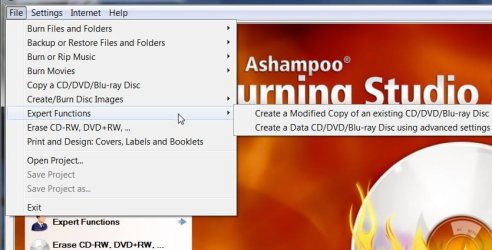
I use Ashampoo Burning Studio 2009 Advanced - it's free and is a lot smaller than Nero.


ASH2009-08-03_184550.jpg
 

My Computers

System One System Two

  • Computer type
    PC/Desktop
    OS
    7 X64
    CPU
    i5 8400
    Motherboard
    gigabyte b365m ds3h
    Memory
    2x8gb 3200mhz
    Hard Drives
    various
    PSU
    pure power 11 400w cm
    Case
    Coolermaster
    Cooling
    cryorig m9i
  • Computer type
    PC/Desktop
    OS
    7x64
    CPU
    g5400
    Motherboard
    ga b365m ds3h
    Memory
    8gb ddr4 2400
    PSU
    xfx pro 450w
55mb, that's astonishing. why so huge?

ImgBurn is 2.12mb installed...


Thank you. ImgBurn is what I use these days. I used to use cdburnerXP...but it has a nasty habit of running my CPU's at 100% for no good reason.

Nero for free....no thanks.
 

My Computer

Computer Manufacturer/Model Number
Self-Built in July 2009
OS
Windows 7 Ultimate x64
CPU
Intel Q9550 2.83Ghz OC'd to 3.40Ghz
Motherboard
Gigabyte GA-EP45-UD3R rev. 1.1, F12 BIOS
Memory
8GB G.Skill PI DDR2-800, 4-4-4-12 timings
Graphics Card(s)
EVGA 1280MB Nvidia GeForce GTX570
Sound Card
Realtek ALC899A 8 channel onboard audio
Monitor(s) Displays
23" Acer x233H
Screen Resolution
1920x1080
Hard Drives
Intel X25-M 80GB Gen 2 SSD
Western Digital 1TB Caviar Black, 32MB cache. WD1001FALS
PSU
Corsair 620HX modular
Case
Antec P182
Cooling
stock
Keyboard
ABS M1 Mechanical
Mouse
Logitech G9 Laser Mouse
Internet Speed
15/2 cable modem
Other Info
Windows and Linux enthusiast. Logitech G35 Headset.
I use Ashampoo Burning Studio 2009 Advanced - it's free and is a lot smaller than Nero.

Website says it's a "trial". So, is it time-limited, or is it feature-limited?
 

My Computer

Computer type
PC/Desktop
Computer Manufacturer/Model Number
Custom
OS
Win7 Pro 32-bit, Win8 Pro 32-bit
CPU
AMD Phenom II X6 1090T
Motherboard
Gigabyte
Memory
4GB ddr3 1300
Graphics Card(s)
AMD HD 4290 onboard
Sound Card
Builtin Realtek HD Audio
Monitor(s) Displays
Samsung 24" widescreen, LG 23" widescreen
Screen Resolution
1920x1200/1920x1080
Hard Drives
Kingston 256GB SSD
Keyboard
Logitech Illuminated Keyboard
Mouse
Logitech M705 wireless mouse
Antivirus
Norton Av 2013
Browser
IE v10
The only thing you can do is Data Burning and copy disc, every tab you go to tells you you need to purchase to use it, it's pretty useless really, much better off using Burning studio or something like that. NERO=FAIL

2009-08-06_043504.jpg
 

My Computer

Computer Manufacturer/Model Number
Home Brew
OS
Windows 7 Ultimate Vista Ultimate x64
CPU
Core 2 Duo E8500 3.16Ghz @ 3.8Ghz
Motherboard
eVGA 750i FTW
Memory
2x2Gigs Patriot PC2-6400 LL
Graphics Card(s)
Inno3D GeForce GTX260 216 SP
Monitor(s) Displays
ASUS VW222U 22" 2ms Response time
Screen Resolution
1680x1050
Hard Drives
SATA 150GB
SATA II 250GB
USB IDE 750GB Ext.
PSU
HYTEC 600W & Thermaltake 650W Toughpower Power Exp
Case
Thermaltake Armor LCS (Liquid Cooling System)
Cooling
Liquid Cooling System
Keyboard
Logitech G15 Gaming Keyboard
Mouse
Logitech G9 Gaming Mouse

My Computer

Computer Manufacturer/Model Number
mickey megabyte 1234
OS
ultimate 64 sp1
CPU
i5 2500K [email protected]
Motherboard
MSI P67A-GD53
Memory
8 gigs GSkill Ripjaws 1600
Graphics Card(s)
amd hd6950
Sound Card
creative x-fi gamer
Monitor(s) Displays
samsung 24"
Screen Resolution
1920x1080
Hard Drives
ocz vertex 2e 60 gig, samsung f3 1tb, buffalo 2tb ext
PSU
antec 550
Case
antec three hundred
Cooling
i'm a cooling fan
Keyboard
saitek eclipse ii
Mouse
logitech g3
Internet Speed
about 4 Mbps
Other Info
i love win7

My Computer

Computer type
PC/Desktop
Computer Manufacturer/Model Number
LENOVO K450 @3.0GHZ
OS
64-bit Windows 8.1 Pro
CPU
Core(TM) i5 CPU 4330 Haswell @ 3.20GHz
Motherboard
LENOVO
Memory
12.00 GB
Graphics Card(s)
Intel(R) HD Graphics
Sound Card
Intel HD integtrated
Monitor(s) Displays
HP 25' ISP Monitor
Screen Resolution
1900/1020
Hard Drives
(1) ST1000DM003-1CH162 (2) Generic STORAGE DEVICE USB Device (3) Generic STORAGE DEVICE USB Device
Internet Speed
100mb down/10mb up
Normally I use Nero 7 to burn DVD Iso images, and never use the rest of the software. I have Nero 7 Ultra. today I just wanted to copy a CD with some images on it. so I created an image from the CD with the free MagicISO, then I clicked on the ISO as usuall expecting Nero to come up so I can burn it, but instead UltraISO came up ( I use that to burn ISO Images to Thumb Drives and nothing else at the moment), so I wondered what happened, I knew Nero is installed so I selected "Open With" but nero was not in the list.. I even tried to locate the exe file I think it's called nero express or something but could not find it right away and looking at the list I saw Windows Disc Image Burner which comes with windows 7 (I think), so I thought I'd give it a try maybe it will work, after all I have over 100 Blank CDs ready just in case it doesn't work lol. so I did and in 1 minute it was already done! ( the ISO was around 100MB), so I made additional copies tested and they all work. so now I wonder do I really even need Nero installed if Windows Disc Burner does the job? I didn't try it with DVD or other types of images so I am not sure yet, but I'm willing to give it a try next time and see for myself! why install bloatware Ultra Nero or even the Light free version if you can do the job with something that is part of windows? now for DVD Movie burning you can always use a specialized software like convertxtodvd or what ever is your prefered package but for normal burning tasks I see no need for nero! what do you guys think? I might remove it from my computer all toghether if I can verify I can burn all ISO images with Windows Disc Image Burner. the only drawback I see with Windows Disk Image Burner is it does not give you many options, for example if you want to burn at a lower speed or other options, but as long as it works why need to tune your burning settings?
 

My Computer

Computer Manufacturer/Model Number
home made
OS
Windows 7 7264x64(main), 7260x86(secendary), XP SP3 Triple Boot
CPU
Intel Core 2 Duo E7400 2.8Mhz
Motherboard
Intel G33 express chipset
Memory
2GB DD2 667
Graphics Card(s)
Intel(R) 82G33 Graphics and Memory Controller Hub
Sound Card
Realtek Built into the G31
Monitor(s) Displays
19"
Screen Resolution
1280x1024
Hard Drives
320GB SATA (Main), 160GB IDE (Backup)
Case
Gigabyte SETTO
Keyboard
Genius
Mouse
Logitech
Internet Speed
1MB Download, 128k Upload
Back
Top