Solved Can't move files from main HD to SATA

m00loihy

New member
Local time
7:18 AM
Messages
11
I got a second internal HDD for my computer as I keep a lot of movies/tv shows on my computer and my main hard drive was getting full. My new 3TB HDD was working great for months now, never really had any trouble until recently out of nowhere.

When moving files to the second hd, it'd freeze up completely to the point where I have to force restart the PC. I've downloaded a program called RichCopy which seems to work a bit, but it's random. Sometimes it'll move one file perfectly, then stop working, sometimes I'll get a bunch before the second hard drive seems to just decide it doesn't want to work any more.

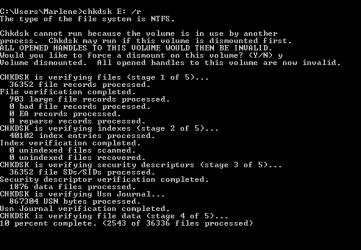
I've done a dskchk on the SATA for hours and got impatient and ended it. I've tried again a couple times and EVERY time it gets stuck on stage 4 at the exact same file. I'm just wondering if it is encountering a problem on this certain file, and it could just take a really long time to resolve or if I'm going about this problem completely the wrong way.

Appreciate any help I can get as I don't know how to go about fixing anything PC related!
Will provide any information necessary to hopefully lead to a fix.

Thanks!
 

My Computer My Computer

At a glance

Windows 7 Home Premium 64-bit
OS
Windows 7 Home Premium 64-bit
Chkdsk|Check Disk|How to Understand and Use in Windows XP
Although it's information for winxp, it's the same for win7. Stage 1 to 3 went fine?
stage doesn't list files as far as I know!(?)
Step 4 displays errors always at same blocks? Only a small range?
Step 5 displays error messages?

Is it a western digital disk, a seagate disk or.....?

Phases 4 and 5: Checking sectors (optional)

If the /R switch is in effect, Chkdsk runs two more passes to look for bad sectors. During stage 4, Chkdsk verifies all clusters in use; during stage 5, Chkdsk verifies unused clusters. Note that this process can be quite lengthy. taking many hours.
 

My Computer My Computer

At a glance

Microsoft Windows 7 Home Premium 64-bits 7601...Intel(R) Core(TM) i3 CPU M 370 @ 2.40GHz4,00 GBATI Mobility Radeon HD 5400 Series
Computer type
Laptop
Computer Manufacturer/Model Number
ACER ASPIRE 5742G
OS
Microsoft Windows 7 Home Premium 64-bits 7601 Multiprocessor Free Service Pack 1
CPU
Intel(R) Core(TM) i3 CPU M 370 @ 2.40GHz
Motherboard
Acer Aspire 5742G
Memory
4,00 GB
Graphics Card(s)
ATI Mobility Radeon HD 5400 Series
Sound Card
(1) AMD High Definition Audio Device (2) Realtek High Defi
Screen Resolution
1366 x 768 x 32 bits (4294967296 colors) @ 60 Hz
Hard Drives
WDC WD5000BEVT-22ZAT0

My Computer My Computer

At a glance

Microsoft Windows 7 Home Premium 64-bits 7601...Intel(R) Core(TM) i3 CPU M 370 @ 2.40GHz4,00 GBATI Mobility Radeon HD 5400 Series
Computer type
Laptop
Computer Manufacturer/Model Number
ACER ASPIRE 5742G
OS
Microsoft Windows 7 Home Premium 64-bits 7601 Multiprocessor Free Service Pack 1
CPU
Intel(R) Core(TM) i3 CPU M 370 @ 2.40GHz
Motherboard
Acer Aspire 5742G
Memory
4,00 GB
Graphics Card(s)
ATI Mobility Radeon HD 5400 Series
Sound Card
(1) AMD High Definition Audio Device (2) Realtek High Defi
Screen Resolution
1366 x 768 x 32 bits (4294967296 colors) @ 60 Hz
Hard Drives
WDC WD5000BEVT-22ZAT0
It is a western, though I can't remember too much about it, so I will try downloading the WD support.

As for the chkdsk which i am running the /r, I've tried doing it atleast 4x now and every time it stops at 10% stage 4 (2543 of 36336 files processed)
I've had it going for 4 and a half hours now and still not a change. This has been the longest I've let it sit though, as I've always been too impatient with technology.
Is it normal for it to take hours on one file if trying to fix it?

Thanks for response!
 

My Computer My Computer

At a glance

Windows 7 Home Premium 64-bit
OS
Windows 7 Home Premium 64-bit
I've done a couple of the quick tests on the HDD that you get to through properties, error check. It always finishes within a minute showing no errors which gives me hope.

The harddrive is only about 3 months old, so it'll be rather upsetting if it is no longer working. Especially as I have about 600GB of data on it.
 

My Computer My Computer

At a glance

Windows 7 Home Premium 64-bit
OS
Windows 7 Home Premium 64-bit
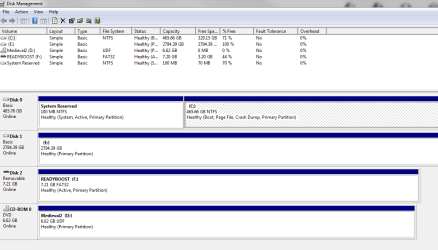
Capture.PNG

Capture2.PNG

Not sure if these will be of any help. Figure I'll let disk check do its thing all night and if still no change come morning, I'll try the data lifeguard for windows.

Unless there is anything else I can attempt
 

My Computer My Computer

At a glance

Windows 7 Home Premium 64-bit
OS
Windows 7 Home Premium 64-bit
View attachment 231942

View attachment 231943

Not sure if these will be of any help. Figure I'll let disk check do its thing all night and if still no change come morning, I'll try the data lifeguard for windows.

Unless there is anything else I can attempt
Some blocks of file 2543 (whatever that may be) are "bad sectors". Is seems to stop/freeze.Maybe a lot of disk space is bad(?)

Try the WD lifeguard software. Do these tests:

  • QUICK TEST - performs SMART drive quick self-test to gather and verify the Data Lifeguard information contained on the drive.
  • EXTENDED TEST - performs a Full Media Scan to detect bad sectors. Test may take several hours to complete depending on the size of the drive.
And of course:
  • VIEW TEST RESULT - displays the latest test results.
Post results
 

My Computer My Computer

At a glance

Microsoft Windows 7 Home Premium 64-bits 7601...Intel(R) Core(TM) i3 CPU M 370 @ 2.40GHz4,00 GBATI Mobility Radeon HD 5400 Series
Computer type
Laptop
Computer Manufacturer/Model Number
ACER ASPIRE 5742G
OS
Microsoft Windows 7 Home Premium 64-bits 7601 Multiprocessor Free Service Pack 1
CPU
Intel(R) Core(TM) i3 CPU M 370 @ 2.40GHz
Motherboard
Acer Aspire 5742G
Memory
4,00 GB
Graphics Card(s)
ATI Mobility Radeon HD 5400 Series
Sound Card
(1) AMD High Definition Audio Device (2) Realtek High Defi
Screen Resolution
1366 x 768 x 32 bits (4294967296 colors) @ 60 Hz
Hard Drives
WDC WD5000BEVT-22ZAT0
I ran the quick test yesterday and it came up with no errors, I then ran the extended test and it took about a half hour in one sector and then came up with an error "too many bad sectors"

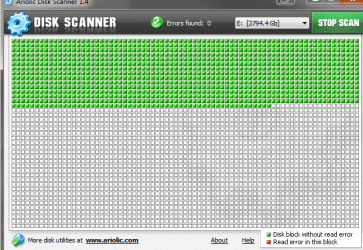
I am assuming this likely means the HDD is failing, I'm running ariolic disk scanner now,it's be going all night and hasn't gotten too far. But I've watched it this morning and it is making progress.

Capture3.PNG

If this test is pointless, I will end it now and try again with the WD tool to get the results.

My computer is pretty old and the HDD is pretty large for it. I got a new power supply to support it, but is it possible for a pc to not be able to handle it?
 

My Computer My Computer

At a glance

Windows 7 Home Premium 64-bit
OS
Windows 7 Home Premium 64-bit
There are bad sectors!! Disk is failing... hardware error. Try to move (not copy) all folders/files from failing disk to empty folder on another disk with a lot of free space. If system does freeze, try to move (not copy) one or some folders only. Or even some files only.

Many unmovable files? How many approximately?
 

My Computer My Computer

At a glance

Microsoft Windows 7 Home Premium 64-bits 7601...Intel(R) Core(TM) i3 CPU M 370 @ 2.40GHz4,00 GBATI Mobility Radeon HD 5400 Series
Computer type
Laptop
Computer Manufacturer/Model Number
ACER ASPIRE 5742G
OS
Microsoft Windows 7 Home Premium 64-bits 7601 Multiprocessor Free Service Pack 1
CPU
Intel(R) Core(TM) i3 CPU M 370 @ 2.40GHz
Motherboard
Acer Aspire 5742G
Memory
4,00 GB
Graphics Card(s)
ATI Mobility Radeon HD 5400 Series
Sound Card
(1) AMD High Definition Audio Device (2) Realtek High Defi
Screen Resolution
1366 x 768 x 32 bits (4294967296 colors) @ 60 Hz
Hard Drives
WDC WD5000BEVT-22ZAT0
Oh boo, I was afraid of that....

I havent had any trouble moving files from second HDD to my main hard drive, though I haven't moved too many.
I don't have enough space on main to hold all the files, if I go out and buy a 1TB external HD, do I just plug it in to pc via USB and then move files over? Will that be good enough?

That said, if I do move over all files, is my current SATA completely toast, or can I use WD to wipe everything and fix it?

Thanks SO MUCH for all the help Kaktussoft:)
 

My Computer My Computer

At a glance

Windows 7 Home Premium 64-bit
OS
Windows 7 Home Premium 64-bit
Oh boo, I was afraid of that....

I havent had any trouble moving files from second HDD to my main hard drive, though I haven't moved too many.
I don't have enough space on main to hold all the files, if I go out and buy a 1TB external HD, do I just plug it in to pc via USB and then move files over? Will that be good enough?

That said, if I do move over all files, is my current SATA completely toast, or can I use WD to wipe everything and fix it?

Thanks SO MUCH for all the help Kaktussoft:)
Borrow or buy a usb external disk with a lot of free space. Just plug it in and move the files from bad disk (don't copy)! DO IT AS SOON AS POSSIBLE

Still waranty? If so... wipe the disk and send it back. Otherwise... wipe the disk, package the disk and you have a nice santaclaus gift... for mother in law for example

Most disks have a 3 years warranty
 

My Computer My Computer

At a glance

Microsoft Windows 7 Home Premium 64-bits 7601...Intel(R) Core(TM) i3 CPU M 370 @ 2.40GHz4,00 GBATI Mobility Radeon HD 5400 Series
Computer type
Laptop
Computer Manufacturer/Model Number
ACER ASPIRE 5742G
OS
Microsoft Windows 7 Home Premium 64-bits 7601 Multiprocessor Free Service Pack 1
CPU
Intel(R) Core(TM) i3 CPU M 370 @ 2.40GHz
Motherboard
Acer Aspire 5742G
Memory
4,00 GB
Graphics Card(s)
ATI Mobility Radeon HD 5400 Series
Sound Card
(1) AMD High Definition Audio Device (2) Realtek High Defi
Screen Resolution
1366 x 768 x 32 bits (4294967296 colors) @ 60 Hz
Hard Drives
WDC WD5000BEVT-22ZAT0
Just went and bought a USB 3TB one, kind of want one anyway just to back up, well..everything! As I've had my fair share of headaches when losing files on my computer.

I know I didn't get an extended warranty with the retailer I got my hdd, but I did get it for sure less than 6months ago. Will it likely be under warranty with the manufacturer?

Sorry for all the questions about this, reeeally appreciate the help:)
 

My Computer My Computer

At a glance

Windows 7 Home Premium 64-bit
OS
Windows 7 Home Premium 64-bit
Did you already move files from thick disk to healthy external? How many ar unmoveable?
Are they very important documents, or just stupid movies?

Maybe moving 1 file only works(?)

Give me the correct type of western digital disk and its serial number please. Then I can check warranty.
 

My Computer My Computer

At a glance

Microsoft Windows 7 Home Premium 64-bits 7601...Intel(R) Core(TM) i3 CPU M 370 @ 2.40GHz4,00 GBATI Mobility Radeon HD 5400 Series
Computer type
Laptop
Computer Manufacturer/Model Number
ACER ASPIRE 5742G
OS
Microsoft Windows 7 Home Premium 64-bits 7601 Multiprocessor Free Service Pack 1
CPU
Intel(R) Core(TM) i3 CPU M 370 @ 2.40GHz
Motherboard
Acer Aspire 5742G
Memory
4,00 GB
Graphics Card(s)
ATI Mobility Radeon HD 5400 Series
Sound Card
(1) AMD High Definition Audio Device (2) Realtek High Defi
Screen Resolution
1366 x 768 x 32 bits (4294967296 colors) @ 60 Hz
Hard Drives
WDC WD5000BEVT-22ZAT0

My Computer My Computer

At a glance

Microsoft Windows 7 Home Premium 64-bits 7601...Intel(R) Core(TM) i3 CPU M 370 @ 2.40GHz4,00 GBATI Mobility Radeon HD 5400 Series
Computer type
Laptop
Computer Manufacturer/Model Number
ACER ASPIRE 5742G
OS
Microsoft Windows 7 Home Premium 64-bits 7601 Multiprocessor Free Service Pack 1
CPU
Intel(R) Core(TM) i3 CPU M 370 @ 2.40GHz
Motherboard
Acer Aspire 5742G
Memory
4,00 GB
Graphics Card(s)
ATI Mobility Radeon HD 5400 Series
Sound Card
(1) AMD High Definition Audio Device (2) Realtek High Defi
Screen Resolution
1366 x 768 x 32 bits (4294967296 colors) @ 60 Hz
Hard Drives
WDC WD5000BEVT-22ZAT0
Looks like it may've been a seagate :x Um, this is what I get from the Lifegaurd. I remember buying a Western Digital but having to return it, I didn't pay much attention to what I got in exchange.

ST3000DM 001-9YN166 SCS1
serial Z1F0BAJA

Would feel pretty dumb had that been the reason it gave me errors, using the wrong program.

Had no issues moving ANY files, I spread them out between my main hd and my new external one. Going to try the seagate program when I get home from work, as it failed the zeroes thing on WD lifeguard.
 

My Computer My Computer

At a glance

Windows 7 Home Premium 64-bit
OS
Windows 7 Home Premium 64-bit

My Computer My Computer

At a glance

Microsoft Windows 7 Home Premium 64-bits 7601...Intel(R) Core(TM) i3 CPU M 370 @ 2.40GHz4,00 GBATI Mobility Radeon HD 5400 Series
Computer type
Laptop
Computer Manufacturer/Model Number
ACER ASPIRE 5742G
OS
Microsoft Windows 7 Home Premium 64-bits 7601 Multiprocessor Free Service Pack 1
CPU
Intel(R) Core(TM) i3 CPU M 370 @ 2.40GHz
Motherboard
Acer Aspire 5742G
Memory
4,00 GB
Graphics Card(s)
ATI Mobility Radeon HD 5400 Series
Sound Card
(1) AMD High Definition Audio Device (2) Realtek High Defi
Screen Resolution
1366 x 768 x 32 bits (4294967296 colors) @ 60 Hz
Hard Drives
WDC WD5000BEVT-22ZAT0
Every time I run the seagates tool, it won't find the HDD. With every search, I get stxcon.exe has stopped working
:(
 

My Computer My Computer

At a glance

Windows 7 Home Premium 64-bit
OS
Windows 7 Home Premium 64-bit
Every time I run the seagates tool, it won't find the HDD. With every search, I get stxcon.exe has stopped working
:(
Do you have file
C:\Program Files\Seagate\SeaTools for Windows\SeaToolsDOS223ALL.ISO
or
C:\Program Files (x86)\Seagate\SeaTools for Windows\SeaToolsDOS223ALL.ISO

on disk?
 

My Computer My Computer

At a glance

Microsoft Windows 7 Home Premium 64-bits 7601...Intel(R) Core(TM) i3 CPU M 370 @ 2.40GHz4,00 GBATI Mobility Radeon HD 5400 Series
Computer type
Laptop
Computer Manufacturer/Model Number
ACER ASPIRE 5742G
OS
Microsoft Windows 7 Home Premium 64-bits 7601 Multiprocessor Free Service Pack 1
CPU
Intel(R) Core(TM) i3 CPU M 370 @ 2.40GHz
Motherboard
Acer Aspire 5742G
Memory
4,00 GB
Graphics Card(s)
ATI Mobility Radeon HD 5400 Series
Sound Card
(1) AMD High Definition Audio Device (2) Realtek High Defi
Screen Resolution
1366 x 768 x 32 bits (4294967296 colors) @ 60 Hz
Hard Drives
WDC WD5000BEVT-22ZAT0
Every time I run the seagates tool, it won't find the HDD. With every search, I get stxcon.exe has stopped working
:(
Do you have file
C:\Program Files\Seagate\SeaTools for Windows\SeaToolsDOS223ALL.ISO
or
C:\Program Files (x86)\Seagate\SeaTools for Windows\SeaToolsDOS223ALL.ISO

on disk?
Burn that iso. right click on it->open with->win7 dvd burning (or something like that). Burn it on CD/DVD
Boot for that cd/dvd and select the correct drive and perform a "short test". If it gives you no errors, perform a "long test"

http://www.seagate.com/files/support/seatools/SeaToolsDOSguide.pdf
SEATOOLS for DOS SeaTools | Seagate
 

My Computer My Computer

At a glance

Microsoft Windows 7 Home Premium 64-bits 7601...Intel(R) Core(TM) i3 CPU M 370 @ 2.40GHz4,00 GBATI Mobility Radeon HD 5400 Series
Computer type
Laptop
Computer Manufacturer/Model Number
ACER ASPIRE 5742G
OS
Microsoft Windows 7 Home Premium 64-bits 7601 Multiprocessor Free Service Pack 1
CPU
Intel(R) Core(TM) i3 CPU M 370 @ 2.40GHz
Motherboard
Acer Aspire 5742G
Memory
4,00 GB
Graphics Card(s)
ATI Mobility Radeon HD 5400 Series
Sound Card
(1) AMD High Definition Audio Device (2) Realtek High Defi
Screen Resolution
1366 x 768 x 32 bits (4294967296 colors) @ 60 Hz
Hard Drives
WDC WD5000BEVT-22ZAT0
Trying it now!
 

My Computer My Computer

At a glance

Windows 7 Home Premium 64-bit
OS
Windows 7 Home Premium 64-bit
Back
Top