None of my 64Bit software will run??

TorQueMoD

New member
Local time
2:10 PM
Messages
10
Hey all,

I recently installed some new software and I noticed that none of my 64 bit versions will run anymore. Photoshop, 3ds max and NDo2 are just some of the examples where the 32 bit version runs but the 64 bit version either crashes or says this application was unable to start correctly (0xc000007b).

I tried to re-install MSC++ Redistributable but that didn't do anything.

Any idea what happened or how to fix it?

Windows 7 professional X64
Service Pack 1
Intel Core 2 Extreme 3.0 ghz
8GB ram
Geforce GTS 280
 

My Computer My Computer

OS
Windows 7 64bit
"installed new software" is a little vague, what were you installing?
 

My Computer My Computer

Computer type
PC/Desktop
Computer Manufacturer/Model Number
Custom Build
OS
MS Windows 7 Home Premium 64-bit SP1
CPU
Intel Core i7 3770K @ 3.50GHz
Motherboard
ASUSTeK COMPUTER INC. P8Z77-V LX (LGA1155)
Memory
8.00 GB Dual-Channel DDR3 @ 679MHz
Graphics Card(s)
EVGA GeForce GTX 760 Graphic Card - 1085MHz Core - 4GB GDDR5
Sound Card
Realtek High Definition Audio
Monitor(s) Displays
2 Acer and 1 Asus
Screen Resolution
1920x1080 and 1280x1024 ans 1280x800
Hard Drives
120GB Kingston HyperX SSD
1.8TB Western Digital
932GB Western Digital
PSU
750W Coolermaster
Case
Coolermaster 912
Cooling
3 Fans, an Extreme CoolerMaster CPU Heatsink
Keyboard
G110 Logitect Black USB Backlighting Keyboard
Mouse
Synaptics PS/2 Port TouchPad
Internet Speed
60MB p/s
Antivirus
Microsoft Security Essentials
Browser
Chrome
Sorry, what I meant was that I noticed that any 64 bit version of software that I install doesn't work. Only the 32 bit versions do. So I recently installed NDo2 and the 64 bit version crashes. I also just installed 3Ds Max 2013 x64 and it simply gives the application failed to start error. Doesn't matter what 64 bit program I try to run, none of them work. Now here's the kicker... any previously installed X64 applications work fine. For example I can run my Photoshop CS4 x64 that I installed a few years back no problem. But if I install an X64 version of a program now, it won't work.

Did windows just corrupt itself somehow or did I uninstall some required component? I'm not a noob by any means with 19 years computer experience... never run into something like this before.
 

My Computer My Computer

OS
Windows 7 64bit
Have you run System File Checker, to check for any corrupted Windows files as you suggested yourself?

sfc /scannow - Command Prompt

Hope this helps,

Harry
 

My Computer My Computer

Computer type
Laptop
Oh yeah I forgot I did that... it said there was an error and it created a log file but I couldn't make sense of it... I'll post it in a bit.
 

My Computer My Computer

OS
Windows 7 64bit
Oh yeah I forgot I did that... it said there was an error and it created a log file but I couldn't make sense of it... I'll post it in a bit.

Okay thanks for informing us, please post the log file as soon as possible, a Windows file must be corrupted or missing.
 

My Computer My Computer

Computer type
Laptop
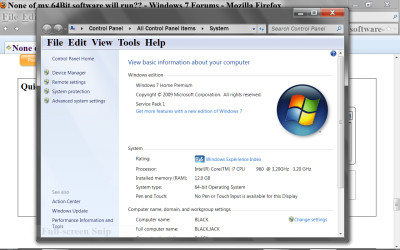
On you keyboard hit the Windows Flag key and Pause key and make sure your have a 64 bit system. Post a picture if you can.

Now and then gone..PNG
 

My Computer My Computer

Computer type
PC/Desktop
Computer Manufacturer/Model Number
Home made Desktop
OS
Windows 10 Pro. 64/ version 1709 Windows 7 Pro/64
CPU
Intel i7-6800K @ 4.3
Motherboard
ASUS X-99 Deluxe II
Memory
Corsair Platinum 16 gig @2400
Graphics Card(s)
EVGA GTX 1070 OC
Monitor(s) Displays
Asus 27" LED LCD/VE278Q
Screen Resolution
1920-1080 or 1280-720 HDMI
Hard Drives
INTEL SSD 730-240 Gb Sata 3.0/
PSU
EVGA Platium 1200W
Case
Phanteks Luxe Tempered Glass 8 fans/ one radiator
Cooling
XSPC/ Water Cooled CPU
Keyboard
Das 4 Professional
Mouse
Logitech M705/MX Anywhere 2-S
Internet Speed
100 mbits
Antivirus
Microsoft Security Essentials/ Malwarebytes Premium 3.0/ SAS
Browser
I.E. 11 default/Firefox/ ISP Time Warner Cable/Spectrum
Other Info
LG BluRay Burner/
Sound system-KLipsch-THX/
Icy Dock ssd Hot Swap bays.
On you keyboard hit the Windows Flag key and Pause key and make sure your have a 64 bit system. Post a picture if you can.

View attachment 232925

I did think that myself, but the OP claimed to have 19 years computer experience, so I thought they must know if they have a 32-bit or a 64-bit operating system :P
 

My Computer My Computer

Computer type
Laptop
Sorry I was a bother.
 

My Computer My Computer

Computer type
PC/Desktop
Computer Manufacturer/Model Number
Home made Desktop
OS
Windows 10 Pro. 64/ version 1709 Windows 7 Pro/64
CPU
Intel i7-6800K @ 4.3
Motherboard
ASUS X-99 Deluxe II
Memory
Corsair Platinum 16 gig @2400
Graphics Card(s)
EVGA GTX 1070 OC
Monitor(s) Displays
Asus 27" LED LCD/VE278Q
Screen Resolution
1920-1080 or 1280-720 HDMI
Hard Drives
INTEL SSD 730-240 Gb Sata 3.0/
PSU
EVGA Platium 1200W
Case
Phanteks Luxe Tempered Glass 8 fans/ one radiator
Cooling
XSPC/ Water Cooled CPU
Keyboard
Das 4 Professional
Mouse
Logitech M705/MX Anywhere 2-S
Internet Speed
100 mbits
Antivirus
Microsoft Security Essentials/ Malwarebytes Premium 3.0/ SAS
Browser
I.E. 11 default/Firefox/ ISP Time Warner Cable/Spectrum
Other Info
LG BluRay Burner/
Sound system-KLipsch-THX/
Icy Dock ssd Hot Swap bays.
Sorry I was a bother.

Sorry Bear, I wasn't trying to be mean to you, it still could technically be a possiblity, in one thread a OP claimed to have a 64-bit OS so suggested the 64-bit drivers, and then it turned out from Speccy they had a 32-bit OS instead :p
 

My Computer My Computer

Computer type
Laptop
Thanks guys... I get that you're trying to help and pointing out the obvious is sometimes necessary but like I said, I do have a lot of experience and as such wouldn't be asking for help if this wasn't a really weird issue. Yes its a 64 bit OS I'm not going to bother posting a picture, you'll just have to take my word on it (also as I said above my Photoshop 64 runs fine which would be impossible if I didn't have a 64 bit os).

I tried posting the log file but it just timed out this page... http://www.torquemod.com/CBS.txt
Its up on my website as a txt file now. Apparently its a Notepad language file that's corrupted?? Notepad.exe.mui

WTH?

Possibly a Virus?
Code:
Language Pack"
2012-09-21 09:26:38, Info                  CSI    000002f8 Hashes for file member \??\C:\Windows\SysWOW64\en-US\notepad.exe.mui do not match actual file [l:30{15}]"notepad.exe.mui" :
  Found: {l:32 b:tfmxBgEeHYSqU0nOhrdrRtqL98a1xYC32if7l90WiOg=} Expected: {l:32 b:o2tSWlTNsLpfCP+I3R4E0Dz7Z4HwNtMMweSbWEZCHTw=}
2012-09-21 09:26:38, Info                  CSI    000002f9 Hashes for file member \SystemRoot\WinSxS\x86_microsoft-windows-notepad.resources_31bf3856ad364e35_6.1.7600.16385_en-us_1dbc2e35304db501\notepad.exe.mui do not match actual file [l:30{15}]"notepad.exe.mui" :
  Found: {l:32 b:tfmxBgEeHYSqU0nOhrdrRtqL98a1xYC32if7l90WiOg=} Expected: {l:32 b:o2tSWlTNsLpfCP+I3R4E0Dz7Z4HwNtMMweSbWEZCHTw=}
2012-09-21 09:26:38, Info                  CSI    000002fa [SR] Could not reproject corrupted file [ml:60{30},l:58{29}]"\??\C:\Windows\SysWOW64\en-US"\[l:30{15}]"notepad.exe.mui"; source file in store is also corrupted
2012-09-21 09:26:38, Info                  CSI    000002fb Repair results created:
 

My Computer My Computer

OS
Windows 7 64bit
yes... downloading another program.... Avast
 

My Computer My Computer

OS
Windows 7 64bit
Nope, no virus detected with Avast or AVG
 

My Computer My Computer

OS
Windows 7 64bit
This is what the notepad.exe.mui file is.

Have you tried repairing the files with a Repair Install, although, I don't see how a language file could cause problems with other applications from running?
 

My Computer My Computer

Computer type
Laptop
No, I didn't want to go through the process of re-installing or repairing windows. My main system is down atm waiting for a new motherboard through RMA and I need this one working at the moment or I'm hooped. I guess I'll just have to wait till I get my main system back up and running before trying to repair or re-install windows. Thanks for the help anyway.
 

My Computer My Computer

OS
Windows 7 64bit
Okay, and this problem is very peculiar if I must say.
 

My Computer My Computer

Computer type
Laptop
Yeah I know. But if you're the only one replying then I'm guessing there isn't anyone else out there who's experienced it or knows how to fix it so I guess the only thing to do is wait and re-install. Thanks again for trying though.
 

My Computer My Computer

OS
Windows 7 64bit
Yeah suppose so, clean install are sometimes the only solution to the problem.

Sorry wasn't able to help any further,

Harry
 

My Computer My Computer

Computer type
Laptop
Back
Top