Lnk files in start menu are blank.

Chio

New member
Local time
5:49 PM
Messages
7
I've read other solutions on this forum, like this one:

https://www.google.com/url?q=http:/...ds-cse&usg=AFQjCNEB_A69a8b6tKo2av-NDG12nndVvQ

but it didn't work for me which is the only reason I'm asking for help. I've even deleted the .lnk sub folder (I've backed up my registry before deleting) in the HKey_Classes_Root folder and then merging the .lnk registry file posted in the link above. I've also tried the Rebuild Icon batch (which was also posted on this forum) and none these solutions fixed it.

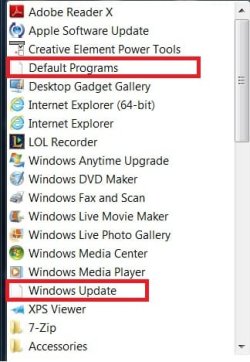
The exact problem is that it doesn't launch the program when I click on it. Nothing happens. (Attached picture)

Thanks in advance for any help! :)
 

Attachments

  • Broken Lnk files.jpg
    Broken Lnk files.jpg
    28.2 KB · Views: 2

My Computer My Computer

OS
Windows 7 Home Premium 64-bit
Have you scanned your PC for malware/viruses?


Check the "Target:" in the shortcut properties (right click on the shortcut and choose "Properties")

The "Target:" for "Default Programs" should be:
%windir%\system32\control.exe /name Microsoft.DefaultPrograms

The "Target:" for "Windows Update" should be:
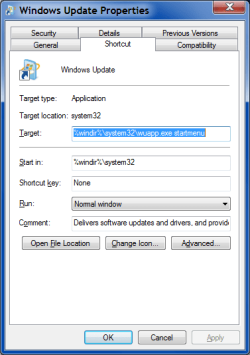
%windir%\system32\wuapp.exe startmenu
 

My Computer My Computer

Computer type
PC/Desktop
Computer Manufacturer/Model Number
n/a
OS
W7 Ultimate SP1, LM19.2 MATE, W10 Home 1703, W10 Pro 1703 VM, #All 64 bit
CPU
AMD Phenom II x6 1100T, 3.3 GHz
Motherboard
ASUS M4A88T-M/USB3 (AM3)
Memory
12GB DDR3 1333 G-Skill (4GB x 2), G-Skill (2GB x 2)
Graphics Card(s)
NVIDIA GeForce GTX 660
Sound Card
Realtek?
Monitor(s) Displays
Samsung S23B350
Screen Resolution
1920x1080
Hard Drives
WD Green 2TB (SATA), WD Green 3TB (SATA), WD Blue 4TB (SATA), WD Blue 6TB (SATA)
PSU
Cooler Master
Case
Antec GX300 Tower
Cooling
3x Antec TRICOOL 120mm Fans
Mouse
Wired Optical
Internet Speed
DSL
Antivirus
Avast
Browser
Pale Moon (64 bit)
Other Info
2018-12-27 Upgraded HDDs
2015-12-10 Upgraded case, graphics card, storage
2015-08-15 Upgraded motherboard & RAM
2015-07-15 Upgraded LM17.1 to LM17.2
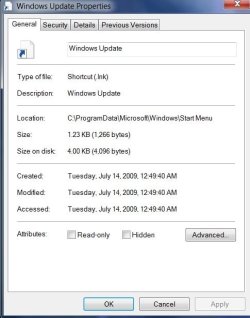
This is all it shows for both shortcuts.

I don't doubt it'll be mal-ware but I highly doubt since I was trying to fix some settings for my Windows Firewall and Defender so the game I was playing wouldn't have any problems. In the process, I disabled all services (at one point and re-enabled all) and I think that's when it caused all sorts of different problems.
 

Attachments

  • No Shortcut.jpg
    No Shortcut.jpg
    35.9 KB · Views: 3

My Computer My Computer

OS
Windows 7 Home Premium 64-bit
This is all it shows for both shortcuts.

I don't doubt it'll be mal-ware but I highly doubt since I was trying to fix some settings for my Windows Firewall and Defender so the game I was playing wouldn't have any problems. In the process, I disabled all services (at one point and re-enabled all) and I think that's when it caused all sorts of different problems.


Try this little .reg file to repair registry.

Download & Unzip the folder, inside the folder right click the .reg =>properties=>unblock=>exit.

Right click again on the .reg then "Merge".
If prompt command, accept. Log off - Log on or reboot to see if it has repair LNK shorcuts.

If you're also using Java update 7, could be good at least to clean the cache.
 

Attachments

My Computer My Computer

Computer type
PC/Desktop
Computer Manufacturer/Model Number
Custom Build
OS
Windows 7 Professional SP1 - x64 [Non-UEFI Boot]
CPU
Ivy Bridge Core i5 3570K (Delidded)
Motherboard
Asus P8Z77-V LE PLUS
Memory
G.Skill "Ares" DDR3 PC3-12800 - 1600MHz (16Gb)
Graphics Card(s)
Asus Dual-RX480-O4G
Sound Card
Creative Sound Blaster Z w/5.1 sound system
Monitor(s) Displays
Asus IPS 23"
Screen Resolution
16/9
Hard Drives
Internal:
500Go Sata 6Gb/s (x2)
500Go Sata 3Gb/s (x2)
SSD 60Go Sata 6Gb/s
PSU
In Win C 900W Series 80+ Platinum
Case
Thermaltake Chaser A71
Cooling
Custom Water Cooling Loop
Keyboard
Cooler Master QuickFire XTi
Mouse
Razer Imperator 2012 (4G)
Antivirus
MSE
Browser
IE 11.0.xxx Rtm
Other Info
"Raid0" with Intel Smart Response Technology (HDD/SSD)
This is all it shows for both shortcuts.

I don't doubt it'll be mal-ware but I highly doubt since I was trying to fix some settings for my Windows Firewall and Defender so the game I was playing wouldn't have any problems. In the process, I disabled all services (at one point and re-enabled all) and I think that's when it caused all sorts of different problems.


Try this little .reg file to repair registry.

I've tried that before, didn't work unfortunately.
 

My Computer My Computer

OS
Windows 7 Home Premium 64-bit
Weird

That is what you see when you right click on the "Start Menu" shortcut and select "Properties"?

This is what mine looks like.
Windows Update Properties.png

Have you made sure that your machine is free of malware/viruses?

If you disabled your Firewall and then used the Internet to play games, something could have got in.
A lot of modern malware disables "Windows Update".

Once you have scanned your PC, try using the System File Checker.

Open the "Command Prompt" and execute:
sfc /scannow
Tutorial:
SFC /SCANNOW Command - System File Checker
 

My Computer My Computer

Computer type
PC/Desktop
Computer Manufacturer/Model Number
n/a
OS
W7 Ultimate SP1, LM19.2 MATE, W10 Home 1703, W10 Pro 1703 VM, #All 64 bit
CPU
AMD Phenom II x6 1100T, 3.3 GHz
Motherboard
ASUS M4A88T-M/USB3 (AM3)
Memory
12GB DDR3 1333 G-Skill (4GB x 2), G-Skill (2GB x 2)
Graphics Card(s)
NVIDIA GeForce GTX 660
Sound Card
Realtek?
Monitor(s) Displays
Samsung S23B350
Screen Resolution
1920x1080
Hard Drives
WD Green 2TB (SATA), WD Green 3TB (SATA), WD Blue 4TB (SATA), WD Blue 6TB (SATA)
PSU
Cooler Master
Case
Antec GX300 Tower
Cooling
3x Antec TRICOOL 120mm Fans
Mouse
Wired Optical
Internet Speed
DSL
Antivirus
Avast
Browser
Pale Moon (64 bit)
Other Info
2018-12-27 Upgraded HDDs
2015-12-10 Upgraded case, graphics card, storage
2015-08-15 Upgraded motherboard & RAM
2015-07-15 Upgraded LM17.1 to LM17.2
This is all it shows for both shortcuts.

I don't doubt it'll be mal-ware but I highly doubt since I was trying to fix some settings for my Windows Firewall and Defender so the game I was playing wouldn't have any problems. In the process, I disabled all services (at one point and re-enabled all) and I think that's when it caused all sorts of different problems.


Try this little .reg file to repair registry.

I've tried that before, didn't work unfortunately.

OOps! didn't saw the link.:o

What's about java cache. It had happen to me once and cleaning did the trick.
 

My Computer My Computer

Computer type
PC/Desktop
Computer Manufacturer/Model Number
Custom Build
OS
Windows 7 Professional SP1 - x64 [Non-UEFI Boot]
CPU
Ivy Bridge Core i5 3570K (Delidded)
Motherboard
Asus P8Z77-V LE PLUS
Memory
G.Skill "Ares" DDR3 PC3-12800 - 1600MHz (16Gb)
Graphics Card(s)
Asus Dual-RX480-O4G
Sound Card
Creative Sound Blaster Z w/5.1 sound system
Monitor(s) Displays
Asus IPS 23"
Screen Resolution
16/9
Hard Drives
Internal:
500Go Sata 6Gb/s (x2)
500Go Sata 3Gb/s (x2)
SSD 60Go Sata 6Gb/s
PSU
In Win C 900W Series 80+ Platinum
Case
Thermaltake Chaser A71
Cooling
Custom Water Cooling Loop
Keyboard
Cooler Master QuickFire XTi
Mouse
Razer Imperator 2012 (4G)
Antivirus
MSE
Browser
IE 11.0.xxx Rtm
Other Info
"Raid0" with Intel Smart Response Technology (HDD/SSD)
That is what you see when you right click on the "Start Menu" shortcut and select "Properties"?

This is what mine looks like.Have you made sure that your machine is free of malware/viruses?

If you disabled your Firewall and then used the Internet to play games, something could have got in.
A lot of modern malware disables "Windows Update".

Once you have scanned your PC, try using the System File Checker.

Open the "Command Prompt" and execute:
sfc /scannow
Tutorial:
SFC /SCANNOW Command - System File Checker

Unfortunately, that "Shortcut" tab isn't available for the two programs I high-lighted (Default Programs and Windows Update) in my first attachment. What I see is the second picture I attached.

As of now, I'm using the sfc /scannow command.
 

My Computer My Computer

OS
Windows 7 Home Premium 64-bit
The scan finished and says it did not find any integrity violation.
 

My Computer My Computer

OS
Windows 7 Home Premium 64-bit
Do those programs still run from the "Control Panel"?

If so, make new shortcuts.
 

My Computer My Computer

Computer type
PC/Desktop
Computer Manufacturer/Model Number
n/a
OS
W7 Ultimate SP1, LM19.2 MATE, W10 Home 1703, W10 Pro 1703 VM, #All 64 bit
CPU
AMD Phenom II x6 1100T, 3.3 GHz
Motherboard
ASUS M4A88T-M/USB3 (AM3)
Memory
12GB DDR3 1333 G-Skill (4GB x 2), G-Skill (2GB x 2)
Graphics Card(s)
NVIDIA GeForce GTX 660
Sound Card
Realtek?
Monitor(s) Displays
Samsung S23B350
Screen Resolution
1920x1080
Hard Drives
WD Green 2TB (SATA), WD Green 3TB (SATA), WD Blue 4TB (SATA), WD Blue 6TB (SATA)
PSU
Cooler Master
Case
Antec GX300 Tower
Cooling
3x Antec TRICOOL 120mm Fans
Mouse
Wired Optical
Internet Speed
DSL
Antivirus
Avast
Browser
Pale Moon (64 bit)
Other Info
2018-12-27 Upgraded HDDs
2015-12-10 Upgraded case, graphics card, storage
2015-08-15 Upgraded motherboard & RAM
2015-07-15 Upgraded LM17.1 to LM17.2
Do those programs still run from the "Control Panel"?

If so, make new shortcuts.

They still work from the Control Panel. It just stumps me why this error is difficult to fix.
 

My Computer My Computer

OS
Windows 7 Home Premium 64-bit
Thanks for highlighting the solution that fixed your problem. :)
 

My Computer My Computer

Computer type
PC/Desktop
Computer Manufacturer/Model Number
n/a
OS
W7 Ultimate SP1, LM19.2 MATE, W10 Home 1703, W10 Pro 1703 VM, #All 64 bit
CPU
AMD Phenom II x6 1100T, 3.3 GHz
Motherboard
ASUS M4A88T-M/USB3 (AM3)
Memory
12GB DDR3 1333 G-Skill (4GB x 2), G-Skill (2GB x 2)
Graphics Card(s)
NVIDIA GeForce GTX 660
Sound Card
Realtek?
Monitor(s) Displays
Samsung S23B350
Screen Resolution
1920x1080
Hard Drives
WD Green 2TB (SATA), WD Green 3TB (SATA), WD Blue 4TB (SATA), WD Blue 6TB (SATA)
PSU
Cooler Master
Case
Antec GX300 Tower
Cooling
3x Antec TRICOOL 120mm Fans
Mouse
Wired Optical
Internet Speed
DSL
Antivirus
Avast
Browser
Pale Moon (64 bit)
Other Info
2018-12-27 Upgraded HDDs
2015-12-10 Upgraded case, graphics card, storage
2015-08-15 Upgraded motherboard & RAM
2015-07-15 Upgraded LM17.1 to LM17.2
Back
Top