Hello all sorry if this is a bit much but i figuerd id do it all in one. firstly I would like to no if this is normal and if so is there a way i can use less memory. Currently Task Manager reports that 1.18GB is being used and I am not sure what Processes or services i can terminate to reduce memory usage.
The other thing is i Recently installed a new GPU 7970 and im getting issues with my BSOD along with my BIOS being overscaned and dont seem to be getting the desierd FPS i thought i would be getting with this card...I don't no if this is down to another component in need of an upgrade but If anyone can advise me about my system or if it needs another upgrade I would be thank full. You can see my system spec on my profile page.thank you
My Computer
At a glance
windows 7 home premium 64bitamd phenom 1090T 4ghzkingston h20 2x2 2000mhz (running at 1333mhz)Saphire HD radion 7970 vapore x ghz edition 3gig
Hello all sorry if this is a bit much but i figuerd id do it all in one. firstly I would like to no if this is normal and if so is there a way i can use less memory. Currently Task Manager reports that 1.18GB is being used and I am not sure what Processes or services i can terminate to reduce memory usage.
The other thing is i Recently installed a new GPU 7970 and im getting issues with my BSOD along with my BIOS being overscaned and dont seem to be getting the desierd FPS i thought i would be getting with this card...I don't no if this is down to another component in need of an upgrade but If anyone can advise me about my system or if it needs another upgrade I would be thank full. You can see my system spec on my profile page.thank you
Hi -- Welcome to SevenForums. According to your specs, you only have 2 GB of RAM installed. Having 1.18 usable would be about right. Some of it is used on your Video Card and a few other things. Since you have a 64-bit system, you can install more RAM and increase the speed of your PC quite a bit. You should have at least 4 GB installed. If you do get more, it needs to match what you have. Don't just buy 2 GB more and stick it in because that would cause more problems. Since RAM is fairly cheap these days, it might be good to buy all new RAM. == Have you tried putting in your old video card and seeing how your PC operates? That will give you something to go on. Do that and get back with us.
My Computer
At a glance
Windows 7 Home Premium 32-Bit - Build 7600 SP1Intel Core i3-2120 3.30GhzKingston 4 GB DDR3 1333 mhzAMD Radeon HD6670
Computer type
PC/Desktop
Computer Manufacturer/Model Number
Custom Build
OS
Windows 7 Home Premium 32-Bit - Build 7600 SP1
CPU
Intel Core i3-2120 3.30Ghz
Motherboard
Asus P8Z68-V LX Intel Z68 Socket H2 ATX
Memory
Kingston 4 GB DDR3 1333 mhz
Graphics Card(s)
AMD Radeon HD6670
Sound Card
Sound Blaster Audigy SE 24-Bit
Monitor(s) Displays
Asus VE228
Screen Resolution
1440 X 900
Hard Drives
OCZ Vertex 3 120 GB Sata 3 SSD ==
Kingston SH103/S3 120 G Hyper X 120 GB SSD ==
Western Digital 500 GB Caviar Green 7200 RPM ==
PSU
Corsair CX600M == 600 Watt
Case
NZXT Apollo - Silver with Clear Side Panel
Cooling
Three 120 mm Fans
Keyboard
Microsoft Natural 4000
Mouse
Microsoft Custom Optical 3000
Internet Speed
AT&T Fiber Optic Wireless Network
Antivirus
Microsoft Security Essentials
Browser
Chrome
Other Info
120 mm Blue LED Fan -- Three Blue LED Lazer Light Sticks
Click on the Start Button and right click on Computer. Left Click on Properties and you will see the amount of RAM installed and the amount that is usable. What do you get for Usable RAM? = Put 4 GB of RAM in your System Specs.
My Computer
At a glance
Windows 7 Home Premium 32-Bit - Build 7600 SP1Intel Core i3-2120 3.30GhzKingston 4 GB DDR3 1333 mhzAMD Radeon HD6670
Computer type
PC/Desktop
Computer Manufacturer/Model Number
Custom Build
OS
Windows 7 Home Premium 32-Bit - Build 7600 SP1
CPU
Intel Core i3-2120 3.30Ghz
Motherboard
Asus P8Z68-V LX Intel Z68 Socket H2 ATX
Memory
Kingston 4 GB DDR3 1333 mhz
Graphics Card(s)
AMD Radeon HD6670
Sound Card
Sound Blaster Audigy SE 24-Bit
Monitor(s) Displays
Asus VE228
Screen Resolution
1440 X 900
Hard Drives
OCZ Vertex 3 120 GB Sata 3 SSD ==
Kingston SH103/S3 120 G Hyper X 120 GB SSD ==
Western Digital 500 GB Caviar Green 7200 RPM ==
PSU
Corsair CX600M == 600 Watt
Case
NZXT Apollo - Silver with Clear Side Panel
Cooling
Three 120 mm Fans
Keyboard
Microsoft Natural 4000
Mouse
Microsoft Custom Optical 3000
Internet Speed
AT&T Fiber Optic Wireless Network
Antivirus
Microsoft Security Essentials
Browser
Chrome
Other Info
120 mm Blue LED Fan -- Three Blue LED Lazer Light Sticks
Ok sorry for double post.i have 2x2=4gig of ram i updated my spec on my profile .i dont no how much is usable though as i dont see the option for that under computer properties.
my old card 5870matrix did not have this issue with the BSOD overscaned screen. this was only when i installed the 7970.I have tryed uninstalling drivers using drive sweeper rebooting and reinstalling amd 12.7 and 12.8 drivers all so with no luck...as far as the card gose when it boots into windows there don't seem to be any problems. but i do get some lag spikes and low fps in some games and i thought since this card is a top end card i would not be having these problems. so upgrading a cpu and mainboard is not needed? .i just need to have more ram or better ram? the other thing is that i herd that the IMC (intergrated memory controller on the 1090T chip is weak and can only take 1666mhz speed of memory.if i was to get more ram and it was faster then 1666mhz would this be a danger to my system and is there a substantial gain in having faster memory or dose it not really effect system performance that much..im still unsure about this.
My Computer
At a glance
windows 7 home premium 64bitamd phenom 1090T 4ghzkingston h20 2x2 2000mhz (running at 1333mhz)Saphire HD radion 7970 vapore x ghz edition 3gig
Ok sorry for double post.i have 2x2=4gig of ram i updated my spec on my profile .i dont no how much is usable though as i dont see the option for that under computer properties.
my old card 5870matrix did not have this issue with the BSOD overscaned screen. this was only when i installed the 7970.I have tryed uninstalling drivers using drive sweeper rebooting and reinstalling amd 12.7 and 12.8 drivers all so with no luck...as far as the card gose when it boots into windows there don't seem to be any problems. but i do get some lag spikes and low fps in some games and i thought since this card is a top end card i would not be having these problems. so upgrading a cpu and mainboard is not needed? .i just need to have more ram or better ram? the other thing is that i herd that the IMC (intergrated memory controller on the 1090T chip is weak and can only take 1666mhz speed of memory.if i was to get more ram and it was faster then 1666mhz would this be a danger to my system and is there a substantial gain in having faster memory or dose it not really effect system performance that much..im still unsure about this.
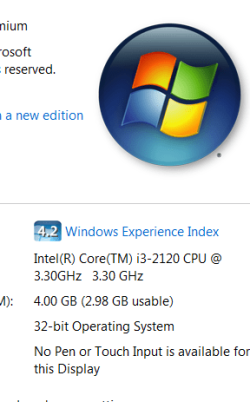
Any RAM you buy has to be matched to your Motherboard. You can't just buy any RAM and expect it to work OK. Did you change the RAM and then start having problems? Did you only start having problems when you installed the Video Card? == Once again, go to Computer, right click and then left click on Properties. A window will open and you will see a big Windows logo. Look under that like in mine and you will see Installed RAM and Usable RAM. What does yours say?
Attachments
Capture.PNG
15.3 KB
· Views: 1
My Computer
At a glance
Windows 7 Home Premium 32-Bit - Build 7600 SP1Intel Core i3-2120 3.30GhzKingston 4 GB DDR3 1333 mhzAMD Radeon HD6670
Computer type
PC/Desktop
Computer Manufacturer/Model Number
Custom Build
OS
Windows 7 Home Premium 32-Bit - Build 7600 SP1
CPU
Intel Core i3-2120 3.30Ghz
Motherboard
Asus P8Z68-V LX Intel Z68 Socket H2 ATX
Memory
Kingston 4 GB DDR3 1333 mhz
Graphics Card(s)
AMD Radeon HD6670
Sound Card
Sound Blaster Audigy SE 24-Bit
Monitor(s) Displays
Asus VE228
Screen Resolution
1440 X 900
Hard Drives
OCZ Vertex 3 120 GB Sata 3 SSD ==
Kingston SH103/S3 120 G Hyper X 120 GB SSD ==
Western Digital 500 GB Caviar Green 7200 RPM ==
PSU
Corsair CX600M == 600 Watt
Case
NZXT Apollo - Silver with Clear Side Panel
Cooling
Three 120 mm Fans
Keyboard
Microsoft Natural 4000
Mouse
Microsoft Custom Optical 3000
Internet Speed
AT&T Fiber Optic Wireless Network
Antivirus
Microsoft Security Essentials
Browser
Chrome
Other Info
120 mm Blue LED Fan -- Three Blue LED Lazer Light Sticks
if ur refering the BSOD overscan issue beffor booting into windows..then yes this happend when i inserted the new card. i have gon to the computer properties and i do not have that listed like you do in your image. i only have this for ram.
Installed Memory (Ram)4.00 GB
My Computer
At a glance
windows 7 home premium 64bitamd phenom 1090T 4ghzkingston h20 2x2 2000mhz (running at 1333mhz)Saphire HD radion 7970 vapore x ghz edition 3gig
Have you tried putting your old card back in and seeing if you still have the trouble? This will tell you if it is the card or if it is something else. That should be your next step.
My Computer
At a glance
Windows 7 Home Premium 32-Bit - Build 7600 SP1Intel Core i3-2120 3.30GhzKingston 4 GB DDR3 1333 mhzAMD Radeon HD6670
Computer type
PC/Desktop
Computer Manufacturer/Model Number
Custom Build
OS
Windows 7 Home Premium 32-Bit - Build 7600 SP1
CPU
Intel Core i3-2120 3.30Ghz
Motherboard
Asus P8Z68-V LX Intel Z68 Socket H2 ATX
Memory
Kingston 4 GB DDR3 1333 mhz
Graphics Card(s)
AMD Radeon HD6670
Sound Card
Sound Blaster Audigy SE 24-Bit
Monitor(s) Displays
Asus VE228
Screen Resolution
1440 X 900
Hard Drives
OCZ Vertex 3 120 GB Sata 3 SSD ==
Kingston SH103/S3 120 G Hyper X 120 GB SSD ==
Western Digital 500 GB Caviar Green 7200 RPM ==
PSU
Corsair CX600M == 600 Watt
Case
NZXT Apollo - Silver with Clear Side Panel
Cooling
Three 120 mm Fans
Keyboard
Microsoft Natural 4000
Mouse
Microsoft Custom Optical 3000
Internet Speed
AT&T Fiber Optic Wireless Network
Antivirus
Microsoft Security Essentials
Browser
Chrome
Other Info
120 mm Blue LED Fan -- Three Blue LED Lazer Light Sticks