

sygnus21
New member
Finally!!! A fix for getting Halo 2 working under Windows 7....
Credit for this find goes to this video... Halo 2 for Windows 7 Installation Tutorial 100% Fix - YouTube. I'm just making the fix easier to find, clarifying the instructions, and providing images.
Now... I’m aware that there are a lot of pirated copies of this game out there so be warned we do not support or condone pirating and that discussion of pirated material gets a ban. I'm just stating the rules.
That said, I can’t say this works for pirated copies of the game, but it does work for legitimate copies.
Alright, first thing you want to do is get an older version of Games For Windows Live (LIVE 3.5.50.0) here Freeware Files.com - Download. OK….
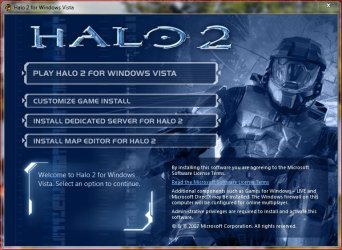
1 – Install your copy of Halo 2 by doing a Customize Game install...
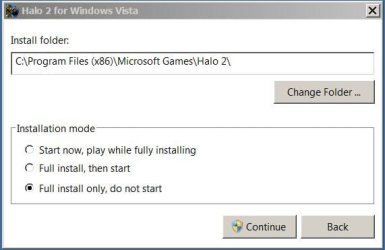
MAKE SURE you choose Full install only, do not start...
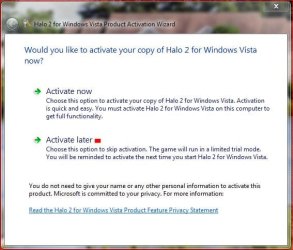
2- You will be asked to Activate the game, choose Activate later
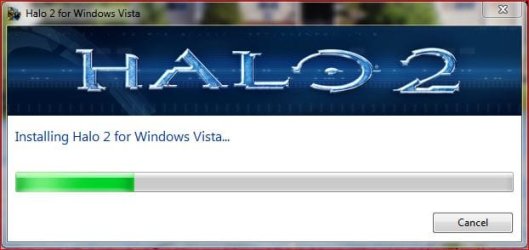
Game will begin installing...
3- Once game is finished installing you should be done for now...
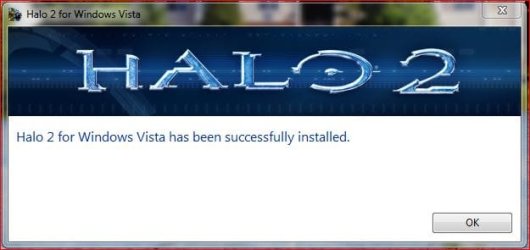
however if it asks again to be activated, again, choose Activate later.
BTW YOU WILL have to activate the game so those without a Product Key.... you're wasting your time here!
4- Now... Go to the Control Panel, Programs and Features, and look for Microsoft Games For Windows - LIVE Redistributable. This is the version that was installed with Halo 2 and NEEDS to be uninstalled!
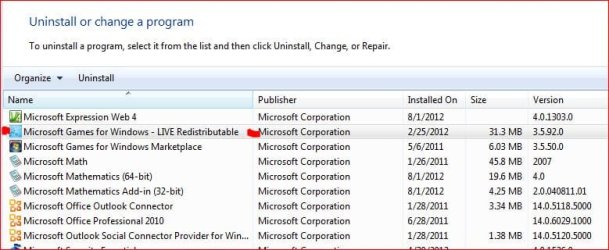
Do not, repeat, do not uninstall Microsoft Games For Windows Market Place! This is the latest version that should have been/should be installed on Windows 7.... AND, Halo 2 will require it as you'll have to be signed into live to play or update the game!
5- Anyway once the old version of GFWL is uninstalled, install the version you downloaded earlier....

Once you're done with installing the file you've downloaded you can start the game. You will be required to activated and register the game. And you will be asked to sign into Games For Windows Live (Market Place). Bottom line follow the on-screen prompts and enjoy the game. I just finished part of the first level and the game looked and ran well thus far.
Things to note....
1- For me the game is running in full screen at a resolution of 1920 x 1080
2- I'm not running in any type of compatibility mode or Admin mode.
3- You can install on a different drive (I did).
4- The game just works
Good Luck
Credit for this find goes to this video... Halo 2 for Windows 7 Installation Tutorial 100% Fix - YouTube. I'm just making the fix easier to find, clarifying the instructions, and providing images.
Now... I’m aware that there are a lot of pirated copies of this game out there so be warned we do not support or condone pirating and that discussion of pirated material gets a ban. I'm just stating the rules.
That said, I can’t say this works for pirated copies of the game, but it does work for legitimate copies.
Alright, first thing you want to do is get an older version of Games For Windows Live (LIVE 3.5.50.0) here Freeware Files.com - Download. OK….
1 – Install your copy of Halo 2 by doing a Customize Game install...
MAKE SURE you choose Full install only, do not start...
2- You will be asked to Activate the game, choose Activate later
Game will begin installing...
3- Once game is finished installing you should be done for now...
however if it asks again to be activated, again, choose Activate later.
BTW YOU WILL have to activate the game so those without a Product Key.... you're wasting your time here!
4- Now... Go to the Control Panel, Programs and Features, and look for Microsoft Games For Windows - LIVE Redistributable. This is the version that was installed with Halo 2 and NEEDS to be uninstalled!
Do not, repeat, do not uninstall Microsoft Games For Windows Market Place! This is the latest version that should have been/should be installed on Windows 7.... AND, Halo 2 will require it as you'll have to be signed into live to play or update the game!
5- Anyway once the old version of GFWL is uninstalled, install the version you downloaded earlier....
Once you're done with installing the file you've downloaded you can start the game. You will be required to activated and register the game. And you will be asked to sign into Games For Windows Live (Market Place). Bottom line follow the on-screen prompts and enjoy the game. I just finished part of the first level and the game looked and ran well thus far.
Things to note....
1- For me the game is running in full screen at a resolution of 1920 x 1080
2- I'm not running in any type of compatibility mode or Admin mode.
3- You can install on a different drive (I did).
4- The game just works
Good Luck
Last edited:
My Computer
- Computer type
- PC/Desktop
- Computer Manufacturer/Model Number
- Custom built by me.
- OS
- Windows 10 Pro
- CPU
- Intel Core i7-4770K (3.5Ghz)
- Motherboard
- Gigabyte G1 Sniper 5 (F10 Bios)
- Memory
- 32 gig Corsair Dominator Platinum (4x8Gig)
- Graphics Card(s)
- Sapphire Tri-X R9 Fury
- Sound Card
- Soundblaster ZXR
- Monitor(s) Displays
- NEC PA242W 24" LCD Monitor
- Screen Resolution
- 1920 x 1200
- Hard Drives
- Primary - Samsung 850 Pro (512gig), Samsung 840 Pro (256gig), 2TB WD Caviar Black.
- PSU
- EVGA Supernova 1000 G2
- Case
- Cooler Master HAF X
- Cooling
- Corsair H100i with Corsair Air Series SP120 Quiet Fans
- Keyboard
- Logitech Wireless Wave
- Mouse
- Logitech Performance MX
- Internet Speed
- High Speed Cable
- Antivirus
- Norton Security
- Browser
- IE11
- Other Info
- Memory Timings - 1866MHz @ 9-9-9-27-1T @ 1.5 volts


