
File Properties Editing Tags Library of Words/Suggestions

Firedoc

New member
Local time
5:00 PM
Messages
19
Location
Salt Lake Valley
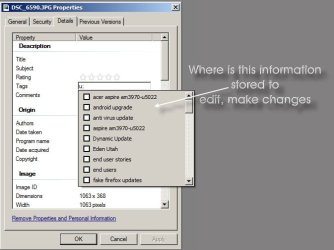
I want to know what file stores a File's Tags (Data Library Dictionary) i.e. that suggested words/phrases separated by ; are displayed

So I can edit/remove keywords/phrases that I do not wish listed/used/suggested that may be spelled incorrectly or there are too many variances of the same/similar phrase/word, thank you, Doc
 

Attachments
  • File-Properties-Details-Tages-DescriptionValues.jpg
    File-Properties-Details-Tages-DescriptionValues.jpg
    37.5 KB · Views: 28

My Computer My Computer

At a glance

Windows 7 Home Premium 64bitIntel Core i3 2100 (3.10GHz)6GB DDR3Intel HD Graphics 2000 Dynamic Video Memory T...
Computer Manufacturer/Model Number
Acer Aspire AM3970-U5022
OS
Windows 7 Home Premium 64bit
CPU
Intel Core i3 2100 (3.10GHz)
Motherboard
Intel H67 Express DIMM 240 Pin
Memory
6GB DDR3
Graphics Card(s)
Intel HD Graphics 2000 Dynamic Video Memory Technology 5.0
Sound Card
I hear sound - High Definition Audio
Monitor(s) Displays
ViewSonic VX2000
Screen Resolution
1152x864
Hard Drives
1TB Serial ATA-300 - 5400 rpm
PSU
300-watt
Case
Full Tower
Cooling
Hopefully
Keyboard
Dell Quiet Key
Mouse
Logitech Track
Internet Speed
12Mbps - Cable
Other Info
Do not like Vista or Windows 7, too many glitches
Me too

Did you ever get to the bottom of this? I'm wondering whether there's only two people in the world who want to organise their tags.
 

My Computer My Computer

At a glance

Windows 7 Professional 64-bitAMD II X4 810 2.6Ghz6MB
Computer Manufacturer/Model Number
Dell Inspiron 546
OS
Windows 7 Professional 64-bit
CPU
AMD II X4 810 2.6Ghz
Memory
6MB

My Computer My Computer

At a glance

64-bit Windows 11 Pro for WorkstationsIntel i7-8700K OC'd to 5 GHz64 GB (4x16GB) G.SKILL TridentZ RGB DDR4 3600...ASUS ROG-STRIX-GTX1080TI-O11G-GAMING
Computer type
PC/Desktop
Computer Manufacturer/Model Number
Self built custom
OS
64-bit Windows 11 Pro for Workstations
CPU
Intel i7-8700K OC'd to 5 GHz
Motherboard
ASUS ROG Maximus XI Formula Z390
Memory
64 GB (4x16GB) G.SKILL TridentZ RGB DDR4 3600 MHz
Graphics Card(s)
ASUS ROG-STRIX-GTX1080TI-O11G-GAMING
Sound Card
Integrated
Monitor(s) Displays
2 x Samsung Odyssey G7 27"
Screen Resolution
2560x1440
Hard Drives
1TB Samsung 990 PRO M.2,
4TB Samsung 990 PRO PRO M.2,
TerraMaster F8 SSD Plus NAS
PSU
Seasonic Prime Titanium 850W
Case
Thermaltake Core P3
Cooling
Corsair Hydro H115i
Keyboard
Logitech wireless K800
Mouse
Logitech MX Master 4
Internet Speed
2 Gb/s Download and 100 Mb/s Upload
Antivirus
Malwarebyte Anti-Malware Premium
Browser
Google Chrome
Other Info
Logitech Z625 speaker system,
Logitech BRIO 4K Pro webcam,
HP Color LaserJet Pro MFP M477fdn,
APC SMART-UPS RT 1000 XL - SURT1000XLI,
Galaxy S23 Plus phone
Hi UnlikelyMoniker,

No I have not found an answer, and I do not want to organize Tags, I want to edit the auto-fill information that appears to the right when I type in my Description, Origin, Tags, Comments, etc. Maybe I am not explaining myself very well.

There are predetermined Field Titles, some of which read from the properties of a File or when you take a Digital Photo, the information of that Camera and all pertinent info. It is after I have entered Title, Subject, Comments or in the Tags about identifying this Photo or File for a later Search.

Otherwise, I have to go back through each and every File, and re-enter information to change what is indexed when you perform a search. Example when you add a word to the dictionary, you can go back and edit the list of words you added, as one may be misspelled still.

And what I am asking is, besides the file itself containing this information where does Windows Properties store this same information in its Library of Keywords when searching, so I am make changes to what I have added in any file, I have added Title, Subject, Comments or Tags information.

Thanks for your assistance, Doc

Did you ever get to the bottom of this? I'm wondering whether there's only two people in the world who want to organise their tags.
 

My Computer My Computer

At a glance

Windows 7 Home Premium 64bitIntel Core i3 2100 (3.10GHz)6GB DDR3Intel HD Graphics 2000 Dynamic Video Memory T...
Computer Manufacturer/Model Number
Acer Aspire AM3970-U5022
OS
Windows 7 Home Premium 64bit
CPU
Intel Core i3 2100 (3.10GHz)
Motherboard
Intel H67 Express DIMM 240 Pin
Memory
6GB DDR3
Graphics Card(s)
Intel HD Graphics 2000 Dynamic Video Memory Technology 5.0
Sound Card
I hear sound - High Definition Audio
Monitor(s) Displays
ViewSonic VX2000
Screen Resolution
1152x864
Hard Drives
1TB Serial ATA-300 - 5400 rpm
PSU
300-watt
Case
Full Tower
Cooling
Hopefully
Keyboard
Dell Quiet Key
Mouse
Logitech Track
Internet Speed
12Mbps - Cable
Other Info
Do not like Vista or Windows 7, too many glitches
Hellow Shawn,

The link you provided is something I already know and does not pertain to what I was originally asking, I tried to explain myself better in a reply to UnlikelyMoniker

The link you provided, is about the details of a File, which are predetermined Topic's Description, Origin, Image, Camera, etc...which list subtopics & after each listed i.e. Title, Subject, Tags, Comments, you provide additional information about that file or picture. And there must be a place as a Window file, besides the File/Photo/Graphic storing this information within that files properties, it may also be stored in a Search Library file of Keywords, for when you do perform a Search.

As I believe SearchIndexer.exe and SearchFilterHost.exe may store/access this information when searching The best way I can describe it, is if I am in Word or Excel and I want to add a word to the Dictionary, I can edit that Dictionary, where I do not know if you enter information in one of the File Property Topic/Subtopic's of a File, you can find the main list/file of those words you add to the File Property Fields.

Windows Search in my experience sucks as it is slow, also no option to search for Folders Only, or be able to select/use a Keyword and File Type as search criteria. And with Windows 7, when you search, it searches all Folders & Libraries and returns hundreds and thousands of results, of all file types. I prefer the old search of 98/XP

Appreciate your time and assistance, thank you....Doc

Hello Firedoc and UnlikelyMoniker,

This may be able to help with that.

http://www.sevenforums.com/tutorials/100618-file-details-properties-add-change-remove.html

Hope this helps, :)
Shawn
 

My Computer My Computer

At a glance

Windows 7 Home Premium 64bitIntel Core i3 2100 (3.10GHz)6GB DDR3Intel HD Graphics 2000 Dynamic Video Memory T...
Computer Manufacturer/Model Number
Acer Aspire AM3970-U5022
OS
Windows 7 Home Premium 64bit
CPU
Intel Core i3 2100 (3.10GHz)
Motherboard
Intel H67 Express DIMM 240 Pin
Memory
6GB DDR3
Graphics Card(s)
Intel HD Graphics 2000 Dynamic Video Memory Technology 5.0
Sound Card
I hear sound - High Definition Audio
Monitor(s) Displays
ViewSonic VX2000
Screen Resolution
1152x864
Hard Drives
1TB Serial ATA-300 - 5400 rpm
PSU
300-watt
Case
Full Tower
Cooling
Hopefully
Keyboard
Dell Quiet Key
Mouse
Logitech Track
Internet Speed
12Mbps - Cable
Other Info
Do not like Vista or Windows 7, too many glitches
Doc. Your problem and mine are the same. The absence of a facility to edit and delete tags from the tag library (wherever it resides) means that one's copy of windows folks up with redundant and misspelled tags. Like you, I want to be able to edit/organise my tags in the same way that I can get to my dictionary and auto complete lists in Word. AFIK there is not a single instance on the Web of a a document that even says where in the registry the tag list Is stored - assuming that it is in the registry.

As you point out, tags are supposed to improve searching. But if the they can't be assured and organised then windows is only doing half the job.
 

My Computer My Computer

At a glance

Windows 7 Professional 64-bitAMD II X4 810 2.6Ghz6MB
Computer Manufacturer/Model Number
Dell Inspiron 546
OS
Windows 7 Professional 64-bit
CPU
AMD II X4 810 2.6Ghz
Memory
6MB
It seems all tags are stored in the Windows Search Index. You'll have to remove the unwanted tags manually, perhaps you could use a tag editor to speed up the work. I use MP3Tag and Music Brainz Picard for music, Windows Live Photo Gallery for photos and Flexible Renamer. There's also "Advancedrenamer", which works for different types of files (photo, video, music, etc.).

The tags should disappear automatically from the search index in a few days, if not, you may try rebuilding the search index.

http://www.sevenforums.com/tutorials/17880-index-rebuild.html
 
Last edited:

My Computer My Computer

At a glance

Windows 7 Home Premium 64 bit
OS
Windows 7 Home Premium 64 bit
I found more about tags and the Windows Search Index. It's not the ideal method (very time consuming), but here's one method to remove unwanted tags.

By using filters in Windows Search you can locate files with tags and remove the unwanted ones.
This doesn't work (at least not with me) for a search in the entire computer, so specify a location first (for instance My documents)
Type "tag:" in the Search Box.
Wait.... wait..... wait.... (...be patient)
Eventually you'll see a list of all the tags Windows Search can find.

I noticed that the search syntax is localised and Windows does not automatically "retranslate" to English when you do a search.
For instance: I have the Dutch version of Windows 7.
To find the tags made on my computer (or on any other computer with a Dutch OS), I have to filter with the Dutch word for "tag" (i.e. label).

If you don't filter on file type, you see all the tags existing in all kinds of files stored on your computer, even of html files.
Major inconvenient: these tags ALSO appear in the "auto suggest" list when you are tagging, but cannot be removed (at least I haven't found a way to delete them).
 

My Computer My Computer

At a glance

Windows 7 Home Premium 64 bit
OS
Windows 7 Home Premium 64 bit
Back
Top