Windows 7 not seeing the network or the internet

stevevmaloney

New member
Local time
12:39 AM
Messages
8
several days ago, I started having problem with Windows 7 not seeing the internet - i have the big red X through the network icon in the systems tray. This comnputer is wired into the router. What's I've done to fix this:
1. Replaced my wireless router with a new Netgear 950
2. Replaced my ethernet cable between the router and the PC
3. Deleted the Network Adaptor in Device Manager forcing Windows to re-install it
4. Purchased a new gibit NIC card
5. Diabled the NIC on the Chipset in the BIOS to force Windows to use the new card, (btw, both seem to be getting packets as the yellow and green light are lit up when the ethernet cable is attached.
6. Booted up in SAFE MODE with networking
7. Did a system restore to a previous date. (This worked once, but when, after a shut down, I rebooted and once again got the big red X, a second system restore didn't fix the problem).
At the moment, I have both adapter present and visible in Device Manager.
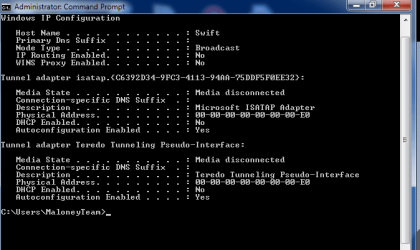
When run ipconfig/all however, I don't see an entry for an ETHERNET ADAPTOR, should I?
I'm down to re-installing windows - which I really don't want to do.

Yes, all the other devices on my home network, (lap tops, iphones, and ipad see the network just fine - - - arrrrgh!:mad:
 

My Computer My Computer

Computer Manufacturer/Model Number
Home built
OS
Windows 7 home premium 64 bit
CPU
Intel Quad Core 2 [email protected] GHz
Motherboard
ASUS
Memory
4gig
Graphics Card(s)
AVI
Sound Card
Chipset
Monitor(s) Displays
Sync Master
Hard Drives
1-500g
1-500g
I would think that reinstalling Windows plus all the Windows updates and drivers would fix the problem unless there is a problem with the board.

Yes the Ethernet adaptor should be showing up in the ipconfig/all.
 

My Computer My Computer

Computer type
PC/Desktop
Computer Manufacturer/Model Number
Home built
OS
Windows 7 Ult, Windows 8.1 Pro,
CPU
Q9650-4.275GHz, E8600 4.5GHz, E6750-3.8GHz
Motherboard
Evga 780i FTW
Memory
G.Skill PC2 9600 1200Mhz 5 5 5 15 2T
Graphics Card(s)
GTX480
Sound Card
Asus Xonar D2
Monitor(s) Displays
HannsG
Screen Resolution
1680X1050
Hard Drives
GSkill Phoenix Pro 120GB SSD
PSU
ThermalTake Toughpower 1000Watt modular
Case
ThermalTake XaserV
Cooling
Xigmatek S1283
Keyboard
Logitech G15
Mouse
Logitech G9
Internet Speed
T1
Thanks, re-stalling windows is something I really want to avoid if possible. Can you tell me what steps I can take to get the ETHERNET ADAPTOR to show up in the ipconfig/all screen output? MY guess this may be the root of the problem.
 

My Computer My Computer

Computer Manufacturer/Model Number
Home built
OS
Windows 7 home premium 64 bit
CPU
Intel Quad Core 2 [email protected] GHz
Motherboard
ASUS
Memory
4gig
Graphics Card(s)
AVI
Sound Card
Chipset
Monitor(s) Displays
Sync Master
Hard Drives
1-500g
1-500g
Thanks, re-stalling windows is something I really want to avoid if possible. Can you tell me what steps I can take to get the ETHERNET ADAPTOR to show up in the ipconfig/all screen output? MY guess this may be the root of the problem.

In general you need to install the driver for the Ethernet adaptor.

I'd have to see a screen shot of the ipconfig/all to see what else is missing.
 

My Computer My Computer

Computer type
PC/Desktop
Computer Manufacturer/Model Number
Home built
OS
Windows 7 Ult, Windows 8.1 Pro,
CPU
Q9650-4.275GHz, E8600 4.5GHz, E6750-3.8GHz
Motherboard
Evga 780i FTW
Memory
G.Skill PC2 9600 1200Mhz 5 5 5 15 2T
Graphics Card(s)
GTX480
Sound Card
Asus Xonar D2
Monitor(s) Displays
HannsG
Screen Resolution
1680X1050
Hard Drives
GSkill Phoenix Pro 120GB SSD
PSU
ThermalTake Toughpower 1000Watt modular
Case
ThermalTake XaserV
Cooling
Xigmatek S1283
Keyboard
Logitech G15
Mouse
Logitech G9
Internet Speed
T1
I've taken a screen shot of the IPCONFIG/All and attached it. I also have re-installed the device driver for the ASUS gigbit adapter that my ethernet cable is currently connect to. I rebooted the machine - nothing. Still big red-X

I appreciate your help!
 

Attachments

  • IPCONFIG-ALL.png
    IPCONFIG-ALL.png
    11.7 KB · Views: 8

My Computer My Computer

Computer Manufacturer/Model Number
Home built
OS
Windows 7 home premium 64 bit
CPU
Intel Quad Core 2 [email protected] GHz
Motherboard
ASUS
Memory
4gig
Graphics Card(s)
AVI
Sound Card
Chipset
Monitor(s) Displays
Sync Master
Hard Drives
1-500g
1-500g
When you go into Network & Sharing, Then on the Left hand side it says adapter settings, Open that and make sure that they're not disabled.
 

My Computer My Computer

OS
Windows 7 Ultimate x64
There are two adapters in this window. The first is the one in the ChipSet and it says its "unplugged" with a red x
The second is the ASUA Realtek PCI adaptor and it says enabled.
 

My Computer My Computer

Computer Manufacturer/Model Number
Home built
OS
Windows 7 home premium 64 bit
CPU
Intel Quad Core 2 [email protected] GHz
Motherboard
ASUS
Memory
4gig
Graphics Card(s)
AVI
Sound Card
Chipset
Monitor(s) Displays
Sync Master
Hard Drives
1-500g
1-500g
Are you using the one that says unplugged?

If so i would suggest trying a different cable, or if you have a cable tester available then i would test it.
 

My Computer My Computer

OS
Windows 7 Ultimate x64
Excuse me parman, I appreciate the help but you are stepping on some toes here.

We usually don't just step into someone's else's thread when they are already receiving help.
 

My Computer My Computer

Computer type
PC/Desktop
Computer Manufacturer/Model Number
Home built
OS
Windows 7 Ult, Windows 8.1 Pro,
CPU
Q9650-4.275GHz, E8600 4.5GHz, E6750-3.8GHz
Motherboard
Evga 780i FTW
Memory
G.Skill PC2 9600 1200Mhz 5 5 5 15 2T
Graphics Card(s)
GTX480
Sound Card
Asus Xonar D2
Monitor(s) Displays
HannsG
Screen Resolution
1680X1050
Hard Drives
GSkill Phoenix Pro 120GB SSD
PSU
ThermalTake Toughpower 1000Watt modular
Case
ThermalTake XaserV
Cooling
Xigmatek S1283
Keyboard
Logitech G15
Mouse
Logitech G9
Internet Speed
T1
No - I'm using the one that's enabled. I tried a new cable yesterday but that didn't make any difference.
 

My Computer My Computer

Computer Manufacturer/Model Number
Home built
OS
Windows 7 home premium 64 bit
CPU
Intel Quad Core 2 [email protected] GHz
Motherboard
ASUS
Memory
4gig
Graphics Card(s)
AVI
Sound Card
Chipset
Monitor(s) Displays
Sync Master
Hard Drives
1-500g
1-500g
Just for fun, I re-attached the PCI nic card to the router via a new cable and - no dice. The status says its enabled but still no network action. I then plugged the same cable into the adapter on the motherboard - it's status instantly changed from UNPLUGGED to ENABLED - still no network connection however, BIG RED X
 

My Computer My Computer

Computer Manufacturer/Model Number
Home built
OS
Windows 7 home premium 64 bit
CPU
Intel Quad Core 2 [email protected] GHz
Motherboard
ASUS
Memory
4gig
Graphics Card(s)
AVI
Sound Card
Chipset
Monitor(s) Displays
Sync Master
Hard Drives
1-500g
1-500g
Using a different cable won't make the network adaptor show up in the ipconfig, as it stands the ipconfig on this machine is showing no network interfaces at all which is rather strange.

You might consider going to the Asus web site and try finding the chipset drivers and the Network drivers for your board. Windows update might also have something for you.
 

My Computer My Computer

Computer type
PC/Desktop
Computer Manufacturer/Model Number
Home built
OS
Windows 7 Ult, Windows 8.1 Pro,
CPU
Q9650-4.275GHz, E8600 4.5GHz, E6750-3.8GHz
Motherboard
Evga 780i FTW
Memory
G.Skill PC2 9600 1200Mhz 5 5 5 15 2T
Graphics Card(s)
GTX480
Sound Card
Asus Xonar D2
Monitor(s) Displays
HannsG
Screen Resolution
1680X1050
Hard Drives
GSkill Phoenix Pro 120GB SSD
PSU
ThermalTake Toughpower 1000Watt modular
Case
ThermalTake XaserV
Cooling
Xigmatek S1283
Keyboard
Logitech G15
Mouse
Logitech G9
Internet Speed
T1
I'm new to this forum - not sure of the protocols, etc.

That said, any idea how I can get the adaptor to show up in the IPCONFIG? CHEV65 - I think I lost my connection to you in this forum. I see your responses in my email though.
 

My Computer My Computer

Computer Manufacturer/Model Number
Home built
OS
Windows 7 home premium 64 bit
CPU
Intel Quad Core 2 [email protected] GHz
Motherboard
ASUS
Memory
4gig
Graphics Card(s)
AVI
Sound Card
Chipset
Monitor(s) Displays
Sync Master
Hard Drives
1-500g
1-500g
I'm new to this forum - not sure of the protocols, etc.

That said, any idea how I can get the adaptor to show up in the IPCONFIG? CHEV65 - I think I lost my connection to you in this forum. I see your responses in my email though.

In general, when the adaptors aren't showing up it means the driver for that adaptor is not installed correctly.

I'm not sure which model of Asus board you are running but you should go the Asus site and look up the drivers for your exact model board and install the latest versions.

However since your board worked before and now doesn't I'd say you have a virus infection that has corrupted your Operating system.

In other words, something is blocking your network interfaces completely so they aren't even showing up in the ipconfig at all. You can try running a virus scan and see if it finds problems.

Or you can use system restore to go back to a point in time before the problem occurred or if you have a system image handy now would be a good time to use it.

You might even try doing a start up repair from the Windows CD but you sometimes have to run the repair 3 times before it will fix everything. Reinstalling windows is another good option. :)
 

My Computer My Computer

Computer type
PC/Desktop
Computer Manufacturer/Model Number
Home built
OS
Windows 7 Ult, Windows 8.1 Pro,
CPU
Q9650-4.275GHz, E8600 4.5GHz, E6750-3.8GHz
Motherboard
Evga 780i FTW
Memory
G.Skill PC2 9600 1200Mhz 5 5 5 15 2T
Graphics Card(s)
GTX480
Sound Card
Asus Xonar D2
Monitor(s) Displays
HannsG
Screen Resolution
1680X1050
Hard Drives
GSkill Phoenix Pro 120GB SSD
PSU
ThermalTake Toughpower 1000Watt modular
Case
ThermalTake XaserV
Cooling
Xigmatek S1283
Keyboard
Logitech G15
Mouse
Logitech G9
Internet Speed
T1
Chev, I downloaded and installed all the updates to the drivers I could find.

REbooted many times, still no network. Still no indication of an Ethernet Controller/adaptor in the ipconfig/all screen. How else can I install a controller for this card?
 

My Computer My Computer

Computer Manufacturer/Model Number
Home built
OS
Windows 7 home premium 64 bit
CPU
Intel Quad Core 2 [email protected] GHz
Motherboard
ASUS
Memory
4gig
Graphics Card(s)
AVI
Sound Card
Chipset
Monitor(s) Displays
Sync Master
Hard Drives
1-500g
1-500g
Chev, I downloaded and installed all the updates to the drivers I could find.

REbooted many times, still no network. Still no indication of an Ethernet Controller/adaptor in the ipconfig/all screen. How else can I install a controller for this card?

You might try running the sfc/scannow command, let me know what it says.
 

My Computer My Computer

Computer type
PC/Desktop
Computer Manufacturer/Model Number
Home built
OS
Windows 7 Ult, Windows 8.1 Pro,
CPU
Q9650-4.275GHz, E8600 4.5GHz, E6750-3.8GHz
Motherboard
Evga 780i FTW
Memory
G.Skill PC2 9600 1200Mhz 5 5 5 15 2T
Graphics Card(s)
GTX480
Sound Card
Asus Xonar D2
Monitor(s) Displays
HannsG
Screen Resolution
1680X1050
Hard Drives
GSkill Phoenix Pro 120GB SSD
PSU
ThermalTake Toughpower 1000Watt modular
Case
ThermalTake XaserV
Cooling
Xigmatek S1283
Keyboard
Logitech G15
Mouse
Logitech G9
Internet Speed
T1
Back
Top