Loose Wifi adapter after latest update September 24, 2012

Cappy8106

New member
Local time
10:07 AM
Messages
6
I recieved a couple of windows updates yesterday and have been unable to connect to wifi ever since. I have tried system restore, and removing the network drivers and reinstalling them but no luck. This happened before and if I recall correctly I had to go into regedit and change something. I cannot find the post on the forum where that correction was a vailable? Anythought on what might be up here.
 

My Computer My Computer

At a glance

Windows 7 pro 64 bit system
OS
Windows 7 pro 64 bit system
Welcome to Seven Forums,

What type of Security Software are you using?

Can you please post an ipconfig/all output for review?
 

My Computer My Computer

At a glance

Win7 & Win8 64bitIntel i5
Computer Manufacturer/Model Number
Lenovo Desktop/Samsung Laptop
OS
Win7 & Win8 64bit
CPU
Intel i5
Internet Speed
Charter-20 Mbps
Antivirus
Avast
Browser
FF, IE9 and Chrome
Norton 2012 is the security software the ipconfig is Microsoft Windows [Version 6.1.7601]
Copyright (c) 2009 Microsoft Corporation. All rights reserved.
C:\Windows\system32>ipconfig
Windows IP Configuration

Ethernet adapter Local Area Connection:
Media State . . . . . . . . . . . : Media disconnected
Connection-specific DNS Suffix . :
Ethernet adapter Local Area Connection 2:
Media State . . . . . . . . . . . : Media disconnected
Connection-specific DNS Suffix . :
Tunnel adapter isatap.{87DD2F20-93A2-4596-817F-EC5B1CFC32AC}:
Media State . . . . . . . . . . . : Media disconnected
Connection-specific DNS Suffix . :
Tunnel adapter Teredo Tunneling Pseudo-Interface:
Media State . . . . . . . . . . . : Media disconnected
Connection-specific DNS Suffix . :
Tunnel adapter isatap.{80171973-C81B-449F-97D7-AB233F6D53E2}:
Media State . . . . . . . . . . . : Media disconnected
Connection-specific DNS Suffix . :
C:\Windows\system32>

No wifi showing in network sharing and is not even an option.
 

My Computer My Computer

At a glance

Windows 7 pro 64 bit system
OS
Windows 7 pro 64 bit system
Your LAN adapter is also showing disconnected, are both wired and wireless affected?
Ethernet adapter Local Area Connection:
Media State . . . . . . . . . . . : Media disconnected
Please try the following suggestions:

If it's just a wireless issue and you're using a laptop or Netbook, look for a physical wireless switch or button if it's ON or OFF.

Check your computer's Bios setting, navigate around and try to locate the integrated ethernet controller and make sure that ethernet controllers (also Wi-Fi) is/are enabled.
How to enter the BIOS or CMOS setup.

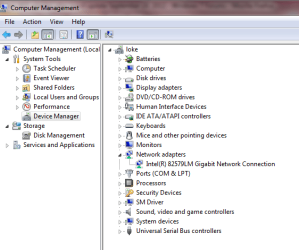
Click on Start and right click Computer, choose Manage, go to Device Manager, expand network adapters, do you see your Network adapters?

Also, Temporarily disable Norton for now and see if this helps. Enable it back after the debugging process.

Please repeat and post another ipconfig /all output on your next post. Your initial output was missing /all.
C:\Windows\system32>ipconfig
 

Attachments

  • device manager-network adapters.PNG
    device manager-network adapters.PNG
    21.4 KB · Views: 1
Last edited:

My Computer My Computer

At a glance

Win7 & Win8 64bitIntel i5
Computer Manufacturer/Model Number
Lenovo Desktop/Samsung Laptop
OS
Win7 & Win8 64bit
CPU
Intel i5
Internet Speed
Charter-20 Mbps
Antivirus
Avast
Browser
FF, IE9 and Chrome
So the wifi switch is on as it controls my bluetooth as well and that is working. In the BIOS it shows the ethernet controls as enabled. Yes the ntetwork adapters show up in the device manager. This has happened before and the reinstalling of the original network driver usually fixed it. I am traveling and do not have access to a lan connection but seeing as it actually shows up as an option in the network and sharing centre (wife does not) and has always worked in the past in this situation I have to assume this would be the case again.

The last time I did this was a couple of years ago and it finally took changing something in regedit to solve the problem.

Microsoft Windows [Version 6.1.7601]
Copyright (c) 2009 Microsoft Corporation. All rights reserved.
C:\Windows\system32>ipconfig/all
Windows IP Configuration
Host Name . . . . . . . . . . . . : BCCP104-PC
Primary Dns Suffix . . . . . . . :
Node Type . . . . . . . . . . . . : Hybrid
IP Routing Enabled. . . . . . . . : No
WINS Proxy Enabled. . . . . . . . : No
Ethernet adapter Local Area Connection:
Media State . . . . . . . . . . . : Media disconnected
Connection-specific DNS Suffix . :
Description . . . . . . . . . . . : Intel(R) 82567LM Gigabit Network Connecti
on
Physical Address. . . . . . . . . : 00-1B-D3-88-F4-FB
DHCP Enabled. . . . . . . . . . . : Yes
Autoconfiguration Enabled . . . . : Yes
Ethernet adapter Local Area Connection 2:
Media State . . . . . . . . . . . : Media disconnected
Connection-specific DNS Suffix . :
Description . . . . . . . . . . . : Bluetooth Personal Area Network
Physical Address. . . . . . . . . : 00-26-43-F7-CB-9E
DHCP Enabled. . . . . . . . . . . : Yes
Autoconfiguration Enabled . . . . : Yes
Tunnel adapter isatap.{87DD2F20-93A2-4596-817F-EC5B1CFC32AC}:
Media State . . . . . . . . . . . : Media disconnected
Connection-specific DNS Suffix . :
Description . . . . . . . . . . . : Microsoft ISATAP Adapter
Physical Address. . . . . . . . . : 00-00-00-00-00-00-00-E0
DHCP Enabled. . . . . . . . . . . : No
Autoconfiguration Enabled . . . . : Yes
Tunnel adapter Teredo Tunneling Pseudo-Interface:
Media State . . . . . . . . . . . : Media disconnected
Connection-specific DNS Suffix . :
Description . . . . . . . . . . . : Teredo Tunneling Pseudo-Interface
Physical Address. . . . . . . . . : 00-00-00-00-00-00-00-E0
DHCP Enabled. . . . . . . . . . . : No
Autoconfiguration Enabled . . . . : Yes
Tunnel adapter isatap.{80171973-C81B-449F-97D7-AB233F6D53E2}:
Media State . . . . . . . . . . . : Media disconnected
Connection-specific DNS Suffix . :
Description . . . . . . . . . . . : Microsoft ISATAP Adapter #2
Physical Address. . . . . . . . . : 00-00-00-00-00-00-00-E0
DHCP Enabled. . . . . . . . . . . : No
Autoconfiguration Enabled . . . . : Yes
C:\Windows\system32>
Connection-specific DNS Suffix . :
 

My Computer My Computer

At a glance

Windows 7 pro 64 bit system
OS
Windows 7 pro 64 bit system
Thanks for the output, it is correct this time. :D

I'd suggest for you to uninstall Norton for now by using this Removal Tool, this 'might' be the culprit. You may reinstall it back if you wish as soon as your issue has been resolved or replace Norton with other great free software such as MSE, AVG, Avast or Panda Cloud Anti Virus.
Norton 2012 is the security software
Please test your connection after and another update of your progress will be nice.
 

My Computer My Computer

At a glance

Win7 & Win8 64bitIntel i5
Computer Manufacturer/Model Number
Lenovo Desktop/Samsung Laptop
OS
Win7 & Win8 64bit
CPU
Intel i5
Internet Speed
Charter-20 Mbps
Antivirus
Avast
Browser
FF, IE9 and Chrome
So Norton is uninstalled and still no wifi. I have contacted Panasonic and they tell me it is windows issue.
 

My Computer My Computer

At a glance

Windows 7 pro 64 bit system
OS
Windows 7 pro 64 bit system

My Computer My Computer

At a glance

Win7 & Win8 64bitIntel i5
Computer Manufacturer/Model Number
Lenovo Desktop/Samsung Laptop
OS
Win7 & Win8 64bit
CPU
Intel i5
Internet Speed
Charter-20 Mbps
Antivirus
Avast
Browser
FF, IE9 and Chrome
So I ran system file checker and there were no integrity violations. Ran scan disk and that also had no issues arise. Still no wifi.

I reset the bios to default and that had no effect either.
 

My Computer My Computer

At a glance

Windows 7 pro 64 bit system
OS
Windows 7 pro 64 bit system
Next tasks:

Click on Start=> All Programs => Accessories and right click on Command Prompt, select "Run as Administrator" to open a command prompt.
Reset IPv4 TCP/IP stack to installation defaults. netsh int ipv4 reset reset.log press enter
Reset IPv6 TCP/IP stack to installation defaults. netsh int ipv6 reset reset.log press enter
Reset WINSOCK entries to installation defaults: netsh winsock reset catalog press enter
Restart the computer after.

From the troublesome computer verify that all your network services are Started from Control Panel=> Admin Tools=> Services:
• COM+ Event System (for WZC issues)
• Computer Browser
• DHCP Client
• DNS Client
• Network Connections
• Network Location Awareness
• Remote Procedure Call (RPC)
• Server
• TCP/IP Netbios helper
• WLAN AutoConfig ( Vista wireless configurations only)
• Workstation

Let's pause here for now and please report back.
 

My Computer My Computer

At a glance

Win7 & Win8 64bitIntel i5
Computer Manufacturer/Model Number
Lenovo Desktop/Samsung Laptop
OS
Win7 & Win8 64bit
CPU
Intel i5
Internet Speed
Charter-20 Mbps
Antivirus
Avast
Browser
FF, IE9 and Chrome
So reset ipv4 and it said everything is OK. Reset ipv6 and it said there was nothing that needed to changed. Reset catalog and that went through as well. Restarted the computer.


Checked All the items listed in adm tools / services and they all indicate started, some automatically and some manually.

Still no wifi.
 

My Computer My Computer

At a glance

Windows 7 pro 64 bit system
OS
Windows 7 pro 64 bit system
Have you tried disabling the bluetooth from Device Manager?
Are you using an integrated Wi-Fi?

Might be worth giving it a try to either restore a backup image or restore to the factory default setting or perhaps try a different Wi-Fi adapter.
 

My Computer My Computer

At a glance

Win7 & Win8 64bitIntel i5
Computer Manufacturer/Model Number
Lenovo Desktop/Samsung Laptop
OS
Win7 & Win8 64bit
CPU
Intel i5
Internet Speed
Charter-20 Mbps
Antivirus
Avast
Browser
FF, IE9 and Chrome
They wrote laptop for dummies for me. Here is my issue. I was getting my automatic updates .After words I tried to back online ,when I found out I could not. System said "LAN area connection driver "could not be found. Also my coprosser was missing .HELP!!!
I have a compuq pasioro. And dumby me tried to put in windows 7 home premeium upgrade. Stupid huh please help
 

My Computer My Computer

At a glance

windows7 home premium upgrade x64
OS
windows7 home premium upgrade x64
:huh:
They wrote laptop for dummies for me. Here is my issue. I was getting my automatic updates .After words I tried to back online ,when I found out I could not. System said "LAN area connection driver "could not be found. Also my coprosser was missing .HELP!!!
I have a compuq pasioro. And dumby me tried to put in windows 7 home premeium upgrade. Stupid huh please help
:sick:
 

My Computer My Computer

At a glance

windows7 home premium upgrade x64
OS
windows7 home premium upgrade x64
Back
Top