Laptop tends to hang on Win 7 logo on boot.

Raynian

New member
Member
VIP
Local time
7:00 PM
Messages
126
I realised my laptop tends to hang at the Win 7 logo at bootup occasionally.

I will have to forceshut it and restart, then it will boot up fine.

Any way to determine the issue ? =/
 

My Computer My Computer

At a glance

Microsoft Windows 7 Professional 64-bitIntel(R) Core(TM) i7-3520M CPU @ 2.90GHz12.00 GB(1) Intel(R) HD Graphics 4000 (2) NVIDIA GeFo...
Computer type
Laptop
Computer Manufacturer/Model Number
Sony Vaio S 13 A
OS
Microsoft Windows 7 Professional 64-bit
CPU
Intel(R) Core(TM) i7-3520M CPU @ 2.90GHz
Memory
12.00 GB
Graphics Card(s)
(1) Intel(R) HD Graphics 4000 (2) NVIDIA GeForce GT 640M L
Screen Resolution
1600x900
Hard Drives
ATA SAMSUNG SSD 830 SCSI Disk Device
Mouse
Logitech / Microsoft touch Mouse
Other Info
Weight: 1.67 Kg
There are a few things you can start looking at. The system tools Check Disk and System File Checker as well as looking over the msconfig's Start items tab and any unnecessary 3rd party background services depending on what programs you have on would be a start.

Disk errors would be fixed(errors on drive not failing drive) with the Disk Check tool, chkdsk /r at command prompt or click the Check now button when right clicking on the hard drive's icon in WE and opening the Tools tab to schedule that for the next startup. Note especially after any number of hard boots or forced shutdowns to deal with the likely errors then created on top of the original problem.

The reduction of startup items in the msconfig is also one way to isolate a program where something doesn't want to load up normally on each startup. If a program is the source by narrowing what loads up along with Windows will eventually isolate that program when suddenly noticing everything is back to normal.

The System File Checker also can play a role and why that is included, sfc /scannow at the Start>Run command line to get that going, since it will verfy all main files are present and replace any found corrupt or missing. When a system file gets a little shaky and flaky it's time to...

The last other item getting back to startups of course would be device and software drivers as a possible culprit to include there. A driver sticking too often the graphics drivers as the usual villian will tend to see Windows hang up when starting and first going to load drivers into memory and one tries to load sideways where it doesn't belong like a system reserved memory address can eventually lead to those dreaded BSOD "Blues"!:eek::(
 

My Computers My Computers

  • At a glance

    W7 Ultimate x64/W10 Pro x64/W11 Pro Triple Bo...AMD Phenom II X4 975 Deneb 3.6ghz - 965 2nd r...Kingston Hyper X DDR3 1600 1.5v 16gb - Hyper ...MSI HD Radeon 5750 1gb - MSI HD Radeon 6450 o...
    Computer type
    PC/Desktop
    Computer Manufacturer/Model Number
    Custom builds = 2
    OS
    W7 Ultimate x64/W10 Pro x64/W11 Pro Triple Boot - Main PC W7 Remote PC Micro ATX W7 Pro x64/W11 Pro
    CPU
    AMD Phenom II X4 975 Deneb 3.6ghz - 965 2nd remote pc
    Motherboard
    Gigabyte GA-790XTA-UD4-Gigabyte GA-880GM-D2H remote pc
    Memory
    Kingston Hyper X DDR3 1600 1.5v 16gb - Hyper X Fury 8gb 2nd
    Graphics Card(s)
    MSI HD Radeon 5750 1gb - MSI HD Radeon 6450 on mini tower
    Sound Card
    Creative Labs X-Fi Xtreme Audio P - Realtek onooard 2nd case
    Monitor(s) Displays
    ASUS VW199T-P 19" HP 2082a Main-HP 2082a 20" remote pc
    Screen Resolution
    Asus 1440x900 - HP 1600x900
    Hard Drives
    WD Black 1TB HD per OS W7, W10, and pending W11 presently on 500gb OS Drive - Pending Triple 1TB HDs for Spanned Storage/backup volume
    Single 2TB external USB enclosure, single 1TB System 7 Host/Boot drive, Pending 8TB external HD for system image b
    PSU
    Corsair 750TX - primary / Corsair CX600 - second
    Case
    Antec 900-2 - SSD compatible / NZXT Vulcan mini tower
    Cooling
    Zalman CNPS9900A
    Keyboard
    AZIO L70 Backlit Letters Gaming - ONN Cordless/USB
    Mouse
    MSI DS200 Programmable, Logitech Cordless
    Internet Speed
    30mbps upgrade - primary hard wired - mini tower usb WiFi
    Antivirus
    GFI VIPRE Internet Security 2014 on W7 2016 beta on W10,
    Browser
    Cyberfox, WaterFox 64bit FF variants, FireFox x64, Pale Moon
    Other Info
    Accomdata fan cooled usb 2.0 PIDE/Sata II, III external enclosure.
    Sambient usb/eSata PATA/Sata II, III external enclosure.
  • At a glance

    W7 Pro x64/W11 ProAMD Deneb 3.6ghz - 965Kingston Hyper X Fury 8gbMSI HD Radeon 6450 DVI Output
    Computer type
    PC/Desktop
    System Manufacturer/Model Number
    CUSTOM ASSEMBLY
    OS
    W7 Pro x64/W11 Pro
    CPU
    AMD Deneb 3.6ghz - 965
    Motherboard
    Gigabyte GA-880GM-D2H remote pc
    Memory
    Kingston Hyper X Fury 8gb
    Graphics Card(s)
    MSI HD Radeon 6450 DVI Output
    Sound Card
    Realtek onooard Creative or Other separate PENDING
    Monitor(s) Displays
    VIZIO 32" LCD TV Separate LCD Pending
    Screen Resolution
    1600x1080
    Hard Drives
    WD 500GB OS Host/Boot WD Green 1TB Storage/Backup
    PSU
    Corsair 600W - THERMALTAKE 600W spare case
    Case
    NZXT Vulcan mini tower
    Cooling
    Twin 120mm Top Fans - 240mm Side Cover
    Keyboard
    ONN Cordless/USB Logitech Cordless
    Mouse
    ONN USB/Cordless - Logitech Cordless
    Internet Speed
    DSL 5G
    Browser
    MS Edge, FireFox, WaterFox x64, FireFox Nightly
    Other Info
    OS Testing-Remote Access to Main TeamViewer
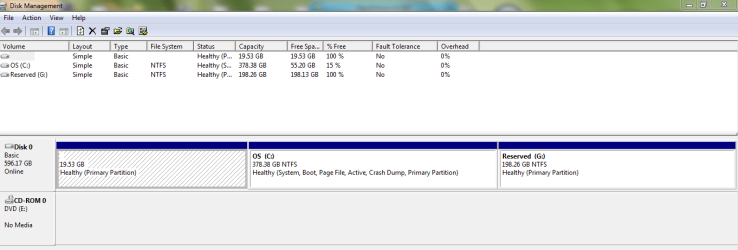
Please post back a screenshot of your maximized Disk Management drive map and listings:

1. Type Disk Management in Start Search box.
2. Open Disk Mgmt. window and maximize it.
3. Type Snipping Tool in Start Search box.
4. Open Snipping Tool, choose Rectangular Snip, click New, draw a box around full drive map and all listings.
5, Save Snip, attach using paper clip in Reply Box.

Tell us what is on each partition.
 
Please post back a screenshot of your maximized Disk Management drive map and listings:

1. Type Disk Management in Start Search box.
2. Open Disk Mgmt. window and maximize it.
3. Type Snipping Tool in Start Search box.
4. Open Snipping Tool, choose Rectangular Snip, click New, draw a box around full drive map and all listings.
5, Save Snip, attach using paper clip in Reply Box.

Tell us what is on each partition.

DM1.PNG

The 19.53 GB is the System Recovery partition.

C Drive consists of the OS and all my files.

G Drive is just an unused partition.

There are a few things you can start looking at. The system tools Check Disk and System File Checker as well as looking over the msconfig's Start items tab and any unnecessary 3rd party background services depending on what programs you have on would be a start.

Disk errors would be fixed(errors on drive not failing drive) with the Disk Check tool, chkdsk /r at command prompt or click the Check now button when right clicking on the hard drive's icon in WE and opening the Tools tab to schedule that for the next startup. Note especially after any number of hard boots or forced shutdowns to deal with the likely errors then created on top of the original problem.

The reduction of startup items in the msconfig is also one way to isolate a program where something doesn't want to load up normally on each startup. If a program is the source by narrowing what loads up along with Windows will eventually isolate that program when suddenly noticing everything is back to normal.

The System File Checker also can play a role and why that is included, sfc /scannow at the Start>Run command line to get that going, since it will verfy all main files are present and replace any found corrupt or missing. When a system file gets a little shaky and flaky it's time to...

The last other item getting back to startups of course would be device and software drivers as a possible culprit to include there. A driver sticking too often the graphics drivers as the usual villian will tend to see Windows hang up when starting and first going to load drivers into memory and one tries to load sideways where it doesn't belong like a system reserved memory address can eventually lead to those dreaded BSOD "Blues"!:eek::(

Running SFC now, see if it picks up anything ~
 

My Computer My Computer

At a glance

Microsoft Windows 7 Professional 64-bitIntel(R) Core(TM) i7-3520M CPU @ 2.90GHz12.00 GB(1) Intel(R) HD Graphics 4000 (2) NVIDIA GeFo...
Computer type
Laptop
Computer Manufacturer/Model Number
Sony Vaio S 13 A
OS
Microsoft Windows 7 Professional 64-bit
CPU
Intel(R) Core(TM) i7-3520M CPU @ 2.90GHz
Memory
12.00 GB
Graphics Card(s)
(1) Intel(R) HD Graphics 4000 (2) NVIDIA GeForce GT 640M L
Screen Resolution
1600x900
Hard Drives
ATA SAMSUNG SSD 830 SCSI Disk Device
Mouse
Logitech / Microsoft touch Mouse
Other Info
Weight: 1.67 Kg
Looks OK. I'd boot into System Recovery Options to run a few Startup Repairs to see if it sorts out your boot issue.

Hanging at start animation is normally caused by drivers which are trying to load. Make sure you have the latest drivers in Device Manager, including any cued in Optional Windows Updates after enabling Automatically get recommended drivers and updates for your hardware.

Next establish a Clean Boot and work through the other steps to read the logs and use System Resources given in Troubleshooting Steps for Windows 7
 
The other alternative method to get past a hang up when starting up would be booting up in Safe mode to run the msconfig utility. You would go into the Startup tab to look over all unnecessary items to see those unchecked as well as a review of the Services tab once you check off the "hide all microsoft services" box before entering to only show 3rd party services which can be started up manually.

By reducing the number of startup even disabling all startup items only re-enabling one at time the time consuming process will usually reveal a program like the ATI Mobiliy Catalyst or for your laptop model the NVidia GeForce GT 425M driver set or other offender preventing a normal startup. The Startup repair tool can also be a large help at times but for main system files not for 3rd party items which may be corrupted.

The first thing to come to mind however would be nuking the graphics driver set right off once you have a fresh download of the latest update onhand to reinstall fresh. That will either confirm or rule out video drivers as the cause.

Often a driver gets a little tainted and starts loading sideways on you and why you end up seeing Windows start hanging when going to start up. The logo screen is right about the time the initial load of all device drivers into memory takes place immediately following the post tests and the hardware detection process begins.

The safe mode method however while taking some time to go through things is generally the sure fire method if it turns out to be something other then any drivers however. A program install going bad or some type of malware not being ruled out is another factor. You would notice a virus like an I-Worm however since you would find the desktop unusable over simply not arriving at the desktop.
 

My Computers My Computers

  • At a glance

    W7 Ultimate x64/W10 Pro x64/W11 Pro Triple Bo...AMD Phenom II X4 975 Deneb 3.6ghz - 965 2nd r...Kingston Hyper X DDR3 1600 1.5v 16gb - Hyper ...MSI HD Radeon 5750 1gb - MSI HD Radeon 6450 o...
    Computer type
    PC/Desktop
    Computer Manufacturer/Model Number
    Custom builds = 2
    OS
    W7 Ultimate x64/W10 Pro x64/W11 Pro Triple Boot - Main PC W7 Remote PC Micro ATX W7 Pro x64/W11 Pro
    CPU
    AMD Phenom II X4 975 Deneb 3.6ghz - 965 2nd remote pc
    Motherboard
    Gigabyte GA-790XTA-UD4-Gigabyte GA-880GM-D2H remote pc
    Memory
    Kingston Hyper X DDR3 1600 1.5v 16gb - Hyper X Fury 8gb 2nd
    Graphics Card(s)
    MSI HD Radeon 5750 1gb - MSI HD Radeon 6450 on mini tower
    Sound Card
    Creative Labs X-Fi Xtreme Audio P - Realtek onooard 2nd case
    Monitor(s) Displays
    ASUS VW199T-P 19" HP 2082a Main-HP 2082a 20" remote pc
    Screen Resolution
    Asus 1440x900 - HP 1600x900
    Hard Drives
    WD Black 1TB HD per OS W7, W10, and pending W11 presently on 500gb OS Drive - Pending Triple 1TB HDs for Spanned Storage/backup volume
    Single 2TB external USB enclosure, single 1TB System 7 Host/Boot drive, Pending 8TB external HD for system image b
    PSU
    Corsair 750TX - primary / Corsair CX600 - second
    Case
    Antec 900-2 - SSD compatible / NZXT Vulcan mini tower
    Cooling
    Zalman CNPS9900A
    Keyboard
    AZIO L70 Backlit Letters Gaming - ONN Cordless/USB
    Mouse
    MSI DS200 Programmable, Logitech Cordless
    Internet Speed
    30mbps upgrade - primary hard wired - mini tower usb WiFi
    Antivirus
    GFI VIPRE Internet Security 2014 on W7 2016 beta on W10,
    Browser
    Cyberfox, WaterFox 64bit FF variants, FireFox x64, Pale Moon
    Other Info
    Accomdata fan cooled usb 2.0 PIDE/Sata II, III external enclosure.
    Sambient usb/eSata PATA/Sata II, III external enclosure.
  • At a glance

    W7 Pro x64/W11 ProAMD Deneb 3.6ghz - 965Kingston Hyper X Fury 8gbMSI HD Radeon 6450 DVI Output
    Computer type
    PC/Desktop
    System Manufacturer/Model Number
    CUSTOM ASSEMBLY
    OS
    W7 Pro x64/W11 Pro
    CPU
    AMD Deneb 3.6ghz - 965
    Motherboard
    Gigabyte GA-880GM-D2H remote pc
    Memory
    Kingston Hyper X Fury 8gb
    Graphics Card(s)
    MSI HD Radeon 6450 DVI Output
    Sound Card
    Realtek onooard Creative or Other separate PENDING
    Monitor(s) Displays
    VIZIO 32" LCD TV Separate LCD Pending
    Screen Resolution
    1600x1080
    Hard Drives
    WD 500GB OS Host/Boot WD Green 1TB Storage/Backup
    PSU
    Corsair 600W - THERMALTAKE 600W spare case
    Case
    NZXT Vulcan mini tower
    Cooling
    Twin 120mm Top Fans - 240mm Side Cover
    Keyboard
    ONN Cordless/USB Logitech Cordless
    Mouse
    ONN USB/Cordless - Logitech Cordless
    Internet Speed
    DSL 5G
    Browser
    MS Edge, FireFox, WaterFox x64, FireFox Nightly
    Other Info
    OS Testing-Remote Access to Main TeamViewer
Back
Top