Solved Hardware Acceleration - Good or Bad?

  • Thread starter Thread starter The Blessed One
  • Start date Start date
T

The Blessed One

Guest
hi,

I tried to test Windows 7 64-bit on VirtualBox 3.0.4 but Vbox told me that I need to turn hardware acceleration on in the BIOS.. I currently have a Dell M1530 Win7 32-bit.

1. Why isn't this on in the first place?
2. What are the pros and cons of having it enabled?
3. Will it make by laptop hotter/slower?

Thanks, :)

Andriy.
 
hi,

I tried to test Windows 7 64-bit on VirtualBox 3.0.4 but Vbox told me that I need to turn hardware acceleration on in the BIOS.. I currently have a Dell M1530 Win7 32-bit.

1. Why isn't this on in the first place?
2. What are the pros and cons of having it enabled?
3. Will it make by laptop hotter/slower?

Thanks, :)

Andriy.

That message is nonsense. the is no such option in the bios.

I don't know Vbox, but there must be an option somewhere in it where you can check a box to enable hardware acc.

Greetz
 

My Computer

OS
Win7 Build 7600 x86
CPU
Pentium II 300MHz
Motherboard
Asus
Memory
32mb EDO RAM
Graphics Card(s)
Diamond Viper
Sound Card
Soundblaster 16
Monitor(s) Displays
14" AOC CRT 16K color
Screen Resolution
800x600
Hard Drives
300mb Quantum fireball
PSU
110 Watts
Cooling
Passive
Keyboard
Trust Ergonomic
Mouse
Generic
Internet Speed
256K u 128K d

My Computer

OS
Win7 Build 7600 x86
CPU
Pentium II 300MHz
Motherboard
Asus
Memory
32mb EDO RAM
Graphics Card(s)
Diamond Viper
Sound Card
Soundblaster 16
Monitor(s) Displays
14" AOC CRT 16K color
Screen Resolution
800x600
Hard Drives
300mb Quantum fireball
PSU
110 Watts
Cooling
Passive
Keyboard
Trust Ergonomic
Mouse
Generic
Internet Speed
256K u 128K d
That message is nonsense. the is no such option in the bios...
Translate it this way, Blessed One. In the VBox panel, select the the VM. The "Settings" group is a virtual BIOS.

"it" is not "on" in the first place because you build the VM.

The pros are, it will work properly. The cons are, well...

A VM will make your laptop hotter and slower, but well within design specifications.

I have installed a 64-bit VBox VM in 32-bit Win7. It was a faulty configuration choice. You can do it, no problem. You will, however, prove nothing about the capability/functionality of Win7x64.

Of course, I could be wrong.
 
First you have to be sure what OS you are running 64 or 32 bit.

and fill in your specs, otherwise it is very hard to help you.

Greetz

I did say what OS I was running in the OP, it says there Win7 32-bit!

My spec is 2.2 Core2Duo, 3GB RAM, 320 HDD, Geforce 8600m GT 256mb DDR3. :D
 
Translate it this way, Blessed One. In the VBox panel, select the the VM. The "Settings" group is a virtual BIOS.

"it" is not "on" in the first place because you build the VM.

The pros are, it will work properly. The cons are, well...

A VM will make your laptop hotter and slower, but well within design specifications.

I have installed a 64-bit VBox VM in 32-bit Win7. It was a faulty configuration choice. You can do it, no problem. You will, however, prove nothing about the capability/functionality of Win7x64.

Of course, I could be wrong.

It is already on! :(

Check out the screenshot below:

http://i31.tinypic.com/9b8yol.jpg
 
@Antman

Remove the checkmarks? I thought your supposed to turn hardware acc. on?

Maybe I've missed something...:confused:
 
We are attempting to use the tools at our disposal in the manner intended. Please fill out your system specs to facilitate full service professional service at no charge.
 

Attachments

  • Capture.PNG
    Capture.PNG
    9.9 KB · Views: 43
I did say what OS I was running in the OP, it says there Win7 32-bit!

My spec is 2.2 Core2Duo, 3GB RAM, 320 HDD, Geforce 8600m GT 256mb DDR3. :D

I refer you to my friend Antman in the post just above yours, who has the proper knowledge of vbox.

good luck
 

My Computer

OS
Win7 Build 7600 x86
CPU
Pentium II 300MHz
Motherboard
Asus
Memory
32mb EDO RAM
Graphics Card(s)
Diamond Viper
Sound Card
Soundblaster 16
Monitor(s) Displays
14" AOC CRT 16K color
Screen Resolution
800x600
Hard Drives
300mb Quantum fireball
PSU
110 Watts
Cooling
Passive
Keyboard
Trust Ergonomic
Mouse
Generic
Internet Speed
256K u 128K d
the error message mentions your 'host' computer. i know very little about virtual machines, but is the 'host' the real machine?

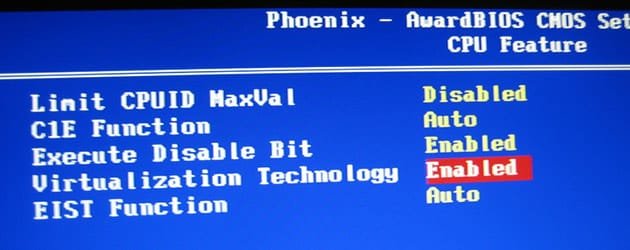
your bios is different to mine, but do you have a similar entry to this? mine was in 'cpu feature(s)'

and please use attachments for your pictures, thank you
 

Attachments

  • bios.jpg
    bios.jpg
    25.2 KB · Views: 15

My Computer

Computer Manufacturer/Model Number
mickey megabyte 1234
OS
ultimate 64 sp1
CPU
i5 2500K [email protected]
Motherboard
MSI P67A-GD53
Memory
8 gigs GSkill Ripjaws 1600
Graphics Card(s)
amd hd6950
Sound Card
creative x-fi gamer
Monitor(s) Displays
samsung 24"
Screen Resolution
1920x1080
Hard Drives
ocz vertex 2e 60 gig, samsung f3 1tb, buffalo 2tb ext
PSU
antec 550
Case
antec three hundred
Cooling
i'm a cooling fan
Keyboard
saitek eclipse ii
Mouse
logitech g3
Internet Speed
about 4 Mbps
Other Info
i love win7
your bios is different to mine, but do you have a similar entry to this? mine was in 'cpu feature(s)'

I haven't tried to mess with the BIOS yet, in my OP I wanted to know why hardware acceleration isn't turned on by default? Does it cause potential problems or something? Once I know the answer to this question, I will have the confidence to adjust the BIOS. :D
 
You do not have Vanderpool technology / amd-v enabled in your laptop bios. The removal of the checkboxes allows the VM to work in that config.

To use the TOP CHECK BOX ONLY, enable vanderpool in your bios. Tell me your Dell service tag and "we" will tell you how, if it is possible.
 
We are attempting to use the tools at our disposal in the manner intended. Please fill out your system specs to facilitate full service professional service at no charge.

Lol sorry mate, Done. And I appreciate the "professional service". :D:D
 
@ Antman

My service tag: deleted.
 
Last edited:
video settings has a hardware acceleration check box.

The System settings also has one for Virtualization.
 

My Computer

Computer Manufacturer/Model Number
Asus CG5290
OS
Windows 7 x64 RTM Retail
CPU
Intel i7-920 Quad @ 4.0Ghz. Stepping D0.
Motherboard
Asus Rampage II GENE
Memory
9GB DDR3 @ 1600 Mhz. 9-8-8-24-CR1
Graphics Card(s)
XFX ATI HD5870 @ 900/1300
Sound Card
SupremeFX X/Fi HD Audio onboard
Monitor(s) Displays
Samsung 24" WS
Screen Resolution
1920x1200
Hard Drives
OCZ AGILITY-EX (64 GB, SATA-II, SSD SLC NAND Flash)
Hitachi HDT721010SLA360 (1 TB, 7200 RPM, SATA-II)
Cavalry (500 GB, 7200 RPM, eSATA-II)
PSU
Antec TruePower 650 Watts
Case
Ugly but functional.
Cooling
Oversized heat sink, lots and lots of fans.
Keyboard
MS
Mouse
MS wireless explorer
Internet Speed
101/15 - Optimum Online Ultra
@ Antman

My service tag: FQFHJ3J
Dell is less than helpful. Bear with me.

I am trying to determine if your laptop support this feature. If it does not, remove the two check marks referenced earlier.

Please hold...

the only thing I can find about your BIOS so far from dell...
  • System configuration

  • Boot order

  • Boot (start-up) configuration

  • Basic device configuration settings

  • System security and hard drive password settings

note.gif
NOTE: Unless you are an expert computer user or are directed to do so by Dell technical support, do not change the system setup settings. Certain changes might make your computer work incorrectly.
 
Back
Top