Solved must reset router everytime i start my computer.

Fawad

New member
Local time
2:51 AM
Messages
23
I got new samsung NP350VC5 laptop and i have TPLINK 740 N router but every time i start my computer i have to reset router to connect to the internet i have an Ipad and on other laptop but i have this problem only with my samsung laptop please if sombody knows the answer hel me.
Thank you.
 

My Computer My Computer

OS
windows 7 home premium 64bit
What happens when you boot up your laptop and try to connect to the router?
 

My Computer My Computer

OS
Windows 7 Ultimate x64 SP1
CPU
Intel Core i7-2600
Motherboard
Gigabyte GA-P67A-UD3P-B3
Memory
12 GB Patriot Extreme DDR3-1333
Graphics Card(s)
Nvidia GTX 470
Monitor(s) Displays
Dell UltraSharp 2209WA
Hard Drives
OCZ Agility3 240 GB, WD5001AALS, WD7501AALS
PSU
OCZ ModStream 700W
Case
CoolerMaster HAF 912 Advanced
Cooling
CoolerMaster Hyper 212 Plus
nothing just internet not working when i try to troubleshoot i get this massage (investigate router or access point issues ) and after i reset router internet works .
 

My Computer My Computer

OS
windows 7 home premium 64bit
What happens when you boot up your laptop and try to connect to the router?

nothing just internet not working when i try to troubleshoot i get this massage (investigate router or access point issues ) and after i reset router internet works .
 

My Computer My Computer

OS
windows 7 home premium 64bit
When you boot up, is Windows teling you that you are connected to the router? If so, are you getting a network address from the router? I'm trying to narrow down the problem here, but you haven't given many details to work with.
 

My Computer My Computer

OS
Windows 7 Ultimate x64 SP1
CPU
Intel Core i7-2600
Motherboard
Gigabyte GA-P67A-UD3P-B3
Memory
12 GB Patriot Extreme DDR3-1333
Graphics Card(s)
Nvidia GTX 470
Monitor(s) Displays
Dell UltraSharp 2209WA
Hard Drives
OCZ Agility3 240 GB, WD5001AALS, WD7501AALS
PSU
OCZ ModStream 700W
Case
CoolerMaster HAF 912 Advanced
Cooling
CoolerMaster Hyper 212 Plus
When you boot up, is Windows teling you that you are connected to the router? If so, are you getting a network address from the router? I'm trying to narrow down the problem here, but you haven't given many details to work with.

yes i am getting network from router and yes when windows starts i connected to the router but internet does not works until i turn off and turn back on the router then internet automatically works.:o
 

My Computer My Computer

OS
windows 7 home premium 64bit
See if flushing the DNS cache and restoring MS's Hosts file helps...
Copy and paste these lines in Note pad.

@Echo on
pushd\windows\system32\drivers\etc
attrib -h -s -r hosts
echo 127.0.0.1 localhost>HOSTS
attrib +r +h +s hosts
popd
ipconfig /release
ipconfig /renew
ipconfig /flushdns
netsh winsock reset all
netsh int ip reset all
shutdown -r -t 1
del %0


Save as flush.bat to your desktop.
Double click on the flush.bat file to run it.Vista and Windows 7... right click the .bat file and choose to run as Administrator. Your computer will reboot itself.
 

My Computer My Computer

Computer type
PC/Desktop
Computer Manufacturer/Model Number
Bruce ... somewhere in his 40's
OS
Windows 7 Ultimate 32bit SP1
CPU
Intel(R) Core(TM)2 Quad CPU @ 2.40GHz, 2400 MHz
Motherboard
INTEL/D975XBX2
Memory
4 GB
Graphics Card(s)
ATI Radeon HD 2600 Pro
Monitor(s) Displays
Samsung SyncMaster 914v
Screen Resolution
1280 x 1024
Hard Drives
2/500GB each ... ST3500630AS ATA Device.
One is not connected
PSU
Rocketfish 700 W
Case
G.Skill Gigabyte Chassis
Keyboard
Standard PS/2 Keyboard
Mouse
Microsoft PS/2 Mouse
Internet Speed
DSL
Antivirus
Avira Internet Security
Browser
IE 11
Other Info
ATI HDMI Audio
See if flushing the DNS cache and restoring MS's Hosts file helps...
Copy and paste these lines in Note pad.

@Echo on
pushd\windows\system32\drivers\etc
attrib -h -s -r hosts
echo 127.0.0.1 localhost>HOSTS
attrib +r +h +s hosts
popd
ipconfig /release
ipconfig /renew
ipconfig /flushdns
netsh winsock reset all
netsh int ip reset all
shutdown -r -t 1
del %0


Save as flush.bat to your desktop.
Double click on the flush.bat file to run it.Vista and Windows 7... right click the .bat file and choose to run as Administrator. Your computer will reboot itself.
sorry i did this but still i have this problem.
 

My Computer My Computer

OS
windows 7 home premium 64bit
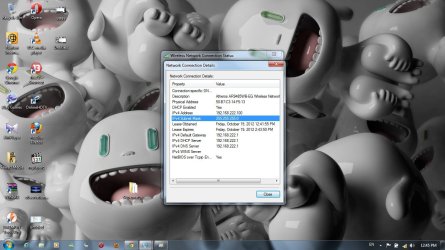
Untitled.jpg
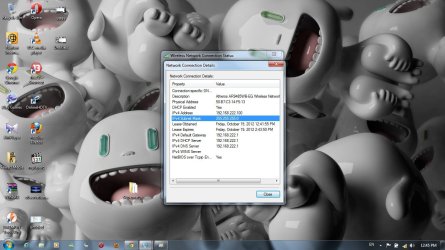
Can you post an ipconfig /all output when you can not connect to the network?

How to run IPconfig /all


Also run through this post to see if you can fix your problem

must reset router every time i start my computer.
 

My Computer My Computer

OS
windows 7 home premium 64bit
When you boot computer (so you're having problems) do the following in command prompt:
Code:
route  print>%userprofile%\route.txt
ipconfig>%userprofile%\ipconfig.txt

Post route.txt and ipconfig.txt. Both are in folder %userprofile% so c:\users\<yourname>

you can delete both files later
 

My Computer My Computer

Computer type
Laptop
Computer Manufacturer/Model Number
ACER ASPIRE 5742G
OS
Microsoft Windows 7 Home Premium 64-bits 7601 Multiprocessor Free Service Pack 1
CPU
Intel(R) Core(TM) i3 CPU M 370 @ 2.40GHz
Motherboard
Acer Aspire 5742G
Memory
4,00 GB
Graphics Card(s)
ATI Mobility Radeon HD 5400 Series
Sound Card
(1) AMD High Definition Audio Device (2) Realtek High Defi
Screen Resolution
1366 x 768 x 32 bits (4294967296 colors) @ 60 Hz
Hard Drives
WDC WD5000BEVT-22ZAT0
To post a picture go to advanced. Then on the top of the text box locate the paperclip, click the paperclip, then choose the file and upload.
 

My Computer My Computer

OS
Windows 7 Ultimate x64
When you boot computer (so you're having problems) do the following in command prompt:
Code:
route  print>%userprofile%\route.txt
ipconfig>%userprofile%\ipconfig.txt

Post route.txt and ipconfig.txt. Both are in folder %userprofile% so c:\users\<yourname>

you can delete both files later
bro i don't know what exactly this problem is. i am trying everything but nothing is useful
and i did this method also but nothing has changed.
i still have this problem.
 

My Computer My Computer

OS
windows 7 home premium 64bit
ip.jpg her it's i took snap shot when internet does not work.
 

My Computer My Computer

OS
windows 7 home premium 64bit
When you boot computer (so you're having problems) do the following in command prompt:
Code:
route  print>%userprofile%\route.txt
ipconfig>%userprofile%\ipconfig.txt

Post route.txt and ipconfig.txt. Both are in folder %userprofile% so c:\users\<yourname>

you can delete both files later
bro i don't know what exactly this problem is. i am trying everything but nothing is useful
and i did this method also but nothing has changed.
i still have this problem.
post both files!
 

My Computer My Computer

Computer type
Laptop
Computer Manufacturer/Model Number
ACER ASPIRE 5742G
OS
Microsoft Windows 7 Home Premium 64-bits 7601 Multiprocessor Free Service Pack 1
CPU
Intel(R) Core(TM) i3 CPU M 370 @ 2.40GHz
Motherboard
Acer Aspire 5742G
Memory
4,00 GB
Graphics Card(s)
ATI Mobility Radeon HD 5400 Series
Sound Card
(1) AMD High Definition Audio Device (2) Realtek High Defi
Screen Resolution
1366 x 768 x 32 bits (4294967296 colors) @ 60 Hz
Hard Drives
WDC WD5000BEVT-22ZAT0
To post a picture go to advanced. Then on the top of the text box locate the paperclip, click the paperclip, then choose the file and upload.

i uploaded the image
 

My Computer My Computer

OS
windows 7 home premium 64bit
Open an elevated command prompt

type 2 separate commands without quotes

"ipconfig /release"
"ipconfig /renew"

Let me know if that brings your internet back. I would also look at the manufactures website for to make sure you have the latest drivers.
 

My Computer My Computer

OS
Windows 7 Ultimate x64
Open an elevated command prompt

type 2 separate commands without quotes

"ipconfig /release"
"ipconfig /renew"

Let me know if that brings your internet back. I would also look at the manufactures website for to make sure you have the latest drivers.

i did this before and didn't fix it like i wrote i tried everything but i don't know what exactly this problem is.
 

My Computer My Computer

OS
windows 7 home premium 64bit
Back
Top