Unable To Sort In Dialog Box

siouxdax

Lovable Rogue
Member
Local time
4:18 PM
Messages
63
Location
Tulsa, OK, USA
Hello all:
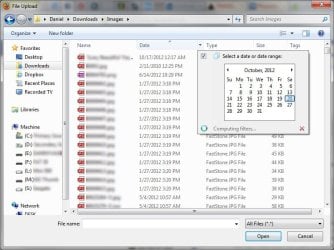
Here's the issue: When I have a dialog box open (to upload a pic to Facebook, for example) I normally sort the folder by date, using the column header, that way I can immediately find pics I just saved to my hard drive. Now, suddenly, it's not sorting at all when I press the column header. Also, something I've never noticed before, is that there is a little down arrow at the right-hand end of the column, with a date selection pop-up (shown in the attached screenshot). Even that feature isn't working. I don't know if the pop-up is new, or if I just have never noticed it before.

At first I thought that maybe it wasn't sorting the column because the folder I usually go to has over 6000 files, but I tested it in a small folder and had the same result. Also, I did do a Windows update a couple of days prior to noticing this issue, but I hand-pick what updates I install, and I only installed security-related updates.

So, does anyone else notices this issue? How can I get back the ability to sort by clicking on the column header?

Please see attached screen cap of the dialog box.

Also, my system specs in my profile have (finally) been updated.

Thank you for your patience. I know I can be a bit wordy at times. :)
 

Attachments

  • DialogSortIssue.jpg
    DialogSortIssue.jpg
    68.2 KB · Views: 13

My Computer My Computer

At a glance

Windows 7 Ultimate 64-bitIntel Pentium D CPU 2.66GHz 3.03GHz4.00 GBNVIDIA GeForce 9400 GT
Computer Manufacturer/Model Number
Custom built desktop PC
OS
Windows 7 Ultimate 64-bit
CPU
Intel Pentium D CPU 2.66GHz 3.03GHz
Memory
4.00 GB
Graphics Card(s)
NVIDIA GeForce 9400 GT
Sound Card
Creative SB Audigy 2 / Realtek AC'97 Audio
Monitor(s) Displays
Dell
Screen Resolution
1600x1200 (two monitors)
Hard Drives
SAMSUNG SP2504C ATA Device
WDC WD2500BB-22FTA0 ATA Device
Case
HP
Keyboard
Logitech S510 Wireless Keyboard & Mouse
Mouse
(see above)
Other Info
Hauppauge WinTV PVR PCI II 250 II (23xx) (Dual Tuner)
Click on the little arrow and you will see that you can make the icons big small or anything in between. As far as sorting your files, click on = View at the top of your screen and Sort By = One of your options under Sort By is Date. That will take care of it.
 

My Computer My Computer

At a glance

Windows 7 Home Premium 32-Bit - Build 7600 SP1Intel Core i3-2120 3.30GhzKingston 4 GB DDR3 1333 mhzAMD Radeon HD6670
Computer type
PC/Desktop
Computer Manufacturer/Model Number
Custom Build
OS
Windows 7 Home Premium 32-Bit - Build 7600 SP1
CPU
Intel Core i3-2120 3.30Ghz
Motherboard
Asus P8Z68-V LX Intel Z68 Socket H2 ATX
Memory
Kingston 4 GB DDR3 1333 mhz
Graphics Card(s)
AMD Radeon HD6670
Sound Card
Sound Blaster Audigy SE 24-Bit
Monitor(s) Displays
Asus VE228
Screen Resolution
1440 X 900
Hard Drives
OCZ Vertex 3 120 GB Sata 3 SSD ==
Kingston SH103/S3 120 G Hyper X 120 GB SSD ==
Western Digital 500 GB Caviar Green 7200 RPM ==
PSU
Corsair CX600M == 600 Watt
Case
NZXT Apollo - Silver with Clear Side Panel
Cooling
Three 120 mm Fans
Keyboard
Microsoft Natural 4000
Mouse
Microsoft Custom Optical 3000
Internet Speed
AT&T Fiber Optic Wireless Network
Antivirus
Microsoft Security Essentials
Browser
Chrome
Other Info
120 mm Blue LED Fan -- Three Blue LED Lazer Light Sticks
Yes, I know about the different icon options. I always use "detail list". But there is not option that says "sort by", if you'll note in the attached screenshot. Clicking on the column header labeled "date" will sort ascending or descending, but it's not working.
 

My Computer My Computer

At a glance

Windows 7 Ultimate 64-bitIntel Pentium D CPU 2.66GHz 3.03GHz4.00 GBNVIDIA GeForce 9400 GT
Computer Manufacturer/Model Number
Custom built desktop PC
OS
Windows 7 Ultimate 64-bit
CPU
Intel Pentium D CPU 2.66GHz 3.03GHz
Memory
4.00 GB
Graphics Card(s)
NVIDIA GeForce 9400 GT
Sound Card
Creative SB Audigy 2 / Realtek AC'97 Audio
Monitor(s) Displays
Dell
Screen Resolution
1600x1200 (two monitors)
Hard Drives
SAMSUNG SP2504C ATA Device
WDC WD2500BB-22FTA0 ATA Device
Case
HP
Keyboard
Logitech S510 Wireless Keyboard & Mouse
Mouse
(see above)
Other Info
Hauppauge WinTV PVR PCI II 250 II (23xx) (Dual Tuner)
I guess you are not going to be able to use "Detail List". Go to Library, Downloads, View, Sort By. You will see Date. This sorts them by Date.
 

My Computer My Computer

At a glance

Windows 7 Home Premium 32-Bit - Build 7600 SP1Intel Core i3-2120 3.30GhzKingston 4 GB DDR3 1333 mhzAMD Radeon HD6670
Computer type
PC/Desktop
Computer Manufacturer/Model Number
Custom Build
OS
Windows 7 Home Premium 32-Bit - Build 7600 SP1
CPU
Intel Core i3-2120 3.30Ghz
Motherboard
Asus P8Z68-V LX Intel Z68 Socket H2 ATX
Memory
Kingston 4 GB DDR3 1333 mhz
Graphics Card(s)
AMD Radeon HD6670
Sound Card
Sound Blaster Audigy SE 24-Bit
Monitor(s) Displays
Asus VE228
Screen Resolution
1440 X 900
Hard Drives
OCZ Vertex 3 120 GB Sata 3 SSD ==
Kingston SH103/S3 120 G Hyper X 120 GB SSD ==
Western Digital 500 GB Caviar Green 7200 RPM ==
PSU
Corsair CX600M == 600 Watt
Case
NZXT Apollo - Silver with Clear Side Panel
Cooling
Three 120 mm Fans
Keyboard
Microsoft Natural 4000
Mouse
Microsoft Custom Optical 3000
Internet Speed
AT&T Fiber Optic Wireless Network
Antivirus
Microsoft Security Essentials
Browser
Chrome
Other Info
120 mm Blue LED Fan -- Three Blue LED Lazer Light Sticks
now 10 20.PNG
Are you sure you are ticking the little arrow in the upper right in the circule.
 

My Computer My Computer

At a glance

Windows 10 Pro. 64/ version 1709 Windows 7 Pr...Intel i7-6800K @ 4.3Corsair Platinum 16 gig @2400EVGA GTX 1070 OC
Computer type
PC/Desktop
Computer Manufacturer/Model Number
Home made Desktop
OS
Windows 10 Pro. 64/ version 1709 Windows 7 Pro/64
CPU
Intel i7-6800K @ 4.3
Motherboard
ASUS X-99 Deluxe II
Memory
Corsair Platinum 16 gig @2400
Graphics Card(s)
EVGA GTX 1070 OC
Monitor(s) Displays
Asus 27" LED LCD/VE278Q
Screen Resolution
1920-1080 or 1280-720 HDMI
Hard Drives
INTEL SSD 730-240 Gb Sata 3.0/
PSU
EVGA Platium 1200W
Case
Phanteks Luxe Tempered Glass 8 fans/ one radiator
Cooling
XSPC/ Water Cooled CPU
Keyboard
Das 4 Professional
Mouse
Logitech M705/MX Anywhere 2-S
Internet Speed
100 mbits
Antivirus
Microsoft Security Essentials/ Malwarebytes Premium 3.0/ SAS
Browser
I.E. 11 default/Firefox/ ISP Time Warner Cable/Spectrum
Other Info
LG BluRay Burner/
Sound system-KLipsch-THX/
Icy Dock ssd Hot Swap bays.
Layback, yes I am ticking that arrow in order to select "detail".

Bigmc, I absolutely abhor "Libraries". I go straight to the actual folder where the content is. And I absolutely refuse to accept that I simply will not be able to use the "details list" any longer. It was working a couple of days ago. There has to be some sort of solution.

Anyone else care to chime in?
 

My Computer My Computer

At a glance

Windows 7 Ultimate 64-bitIntel Pentium D CPU 2.66GHz 3.03GHz4.00 GBNVIDIA GeForce 9400 GT
Computer Manufacturer/Model Number
Custom built desktop PC
OS
Windows 7 Ultimate 64-bit
CPU
Intel Pentium D CPU 2.66GHz 3.03GHz
Memory
4.00 GB
Graphics Card(s)
NVIDIA GeForce 9400 GT
Sound Card
Creative SB Audigy 2 / Realtek AC'97 Audio
Monitor(s) Displays
Dell
Screen Resolution
1600x1200 (two monitors)
Hard Drives
SAMSUNG SP2504C ATA Device
WDC WD2500BB-22FTA0 ATA Device
Case
HP
Keyboard
Logitech S510 Wireless Keyboard & Mouse
Mouse
(see above)
Other Info
Hauppauge WinTV PVR PCI II 250 II (23xx) (Dual Tuner)
Hello all:
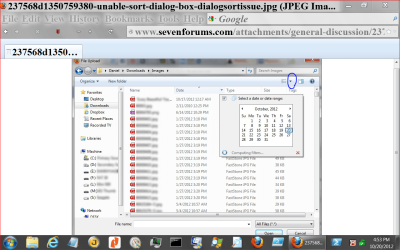
Here's the issue: When I have a dialog box open (to upload a pic to Facebook, for example) I normally sort the folder by date, using the column header, that way I can immediately find pics I just saved to my hard drive. Now, suddenly, it's not sorting at all when I press the column header. Also, something I've never noticed before, is that there is a little down arrow at the right-hand end of the column, with a date selection pop-up (shown in the attached screenshot). Even that feature isn't working. I don't know if the pop-up is new, or if I just have never noticed it before.

At first I thought that maybe it wasn't sorting the column because the folder I usually go to has over 6000 files, but I tested it in a small folder and had the same result. Also, I did do a Windows update a couple of days prior to noticing this issue, but I hand-pick what updates I install, and I only installed security-related updates.

So, does anyone else notices this issue? How can I get back the ability to sort by clicking on the column header?

Please see attached screen cap of the dialog box.

Also, my system specs in my profile have (finally) been updated.

Thank you for your patience. I know I can be a bit wordy at times. :)

If it was working a couple of days ago, what about trying System Restore?

HTH
 

My Computer My Computer

At a glance

Windows 7 Professional x64Intel i5 quad processor16 GBRadeon HD 5770
Computer type
PC/Desktop
Computer Manufacturer/Model Number
Custom Built
OS
Windows 7 Professional x64
CPU
Intel i5 quad processor
Motherboard
DP67BG
Memory
16 GB
Graphics Card(s)
Radeon HD 5770
Sound Card
Realtek High Definition Audio
Monitor(s) Displays
Samsung SyncMaster
Screen Resolution
1920X1080
Hard Drives
WD 2TB (SATA Internal)
WD 1TB (USB External)
PSU
Corsair GS800
Case
Tower (Generic)
Cooling
3 Internal Fans
Keyboard
MS Wireless
Mouse
MS Optical Wired
Internet Speed
54 mbps
Antivirus
Emsisoft
Browser
IE-Version 9, Palemoon-Version 24.2.0
If it was working a couple of days ago, what about trying System Restore?

HTH

I would do that, but unfortunately there are no restore points available due to having practically filling up my hard drive temporarily.
 

My Computer My Computer

At a glance

Windows 7 Ultimate 64-bitIntel Pentium D CPU 2.66GHz 3.03GHz4.00 GBNVIDIA GeForce 9400 GT
Computer Manufacturer/Model Number
Custom built desktop PC
OS
Windows 7 Ultimate 64-bit
CPU
Intel Pentium D CPU 2.66GHz 3.03GHz
Memory
4.00 GB
Graphics Card(s)
NVIDIA GeForce 9400 GT
Sound Card
Creative SB Audigy 2 / Realtek AC'97 Audio
Monitor(s) Displays
Dell
Screen Resolution
1600x1200 (two monitors)
Hard Drives
SAMSUNG SP2504C ATA Device
WDC WD2500BB-22FTA0 ATA Device
Case
HP
Keyboard
Logitech S510 Wireless Keyboard & Mouse
Mouse
(see above)
Other Info
Hauppauge WinTV PVR PCI II 250 II (23xx) (Dual Tuner)
Back
Top