SATA Drivers - Slipstream into Windows XP CD

How to slipstream SATA drivers into Windows XP setup CD, on your dual boot PC with Windows 7 or Vista

When you install Win XP, setup can not find your Hard Drive.

1.PNG

2.PNG


1) Download & Install nLite
nLite - Deployment Tool for the bootable Unattended Windows installation

2) Make a new folder for your Windows XP image.
Note: for this example, I am using the name Win XP Sata.

3) Insert XP CD & start nLite

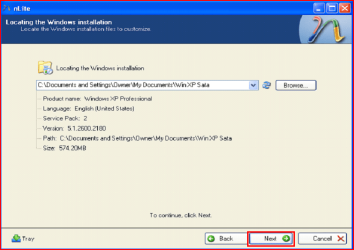
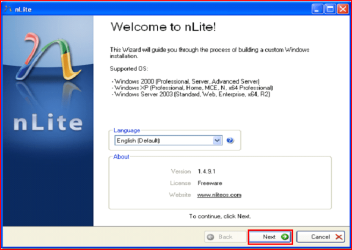
4) Click Next.
3.PNG
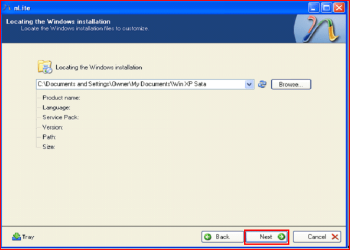
5) Choose your Windows XP image folder, & Click Next, than OK.
Note: nLite will put the image into your folder.
4.PNG

5.PNG
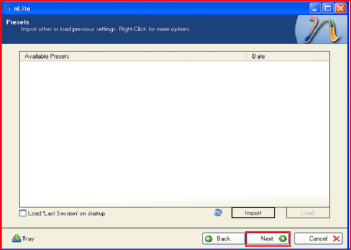
6) Click Next.
6.PNG
7) Click Next.
7.PNG
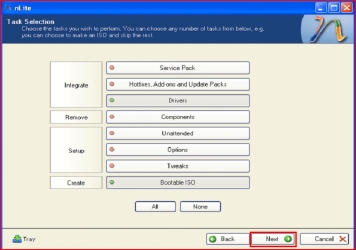
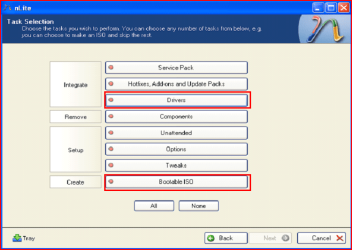
8) Choose Integrate Drivers & Create Bootable ISO
8.PNG
9) Click Next.
9.PNG
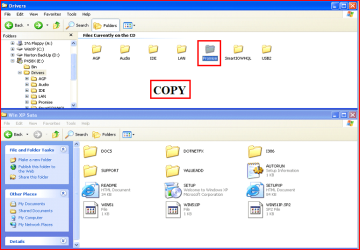
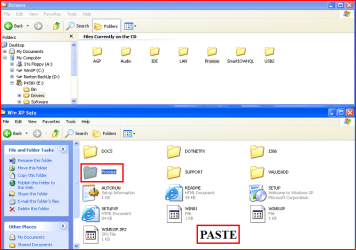
10) Copy & Paste your Sata Driver to your image folder.
Note: for this example, I am using Promise Fastrak 376.
10.PNG

11.PNG
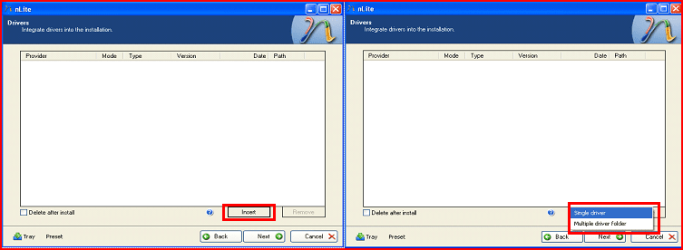
11) Click Insect, than Single Driver.
12.PNG
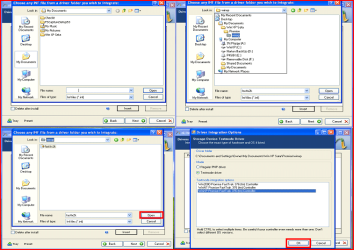
12) Locate your Sata Setup Inf file.
Click Open, than OK.
Note: for this example the file is called fasttx2k.
Note: for this example, I am using Promise Fastrak 376.
13.PNG
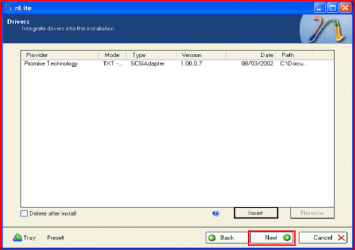
13) Click Next.
14.PNG
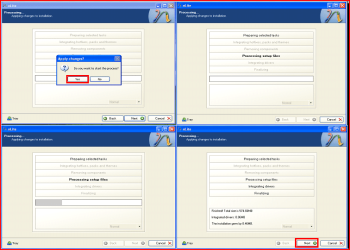
14) Click Yes, than Next.
15.PNG
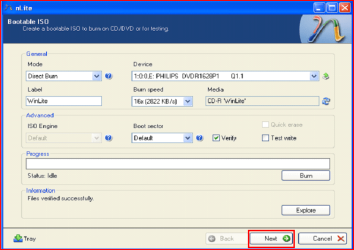
15) Choose Direct Burn.
Click Burn, than Yes.
Note: nLite will now burn your new CD.
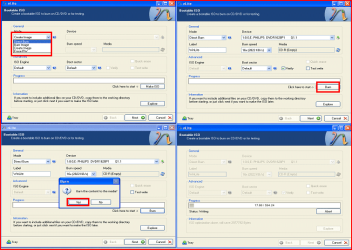
16.PNG
16) Click Next.
17.PNG
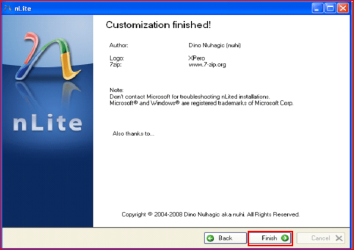
17) Click Finish.
18.PNG
Your Sata drive will now show up in setup.
19.PNG

 
Last edited by a moderator:
Tentatively I have given up on making a dual-boot system. I have a perfectly good, never-registered retail-box copy of Windows XP SP 2 on my bookshelf, but I have run into too many fangdanged hassles trying install it on my Windows 7 / SATA system.

As far as using the F6, I could not use an internal floppy drive. My Gigabyte Z68X-UD7-B3 motherboard does not have a floppy-drive connector. I bought an external USB floppy drive, which according to my motherboard's manual, was supposed to work at the F6 spot, but it never has. And please do not bother trying to help me in that respect.

I was able to create a slipstream disk. I have an LG Super Multi Blue optical drive that came with CyberLink software that allowed me to use n-Lite and burn a copy of my Windows XP SP 2 intstall disk, with SATA drivers slipstreamed from an appropriate file I downloaded from my motherboard's web site.

Unfortunately after the Windows XP installation procedure copied all the files, the setup procedure had to reboot in order to continue. During that re-boot, I got a message saying that the operating system failed to load. That is the furthest I have got in trying to make a dual-boot system.

I think that if I uninstalled Windows 7 and tried to install Windows XP first, that might work. But I've failed so often, I've given up. I don't want to try uninstalling Windows 7. Too much work. :zip:

NOTE! I went back to the original dual-boot tutorial at the top of this thread, and I saw that there are indeed instructions on what to do if I get an error message while rebooting during the Windows XP setup. Exactly my problem! I have not decided if I want to devote more time to creating a dual-boot system, but those instructions seem clear and they might work. Thank you, Theog.
 
Last edited:

My Computer My Computer

OS
Windows 7 Home Premium 64 bits
Hi sjanzeir

As the Getac B300 Fully Rugged Notebook comes with Windows 7 Professional, have you tried the FREE XP Mode?
http://www.sevenforums.com/tutorials/8247-windows-xp-mode-install-setup.html?ltr=W

First check for all the Win XP drivers for your hardware on the manufacturer's web site.
If your Win XP CD, does not support your Sata Controller, you will need to load drivers to uses at F6.
Load Sata Controller drivers with a floppy disk is the best way.
http://www.sevenforums.com/tutorials/66010-sata-drivers-load-windows-xp-setup-dual-boot.html
OR
http://www.sevenforums.com/tutorials/72185-sata-drivers-slipstream-into-windows-xp-cd.html

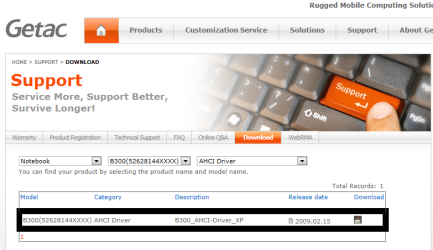
Unzipped download from Getac.

View attachment 199069

Using Intel Sata Controller Drivers:

Take a look at step 11.(option Multple Drivers)


Choose both setup inf files.

Choose all drivers.

Choose all sata controllers.


View attachment 149858


View attachment 149859

Good news first: I worked it out, and it's running brilliantly now, with a dual boot of 7 and XP :)

But to answer your question, I was under the impression that my B300 wouldn't have the power to support XP Mode (it's more than two years old, and only came with two gigs of RAM before I added an extra gig.)

Where on Getac's site did you find those drivers? I ended up downloading the correct driver from here. This gentlemen offers a modified driver that would enable ICH8 chipsets to "see" the HDD (which was the problem I ran into initially before I attempted the first few failed slipstreams, finding out that I had been slipstreaming the wrong drivers all along :cry:).
 

My Computer My Computer

Computer type
Laptop
Computer Manufacturer/Model Number
Getac B300, Dell Latitude E6420, Toshiba Tecra R940, wife's Toshiba Satellite U500, ThinkPad T60
OS
Windows 7 Professional 32-bit on E6420, Windows 7 Professional 64-bit on other three
Missing Driver Integration Option dialog box

I have followed the step by step instructions which seem very easy. The problem is that after finding the .inf file to integrate nLite goes directly to listing the PNP version of the SATA driver (Intel 10.5.0.1026) and it does not give me the Driver Integration Option dialog box in which to choose the TXT version. Can you explain what I must do to get this dialog option box to appear?

The HP web site has a wizard and does not seem to allow an extraction of the various files, though I do see 4 files in the Driverstore master folder .
 

My Computer My Computer

Computer Manufacturer/Model Number
HP p6-2026
OS
Windows 7 Home Premium 64 bit
Memory
8 Gb
Hard Drives
Seagate 1.5T 5400 rpm
I have followed the step by step instructions which seem very easy. The problem is that after finding the .inf file to integrate nLite goes directly to listing the PNP version of the SATA driver (Intel 10.5.0.1026) and it does not give me the Driver Integration Option dialog box in which to choose the TXT version. Can you explain what I must do to get this dialog option box to appear?

A: Take a look at Step 12 screenshot 4


First check for all the Win XP drivers for your hardware.
You can check your HP/compaq PC here:
General XP Downgrade Guide for HP Laptops - HP Support Forum
NOTE: Please read this thread fully.
As some HP/compaq PC have a BIOS problem with Win XP
 

My Computer My Computer

OS
ME/XP/Vista/Win7
I have followed the step by step instructions which seem very easy. The problem is that after finding the .inf file to integrate nLite goes directly to listing the PNP version of the SATA driver (Intel 10.5.0.1026) and it does not give me the Driver Integration Option dialog box in which to choose the TXT version. Can you explain what I must do to get this dialog option box to appear?

A: Take a look at Step 12 screenshot 4


First check for all the Win XP drivers for your hardware.
You can check your HP/compaq PC here:
General XP Downgrade Guide for HP Laptops - HP Support Forum
NOTE: Please read this thread fully.
As some HP/compaq PC have a BIOS problem with Win XP

That is the problem. The step 12 screenshot show a box that does not display. The nLite goes directly from Step 12 shot 3 to Step 13 and show PNP for the driver type.

In addition to that, my computer (HP p6-2026) is NOT a laptop, but a decktop.
 

My Computer My Computer

Computer Manufacturer/Model Number
HP p6-2026
OS
Windows 7 Home Premium 64 bit
Memory
8 Gb
Hard Drives
Seagate 1.5T 5400 rpm
That is the problem. The step 12 screenshot show a box that does not display. The nLite goes directly from Step 12 shot 3 to Step 13 and show PNP for the driver type.

To make sure nLite is working OK, I would uninstall & start afresh.
 

My Computer My Computer

OS
ME/XP/Vista/Win7
I already uninstalled and re-installed twice. I even installed an older version and still no luck. I have no idea why nLite does not give the Dialog Intergration Options box. I'm sure that is why I have had no luck with the Slipstream. Of course, this computer does not have a floppy, or even an IDE connection on the MOBO.
 

My Computer My Computer

Computer Manufacturer/Model Number
HP p6-2026
OS
Windows 7 Home Premium 64 bit
Memory
8 Gb
Hard Drives
Seagate 1.5T 5400 rpm
Hi Guys,
I apologise if this particular question has been answered in the 100+ pages of Q&A but as I am in the middle of the install/tutorial I didn't want to wade through them all to find it wasn't.

I've got as far as creating the specific Windows Install using NLite but how do I find the right SATA Drivers for my XP Install? The laptop I'm working on is a Fujitsu AH530 Lifebook which comes with Windows 7 Home Premium 64Bit ready installed. So how do I find the appropriate SATA drivers to add to the custom XP Install please?

Many Thanks for any help.

Winch
 

My Computer My Computer

OS
XP Pro, Vista Home and 7 Home across several machines

My Computer My Computer

Computer type
PC/Desktop
Computer Manufacturer/Model Number
Self built custom
OS
64-bit Windows 11 Pro for Workstations
CPU
Intel i7-8700K OC'd to 5 GHz
Motherboard
ASUS ROG Maximus XI Formula Z390
Memory
64 GB (4x16GB) G.SKILL TridentZ RGB DDR4 3600 MHz
Graphics Card(s)
ASUS ROG-STRIX-GTX1080TI-O11G-GAMING
Sound Card
Integrated
Monitor(s) Displays
2 x Samsung Odyssey G7 27"
Screen Resolution
2560x1440
Hard Drives
1TB Samsung 990 PRO M.2,
4TB Samsung 990 PRO PRO M.2,
TerraMaster F8 SSD Plus NAS
PSU
Seasonic Prime Titanium 850W
Case
Thermaltake Core P3
Cooling
Corsair Hydro H115i
Keyboard
Logitech wireless K800
Mouse
Logitech MX Master 4
Internet Speed
2 Gb/s Download and 100 Mb/s Upload
Antivirus
Malwarebyte Anti-Malware Premium
Browser
Google Chrome
Other Info
Logitech Z625 speaker system,
Logitech BRIO 4K Pro webcam,
HP Color LaserJet Pro MFP M477fdn,
APC SMART-UPS RT 1000 XL - SURT1000XLI,
Galaxy S23 Plus phone
Hi Winch

OR
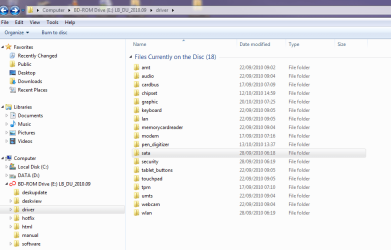
You can Copy & Paste the Intel Sata Controller drivers from your Fujitsu AH530 Lifebook, Drivers, Manuals, & Utilities DVD.

AH530 Drivers.PNG
 

My Computer My Computer

OS
ME/XP/Vista/Win7
Hard drive drivers location

Hi -

I'm trying to install XP as a second boot on a Windows 7 Dell laptop. I've followed all the instructions no problem, up until the driver integration in nLite. I've copied and pasted the partition I created into the Win XP Sata folder I created, but the folder is empty when I go to it to find drivers.

Should I be looking somewhere else?

Sorry if this is a stupid question, I'm not very experienced with Windows machines.

Thanks!
 

My Computer My Computer

OS
Windows 7 Home 32bit
Hi -

I'm trying to install XP as a second boot on a Windows 7 Dell laptop. I've followed all the instructions no problem, up until the driver integration in nLite. I've copied and pasted the partition I created into the Win XP Sata folder I created, but the folder is empty when I go to it to find drivers.

Should I be looking somewhere else?

Sorry if this is a stupid question, I'm not very experienced with Windows machines.

Thanks!

What partition?

If you downloaded F6 Sata Controller drivers from the web, did you unzip the download?

Have you looked at using XP Mode, Virtual Player, VMWare, or Virtual Box.
http://www.sevenforums.com/tutorials/8247-windows-xp-mode-install-setup.html?ltr=W
 

My Computer My Computer

OS
ME/XP/Vista/Win7
Hi, I have a HP mini 311-1033CA

I have gotten to 100% format but it froze there. After waiting an hour, I restarted the netbook, rebooted from the disc, and received the "setup did not find any hard disk drives..." I have slipstreamed all the drivers from Software & Driver Downloads HP Mini 311-1033CA PC - HP Customer Care (United States - English)

and this NVIDIA DRIVERS 15.56WHQL

I however have only slipstreamed the windows xp version from the hp site and both windows 7 32-bit and windows xp versions from the nvidia site. I still get the "setup did not find..." message. Help please?
 

My Computer My Computer

OS
7 32 bit
hi,

I am trying to make an installation CD as it is instructed in this section. When I insect (single driver) there are 2 files.
"iaAHCI" and "iaStor" . Which one should I choose?

THE SYSTEM
Windows® 7 Home Premium (64 bit)
Intel® PM55 Express Chipset
Intel® Core™ i7-740QM
Ram: PC3-10600 - DDR3 SDRAM - 1333 - 8GB
Serial ATA

The web adress: Specifications

Thanks in advance
 

My Computer My Computer

OS
Windows 7 Ultimate x64
XP install crashes after first reboot

My rebuilt PC runs Windows 7 Home Premium 64 bit with the BIOS set to AHCI. I would like to dual boot with XP so that my sons can still play some of their old XP games.

Following the tutorial, I slipstreamed the Intel(R) 7 Series/C216 Chipset Family SATA AHCI Controller which I downloaded from the Asus website into Windows XP SP3.

The initial setup runs fine but at the first reboot the system crashes just as it gets to the XP GUI interface.

When I first used my regular XP installation disk I got the BSOD during initial setup so slipstreaming the SATA driver has allowed setup to progress further.

I can install XP when I change the BIOS to IDE but then Windows 7 crashes.

Any ideas what else I could try to get XP to install in SATA (AHCI) mode?
 

My Computer My Computer

Computer Manufacturer/Model Number
Home built
OS
Windows 7 Home Premium 64 bit
CPU
Intel Core i5 3450
Motherboard
Asus P8Z77-V LX
Memory
8GB DDR3
Graphics Card(s)
AMD Radeon HD 7850
Sound Card
None
Monitor(s) Displays
Samsung SyncMaster 2053 BW
Hard Drives
Seagate Barracuda ST31000524AS
Western Digital WDC WD5000AAKS-00V1A0
PSU
OCZ 600W
Case
Antec NSK 6500
Cooling
120mm rear fan plus 80mm front fan
My rebuilt PC runs Windows 7 Home Premium 64 bit with the BIOS set to AHCI. I would like to dual boot with XP so that my sons can still play some of their old XP games.

Following the tutorial, I slipstreamed the Intel(R) 7 Series/C216 Chipset Family SATA AHCI Controller which I downloaded from the Asus website into Windows XP SP3.

The initial setup runs fine but at the first reboot the system crashes just as it gets to the XP GUI interface.

When I first used my regular XP installation disk I got the BSOD during initial setup so slipstreaming the SATA driver has allowed setup to progress further.

I can install XP when I change the BIOS to IDE but then Windows 7 crashes.

Any ideas what else I could try to get XP to install in SATA (AHCI) mode?

As you have a uEFI BIOS & 8 gb of ram, Win XP 32bit is not supported.
Have you looked at using XP Mode, Virtual Player, VMWare, Virtual Box.
http://www.sevenforums.com/tutorials/8247-windows-xp-mode-install-setup.html?ltr=W
 

My Computer My Computer

OS
ME/XP/Vista/Win7
Most counterfeit copy of Windows XP (in Indonesia) already contained generic SATA driver.
 

My Computer My Computer

Computer Manufacturer/Model Number
HP Pavilion dm1-4000AU
OS
Windows 7 Home Premium 32-bit
CPU
AMD E-450 APU
Motherboard
HP 3387 with AMD A40/A50 Series FCH
Memory
2GB SO-DIMM DDR3
Graphics Card(s)
ATi Mobility Radeon HD 6320
Sound Card
IDT High Definition Audio with Beats by dr. Dre
Monitor(s) Displays
HP Brightview LED 11.6"
Screen Resolution
1366x768 pixels, 32-bit Colour
Hard Drives
Hitachi HTS547550A9E384
500GB SATA II
PSU
HP Battery OEM
Case
HP OEM
Cooling
HP OEM
Keyboard
Just an ordinary island style 101-102 keys keyboard
Mouse
Synaptics Touchpad
Internet Speed
1 Mbps
I ended up by initially installing XP in IDE mode on a spare second hard disk which I installed in the computer. I then followed the method in this link to install the correct SATA AHCI driver for my motherboard and then change the BIOS to AHCI:

http://h20000.www2.hp.com/bizsuppor...=5056942&prodTypeId=321957&objectID=c03101776

Having now got XP installed in AHCI mode on my spare hard disk, I made an image backup of it and restored the image to a separate partition on my Windows 7 hard drive. Finally, I downloaded a program called EasyBCD which made it simple to add XP to the master boot record.

A bit long winded perhaps, but I can now dual boot XP and Windows 7.
 

My Computer My Computer

Computer Manufacturer/Model Number
Home built
OS
Windows 7 Home Premium 64 bit
CPU
Intel Core i5 3450
Motherboard
Asus P8Z77-V LX
Memory
8GB DDR3
Graphics Card(s)
AMD Radeon HD 7850
Sound Card
None
Monitor(s) Displays
Samsung SyncMaster 2053 BW
Hard Drives
Seagate Barracuda ST31000524AS
Western Digital WDC WD5000AAKS-00V1A0
PSU
OCZ 600W
Case
Antec NSK 6500
Cooling
120mm rear fan plus 80mm front fan
Back
Top