Tried to change from IDE to AHCI, now computer is stuck

Vtvick777

New member
Local time
5:29 PM
Messages
7
First off let me say that I don't know very much about computers. I just ordered a SSD online and will get it in a couple days. I was reading up on the tweaks and settings to change to optimize the SSD performance. One of them was to have AHCI enabled during OS installation. I decided to check if my computer had it enabled or not yet, and it didn't, it was set to IDE. So, naturally without reading anything about whether it was ok or not, I switched it to ACHI. In hindsight this was not a good decision. When I exited the BIOS my computer just hung up on "loading operating system". I then switched it back to IDE, so I could use my computer again in the meantime, but now even with IDE enabled, it hangs up on "loading operating system" as well. All I want to do is go back to having my computer work in IDE mode. Is there an easy fix to this? Thanks in advance for any replies.
 

My Computer My Computer

At a glance

Windows 7 Home Premium x64
OS
Windows 7 Home Premium x64
It really hangs or crashes?
 

My Computer My Computer

At a glance

Microsoft Windows 7 Home Premium 64-bits 7601...Intel(R) Core(TM) i3 CPU M 370 @ 2.40GHz4,00 GBATI Mobility Radeon HD 5400 Series
Computer type
Laptop
Computer Manufacturer/Model Number
ACER ASPIRE 5742G
OS
Microsoft Windows 7 Home Premium 64-bits 7601 Multiprocessor Free Service Pack 1
CPU
Intel(R) Core(TM) i3 CPU M 370 @ 2.40GHz
Motherboard
Acer Aspire 5742G
Memory
4,00 GB
Graphics Card(s)
ATI Mobility Radeon HD 5400 Series
Sound Card
(1) AMD High Definition Audio Device (2) Realtek High Defi
Screen Resolution
1366 x 768 x 32 bits (4294967296 colors) @ 60 Hz
Hard Drives
WDC WD5000BEVT-22ZAT0
Switch to AHCI and so a repair install.
 

My Computer My Computer

At a glance

Win 7x64, Win 10x64, Win 11x64
Computer type
PC/Desktop
Computer Manufacturer/Model Number
Custom
OS
Win 7x64, Win 10x64, Win 11x64
It hangs, it just stays at that screen with the dots blinking for minutes (as long as I've kept it up before shutting it down).

Will a repair install have a chance of affecting any of my settings or files? I'd still rather just go back to IDE, is there a reason why that's not working?
 

My Computer My Computer

At a glance

Windows 7 Home Premium x64
OS
Windows 7 Home Premium x64
Switch to AHCI and so a repair install.
Only possible from within win7! And win7 doesn't boot.

Are you sure you didn't change anything in BIOS?
 

My Computer My Computer

At a glance

Microsoft Windows 7 Home Premium 64-bits 7601...Intel(R) Core(TM) i3 CPU M 370 @ 2.40GHz4,00 GBATI Mobility Radeon HD 5400 Series
Computer type
Laptop
Computer Manufacturer/Model Number
ACER ASPIRE 5742G
OS
Microsoft Windows 7 Home Premium 64-bits 7601 Multiprocessor Free Service Pack 1
CPU
Intel(R) Core(TM) i3 CPU M 370 @ 2.40GHz
Motherboard
Acer Aspire 5742G
Memory
4,00 GB
Graphics Card(s)
ATI Mobility Radeon HD 5400 Series
Sound Card
(1) AMD High Definition Audio Device (2) Realtek High Defi
Screen Resolution
1366 x 768 x 32 bits (4294967296 colors) @ 60 Hz
Hard Drives
WDC WD5000BEVT-22ZAT0
The only things I changed were the PCH SATA control mode and GSATA control mode from IDE to ACHI and then back to IDE.
 

My Computer My Computer

At a glance

Windows 7 Home Premium x64
OS
Windows 7 Home Premium x64

My Computer My Computer

At a glance

Microsoft Windows 7 Home Premium 64-bits 7601...Intel(R) Core(TM) i3 CPU M 370 @ 2.40GHz4,00 GBATI Mobility Radeon HD 5400 Series
Computer type
Laptop
Computer Manufacturer/Model Number
ACER ASPIRE 5742G
OS
Microsoft Windows 7 Home Premium 64-bits 7601 Multiprocessor Free Service Pack 1
CPU
Intel(R) Core(TM) i3 CPU M 370 @ 2.40GHz
Motherboard
Acer Aspire 5742G
Memory
4,00 GB
Graphics Card(s)
ATI Mobility Radeon HD 5400 Series
Sound Card
(1) AMD High Definition Audio Device (2) Realtek High Defi
Screen Resolution
1366 x 768 x 32 bits (4294967296 colors) @ 60 Hz
Hard Drives
WDC WD5000BEVT-22ZAT0
give me all setting as they are now GSATA Controller Enabled =>is it enabled?Applies to the two 6 Gb/s SATA connectors.

GSATA Ctrl Mode AHCI The other value is IDE. Ditto the comments for the eSATA Ctrl Mode setting.
SATA Port0-3 Native Mode Enabled ????With the Disabled setting, the SATA devices operate like legacy IDE devices, which is fine and even best under Windows XP. Operating systems with native SATA support, such as Windows Vista and Windows 7, are fine to use a setting of Enabled.
Onboard eSATA Controller Enabled ???Applies to the six 3 Gb/s SATA connectors.

eSATA Ctrl Mode AHCI ???Other values are IDE and RAID. A value of IDE operates the SATA hard drive using IDE legacy mode, which is fine and less troublesome under Windows XP. Under an operating system that supports SATA without installing additional drivers, such as Windows Vista and Windows 7, a setting of AHCI allows the full capabilities of the SATA hard drive to be used, such as Native Command Queuing (NCQ) and hot-plugging. However, don't expect a noticeable performance difference. The RAID setting is for hard drives configured in a RAID configuration.
 

My Computer My Computer

At a glance

Microsoft Windows 7 Home Premium 64-bits 7601...Intel(R) Core(TM) i3 CPU M 370 @ 2.40GHz4,00 GBATI Mobility Radeon HD 5400 Series
Computer type
Laptop
Computer Manufacturer/Model Number
ACER ASPIRE 5742G
OS
Microsoft Windows 7 Home Premium 64-bits 7601 Multiprocessor Free Service Pack 1
CPU
Intel(R) Core(TM) i3 CPU M 370 @ 2.40GHz
Motherboard
Acer Aspire 5742G
Memory
4,00 GB
Graphics Card(s)
ATI Mobility Radeon HD 5400 Series
Sound Card
(1) AMD High Definition Audio Device (2) Realtek High Defi
Screen Resolution
1366 x 768 x 32 bits (4294967296 colors) @ 60 Hz
Hard Drives
WDC WD5000BEVT-22ZAT0

My Computer My Computer

At a glance

Microsoft Windows 7 Home Premium 64-bits 7601...Intel(R) Core(TM) i3 CPU M 370 @ 2.40GHz4,00 GBATI Mobility Radeon HD 5400 Series
Computer type
Laptop
Computer Manufacturer/Model Number
ACER ASPIRE 5742G
OS
Microsoft Windows 7 Home Premium 64-bits 7601 Multiprocessor Free Service Pack 1
CPU
Intel(R) Core(TM) i3 CPU M 370 @ 2.40GHz
Motherboard
Acer Aspire 5742G
Memory
4,00 GB
Graphics Card(s)
ATI Mobility Radeon HD 5400 Series
Sound Card
(1) AMD High Definition Audio Device (2) Realtek High Defi
Screen Resolution
1366 x 768 x 32 bits (4294967296 colors) @ 60 Hz
Hard Drives
WDC WD5000BEVT-22ZAT0
GSATA controller - enabled
GSATA control mode - IDE

I don't have anything that says esata, only pch sata

Pch sata control mode - IDE

Sata port 0-3 native mode - enabled

The sata connector on the motherboard is white.
 

My Computer My Computer

At a glance

Windows 7 Home Premium x64
OS
Windows 7 Home Premium x64
all setting that can be IDE are IDE now instead of AHCI?
Sata port 0-3 native mode -set to disabled

Now try to reboot. Post results. If boots fine then I give you more info
 

My Computer My Computer

At a glance

Microsoft Windows 7 Home Premium 64-bits 7601...Intel(R) Core(TM) i3 CPU M 370 @ 2.40GHz4,00 GBATI Mobility Radeon HD 5400 Series
Computer type
Laptop
Computer Manufacturer/Model Number
ACER ASPIRE 5742G
OS
Microsoft Windows 7 Home Premium 64-bits 7601 Multiprocessor Free Service Pack 1
CPU
Intel(R) Core(TM) i3 CPU M 370 @ 2.40GHz
Motherboard
Acer Aspire 5742G
Memory
4,00 GB
Graphics Card(s)
ATI Mobility Radeon HD 5400 Series
Sound Card
(1) AMD High Definition Audio Device (2) Realtek High Defi
Screen Resolution
1366 x 768 x 32 bits (4294967296 colors) @ 60 Hz
Hard Drives
WDC WD5000BEVT-22ZAT0
I set the bios to those settings and it still hangs on the loading operating system screen.

I just remembered something that might be a part of the problem. When I first installed windows 7, I didn't have my main hard drive in the first sata port, so the os boot file instead installed on my secondary hard drive. I only found out about that later, and instead of doing a clean install, I just let it be as it was, because it didn't make a difference to me. Could that be what is causing problems when I switched from IDE to ACHI and back?
 

My Computer My Computer

At a glance

Windows 7 Home Premium x64
OS
Windows 7 Home Premium x64
I set the bios to those settings and it still hangs on the loading operating system screen.

I just remembered something that might be a part of the problem. When I first installed windows 7, I didn't have my main hard drive in the first sata port, so the os boot file instead installed on my secondary hard drive. I only found out about that later, and instead of doing a clean install, I just let it be as it was, because it didn't make a difference to me. Could that be what is causing problems when I switched from IDE to ACHI and back?
So bootmgr is on secondary harddisk and win7 OS on another physical disk? Is that what you mean?

Please fill in your system specifications!! So I know what computer you have!
 

My Computer My Computer

At a glance

Microsoft Windows 7 Home Premium 64-bits 7601...Intel(R) Core(TM) i3 CPU M 370 @ 2.40GHz4,00 GBATI Mobility Radeon HD 5400 Series
Computer type
Laptop
Computer Manufacturer/Model Number
ACER ASPIRE 5742G
OS
Microsoft Windows 7 Home Premium 64-bits 7601 Multiprocessor Free Service Pack 1
CPU
Intel(R) Core(TM) i3 CPU M 370 @ 2.40GHz
Motherboard
Acer Aspire 5742G
Memory
4,00 GB
Graphics Card(s)
ATI Mobility Radeon HD 5400 Series
Sound Card
(1) AMD High Definition Audio Device (2) Realtek High Defi
Screen Resolution
1366 x 768 x 32 bits (4294967296 colors) @ 60 Hz
Hard Drives
WDC WD5000BEVT-22ZAT0
Do you have a bootable CD/DVD? preferable win7 install dvd or win7 system repair disc
 

My Computer My Computer

At a glance

Microsoft Windows 7 Home Premium 64-bits 7601...Intel(R) Core(TM) i3 CPU M 370 @ 2.40GHz4,00 GBATI Mobility Radeon HD 5400 Series
Computer type
Laptop
Computer Manufacturer/Model Number
ACER ASPIRE 5742G
OS
Microsoft Windows 7 Home Premium 64-bits 7601 Multiprocessor Free Service Pack 1
CPU
Intel(R) Core(TM) i3 CPU M 370 @ 2.40GHz
Motherboard
Acer Aspire 5742G
Memory
4,00 GB
Graphics Card(s)
ATI Mobility Radeon HD 5400 Series
Sound Card
(1) AMD High Definition Audio Device (2) Realtek High Defi
Screen Resolution
1366 x 768 x 32 bits (4294967296 colors) @ 60 Hz
Hard Drives
WDC WD5000BEVT-22ZAT0
That is correct.

Yes I have windows 7 discs.

My current setup :
ga-p55a-ud3 gigabyte motherboard
Intel core i5 processor
G.skill ripjaws 16 gb RAM
 

My Computer My Computer

At a glance

Windows 7 Home Premium x64
OS
Windows 7 Home Premium x64
try to boot from win7 install disk and boot into recovery environment. http://www.sevenforums.com/tutorials/668-system-recovery-options.html option two.

Does it see your win7 os installation?

Enter "command prompt".
Code:
diskpart
list  vol
list  disk

Do you see all disk? You see all volumes (volumes can have other drive letters than in win7!)
 

My Computer My Computer

At a glance

Microsoft Windows 7 Home Premium 64-bits 7601...Intel(R) Core(TM) i3 CPU M 370 @ 2.40GHz4,00 GBATI Mobility Radeon HD 5400 Series
Computer type
Laptop
Computer Manufacturer/Model Number
ACER ASPIRE 5742G
OS
Microsoft Windows 7 Home Premium 64-bits 7601 Multiprocessor Free Service Pack 1
CPU
Intel(R) Core(TM) i3 CPU M 370 @ 2.40GHz
Motherboard
Acer Aspire 5742G
Memory
4,00 GB
Graphics Card(s)
ATI Mobility Radeon HD 5400 Series
Sound Card
(1) AMD High Definition Audio Device (2) Realtek High Defi
Screen Resolution
1366 x 768 x 32 bits (4294967296 colors) @ 60 Hz
Hard Drives
WDC WD5000BEVT-22ZAT0
where are the two sata disks connected to?
Sata port 0-3 native mode -set back to enabled as it was before
 

Attachments

  • Knipsel.JPG
    Knipsel.JPG
    14.2 KB · Views: 109

My Computer My Computer

At a glance

Microsoft Windows 7 Home Premium 64-bits 7601...Intel(R) Core(TM) i3 CPU M 370 @ 2.40GHz4,00 GBATI Mobility Radeon HD 5400 Series
Computer type
Laptop
Computer Manufacturer/Model Number
ACER ASPIRE 5742G
OS
Microsoft Windows 7 Home Premium 64-bits 7601 Multiprocessor Free Service Pack 1
CPU
Intel(R) Core(TM) i3 CPU M 370 @ 2.40GHz
Motherboard
Acer Aspire 5742G
Memory
4,00 GB
Graphics Card(s)
ATI Mobility Radeon HD 5400 Series
Sound Card
(1) AMD High Definition Audio Device (2) Realtek High Defi
Screen Resolution
1366 x 768 x 32 bits (4294967296 colors) @ 60 Hz
Hard Drives
WDC WD5000BEVT-22ZAT0
When I boot into recovery mode, it does not see my windows 7 installation.

When I ran those commands in the prompt, it did show all off my drives
Volume 0 - grmchpxfrer - udf - DVD-rom - healthy
Volume 1 - blank - ntfs - partition - healty
Volume 2 - system rese - ntfs - partition - healthy
Volume 3 - internal b1 - ntfs - partition - healthy
Volume 4 - hp - ntfs - partition - healthy
Volume 5 - recovery - ntfs - partition - healthy

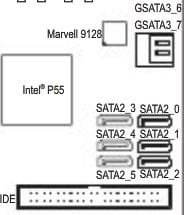
The hard drive with the os installed is in one of the two gsata3 slots, the hard drive with the boot record is in one of the 6 sata2 slots.
 

My Computer My Computer

At a glance

Windows 7 Home Premium x64
OS
Windows 7 Home Premium x64
When I boot into recovery mode, it does not see my windows 7 installation.

When I ran those commands in the prompt, it did show all off my drives
Volume 0 - grmchpxfrer - udf - DVD-rom - healthy
Volume 1 - blank - ntfs - partition - healty
Volume 2 - system rese - ntfs - partition - healthy
Volume 3 - internal b1 - ntfs - partition - healthy
Volume 4 - hp - ntfs - partition - healthy
Volume 5 - recovery - ntfs - partition - healthy

The hard drive with the os installed is in one of the two gsata3 slots, the hard drive with the boot record is in one of the 6 sata2 slots.

Code:
diskpart
sel vol 0
det part
sel vol 1
det part
[COLOR=red]and so on[/COLOR]
Which are marked as ACTIVE?
what is drive letter of win7 OS partition? (not necessary C in the list!)
what is drive letter of active partition?
 

My Computer My Computer

At a glance

Microsoft Windows 7 Home Premium 64-bits 7601...Intel(R) Core(TM) i3 CPU M 370 @ 2.40GHz4,00 GBATI Mobility Radeon HD 5400 Series
Computer type
Laptop
Computer Manufacturer/Model Number
ACER ASPIRE 5742G
OS
Microsoft Windows 7 Home Premium 64-bits 7601 Multiprocessor Free Service Pack 1
CPU
Intel(R) Core(TM) i3 CPU M 370 @ 2.40GHz
Motherboard
Acer Aspire 5742G
Memory
4,00 GB
Graphics Card(s)
ATI Mobility Radeon HD 5400 Series
Sound Card
(1) AMD High Definition Audio Device (2) Realtek High Defi
Screen Resolution
1366 x 768 x 32 bits (4294967296 colors) @ 60 Hz
Hard Drives
WDC WD5000BEVT-22ZAT0
Boot into recovery environment. Does it see your Windows 7 os installation?
Something like this:

which screenshot do you see?
 

My Computer My Computer

At a glance

Microsoft Windows 7 Home Premium 64-bits 7601...Intel(R) Core(TM) i3 CPU M 370 @ 2.40GHz4,00 GBATI Mobility Radeon HD 5400 Series
Computer type
Laptop
Computer Manufacturer/Model Number
ACER ASPIRE 5742G
OS
Microsoft Windows 7 Home Premium 64-bits 7601 Multiprocessor Free Service Pack 1
CPU
Intel(R) Core(TM) i3 CPU M 370 @ 2.40GHz
Motherboard
Acer Aspire 5742G
Memory
4,00 GB
Graphics Card(s)
ATI Mobility Radeon HD 5400 Series
Sound Card
(1) AMD High Definition Audio Device (2) Realtek High Defi
Screen Resolution
1366 x 768 x 32 bits (4294967296 colors) @ 60 Hz
Hard Drives
WDC WD5000BEVT-22ZAT0
Back
Top