Solved I'm afraid of android and can't learn

pacinitaly

HappyGuru Lovin 2Help
Guru
VIP
Local time
4:18 PM
Messages
1,093
Location
the worst state in america
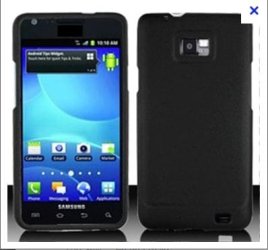
I finally got the walmart samsung galaxy s2 ($349usd) AT&T Samsung SGH-S959G
I'm a PC, I don't have any experience w/ linux at all ( prob why I'm afraid of android) I have not used apple products since 1994 either.

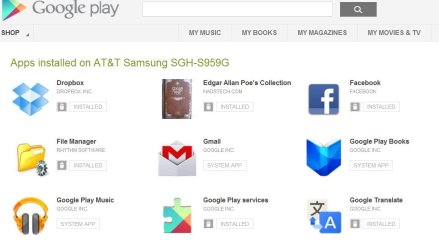
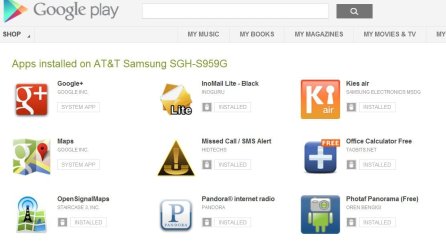
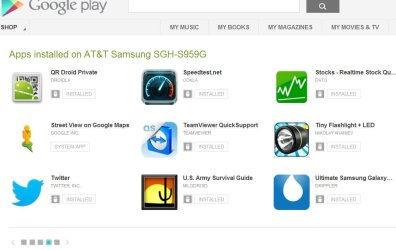
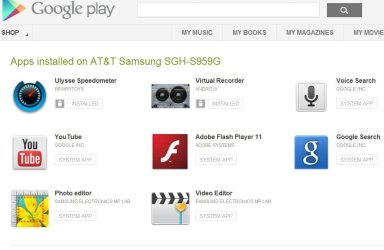
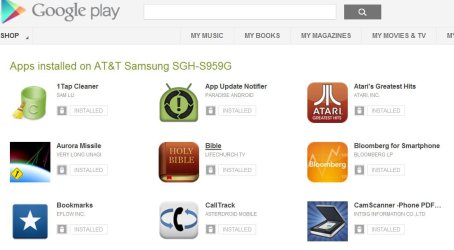
I have sort of read the manual on the sgs2 but tinkered with it for over 30hrs. I have downloaded 44 apps so far. see pics.
I'm looking to find a free app that clones/backs up/syncs or restores my phone if/when it crashes. ( i know how to get my contacts- .vcf files over I also found a way to get my bookmarks over... export from IE then put .html file on sd card and create shortcut to it) I'd love to run .bat/.vbs files

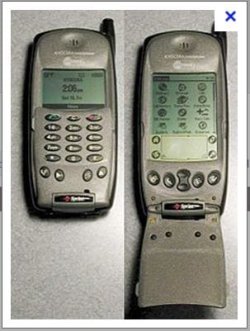
my old phone was a koycera 6350
redface.gif
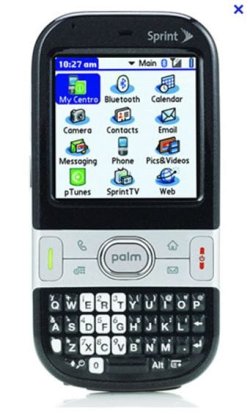
then I got a palm centro
smile.gif
( I used palm with my old job since 1995) see pics attached
so when I wanted to update outlook 98,2002,2003,2007,2010 I hooked up cable and push sync.. when i needed to master reset the old phones I would do a a sync to make the device return to the last good image.

So now I'm looking for the same type of app that does it. Fellow techies at work say It can be done via my gmail acct, but I don't see how and I'm afraid to test anything yet. In the android langauge, my phone is not bricked, rooted, flashed, rom updated, etc (not well versed on terminology yet)

Thank you so much in advance,

~Carmine


ps I deleted kies, not what I wanted
 

Attachments
  • 2.JPG
    2.JPG
    62.9 KB · Views: 101
  • 3.JPG
    3.JPG
    57.3 KB · Views: 103
  • 4.JPG
    4.JPG
    60.1 KB · Views: 94
  • 5.JPG
    5.JPG
    63.4 KB · Views: 96
  • 6.JPG
    6.JPG
    55 KB · Views: 100
  • current phone.JPG
    current phone.JPG
    24.1 KB · Views: 502
  • newer phone.JPG
    newer phone.JPG
    35 KB · Views: 511
  • old phone.JPG
    old phone.JPG
    29.8 KB · Views: 422

My Computer My Computer

At a glance

windows 7 professional & ultimate 64bit laptops2.27 boost to 2.53 & 2.53 boost to 2.804GBIntel® Graphics Media Accelerator HD
Computer Manufacturer/Model Number
Gateway/NV7923u & NV79C52u Laptops
OS
windows 7 professional & ultimate 64bit laptops
CPU
2.27 boost to 2.53 & 2.53 boost to 2.80
Motherboard
Mobile Intel® HM55 Express Chipset ???
Memory
4GB
Graphics Card(s)
Intel® Graphics Media Accelerator HD
Sound Card
realtek High-definition audio support
Monitor(s) Displays
17.3 " HD 1600 x 900
Hard Drives
hatachi Travelstar 5400 500GB & west digital 500GB
Internet Speed
35MB fios
No apps... I was going to learn how to write apps. I have two books. I have a degree in computer programming. I'm lost after reading the books.
 

My Computer My Computer

At a glance

Vista Home Premium, contemplating moving to L...EVGA 1 gig GeForce 210
Computer Manufacturer/Model Number
Acer AX1700-U1710A
OS
Vista Home Premium, contemplating moving to Linux
Graphics Card(s)
EVGA 1 gig GeForce 210
Monitor(s) Displays
39 inch HDTV
Screen Resolution
1920x1080
Internet Speed
5 megabits
For an app that does full backups of all your apps etc, you need to have your device rooted (have root access), which will void your warranty (unless you restore it all to stock before sending it off for repair or anything).

The easiest way for contact backup is via Google Mail. All you do is login to your Google account, go to accounts and sync in Settings, go to your Google account, and select which elements of Google you want to Sync. Make sure Contacts is selected, and they'll be synced to your Google Mail account.

If you use Chrome on your desktop, and Chrome on your phone (if you have Ice Cream Sandwich (Android 4.0+), you can sync your bookmarks too, by logging in to your Google account on Chrome within the settings, and enabling sync.

Use SMS Backup & Restore to keep SMS messages backed up too on your SD Card.

If you do get in to the whole root access bit, you can then create entire images of your phone that you can easily restore in case anything goes wrong.
 

My Computer My Computer

At a glance

Windows 8.1 Pro x64Intel Core i7 4790k8GB Corsair Dominator 1600MHzMSI TwinFrozr GeForce GTX770
Computer type
PC/Desktop
Computer Manufacturer/Model Number
Custom Built
OS
Windows 8.1 Pro x64
CPU
Intel Core i7 4790k
Motherboard
MSI Z97S Krait Edition
Memory
8GB Corsair Dominator 1600MHz
Graphics Card(s)
MSI TwinFrozr GeForce GTX770
Sound Card
ASUS Xonar DX/XD 7.1
Monitor(s) Displays
Dell 24" S2409W + Dell 20" E207WFP
Screen Resolution
1920x1080 + 1680x1050
Hard Drives
1x 120GB OCZ Agility 3, 1x 750GB Western Digital Caviar Black, 1x 1TB Western Digital Caviar Blue
PSU
Corsair HX850 modular
Case
Fractal Design Define R4
Cooling
Corsair H60 w/ twin Corsair SP120 fans
Keyboard
Logitech G510S Keyboard
Mouse
Logitech G500S Laser Mouse
Internet Speed
40Mbps
Antivirus
Microsoft Security Essentials
Browser
Google Chrome
Other Info
LG Blu-Ray player
This guy has it right. At least thats how I would do it. If your really workied about learnig linux first you can always run a VM of it to learn your way around first, but I have found the best way to learn is to find out what you want to do, read up about it, and just do it. I have also found the people on the XDA forums to be increadibly helpful.
 

My Computer My Computer

At a glance

Win 8 EnterpriseIntel i5 2500K8 1600
Computer type
PC/Desktop
Computer Manufacturer/Model Number
Custom Build
OS
Win 8 Enterprise
CPU
Intel i5 2500K
Motherboard
ASUS P8Z68-V LX LGA 1155 Z68
Memory
8 1600
Hard Drives
300GB 7200rpm
and 2 250GB in RAID 0
PSU
Coolermaster 400w
Case
Thermaltake V3 Gaming
Cooling
H80
This guy has it right. At least thats how I would do it. If your really workied about learnig linux first you can always run a VM of it to learn your way around first, but I have found the best way to learn is to find out what you want to do, read up about it, and just do it. I have also found the people on the XDA forums to be increadibly helpful.

Yea XDA is the best place to start if you have any questions or want help with your phone. Should be able to get help with anything in the SGSII section.
 

My Computer My Computer

At a glance

Windows 8.1 Pro x64Intel Core i7 4790k8GB Corsair Dominator 1600MHzMSI TwinFrozr GeForce GTX770
Computer type
PC/Desktop
Computer Manufacturer/Model Number
Custom Built
OS
Windows 8.1 Pro x64
CPU
Intel Core i7 4790k
Motherboard
MSI Z97S Krait Edition
Memory
8GB Corsair Dominator 1600MHz
Graphics Card(s)
MSI TwinFrozr GeForce GTX770
Sound Card
ASUS Xonar DX/XD 7.1
Monitor(s) Displays
Dell 24" S2409W + Dell 20" E207WFP
Screen Resolution
1920x1080 + 1680x1050
Hard Drives
1x 120GB OCZ Agility 3, 1x 750GB Western Digital Caviar Black, 1x 1TB Western Digital Caviar Blue
PSU
Corsair HX850 modular
Case
Fractal Design Define R4
Cooling
Corsair H60 w/ twin Corsair SP120 fans
Keyboard
Logitech G510S Keyboard
Mouse
Logitech G500S Laser Mouse
Internet Speed
40Mbps
Antivirus
Microsoft Security Essentials
Browser
Google Chrome
Other Info
LG Blu-Ray player

My Computer My Computer

At a glance

Windows 7 Ultimate 64bitAMD Phenom Quad core 9950 black edition16Gb2x XFX Radeon 5850
Computer type
PC/Desktop
Computer Manufacturer/Model Number
Self Built
OS
Windows 7 Ultimate 64bit
CPU
AMD Phenom Quad core 9950 black edition
Motherboard
Gigabyte
Memory
16Gb
Graphics Card(s)
2x XFX Radeon 5850
Sound Card
PCI Express X-Fi Titanium / Logitech G35
Monitor(s) Displays
2x HP 2410i
Screen Resolution
1920x1080
Hard Drives
2x 500Gb Seagate
1x 300Gb Seagate
1x 1Tb Seagate
2x 1Tb Hitatchi
PSU
Jean Tech Storm 700W
Case
Cooler Master COSMOS S
Cooling
Akasa Evo Blue Pro
Keyboard
Logitech G15
Mouse
Mad Catz M.M.O. 7
Internet Speed
12mb
Use the Samsung Official back up program KIES to back up, restore, update etc
 

My Computer My Computer

At a glance

Windows 10 Pro x64i7-4770K16Gig DDR3-2400Gigabyte GT740
Computer type
PC/Desktop
Computer Manufacturer/Model Number
Self Built Custom Computer.
OS
Windows 10 Pro x64
CPU
i7-4770K
Motherboard
Asus Z87 Sabertooth
Memory
16Gig DDR3-2400
Graphics Card(s)
Gigabyte GT740
Sound Card
Onboard
Monitor(s) Displays
Benq 27" - Dell 23' - Benq 22"
Screen Resolution
1680x1050
Hard Drives
Samsung 840 Pro 128g SSD
1xWestern Digital Caviar Green 1tb
2xWestern Digital Caviar Green 2 tb
PSU
Seasonic 760 watt Platinum
Case
Coolermaster Haf - X
Cooling
Noctua NH-C12P CPU Cooler
Keyboard
Logitech illuminated keyboard
Mouse
Logitech Perfomance MX
Internet Speed
Cable = speeds to 20Mbps downsteam and 512kbps upsteam
Antivirus
Avast Internet Security
Browser
Firefox
Use the Samsung Official back up program KIES to back up, restore, update etc

This guy has it right. At least thats how I would do it. If your really workied about learnig linux first you can always run a VM of it to learn your way around first, but I have found the best way to learn is to find out what you want to do, read up about it, and just do it. I have also found the people on the XDA forums to be increadibly helpful.

Yea XDA is the best place to start if you have any questions or want help with your phone. Should be able to get help with anything in the SGSII section.

This guy has it right. At least thats how I would do it. If your really workied about learnig linux first you can always run a VM of it to learn your way around first, but I have found the best way to learn is to find out what you want to do, read up about it, and just do it. I have also found the people on the XDA forums to be increadibly helpful.

For an app that does full backups of all your apps etc, you need to have your device rooted (have root access), which will void your warranty (unless you restore it all to stock before sending it off for repair or anything).

The easiest way for contact backup is via Google Mail. All you do is login to your Google account, go to accounts and sync in Settings, go to your Google account, and select which elements of Google you want to Sync. Make sure Contacts is selected, and they'll be synced to your Google Mail account.

If you use Chrome on your desktop, and Chrome on your phone (if you have Ice Cream Sandwich (Android 4.0+), you can sync your bookmarks too, by logging in to your Google account on Chrome within the settings, and enabling sync.

Use SMS Backup & Restore to keep SMS messages backed up too on your SD Card.

If you do get in to the whole root access bit, you can then create entire images of your phone that you can easily restore in case anything goes wrong.

No apps... I was going to learn how to write apps. I have two books. I have a degree in computer programming. I'm lost after reading the books.


love ya all but I hope no1 else helps this way...

thanks anyway back to my palm phone
 

My Computer My Computer

At a glance

windows 7 professional & ultimate 64bit laptops2.27 boost to 2.53 & 2.53 boost to 2.804GBIntel® Graphics Media Accelerator HD
Computer Manufacturer/Model Number
Gateway/NV7923u & NV79C52u Laptops
OS
windows 7 professional & ultimate 64bit laptops
CPU
2.27 boost to 2.53 & 2.53 boost to 2.80
Motherboard
Mobile Intel® HM55 Express Chipset ???
Memory
4GB
Graphics Card(s)
Intel® Graphics Media Accelerator HD
Sound Card
realtek High-definition audio support
Monitor(s) Displays
17.3 " HD 1600 x 900
Hard Drives
hatachi Travelstar 5400 500GB & west digital 500GB
Internet Speed
35MB fios
I'd humbly request you to give Android sometime, it's a wonderful operating system and for backing up contacts, it's best to sync with gmail account (as Everlong said). To backup the installed apps and its data you can use Titanium Backup (although root would be good but even without root also it can do the thing), rest on you
 

My Computer My Computer

At a glance

Windows 8.1u1 x64i3DDR3 6GBNvidia 410
Computer type
Laptop
Computer Manufacturer/Model Number
Sony Vaio VPCEH25EN
OS
Windows 8.1u1 x64
CPU
i3
Memory
DDR3 6GB
Graphics Card(s)
Nvidia 410
Screen Resolution
1366*768
Hard Drives
Toshiba 1TB
Internet Speed
Dial Up 56kbps
Root your phone using the instructions on XDA, and then install Titanium Backup (Free/Pro). It is all the backup you will ever need.
 

My Computers My Computers

  • At a glance

    Windows 10 Professional 64-BitIntel Core i7 8700KG.Skill TridentZ RGB DDR4 4000 F4-4000C18D-16...Zotac GeForce GTX-1660 Ti AMP 6GB
    Computer type
    Laptop
    Computer Manufacturer/Model Number
    Custom
    OS
    Windows 10 Professional 64-Bit
    CPU
    Intel Core i7 8700K
    Motherboard
    Asus Maximus X Code
    Memory
    G.Skill TridentZ RGB DDR4 4000 F4-4000C18D-16GTZR
    Graphics Card(s)
    Zotac GeForce GTX-1660 Ti AMP 6GB
    Sound Card
    ROG SupremeFX S1220 (Onboard)
    Monitor(s) Displays
    Dell UP2716D
    Screen Resolution
    2560x1440
    Hard Drives
    Samsung 980 Pro PCIe NVMe 500GB
    Samsung 970 Evo PCIe NVMe 250GB
    Samsung 860 Evo SATA III 2TB
    WD Black WD2003FZEX 2TB x 3
    ODD - GH24NSC0
    PSU
    Coolermaster V1000
    Case
    Corsair Obsidian 450D
    Cooling
    Corsair H115i - Corsair SP140 Red x 2
    Keyboard
    Logitech G213
    Mouse
    Logitech G102
    Internet Speed
    100 Mbps (Supposedly) - Asianet India FTTH
    Antivirus
    Avast Free!
    Browser
    Maxthon Cloud Browser 5.xx
    Other Info
    Asus FX-553VD (960 Evo, 860 Evo, 16GB)
    Samsung Galaxy C9 Pro
    Canon EOS 70D
  • At a glance

    Windows 10 Pro x64Intel Core i7 7700HQ2 x 8GB Samsung DDR4 2400GTX 1050
    Computer type
    Laptop
    System Manufacturer/Model Number
    Asus FX503VD
    OS
    Windows 10 Pro x64
    CPU
    Intel Core i7 7700HQ
    Memory
    2 x 8GB Samsung DDR4 2400
    Graphics Card(s)
    GTX 1050
    Screen Resolution
    1920 x 1080
    Hard Drives
    Samsung 960 Evo PCIe NVMe 250GB Boot
    Samsung 840 Pro Series 256 GB SSD (MZ-7PD256BW);
I've read all of the above messages.. I'm thinking it might have helped the person who began this thread.,
if someone would have taken that person under their wing to assist in doing the Rom thing.. rooted, or even what those terms mean at this point ( I noticed they didn't seem to understand how those items work or how to get started.)
( I have no idea how that's done, I've only read about those thing ).. and flashing an expensive piece of
equipment scares the tar out of me.. I've yet to even think of giving it a go, or of rooting either of my tablets.
I have horrors of seeing a huge brick on my desk. looking like either of my tablets.
I don't mean to know the posters mind on what i've said, only their last post above.:)
I would need a lot of hands on help if I was going to try anything mentioned here.
All of you guys are way over my head.:)
 

My Computer My Computer

At a glance

Windows 8 - 64-bit2.2GHz Intel Pentium dual-core B960 processor...8GB DDR3Intel HD Graphics with 128MB of dedicated sys...
Computer type
Laptop
Computer Manufacturer/Model Number
Gateway 17.3" LCD Intel Dual-Core, 8GB RAM 1TB HDD Windows 8 Laptop
OS
Windows 8 - 64-bit
CPU
2.2GHz Intel Pentium dual-core B960 processor with 2MB L3 ca
Memory
8GB DDR3
Graphics Card(s)
Intel HD Graphics with 128MB of dedicated system memory
Monitor(s) Displays
17.3" Ultrabright HD widescreen LED-backlit LCD
Screen Resolution
1280 X 1024
Hard Drives
1TB hard drive-1000 GB HDD
DVD-Super Multi DL drive
PSU
Intel B960 processor
Case
XXXXX
Cooling
XXXXX
Keyboard
Multi Gesture Touchpad
Mouse
USB - portable mouse... I added this
Antivirus
Avast
Browser
I E 10
Other Info
I see nothing about Motherboard info.
I'm not sure about Sound Card
Ports :(3) USB 2.0, (1) HDMI, (1) VGA, (1) Headphone out, (1) Microphone in, (1) Ethernet LAN

•Fast Wi-Fi wireless and wired Gigabit Ethernet networking
•HDMI output
•Kensington lock slot
I have no idea what all this actually means
I've read all of the above messages.. I'm thinking it might have helped the person who began this thread.,
if someone would have taken that person under their wing to assist in doing the Rom thing.. rooted, or even what those terms mean at this point ( I noticed they didn't seem to understand how those items work or how to get started.)
( I have no idea how that's done, I've only read about those thing ).. and flashing an expensive piece of
equipment scares the tar out of me.. I've yet to even think of giving it a go, or of rooting either of my tablets.
I have horrors of seeing a huge brick on my desk. looking like either of my tablets.
I don't mean to know the posters mind on what i've said, only their last post above.:)
I would need a lot of hands on help if I was going to try anything mentioned here.
All of you guys are way over my head.:)

Yeah. No way would I root my tablet. Cost me a big chunk.
 

My Computer My Computer

At a glance

Vista Home Premium, contemplating moving to L...EVGA 1 gig GeForce 210
Computer Manufacturer/Model Number
Acer AX1700-U1710A
OS
Vista Home Premium, contemplating moving to Linux
Graphics Card(s)
EVGA 1 gig GeForce 210
Monitor(s) Displays
39 inch HDTV
Screen Resolution
1920x1080
Internet Speed
5 megabits
I've read all of the above messages.. I'm thinking it might have helped the person who began this thread.,
if someone would have taken that person under their wing to assist in doing the Rom thing.. rooted, or even what those terms mean at this point ( I noticed they didn't seem to understand how those items work or how to get started.)
( I have no idea how that's done, I've only read about those thing ).. and flashing an expensive piece of
equipment scares the tar out of me.. I've yet to even think of giving it a go, or of rooting either of my tablets.
I have horrors of seeing a huge brick on my desk. looking like either of my tablets.
I don't mean to know the posters mind on what i've said, only their last post above.:)
I would need a lot of hands on help if I was going to try anything mentioned here.
All of you guys are way over my head.:)


thanks so much. my AT&T Samsung SGH-S959G is from straight talk/walmart.
It does not have the developement options as a contract/unlocked phone. I can't root due to this model is not supported YET...

stay well
~Carmine
 

My Computer My Computer

At a glance

windows 7 professional & ultimate 64bit laptops2.27 boost to 2.53 & 2.53 boost to 2.804GBIntel® Graphics Media Accelerator HD
Computer Manufacturer/Model Number
Gateway/NV7923u & NV79C52u Laptops
OS
windows 7 professional & ultimate 64bit laptops
CPU
2.27 boost to 2.53 & 2.53 boost to 2.80
Motherboard
Mobile Intel® HM55 Express Chipset ???
Memory
4GB
Graphics Card(s)
Intel® Graphics Media Accelerator HD
Sound Card
realtek High-definition audio support
Monitor(s) Displays
17.3 " HD 1600 x 900
Hard Drives
hatachi Travelstar 5400 500GB & west digital 500GB
Internet Speed
35MB fios
Back
Top