Is leaving your computer on all the time (24/7) better for hard drive?

To save all that typing I will just cut and past post #22 which I believe to be correct.
----------------------
I'm layed back and simple. Years ago when hard drives clanged and banged doing their/there job to a degree their/there was a concern with all the charts and grafts and how you used your hard drive. I don't believe that todays hard drives have that concern. Use your system as you see fit. If the hard drive fail it will not be because of the way your use it. Hard drive life span is controlled by the quality and standards it was made by.
 

My Computer My Computer

At a glance

Windows 10 Pro. 64/ version 1709 Windows 7 Pr...Intel i7-6800K @ 4.3Corsair Platinum 16 gig @2400EVGA GTX 1070 OC
Computer type
PC/Desktop
Computer Manufacturer/Model Number
Home made Desktop
OS
Windows 10 Pro. 64/ version 1709 Windows 7 Pro/64
CPU
Intel i7-6800K @ 4.3
Motherboard
ASUS X-99 Deluxe II
Memory
Corsair Platinum 16 gig @2400
Graphics Card(s)
EVGA GTX 1070 OC
Monitor(s) Displays
Asus 27" LED LCD/VE278Q
Screen Resolution
1920-1080 or 1280-720 HDMI
Hard Drives
INTEL SSD 730-240 Gb Sata 3.0/
PSU
EVGA Platium 1200W
Case
Phanteks Luxe Tempered Glass 8 fans/ one radiator
Cooling
XSPC/ Water Cooled CPU
Keyboard
Das 4 Professional
Mouse
Logitech M705/MX Anywhere 2-S
Internet Speed
100 mbits
Antivirus
Microsoft Security Essentials/ Malwarebytes Premium 3.0/ SAS
Browser
I.E. 11 default/Firefox/ ISP Time Warner Cable/Spectrum
Other Info
LG BluRay Burner/
Sound system-KLipsch-THX/
Icy Dock ssd Hot Swap bays.
Hard drive life span is controlled by the quality and standards it was made by.
Drive life expectancy is mostly defined by manufacturing defects. Power cycling myths are disputed by even by specification numbers. Two posters who cannot defend their claims with facts, instead, post cheap shots and emotional tirades. As if attacking the messenger proves anything.

Layman can quickly identify mythical claims: no facts and no numbers. Claims made only from observation and speculation are junk science reasoning (as also demonstrated by DeaconFrost's light bulb example in post 49 and exposed by bobafetthotmail in post 50).

Manufacturer specs say power cycling is destructive ... 39 or more years later. IOW power cycling is irrelevant. Manufacturing defects (ie quality and production standards) explain most drive failures. Neither power cycling nor cheap shots explain drive failures.
 

My Computer My Computer

At a glance

XP
OS
XP
Never mind. I'd rather not get involved.
 
Last edited:

My Computer My Computer

At a glance

Windows 7 Professional SP1 64bit, Manjaro Xfc...Intel i7-3930K @ 4.2GHzCorsair Dominator 64GB Quad Channel DDR3 @ 16...EVGA GeForce GTX Titan Black Superclocked (×2...
Computer type
PC/Desktop
OS
Windows 7 Professional SP1 64bit, Manjaro Xfce, Debian 10 64bit Xfce
CPU
Intel i7-3930K @ 4.2GHz
Motherboard
ASUS P9X79 WS
Memory
Corsair Dominator 64GB Quad Channel DDR3 @ 1600MHz
Graphics Card(s)
EVGA GeForce GTX Titan Black Superclocked (×2, SLI)
Monitor(s) Displays
Sony Bravia 46"
Screen Resolution
1920×1080 (Full Screen), 1366×768 (Windows)
Hard Drives
Samsung 860 PRO 4TB SSD, Samsung 850 EVO 1TB SSD, Western Digital WD Gold 16TB 7200 RPM 512MB Cache HDD
PSU
Corsair AX1200 (1200W, 100.4A @ 12V)
Case
Corsair Obsidian 750D
Cooling
Corsair H110, 5 NOCTUA NF-A14 industrialPPC-3000 PWM Fans
Keyboard
Logitech K360
Mouse
Logitech M220
Browser
Firefox Developer Edition, Pale Moon, Tor
Hard drive life span is controlled by the quality and standards it was made by.
Drive life expectancy is mostly defined by manufacturing defects. Power cycling myths are disputed by even by specification numbers. Two posters who cannot defend their claims with facts, instead, post cheap shots and emotional tirades. As if attacking the messenger proves anything.

Layman can quickly identify mythical claims: no facts and no numbers. Claims made only from observation and speculation are junk science reasoning (as also demonstrated by DeaconFrost's light bulb example in post 49 and exposed by bobafetthotmail in post 50).

Manufacturer specs say power cycling is destructive ... 39 or more years later. IOW power cycling is irrelevant. Manufacturing defects (ie quality and production standards) explain most drive failures. Neither power cycling nor cheap shots explain drive failures.
Well, quit the cheap shots then, LOL! I've seen no supporting evidence for any of your junk science claims while you try to impress us with your vast knowledge of everything that uses electricity. I think your knowledge is half vast at best.:p
 

My Computer My Computer

At a glance

Windows 7 Ultimate X64 SP1Intel i5-2550K, Differing ~4.4-4.8GHz No buil...16GB G.Skill Sniper 1866MHz @ 2133MHz 2x8GBASUS GTX650TIB-DC2OC-2GD5, (650TI Boost)
Computer type
PC/Desktop
Computer Manufacturer/Model Number
Home Built Desktop By DataTech
OS
Windows 7 Ultimate X64 SP1
CPU
Intel i5-2550K, Differing ~4.4-4.8GHz No built in GPU
Motherboard
ASUS P8Z68-V PRO/GEN3
Memory
16GB G.Skill Sniper 1866MHz @ 2133MHz 2x8GB
Graphics Card(s)
ASUS GTX650TIB-DC2OC-2GD5, (650TI Boost)
Sound Card
Onboard Realtek 5-1
Monitor(s) Displays
Samsung P2570HD
Screen Resolution
1920x1080
Hard Drives
Samsung 840 Pro 256GB SSD for OS, 500GB Seagate Constellation (Enterprise drive) for Data
PSU
Corsair HX650W
Case
Inwin Dragon Rider
Cooling
Hyper 212 EVO w/two Noctua fans, push-pull, @1300 RPM
Keyboard
E-Z Eyes, bright yellow keys with large characters
Mouse
steelseries SENSEI Laser Pro Gaming
Internet Speed
48-51Mbs Mbs down, 11 Mbs up Xfinity Cable
Antivirus
Norton Internet Security 2013
Browser
IE 10, Opera, Pale Moon if needed
Other Info
4 case fans, LG BluRay-RE, ASUS DVD-RW, Mr. Fusion power supply, 1.21 gigawatts.
Well I didn't intend a cheep shot.
 

My Computer My Computer

At a glance

Windows 10 Pro. 64/ version 1709 Windows 7 Pr...Intel i7-6800K @ 4.3Corsair Platinum 16 gig @2400EVGA GTX 1070 OC
Computer type
PC/Desktop
Computer Manufacturer/Model Number
Home made Desktop
OS
Windows 10 Pro. 64/ version 1709 Windows 7 Pro/64
CPU
Intel i7-6800K @ 4.3
Motherboard
ASUS X-99 Deluxe II
Memory
Corsair Platinum 16 gig @2400
Graphics Card(s)
EVGA GTX 1070 OC
Monitor(s) Displays
Asus 27" LED LCD/VE278Q
Screen Resolution
1920-1080 or 1280-720 HDMI
Hard Drives
INTEL SSD 730-240 Gb Sata 3.0/
PSU
EVGA Platium 1200W
Case
Phanteks Luxe Tempered Glass 8 fans/ one radiator
Cooling
XSPC/ Water Cooled CPU
Keyboard
Das 4 Professional
Mouse
Logitech M705/MX Anywhere 2-S
Internet Speed
100 mbits
Antivirus
Microsoft Security Essentials/ Malwarebytes Premium 3.0/ SAS
Browser
I.E. 11 default/Firefox/ ISP Time Warner Cable/Spectrum
Other Info
LG BluRay Burner/
Sound system-KLipsch-THX/
Icy Dock ssd Hot Swap bays.
Well I didn't intend a cheep shot.
You neither posted nor received one. Two cheap shot artists make accusations and claims without facts. They insist power cycling does that damage.

Manufacturing defects, that you defined, are the reason for most failures - as so many others also posted.

Answer to the OP's question was also provided by Layback Bear. Power cycling does not do that damage despite conclusions based only in wild speculation. Manufacturing defects (averted by quality and standards) define most failures. An answer to the OP's original question was that simple.
 

My Computer My Computer

At a glance

XP
OS
XP
Power cycling does not do that damage despite conclusions based only in wild speculation.
Why not end the debate with some proof? Seems like you enjoy belittling others who don't completely agree with you, yet you've done nothing to support your claims, which can be easily considered "wild" by your own criteria. Many forums are filled with people who try to boast and belittle others to boost their own reputation, so why not prove you aren't like that?
 

My Computer My Computer

At a glance

Windows 7 Ultimate x64 SP1Intel Core i7-260012 GB Patriot Extreme DDR3-1333Nvidia GTX 470
OS
Windows 7 Ultimate x64 SP1
CPU
Intel Core i7-2600
Motherboard
Gigabyte GA-P67A-UD3P-B3
Memory
12 GB Patriot Extreme DDR3-1333
Graphics Card(s)
Nvidia GTX 470
Monitor(s) Displays
Dell UltraSharp 2209WA
Hard Drives
OCZ Agility3 240 GB, WD5001AALS, WD7501AALS
PSU
OCZ ModStream 700W
Case
CoolerMaster HAF 912 Advanced
Cooling
CoolerMaster Hyper 212 Plus
Sorry to bump this thread but I thought I'd ask since it goes back to source of where this thread started... Does power-cycling (persumably, turning a computer on and off) have any effect on a computer's motherboard? Does it wear it down? Or am I just repeating the same question in this thread already?

According to my source, he claims that it does but I thought I'd ask since I assume a dying hard drive and a computer's motherboard are separate issue.

For anyone happening to read this, here are the photos again of where these question stemmed from:

This screen would appear right after the "ACER" logo disappeared, this happens whenever I would turn on my computer:
DSC00918.jpg


When the problem first came, this was the error message that appeared.
DSC00920.jpg
 

My Computer My Computer

At a glance

Windows 7 64bit
OS
Windows 7 64bit
Goji73 here is how simple it is. Todays PC's are designed to do either shut down when not in use or let run 24/7 if one has the desire to do so. You will always be able to find somebody on some website to tell you different.
Of course you will need a quality PC with quality hardware and proper cooling. To buy or build a computer and then sit around worrying about using it doesn't make a hill of beans to me. If by chance a piece of hardware got missed in the quality control during manufacturing it will of course fail no matter how you use your computer. The only positive thing that I can think of is if the computer is off it doesn't use electricity and doesn't create heat. Many members run computers 24/7 without any problems and I shut mine off when not in use without problems. Choose a method and don't worry about it.
 

My Computer My Computer

At a glance

Windows 10 Pro. 64/ version 1709 Windows 7 Pr...Intel i7-6800K @ 4.3Corsair Platinum 16 gig @2400EVGA GTX 1070 OC
Computer type
PC/Desktop
Computer Manufacturer/Model Number
Home made Desktop
OS
Windows 10 Pro. 64/ version 1709 Windows 7 Pro/64
CPU
Intel i7-6800K @ 4.3
Motherboard
ASUS X-99 Deluxe II
Memory
Corsair Platinum 16 gig @2400
Graphics Card(s)
EVGA GTX 1070 OC
Monitor(s) Displays
Asus 27" LED LCD/VE278Q
Screen Resolution
1920-1080 or 1280-720 HDMI
Hard Drives
INTEL SSD 730-240 Gb Sata 3.0/
PSU
EVGA Platium 1200W
Case
Phanteks Luxe Tempered Glass 8 fans/ one radiator
Cooling
XSPC/ Water Cooled CPU
Keyboard
Das 4 Professional
Mouse
Logitech M705/MX Anywhere 2-S
Internet Speed
100 mbits
Antivirus
Microsoft Security Essentials/ Malwarebytes Premium 3.0/ SAS
Browser
I.E. 11 default/Firefox/ ISP Time Warner Cable/Spectrum
Other Info
LG BluRay Burner/
Sound system-KLipsch-THX/
Icy Dock ssd Hot Swap bays.
According to my source, he claims that it does but I thought I'd ask since I assume a dying hard drive and a computer's motherboard are separate issue.
Did your source provide numbers with that answer? Or just recite a popular old wive's tale? One who had to learn this stuff, read datasheets, designed hardware, and traced failures because each failure had to be explained, posted:
So the question, "Is power cycling destructive?" One who said so only using speculation and subjective reasoning said yes. Instead, let's read numbers. ...

Most defects are manufacturing defects. Completely unrelated to power cycling.

What do digital electronics do when powered? Power cycle. Off and on repeatedly. If power cycling is destructive, then leaving it on is also destructive. When is strain greatest? Each time a transistor switches, strain on the PN junction is so large as to even emit a small IR pulse. Did other 'sources' discuss that? And provide numbers? Or repeat what someone told them?
 

My Computer My Computer

At a glance

XP
OS
XP
Does power-cycling (persumably, turning a computer on and off) have any effect on a computer's motherboard? Does it wear it down? Or am I just repeating the same question in this thread already?
the answer is more or less the same. It will wear it down. Everything wears down with use, and even just time passing wears down things. Point is, as long as it is a quality motherboard, its supposed to endure the stress for decades. More often than not, even trashy mobos greatly outlast their service life and end up gathering dust in my shop's storage, even if still working perfectly.

According to my source, he claims that it does but I thought I'd ask since I assume a dying hard drive and a computer's motherboard are separate issue.
Yes, your source is wrong. They are a completely different thing. HDD failure is relatively common (tech support point of view), mobo failure is very very rare and usually connected to failing PSU or thunderstorms or some external cause.

This screen would appear right after the "ACER" logo disappeared, this happens whenever I would turn on my computer:
Clone that disk on a new one before it dies completely, trash the old one as it can die any moment.
Mobo is fine.
 
Last edited:

My Computer My Computer

At a glance

Win 7 Pro 64-bit 7601AMD Phenom 9650 QuadCore, revision DR-B35 GB yes I run 2x 2GB and 1x 1GB, different b...NVIDIA GeForce 9800 GT 512 Mb, unknown manufa...
Computer type
PC/Desktop
Computer Manufacturer/Model Number
custom built
OS
Win 7 Pro 64-bit 7601
CPU
AMD Phenom 9650 QuadCore, revision DR-B3
Motherboard
ASUS M4A78
Memory
5 GB yes I run 2x 2GB and 1x 1GB, different brand, spank me.
Graphics Card(s)
NVIDIA GeForce 9800 GT 512 Mb, unknown manufacturer.
Sound Card
Crappy Realtek Integrated Audio
Monitor(s) Displays
Fujitsu Siemens P19-3P
Screen Resolution
1280 x 1024 x 32 bits @ 60 Hz Oh yeah, 4:3 rocks!
Hard Drives
(1) MAXTOR S TM3320613AS SATA Disk Device (2) STM35004 18AS SATA Disk Device (3) TOSHIBA USB 2.5"-HDD
PSU
whatever, around 450w
Case
Scavenged from old company PC, 10+ years old
Cooling
CPU fan, GPU fan, case fan, nothing fancy
Keyboard
Microsoft, PS/2, white.
Mouse
Optical, logitec.
Internet Speed
effective max speeds: 70-ish kB/s down 30-ish kB/s up
Antivirus
Avira, free edition.
Browser
Firefox with FXChrome to make it look like Google Chrome :P
Other Info
Was discarded by previous owner due to "horrible performance".
Was running Win Xp from a IDE drive. Yeah. Was a pain.
SATA II drive and Win7 and it zips away! Yay!
Sorry to bump this thread but I thought I'd ask since it goes back to source of where this thread started... Does power-cycling (persumably, turning a computer on and off) have any effect on a computer's motherboard? Does it wear it down? Or am I just repeating the same question in this thread already?

According to my source, he claims that it does but I thought I'd ask since I assume a dying hard drive and a computer's motherboard are separate issue.
The motherboard has no moving parts, but the electronic components (chips) do generate heat. As long as the system has a resonable airflow, the components are designed to withstand temperature changes.

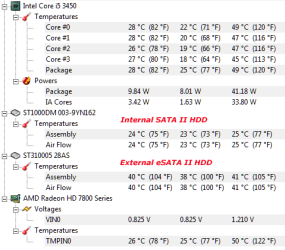
Most chips don't really heat up much and the ones that do, CPU, North Bridge, GPU, etc., they had been designed to withstand wide temperature ranges. For example, here are the temperature ranges for my system:

heat.png

The ambient temperature was around 20-22 degree Celsius. Note that the temperature for the internal hard drive is pretty close to the ambient temperature, while the external drive is running much warmer.

The CPU and the GPU on the other hand are 4-8 degree Celsius above ambient temperature, which isn't that bad. Playing some games and/or heavy use of the computer can easily push the temperature for the CPU and GPU to the 50's range, which is about 50% more than the idle temperatures.

If it's true that turning on/off the computer would damage the motherboard, using it beyond idling would downright destroy it in a very short timeframe. I for one who has some doubts that it's true...

You are correct that the HDD and motherboard is a separate issue. One the other hand, the power supply could cause damage to the HDD, even if there's no storm in your area...
 

My Computer My Computer

At a glance

Windows 7 64-bit, Windows 8.1 64-bit, OSX El ...Intel i5-3350P 3.1 GHz16 GBs GSkill SniperRadeon HD 7850
Computer type
PC/Desktop
Computer Manufacturer/Model Number
Custom built at Home
OS
Windows 7 64-bit, Windows 8.1 64-bit, OSX El Capitan, Windows 10 (VMware)
CPU
Intel i5-3350P 3.1 GHz
Motherboard
Gigabyte GA-Z77X-UP5 TH
Memory
16 GBs GSkill Sniper
Graphics Card(s)
Radeon HD 7850
Sound Card
VIA HD Audio
Monitor(s) Displays
Dell U2410 24"
Screen Resolution
1920x1200
Hard Drives
1 x Intel 520 240 GBs
1 x Seagate 1TBs SATA 2.0,
1 x Seagate 1TBs eSATA 2.0
PSU
Thermaltake 850W
Case
Antec P183
Cooling
Noctua NH-D14 Heatsink 2 x 120mm fans, 4 x 120mm case fans
Keyboard
Dell Multimedia keyboard
Mouse
Logitech Trackball
Internet Speed
28.5 Mb/s
You are correct that the HDD and motherboard is a separate issue. One the other hand, the power supply could cause damage to the HDD, even if there's no storm in your area...
Any properly designed power supply, even many years before the original IBM PC existed, could not damage hardware. Due to many functions that make damage virtually impossible.

Heat ICs to ambient temperatures above 100 degrees F (40 C) and not one IC is damaged. Many see the resulting crash. Then assume that is hardware damage. Heat only causes timing changes resulting in failed instruction processing. Cool the IC and nothing changes.

Intel processors have even operated in temperatures as high as 350 degrees F without hardware damage. Semiconductor damage meeans temperatures even higher.

How to find defective semiconductors? Operate the computer in a 100 degree F room. The timing changes causing crashes at 100 degrees F is how to identify and avert failures maybe a year later at 70 degrees F.

That is also how a defective drive might have been found before its warranty expired.

Another failure can be traceable to a defective power supply. Normal is for a defective supply to still boot and run a computer even for months. Heat and a multimeter can also identify that defect long before defective voltages eventually make a disk driver appear to be defective.

Determine what is and is not defective by executing a disk drive manufacturer's (provided for free) diagnostics. Especially informative when executed at higher ambient temperatures. And also at lower (ie 40 degree F) temperature. Temperature is a powerful tool to find defects. Unfortunately, many see the defect. Then blame temperature for what is really a marginal and slowly getting worse hardware.
 

My Computer My Computer

At a glance

XP
OS
XP
Back
Top