Does anyone have advice for using an external sound card?

Spritsailor

New member
Local time
2:21 PM
Messages
37
I was thinking of trying one to see if the sound garbling problem I experience would be alleviated with an external sound card.
 

My Computer My Computer

At a glance

Windows 7 Home Premium 64-bitIntel Core i3 2310M @ 2.10 GHz Sandy Bridge 3...4.00 GBGeneric PnP Monitor 1366 x 768 @ 60 Hz Intel ...
Computer Manufacturer/Model Number
Toshiba Satellite L745-S4210
OS
Windows 7 Home Premium 64-bit
CPU
Intel Core i3 2310M @ 2.10 GHz Sandy Bridge 32nm technology
Motherboard
Intel Corp. Base Board Product Name (CPU1)
Memory
4.00 GB
Graphics Card(s)
Generic PnP Monitor 1366 x 768 @ 60 Hz Intel HD Graphics
Sound Card
Conexant SmartAudio HD
Depends on what the "sound garbling" problem actually is.

Can you elaborate a little more on what "sound garbling" problem you have?

One comment, what sound driver are you using? As you have a Toshiba, the Toshiba provided sound driver should be used. Non vendor sound drivers, in many cases, can either not work or not work correctly.
 

My Computer My Computer

At a glance

Windows 10 64 bitIntel i7 6700K16GB Corsair DominatorIntel CPU Graphics
Computer type
PC/Desktop
Computer Manufacturer/Model Number
My Own Build
OS
Windows 10 64 bit
CPU
Intel i7 6700K
Motherboard
ASUS ROG Maximus VIII Hero
Memory
16GB Corsair Dominator
Graphics Card(s)
Intel CPU Graphics
Sound Card
RealTek
Monitor(s) Displays
27" Dell S2719dgf
Screen Resolution
2560X1440
Hard Drives
1 TB Samsung 850 EVO SSD for Win 10 Pro
500GB Samsung 850 EVO SSD for Win 10 Insider
2 TB drive for backup
PSU
EVGA Supernova 750G2
Case
BeQuiet Silent Base 600
Cooling
Deepcool Captain 120EX
Keyboard
Microsoft Wireless 2000
Mouse
Microsoft wireless
Internet Speed
100 MB/sec (Cable)
Antivirus
Microsoft Defender and Malwarebytes
Browser
Edge/Firefox
Other Info
Cakewalk (Sonar) by BandLab and Studio One 4.1 Pro recording studio software. MOTU 896Mk3 Hybrid recording interface, Frontier Tranzport wireless control unit, Behringer X-Touch Control Surface.
Five USB connected optical drives for CD Audio production using Nero BurningROM
Depends on what the "sound garbling" problem actually is.

Can you elaborate a little more on what "sound garbling" problem you have?

One comment, what sound driver are you using? As you have a Toshiba, the Toshiba provided sound driver should be used. Non vendor sound drivers, in many cases, can either not work or not work correctly.

The recorded music sounds perfect for 30 seconds to 2 minutes, then sounds like it's underwater and never recovers. Doesn't matter if the sound recorder that came with my computer is used or the Roxio program......the source doesn't matter......can be a microphone, youtube from my Galaxy or an external mudic recorder.
 

My Computer My Computer

At a glance

Windows 7 Home Premium 64-bitIntel Core i3 2310M @ 2.10 GHz Sandy Bridge 3...4.00 GBGeneric PnP Monitor 1366 x 768 @ 60 Hz Intel ...
Computer Manufacturer/Model Number
Toshiba Satellite L745-S4210
OS
Windows 7 Home Premium 64-bit
CPU
Intel Core i3 2310M @ 2.10 GHz Sandy Bridge 32nm technology
Motherboard
Intel Corp. Base Board Product Name (CPU1)
Memory
4.00 GB
Graphics Card(s)
Generic PnP Monitor 1366 x 768 @ 60 Hz Intel HD Graphics
Sound Card
Conexant SmartAudio HD
Do you have the correct Toshiba sound driver, as I mentioned?

Also what other programs do you have running? Anything such as skype or some other program that also uses audio?


(Did you get an snow from the storm? My wife is from the south of Clarksburg).
 

My Computer My Computer

At a glance

Windows 10 64 bitIntel i7 6700K16GB Corsair DominatorIntel CPU Graphics
Computer type
PC/Desktop
Computer Manufacturer/Model Number
My Own Build
OS
Windows 10 64 bit
CPU
Intel i7 6700K
Motherboard
ASUS ROG Maximus VIII Hero
Memory
16GB Corsair Dominator
Graphics Card(s)
Intel CPU Graphics
Sound Card
RealTek
Monitor(s) Displays
27" Dell S2719dgf
Screen Resolution
2560X1440
Hard Drives
1 TB Samsung 850 EVO SSD for Win 10 Pro
500GB Samsung 850 EVO SSD for Win 10 Insider
2 TB drive for backup
PSU
EVGA Supernova 750G2
Case
BeQuiet Silent Base 600
Cooling
Deepcool Captain 120EX
Keyboard
Microsoft Wireless 2000
Mouse
Microsoft wireless
Internet Speed
100 MB/sec (Cable)
Antivirus
Microsoft Defender and Malwarebytes
Browser
Edge/Firefox
Other Info
Cakewalk (Sonar) by BandLab and Studio One 4.1 Pro recording studio software. MOTU 896Mk3 Hybrid recording interface, Frontier Tranzport wireless control unit, Behringer X-Touch Control Surface.
Five USB connected optical drives for CD Audio production using Nero BurningROM
Do you have the correct Toshiba sound driver, as I mentioned?

Also what other programs do you have running? Anything such as skype or some other program that also uses audio?


(Did you get an snow from the storm? My wife is from the south of Clarksburg).


I have the sound card and everything else that came with the computer. It's all factory equipment. I haven't downloaded Skype. No other program uses audio. From what I gather, the "sound card" is part of the processor.

Where I live in Parkersburg we didn't get any snow, except for a few flakes. Elkins got pounded and the power went out with two feet of snow there. Clarksburg made it through with alot of rain.
 

My Computer My Computer

At a glance

Windows 7 Home Premium 64-bitIntel Core i3 2310M @ 2.10 GHz Sandy Bridge 3...4.00 GBGeneric PnP Monitor 1366 x 768 @ 60 Hz Intel ...
Computer Manufacturer/Model Number
Toshiba Satellite L745-S4210
OS
Windows 7 Home Premium 64-bit
CPU
Intel Core i3 2310M @ 2.10 GHz Sandy Bridge 32nm technology
Motherboard
Intel Corp. Base Board Product Name (CPU1)
Memory
4.00 GB
Graphics Card(s)
Generic PnP Monitor 1366 x 768 @ 60 Hz Intel HD Graphics
Sound Card
Conexant SmartAudio HD
The sound "card" is an IC chip on the motherboard, its not part of the CPU.

Go to the Device Manager and display the sound device. It should be the actual hardware device, such as RealTek, IDT, VIA, etc. If it says "HD Audio Codec" that indicates the generic Windows installed sound driver and that could be the problem. If this is the case you will have to get the correct Toshiba supplied sound driver and install that, as a first step.


If its listed as the correct device in the Device Manager, RIGHT click on the entry for the sound device to highlight it and then LEFT click "Uninstall". DO NOT check the box to also uninstall the drivers. Then restart the PC and when Windows starts it will detect and reinstall the sound. This fixes a lot of flakey problems.

Thanks for the update on Clarksburg area.
 

My Computer My Computer

At a glance

Windows 10 64 bitIntel i7 6700K16GB Corsair DominatorIntel CPU Graphics
Computer type
PC/Desktop
Computer Manufacturer/Model Number
My Own Build
OS
Windows 10 64 bit
CPU
Intel i7 6700K
Motherboard
ASUS ROG Maximus VIII Hero
Memory
16GB Corsair Dominator
Graphics Card(s)
Intel CPU Graphics
Sound Card
RealTek
Monitor(s) Displays
27" Dell S2719dgf
Screen Resolution
2560X1440
Hard Drives
1 TB Samsung 850 EVO SSD for Win 10 Pro
500GB Samsung 850 EVO SSD for Win 10 Insider
2 TB drive for backup
PSU
EVGA Supernova 750G2
Case
BeQuiet Silent Base 600
Cooling
Deepcool Captain 120EX
Keyboard
Microsoft Wireless 2000
Mouse
Microsoft wireless
Internet Speed
100 MB/sec (Cable)
Antivirus
Microsoft Defender and Malwarebytes
Browser
Edge/Firefox
Other Info
Cakewalk (Sonar) by BandLab and Studio One 4.1 Pro recording studio software. MOTU 896Mk3 Hybrid recording interface, Frontier Tranzport wireless control unit, Behringer X-Touch Control Surface.
Five USB connected optical drives for CD Audio production using Nero BurningROM
The sound "card" is an IC chip on the motherboard, its not part of the CPU.

Go to the Device Manager and display the sound device. It should be the actual hardware device, such as RealTek, IDT, VIA, etc. If it says "HD Audio Codec" that indicates the generic Windows installed sound driver and that could be the problem. If this is the case you will have to get the correct Toshiba supplied sound driver and install that, as a first step.


If its listed as the correct device in the Device Manager, RIGHT click on the entry for the sound device to highlight it and then LEFT click "Uninstall". DO NOT check the box to also uninstall the drivers. Then restart the PC and when Windows starts it will detect and reinstall the sound. This fixes a lot of flakey problems.

Thanks for the update on Clarksburg area.


Mine says "Conexant SmartAudio HD" and "Intel(R) Display Audio". Should I proceed with the uninstall?
 

My Computer My Computer

At a glance

Windows 7 Home Premium 64-bitIntel Core i3 2310M @ 2.10 GHz Sandy Bridge 3...4.00 GBGeneric PnP Monitor 1366 x 768 @ 60 Hz Intel ...
Computer Manufacturer/Model Number
Toshiba Satellite L745-S4210
OS
Windows 7 Home Premium 64-bit
CPU
Intel Core i3 2310M @ 2.10 GHz Sandy Bridge 32nm technology
Motherboard
Intel Corp. Base Board Product Name (CPU1)
Memory
4.00 GB
Graphics Card(s)
Generic PnP Monitor 1366 x 768 @ 60 Hz Intel HD Graphics
Sound Card
Conexant SmartAudio HD
The Conexant is the PC audio, you can do the uninstall on it, The Intel display audio is for HDMI audio.
 

My Computer My Computer

At a glance

Windows 10 64 bitIntel i7 6700K16GB Corsair DominatorIntel CPU Graphics
Computer type
PC/Desktop
Computer Manufacturer/Model Number
My Own Build
OS
Windows 10 64 bit
CPU
Intel i7 6700K
Motherboard
ASUS ROG Maximus VIII Hero
Memory
16GB Corsair Dominator
Graphics Card(s)
Intel CPU Graphics
Sound Card
RealTek
Monitor(s) Displays
27" Dell S2719dgf
Screen Resolution
2560X1440
Hard Drives
1 TB Samsung 850 EVO SSD for Win 10 Pro
500GB Samsung 850 EVO SSD for Win 10 Insider
2 TB drive for backup
PSU
EVGA Supernova 750G2
Case
BeQuiet Silent Base 600
Cooling
Deepcool Captain 120EX
Keyboard
Microsoft Wireless 2000
Mouse
Microsoft wireless
Internet Speed
100 MB/sec (Cable)
Antivirus
Microsoft Defender and Malwarebytes
Browser
Edge/Firefox
Other Info
Cakewalk (Sonar) by BandLab and Studio One 4.1 Pro recording studio software. MOTU 896Mk3 Hybrid recording interface, Frontier Tranzport wireless control unit, Behringer X-Touch Control Surface.
Five USB connected optical drives for CD Audio production using Nero BurningROM
The Conexant is the PC audio, you can do the uninstall on it, The Intel display audio is for HDMI audio.

I just tried it and my computer told me it reinstalled the sound card. I recorded music at various volumes and got the same result, except now the recorded music sounds muddled and under water the entire time, not that it makes any difference!
 

My Computer My Computer

At a glance

Windows 7 Home Premium 64-bitIntel Core i3 2310M @ 2.10 GHz Sandy Bridge 3...4.00 GBGeneric PnP Monitor 1366 x 768 @ 60 Hz Intel ...
Computer Manufacturer/Model Number
Toshiba Satellite L745-S4210
OS
Windows 7 Home Premium 64-bit
CPU
Intel Core i3 2310M @ 2.10 GHz Sandy Bridge 32nm technology
Motherboard
Intel Corp. Base Board Product Name (CPU1)
Memory
4.00 GB
Graphics Card(s)
Generic PnP Monitor 1366 x 768 @ 60 Hz Intel HD Graphics
Sound Card
Conexant SmartAudio HD
Do you have any "Sound Enhancements" enabled. My RealTek and many others have some options for enhancements such as echo, reverb, chorus.

"Recorded music" is bad. What happens if you play a commercial audio CD? Or some other audio from the internet?

Also, what program are you using to record, and what are you recording?
 

My Computer My Computer

At a glance

Windows 10 64 bitIntel i7 6700K16GB Corsair DominatorIntel CPU Graphics
Computer type
PC/Desktop
Computer Manufacturer/Model Number
My Own Build
OS
Windows 10 64 bit
CPU
Intel i7 6700K
Motherboard
ASUS ROG Maximus VIII Hero
Memory
16GB Corsair Dominator
Graphics Card(s)
Intel CPU Graphics
Sound Card
RealTek
Monitor(s) Displays
27" Dell S2719dgf
Screen Resolution
2560X1440
Hard Drives
1 TB Samsung 850 EVO SSD for Win 10 Pro
500GB Samsung 850 EVO SSD for Win 10 Insider
2 TB drive for backup
PSU
EVGA Supernova 750G2
Case
BeQuiet Silent Base 600
Cooling
Deepcool Captain 120EX
Keyboard
Microsoft Wireless 2000
Mouse
Microsoft wireless
Internet Speed
100 MB/sec (Cable)
Antivirus
Microsoft Defender and Malwarebytes
Browser
Edge/Firefox
Other Info
Cakewalk (Sonar) by BandLab and Studio One 4.1 Pro recording studio software. MOTU 896Mk3 Hybrid recording interface, Frontier Tranzport wireless control unit, Behringer X-Touch Control Surface.
Five USB connected optical drives for CD Audio production using Nero BurningROM
Do you have any "Sound Enhancements" enabled. My RealTek and many others have some options for enhancements such as echo, reverb, chorus.

"Recorded music" is bad. What happens if you play a commercial audio CD? Or some other audio from the internet?

Also, what program are you using to record, and what are you recording?

There are no sound enhancements that I am aware of. If I just listen to music it sounds perfect. When I try recording on this Toshiba Satellite with the "sound recorder" or another program like Roxio it gets garbled. That same Roxio program on my old computer recorded beautifully. I am recording music from either Youtube or my Zoom recorder I use to record live music. Played through my stereo that Zoom sounds perfect. When I record it on my computer it gets garbled.
 

My Computer My Computer

At a glance

Windows 7 Home Premium 64-bitIntel Core i3 2310M @ 2.10 GHz Sandy Bridge 3...4.00 GBGeneric PnP Monitor 1366 x 768 @ 60 Hz Intel ...
Computer Manufacturer/Model Number
Toshiba Satellite L745-S4210
OS
Windows 7 Home Premium 64-bit
CPU
Intel Core i3 2310M @ 2.10 GHz Sandy Bridge 32nm technology
Motherboard
Intel Corp. Base Board Product Name (CPU1)
Memory
4.00 GB
Graphics Card(s)
Generic PnP Monitor 1366 x 768 @ 60 Hz Intel HD Graphics
Sound Card
Conexant SmartAudio HD
OK. So its just recorded music that is bad.

In the Sound Panel, Recording section. You should have Stereo Mix or System Mixer (both are the same). Doubleclick on that and it will bring up the Stereo Mix (or whatever yours is called) panel. In mine there is an enhancements tab (section) that enhancements can be enabled or disabled. Check yours to see if there is something there.
 

My Computer My Computer

At a glance

Windows 10 64 bitIntel i7 6700K16GB Corsair DominatorIntel CPU Graphics
Computer type
PC/Desktop
Computer Manufacturer/Model Number
My Own Build
OS
Windows 10 64 bit
CPU
Intel i7 6700K
Motherboard
ASUS ROG Maximus VIII Hero
Memory
16GB Corsair Dominator
Graphics Card(s)
Intel CPU Graphics
Sound Card
RealTek
Monitor(s) Displays
27" Dell S2719dgf
Screen Resolution
2560X1440
Hard Drives
1 TB Samsung 850 EVO SSD for Win 10 Pro
500GB Samsung 850 EVO SSD for Win 10 Insider
2 TB drive for backup
PSU
EVGA Supernova 750G2
Case
BeQuiet Silent Base 600
Cooling
Deepcool Captain 120EX
Keyboard
Microsoft Wireless 2000
Mouse
Microsoft wireless
Internet Speed
100 MB/sec (Cable)
Antivirus
Microsoft Defender and Malwarebytes
Browser
Edge/Firefox
Other Info
Cakewalk (Sonar) by BandLab and Studio One 4.1 Pro recording studio software. MOTU 896Mk3 Hybrid recording interface, Frontier Tranzport wireless control unit, Behringer X-Touch Control Surface.
Five USB connected optical drives for CD Audio production using Nero BurningROM
OK. So its just recorded music that is bad.

In the Sound Panel, Recording section. You should have Stereo Mix or System Mixer (both are the same). Doubleclick on that and it will bring up the Stereo Mix (or whatever yours is called) panel. In mine there is an enhancements tab (section) that enhancements can be enabled or disabled. Check yours to see if there is something there.


There is only a Stereo Mixer on the Playback. There is no Stereo Mixer on the Recording Section. The only thing I get when I click on the microphone in that section is a way to configure the speech recognition stuff. I did click on properties and see that there is a Microphone Boost in that section. I turned down the microphone boost from 24 dB to 12 dB.
 

My Computer My Computer

At a glance

Windows 7 Home Premium 64-bitIntel Core i3 2310M @ 2.10 GHz Sandy Bridge 3...4.00 GBGeneric PnP Monitor 1366 x 768 @ 60 Hz Intel ...
Computer Manufacturer/Model Number
Toshiba Satellite L745-S4210
OS
Windows 7 Home Premium 64-bit
CPU
Intel Core i3 2310M @ 2.10 GHz Sandy Bridge 32nm technology
Motherboard
Intel Corp. Base Board Product Name (CPU1)
Memory
4.00 GB
Graphics Card(s)
Generic PnP Monitor 1366 x 768 @ 60 Hz Intel HD Graphics
Sound Card
Conexant SmartAudio HD
I tried recording again with the Microphone boost down and this time it came out crystal clear for 25 seconds, then sounded underwater/garbled again.
 

My Computer My Computer

At a glance

Windows 7 Home Premium 64-bitIntel Core i3 2310M @ 2.10 GHz Sandy Bridge 3...4.00 GBGeneric PnP Monitor 1366 x 768 @ 60 Hz Intel ...
Computer Manufacturer/Model Number
Toshiba Satellite L745-S4210
OS
Windows 7 Home Premium 64-bit
CPU
Intel Core i3 2310M @ 2.10 GHz Sandy Bridge 32nm technology
Motherboard
Intel Corp. Base Board Product Name (CPU1)
Memory
4.00 GB
Graphics Card(s)
Generic PnP Monitor 1366 x 768 @ 60 Hz Intel HD Graphics
Sound Card
Conexant SmartAudio HD
There should not be a Stereo Mixer on the Playback. If there is there is a major problem. The Default Playback device should be set to your "Speakers" (the Connexant integrated audio device). However, you should have Stereo Mixer in the Recording section. Bring up the Sound panel/Recording section and then RIGHT click in an empty space in the panel and then check the boxes to show disabled devices and disabled devices. If the Stero Mixer is now shown, enable it and make it the default recording device.
 

My Computer My Computer

At a glance

Windows 10 64 bitIntel i7 6700K16GB Corsair DominatorIntel CPU Graphics
Computer type
PC/Desktop
Computer Manufacturer/Model Number
My Own Build
OS
Windows 10 64 bit
CPU
Intel i7 6700K
Motherboard
ASUS ROG Maximus VIII Hero
Memory
16GB Corsair Dominator
Graphics Card(s)
Intel CPU Graphics
Sound Card
RealTek
Monitor(s) Displays
27" Dell S2719dgf
Screen Resolution
2560X1440
Hard Drives
1 TB Samsung 850 EVO SSD for Win 10 Pro
500GB Samsung 850 EVO SSD for Win 10 Insider
2 TB drive for backup
PSU
EVGA Supernova 750G2
Case
BeQuiet Silent Base 600
Cooling
Deepcool Captain 120EX
Keyboard
Microsoft Wireless 2000
Mouse
Microsoft wireless
Internet Speed
100 MB/sec (Cable)
Antivirus
Microsoft Defender and Malwarebytes
Browser
Edge/Firefox
Other Info
Cakewalk (Sonar) by BandLab and Studio One 4.1 Pro recording studio software. MOTU 896Mk3 Hybrid recording interface, Frontier Tranzport wireless control unit, Behringer X-Touch Control Surface.
Five USB connected optical drives for CD Audio production using Nero BurningROM
There should not be a Stereo Mixer on the Playback. If there is there is a major problem. The Default Playback device should be set to your "Speakers" (the Connexant integrated audio device). However, you should have Stereo Mixer in the Recording section. Bring up the Sound panel/Recording section and then RIGHT click in an empty space in the panel and then check the boxes to show disabled devices and disabled devices. If the Stero Mixer is now shown, enable it and make it the default recording device.


I have it up now....the choices in recording section properties is General, which says it's working normally, Listen, which is set to "default playback device" with "speakers conexant smartaudio HD" as an alternative. It's set on "default playback device". Levels where the mic and boost are located and Advanced where I see there is an "audio enhancements" box that is checked. NO stereo options in the Recording section.
 

My Computer My Computer

At a glance

Windows 7 Home Premium 64-bitIntel Core i3 2310M @ 2.10 GHz Sandy Bridge 3...4.00 GBGeneric PnP Monitor 1366 x 768 @ 60 Hz Intel ...
Computer Manufacturer/Model Number
Toshiba Satellite L745-S4210
OS
Windows 7 Home Premium 64-bit
CPU
Intel Core i3 2310M @ 2.10 GHz Sandy Bridge 32nm technology
Motherboard
Intel Corp. Base Board Product Name (CPU1)
Memory
4.00 GB
Graphics Card(s)
Generic PnP Monitor 1366 x 768 @ 60 Hz Intel HD Graphics
Sound Card
Conexant SmartAudio HD
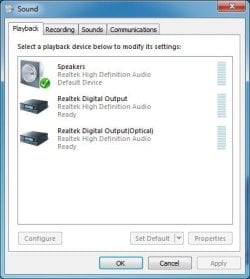
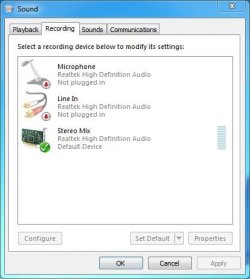
Here is what I have for the Playback and Recording panels. You should have something close to these.
 

Attachments

  • Playback.JPG
    Playback.JPG
    32 KB · Views: 3
  • Capture.JPG
    Capture.JPG
    31.1 KB · Views: 3

My Computer My Computer

At a glance

Windows 10 64 bitIntel i7 6700K16GB Corsair DominatorIntel CPU Graphics
Computer type
PC/Desktop
Computer Manufacturer/Model Number
My Own Build
OS
Windows 10 64 bit
CPU
Intel i7 6700K
Motherboard
ASUS ROG Maximus VIII Hero
Memory
16GB Corsair Dominator
Graphics Card(s)
Intel CPU Graphics
Sound Card
RealTek
Monitor(s) Displays
27" Dell S2719dgf
Screen Resolution
2560X1440
Hard Drives
1 TB Samsung 850 EVO SSD for Win 10 Pro
500GB Samsung 850 EVO SSD for Win 10 Insider
2 TB drive for backup
PSU
EVGA Supernova 750G2
Case
BeQuiet Silent Base 600
Cooling
Deepcool Captain 120EX
Keyboard
Microsoft Wireless 2000
Mouse
Microsoft wireless
Internet Speed
100 MB/sec (Cable)
Antivirus
Microsoft Defender and Malwarebytes
Browser
Edge/Firefox
Other Info
Cakewalk (Sonar) by BandLab and Studio One 4.1 Pro recording studio software. MOTU 896Mk3 Hybrid recording interface, Frontier Tranzport wireless control unit, Behringer X-Touch Control Surface.
Five USB connected optical drives for CD Audio production using Nero BurningROM
Here is what I have for the Playback and Recording panels. You should have something close to these.


All I have on mine are speakers and microphone. No realtek or stereo mix.
 

My Computer My Computer

At a glance

Windows 7 Home Premium 64-bitIntel Core i3 2310M @ 2.10 GHz Sandy Bridge 3...4.00 GBGeneric PnP Monitor 1366 x 768 @ 60 Hz Intel ...
Computer Manufacturer/Model Number
Toshiba Satellite L745-S4210
OS
Windows 7 Home Premium 64-bit
CPU
Intel Core i3 2310M @ 2.10 GHz Sandy Bridge 32nm technology
Motherboard
Intel Corp. Base Board Product Name (CPU1)
Memory
4.00 GB
Graphics Card(s)
Generic PnP Monitor 1366 x 768 @ 60 Hz Intel HD Graphics
Sound Card
Conexant SmartAudio HD

My Computer My Computer

At a glance

Windows 10 64 bitIntel i7 6700K16GB Corsair DominatorIntel CPU Graphics
Computer type
PC/Desktop
Computer Manufacturer/Model Number
My Own Build
OS
Windows 10 64 bit
CPU
Intel i7 6700K
Motherboard
ASUS ROG Maximus VIII Hero
Memory
16GB Corsair Dominator
Graphics Card(s)
Intel CPU Graphics
Sound Card
RealTek
Monitor(s) Displays
27" Dell S2719dgf
Screen Resolution
2560X1440
Hard Drives
1 TB Samsung 850 EVO SSD for Win 10 Pro
500GB Samsung 850 EVO SSD for Win 10 Insider
2 TB drive for backup
PSU
EVGA Supernova 750G2
Case
BeQuiet Silent Base 600
Cooling
Deepcool Captain 120EX
Keyboard
Microsoft Wireless 2000
Mouse
Microsoft wireless
Internet Speed
100 MB/sec (Cable)
Antivirus
Microsoft Defender and Malwarebytes
Browser
Edge/Firefox
Other Info
Cakewalk (Sonar) by BandLab and Studio One 4.1 Pro recording studio software. MOTU 896Mk3 Hybrid recording interface, Frontier Tranzport wireless control unit, Behringer X-Touch Control Surface.
Five USB connected optical drives for CD Audio production using Nero BurningROM
Right click an area of the sound/record window and select show hidden or disabled items ,
I'm using my phone to post so I can't give you the exact terms ,but you should see similar when you right click,
 

My Computer My Computer

At a glance

Microsoft Windows 7 Home Premium 64-bit 7600IIx4 amd athelon 635 processor2x2gbati radeon HD 5450
Computer Manufacturer/Model Number
Hewlett packard/p6512uk
OS
Microsoft Windows 7 Home Premium 64-bit 7600
CPU
IIx4 amd athelon 635 processor
Motherboard
FOXCONN 2AA9
Memory
2x2gb
Graphics Card(s)
ati radeon HD 5450
Sound Card
(1) Realtek High Definition Audio (2) AMD High Definition
Monitor(s) Displays
samsung lcd tv 32"
Screen Resolution
1360x 768
Hard Drives
(1) WDC WD10 01FAES-60Z2A0 SATA Disk Device (2) Maxtor OneTouch USB Device (3) ST310003 33AS USB Device (4) WD My Book 1111 USB Device
PSU
?
Cooling
air!
Keyboard
wireless hp
Mouse
wireless Hp,optical
Internet Speed
1.10mb/s
Antivirus
MSE
Browser
Firefox
Back
Top