Can I Install Win 7 On My Old Computer

computernewb

New member
I have an older computer and was wondering if I can run Windows 7. I already have run the Upgrade Advisor and everything seemed to be OK except for my graphics controller (Intel 82845G/GL/GE/PE/GV) saying the driver installed is not compatible. Can I install something else so that it will be compatible?

I'm also thinking that it just might be time to get a better computer, as I'm wondering that even if I can get Win 7 going on my current setup, it may not be optimized correctly, run sluggish, any thoughts?

My specs:

Compaq Evo D310 Tower
P4 2.4 Ghz
Win XP Pro
1 GB Ram
32 bit
 

My Computer

OS
WinXP Pro 32bit

My Computer

Computer Manufacturer/Model Number
Custom built
OS
Windows 7 Ultimate 64 bit
CPU
AMD Phenom II X4 965 Black Edition
Motherboard
Gigabyte GA-MA790X-DS4
Memory
GSkill 4 X 2 GB PC 8500
Graphics Card(s)
XFX Radeon HD 6790 D
Sound Card
On board RealTek HD
Monitor(s) Displays
Dual monitors:Samsung SyncMaster S20B300
Screen Resolution
1600 X 900
Hard Drives
Seagate Barracuda 1TB (primary)
Seagate Barracuda 2 X 320 GB
PSU
Ultra X4 750 watt fully modular
Case
Thermaltake Overseer RX 1 full tower
Cooling
Core-Contact 92 mm CPU Cooler
Keyboard
Logitech G510
Mouse
Razor DeathAdder
Internet Speed
50/5 Mbps UL/DL
Other Info
Optical: Super Muliti DVD burner w/lightscribe, Hauppauge WinTV HVR-1800
Buy a new video PCI/AGP/PCI-E video addin card and you should be all set.
 

My Computer

Computer type
PC/Desktop
Computer Manufacturer/Model Number
Lenovo IdeaCenter 450
OS
Windows 10 Pro X64
CPU
Intel Quad Core i7-4770 @ 3.4Ghz
Memory
16.0GB PC3-12800 DDR3 SDRAM 1600 MHz
Graphics Card(s)
Intel Integrated HD Graphics
Sound Card
Realtek HD Audio
Monitor(s) Displays
HP 22" LCD
Screen Resolution
1680 x 1050
Hard Drives
250GB Samsung EVO SATA-3 SSD
2TB Seagate ST2000DM001 SATA-2
1.5TB Seagate ST3150041AS SATA
Keyboard
Dell USB
Mouse
Lenovo USB
Internet Speed
Cable via Road Runner 3MB Upload, 30MB Download
Antivirus
Windows Defender, MBAM Pro, MBAE
Browser
Seamonkey
Other Info
UEFI/GPT
PLDS DVD-RW DH16AERSH
You can use this Intel utility to find your driver.

Intel® Driver Update Utility
It says my graphics driver is current.

It says it`s current because it`s current for the system you now have installed. Will you be wiping XP out ? You should create another partition and install W7 on that until you`re sure you`re happy with it. No sense wiping out what you have......yet. Is that all the ram the motherboard supports ? You should max it out b4 you install. All you need is an AGP video card with at least 512 MB memory. It does have an AGP slot doesn`t it ?

Post a snip of disk management now, so we can advise you.
 

My Computer

Computer type
PC/Desktop
Computer Manufacturer/Model Number
Skylake Special #666
OS
Windows 10 Pro x64
CPU
Intel Core i7 6700K
Motherboard
Asus Sabertooth Z170 Mark 1
Memory
GSkill TridentZ RGB 16GB 3600 16-16-16-36
Graphics Card(s)
EVGA GTX 980 Ti SC x2
Sound Card
Realtek High Definition
Monitor(s) Displays
AOC G2460PG
Screen Resolution
1920 x 1080 144Hz
Hard Drives
Samsung 860 Pro 256GB, Seagate Barracuda 4TB x2
PSU
EVGA 1000 P2, EVGA White Custom Braided Cables
Case
Corsair Vengeance C70 Gunmetal Black
Cooling
Corsair H100i v2, Corsair ML120 x2, Thermal Grizzly Kryonaut
Keyboard
Logitech G910 Orion Spectrum
Mouse
Logitech G700s
Internet Speed
Verizon Fios Quantum Gateway 75/75
Antivirus
Windows Defender, Malwarebytes Free 3.8.3
Browser
Chrome
Other Info
Corsair SP120 x4, LG Blu-ray Drive, Durabrand HT-395 100 Watt Dolby Digital Amp, Corsair H2100 Wireless 7.1 Headset
You can use this Intel utility to find your driver.

Intel® Driver Update Utility
It says my graphics driver is current.

It says it`s current because it`s current for the system you now have installed. Will you be wiping XP out ? You should create another partition and install W7 on that until you`re sure you`re happy with it. No sense wiping out what you have......yet. Is that all the ram the motherboard supports ? You should max it out b4 you install. All you need is an AGP video card with at least 512 MB memory. It does have an AGP slot doesn`t it ?

Post a snip of disk management now, so we can advise you.

I'll probably wipe XP out, wouldn't having 2 OS's cause it to be slower? I'll definitely take your advice and create win 7 on a second partition first to make sure though.

Motherboard can hold 2 GB ram whereas I only have 1 GB right now, I'll upgrade first.

Yes it has an AGP slot, I'll buy a video card for it.

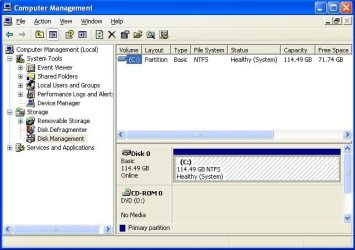
"snip of disk management" ......not sure what you mean by that, I went to the disk management and it said basic, NTFS, healthy, 115GB with 70GB free
 

My Computer

OS
WinXP Pro 32bit
Having 2 OS`s will not slow it down. Remember you`re just testing here, don`t wipe out XP. Post the shot using paint or the snipping tool.

Partition Wizard Bootable cd is the best tool ( IMO ) to make and modify partitions.
http://partitionwizard.com/partition-wizard-bootable-cd.html

here`s an example.
 
Last edited:

My Computer

Computer type
PC/Desktop
Computer Manufacturer/Model Number
Skylake Special #666
OS
Windows 10 Pro x64
CPU
Intel Core i7 6700K
Motherboard
Asus Sabertooth Z170 Mark 1
Memory
GSkill TridentZ RGB 16GB 3600 16-16-16-36
Graphics Card(s)
EVGA GTX 980 Ti SC x2
Sound Card
Realtek High Definition
Monitor(s) Displays
AOC G2460PG
Screen Resolution
1920 x 1080 144Hz
Hard Drives
Samsung 860 Pro 256GB, Seagate Barracuda 4TB x2
PSU
EVGA 1000 P2, EVGA White Custom Braided Cables
Case
Corsair Vengeance C70 Gunmetal Black
Cooling
Corsair H100i v2, Corsair ML120 x2, Thermal Grizzly Kryonaut
Keyboard
Logitech G910 Orion Spectrum
Mouse
Logitech G700s
Internet Speed
Verizon Fios Quantum Gateway 75/75
Antivirus
Windows Defender, Malwarebytes Free 3.8.3
Browser
Chrome
Other Info
Corsair SP120 x4, LG Blu-ray Drive, Durabrand HT-395 100 Watt Dolby Digital Amp, Corsair H2100 Wireless 7.1 Headset
I think 82845 will run in Win7 so I'd install it first to see if you get a driver via installer or WIndows Updates that gives you the screen res you desire. If not then you can buy a card.

Let us know what happens.
 
Having 2 OS`s will not slow it down. Remember you`re just testing here, don`t wipe out XP. Post the shot using paint or the snipping tool.

Partition Wizard Bootable cd is the best tool ( IMO ) to make and modify partitions.
Partition Wizard Bootable CD allows user to manage partition directly with partition manager bootable CD.

here`s an example.

Here's the shot, I also might try the above posters suggestion and just try to install win 7 and see if it works as it is right now.
 

Attachments

  • dm.JPG
    dm.JPG
    57.6 KB · Views: 7

My Computer

OS
WinXP Pro 32bit
Use free Partition Wizard bootable CD burned to CD using WIndows Image Burner or Imgburn, boot, rightclick C to Resize to the size you want to make Win7, Click OK, then Apply. Partition Wizard Move/Resize Partition Video Help.

I'd suggest 40-50gb depending upon how many programs you want to test run it with and whether you want to keep your files on 7 or access them from the XP partition.

Boot the Win7 installer to Clean Install Windows 7 to the partition you made, which will configure a Dual Boot menu to choose the OS you want.

Have your wireless or ethernet driver for Win7 or Vista on a stick or CD so you can get online quickly to install all Important and Optional Windows Updates after enabling Automatically get recommended drivers and updates for your hardware.

Any drivers which are then missing in Device Manager should be imported from the Support Downloads webpage for the PC or device model. YOu can also google the device make/model and Win7 driver, or report back what's missing and we'll help you find it.

If you decide you want to keep Win7 and remove XP we'll help you move the boot files to Win7 and even recover the disk space after deleting XP as shown in Partition Recover Space Used by an Older OS
 
Go for it, and when you`re done you`ll see how sluggish it will run and you`ll say, why did I do that. You should really reconsider and I`m sure Greg will agree with me.

1 more thing, how you gonna activate it ?
 

My Computer

Computer type
PC/Desktop
Computer Manufacturer/Model Number
Skylake Special #666
OS
Windows 10 Pro x64
CPU
Intel Core i7 6700K
Motherboard
Asus Sabertooth Z170 Mark 1
Memory
GSkill TridentZ RGB 16GB 3600 16-16-16-36
Graphics Card(s)
EVGA GTX 980 Ti SC x2
Sound Card
Realtek High Definition
Monitor(s) Displays
AOC G2460PG
Screen Resolution
1920 x 1080 144Hz
Hard Drives
Samsung 860 Pro 256GB, Seagate Barracuda 4TB x2
PSU
EVGA 1000 P2, EVGA White Custom Braided Cables
Case
Corsair Vengeance C70 Gunmetal Black
Cooling
Corsair H100i v2, Corsair ML120 x2, Thermal Grizzly Kryonaut
Keyboard
Logitech G910 Orion Spectrum
Mouse
Logitech G700s
Internet Speed
Verizon Fios Quantum Gateway 75/75
Antivirus
Windows Defender, Malwarebytes Free 3.8.3
Browser
Chrome
Other Info
Corsair SP120 x4, LG Blu-ray Drive, Durabrand HT-395 100 Watt Dolby Digital Amp, Corsair H2100 Wireless 7.1 Headset
I've had Win7 run fast on P4 with 1gb RAM before. I'd just like to know if 82845 GPU will give a good resolution nowadays. I believe it finally got a driver other than Standard VGA, or it's XP driver will function installed in XP mode. So I'm willing to work with you and others to see how it sorts out since you like AddRam's idea to test it first.

You'll need to buy a license if you decide to keep it.
 
Back
Top