Anyone know how to revirginise MC?

mcnaugha

New member
Local time
11:15 AM
Messages
8
Location
Glasgow, U.K.
I upgraded Vista Ultimate 64-bit to 7 RTM and now MC crashes when accessing the TV signal from my Hauppauge TV Tuner.

I performed a clean install on a separate partition and everything works fine.

I have ran Hauppauge's driver cleaner and then reinstalled the latest driver and still get the same problem.

Hauppauge's own Win TV v7 works provided I do not use MC first. MC seems to crash the driver itself or something similar and the Win TV v7 also hangs upon accessing the signal. My signal is coming in via composite and I was advised the latest Hauppauge driver did receive changes related to composite input and Windows 7.

I reckon I need to clean out old settings or cache files relating to MC so that it is essentially back to the way it would be on a clean install. Perhaps this may cure this illness. Anyone got other suggestions or advice on how to reset MC?

Thanks in advance.
 

My Computer My Computer

At a glance

Windows 7 Ultimate 64-bit RTMIntel Core i7 9406GB DDR3 1600MHzSparkle 9600GT 512MB Silent
OS
Windows 7 Ultimate 64-bit RTM
CPU
Intel Core i7 940
Motherboard
ASUS P6T Deluxe
Memory
6GB DDR3 1600MHz
Graphics Card(s)
Sparkle 9600GT 512MB Silent
Sound Card
Auzentech X-Fi Prelude 7.1
Monitor(s) Displays
Sony KDL-40W2000
Hard Drives
2 x Seagate 7200.11 500GB in RAID 0
PSU
Gigabyte Odin
Case
Thermaltake Tenor
Cooling
Intel standard, case-included fans
I would think that going to Control panel (all items)/Programs and Features/Turn Win. Features on off. Turn off Media Center. Reboot and then restore. See if that will delete the associated files. Haven't tried it, so let us know if it works.

Gary
 

My Computer My Computer

At a glance

Vista Ult 64 bit Seven Ult RTM x64Intel Core2 Quad Q6600 2.40 gigahertzCrucial Ballistix 4x2GB PC2 6400NVIDIA GeForce 8600 GTS 256 MB
Computer Manufacturer/Model Number
Dell XPS420
OS
Vista Ult 64 bit Seven Ult RTM x64
CPU
Intel Core2 Quad Q6600 2.40 gigahertz
Memory
Crucial Ballistix 4x2GB PC2 6400
Graphics Card(s)
NVIDIA GeForce 8600 GTS 256 MB
Sound Card
Creative SB X-Fi audio
Monitor(s) Displays
HP w2207 + HPvs15
Screen Resolution
1680x1050 + 1024x768
Hard Drives
2-WD5000AAKS-500 GB
WD5000AAV-500 GB external
Keyboard
Microsoft Comfort Curve
Mouse
MX Revolution
Other Info
Wacom Intuos 2 Graphics Tablet
Experience Index=5.5
I would think that going to Control panel (all items)/Programs and Features/Turn Win. Features on off. Turn off Media Center. Reboot and then restore. See if that will delete the associated files. Haven't tried it, so let us know if it works.

Gary

LOL, i was just about to suggest that Gary ;)
 

My Computer My Computer

At a glance

Windows 7 Ultimate x64AMD Sempron Dual Core3GBNVIDIA GeForce 6150SE nForce 430
Computer Manufacturer/Model Number
Compaq Desktop
OS
Windows 7 Ultimate x64
CPU
AMD Sempron Dual Core
Memory
3GB
Graphics Card(s)
NVIDIA GeForce 6150SE nForce 430
Screen Resolution
1024x768
Hard Drives
150GB Sata
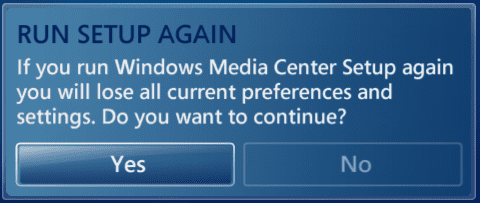
Sorry geeks but isn't WMC completely revirgininized when you go to Tasks > Settings > General > Windows Media Center Setup > Run Setup Again ?

WMC_setup.PNG

Kari
 

My Computer My Computer

At a glance

Windows 10 Pro x64 EN-GB1.6 GHz Intel Core i7-720QM Processor6 GBATI Mobility Radeon HD 5850 Graphics
Computer type
Laptop
Computer Manufacturer/Model Number
HP ENVY 17-1150eg
OS
Windows 10 Pro x64 EN-GB
CPU
1.6 GHz Intel Core i7-720QM Processor
Memory
6 GB
Graphics Card(s)
ATI Mobility Radeon HD 5850 Graphics
Sound Card
Beats sound system with integrated subwoofer
Monitor(s) Displays
17" laptop display, 22" LED and 32" Full HD TV through HDMI
Screen Resolution
1600*900 (1), 1920*1080 (2&3)
Hard Drives
Internal: 2 x 500 GB SATA Hard Disk Drive 7200 rpm
External: 2TB for backups, 3TB USB3 network drive for media
Cooling
As Envy runs a bit warm, I have it on a Cooler Master pad
Keyboard
Logitech diNovo Media Desktop Laser (bluetooth)
Mouse
Logitech Performance Mouse MX
Internet Speed
50/10 Mbps VDSL
Antivirus
Windows Defender 4.3.9431.0
Browser
Maxthon 3.5.2., IE11
Sorry geeks but isn't WMC completely revirgininized when you go to Tasks > Settings > General > Windows Media Center Setup > Run Setup Again ?

View attachment 22218

Kari

Tried that Kari. No joy I'm afraid. I'm about to try the Windows Features option. I'll maybe run the reset MC thing first too.
 

My Computer My Computer

At a glance

Windows 7 Ultimate 64-bit RTMIntel Core i7 9406GB DDR3 1600MHzSparkle 9600GT 512MB Silent
OS
Windows 7 Ultimate 64-bit RTM
CPU
Intel Core i7 940
Motherboard
ASUS P6T Deluxe
Memory
6GB DDR3 1600MHz
Graphics Card(s)
Sparkle 9600GT 512MB Silent
Sound Card
Auzentech X-Fi Prelude 7.1
Monitor(s) Displays
Sony KDL-40W2000
Hard Drives
2 x Seagate 7200.11 500GB in RAID 0
PSU
Gigabyte Odin
Case
Thermaltake Tenor
Cooling
Intel standard, case-included fans
No joy folks. Still crashing at point of accessing the signal.

When setting it up again it has remembered things like my zip code and it's not asking me about playready or whatever their new DRM is. Makes me think neither technique is truly flushing all settings.
 

My Computer My Computer

At a glance

Windows 7 Ultimate 64-bit RTMIntel Core i7 9406GB DDR3 1600MHzSparkle 9600GT 512MB Silent
OS
Windows 7 Ultimate 64-bit RTM
CPU
Intel Core i7 940
Motherboard
ASUS P6T Deluxe
Memory
6GB DDR3 1600MHz
Graphics Card(s)
Sparkle 9600GT 512MB Silent
Sound Card
Auzentech X-Fi Prelude 7.1
Monitor(s) Displays
Sony KDL-40W2000
Hard Drives
2 x Seagate 7200.11 500GB in RAID 0
PSU
Gigabyte Odin
Case
Thermaltake Tenor
Cooling
Intel standard, case-included fans
Daddy's back in business

I'm back in business people! Woohoo!

I'll try and detail the steps I took:

First of all I used Folder Options to enable visibility of hidden items. I then went to C:\ProgramData\Microsoft and pulled out the eHome folder. This folder was not removed by the above reset processes.

I then thought I'd reinstall Win TV v7 and while I was at it I wondered if there was a different driver in that package versus the separate driver-only package. I was right. The CD download includes driver 1.4.0 and the driver-only package includes 1.4.1. Upon telling the CD package installer to run the driver install it downgraded v1.4.1 to v1.4.0.

I then tried to run WMC and it refused to run saying that there was no tuner. I then ran the remove Windows Features to take out WMC and this requires a reboot. After that I re-enabled WMC. This time WMC was seeing the tuner. Must have reset the stuff I pulled out of the ProgramData folder. So I cautiously returned to setting up the signal. Wow it's working. No crash. BUT... there's always a BUT. No sound.

I then proceeded to update the driver via Device Manager pointing it to the download containing the 1.4.1 driver. Afterwards I went straight into WMC and BOOM... the sound was back. All is well in Andrewtown. Thank God.

So I think the main fix was getting that eHome data out. It was obviously tied to my Vista install and didn't survive the upgrade. I wonder if this info will help others.

 

My Computer My Computer

At a glance

Windows 7 Ultimate 64-bit RTMIntel Core i7 9406GB DDR3 1600MHzSparkle 9600GT 512MB Silent
OS
Windows 7 Ultimate 64-bit RTM
CPU
Intel Core i7 940
Motherboard
ASUS P6T Deluxe
Memory
6GB DDR3 1600MHz
Graphics Card(s)
Sparkle 9600GT 512MB Silent
Sound Card
Auzentech X-Fi Prelude 7.1
Monitor(s) Displays
Sony KDL-40W2000
Hard Drives
2 x Seagate 7200.11 500GB in RAID 0
PSU
Gigabyte Odin
Case
Thermaltake Tenor
Cooling
Intel standard, case-included fans
So I think the main fix was getting that eHome data out. It was obviously tied to my Vista install and didn't survive the upgrade. I wonder if this info will help others.

That's an important point! Thanks for sharing.

Kari
 

My Computer My Computer

At a glance

Windows 10 Pro x64 EN-GB1.6 GHz Intel Core i7-720QM Processor6 GBATI Mobility Radeon HD 5850 Graphics
Computer type
Laptop
Computer Manufacturer/Model Number
HP ENVY 17-1150eg
OS
Windows 10 Pro x64 EN-GB
CPU
1.6 GHz Intel Core i7-720QM Processor
Memory
6 GB
Graphics Card(s)
ATI Mobility Radeon HD 5850 Graphics
Sound Card
Beats sound system with integrated subwoofer
Monitor(s) Displays
17" laptop display, 22" LED and 32" Full HD TV through HDMI
Screen Resolution
1600*900 (1), 1920*1080 (2&3)
Hard Drives
Internal: 2 x 500 GB SATA Hard Disk Drive 7200 rpm
External: 2TB for backups, 3TB USB3 network drive for media
Cooling
As Envy runs a bit warm, I have it on a Cooler Master pad
Keyboard
Logitech diNovo Media Desktop Laser (bluetooth)
Mouse
Logitech Performance Mouse MX
Internet Speed
50/10 Mbps VDSL
Antivirus
Windows Defender 4.3.9431.0
Browser
Maxthon 3.5.2., IE11
Glad you got it sorted out and thanks for posting your fix. :D

Gary
 

My Computer My Computer

At a glance

Vista Ult 64 bit Seven Ult RTM x64Intel Core2 Quad Q6600 2.40 gigahertzCrucial Ballistix 4x2GB PC2 6400NVIDIA GeForce 8600 GTS 256 MB
Computer Manufacturer/Model Number
Dell XPS420
OS
Vista Ult 64 bit Seven Ult RTM x64
CPU
Intel Core2 Quad Q6600 2.40 gigahertz
Memory
Crucial Ballistix 4x2GB PC2 6400
Graphics Card(s)
NVIDIA GeForce 8600 GTS 256 MB
Sound Card
Creative SB X-Fi audio
Monitor(s) Displays
HP w2207 + HPvs15
Screen Resolution
1680x1050 + 1024x768
Hard Drives
2-WD5000AAKS-500 GB
WD5000AAV-500 GB external
Keyboard
Microsoft Comfort Curve
Mouse
MX Revolution
Other Info
Wacom Intuos 2 Graphics Tablet
Experience Index=5.5
Back
Top